Construct curves with Points and de Casteljau interpolation, edit native handles, compare sampled drawings, and animate a safe parameter clock.
8 construction stagesTested source & checkpointsNative screenshots & demos
Before you start
Build a native Squeak laboratory that explains a curve while you change it. Eight cumulative, independently runnable checkpoints grow from linear interpolation to quadratic and cubic geometry, native editing, sampled drawing, animation and repeatable presets.
Each checkpoint is a complete .st file-in. Install it, accept the displayed Browser methods on their named classes, and execute the exact Workspace block. All calculation, widgets, drawing and scheduling run in native Squeak 6.1.
Squeak 6.1 with bundled Morphic and SUnit; no packages or network access
Workspace Do It / Print It, Browser Accept, blocks, Arrays and one-based collection indexing
A Bézier curve begins with ordinary Point objects. In Smalltalk, 60@280 sends the binary message @ to 60 with 280 as its argument. The answer has an x coordinate and a y coordinate. Our model uses a 600 by 360 coordinate rectangle. Positive x goes right and positive y goes down, matching the screen convention. The view adds plotOrigin when drawing; model coordinates do not depend on where the window sits on the desktop.
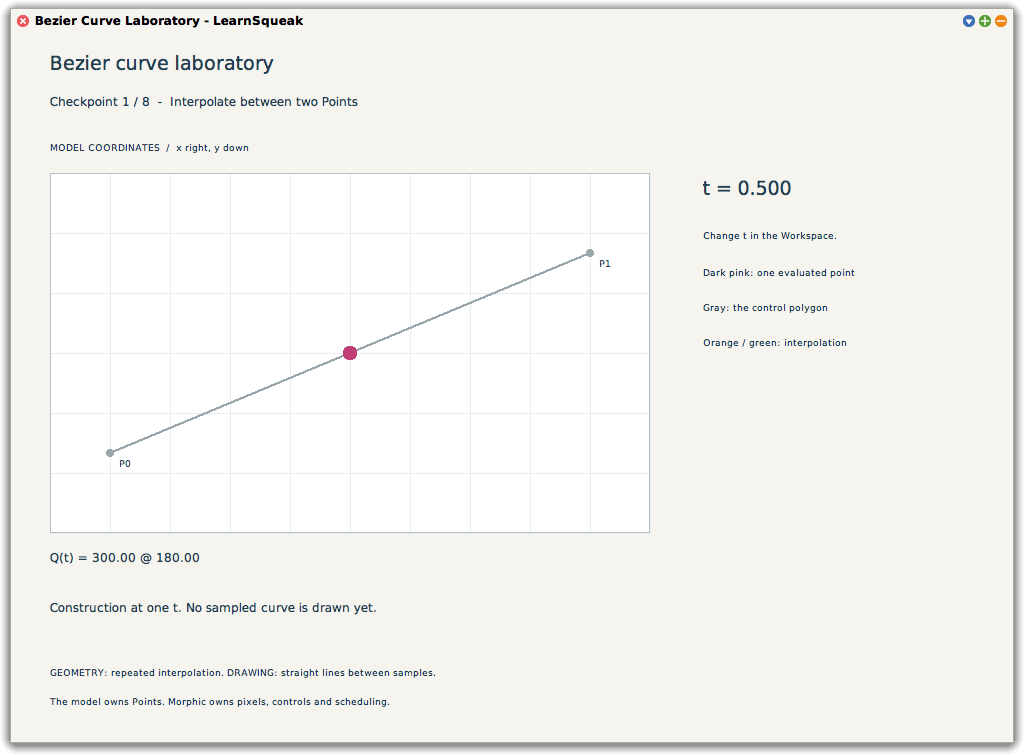
The first experiment has two controls, P0 at 60@280 and P1 at 540@80. interpolate:to:at: answers start * (1 - t) + finish * t. Multiplication and addition on Points operate on their coordinates. At t = 0, the result is the start point. At t = 1 it is the finish point. At t = 1/2, each endpoint contributes half, giving 300@180. That is the dark pink dot in this checkpoint. The gray line is the control polygon, which happens to be one straight segment here.
The model retains numeric Points, not pixels. parameter: accepts a number in the closed interval zero through one. setPoints: validates the entire input before replacing anything and copies both the collection and its Points. Querying points also returns copies. A caller therefore cannot silently change a control by replacing an element in an Array it previously received. The first checkpoint accepts exactly two controls; later checkpoints explicitly widen that contract.
LBZApp asks its LBZModel for construction points and draws the answer. Rounding occurs only at the canvas boundary. Use the exact Workspace block below, then inspect the returned app. Change its model parameter and refresh to compare positions. At this stage you are evaluating a point on a straight segment; you have not yet drawn a sampled curved path.
LBZModel · instance-side supporting method, included in the checkpoint
Genuine Squeak 6.1 SystemWindow capture after accepting the displayed methods and executing the exact checkpoint 1 Workspace block.
02 · Build a quadratic construction
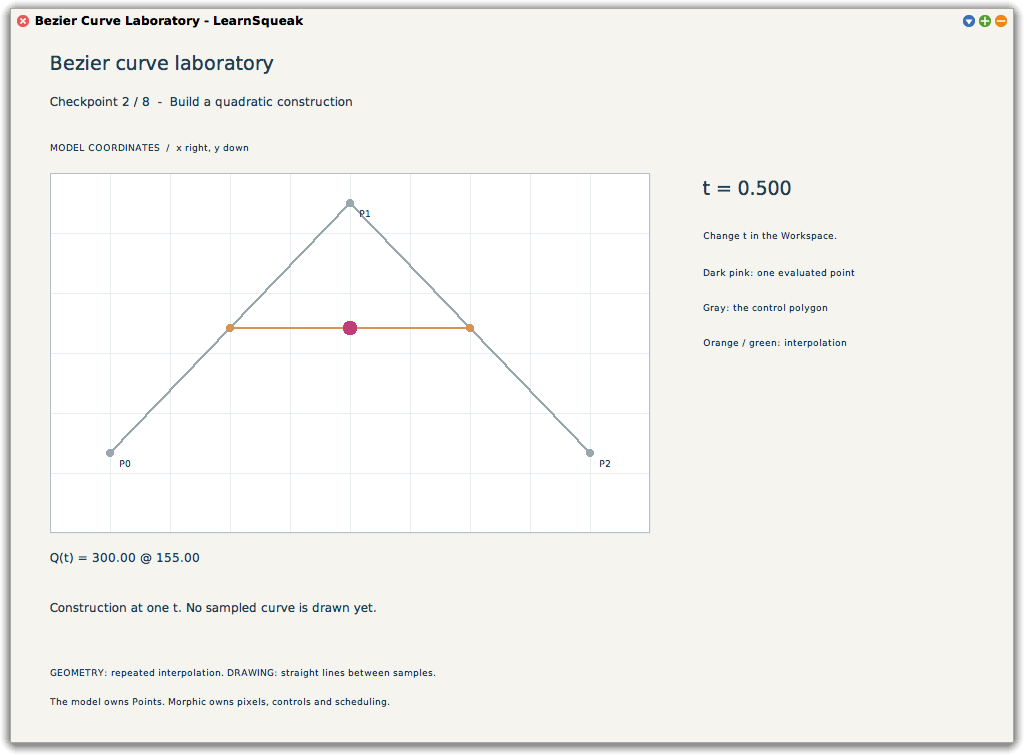
A quadratic Bézier uses three controls: two endpoints and one interior control. The interior control usually does not lie on the curve. Its job is to pull the path toward a direction. This checkpoint starts with P0 = 60@280, P1 = 300@30 and P2 = 540@280. The gray broken line connects these controls in their given order. That polygon is a construction aid, not the curve itself.
The quadratic method applies our existing interpolation helper three times. First interpolate from P0 toward P1, producing A. Independently interpolate from P1 toward P2, producing B. Then interpolate from A toward B using the same parameter t. Reusing one t at every level is essential. Mixing a quarter of one segment with half of another would define a different construction.
At t = 1/2, A is 180@155 and B is 420@155. Their midpoint is 300@155, the dark pink result. At t = 0 all reductions lead back to P0; at t = 1 they lead to P2. Fractions remain exact in these calculations, so a half coordinate need not be rounded to the nearest pixel in the model. The view rounds only when sending screen locations to the canvas.
levelsAt: answers the complete geometric explanation: the original three controls, the two first-level interpolation points and the single result. The view uses these rows for the gray and orange lines and the final marker. Notice that a colored construction segment changes as t changes. It is not a saved trace of where the marker has been. No full sampled curve is drawn yet. Set the model parameter to 1/4, refresh, and compare the two intermediate points with their adjacent controls. This stage accepts exactly three control Points so its public data contract matches the quadratic evaluator.
LBZModel · instance-side supporting method, included in the checkpoint
levelsAt: fraction
| first second |
first := self interpolate: points first to: points second at: fraction.
second := self interpolate: points second to: points third at: fraction.
^ {self points. {first. second}. {self quadraticAt: fraction}}
Where to run this
System Browser → LBZModel → instance side → tutorial. Accept the complete method after installing this checkpoint.
LBZModel · instance-side method
quadraticAt: fraction
| first second |
first := self interpolate: points first to: points second at: fraction.
second := self interpolate: points second to: points third at: fraction.
^ self interpolate: first to: second at: fraction
File List → fileIn bezier-curves-02.st. Then Workspace → select the whole block → Do It.
Workspace · run after installing this checkpoint
| app |
app := LBZApp open.
app
Watch for: The middle control is generally not on the quadratic curve. The orange line is a construction at one t.
Try it: At t = 1/4, predict the intermediate points before refreshing the view.
Expected result
Three gray controls, an orange interpolation segment and the result 300.00 @ 155.00.
Genuine Squeak 6.1 SystemWindow capture after accepting the displayed methods and executing the exact checkpoint 2 Workspace block.
03 · Generalize to cubic de Casteljau
A cubic Bézier uses four controls. The same process now has three reductions: four controls become three interpolated points, those become two, and those become one. There is no need to write a separate expanded cubic polynomial to perform the construction. de Casteljau's algorithm repeatedly interpolates adjacent pairs until one Point remains.
The loop in levelsAt: makes that reduction explicit. row initially contains copies of the model controls. The interval 1 to: row size - 1 contains one index for each adjacent pair. collect: builds a fresh collection containing the interpolation of each pair. The new row is appended to levels, and the loop repeats while its size exceeds one. For this checkpoint, the row sizes are 4, 3, 2 and 1. pointAt: simply asks for the final row's first element.
The generic evaluator supports two, three or four controls. The laboratory window uses four from this stage onward, while the headless model can still run a linear or quadratic experiment. The first and last controls are the curve endpoints. Moving an interior control changes the shape, and coincident controls are allowed. If all four controls coincide, every interpolated point is the same Point; the loop still terminates normally because collection size decreases independently of geometric distance.
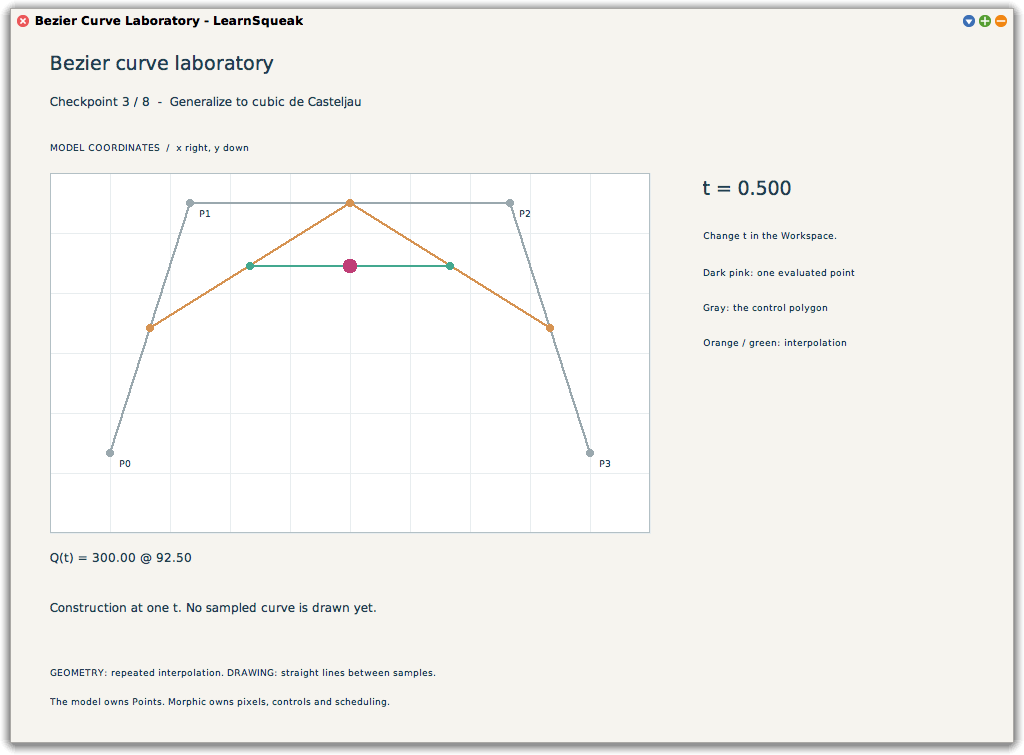
The cubic arch begins at 60@280 and ends at 540@280, with interior controls at 140@30 and 460@30. At one half, its exact result is 300@(185/2), displayed as 300.00 @ 92.50. Gray shows the original polygon, orange the first reduction and green the second reduction. The dark pink point is the final reduction. Keeping these roles separate will matter when a blue sampled drawing is added later. The tests independently compare this algorithm with the cubic Bernstein formula across 101 parameter values.
LBZModel · instance-side supporting method, included in the checkpoint
pointAt: fraction
 ^ (self levelsAt: fraction) last first
Where to run this
System Browser → LBZModel → instance side → tutorial. Accept the complete method after installing this checkpoint.
Genuine Squeak 6.1 SystemWindow capture after accepting the displayed methods and executing the exact checkpoint 3 Workspace block.
04 · Scrub the parameter with native controls
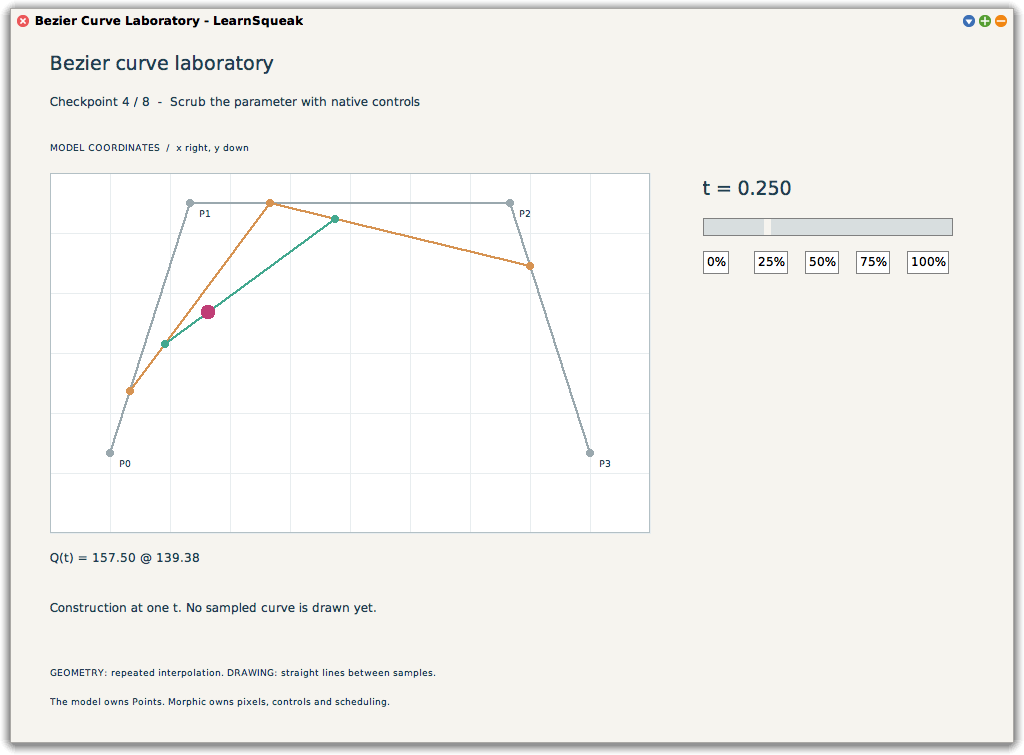
The geometry is ready for a native controller. This checkpoint adds SimpleSliderMorph and SimpleButtonMorph instances to the Squeak window. The horizontal slider exposes a percentage from zero through one hundred. Its target is the app, and its action selector is percent:. When the value changes, the slider sends that message with its numeric value. The app divides by one hundred before asking the model to update parameter.
The model's interval remains zero through one. Percentage is only a user interface convention. A slider position may be fractional, so percent: preserves that precision instead of rounding every move to an integer percentage. The five buttons provide exact, repeatable examples at zero, one quarter, one half, three quarters and one. Their labels are strings, but their action arguments are numbers.
refresh synchronizes the slider in the other direction. It calls adjustToValue: with model parameter * 100. In the supplied Squeak version this moves the slider without invoking its action. setScaledValue:, in contrast, invokes the real target callback. Using that callback-producing message inside refresh would create a feedback loop. The capture scripts deliberately use setScaledValue: when demonstrating slider input, and the tests check the resulting model state.
Try the 0% and 100% buttons before dragging the slider. At either boundary the construction collapses toward the corresponding endpoint. At 25%, all orange and green points still use the same parameter, though their distances along the several control segments differ. The whole display is recalculated from the current model on every refresh. There is no accumulated trail. Changing t selects a point along the curve; equal changes in t do not generally mean equal distances travelled on the curve. That distinction will remain true when we animate the parameter in checkpoint seven.
LBZApp · instance-side supporting method, included in the checkpoint
Genuine Squeak 6.1 SystemWindow capture after accepting the displayed methods and executing the exact checkpoint 4 Workspace block.
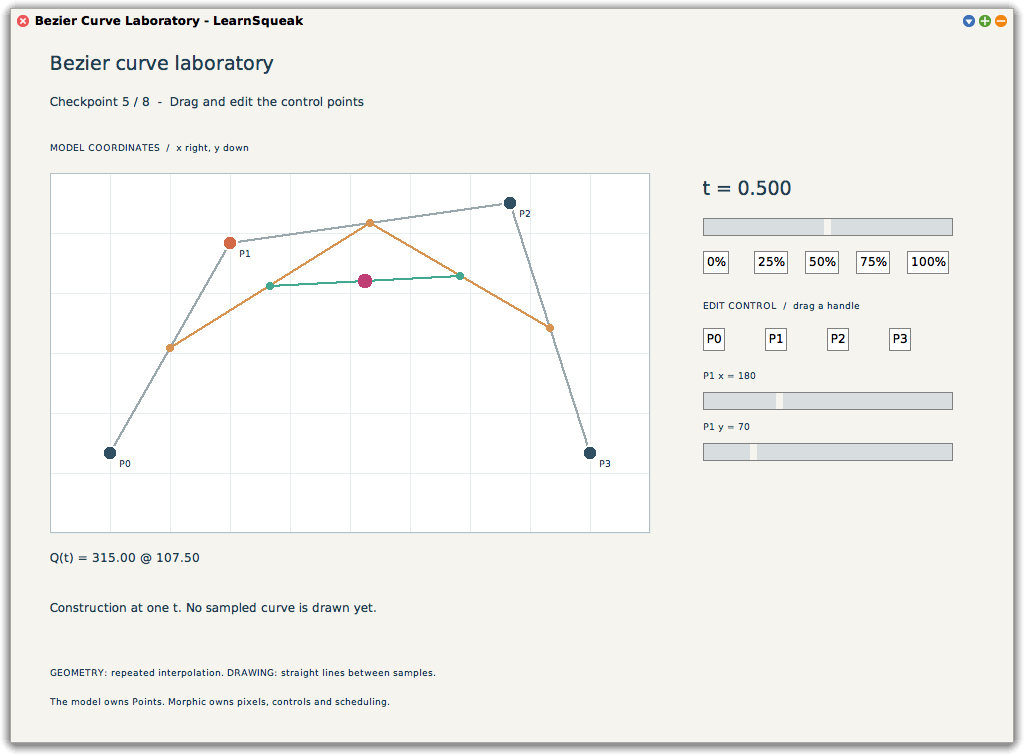
05 · Drag and edit the control points
Now make the controls themselves editable. Each control receives an LBZHandle, a small native EllipseMorph. Pressing its primary mouse button selects its model index and gives the handle mouse focus. While that focus is held and a button remains pressed, mouseMove: subtracts the current plotOrigin from the event's screen position. The answer is a model coordinate. The app then clamps it to the 600 by 360 plot bounds, updates that control and refreshes.
mouseUp: calls cancelDrag, which clears the dragging flag and releases only this handle’s captured mouse focus. Pause, focus loss, collapse, close, Reset and preset changes also cancel the drag; another morph’s focus is preserved. The handle never attaches itself to the hand or becomes the authoritative control point. Its center is recalculated from model data during refresh. This keeps window movement, selection, drawing and geometry separate. The native interaction tests send real mouse-down, mouse-move and mouse-up events to a handle, check mouse focus, drag beyond the plot, and verify the clamped result and released focus.
The P0 through P3 buttons select one control. Native x and y sliders edit its coordinates and give a second way to make precise or repeatable changes. The app rounds those slider coordinates to whole units before submitting them. Dragging can still produce any valid coordinate supplied by the event path. The model validates the complete candidate collection before accepting the replacement; the view clamps because that is the chosen dragging behavior, while the model rejects out-of-bounds data supplied directly.
The run block moves P1 to 180@70 and selects it. Watch the control polygon and each interpolation row respond. P0 and P3 remain endpoints; an interior handle is generally away from the current curve point. All editing is local to this laboratory instance. Neither the handle nor a returned points Array can alter a different model. Later, editing also pauses playback so the moving construction does not compete with your gesture.
LBZHandle · instance-side supporting method, included in the checkpoint
Genuine Squeak 6.1 SystemWindow capture after accepting the displayed methods and executing the exact checkpoint 5 Workspace block.
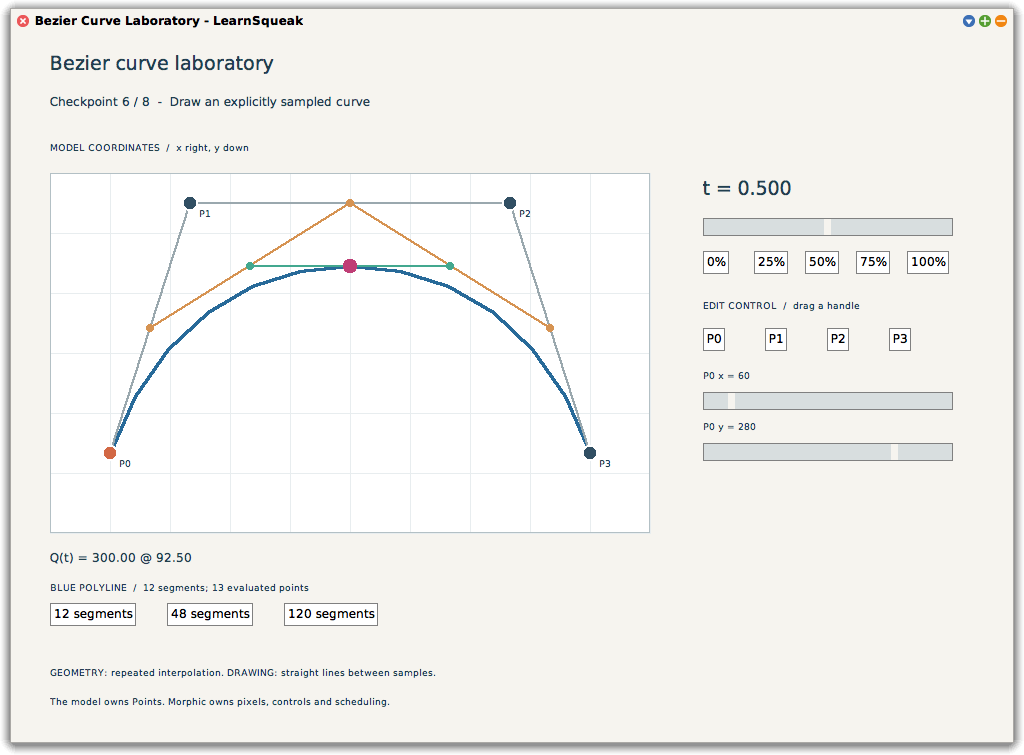
06 · Draw an explicitly sampled curve
The colored geometry so far has explained one parameter value at a time. To show the whole curve, this checkpoint evaluates many parameter values and joins the answers with straight lines. sampledPoints includes both endpoints: for n segments, indices run from zero through n, producing n + 1 Points. Dividing each index by n gives evenly spaced parameter values from zero through one.
The blue path is therefore a polyline approximation. It is not a native mathematical Bézier stroke, and it is not the orange or green construction at the current t. Each sampled Point comes from the same de Casteljau evaluator that supplies the moving marker. The canvas merely joins neighboring samples. A small segment count can reveal corners, especially where the curve bends strongly. Increasing the count usually makes this drawing smoother, but does not change the underlying controls or the mathematical pointAt: answer.
The model accepts an integer segment count from two through one hundred and twenty. The buttons choose twelve, forty-eight or one hundred and twenty. There is always one more sampled Point than drawn segments. At forty-eight segments, element twenty-five is exactly the sample at t = 1/2 because Squeak collections are one-based and sample index twenty-four is the middle of zero through forty-eight.
Sampling does not change model parameter. You can move the pink construction marker while leaving the same complete blue drawing underneath it, or change the resolution while keeping the selected t fixed. These are independent controls for different questions. Uniform parameter spacing does not promise uniform distance spacing, a bounded visual error, or constant-speed motion. The tests check endpoints, the exact middle sample, supported counts and the fact that sampling leaves controls and parameter unchanged. Drag an interior point, compare twelve and one hundred and twenty segments, and look for where the coarse polyline is most visibly different.
LBZModel · instance-side supporting method, included in the checkpoint
Genuine Squeak 6.1 SystemWindow capture after accepting the displayed methods and executing the exact checkpoint 6 Workspace block.
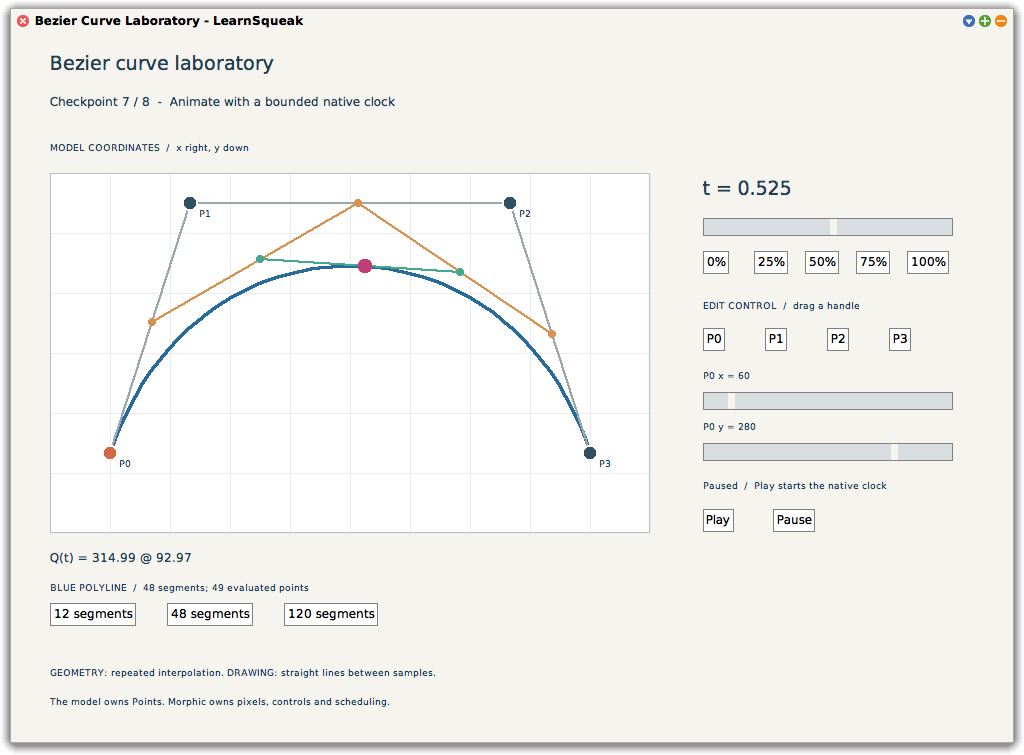
07 · Animate with a bounded native clock
Morphic already has a stepping scheduler; this laboratory does not need a background process or a forever loop. Play records the current millisecond clock, remembers the world that owns the scheduled step, and requests stepping. stepTime asks for approximately forty milliseconds between callbacks. That request is a scheduling interval, not a guarantee that every callback arrives exactly on time.
step computes the elapsed milliseconds since the previous callback, clamps the amount to zero through one hundred, and passes it to advanceMilliseconds:. The parameter advances by elapsed / 4000, giving a nominal four-second cycle. After crossing one it wraps back toward zero. Because the elapsed amount is capped, a delayed callback cannot suddenly jump across a large portion of the experiment. If the millisecond clock wraps and subtraction is negative, that one interval contributes zero. The next callback starts from the newly recorded clock value.
This is animation of t, not constant-speed travel along the curve. Equal time steps give equal parameter increments. The distance covered can vary with the derivative, which the first exercise explores. The clamp also deliberately discards excess delayed time, so a heavily delayed scheduler makes the animation take longer than four wall-clock seconds.
Pause clears the running flag, clears the timestamp and explicitly removes the scheduled step from the remembered world. Remembering that world matters because a collapsed or detached morph may no longer answer the world where it was registered. Losing window focus, collapsing, closing or editing pauses the experiment. Reopening or expanding leaves it paused until Play is pressed again. Repeated Play does not create a second clock. The exact launcher below performs a deterministic 100-millisecond advance and pauses so its screenshot can be reproduced. The GIF labels its timing script explicitly rather than suggesting it is a real-time human recording.
LBZApp · instance-side supporting method, included in the checkpoint
Genuine Squeak 6.1 SystemWindow capture after accepting the displayed methods and executing the exact checkpoint 7 Workspace block.
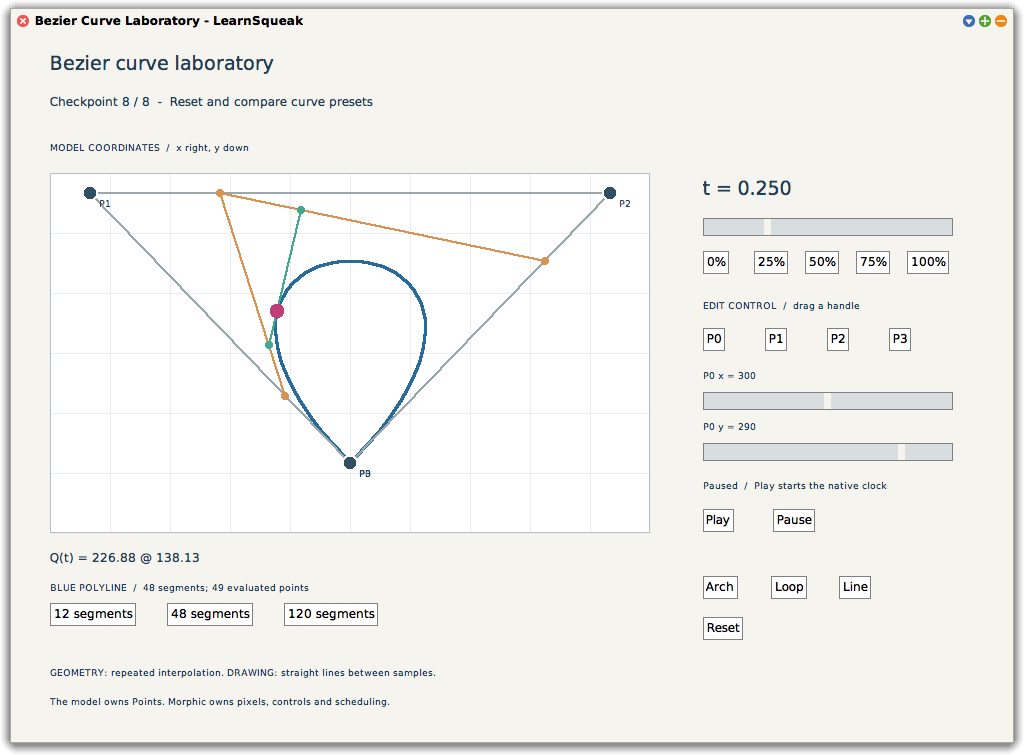
08 · Reset and compare curve presets
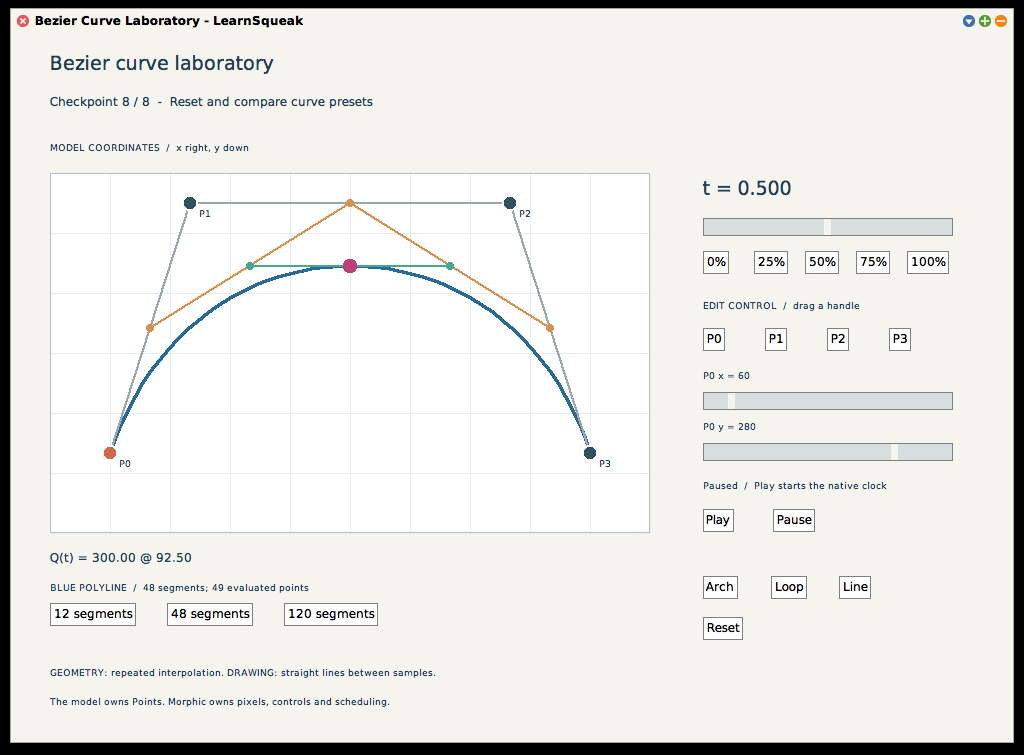
The final checkpoint turns the controls into a repeatable laboratory. Arch restores the default four control positions. Loop places the first and last controls at the same location while leaving the two interior controls apart. Line uses four equally spaced collinear controls. Each preset changes the control geometry and pauses playback, while preserving the current parameter and sampling resolution. That makes comparisons at the same t straightforward.
The line preset is a useful exact check. Since its controls are equally spaced, its cubic evaluator agrees with direct linear interpolation between its endpoints. Collinearity alone does not guarantee that particular parameterization: unevenly spaced controls can still lie on a straight line while giving a different relation between t and position. The closed loop illustrates another distinction. Equal endpoints do not make the whole curve a single point; all controls must coincide for that complete degeneracy.
Reset has a broader contract than a preset. It pauses and unregisters animation, restores the arch, sets t to one half, restores forty-eight segments and selects P0. Repeating Reset gives the same result. The model owns geometry, parameter and sample count; the app owns selection and scheduling. Keeping those responsibilities explicit prevents a reset that looks correct but leaves a hidden clock running.
Use the run block to select the loop at one quarter. Compare its orange and green construction with the blue approximation, then select Line without moving t. Finally press Reset twice and check every visible control. The supplied tests exercise native preset buttons, changes while playing and repeated reset. Keep the final source separately from your learning image, and close the window when you finish. The downloadable kit includes every independent checkpoint, exact Browser methods, Workspace launchers, native screenshots, scripted GIF frames, exercise solutions and the scripts used to reproduce the results in a fresh Squeak image.
LBZModel · instance-side supporting method, included in the checkpoint
preset: name
 name = #arch ifTrue: [^ self setPoints: {60@280. 140@30. 460@30. 540@280}].
 name = #loop ifTrue: [^ self setPoints: {300@290. 40@20. 560@20. 300@290}].
 name = #line ifTrue: [^ self setPoints: {60@280. 220@200. 380@120. 540@40}].
 ^ false
LBZApp · instance-side supporting method, included in the checkpoint
reset
 self pause. model reset. selected := 1. self refresh
Where to run this
System Browser → LBZModel → instance side → tutorial. Accept the complete method after installing this checkpoint.
Genuine Squeak 6.1 SystemWindow capture after accepting the displayed methods and executing the exact checkpoint 8 Workspace block.
Watch the workflow
All eight PNGs and every GIF frame are genuine SystemWindow imageForm renders from native Squeak 6.1 build 23976. The capture pass accepts every displayed Browser method and evaluates each exact Workspace launcher. The GIF is explicitly scripted native execution: real SimpleButtonMorph mouse events, SimpleSliderMorph target callbacks and LBZHandle mouse-down/move/up events. Clock frames use controlled elapsed increments for reproducibility; they do not claim real-time playback or a person recorded at the mouse. Only frame encoding and durations are applied outside Squeak.
NATIVE SQUEAK CAPTURE
Scripted native workflow: scrub t, drag P1 with native mouse events, compare sample counts, advance the parameter clock deterministically, select a loop and line, then Reset. The blue polyline is a sampled drawing; orange and green lines show de Casteljau construction at the selected t.
Practice with tested solutions
1. Compute the tangent vector
Add tangentAt: to LBZModel. Build a degree-minus-one Bézier from consecutive control differences multiplied by the original degree, then evaluate that derived curve. Answer a vector, not a normalized direction or a speed-controlled animation.
Hint
For n + 1 controls the degree is n. Compute n * (P(i+1) - P(i)), then reduce that row with the same interpolation helper.
Show a tested solution
System Browser → LBZModel → instance side. Accept this complete method after installing bezier-curves-final.st.
| model |
model := LBZModel new.
model preset: #arch.
{model tangentAt: 0. model tangentAt: 1/2. model tangentAt: 1}
The exact tangent vectors are 240@-750, 600@0 and 240@750. A zero vector is valid when the controls coincide.
The derivative describes change per unit of t. Its magnitude can vary along the curve, explaining why uniform parameter motion is not generally uniform distance motion. Tests cover endpoints, the middle and coincident controls.
Executed by the supplied LBZExerciseTest SUnit suite.
2. Split a curve without changing its shape
Add splitAt: to LBZModel. Use the first and last Point of every de Casteljau row to construct two new control polygons. The left curve covers the original parameter interval 0..t and the right covers t..1. Return both Arrays and leave the original model unchanged.
Hint
Read the first Point of each row in order for the left controls. Read the last Point of each row and reverse that collection for the right controls.
Show a tested solution
System Browser → LBZModel → instance side. Accept this complete method after installing bezier-curves-final.st.
| model halves |
model := LBZModel new.
model preset: #arch.
halves := model splitAt: 1/2.
{halves first last. halves second first. model points}
The first two values are both 300@(185/2). The third value is the original four-control Array.
The tests evaluate both halves at 101 local parameter values and compare them exactly with the corresponding positions on the original curve. Splitting at either endpoint produces one degenerate half and one unchanged half.
Executed by the supplied LBZExerciseTest SUnit suite.
When something looks wrong
The marker travels uneven distances in equal time
The clock advances parameter t. Bézier parameterization is generally not uniform in arc length; see the tangent exercise.
The blue curve looks angular
It is an explicitly sampled polyline. Increase the number of segments or move the controls less sharply. The mathematical evaluator itself has not changed.
Playback stops when I change windows or collapse the lab
Focus loss and collapse deliberately pause and unschedule the clock. Return to the lab and press Play; expanding and reopening do not automatically restart it.
The handle reaches the edge but goes no farther
Drag edits clamp to x = 0..600 and y = 0..360. Direct invalid model edits are rejected atomically.
Old methods remain when loading an early checkpoint
File-in replaces definitions without removing later methods. Use a fresh copy of the baseline image for an earlier stage.
Verification, cleanup and next steps
Built and verified on 2026-10-19 using native Squeak 6.1-23976, 64-bit image and VM. The kit includes generators, captured PNG frames, exact code checks, SUnit reports and a SHA-256 manifest.
Native Squeak: 46 application tests and 6 exercise tests pass, with zero failures and zero errors. All eight clean checkpoints compile their exact displayed methods, evaluate their exact launchers and render native screenshots.
Coverage includes interpolation boundaries and exact intermediates, cubic agreement with the Bernstein formula, coordinate bounds, coincident and collinear controls, closed loops, defensive copies, independent models, sample counts, native button/slider/drag events and reset.
Clock tests cover repeated Play/Pause, elapsed clamping and wrap, scheduled registration, focus loss, collapse, detachment, close and reopen.
The view is drawn directly during checks, preventing a Morphic error rectangle from silently hiding a drawing exception.
Both exercise methods and the exact displayed Workspace checks are compiled and evaluated in native Squeak.
The downloaded ZIP is extracted into a different directory and its native tests, all eight stage captures, examples and GIF are replayed.
Pause or close the laboratory when finished. The window also pauses on focus loss and collapse. Close unregisters the clock before detaching the view; reopening keeps the same model and stays paused. Save .st sources separately from the learning image.
Shipped Squeak 6.1: Point arithmetic and Canvas line:to:width:color: — The model computes numeric Points; the view rounds screen coordinates only at the drawing boundary.
Shipped Squeak 6.1: SimpleSliderMorph and SimpleButtonMorph — Verified target callback order, non-callback adjustToValue: synchronization and native mouse event dispatch.
Shipped Squeak 6.1: Morph stepping, SystemWindow focus/collapse/delete and SUnit — The clock explicitly unregisters from its remembered world; real native tests exercise lifecycle interruptions.