SYMBOLS → STACK → NATIVE DRAWING
Build an L-system plant laboratory
Rewrite symbols in parallel, interpret branches with a stack, and draw the result in native Squeak.
Two passes from text to plant
This lab separates three jobs: rewrite a string, turn its symbols into segments, and draw those segments. Unlike the recursive-tree lesson, the plant is described by a grammar and interpreted with an explicit stack. A production is a replacement rule; an axiom is the starting word.
Prerequisites: Workspace evaluation, classes and methods, blocks, collections, and a disposable native Squeak 6.1 image. This application is a native download. It has not been registered as a SqueakJS playground demo.
Download the complete source below. In Squeak’s File List, select l-systems.st and choose fileIn. Open a Workspace, enter app := LSApp open., select the whole expression, then choose do it. Keep that Workspace: it remembers app for the later commands. Close old lab windows before opening a state checkpoint.
Download the complete laboratory · Application source (.st) · Native SUnit tests (.st)
The eight downloadable checkpoints are complete source files plus launch commands for reproducible states. They are not progressively reduced implementations: each contains the full application, so any checkpoint runs independently in a clean image. Browser snippets below are method definitions to inspect or install in the named class, not standalone Workspace expressions.
01 · Start with one symbol
An axiom is the starting word, not a drawing. Here it is the one-character string F. Keep the text model separate from the Morphic window: you can test it without opening a window. The initial generation is zero, so no substitution has happened yet. The interpreter turns that one F into one segment.
- Open a fresh learning image and file in l-systems.st with the File List fileIn command.
- Open a Workspace, select the entire launcher below, and choose do it. Keep this same Workspace for the following steps.
- In a System Browser, select LSGrammar, its tutorial category, and initialize. Compare the method with the source shown here.
initialize
super initialize. axiom := 'F'. rule := 'F[+F]F[-F]F'. generation := 0. angle := 25. self rebuildapp := LSApp open.Expected: One vertical brown segment; generation 0 and F segments 1.
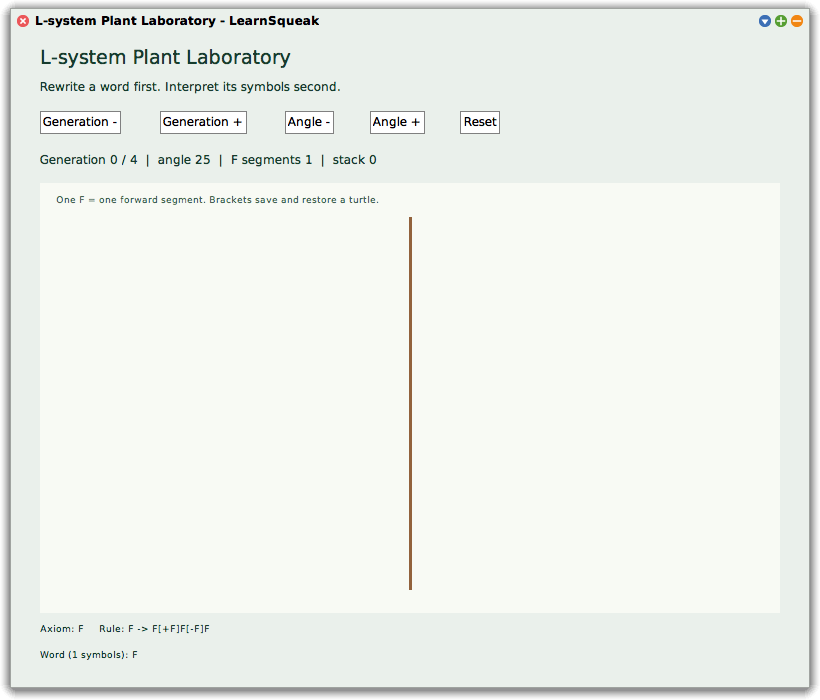
The renderer fits the segment to its panel. Apparent on-screen length is not the model’s unit length.
02 · Rewrite a whole generation
A parallel rewrite reads each character of the old word exactly once and writes a new word. It does not rewrite the replacement again during this pass. Every F is replaced by F[+F]F[-F]F, while turns and brackets are copied unchanged. String streamContents: builds the answer without repeatedly concatenating growing strings.
- Inspect rewrite: in LSGrammar. Notice the old text is never modified.
- Run the launcher lines to move to generation 1.
- Read the word along the bottom: it is exactly the production string, with five F symbols.
rewrite: text
 ^ String streamContents: [:out | text do: [:symbol |
symbol = $F ifTrue: [out nextPutAll: rule] ifFalse: [out nextPut: symbol]]]app grammar generation: 1.
app refresh.Expected: Generation 1; five drawn segments and eleven text symbols.
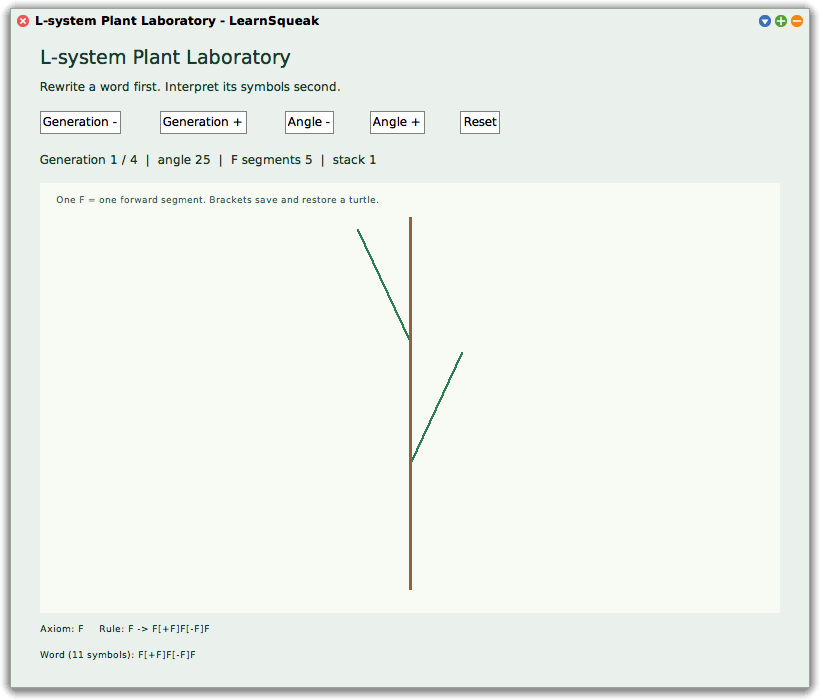
Calling rewrite: once on FF produces two copies of the rule, not an indefinitely growing plant.
03 · Repeat the rewrite, not the drawing
rebuild always starts from the axiom, then performs generation complete passes. Generation two is therefore independent of what was displayed previously. The number of forward symbols is 5 raised to the generation: 1, 5, 25, 125, 625. The total word also contains turns and brackets, so its size is not the segment count.
- Read rebuild and forwardCount in the Browser.
- Move to generation 2 using the code or the Generation + button.
- Try decreasing once and increasing again. The same word and geometry should return.
rebuild
 word := axiom.
 generation timesRepeat: [word := self rewrite: word].
self interpretforwardCount
^ word count: [:symbol | symbol = $F]app grammar generation: 2.
app refresh.Expected: Generation 2; 25 F segments and a maximum bracket depth of 2.
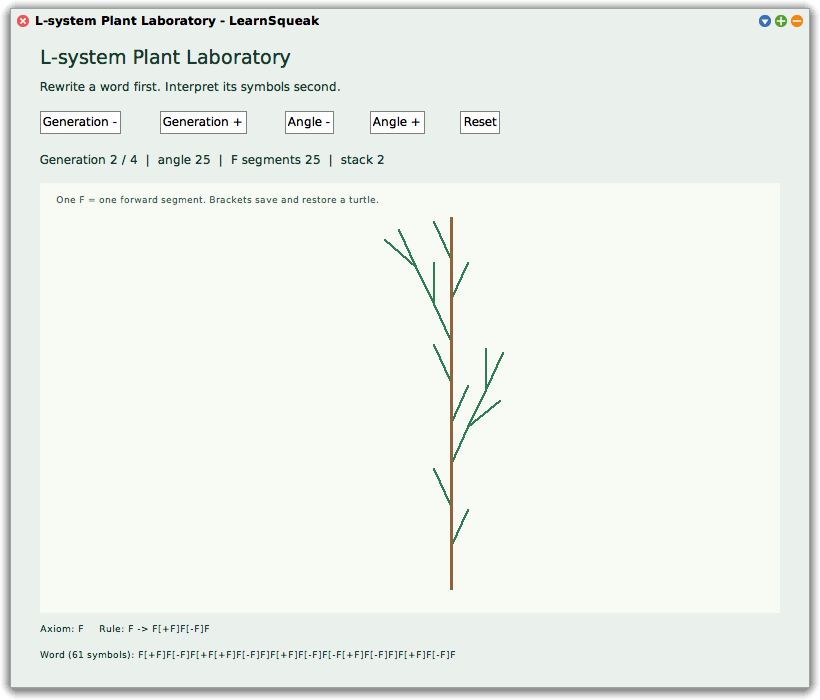
Do not use repeated substring replacement on the same mutable word: that can accidentally rewrite new symbols in the same generation.
04 · Interpret brackets with a stack
Now interpret the completed string from left to right. F moves forward and records a segment; + and - change the heading. The opening bracket pushes both position and heading. The closing bracket pops both values so a side branch does not move the main stem. This is an iterative turtle interpreter, not a recursive tree drawing function.
- Read interpret in LSGrammar. A point and angle form each saved turtle state.
- Move to generation 3 and compare the counter with the earlier generation.
- Follow F[+F]F on paper: the final F resumes at the end of the first F, not at the end of the side branch.
interpret
 | position heading stack finish radians |
 segments := OrderedCollection new. stack := OrderedCollection new.
 maximumStack := 0. position := 0@0. heading := -90.
 word do: [:symbol |
  symbol = $F ifTrue: [
   radians := heading degreesToRadians.
   finish := position + (radians cos @ radians sin).
   segments add: {position. finish. stack size}. position := finish].
  symbol = $+ ifTrue: [heading := heading + angle].
  symbol = $- ifTrue: [heading := heading - angle].
  symbol = $[ ifTrue: [stack addLast: {position. heading}. maximumStack := maximumStack max: stack size].
symbol = $] ifTrue: [position := stack last first. heading := stack removeLast second]]app grammar generation: 3.
app refresh.Expected: Generation 3; 125 segments and a maximum stack depth of 3.
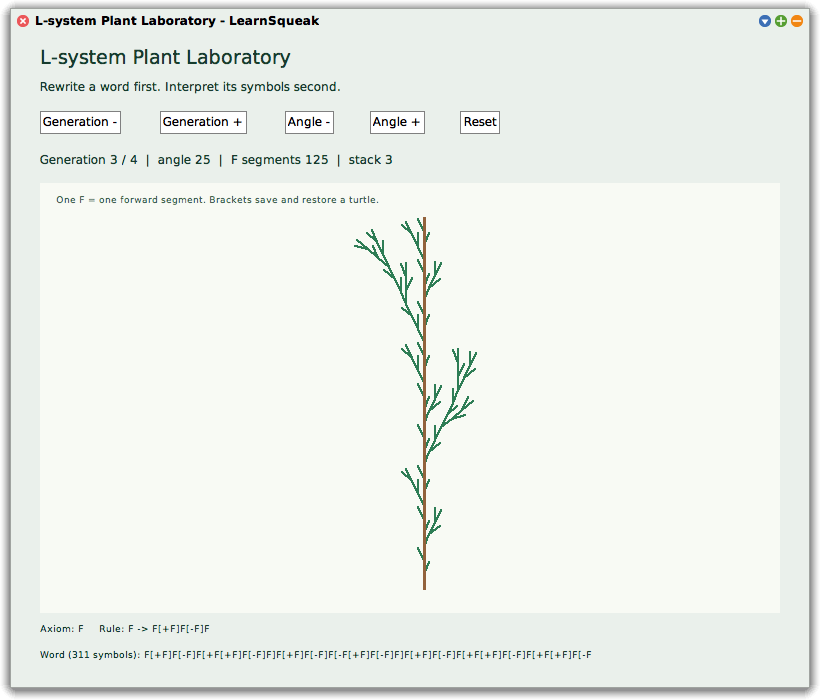
Heading starts at -90 degrees because Morphic’s vertical coordinate grows downward. In this example + turns clockwise on screen.
05 · Change geometry without rewriting the rule
The same grammar word can produce different drawings under different turtle angles. The model keeps angle separate from rule and generation. We rebuild the interpretation after an accepted angle change; the F count stays 125. Input validation rejects non-integer or out-of-range angles before changing state.
- Inspect angle: and try the narrow ten-degree setting.
- Observe that the branches close toward the trunk while word length stays fixed.
- Try the Angle + and Angle - buttons. They change the angle by five degrees and clamp it to the 10–50 range.
angle: number
(number isInteger and: [number between: 10 and: 50]) ifFalse: [^ false].
angle := number. self rebuild. ^ truechangeAngle: delta
grammar angle: (((grammar angle + delta) max: 10) min: 50). self refreshapp grammar angle: 10.
app refresh.Expected: A narrow generation-3 plant, with the same 125 forward segments.
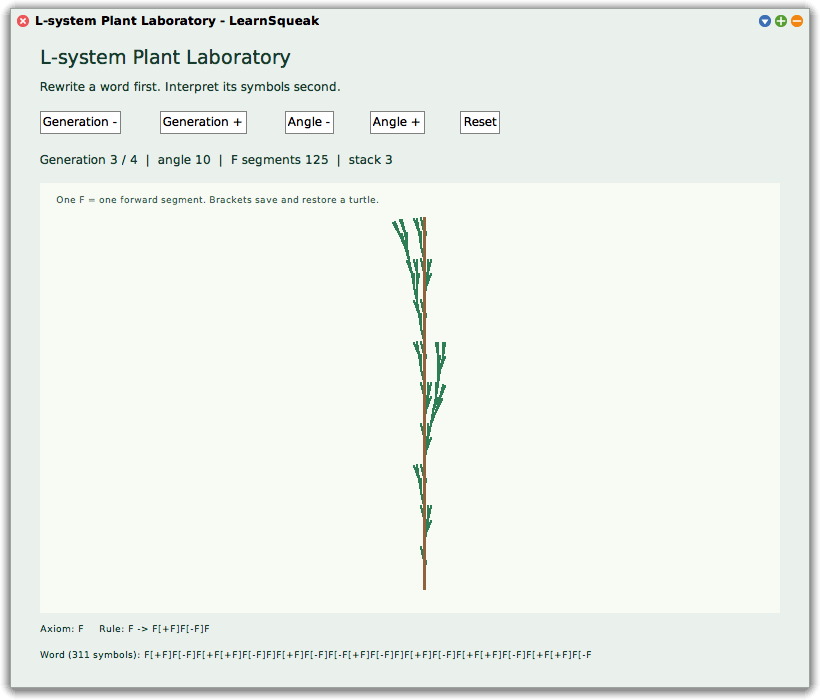
Pixel fitting changes the visual scale. Compare branch directions, not apparent trunk height between captures.
06 · Map model points onto a native canvas
The model contains unit-length segments around the origin; it knows nothing about the window. bounds collects their endpoints. drawOn: chooses a single scale to fit both width and height, centers the plant horizontally, and places its base near the panel bottom. Root-level segments are brown and branches are green. The colors visualize stack depth, not real botanical age.
- Inspect bounds and LSCanvas drawOn:. The drawing routine only reads geometry.
- Change the angle to fifty degrees and redraw.
- Notice that no fixed pixel positions are stored in LSGrammar. That makes the model suitable for tests and other renderers.
bounds
| points xs ys |
points := segments gather: [:each | {each first. each second}].
points isEmpty ifTrue: [^ 0@0 corner: 1@1].
xs := points collect: [:p | p x]. ys := points collect: [:p | p y].
^ (xs min @ ys min) corner: (xs max @ ys max)drawOn: canvas
| bounds scale origin toScreen |
super drawOn: canvas. grammar ifNil: [^ self].
bounds := grammar bounds.
scale := (680 / (bounds width max: 1)) min: (370 / (bounds height max: 1)).
origin := self position + (370@405).
toScreen := [:p | (origin + ((p x - bounds center x) * scale @ ((p y - bounds bottom) * scale))) rounded].
grammar segments do: [:segment |
canvas line: (toScreen value: segment first) to: (toScreen value: segment second) width: (segment third = 0 ifTrue: [3] ifFalse: [2]) color: (segment third = 0 ifTrue: [Color fromString: '#92623C'] ifFalse: [Color fromString: '#2E7D55'])].
canvas drawString: 'One F = one forward segment. Brackets save and restore a turtle.' at: self position + (16@12) font: (TextStyle default fontOfSize: 12) color: (Color fromString: '#456455')app grammar angle: 50.
app refresh.Expected: Wider branches still fit inside the fixed-size panel.
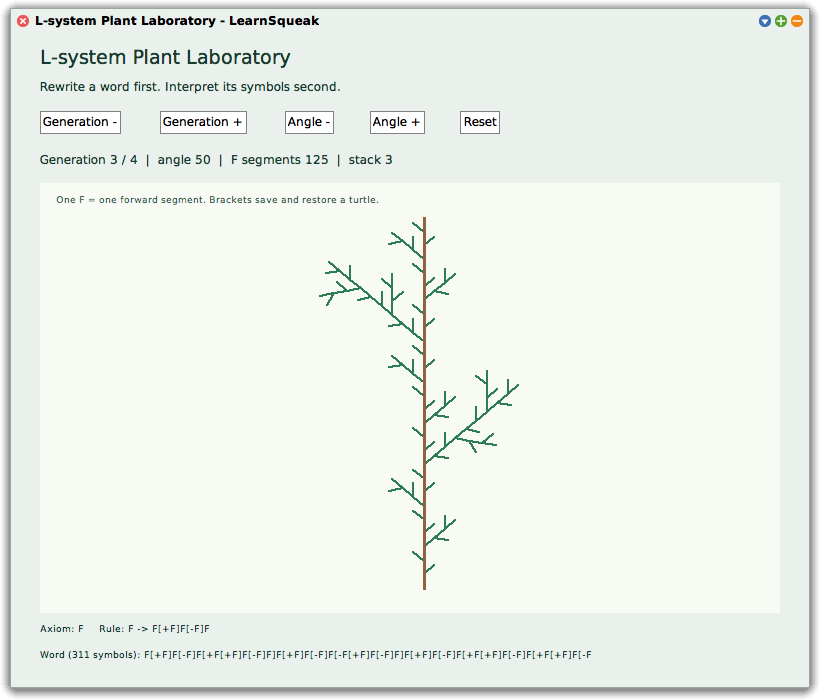
The teaching window has a fixed size. Responsive resizing and pan/zoom are deliberately outside this lesson.
07 · Keep exponential growth bounded
Five replacements per F means a single extra generation multiplies drawing work by five. This lab deliberately stops at generation 4. Custom productions must be 1–20 characters, balanced, use only F + - [ ], and contain at most five F symbols. Those limits keep accepted configurations at no more than 625 forward segments. Rejecting a bad production preserves the previous state.
- Read generation:, validWord: and useRule:. Validate the entire rule before assigning it.
- Move to the maximum generation with the launcher below.
- Try Generation + again: the button cannot go beyond 4. SUnit also tests negative, fractional and excessive generation requests.
generation: number
(number isInteger and: [number between: 0 and: 4]) ifFalse: [^ false].
generation := number. self rebuild. ^ truevalidWord: text
| depth |
depth := 0.
text do: [:symbol |
('F+-[]' includes: symbol) ifFalse: [^ false].
symbol = $[ ifTrue: [depth := depth + 1].
symbol = $] ifTrue: [depth := depth - 1].
depth < 0 ifTrue: [^ false]].
^ depth = 0useRule: text
((text isString and: [text size between: 1 and: 20]) and: [self validWord: text]) ifFalse: [^ false].
(text count: [:symbol | symbol = $F]) > 5 ifTrue: [^ false].
rule := text copy. generation := 0. self rebuild. ^ trueapp grammar angle: 25; generation: 4.
app refresh.Expected: Generation 4; 625 segments, 1,561 symbols for the default rule, stack depth 4.
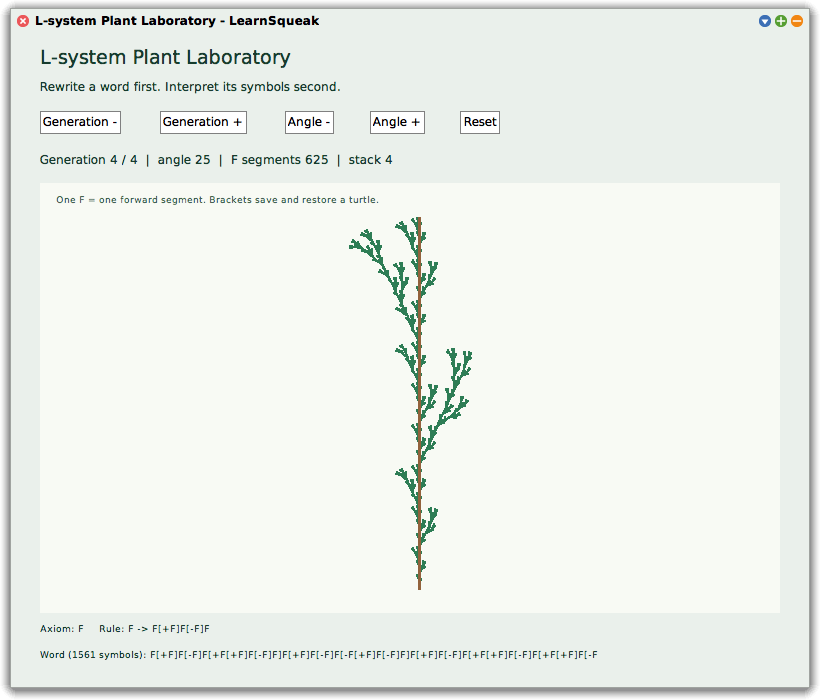
The public rewrite: method is a low-level helper. Do not feed arbitrarily huge strings to it or remove the generation bounds.
08 · Swap the production and test the contract
Change the production to F[+F][-F]. Each old F now produces three forward symbols, so generation 3 contains 27 segments. useRule: resets generation to zero before rebuilding; this prevents a new rule from inheriting a surprisingly expensive old generation. The app remains a symbolic experiment, not a scientifically calibrated plant growth simulation.
- Use the launcher to install the alternative rule and explicitly choose generation 3.
- Compare its branching structure and F count with the default rule. Reset returns the original grammar, angle 25 and generation 0.
- File in l-systems-tests.st, then select LSGrammarTest suite run in a Workspace and choose print it.
refresh
status contents: 'Generation ', grammar generation printString, ' / 4 | angle ', grammar angle printString, ' | F segments ', grammar forwardCount printString, ' | stack ', grammar maximumStack printString.
ruleLabel contents: 'Axiom: F Rule: F -> ', grammar rule.
wordLabel contents: 'Word (', grammar word size printString, ' symbols): ', (grammar word first: (grammar word size min: 85)).
board changed. self changedreset
grammar reset. self refreshapp grammar useRule: 'F[+F][-F]'.
app grammar generation: 3.
app refresh.
Expected: The alternative grammar makes 27 segments at generation 3.
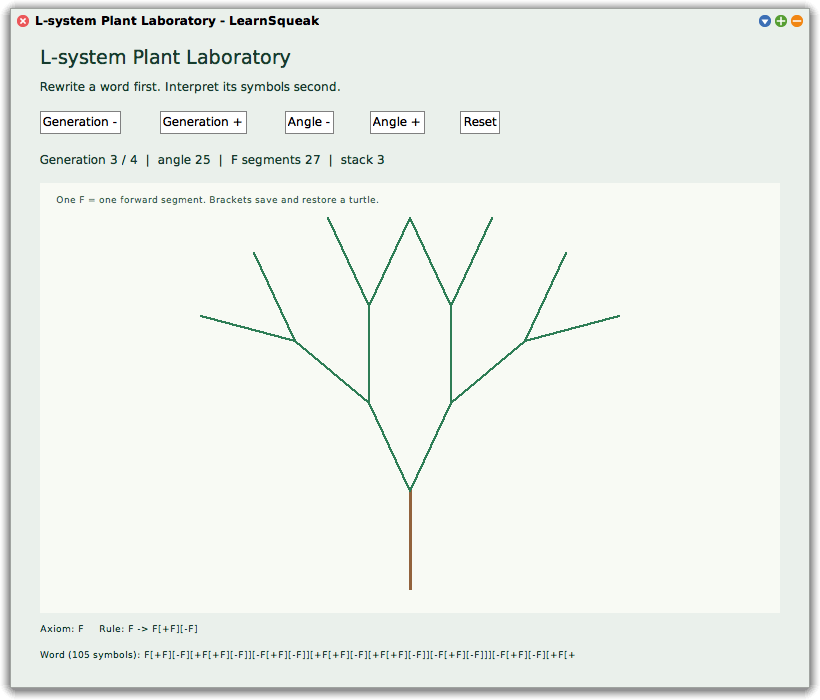
Model strings are data. The grammar is never evaluated as Smalltalk code. Only the explicitly shown Workspace commands are code.
Watch rewriting change the shape
Frames show default generations 0–3, narrow and wide angles, generation 4, and the alternative production. Use the app buttons to reproduce the default sequence yourself.
Verify behavior, then change one thing
LSGrammarTest suite runAll 37 native SUnit tests passed in Squeak 6.1 build 23976. They cover parallel substitution, exact segment counts, balanced brackets, invalid input, turtle position and heading restoration, model bounds, copying the returned word, reset, and button action methods. Eight complete state checkpoints were independently filed into fresh image runs. All eight displayed Workspace launchers were evaluated in sequence. The visible Browser methods are taken directly from the compiled application source.
Exercise: use F[+F][-F] at generation 2. Predict the count before running it: each F becomes three, so there should be 9 segments. Change the angle without changing the generation; the count must stay 9. Reset afterward.
Exercise: try an invalid rule such as F] or FFFFFF through useRule:. It should answer false and leave the earlier rule and generation unchanged. Never remove the limits to make a more detailed screenshot: exponential growth can make a Smalltalk image unresponsive.
This is a deterministic single-production, two-dimensional teaching system. There are no stochastic productions, context-sensitive rules, botanical measurements, obstacle avoidance, file persistence or network calls. Squeak’s normal image save is separate from this application.
Compare algorithms and keep exploring
Compare recursive tree drawing · Review stacks and queues · Build a tiny arithmetic language · Learn SUnit
For background on symbolic plant models and turtle interpretation, see the authors’ Algorithmic Botany publications, especially The Algorithmic Beauty of Plants. For the environment, use official Squeak documentation. The code and native captures here were created for this lesson.