FROM CLASS DEFINITION TO TESTS
Classes and objects in the Browser
Eight verified stages from your first class definition to a green SUnit suite. Learn the difference between a class and its instances by working in the real Morphic Browser, Workspace, Inspector, and Test Runner.
Run in the SqueakJS playground
The separate playground loads the real Smalltalk image on demand. This lesson keeps its native setup instructions; browser compatibility notes appear beside each demo.
Two ways to build the same class
Download all stages and the standalone guide
Before you begin: A running Squeak 6.1 image; Know how to select text and use do it / print it; No class or SUnit experience required.
Review language basics · Set up your learning image
- Work in a fresh image or use the unique LearningCounter and LearningCounterTest names. These names are created or updated by the lesson.
- The method source blocks are accepted separately in the Browser. The downloadable stage files are equivalent Workspace installation chunks; evaluate the whole file with do it, or file it in.
- Stages are cumulative. Install them in order in a clean image for the exact pictured progression. Reinstalling an earlier stage after later stages does not remove later methods.
- Choose do it / print it / inspect it / accept from the text menu. Keyboard command modifiers vary by platform and preferences; the menu shows the active shortcuts.
- Temporary-variable checkpoints are self-contained. Select the whole block, including its | variables | declaration, and choose print it. The displayed result may use a different equivalent collection-printing layout.
- The .st file-in downloads use exclamation-mark chunk delimiters. Do not paste a whole file-in into a Browser method pane; use File List fileIn or the runnable stage chunk instead.
Build the stages in order for the screenshots shown here. Each installation checkpoint includes the definitions required up to that point. Using an earlier checkpoint after a later one does not delete methods that you already installed.
01 · Create a class in the Browser
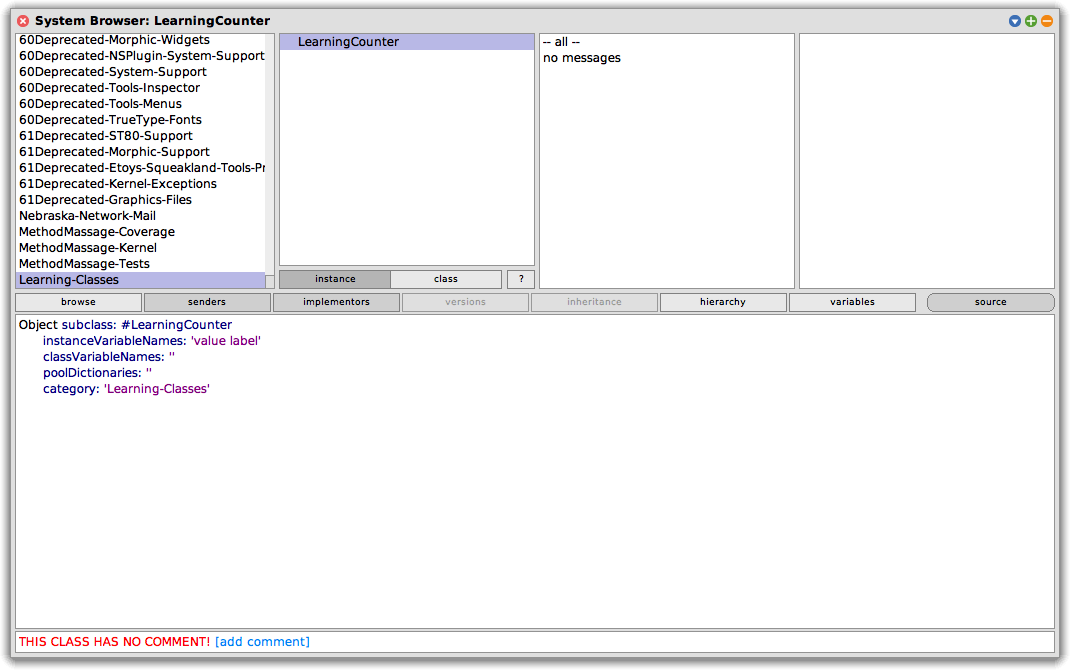
The System Browser shows system categories, classes, method categories (also called protocols), and selectors from left to right. The bottom pane holds source code. A class describes the state and behavior its instances will have. LearningCounter inherits general behavior from Object and reserves two instance variables: value and label. Instance variables initially hold nil; initialization comes next.
- Open a Workspace from the World menu. Select the whole class definition below and choose do it from the text menu.
- Evaluate Browser fullOnClass: LearningCounter. In the Browser, select Learning-Classes, then LearningCounter. Keep the instance button selected.
- Read the definition in the lower pane. Alternatively, add the Learning-Classes category in the first pane and accept this definition in its class template using the text menu accept command.
Object subclass: #LearningCounter
    instanceVariableNames: 'value label'
    classVariableNames: ''
    poolDictionaries: ''
category: 'Learning-Classes'.{LearningCounter superclass name.
LearningCounter instVarNames.
(LearningCounter new instVarNamed: 'value')}#(#Object #('value' 'label') nil)Browser fullOnClass: LearningCounterExpected: native Browser window opens
Try it: Select each of the four top panes in order. Notice that the class has no methods of its own yet.
Watch for: Do not paste a method body into the class definition. Definitions, instance methods, and class methods use different Browser selections.
Complete installation checkpoint 1
Object subclass: #LearningCounter
    instanceVariableNames: 'value label'
    classVariableNames: ''
    poolDictionaries: ''
    category: 'Learning-Classes'.
02 · Initialize every new instance
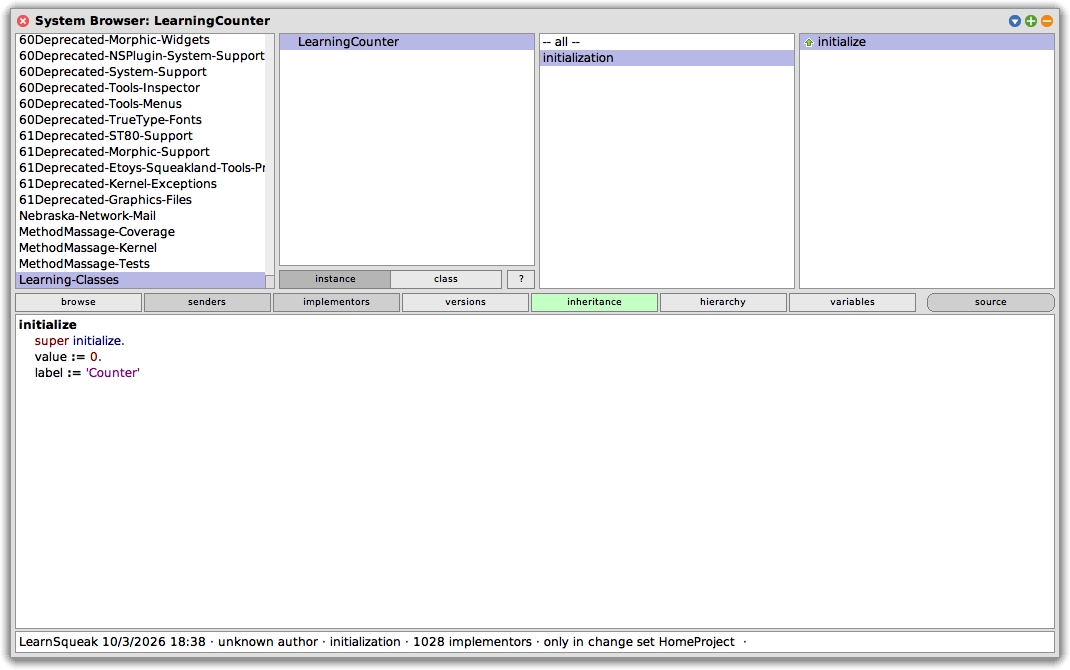
In this Squeak 6.1 image, Behavior>>new answers self basicNew initialize. Defining initialize on the instance side gives every newly created counter a reliable starting state. super initialize preserves the initialization behavior inherited from Object. := assigns a value; a period separates expressions. A method without an explicit return answers its receiver.
- On the instance side of LearningCounter, add the method category initialization in the third pane.
- Paste the initialize method into the source pane and accept it. The method name is its first line; do not include LearningCounter>> in the source.
- Run the checkpoint in a Workspace using print it. New counters start at zero with the default label.
initialize
    super initialize.
    value := 0.
label := 'Counter'| counter |
counter := LearningCounter new.
{counter instVarNamed: 'value'.
counter instVarNamed: 'label'}#(0 'Counter')Try it: Make a fresh counter again. Every new instance independently runs initialize.
Watch for: Adding initialize does not rerun initialization on objects you created earlier. Use a newly created object at this checkpoint.
Complete installation checkpoint 2
Object subclass: #LearningCounter
    instanceVariableNames: 'value label'
    classVariableNames: ''
    poolDictionaries: ''
    category: 'Learning-Classes'.

LearningCounter compile: 'initialize
    super initialize.
    value := 0.
    label := ''Counter''' classified: 'initialization'.
03 · Give objects a small public interface
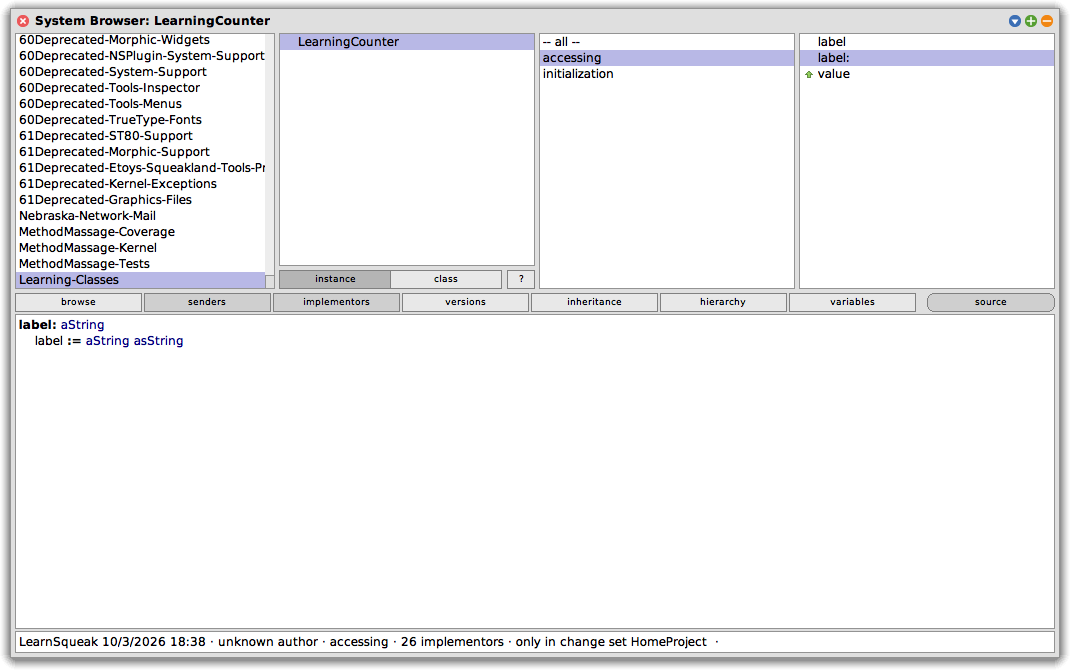
An accessor method such as value answers an instance variable with ^. A setter such as label: receives one argument and stores it; its colon is part of the selector. These methods provide the normal interface to a counter. The earlier instVarNamed: expressions were diagnostic probes; use value and label for normal code.
- Create the accessing method category on the instance side.
- Accept value, label, and label: separately. Each source block is one complete method.
- In a Workspace, create a counter, set its label, and ask for both values with print it.
value
^ valuelabel
^ labellabel: aString
label := aString asString| counter |
counter := LearningCounter new.
counter label: 'Practice'.
{counter label. counter value}#('Practice' 0)| counter |
counter := LearningCounter new.
counter label: 42.
counter labelExpected: '42'
Try it: Try counter label: 42 in the same selected block. The setter converts its input with asString, so the label becomes '42'.
Watch for: Use single quotes for strings and double quotes for comments. label and label: are two different selectors.
Complete installation checkpoint 3
Object subclass: #LearningCounter
    instanceVariableNames: 'value label'
    classVariableNames: ''
    poolDictionaries: ''
    category: 'Learning-Classes'.

LearningCounter compile: 'initialize
    super initialize.
    value := 0.
    label := ''Counter''' classified: 'initialization'.

LearningCounter compile: 'value
    ^ value' classified: 'accessing'.

LearningCounter compile: 'label
    ^ label' classified: 'accessing'.

LearningCounter compile: 'label: aString
    label := aString asString' classified: 'accessing'.
04 · Change state with behavior
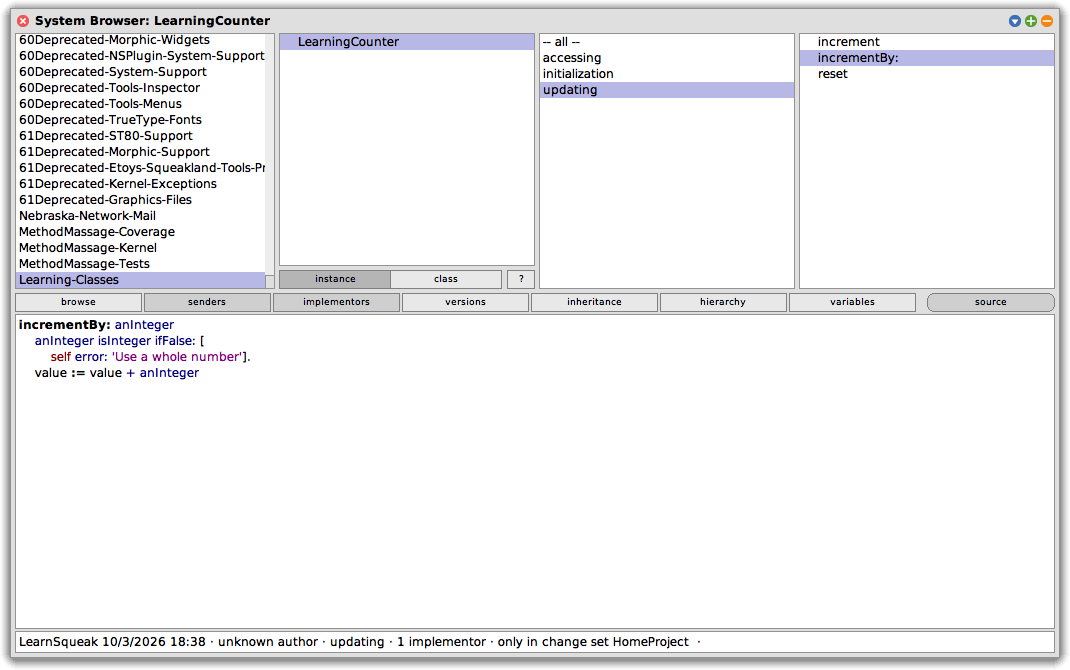
increment delegates to incrementBy: so one method owns the arithmetic and validation. incrementBy: accepts whole numbers, including negative integers, and rejects fractional values before changing state. reset restores value to zero. A semicolon cascades another message to the same receiver, so counter increment; incrementBy: 4 sends both messages to counter.
- Create the updating method category and accept increment, incrementBy:, and reset separately.
- Run the checkpoint with print it. You should see the value after both increments and after reset.
- Read the guard in incrementBy:. ifFalse: takes a block, written inside square brackets.
increment
self incrementBy: 1incrementBy: anInteger
anInteger isInteger ifFalse: [
self error: 'Use a whole number'].
value := value + anIntegerreset
value := 0| counter beforeReset |
counter := LearningCounter new.
counter increment; incrementBy: 4.
beforeReset := counter value.
counter reset.
{beforeReset. counter value}#(5 0)| counter |
counter := LearningCounter new.
counter increment; incrementBy: -2.
counter valueExpected: -1
| counter rejected |
counter := LearningCounter new.
rejected := [counter incrementBy: 1.5. false]
    on: Error do: [:error | error messageText = 'Use a whole number'].
{rejected. counter value}
Expected: #(true 0)
Try it: Replace incrementBy: 4 with incrementBy: -2. The first result becomes -1 because the counter was incremented once first.
Watch for: A cascade does not send the next message to the result of the previous one. A period would start a separate expression and require repeating counter.
Complete installation checkpoint 4
Object subclass: #LearningCounter
    instanceVariableNames: 'value label'
    classVariableNames: ''
    poolDictionaries: ''
    category: 'Learning-Classes'.

LearningCounter compile: 'initialize
    super initialize.
    value := 0.
    label := ''Counter''' classified: 'initialization'.

LearningCounter compile: 'value
    ^ value' classified: 'accessing'.

LearningCounter compile: 'label
    ^ label' classified: 'accessing'.

LearningCounter compile: 'label: aString
    label := aString asString' classified: 'accessing'.

LearningCounter compile: 'increment
    self incrementBy: 1' classified: 'updating'.

LearningCounter compile: 'incrementBy: anInteger
    anInteger isInteger ifFalse: [
        self error: ''Use a whole number''].
    value := value + anInteger' classified: 'updating'.

LearningCounter compile: 'reset
    value := 0' classified: 'updating'.
05 · Create two independent objects
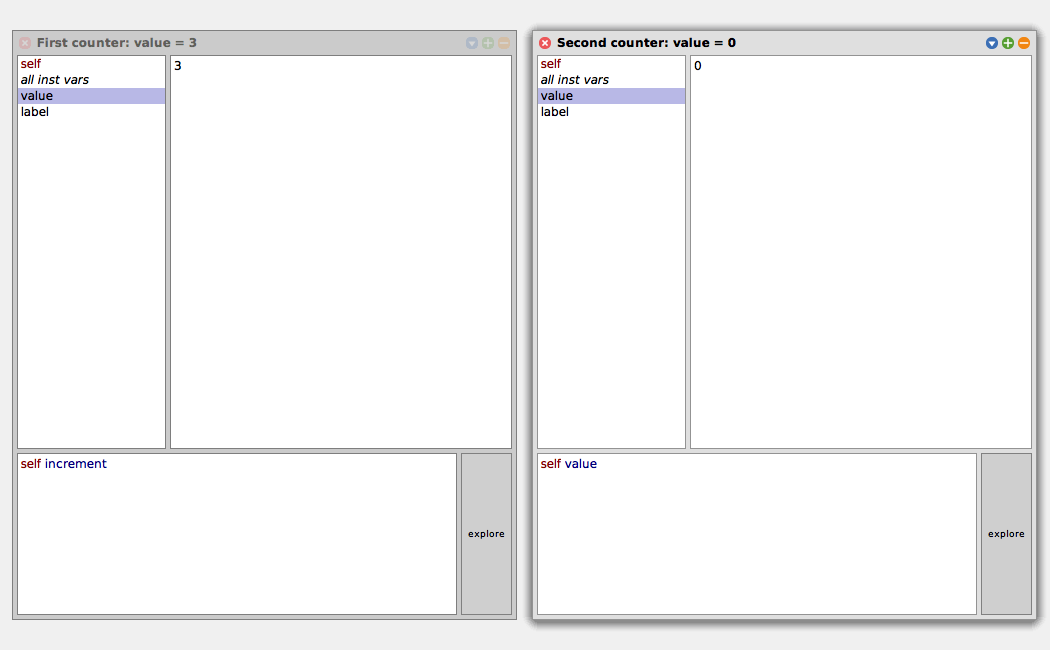
Both objects have the same class and the same methods, but each owns its own value and label. == tests identity, so it asks whether two references point to the very same object. An Inspector shows the live fields of a particular object. Opening the class in a Browser instead shows shared method definitions.
- Run the entire checkpoint with print it; temporary variables exist only inside that evaluation.
- Run the inspect example below with do it to open two native Inspectors.
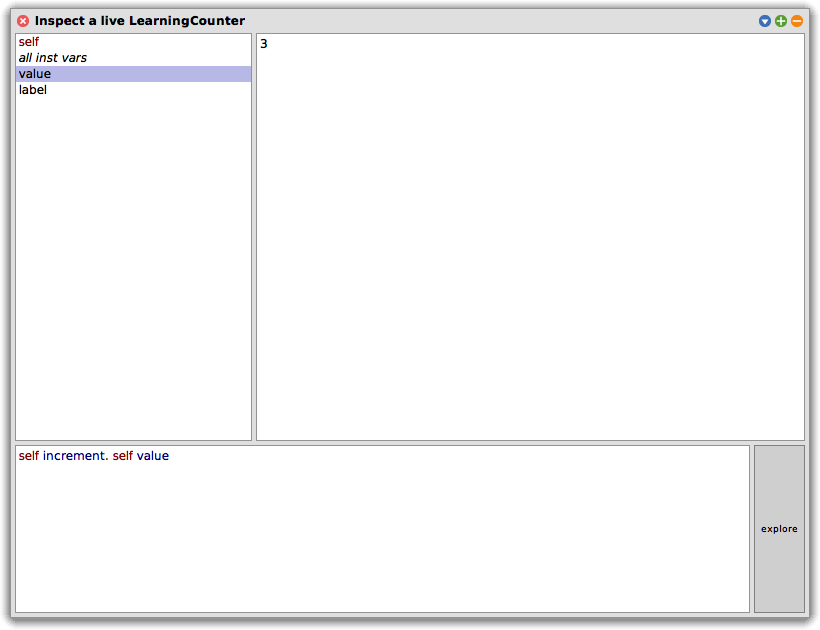
- Select value in each Inspector. The left counter has 3; the right counter still has 0.
| first second |
first := LearningCounter new.
second := LearningCounter new.
first label: 'First'; incrementBy: 3.
second label: 'Second'.
{first value. second value.
 first class == second class.
first == second}#(3 0 true false)| first second |
first := LearningCounter new.
second := LearningCounter new.
first label: 'First'; incrementBy: 3.
second label: 'Second'.
first inspect.
second inspect.Expected: two native Inspectors open
Try it: In the Inspector evaluation pane for First, do self increment. Select value again if needed and observe 4. The Second counter stays at 0.
Watch for: The temporary variable names first and second are not global names. To reuse them, keep all related expressions in one selected block or work in each Inspector with self.
Complete installation checkpoint 5
Object subclass: #LearningCounter
    instanceVariableNames: 'value label'
    classVariableNames: ''
    poolDictionaries: ''
    category: 'Learning-Classes'.

LearningCounter compile: 'initialize
    super initialize.
    value := 0.
    label := ''Counter''' classified: 'initialization'.

LearningCounter compile: 'value
    ^ value' classified: 'accessing'.

LearningCounter compile: 'label
    ^ label' classified: 'accessing'.

LearningCounter compile: 'label: aString
    label := aString asString' classified: 'accessing'.

LearningCounter compile: 'increment
    self incrementBy: 1' classified: 'updating'.

LearningCounter compile: 'incrementBy: anInteger
    anInteger isInteger ifFalse: [
        self error: ''Use a whole number''].
    value := value + anInteger' classified: 'updating'.

LearningCounter compile: 'reset
    value := 0' classified: 'updating'.
06 · Add a class-side factory
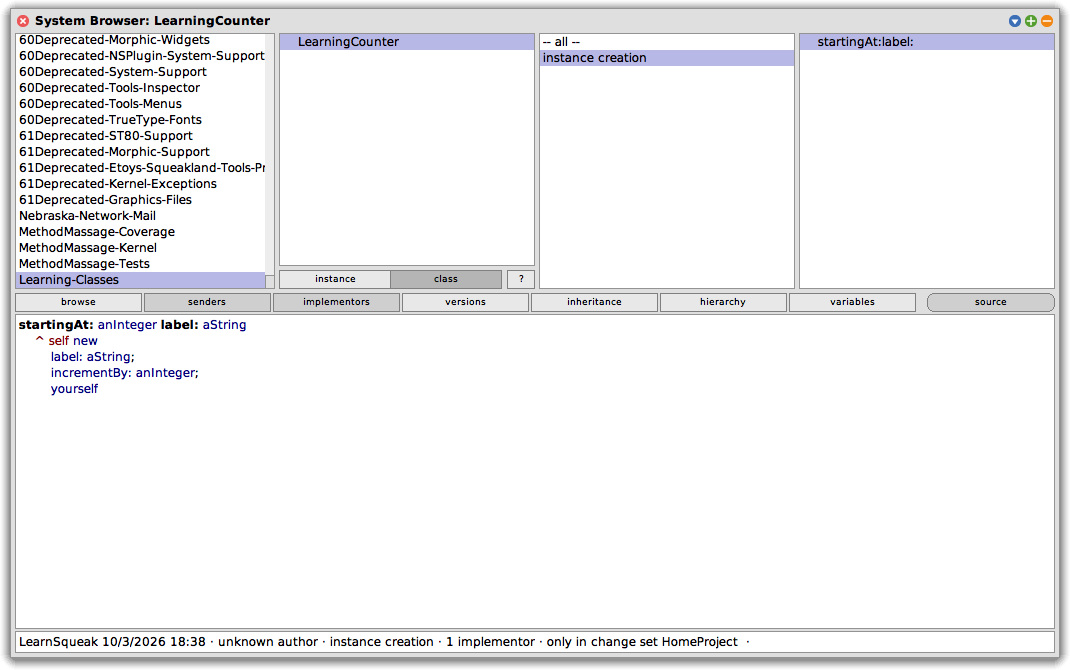
LearningCounter is itself an object. startingAt:label: is a class-side method because its receiver is the LearningCounter class. Inside it, self means that class; self new creates an instance. The returned instance receives label: and incrementBy:. The final yourself makes the returned object explicit. On the instance side, self means one counter instead.
- Select LearningCounter and click class under the class list. Add the method category instance creation.
- Accept startingAt:label: on this class side. The selector has two keyword parts and takes two arguments.
- Run the checkpoint. Click instance again to return to value, label, and increment methods.
startingAt: anInteger label: aString
    ^ self new
        label: aString;
        incrementBy: anInteger;
yourself| counter |
counter := LearningCounter startingAt: 10 label: 'Laps'.
{counter class name. counter label. counter value.
(LearningCounter respondsTo: #startingAt:label:).
(counter respondsTo: #startingAt:label:)}#(#LearningCounter 'Laps' 10 true false)(LearningCounter startingAt: -5 label: 'Balance') valueExpected: -5
Try it: Try LearningCounter startingAt: -5 label: 'Balance'. Negative whole-number starting values are allowed by the same incrementBy: rule.
Watch for: If LearningCounter does not understand startingAt:label:, check that you accepted it on the class side. Defining it on the instance side gives a different receiver that message.
Complete installation checkpoint 6
Object subclass: #LearningCounter
    instanceVariableNames: 'value label'
    classVariableNames: ''
    poolDictionaries: ''
    category: 'Learning-Classes'.

LearningCounter compile: 'initialize
    super initialize.
    value := 0.
    label := ''Counter''' classified: 'initialization'.

LearningCounter compile: 'value
    ^ value' classified: 'accessing'.

LearningCounter compile: 'label
    ^ label' classified: 'accessing'.

LearningCounter compile: 'label: aString
    label := aString asString' classified: 'accessing'.

LearningCounter compile: 'increment
    self incrementBy: 1' classified: 'updating'.

LearningCounter compile: 'incrementBy: anInteger
    anInteger isInteger ifFalse: [
        self error: ''Use a whole number''].
    value := value + anInteger' classified: 'updating'.

LearningCounter compile: 'reset
    value := 0' classified: 'updating'.

LearningCounter class compile: 'startingAt: anInteger label: aString
    ^ self new
        label: aString;
        incrementBy: anInteger;
        yourself' classified: 'instance creation'.
07 · Make inspection readable
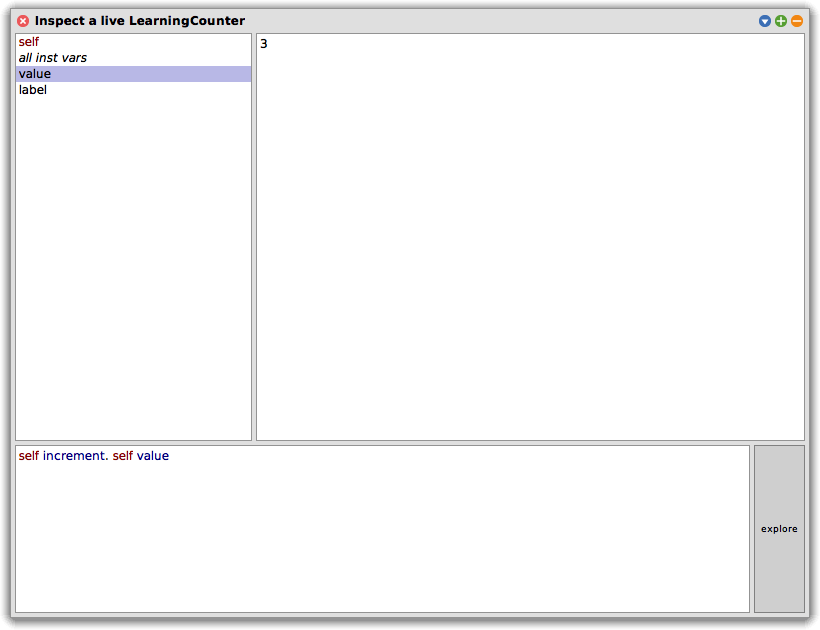
Object>>printString uses printOn: to ask an object for its textual representation. Overriding printOn: on the instance side gives each counter a useful summary such as Laps: 3. The Inspector remains a view of the same live object; printing is only a description, not a copy of its state.
- Switch back to instance, create printing, and accept printOn:.
- Run the printString checkpoint with print it.
- Inspect a counter and evaluate self increment in the bottom evaluation pane. The animation here shows scripted messages changing a real native Inspector.
printOn: aStream
    aStream
        nextPutAll: label;
        nextPutAll: ': ';
print: value| counter before after |
counter := LearningCounter startingAt: 3 label: 'Laps'.
before := counter printString.
counter increment.
after := counter printString.
{before. after}#('Laps: 3' 'Laps: 4')(LearningCounter startingAt: 3 label: 'Laps') inspectExpected: a native Inspector opens
Try it: Do self reset in the Inspector evaluation pane. Then print self value. The counter still exists and its value is now 0.
Watch for: printOn: should write to its supplied stream. Do not implement it by calling self printString; that would ask printOn: again and recurse.
Complete installation checkpoint 7
Object subclass: #LearningCounter
    instanceVariableNames: 'value label'
    classVariableNames: ''
    poolDictionaries: ''
    category: 'Learning-Classes'.

LearningCounter compile: 'initialize
    super initialize.
    value := 0.
    label := ''Counter''' classified: 'initialization'.

LearningCounter compile: 'value
    ^ value' classified: 'accessing'.

LearningCounter compile: 'label
    ^ label' classified: 'accessing'.

LearningCounter compile: 'label: aString
    label := aString asString' classified: 'accessing'.

LearningCounter compile: 'increment
    self incrementBy: 1' classified: 'updating'.

LearningCounter compile: 'incrementBy: anInteger
    anInteger isInteger ifFalse: [
        self error: ''Use a whole number''].
    value := value + anInteger' classified: 'updating'.

LearningCounter compile: 'reset
    value := 0' classified: 'updating'.

LearningCounter class compile: 'startingAt: anInteger label: aString
    ^ self new
        label: aString;
        incrementBy: anInteger;
        yourself' classified: 'instance creation'.

LearningCounter compile: 'printOn: aStream
    aStream
        nextPutAll: label;
        nextPutAll: '': '';
        print: value' classified: 'printing'.
08 · Protect behavior with SUnit
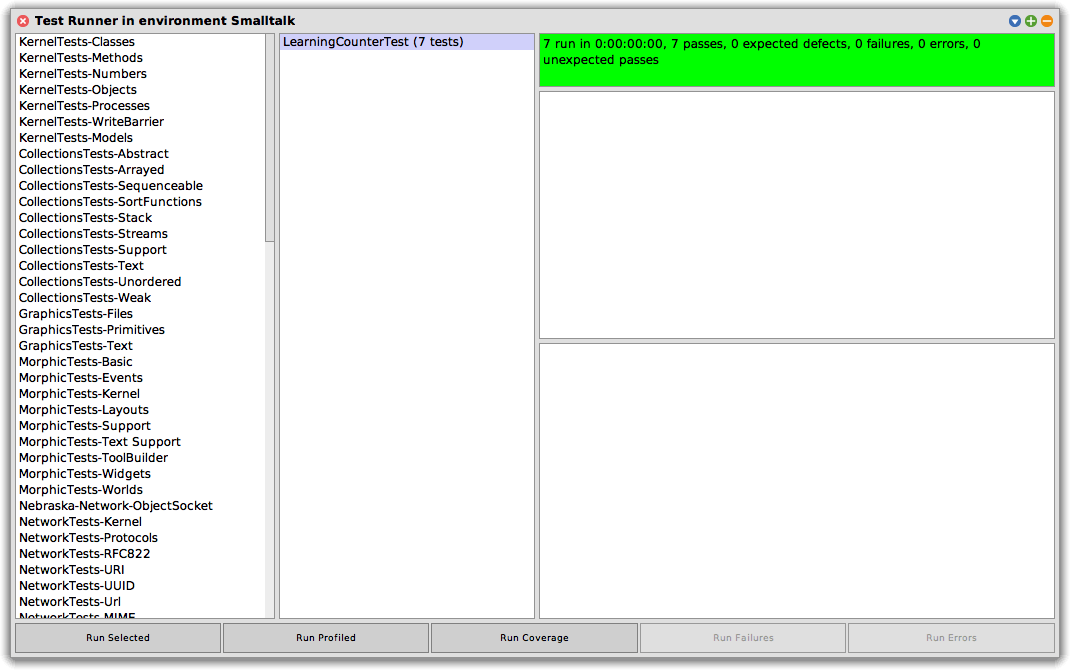
A test is an instance-side method whose selector begins with test on a TestCase subclass. Each assertion records a concrete expectation. These seven tests cover default state, mutation/reset, separate objects, the class-side factory, negative increments, rejected fractional increments, and readable printing. SUnit distinguishes assertion failures from unexpected errors.
- Define LearningCounterTest as a subclass of TestCase, in Learning-Classes-Tests.
- On its instance side, create tests and accept each test method separately, or file in the supplied LearningCounterTest.st.
- Run the suite checkpoint with print it. Then evaluate TestRunner openForSuite: LearningCounterTest suite; select the displayed test class and use Run Selected to see the green result.
TestCase subclass: #LearningCounterTest
    instanceVariableNames: ''
    classVariableNames: ''
    poolDictionaries: ''
category: 'Learning-Classes-Tests'.testNewCounterStartsAtZero
self assert: LearningCounter new value equals: 0.
self assert: LearningCounter new label equals: 'Counter'testIncrementAndReset
| counter |
counter := LearningCounter new.
counter increment; incrementBy: 4.
self assert: counter value equals: 5.
counter reset.
self assert: counter value equals: 0testInstancesKeepSeparateState
| first second |
first := LearningCounter new.
second := LearningCounter new.
first label: 'First'; incrementBy: 3.
self assert: first value equals: 3.
self assert: second value equals: 0.
self assert: second label equals: 'Counter'.
self deny: first == secondtestNamedStartingValue
| counter |
counter := LearningCounter startingAt: 10 label: 'Laps'.
self assert: counter value equals: 10.
self assert: counter label equals: 'Laps'testNegativeIncrement
| counter |
counter := LearningCounter new.
counter incrementBy: -2.
self assert: counter value equals: -2testRejectsFractionalIncrement
| counter |
counter := LearningCounter new.
self should: [counter incrementBy: 1.5] raise: Error.
self assert: counter value equals: 0testReadablePrintString
self
assert: (LearningCounter startingAt: 3 label: 'Laps') printString
equals: 'Laps: 3'| result |
result := LearningCounterTest suite run.
{result runCount. result passed size.
result failures size. result errors size}#(7 7 0 0)TestRunner openForSuite: LearningCounterTest suiteExpected: native SUnit TestRunner opens
Try it: Read testInstancesKeepSeparateState and identify which assertion would catch accidentally shared state. Read testRejectsFractionalIncrement to see that rejection must leave the value unchanged.
Watch for: Accept test methods in LearningCounterTest, not LearningCounter. A test class inherits from TestCase; production code inherits from Object.
Complete installation checkpoint 8
Object subclass: #LearningCounter
    instanceVariableNames: 'value label'
    classVariableNames: ''
    poolDictionaries: ''
    category: 'Learning-Classes'.

LearningCounter compile: 'initialize
    super initialize.
    value := 0.
    label := ''Counter''' classified: 'initialization'.

LearningCounter compile: 'value
    ^ value' classified: 'accessing'.

LearningCounter compile: 'label
    ^ label' classified: 'accessing'.

LearningCounter compile: 'label: aString
    label := aString asString' classified: 'accessing'.

LearningCounter compile: 'increment
    self incrementBy: 1' classified: 'updating'.

LearningCounter compile: 'incrementBy: anInteger
    anInteger isInteger ifFalse: [
        self error: ''Use a whole number''].
    value := value + anInteger' classified: 'updating'.

LearningCounter compile: 'reset
    value := 0' classified: 'updating'.

LearningCounter class compile: 'startingAt: anInteger label: aString
    ^ self new
        label: aString;
        incrementBy: anInteger;
        yourself' classified: 'instance creation'.

LearningCounter compile: 'printOn: aStream
    aStream
        nextPutAll: label;
        nextPutAll: '': '';
        print: value' classified: 'printing'.

TestCase subclass: #LearningCounterTest
    instanceVariableNames: ''
    classVariableNames: ''
    poolDictionaries: ''
    category: 'Learning-Classes-Tests'.

LearningCounterTest compile: 'testNewCounterStartsAtZero
    self assert: LearningCounter new value equals: 0.
    self assert: LearningCounter new label equals: ''Counter''' classified: 'tests'.

LearningCounterTest compile: 'testIncrementAndReset
    | counter |
    counter := LearningCounter new.
    counter increment; incrementBy: 4.
    self assert: counter value equals: 5.
    counter reset.
    self assert: counter value equals: 0' classified: 'tests'.

LearningCounterTest compile: 'testInstancesKeepSeparateState
    | first second |
    first := LearningCounter new.
    second := LearningCounter new.
    first label: ''First''; incrementBy: 3.
    self assert: first value equals: 3.
    self assert: second value equals: 0.
    self assert: second label equals: ''Counter''.
    self deny: first == second' classified: 'tests'.

LearningCounterTest compile: 'testNamedStartingValue
    | counter |
    counter := LearningCounter startingAt: 10 label: ''Laps''.
    self assert: counter value equals: 10.
    self assert: counter label equals: ''Laps''' classified: 'tests'.

LearningCounterTest compile: 'testNegativeIncrement
    | counter |
    counter := LearningCounter new.
    counter incrementBy: -2.
    self assert: counter value equals: -2' classified: 'tests'.

LearningCounterTest compile: 'testRejectsFractionalIncrement
    | counter |
    counter := LearningCounter new.
    self should: [counter incrementBy: 1.5] raise: Error.
    self assert: counter value equals: 0' classified: 'tests'.

LearningCounterTest compile: 'testReadablePrintString
    self
        assert: (LearningCounter startingAt: 3 label: ''Laps'') printString
        equals: ''Laps: 3''' classified: 'tests'.
Review the object model
Genuine native Squeak 6.1 Morphic tools rendered by their imageForm in an isolated headless copy of the supplied image. Captures are not recreated HTML UI. Inspector animation uses scripted Smalltalk messages; it is not a recording of mouse or keyboard input.
The class describes behavior shared by its instances. Each instance keeps its own variables. A class-side factory such as named: is a message to the class object; increment is sent to one counter instance.
Close tutorial Browser, Inspector and Test Runner windows when finished. Saving the image retains installed classes; keeping the .st source lets you recreate them in another image.
Verification and next lesson
Eight installation checkpoints, eight result checks and eight additional snippets were executed in Squeak 6.1. The downloadable source files load correctly and all seven SUnit tests pass.
- Squeak 6.1 image: executable source of truth — All tutorial code and UI captures verified in Squeak6.1-23976-64bit, bundle 202606270913. Behavior>>new, Browser, Inspector, and TestRunner source was inspected inside that image.
- Squeak documentation: Smalltalk Objects — Primary project documentation on objects, classes, instance variables and messages.
- Squeak documentation: Introduction to the Browser — Background on the Browser. This older article is supplementary; current UI and code were checked in the supplied 6.1 image.
- Squeak by Example — Project listing for the book, with chapters about the Browser, object model, and SUnit.
Put it into practice.
Try an exercise before revealing its hints and tested solution.