The separate playground loads the real Smalltalk image on demand. This lesson keeps its native setup instructions; browser compatibility notes appear beside each demo.
Before you start
Build Pathfinding Lab: a native 18×12 grid editor with movable endpoints, walls, BFS, Manhattan A*, step/run/pause/cancel controls, route overlays, deterministic fixtures, and a comparison of search effort.
Each checkpoint is a complete, cumulative .st file. Install it in Squeak File List, inspect the highlighted Browser method, then Do It on the exact Workspace block. The nine stages add working behavior; each can also run independently in a fresh baseline image.
Squeak 6.1 with bundled SUnit; no packages, network calls, or external data
Basic Workspace Do It / Print It, Browser method editing, blocks, collections, and Points
Work in a copy of your learning image. Close the previous application window before moving forward.
Download a checkpoint .st file. File List → select it → fileIn. Chunk-format source with exclamation marks belongs in File List, not pasted as one Workspace expression.
Paste only the shown method into the named class’s instance side and Accept. The complete download installs its dependencies.
Checkpoint files support forward progression. For independent earlier stages, start from a clean image so later methods cannot remain.
Start with a graph, not a search loop. Each integer Point is a vertex in an 18 by 12 grid. An edge joins orthogonally adjacent cells when the destination is inside the grid and not a wall. Every edge costs one move. LPFSearch owns the data; LPFGrid only draws it. This separation lets SUnit test shortest paths without opening windows.
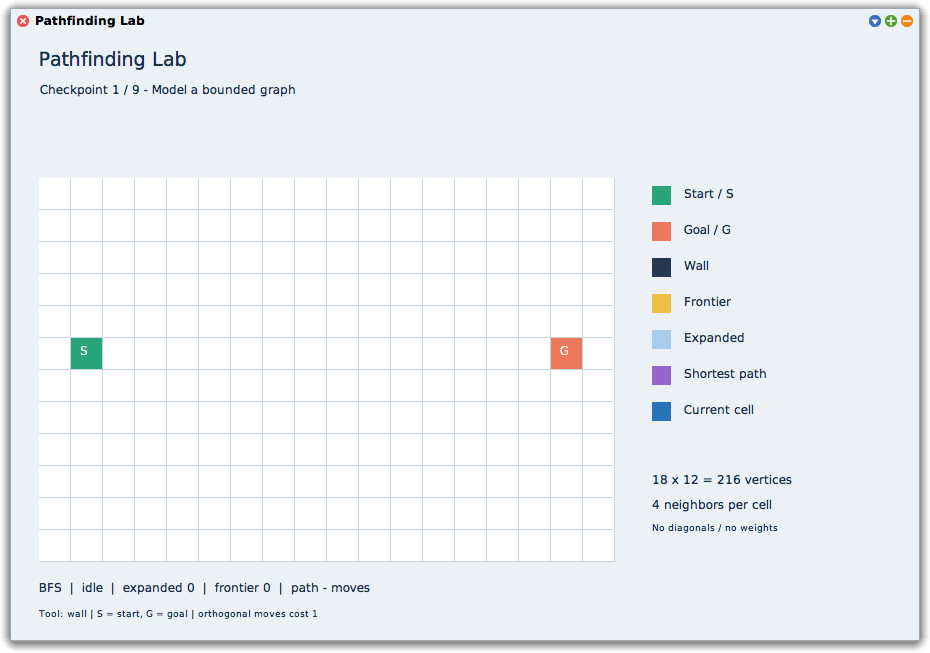
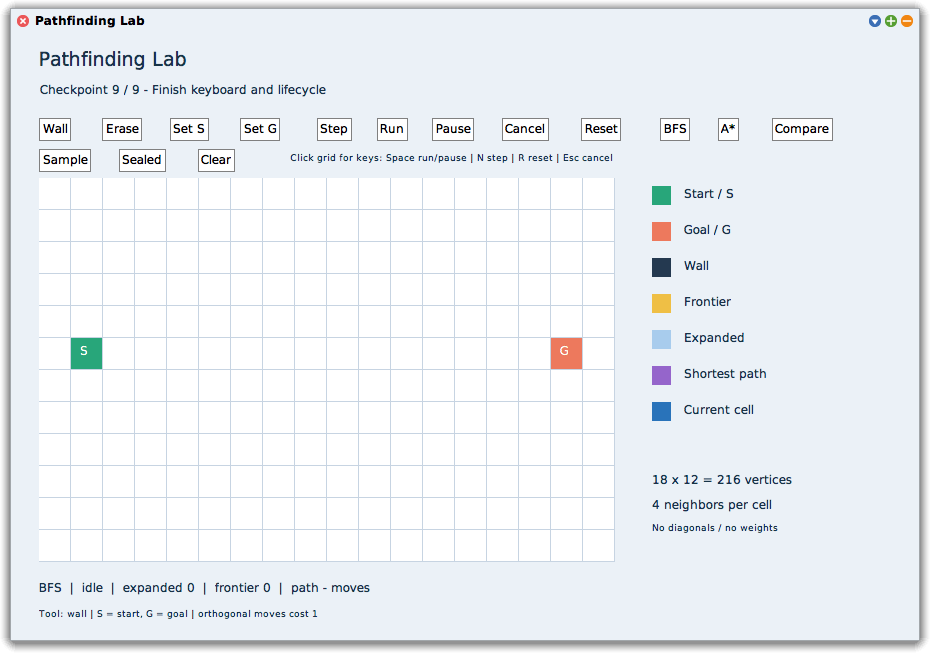
The model uses Sets for walls and expanded cells, Dictionaries for distances and predecessors, and an OrderedCollection for the frontier. Public collection queries return copies so a caller cannot silently corrupt the search. The first checkpoint displays a green S and coral G on a blank grid. There is deliberately no search button yet.
Read neighborsOf: from left to right. The literal array fixes the exploration order: right, down, left, up. select: removes blocked or out-of-bounds candidates. That stable order makes equal-cost BFS routes and captures reproducible. The graph has at most 216 vertices and fewer than four directed neighbor edges per vertex.
Where to run this
System Browser → LPFSearch → instance side → tutorial. Accept this complete method after installing this checkpoint. The download contains every required class and method.
Actual Squeak 6.1 window from the exact checkpoint 1 Workspace block above.
02 · Edit walls and endpoints
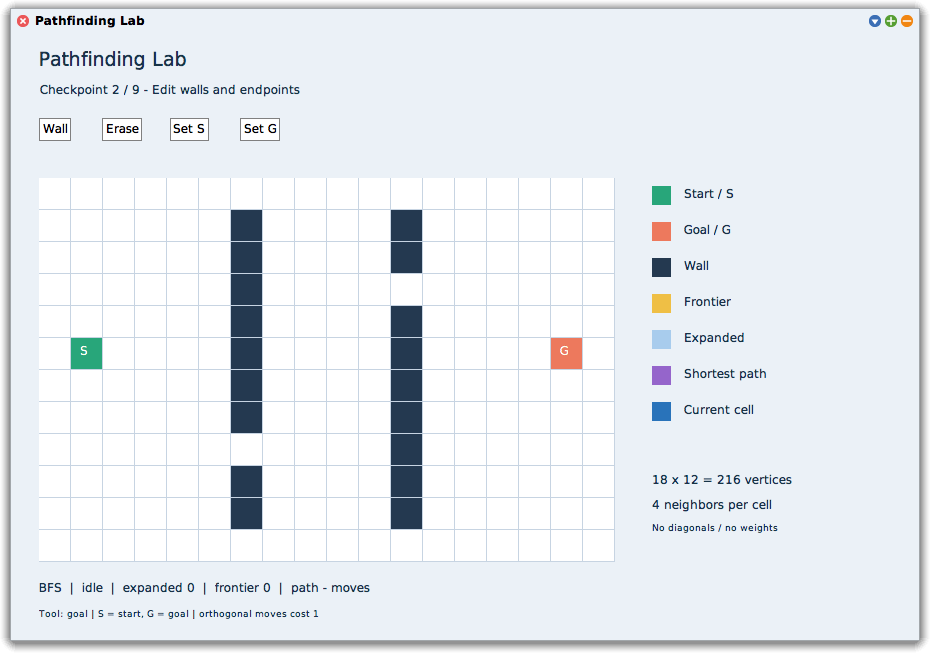
Add an editor before adding an algorithm. Wall and Erase assign a Boolean state; they do not toggle it. Dragging across the same cell twice therefore cannot undo a stroke. Set S and Set G relocate the endpoints. A wall cannot occupy either endpoint, and an endpoint cannot move onto a wall. You may place S and G on the same cell to explore the zero-move case later.
Mouse coordinates are screen coordinates. Subtract the grid position, reject coordinates outside its half-open rectangle, then divide by the 32-pixel cell size. The right and bottom edges belong outside the grid; tests cover those exact boundaries. Each stroke remembers visited cells, receives native Morphic mouse focus, and ends on mouse-up even outside the grid.
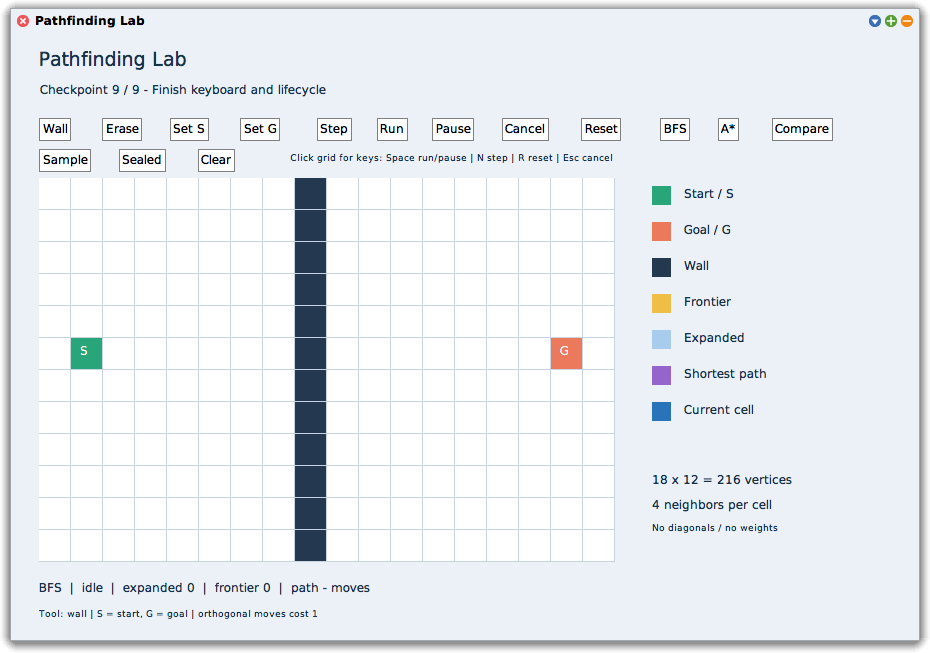
Every successful model edit resets transient search state. Once animation exists, edits also stop its scheduler first. The visible grid never continues showing a route from an older map. The Workspace block builds two barriers with different gaps, a deterministic fixture that will force a detour.
Where to run this
System Browser → LPFGrid → instance side → tutorial. Accept this complete method after installing this checkpoint. The download contains every required class and method.
LPFGrid · instance-side method
editAt: point
 | local cell |
 local := point - self position.
 ((0@0 extent: self extent) containsPoint: local) ifFalse: [^ false].
 cell := ((local x // cellSize) + 1) @ ((local y // cellSize) + 1).
 (visited includes: cell) ifTrue: [^ false].
 visited add: cell. ^ app editCell: cell
File List → fileIn pathfinding-02.st. Then Workspace → select this entire block → Do It.
Actual Squeak 6.1 window from the exact checkpoint 2 Workspace block above.
03 · Expand the BFS frontier
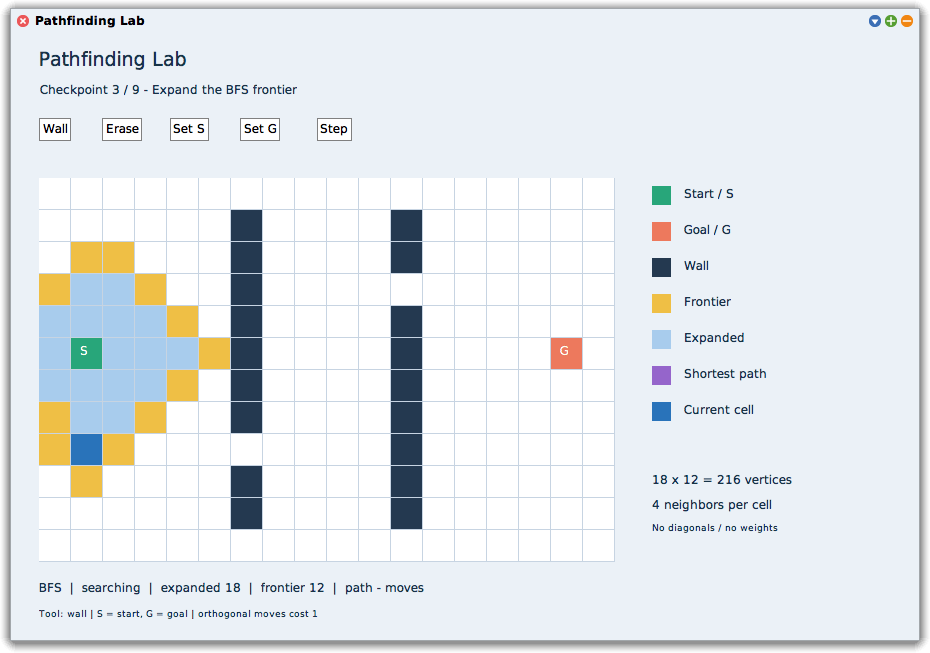
Breadth-first search explores vertices in order of distance from S. begin puts only S in the frontier, marks it discovered, and gives it distance zero. Step removes the oldest frontier cell, marks it expanded, then discovers each unseen neighbor. A discovered neighbor receives both a distance and a predecessor before joining the queue.
Marking on enqueue is essential: two expanded cells can share a neighbor. If discovery waited until removal, the same cell could enter the frontier many times. With unit costs and FIFO order, the first discovered distance is shortest. The yellow frontier separates the explored blue region from undiscovered white cells.
This checkpoint can recognize that the goal was removed from the queue, but it does not yet reconstruct a route. The run block advances exactly 18 vertices so you can inspect the wave. Step remains safe after a terminal state. For the general graph, BFS requires O(V + E) work with amortized constant-time queue removal and expected constant-time hash lookups, plus O(V) memory. This describes model traversal: repainting all V cells costs another O(V) per displayed frame.
Where to run this
System Browser → LPFSearch → instance side → tutorial. Accept this complete method after installing this checkpoint. The download contains every required class and method.
Actual Squeak 6.1 window from the exact checkpoint 3 Workspace block above.
04 · Recover the shortest path
Finding G gives a distance; predecessors turn that fact into a route. Starting at the goal, repeatedly follow parents back to S. addFirst: constructs the sequence in forward order so its first item is S and its last is G. A path with k vertices has k - 1 moves. The two endpoints are included even when they coincide, giving a one-vertex, zero-move path.
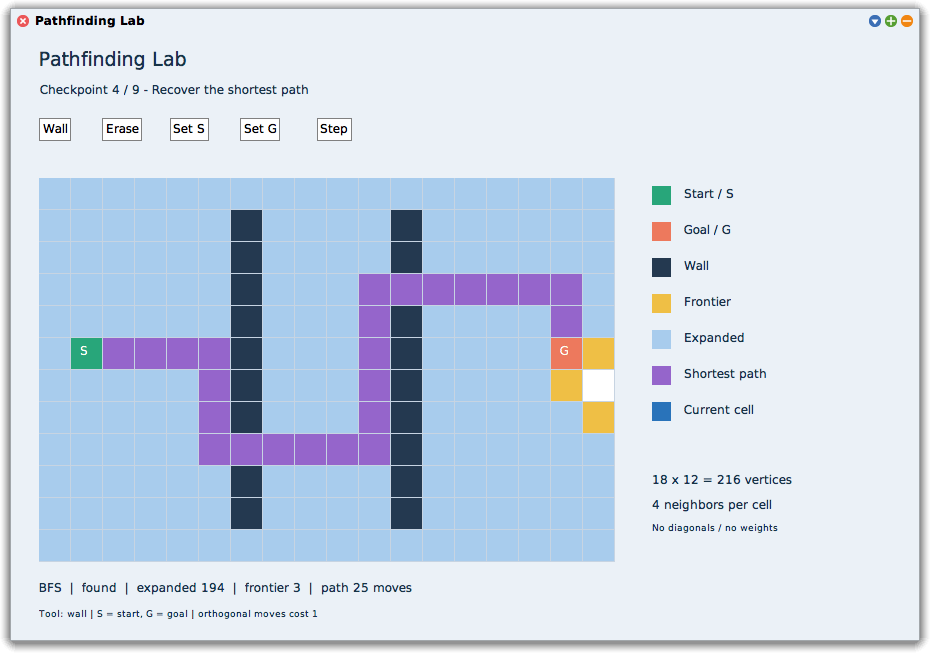
The search stops when the goal is removed from the frontier. That makes the termination rule consistent with the later A* implementation. Expanded counts include the goal. Remaining frontier cells stay yellow; a successful search need not exhaust every reachable cell. Purple cells show the shortest route, with the endpoint colors taking visual precedence.
solve starts a fresh search and performs at most 216 expansions. Each vertex is expanded once, so that bound covers success or exhaustion. On the sample barriers BFS finds 25 moves after expanding 194 vertices. The tests check endpoints, walkability, orthogonal adjacency, uniqueness, and the path length, rather than checking colors alone.
Where to run this
System Browser → LPFSearch → instance side → tutorial. Accept this complete method after installing this checkpoint. The download contains every required class and method.
Actual Squeak 6.1 window from the exact checkpoint 4 Workspace block above.
05 · Run, pause and cancel
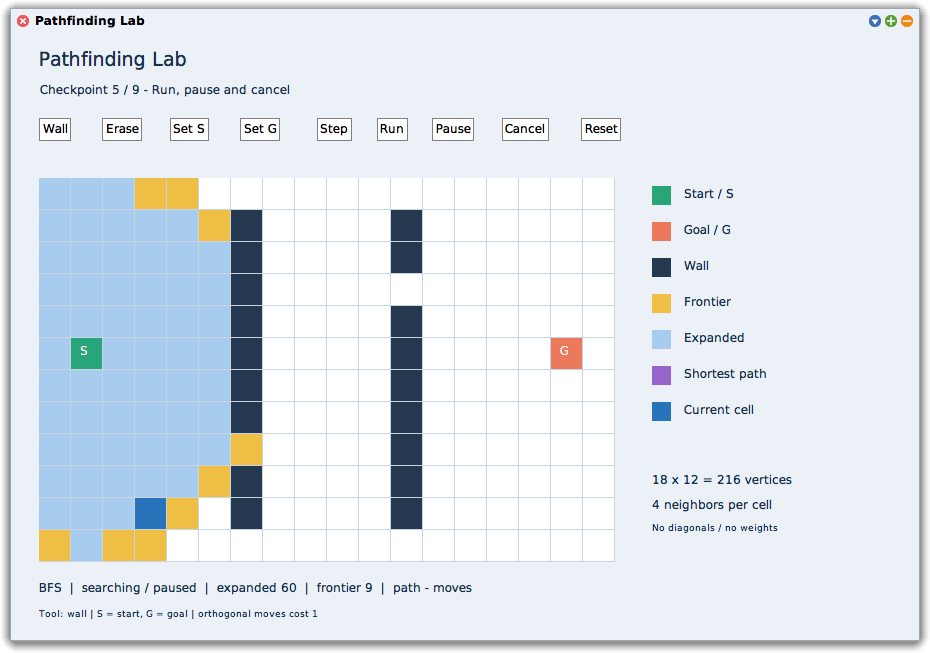
Animate one expansion at a time using Morphic stepping. Run starts or resumes a searching model and registers the app with the world scheduler. stepTime requests 80 milliseconds per expansion; actual timing depends on the UI load. step performs bounded work and unregisters automatically when the model is found or noPath. It never runs a blocking loop in the event handler.
Pause preserves the frontier, distances, predecessors, and expanded count, so Run continues from that point. Cancel marks a searching model cancelled and stops the scheduler. Reset clears only search progress and returns to idle while keeping walls and endpoints. Run and Step do nothing after found, noPath, or cancelled until Reset or a map edit. Repeated Run presses do not restart the frontier or add separate worker processes.
The exact block below explicitly invokes the same step callback 60 times and then pauses, making its screenshot deterministic. In ordinary use the scheduler supplies these callbacks. The suite separately proves that Run registers stepping, Pause/Cancel unregister it, and closing the window stops it.
Where to run this
System Browser → LPFApp → instance side → tutorial. Accept this complete method after installing this checkpoint. The download contains every required class and method.
Actual Squeak 6.1 window from the exact checkpoint 5 Workspace block above.
06 · Prioritize with A*
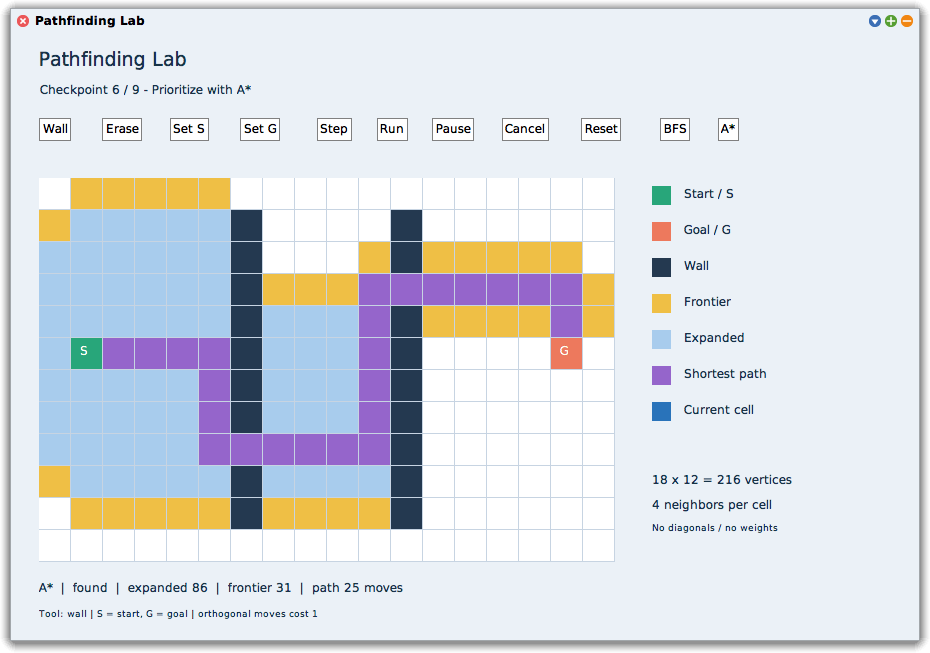
A* chooses a frontier cell using f = g + h. g is the best known distance from S. h is Manhattan distance to G: absolute horizontal difference plus absolute vertical difference. With four-direction unit-cost movement, h never overestimates the remaining route and is consistent across every edge. Walls can only lengthen the route. These facts let the algorithm permanently close an expanded cell and stop when G is selected.
The highlighted nextCell method scans for the smallest f. Ties prefer smaller h, then keep insertion order. This affects effort and which equally short route is returned, but not optimality here. expand: relaxes an edge whenever a shorter distance is found and updates the predecessor even when the neighbor is already waiting. Discovered prevents duplicate queue entries.
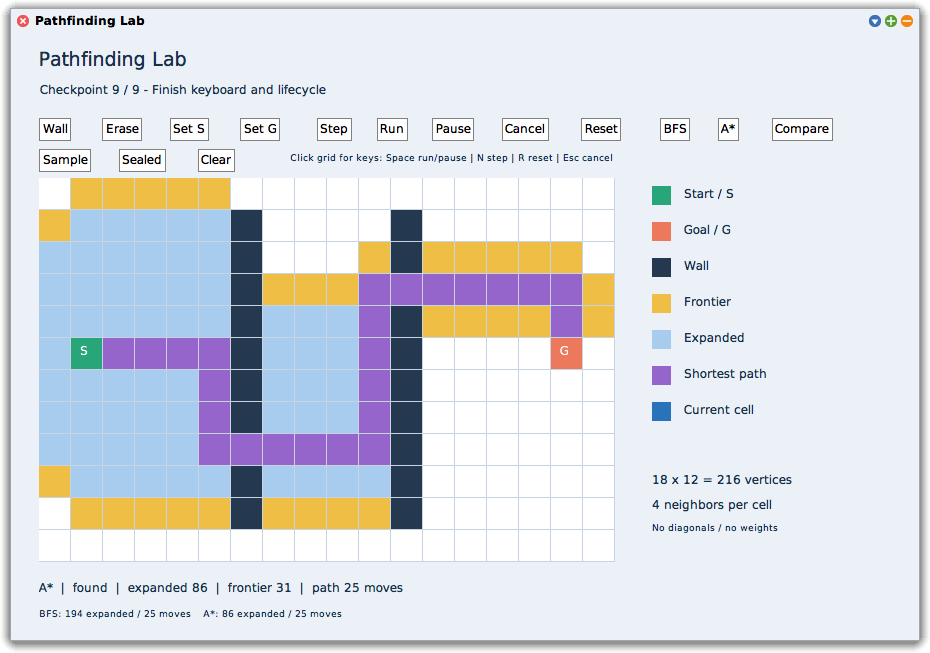
This teaching version uses a linear frontier scan and removal, not a heap. Its worst-case search cost is O(V squared + E), with O(V) storage. A heap can improve larger searches to O((V + E) log V), but adds bookkeeping beyond this lesson. A* can expand fewer cells and still incur more bookkeeping per expansion. On this fixed fixture it expands 86 cells for the same 25-move optimum.
Where to run this
System Browser → LPFSearch → instance side → tutorial. Accept this complete method after installing this checkpoint. The download contains every required class and method.
Actual Squeak 6.1 window from the exact checkpoint 6 Workspace block above.
07 · Compare search effort
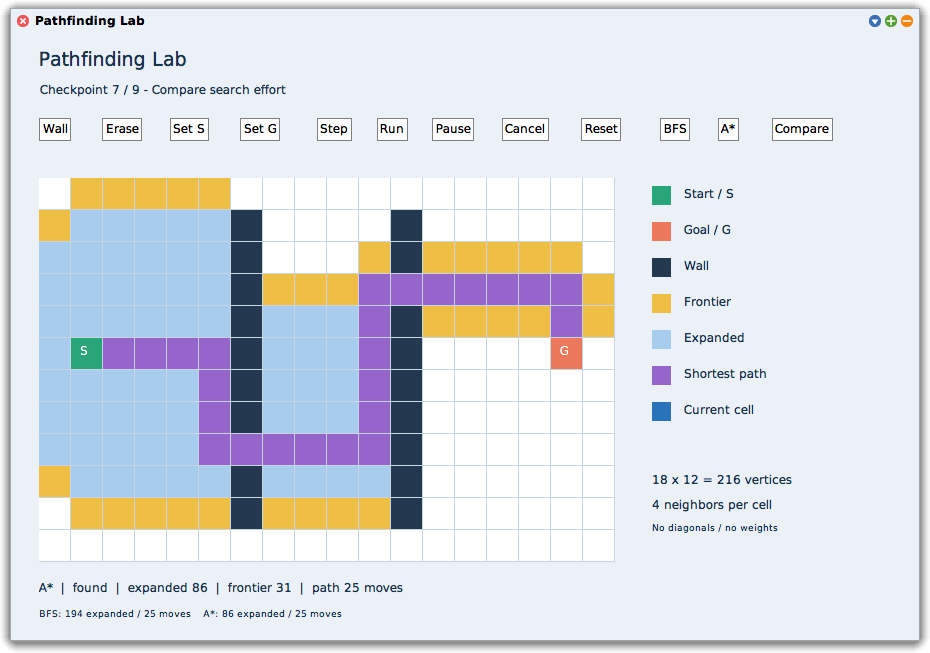
A fair comparison needs the same input graph. comparison creates two detached copies of the current walls, start, and goal, then solves one with BFS and one with A*. Their search state is entirely separate. Pressing Compare pauses any animation, reports expanded cells and path length, and leaves the displayed search progress intact. It does not select a winner or overwrite your working map.
Compare reports work, not wall-clock time. Native rendering, garbage collection, and the linear A* frontier implementation would make tiny timing measurements misleading. On these barriers the two algorithms both find 25 moves, while BFS expands 194 cells and A* expands 86. For other maps, equal effort or even more A* effort is possible. Correctness is the shared shortest distance, not a promise of always fewer expansions.
The regression suite compares 24 additional deterministic obstacle patterns, including both reachable and unreachable cases. It validates each returned route and checks that neither search expands more than 216 cells. Identical shortest lengths do not require identical path shapes when several optimal routes exist.
Where to run this
System Browser → LPFSearch → instance side → tutorial. Accept this complete method after installing this checkpoint. The download contains every required class and method.
Actual Squeak 6.1 window from the exact checkpoint 7 Workspace block above.
08 · Handle no-path fixtures
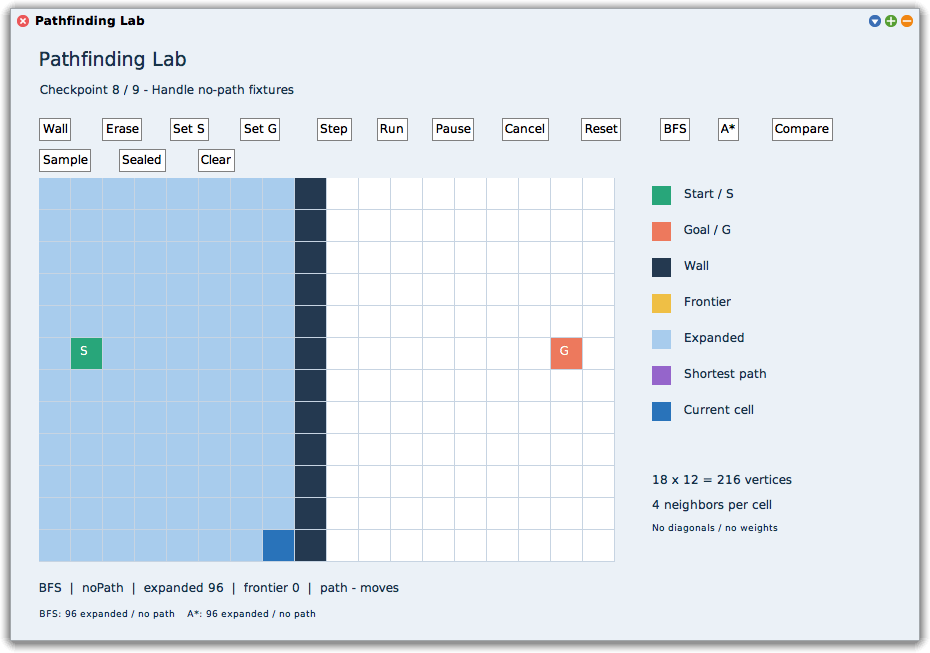
Exhaustion is a result, not an error. If the frontier becomes empty before the goal is selected, state becomes noPath and pathLength is nil. The sealed fixture draws a complete vertical wall at x = 9. S can visit exactly 8 times 12 = 96 cells on the left; G is in the disconnected region on the right. Both algorithms exhaust the reachable side and report no path.
Sample reinstalls the two-gapped-barrier fixture. Sealed creates the disconnected map. Clear removes walls and restores the default endpoints. Each fixture stops animation and discards prior search progress. Reset behaves differently: it preserves the current map. Neither requires an external file or randomness, so failures can be reproduced exactly.
An isolated start is a smaller useful test: block its four neighbors and it should expand once, then fail. A coincident start and goal is the opposite edge case: success in one expansion and zero moves. Cancel remains distinct from noPath; cancellation means the user stopped the search before a conclusion was established.
Where to run this
System Browser → LPFSearch → instance side → tutorial. Accept this complete method after installing this checkpoint. The download contains every required class and method.
Actual Squeak 6.1 window from the exact checkpoint 8 Workspace block above.
09 · Finish keyboard and lifecycle
Finish the interaction contract. Clicking the grid gives it keyboard focus. Space runs or pauses, N steps, R resets, and Escape cancels. The keys call the same application methods as the buttons, so their state transitions cannot drift into a second implementation. Buttons remain available when another window owns keyboard focus.
A closing SystemWindow calls windowIsClosing. The app stops stepping, ends any drag, clears mouse focus held by its grid, and releases only keyboard focus held by that grid. It then drops the window reference so open can create a fresh native window. Run rejects an app without an open window, including a reference retained after close. No forked background process exists to outlive the UI. Closing this learning app has no save prompt because it has no persistence or dirty-document contract.
Try Run, Pause, Run, Cancel, Reset, and Run again. Then close during an active drag or search. The SUnit suite dispatches actual MouseButtonEvent, MouseMoveEvent, and KeyboardEvent objects, including a native Reset-button click, and checks scheduler and focus cleanup. All final source is ordinary Smalltalk in the LearnSqueak-Pathfinding category, ready for browsing and modification.
Where to run this
System Browser → LPFApp → instance side → tutorial. Accept this complete method after installing this checkpoint. The download contains every required class and method.
Actual Squeak 6.1 window from the exact checkpoint 9 Workspace block above.
Watch the workflow
All nine stage PNGs and every GIF frame are actual SystemWindow imageForm renders from the supplied Squeak 6.1 build 23976. Capture scripts file in an isolated unsaved baseline image, recompile the displayed method, and evaluate the exact visible Workspace block. Demos are scripted native executions: editing dispatches real Morphic mouse events; controls dispatch native button events; animation invokes the same step callback used by the Morphic scheduler. These are not human screen recordings or recreated interfaces. GIF encoding combines unmodified native PNG frames; each poster is a byte-for-byte copy of the first frame.
NATIVE SQUEAK CAPTURE
Scripted native mouse and button events draw two barriers, run BFS, pause and resume its wave, then reset and run A*. Both routes take 25 moves; A* expands fewer cells on this fixture.
NATIVE SQUEAK CAPTURE
Scripted native controls create a sealed wall, step to noPath, erase a gap through a real grid mouse event, run to success, then cancel and reset a fresh search.
Practice with tested solutions
1. Count the entire reachable region
Add reachableCount to LPFSearch. Count all cells reachable from S, even when G would be found early. Leave the live search and map unchanged.
Hint
Use a fresh queue and a seen Set; do not call solve because solve stops when it finds G.
Show a tested solution
System Browser → LPFSearch → instance side → tutorial. Accept this method, or file in pathfinding-exercise-1.st (complete final application plus solution).
Workspace → select the complete block → Print It. Expected: true.
Check the solution
| model |
model := LPFSearch new. model sealedMap; begin; stepSearch.
(model reachableCount = 96) and: [model expanded = 1 and: [model state = #searching]]
true
A separate flood fill computes connectivity, not a shortest route. Its O(V + E) traversal uses O(V) additional storage. The check also prevents accidental mutation of the displayed search.
2. Count turns along a route
Add pathTurns to LPFSearch. Return zero for an absent, zero-move, or straight path; otherwise count direction changes between consecutive edges.
Hint
Subtract successive Points to obtain direction vectors. Compare adjacent vectors starting with the third vertex.
Show a tested solution
System Browser → LPFSearch → instance side → tutorial. Accept this method, or file in pathfinding-exercise-2.st (complete final application plus solution).
Exercise solution
pathTurns
 | turns previous direction |
 path size < 3 ifTrue: [^ 0].
 turns := 0. previous := path second - path first.
 3 to: path size do: [:index |
  direction := (path at: index) - (path at: index - 1).
  direction ~= previous ifTrue: [turns := turns + 1].
  previous := direction].
 ^ turns
Expected
true; the deterministic BFS route has four moves and one turn, and an empty route has zero turns.
Workspace → select the complete block → Print It. Expected: true.
Check the solution
| model |
model := LPFSearch new. model start: 1@1; goal: 3@3; solve.
(model pathTurns = 1) and: [model pathLength = 4 and: [model resetSearch. model pathTurns = 0]]
true
A route length and a turn count answer different questions. This method examines the existing route in O(path length), leaving shortest-path selection unchanged.
3. Advance under a caller budget
Add advanceBy: to LPFSearch. Accept integers 1 through 216, advance an already searching model by at most that many expansions, and return how many expansions happened. Invalid budgets return nil without changing state.
Hint
Snapshot expanded before calling stepSearch in a bounded loop. A finished search must remain finished.
Show a tested solution
System Browser → LPFSearch → instance side → tutorial. Accept this method, or file in pathfinding-exercise-3.st (complete final application plus solution).
Exercise solution
advanceBy: budget
 | before |
 (budget isInteger and: [budget between: 1 and: width * height]) ifFalse: [^ nil].
 before := expanded.
 1 to: budget do: [:ignored | state = #searching ifTrue: [self stepSearch]].
 ^ expanded - before
Expected
true; three expansions occur, invalid input changes nothing, and an immediate goal uses only one expansion.
Workspace → select the complete block → Print It. Expected: true.
Check the solution
| model count |
model := LPFSearch new. model begin.
count := model advanceBy: 3.
(count = 3) and: [(model advanceBy: 0) isNil and: [model expanded = 3 and: [
 model goal: model start; begin. (model advanceBy: 216) = 1 and: [model pathLength = 0]]]]
true
A bounded batch can later support multiple expansions per animation tick. Keeping the budget separate from begin preserves pause/resume semantics and avoids silently restarting a search.
When something looks wrong
Run appears inactive after a completed or cancelled search
Press Reset to clear search state while retaining the map. Pause is the operation that allows Run to resume.
An endpoint will not move, or a wall will not paint
Endpoints cannot occupy walls, and walls cannot replace S or G. Erase the target first. Model coordinates must be integer cells inside the grid.
BFS and A* show different routes
Several shortest routes can have the same length. Compare the move count and route validity; the stable tie-breaking policies need not choose the same shape.
A* still explores a large area
Obstacles can make Manhattan distance a weak guide. It remains admissible here but cannot see the barriers ahead. The app reports effort instead of promising a speedup.
Keyboard shortcuts do nothing
Click the grid to give it keyboard focus, or use the visible buttons. Clicking another native window moves focus.
An earlier checkpoint has later methods
Use a fresh baseline image for isolated earlier stages. Filing in a previous checkpoint does not uninstall methods added by later checkpoints.
Verification, cleanup and next steps
All data and obstacles are synthetic. No personal files, accounts, or connected services are used. The native Squeak application and tests run independently of the tutorial website.
44 SUnit tests pass in Squeak 6.1 build 23976. All nine checkpoint files, exact highlighted methods, and Workspace blocks are independently executed before capture. All three exercise solutions and exact check blocks are tested separately.
File in pathfinding-final.st, then pathfinding-tests.st. Workspace → LPFTest suite run → Print It. Expected: 44 passes, zero failures and errors.
Bounds, wall and endpoint validation, deterministic BFS order, heuristic consistency, coincident endpoints, isolated start, successful routes and exhausted frontiers
BFS versus A* on the known 25-move fixture and 24 additional deterministic obstacle patterns; route adjacency, walkability, distance agreement, and 216-expansion bounds
Actual MouseButtonEvent and MouseMoveEvent dispatch, drag release outside the grid, exact pixel boundaries, native Reset-button event dispatch, and KeyboardEvent shortcuts
Scheduler registration and cleanup, repeated Run, pause/resume, cancel/reset, edit/algorithm/fixture interruption, close during run and drag, reopening, detached comparison, and collection encapsulation
Close the window to stop Morphic stepping and release its mouse/keyboard focus. This tutorial has no file persistence or unsaved-close prompt. Recreate maps with the deterministic fixture buttons, keep source outside the image, and use a disposable image copy for experiments.
Squeak official downloads — Runtime used: Squeak6.1-23976-64bit, supplied VM, image, changes, and source file
Shipped Morph, SystemWindow, SimpleButtonMorph, MouseButtonEvent, MouseMoveEvent, KeyboardEvent, OrderedCollection, and TestCase sources — Actual native APIs are compiled and exercised in the baseline image
Fixed 18×12 unit-cost grid, orthogonal movement only; no weighted terrain, diagonals, dynamic obstacles during an active search, or arbitrary graph importer
Manhattan A* optimality depends on the movement/cost contract; changing either requires reconsidering the heuristic and closed-set policy
Linear-scan A* has O(V squared + E) worst-case work; this is a small educational implementation, not a claim of production pathfinding performance
The scheduler requests 80 ms ticks and may run slower under load. GIF timing is separately chosen for readable playback
Editing visits reported mouse cells without interpolation; fast drags may skip cells
No persistence, undo, resize layout, accessibility claim, multi-agent routing, or background search process
Path length is nil for noPath, cancelled, and incomplete searches; a valid zero-move route has length 0