Home/Measure first: collections and Morphic redraws
PRACTICAL SQUEAK WORKSHOP
Measure first: collections and Morphic redraws
Find the cost of copying, repeated searches and forced rendering with a reproducible native Squeak experiment.
10 construction stagesTested source & checkpointsNative screenshots & demos
Before you start
A performance claim needs a workload, an output check and a measurement. We will start with deliberately wasteful code, preserve its answer, then measure alternatives in the actual Squeak VM. The examples cover building collections, repeated membership queries and forcing a native image render after every update. These are small experiments, not a universal ranking of collection classes or a frame-rate benchmark.
Comfortable with blocks, collections and basic SUnit tests
Know that a Morph can receive changed and drawOn:
A standard Squeak 6.1 image; keep this exercise in a separate learning copy
Use Squeak 6.1 and save a learning copy of your image. Extract the bundle, open File List, select the named .st checkpoint and choose fileIn. Each checkpoint is complete and cumulative: it works on its own in a clean image, or in the numbered order shown here. File-in chunks contain ! separators and belong in File List. Short expressions labeled Workspace use Do It or Print It; Browser methods are accepted individually on the named class and side. No extra packages are needed. Moving backwards after installing a later checkpoint can leave later methods in your image, so use a fresh learning image for that experiment.
01 · Start with a slow version whose answer is obvious
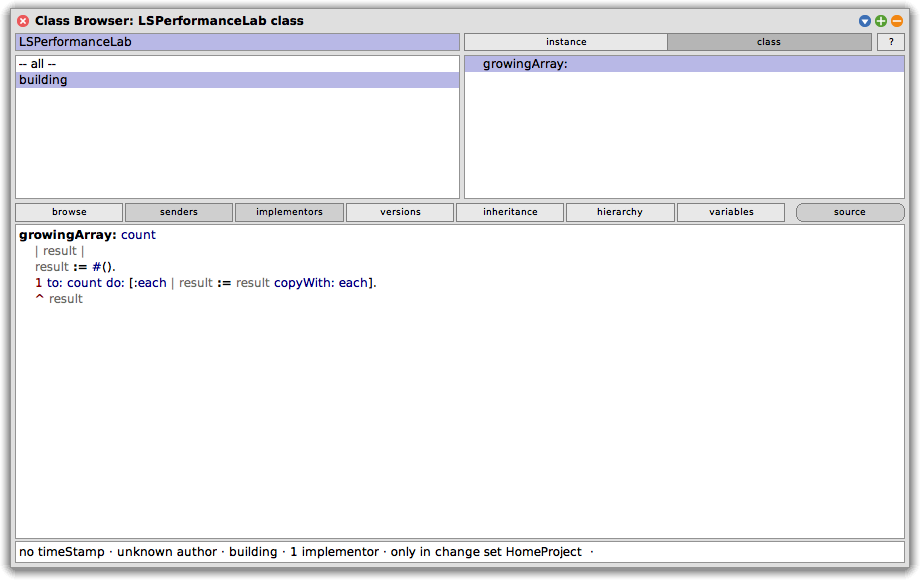
Checkpoint 01 defines LSPerformanceLab with class-side methods, plus LSPerformanceTest. growingArray: starts with an empty Array and appends each integer using copyWith:. An Array has a fixed size, so every append makes another array and copies the earlier contents. The growing prefixes make this deliberately wasteful as the input grows.
Use a small input first and check the answer. A faster wrong result is still wrong. The lesson bounds the larger experiment at 6,000 items; there is no reason to freeze your image by trying millions of repeated copies. The method’s intended input is a non-negative integer count.
Browser → class definition pane → Accept this definition separately
Native Squeak 6.1 capture from this lesson’s verified source; prepared by a reproducible script.
02 · Collect samples and report their median
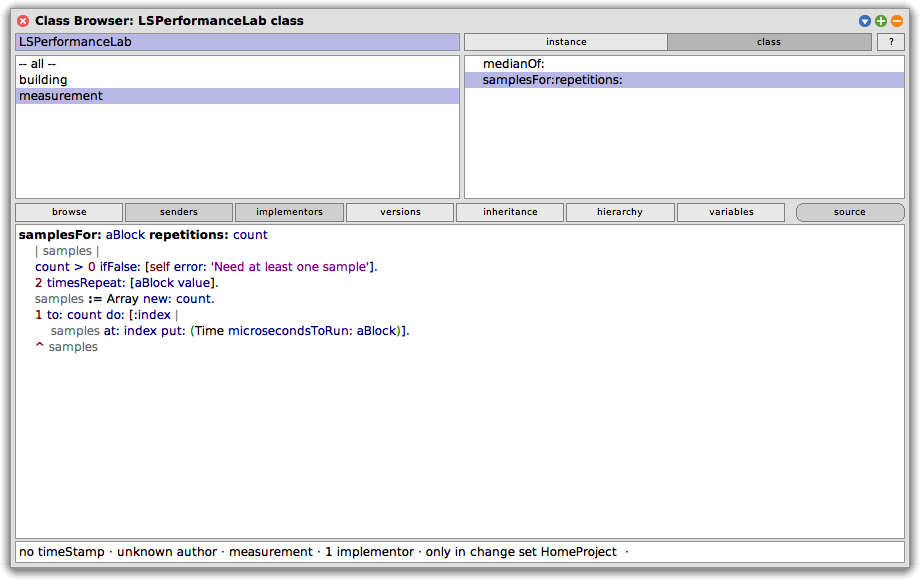
Checkpoint 02 adds a small timing harness. samplesFor:repetitions: runs two warmups before seven measured invocations in our experiments. Time microsecondsToRun: measures each complete block. Warmup helps avoid treating the very first invocation as typical, but does not eliminate all VM, cache or garbage-collection effects.
medianOf: sorts the samples and selects the middle observation; with an even number it averages the two middle ones. Keep the raw samples as well: a median hides variation. Do not put Transcript output, window creation or input generation inside the timed block unless those are deliberately part of the workload. Natural allocation and garbage collection during the block remain included.
Browser → LSPerformanceLab → class side → measurement → Accept this method
samplesFor: aBlock repetitions: count
    | samples |
    count > 0 ifFalse: [self error: 'Need at least one sample'].
    2 timesRepeat: [aBlock value].
    samples := Array new: count.
    1 to: count do: [:index |
        samples at: index put: (Time microsecondsToRun: aBlock)].
    ^ samples
Browser → LSPerformanceLab → class side → measurement → Accept this method
Native Squeak 6.1 capture from this lesson’s verified source; prepared by a reproducible script.
03 · Accumulate, then convert once
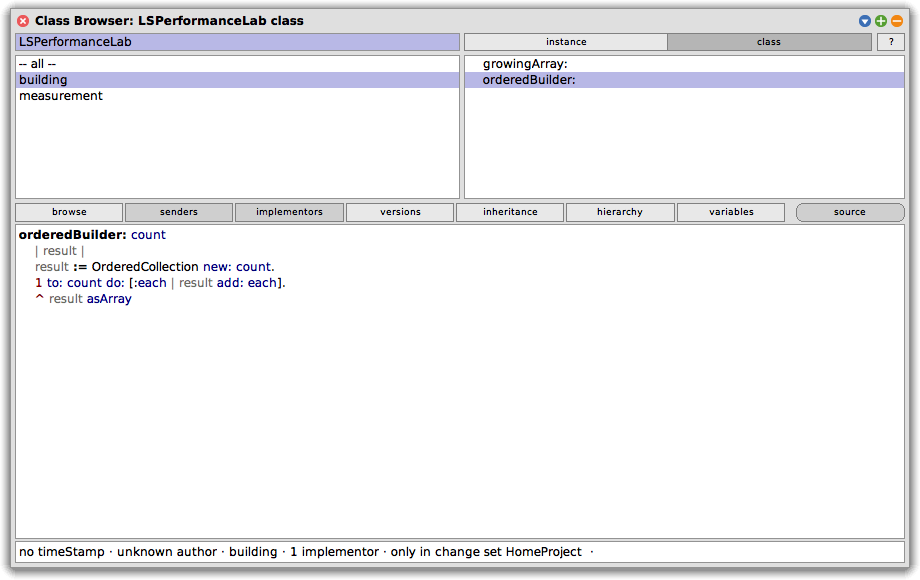
orderedBuilder: allocates an OrderedCollection with the expected capacity, appends the integers and converts to an Array once. Both implementations promise the same ordered Array. Choosing a growable accumulator avoids copying the entire prefix for each append.
The capacity hint is appropriate here because count is known. In a streaming problem the final size might be unknown; OrderedCollection can still grow. If the exact final size is known and every slot can be assigned directly, preallocating an Array is another option, explored in exercise 1. Choose based on your output contract and access pattern, then measure.
Browser → LSPerformanceLab → class side → building → Accept this method
orderedBuilder: count
    | result |
    result := OrderedCollection new: count.
    1 to: count do: [:each | result add: each].
    ^ result asArray
Where to run this
Workspace → Print It after checkpoint 02. The displayed method belongs on LSPerformanceLab’s class side.
Construction code · follow the run instructions above
Native Squeak 6.1 capture from this lesson’s verified source; prepared by a reproducible script.
04 · Read the measured result with its context
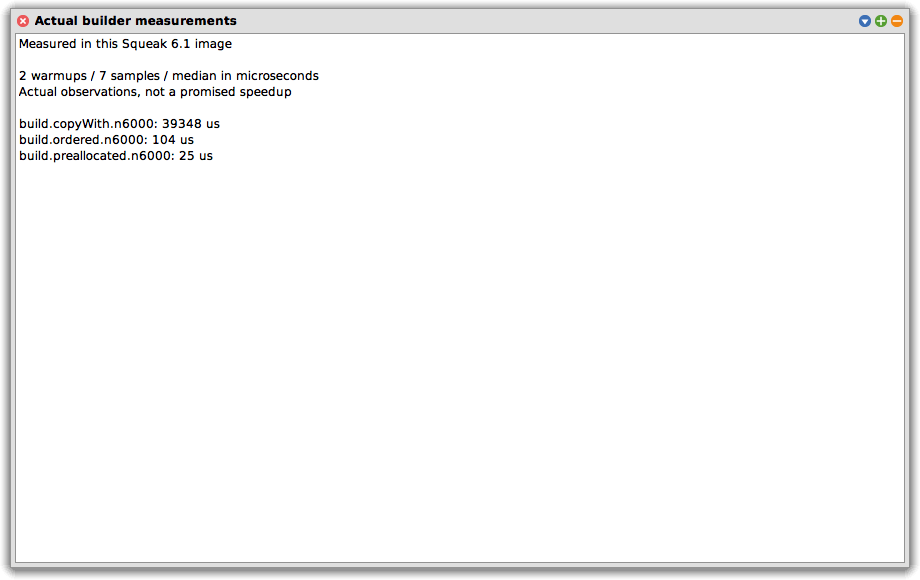
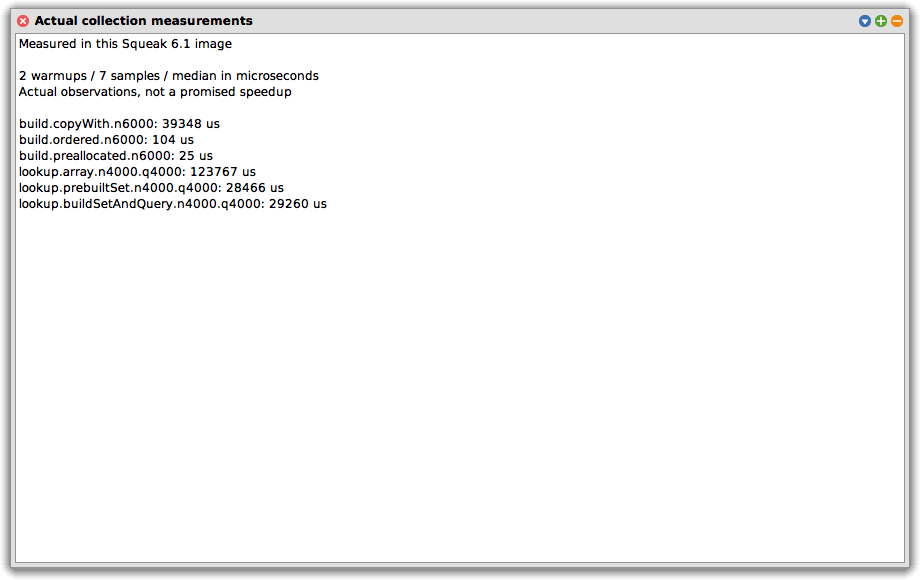
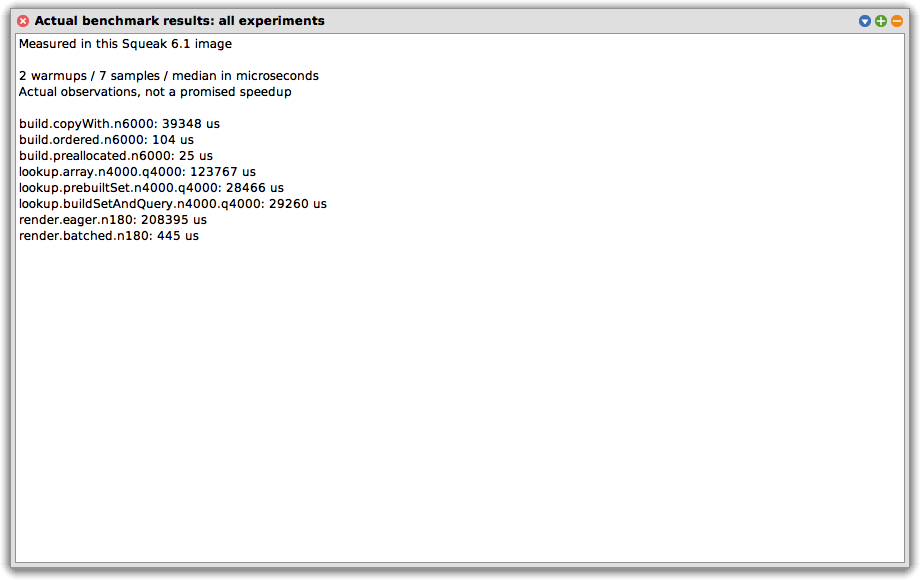
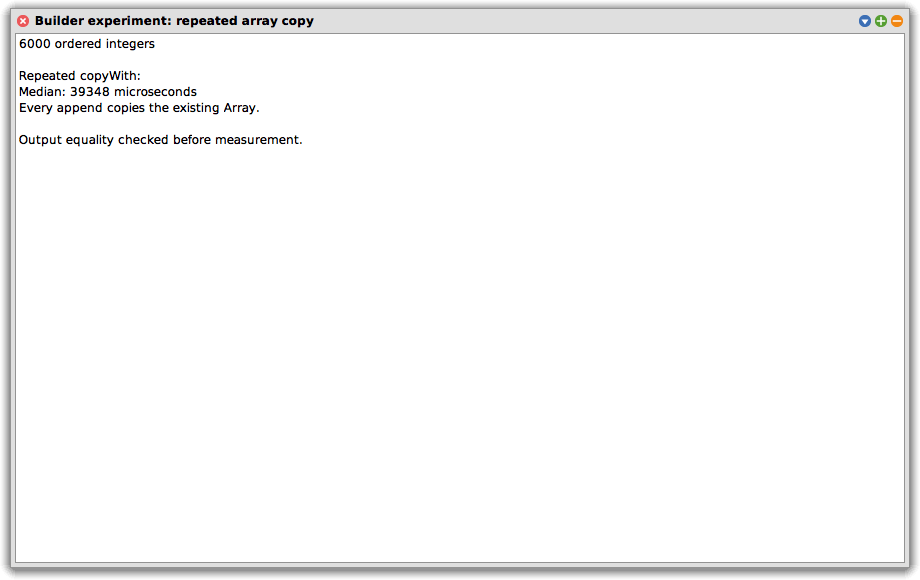
On this run, the median for 6,000 integers was 39,348 microseconds with repeated copyWith: and 104 microseconds with OrderedCollection plus one asArray. All seven observations, in execution order, are in raw-measurements.txt and measurements.json. The complete 6,000-element outputs were compared before timing.
The machine reported an Intel Xeon Platinum 8573C with 9 visible logical CPUs, running Linux x86_64 in a shared container. The VM was official Squeak 6.1 build 23976, 64-bit Cog/Spur, using null display and null sound. CPU sharing and scheduling were uncontrolled; the VM also reported that it could not raise its heartbeat thread priority. Each result is two warmups followed by seven timed calls, without forced garbage collection.
These short operations can vary noticeably between samples. The timer reports microseconds, which does not imply microsecond accuracy or a stable latency guarantee. Repeat the experiment on the machine and image you care about. Avoid presenting this ratio as a general speedup for every program.
Where to run this
Workspace → Print It after checkpoint 02. The screenshot shows the actual measured run used to write this lesson.
Construction code · follow the run instructions above
Native Squeak 6.1 capture from this lesson’s verified source; prepared by a reproducible script.
05 · Separate a repeated query from its input
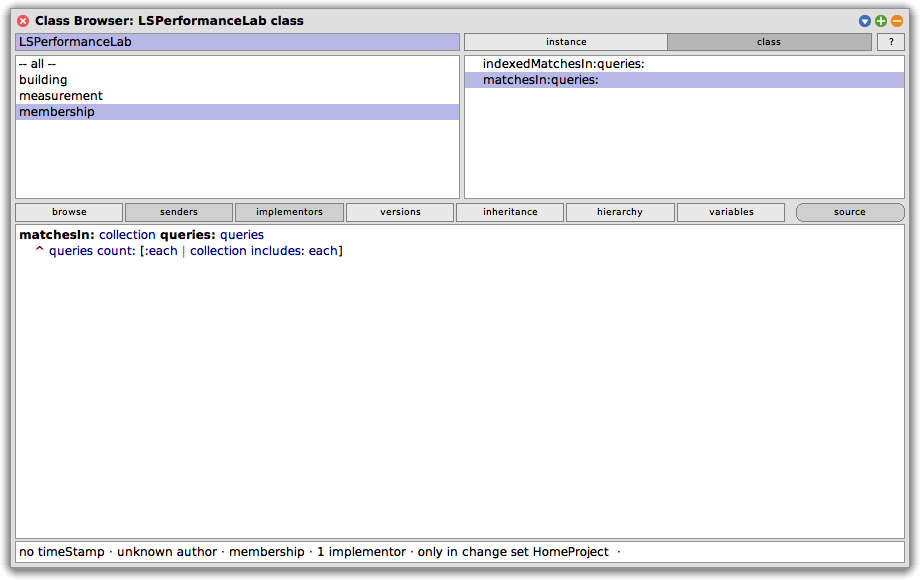
Checkpoint 03 adds matchesIn:queries:. For every query, it asks the supplied collection includes:. In the experiment, values is an Array of integers 1 through 4,000 and queries contains 2,001 through 6,000. Exactly 2,000 queries should match.
Array membership must search elements. Repeating that search for many queries can dominate the work. The method accepts either an Array or a Set without changing the question it asks. The result counts matching queries, including repeated queries; it is not a count of distinct values. The test with #(1 1 4) makes this detail explicit.
Browser → LSPerformanceLab → class side → membership → Accept this method
Native Squeak 6.1 capture from this lesson’s verified source; prepared by a reproducible script.
06 · Build an index when you will reuse membership queries
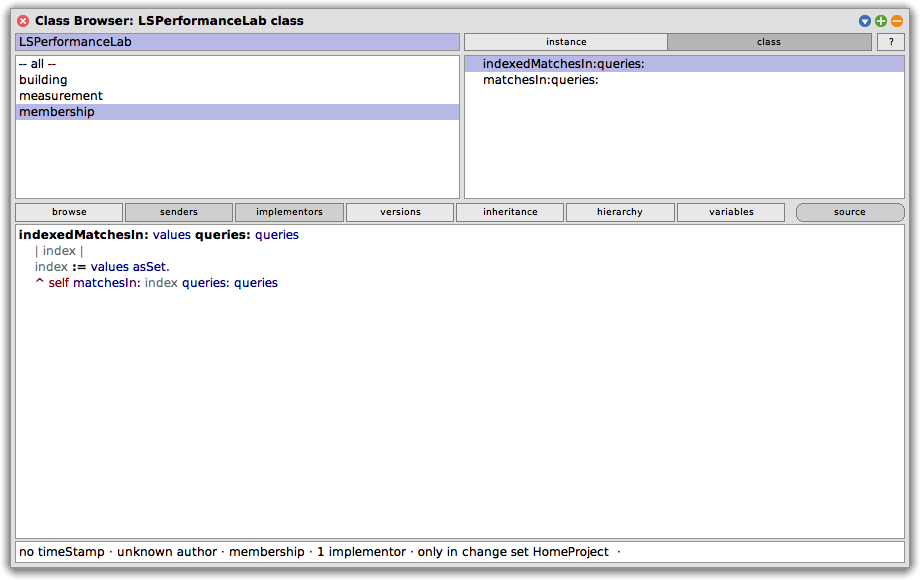
A Set is designed for membership lookup. indexedMatchesIn:queries: converts values to a Set and then delegates to the same query loop. The conversion has a cost and the index occupies memory. A prebuilt index can be useful when the source values stay stable and many queries reuse it.
The source Array’s order and duplicate elements are not carried into the Set. That is acceptable for includes:, but would change a program that needed stable iteration order or occurrence counts. Queries themselves are still traversed in their original collection, so repeated matching queries still count repeatedly. Custom objects stored in a hashed collection must have consistent equality and hash behavior; mutating equality-relevant state while an object is in the Set can invalidate lookup assumptions.
Browser → LSPerformanceLab → class side → membership → Accept this method
indexedMatchesIn: values queries: queries
    | index |
    index := values asSet.
    ^ self matchesIn: index queries: queries
Where to run this
Workspace → Print It after checkpoint 03.
Construction code · follow the run instructions above
| values queries index |
values := (1 to: 4000) asArray.
queries := (2001 to: 6000) asArray.
index := values asSet.
LSPerformanceLab matchesIn: index queries: queries.
Expected result
2000, the same answer as the Array version. Here index construction happens before the query.
Native Squeak 6.1 capture from this lesson’s verified source; prepared by a reproducible script.
07 · Measure lookup alone and the complete operation
The actual medians were 123,767 µs for Array queries, 28,466 µs for a prebuilt Set, and 29,260 µs to build the Set and perform the queries. Each invocation uses 4,000 input values and 4,000 queries, with 2,000 expected matches. The input arrays are created outside all three timed blocks.
The prebuilt measurement excludes index construction; the end-to-end measurement explicitly includes it on every invocation. That distinction matters when deciding whether an optimization pays for a one-off request. These are simple sequential experiments in one VM, not randomized benchmark trials. Tiny queries or changing inputs may produce a different tradeoff. Keep the correctness check and workload description next to the timing.
Where to run this
Workspace → Print It after checkpoint 03.
Construction code · follow the run instructions above
Native Squeak 6.1 capture from this lesson’s verified source; prepared by a reproducible script.
08 · Make a deliberately expensive rendering loop explicit
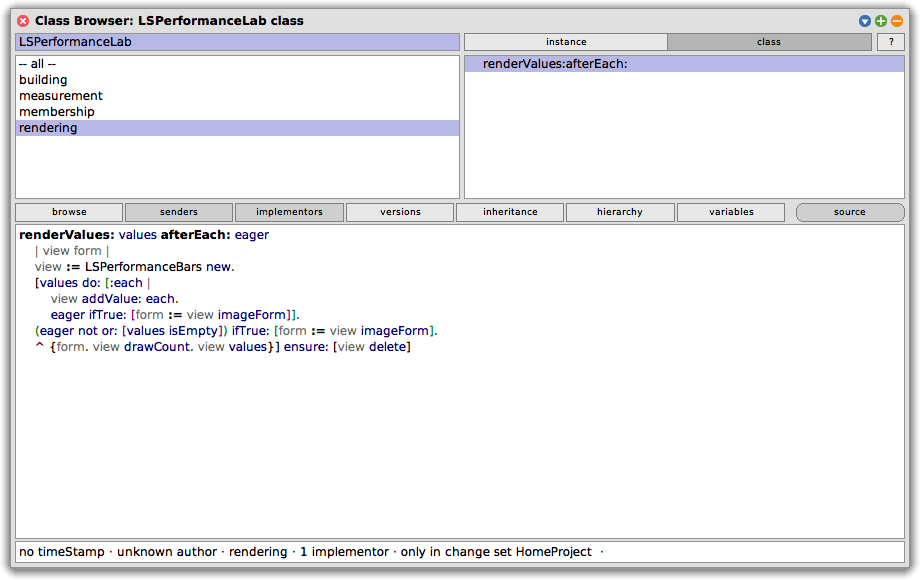
Checkpoint 04 adds LSPerformanceBars, a native Morph whose drawOn: paints a sequence of narrow bars and counts actual calls. renderValues:afterEach: creates a view and adds each value. With eager true it requests imageForm after every update, forcing a complete offscreen native render each time. With eager false it requests just one final form.
Calling changed normally marks a Morph’s area for repainting; Morphic may combine multiple invalidations before its next display cycle. It does not necessarily repaint immediately. We use imageForm deliberately so the difference in rendering work is explicit and reproducible. This example is about forced offscreen renders, not ordinary changed calls, live display frame rate or user-perceived responsiveness.
Browser → class definition pane → Accept this definition separately
Native Squeak 6.1 capture from this lesson’s verified source; prepared by a reproducible script.
09 · Compare the complete redraw workload, including cleanup
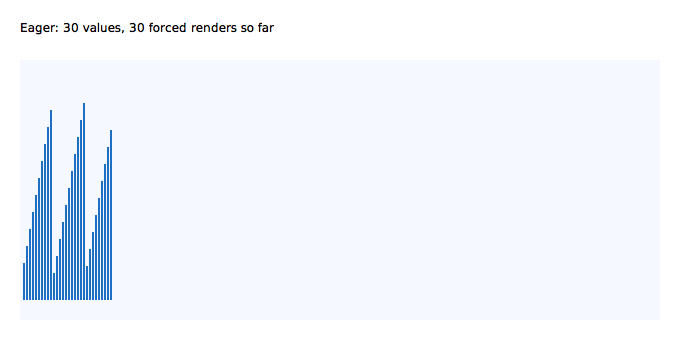
For the larger bounded input, 180 bar heights are generated by (i * 17 \\ 180) + 20. Both timed versions create their own Morph, add all 180 values, render as specified and delete the temporary view in ensure:. The final data arrays and Form bits are checked for equality. The eager version performs 180 draws; the batched version performs 1.
The measured medians were 208,395 µs for eager rendering and 445 µs for one final render. The measurements include allocation and cleanup. They exclude construction of the input height collection. The animation shows selected native states at a fixed playback pace; its duration is not measurement data.
For a real UI, avoid unnecessary synchronous full renders. Update the model, refresh the visible state at a useful boundary and allow Morphic’s normal display cycle to do its job. A long computation still needs scheduling care so the interface can respond; batching rendering alone does not make an arbitrarily long loop responsive.
Where to run this
Workspace → Print It after checkpoint 04.
Construction code · follow the run instructions above
Native Squeak 6.1 capture from this lesson’s verified source; prepared by a reproducible script.
10 · Keep correctness tests separate from timing observations
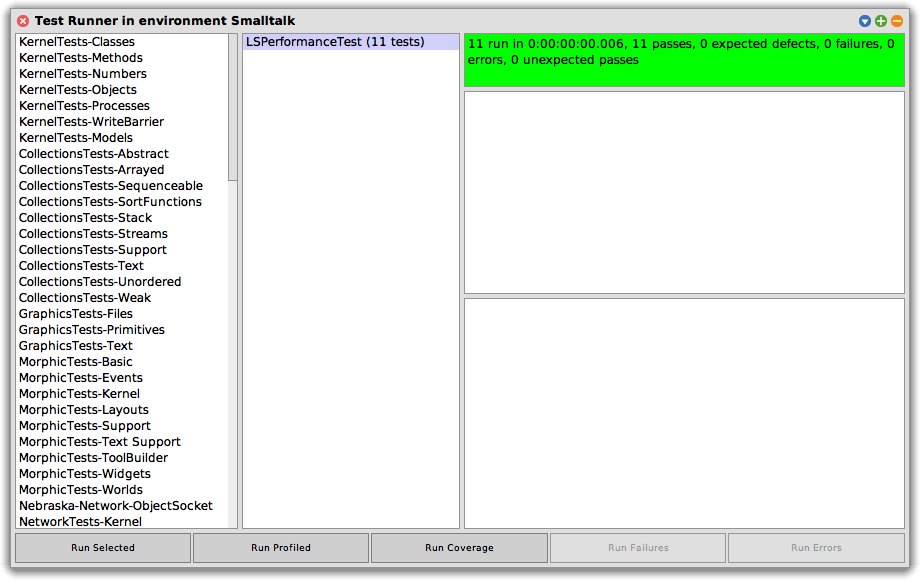
Checkpoint 05 adds the three tested exercise solutions: direct Array preallocation, preserving unmatched queries in their original order, and reporting the minimum/maximum sample range. The complete suite has 11 tests. It asserts output values, sample counts and render counts; it does not assert that one version must finish under an arbitrary millisecond threshold.
A useful next investigation starts with a concrete slow interaction and a representative input. Reproduce it, check what its result should be, measure a baseline, make one change and recheck the result. If the time is still unexpected, use Squeak’s MessageTally to locate where repeated work occurs before rewriting more code. Profiling has overhead and answers a different question from these timing samples.
Run all tests after changing an implementation. If output equality fails, resolve the semantic difference before comparing speed. Keep raw measurements with the input size, image and VM version, environment, warmup and repetition rules so another person can interpret or reproduce your observations.
Where to run this
File List → fileIn source/05-exercise-solutions.st; Workspace → Do It; Test Runner → Run Selected.
Construction code · follow the run instructions above
Native Squeak 6.1 capture from this lesson’s verified source; prepared by a reproducible script.
Watch the workflow
Every screenshot comes from the actual Squeak 6.1 image. Animations are scripted sequences of native rendered states, not a recording of a person clicking. Their playback speed is editorial and does not represent benchmark time. Source, verification results and capture provenance are included in the bundle.
NATIVE SQUEAK CAPTURE
Scripted native Workspace sequence: the same 6,000-integer output, the repeated-copy strategy and the accumulator strategy, with their actual measured medians. Fixed playback timing is not benchmark timing.
NATIVE SQUEAK CAPTURE
Scripted native Morphic states: the eager experiment renders every prefix, followed by the batched experiment’s initial and final state. Captions show the measured workload’s render count; composing each documentation frame also performs its own capture render outside the benchmark.
Practice with tested solutions
1. Fill an Array with its final size
When count is known, allocate the result once and fill each slot using at:put:. Match the exact output of growingArray:, including count zero. Time it only after checking equality.
Browser → LSPerformanceTest → tests-exercises → Accept the test and run it.
Use a Set to test membership, but return the queries that were absent in their original order, including duplicates. Do not convert the query result to a Set.
Browser → LSPerformanceTest → tests-exercises → Accept and run the test.
Add rangeOf: to return an Array containing the smallest and largest observation. Reject an empty sample collection. Use it alongside the median, not as a substitute for storing all samples.
Browser → LSPerformanceTest → tests-exercises → Accept and run the test.
That is expected. Compare the workload, VM, machine load and allocation behavior. Keep all samples and repeat locally. Correctness tests should pass regardless of speed.
The method is missing from LSPerformanceLab
These experiment methods belong on the class side. Select the class button in the Browser before accepting one, or file in the complete checkpoint.
The image seems busy during a measurement
Stay with the documented bounded inputs. Two warmups plus seven samples run synchronously. Increasing the quadratic array-copy workload by a large factor can make it much more expensive.
The two versions return different answers
Stop comparing their speed. Check ordering, duplicates, empty input, and whether index construction is inside or outside your intended operation. Restore output equality first.
Verification, cleanup and next steps
Verified in official Squeak 6.1 build 23976 with an isolated copied image. Checkpoints pass 1, 4, 6, 8 and 11 tests respectively. Actual benchmark values were captured after running the complete suite.
Builder equality checked for multiple small sizes and the measured 6,000-item workload
Array and Set membership both answer 2,000 for the measured input; duplicate-query semantics are tested
Final eager and batched Form bits and data arrays match at 180 values; 180 versus 1 native draw calls verified
Two warmups and seven timed repetitions per experiment; raw samples, medians, environment and rerunnable benchmark script are downloadable
Every source checkpoint also verified independently in the clean baseline image; all three exercise tests pass
The benchmark deletes every temporary bar Morph with ensure:. Close the optional Test Runner and Workspaces. Keep the raw sample and environment files with your own future timing results.
Shipped Squeak 6.1 source — Time class>>microsecondsToRun:, Array>>copyWith:, OrderedCollection, Set, Morph>>imageForm and Morph>>changed are available in the image’s Browser