Use seeded experiments, exact sample spaces and native Morphic histograms to explore probability and sampling variability.
8 construction stagesTested source & checkpointsNative screenshots & demos
Before you start
Build a native Dice Probability Lab in eight runnable stages: roll a seeded die, count outcomes, switch to two dice, enumerate exact probabilities, compare relative frequencies, control bounded playback, replay seeds and inspect repeated samples.
Each checkpoint is a complete cumulative application. Start at any checkpoint in a clean Squeak image, or work forward. The highlighted methods explain the new behavior; the full downloads also contain the drawing and window scaffold. This is a native Squeak 6.1 workshop, with real screenshots and a scripted native demonstration.
Squeak 6.1 64-bit image build 23976; Morphic, Random and SUnit are bundled
Basic messages, Arrays, blocks, loops, fractions, the System Browser and Workspace Do it / Inspect it
Allow about 60–80 minutes for the checkpoints and two exercises
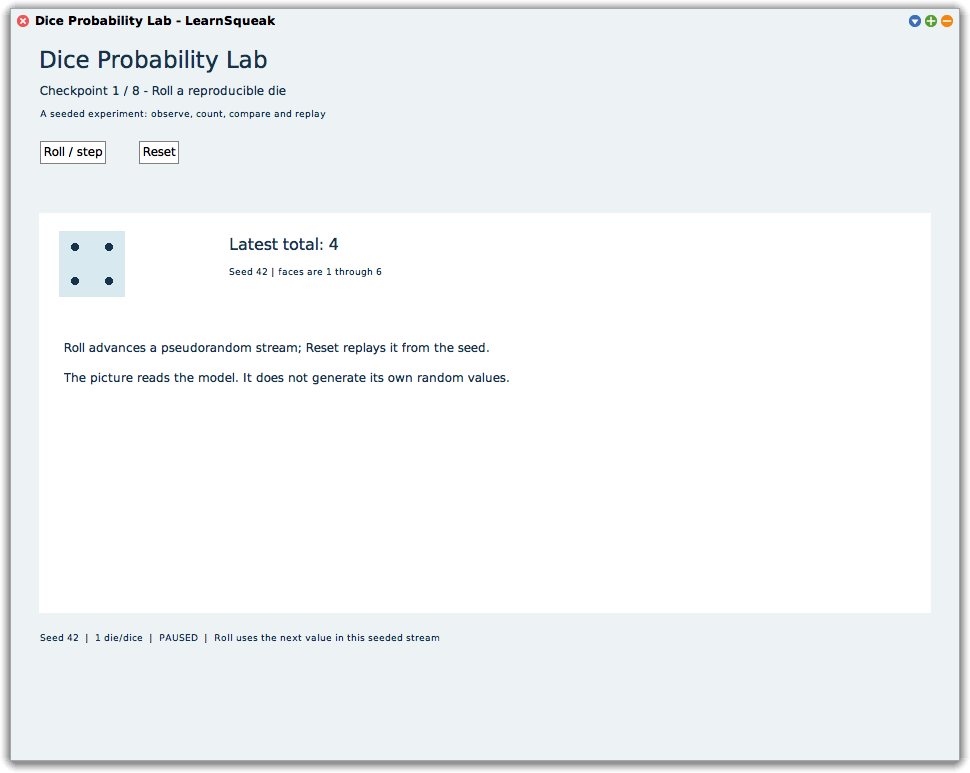
Start with one six-sided die and a repeatable source of numbers. LSProbabilityModel owns the seed, the Random object and the last roll. LSProbabilityPanel draws the model's value as pips; LSProbabilityApp connects the buttons to the model. Drawing a face must never call Random: repainting or moving a window should not secretly consume another trial.
Random new seed: 42 initializes a pseudorandom stream. nextInt: 6 returns an integer from 1 through 6, inclusive. It is clearer than rounding a floating-point value, which can accidentally favor some faces or produce zero. roll consumes one value and stores it in a one-element Array. The panel sees that stored Array whenever Squeak redraws. Before any roll, lastRoll is empty and lastTotal answers nil; the view shows a question mark rather than inventing an observation.
Reset creates a new Random with the same seed and clears transient state. Roll five times, reset, and roll five times again: in this Squeak build the same sequence should repeat. This is useful when a test fails, because a seed plus the same sequence of calls recreates the experiment. It does not make the results truly unpredictable. This generator is for a teaching simulation, not passwords, security tokens or gambling.
File in the complete checkpoint to install the view and window scaffold. The excerpts below are the model methods to read or type in the Browser. Use the Workspace block separately to open the application and make one roll. Inspect the returned app, follow model, and compare lastRoll with the visible pips.
reset
 random := Random new seed: seed. lastRoll := #().
 counts := Array new: 12 withAll: 0. trials := 0. history := OrderedCollection new
LSProbabilityModel >> roll · instance side
roll
 lastRoll := {random nextInt: 6}. ^ true
Where to run this
File List → choose probability-lab-01.st → fileIn. Read the following methods on the named class, instance side, in the System Browser. They are included in the checkpoint; accept them there if typing along.
Workspace → select the entire block → Do it. Use Inspect it instead to inspect the returned app and its model. Close the previous lab window first.
Native Squeak 6.1, after executing the exact launcher above. One native die shows the first face from seed 42. Reset then Roll reproduces it.
02 · Count every observed outcome
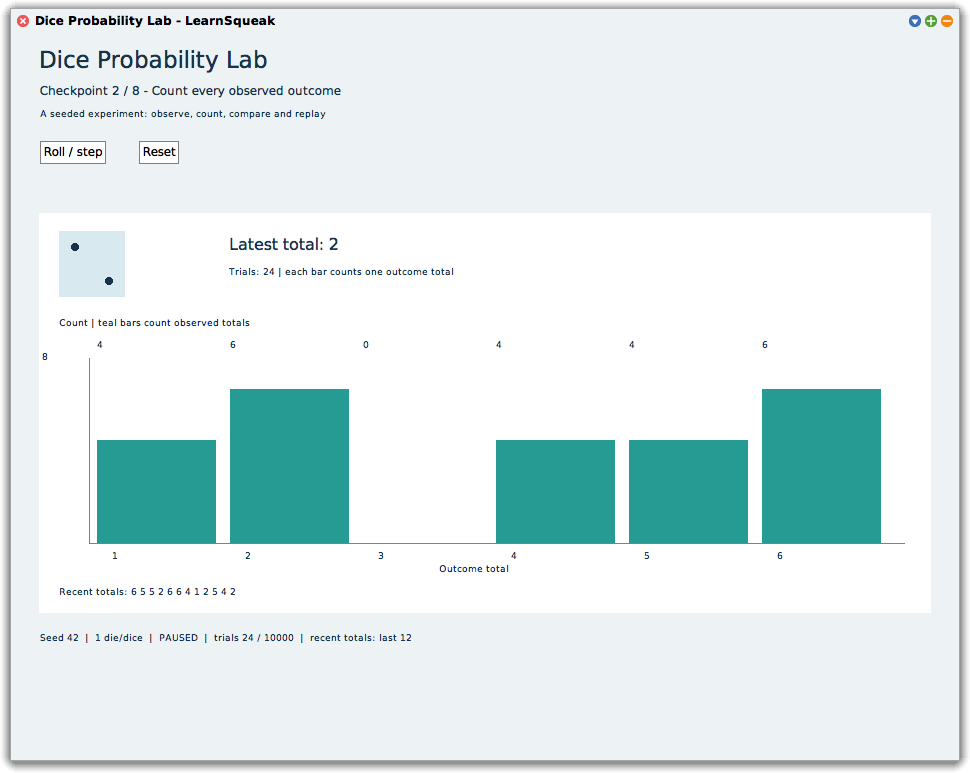
A single roll is an observation; a tally is a summary of many observations. Add a fixed twelve-slot Array indexed by outcome total. Only positions 1 through 6 can be used with one die. We reserve twelve slots now so the same representation can support two dice later. counts at: total is the number of trials that produced that total, not the number of individual dice showing that face.
recordRoll: validates its input before changing anything, copies the Array, increments one count and increments trials once. The invariant is counts sum = trials. We can test this after every roll without depending on a particular random outcome. Accepting a validated observation also gives tests a way to supply small synthetic fixtures, such as #(1), #(2), #(2), whose counts we know exactly. Production roll still obtains its values from the seeded generator.
The chart reads the tally and draws teal bars. Above each bar is the observed count; below it is the outcome total. The vertical scale adapts to the largest bar and is labelled at the upper left. A larger picture does not imply a larger probability when the axis changes. At this stage you are counting occurrences, not calculating percentages.
Keep only the newest twelve totals in history while retaining the complete tally. The public history, counts and lastRoll queries return copies. The history contains immutable integers, so a shallow copy is sufficient here. A 10,000-trial ceiling bounds the whole experiment. At the ceiling roll answers false and leaves the state unchanged. Reset starts a new experiment and rewinds the same seed.
File List → choose probability-lab-02.st → fileIn. Read the following methods on the named class, instance side, in the System Browser. They are included in the checkpoint; accept them there if typing along.
Workspace → select the entire block → Do it. Use Inspect it instead to inspect the returned app and its model. Close the previous lab window first.
Native Squeak 6.1, after executing the exact launcher above. Twenty-four one-die trials appear as six count bars; the counts sum to 24 and the recent history has twelve totals.
03 · Roll two independent dice
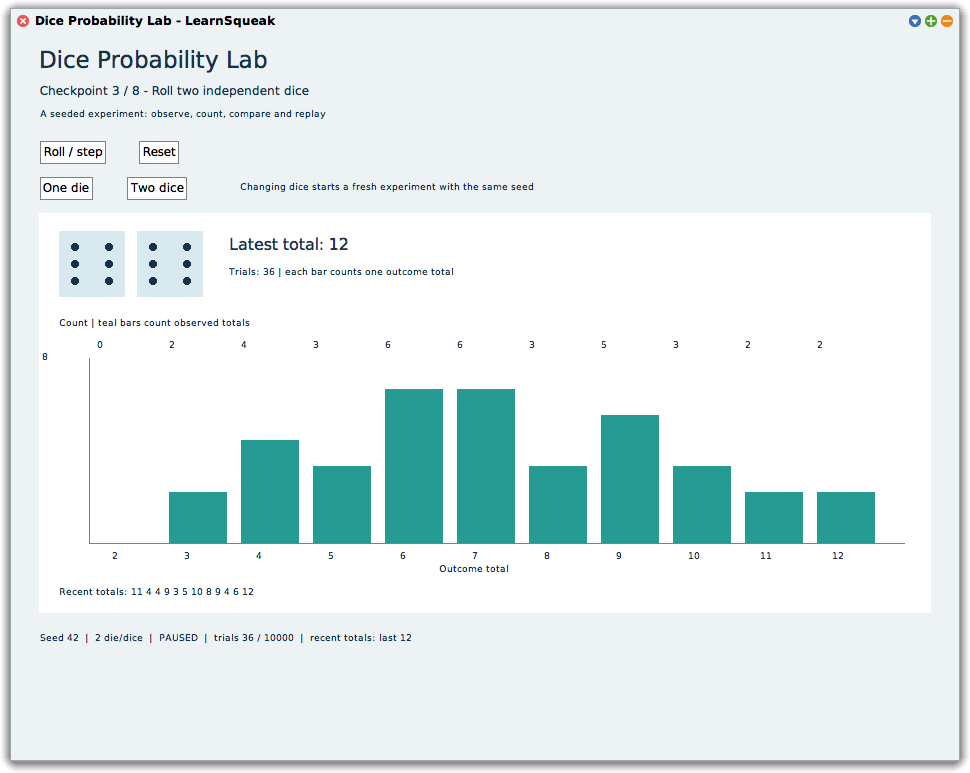
Now model two dice. A trial consists of two draws from the generator, and its outcome is their sum. roll builds an Array with one value for each die and passes it to the same recordRoll: method. The tally still increments once per trial. For two dice, possible totals run from 2 through 12; a 1 is impossible even though each die can show 1.
The two pips panels show the individual faces. Their sum appears beside them, while the chart groups all ordered pairs having that sum. The pair #(2 5) and the pair #(5 2) both increase the bar for 7. Do not sort, collapse or draw only one random face and double it: those choices change the experiment. We use successive pseudorandom draws to model independent fair dice; the theoretical calculation in the next stage makes that assumption explicit.
dice: accepts only the integers 1 and 2. A successful change resets the tally, history and generator. Mixing old one-die counts into a two-dice sample would make both the denominator and the meaning of the bars misleading. The seed remains 42, but two-dice trials consume two generated values, so the sequence of totals is not the one-die sequence.
Switch between One die and Two dice, inspect outcomes, and explain why the number of visible bars changes from six to eleven. A symmetric list of possible totals does not make those totals equally likely. Before reading the next stage, enumerate the ways to make 2 and the ways to make 7. Predict which total has more opportunities, then compare that prediction with several small samples.
roll
 self atLimit ifTrue: [^ false].
 ^ self recordRoll: ((1 to: dice) collect: [:ignored | random nextInt: 6]) asArray
LSProbabilityModel >> outcomes · instance side
outcomes
 ^ dice to: dice * 6
Where to run this
File List → choose probability-lab-03.st → fileIn. Read the following methods on the named class, instance side, in the System Browser. They are included in the checkpoint; accept them there if typing along.
Workspace → select the entire block → Do it. Use Inspect it instead to inspect the returned app and its model. Close the previous lab window first.
Native Squeak 6.1, after executing the exact launcher above. Two dice and eleven outcome bars appear after 36 trials. Counts still sum to 36, not 72.
04 · Enumerate exact probabilities
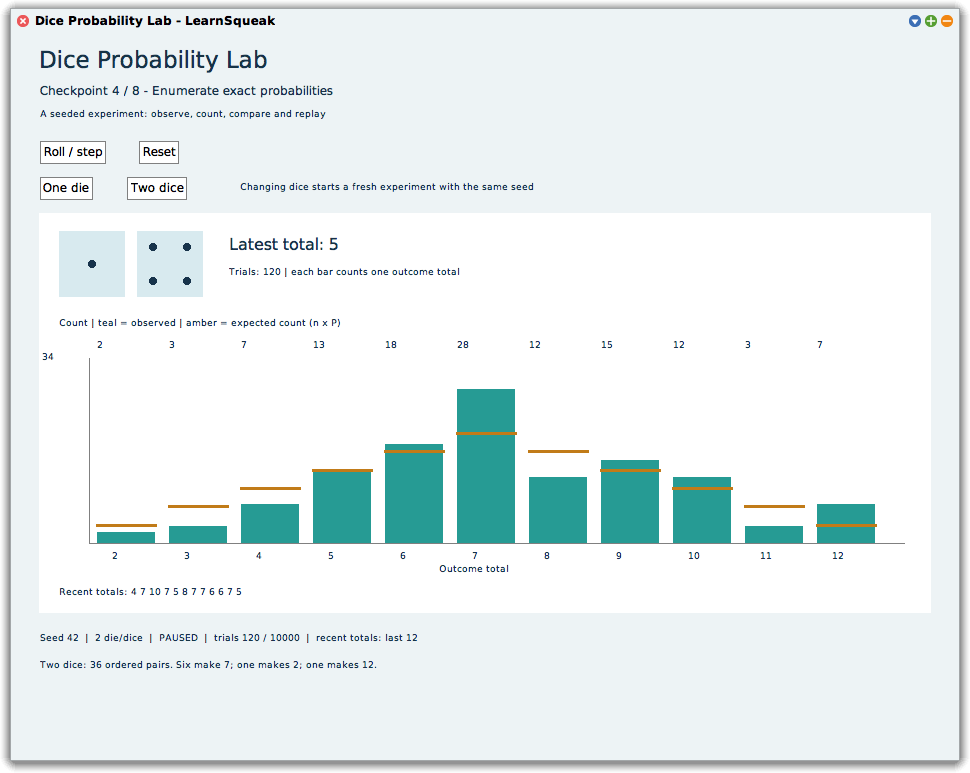
Theory comes from the sample space, not from the latest chart. With two independent fair dice there are 6 × 6 = 36 equally likely ordered pairs. Nested loops enumerate all of them. For each left and right face, increment the entry for left + right. The exact counts for totals 2 through 12 are 1, 2, 3, 4, 5, 6, 5, 4, 3, 2, 1. Their sum is 36.
Divide each exact count by 36 to obtain its probability. Smalltalk's / keeps the answer exact when integers form a Fraction: P(7) is 6/36, reduced to 1/6, while P(2) is 1/36. For a single die the enumeration contains six equally likely outcomes and each has probability 1/6. There is no random sampling in theoreticalCounts, so resetting or changing a seed cannot alter these answers.
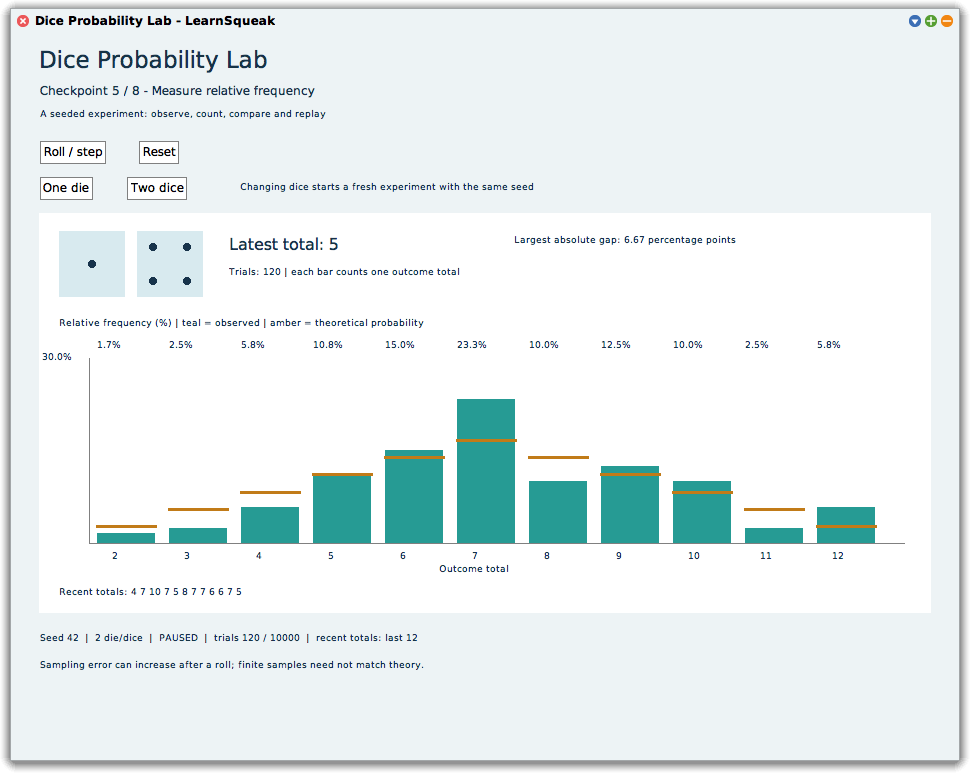
The amber mark above each category shows n × P(total), its expected count for the current number of trials. Expected counts can be fractional; they describe the mean over a hypothetical collection of repeated experiments, not a requirement that each observed count equal that number. After 120 rolls the expected count for 7 is 20 and for 2 is 10/3. An observed tally must contain integers.
The chart scales both the observed bars and the expected marks with the same axis. This makes their discrepancy visible without implying that 120 trials must resemble the exact triangle. Test the theory separately from the random generator: feed all 36 ordered pairs through recordRoll: and confirm that the observed counts equal theoreticalCounts exactly. That is a deterministic enumeration test, not evidence that every random sample will be perfect.
LSProbabilityModel >> theoreticalCounts · instance side
theoreticalCounts
 | exact |
 exact := Array new: 12 withAll: 0.
 dice = 1 ifTrue: [1 to: 6 do: [:face | exact at: face put: 1]] ifFalse: [
  1 to: 6 do: [:left | 1 to: 6 do: [:right | exact at: left + right put: (exact at: left + right) + 1]]].
 ^ exact
LSProbabilityModel >> theoreticalProbabilityAt: · instance side
File List → choose probability-lab-04.st → fileIn. Read the following methods on the named class, instance side, in the System Browser. They are included in the checkpoint; accept them there if typing along.
Workspace → select the entire block → Do it. Use Inspect it instead to inspect the returned app and its model. Close the previous lab window first.
Native Squeak 6.1, after executing the exact launcher above. After 120 two-dice trials, amber expected-count marks overlay the observed counts. The expected mark for total 7 is 20.
05 · Measure relative frequency
Counts depend on sample size. Relative frequency divides the observed count for an outcome by trials, making samples with different sizes easier to compare. A frequency is a property of the observed data. A theoretical probability is a property of our fair-dice model. Keeping separate methods for these quantities prevents an attractive chart from silently replacing the theory with its current observations.
For zero trials, frequencyAt: returns zero as a display convention, while maxAbsoluteError returns nil because there is no empirical distribution to evaluate. Once trials is positive, the relative frequencies sum exactly to one. The model retains rational arithmetic; only the view rounds percentages for display. Displayed values may add to 99.9% or 100.1% because each label is rounded independently.
The chart now uses percentages. Teal bars show observed frequency and amber marks show theoretical probability. Both use the same labelled vertical scale. The chart allows at least 25% plus headroom and expands for unusual samples, including a first roll whose observed frequency is 100%. Do not compare screenshot bar heights without reading the axis. The largest absolute gap is max over outcomes of |observed frequency − theoretical probability|, reported in percentage points, not as a percentage increase.
Sampling variability means finite samples differ. More trials usually help stabilize proportions under the model, but a single extra roll can move a sample farther from theory. To see that without relying on luck, feed each one-die face once: the frequencies equal theory. Feed one additional 6: the largest gap increases from zero. No test in this lesson demands that a random sample meet a closeness threshold or improve monotonically.
LSProbabilityModel >> frequencyAt: · instance side
File List → choose probability-lab-05.st → fileIn. Read the following methods on the named class, instance side, in the System Browser. They are included in the checkpoint; accept them there if typing along.
Workspace → select the entire block → Do it. Use Inspect it instead to inspect the returned app and its model. Close the previous lab window first.
Native Squeak 6.1, after executing the exact launcher above. The same 120-trial sample now appears as relative frequencies, with fixed theoretical-probability markers and an absolute-gap readout.
06 · Run bounded batches safely
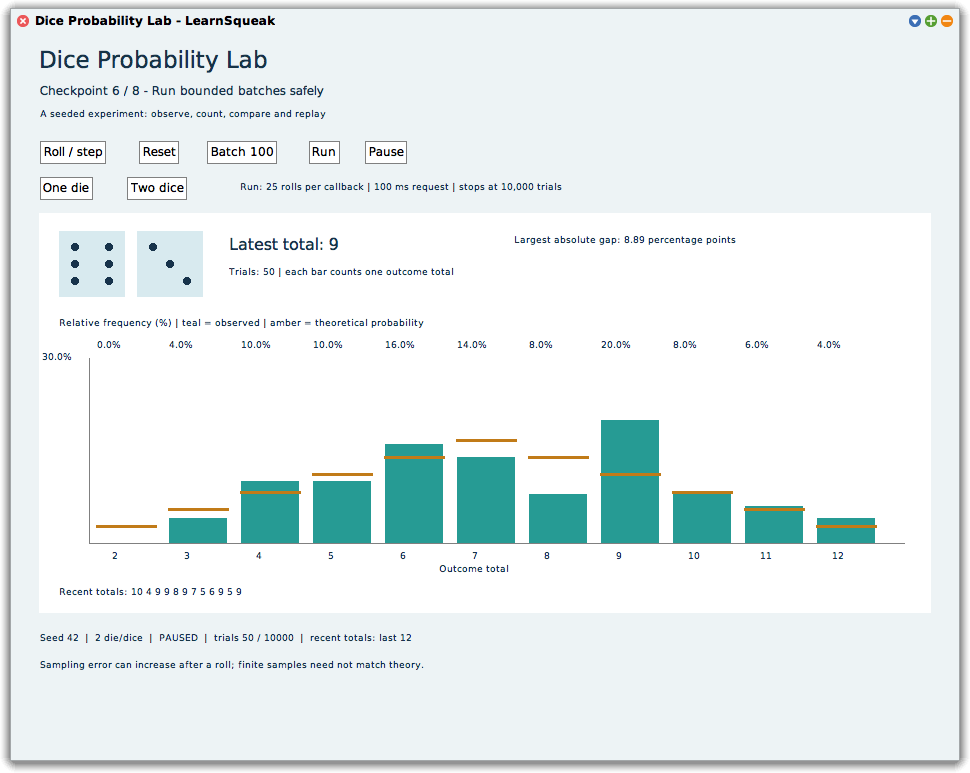
The model can now perform a bounded batch. rollMany: accepts an integer from 1 through 500 and reports how many rolls actually completed. A request near the 10,000-trial ceiling can complete only part of the batch. Invalid requests do no work. The Batch 100 button pauses playback and advances at most 100 trials; Roll / step pauses and advances at most one.
Run uses Morphic's existing stepping scheduler. Each callback performs at most 25 rolls, redraws once and returns control. stepTime requests 100 milliseconds between callbacks; it is not a measured performance guarantee or a reliable stopwatch. A tight loop that repeatedly rolls until stopped would occupy the UI process and make Pause difficult to use. The fixed batch size and total ceiling keep both per-callback work and the overall experiment bounded.
Pause sets running to false before unregistering the app, making a late queued callback harmless. Remember scheduledWorld when Run registers the app, because closing a window can detach it before cleanup asks self world. windowIsClosing stops activity before forgetting the window. Repeated Run and repeated Pause are safe. Run also requires an attached, open view; it does not register while the window is collapsed and the app has no World.
The launcher below invokes two callbacks directly, then pauses, leaving exactly 50 trials. This makes the checkpoint and its screenshot reproducible without waiting on wall-clock scheduling. After opening it, click Run to let Morphic deliver callbacks normally, then Pause, Step and Reset. Reset pauses and rewinds the current seed; it does not preserve the tally. At 10,000 trials playback stops automatically and Run does nothing until Reset.
LSProbabilityApp >> windowIsClosing · instance side
windowIsClosing
 self stopActivity. window := nil
Where to run this
File List → choose probability-lab-06.st → fileIn. Read the following methods on the named class, instance side, in the System Browser. They are included in the checkpoint; accept them there if typing along.
Workspace → select the entire block → Do it. Use Inspect it instead to inspect the returned app and its model. Close the previous lab window first.
Native Squeak 6.1, after executing the exact launcher above. Two explicit callbacks produce exactly 50 two-dice trials, and the app is paused with no scheduled stepping.
07 · Change and replay the seed
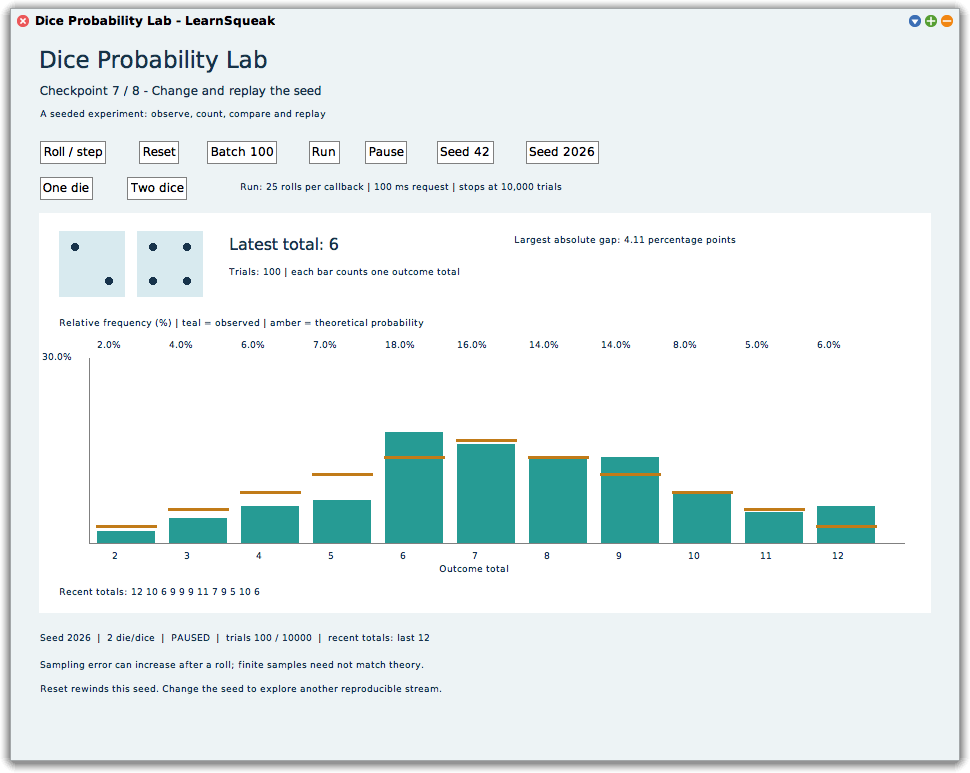
Make the experiment's seed an explicit piece of configuration. seed: accepts integers from 1 through 2,147,483,646 and rejects invalid values before changing any state. These are the lesson's chosen input bounds, not a claim about every Random implementation. A successful seed change creates a new generator and clears the observation, tally and history. The two preset buttons make repeatable experiments easy to compare.
Reset and changing a seed serve different purposes. Reset replays the current stream from its beginning. Choosing a new seed explores a different reproducible stream in this build. Replaying requires the same seed, the same dice configuration and the same sequence of generator calls. One-die and two-dice modes consume different numbers of draws per trial. The sequence is not promised to remain identical across different Squeak or Random implementations.
The app validates a seed before pausing. This matters when an Inspector sends an invalid value while playback is active: an unsuccessful configuration request should leave the state and scheduling unchanged. A valid request pauses, updates the model and refreshes the labels. The status line always shows the selected seed so a screenshot can be traced to a reproducible starting configuration.
The launcher selects two dice and seed 2026, rolls 100 trials, resets and rolls the same 100 again. Its final chart matches the first 100 exactly. Inspect counts before and after the rewind, or use two independent model instances in a Workspace. Neither an attractive histogram nor a different seed proves the underlying dice are fair; fairness and independence are assumptions of this toy model, and the test suite checks the implementation's mechanics.
reset
 random := Random new seed: seed. lastRoll := #().
 counts := Array new: 12 withAll: 0. trials := 0. history := OrderedCollection new
Where to run this
File List → choose probability-lab-07.st → fileIn. Read the following methods on the named class, instance side, in the System Browser. They are included in the checkpoint; accept them there if typing along.
Workspace → select the entire block → Do it. Use Inspect it instead to inspect the returned app and its model. Close the previous lab window first.
Native Squeak 6.1, after executing the exact launcher above. Seed 2026, two dice and 100 trials are visible. The reset and second batch reproduced the first batch exactly.
08 · Compare repeated experiments
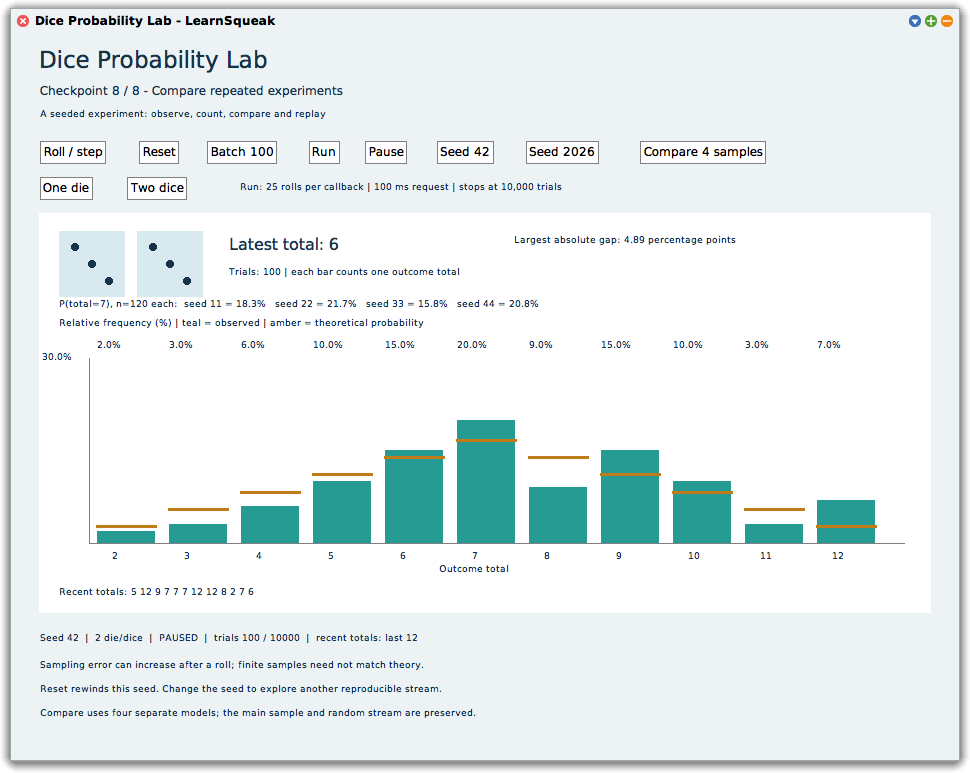
One reproducible run is not a study of sampling variability. Compare 4 samples creates four fresh models with seeds 11, 22, 33 and 44. Each uses the current one-die or two-dice configuration and runs exactly 120 trials. The comparison reports the frequency of one target outcome: total 7 for two dice or face 6 for one die. The theoretical probability is 1/6 in either case, so equal theoretical chances can be contrasted with unequal observed proportions.
The comparison returns a small Array of rows containing seed, target frequency and largest absolute gap. It performs 480 rolls altogether, a fixed finite amount of work. Each row comes from its own model. It never resets, extends or consumes the main model's generator, which is crucial if the reader is trying to replay a sample. The app pauses live playback before calculating the comparison, then labels the target and per-sample size beside the chart.
The four two-dice target frequencies in this Squeak build are 22/120, 26/120, 19/120 and 25/120. These are actual synthetic outputs of the specified seeded experiment, not measurements of physical dice or benchmark results. They illustrate differences between finite samples; four selected seeds do not establish a confidence interval or prove a statistical theorem. Repeating Compare returns the same rows because the experiments are deliberately replayable.
Try doubling each replicate's sample size in your own copy, while keeping its work explicitly bounded. Compare the outcomes without writing a test that insists every error shrink. The stable tests assert exact theory, tally conservation, reproducibility, isolation and lifecycle behavior. The two exercises below extend the mathematical queries while preserving the separation between the model, the display and the scheduling controls.
LSProbabilityModel >> replicateSummaries · instance side
replicateSummaries
 | target |
 target := dice = 2 ifTrue: [7] ifFalse: [6].
 ^ #(11 22 33 44) collect: [:aSeed |
  | other |
  other := self class new. other dice: dice; seed: aSeed; rollMany: 120.
  {aSeed. other frequencyAt: target. other maxAbsoluteError}]
LSProbabilityApp >> compareSamples · instance side
File List → choose probability-lab-08.st → fileIn. Read the following methods on the named class, instance side, in the System Browser. They are included in the checkpoint; accept them there if typing along.
Workspace → select the entire block → Do it. Use Inspect it instead to inspect the returned app and its model. Close the previous lab window first.
Native Squeak 6.1, after executing the exact launcher above. The main sample remains at 100 trials. Four 120-trial experiments show total-7 frequencies 18.3%, 21.7%, 15.8% and 20.8%.
Watch the workflow
Every stage PNG is a real SystemWindow imageForm captured in native Squeak 6.1 after its exact launcher. The GIF uses native frames generated after scripted button events and explicit step callbacks. Playback is edited for teaching; it is not a screen recording or a wall-clock timing measurement. All dice samples are synthetic.
NATIVE SQUEAK CAPTURE
Scripted native workflow: two dice → individual roll → batches → Run callbacks → Pause → Reset → seed 2026 → replay → Compare 4 samples. Frames are genuine Squeak window renders; GIF timing is illustrative.
Practice with tested solutions
1. Calculate the exact chance of an even total
Add probabilityOfEven to LSProbabilityModel. Select the even outcomes and sum their exact theoretical probabilities. Support both one and two dice; do not use the current observed tally.
Hint
Collection>>select: filters outcomes. inject:into: folds exact probabilities from zero.
Show a tested solution
System Browser → LSProbabilityModel → instance side → accept the method below, or file in probability-lab-exercise-1.st after the final application.
Workspace · Print it after installing the solution
Check the solution
| one two |
one := LSProbabilityModel new.
two := LSProbabilityModel new. two dice: 2.
{one probabilityOfEven. two probabilityOfEven}
An Array containing two Fraction values, each 1/2. Print it shows {(1/2) . (1/2)}.
An even total requires equal parity for the two faces. Summing the exact sample-space probabilities reaches the same answer without assuming totals are uniform.
2. Calculate the empirical mean without the full history
Add empiricalMean to LSProbabilityModel. Use each total times its count, divide the sum by trials, and return nil before any observations. Keep the calculation exact. Do not average only the twelve recent totals: that would discard most of the experiment.
Hint
Use outcomes inject: 0 into: to accumulate the weighted total.
Show a tested solution
System Browser → LSProbabilityModel → instance side → accept this method, or file in probability-lab-exercise-2.st after the final application.
Workspace · Print it after installing the solution
Check the solution
| model |
model := LSProbabilityModel new.
model recordRoll: #(1); recordRoll: #(2); recordRoll: #(2).
model empiricalMean
(5/3)
The twelve-slot tally retains enough information for the mean even though the visible history is bounded. A random finite sample need not have theoretical mean 7.
When something looks wrong
The chart changes when I change mode
A mode change deliberately starts a fresh experiment. One-die and two-dice counts have different meanings and must not be combined.
Run does nothing
At 10,000 trials, Reset is required. Run also needs an open expanded window attached to a World; expand it before pressing Run.
Bars do not match the amber lines
That is expected sampling variability. Confirm the trial count and axis. The amber line is theory; a finite empirical sample can differ.
Reset gives the same numbers
Reset deliberately rewinds the selected seed. Choose Seed 2026 or send chooseSeed: a valid integer to explore a different stream.
A test expects exactly the displayed percentage
The model stores exact rational values and the view rounds. Compare exact fractions in tests, not rounded text.
Source compilation fails after opening the .st download
Use File List and fileIn for chunk-format class and method definitions. Use Workspace only for the labelled launcher and check blocks.
Verification, cleanup and next steps
Executed using Squeak 6.1 64-bit build 23976 in private copies of the supplied image with the null display and sound drivers. Screenshots are native window forms, not HTML recreations. Verification scripts and text reports are included in the ZIP.
Native Squeak verification: 44 application SUnit tests and 5 exercise tests pass. All eight checkpoints and their exact displayed methods and launchers are executed in separate pristine image copies.
The suite checks mechanics deterministically, not a probabilistic closeness threshold.
Exact one-die and 36-pair two-dice theoretical counts, exact probability mass, exhaustive synthetic observation fixture
Tally conservation, face and total ranges, defensive copies, twelve-value history, 10,000-trial cap and partial batches
Bounded batch work, run/pause/reset/late callbacks, real button events, close/reopen and collapsed-window scheduler cleanup
Exercises: exact even probability, empty mean, rational fixture mean and exhaustive pair mean
Pause or close the lab window when finished. Closing unregisters stepping. Keep the .st files separately to rebuild in a clean image; no image snapshot is required.
Bundled Squeak 6.1 image source: Random>>seed: and Random>>nextInt: — Seed initialization and inclusive integer draws were checked in the actual image.
Bundled Squeak 6.1 image source: SystemWindow>>delete and Morphic stepping — Window lifecycle and scheduler cleanup are exercised by the SUnit tests.
Exact sample space calculated in this lesson — All 36 ordered pairs of fair independent six-sided dice are enumerated directly; no external data is used.