RAYS · SEGMENTS · NEAREST HITS
Build a 2D ray-casting light laboratory
Intersect rays with finite wall segments, select the nearest hit and explore sampled light fans with tested native Squeak geometry.
Install a working native laboratory
Prerequisites: Squeak 6.1, Points, Arrays, blocks and basic algebra. No packages, network calls or paid services. This app runs in native Squeak; it has not been packaged into the SqueakJS playground.
Use a copy of a learning image. Download and unzip the kit. In File List, select ray-casting.st and fileIn, then do the same for ray-casting-tests.st. File-in chunks belong in File List, not Workspace.
Install the full lab once, then use eight guided experiments to understand its methods. Read or accept each complete model method in the System Browser on LRCRays, instance side. The view files are Workspace launchers for the installed app, not standalone or cumulative checkpoints. Close each earlier lab with its halo delete control. Keep app messages in the same Workspace block, or inspect the returned Morph and use self.
Download complete laboratory and tests
Native source · SUnit tests · Instructions
LRCLab open01 · Describe a ray with two Points
A ray starts at an origin O and travels along a direction D. Its points have the form O + D * t, where t is nonnegative. A wall segment begins at A and ends at B, with points A + (B - A) * u for u between zero and one. Separating these parameter ranges is the central idea: the ray continues forward indefinitely, while the wall is finite.
Our model uses ordinary Smalltalk Point objects. The message 150@180 constructs the origin; adding Points and multiplying a Point by a number performs coordinate arithmetic. Screen y increases downward. The laboratory therefore treats a positive angle as clockwise, even though the familiar mathematical diagram usually draws positive y upward. The renderer adds its screen offset only when drawing; the intersection solver knows nothing about pixels or Morph positions.
directionAt: turns degrees into radians and returns cosine @ sine. Those directions have approximately unit length, so t is approximately a geometric distance. The solver does not require a unit direction. With direction 2@0, a wall ten units to the right is reached at t = 5, not 10. Never label t as distance unless the direction is normalized. The orange ray in the first view starts at 150@180 and meets the vertical wall at 280@180.
Read or accept the model method
directionAt: degrees
 | radians |
 radians := degrees * Float pi / 180.
 ^ radians cos @ radians sin
Open this experiment
| app |
app := LRCLab open.
app stage: 1.
app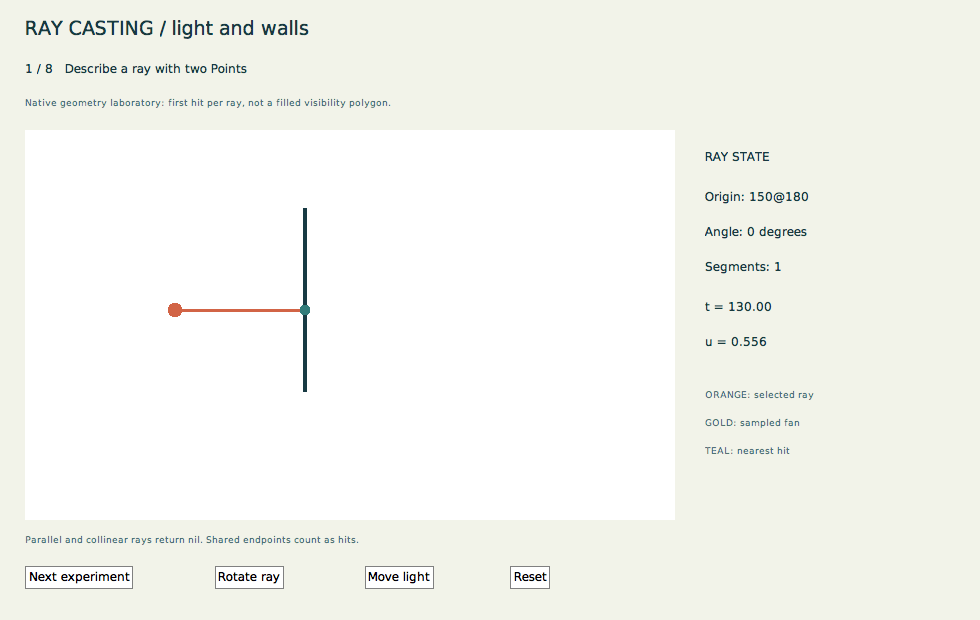
Check the model
LRCRays new directionAt: 0Expected: 1.0@0.0
02 · Use the two-dimensional cross product
The 2D cross product a x b is the scalar ax*by - ay*bx. It tells us how two directions differ in orientation, and is zero when they are parallel. This is not a Point result and not the same as the dot product. In Smalltalk the parentheses make the two products explicit before subtraction; they also help a reader see the equation instead of relying on binary-message precedence.
For a rightward direction 1@0 and a downward edge 0@180, the determinant is 180. Reverse the edge and the determinant changes sign. The intersection remains the same because the relevant numerator changes with it. The tests include both wall orientations rather than assuming that every author draws a wall in one direction.
Open the second view, which rotates the chosen ray to 15 degrees. The teal dot is still on the finite vertical wall. The cross product is the foundation for the next calculation; this view is not a new collision algorithm. You can inspect LRCRays in the Browser and accept the complete method below after installing the lab. Its two inputs are numeric Points.
Read or accept the model method
cross: a with: b
 ^ (a x * b y) - (a y * b x)
Open this experiment
| app |
app := LRCLab open.
app stage: 2.
app rotateRay.
app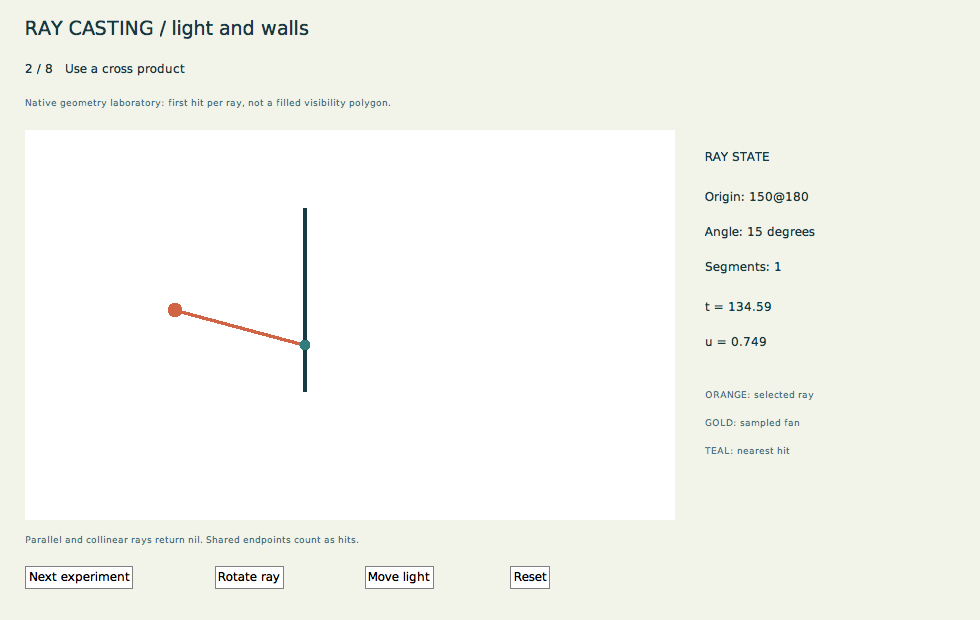
Check the model
LRCRays new cross: 1@0 with: 0@1Expected: 1
03 · Solve for both intersection parameters
Set O + D*t equal to A + E*u, with E = B - A. Let Q = A - O. Crossing both sides of D*t - E*u = Q with E removes the u term, leaving t = cross(Q,E) / cross(D,E). Crossing with D gives u = cross(Q,D) / cross(D,E). The two values describe the same intersection in the coordinate systems of the ray and segment.
The method answers a three-element Array: t, the intersection Point, and u. That contract lets the renderer show the point while the nearest-hit selector compares t. Array indexing is one-based in Squeak. first, second and third make the returned record readable. A rejected intersection answers nil rather than a fake point at the origin.
The displayed method is the complete implementation, including guards that the next step examines. At 30 degrees the selected ray reaches the wall close to its lower endpoint. The geometry uses Float trigonometry for rotation, but the simple cardinal-axis Print It example below uses integer Points and produces an exact Fraction for u. This distinction is useful when testing expected results.
Read or accept the model method
hitFrom: origin direction: direction segment: segment
 | a edge offset denominator t u |
 (direction = (0@0)) ifTrue: [self error: 'A ray needs a nonzero direction'].
 a := segment first. edge := segment second - a.
 denominator := self cross: direction with: edge.
 denominator abs < 0.000000001 ifTrue: [^ nil].
 offset := a - origin.
 t := (self cross: offset with: edge) / denominator.
 u := (self cross: offset with: direction) / denominator.
 (t >= 0 and: [u between: 0 and: 1]) ifFalse: [^ nil].
 ^ {t. origin + (direction * t). u}
Open this experiment
| app |
app := LRCLab open.
app stage: 3.
2 timesRepeat: [app rotateRay].
app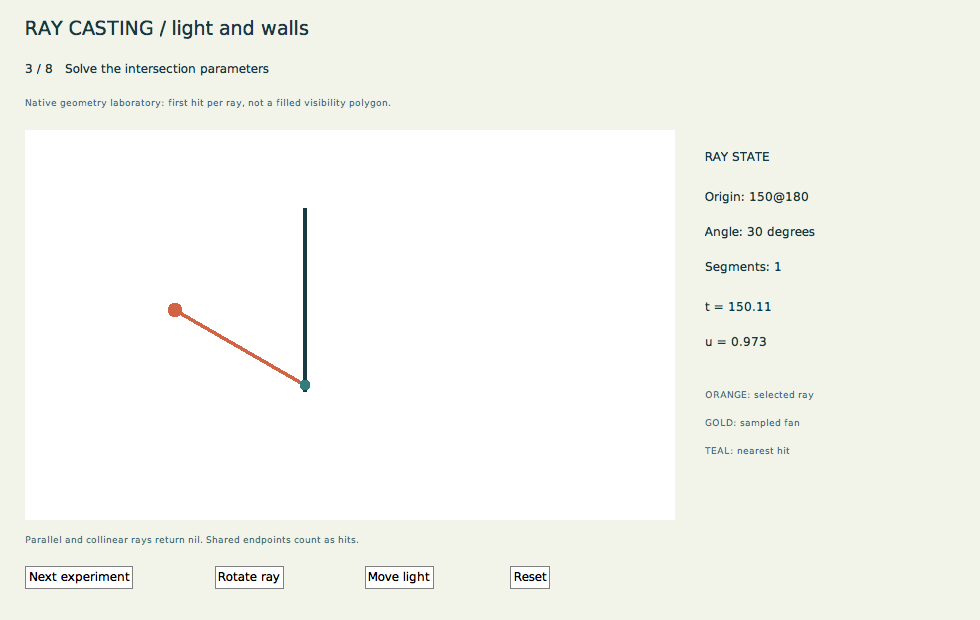
Check the model
LRCRays new hitFrom: 0@0 direction: 1@0 segment: {10 @ -5. 10@5}Expected: An Array containing 10, 10@0 and 1/2
04 · Reject backward and off-segment intersections
An intersection of infinite supporting lines is not necessarily a ray hit. We require t >= 0 so the point is in front of the origin, and 0 <= u <= 1 so it lies on the finite wall. The equality signs intentionally include the ray origin and either segment endpoint. This policy means two walls sharing a corner may both report the same point.
The fourth view points the ray down at 90 degrees. Its supporting line cannot meet the wall at x = 280, so no forward hit is displayed. When no hit exists, the illustration draws an orange direction guide clipped to the scene rectangle. That guide is just a visualization limit, not a finite ray or a newly accepted wall in the model. No-hit state is also possible for a nonparallel ray whose line crosses the wall only behind the origin.
A zero direction is rejected with Error. Parallel or nearly parallel lines return nil before division. Collinear overlap is deliberately outside this lab’s policy: even a wall lying directly along the ray returns nil. A zero-length segment also returns nil. These choices are documented and tested rather than silently presented as a complete general-purpose geometry library.
Read or accept the model method
hitFrom: origin direction: direction segment: segment
 | a edge offset denominator t u |
 (direction = (0@0)) ifTrue: [self error: 'A ray needs a nonzero direction'].
 a := segment first. edge := segment second - a.
 denominator := self cross: direction with: edge.
 denominator abs < 0.000000001 ifTrue: [^ nil].
 offset := a - origin.
 t := (self cross: offset with: edge) / denominator.
 u := (self cross: offset with: direction) / denominator.
 (t >= 0 and: [u between: 0 and: 1]) ifFalse: [^ nil].
 ^ {t. origin + (direction * t). u}
Open this experiment
| app |
app := LRCLab open.
app stage: 4.
6 timesRepeat: [app rotateRay].
app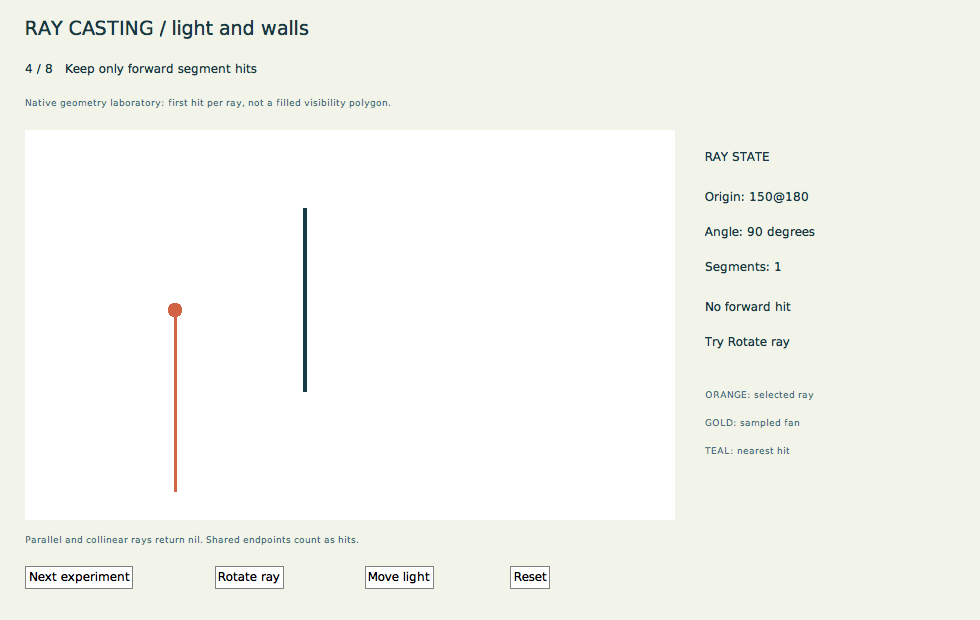
Check the model
(LRCRays new hitFrom: 0@0 direction: 1@0 segment: {-10 @ -5. -10@5}) isNilExpected: true
05 · Choose the first wall, not the first Array item
A scene contains several segments. Testing only the first one in the Array would make visibility depend on storage order. nearestFrom:direction:segments: checks every segment, keeps non-nil results, and replaces the current answer only when a smaller t is found. Because every candidate uses the same origin and direction, ordering by t orders the forward points correctly even if D is not normalized.
The scene now has four boundary edges and three internal walls. A rightward ray from the starting light meets the internal vertical wall before the outside boundary. The gold fan is not drawn yet: concentrate on the one orange ray and its teal nearest-hit marker. Reverse the scene collection to test that the nearest position stays unchanged.
When two segments share an exactly equal nearest t, the implementation retains the first encountered record. The point is the same, but u may differ because it belongs to the individual segment. The lab does not return a wall ID, normal vector or material. Add those to the record if you later need reflection or shading. An empty collection returns nil, as verified by SUnit.
Read or accept the model method
nearestFrom: origin direction: direction segments: segments
 | nearest hit |
 nearest := nil.
 segments do: [:segment |
  hit := self hitFrom: origin direction: direction segment: segment.
  hit ifNotNil: [(nearest isNil or: [hit first < nearest first]) ifTrue: [nearest := hit]]].
 ^ nearest
Open this experiment
| app |
app := LRCLab open.
app stage: 5.
app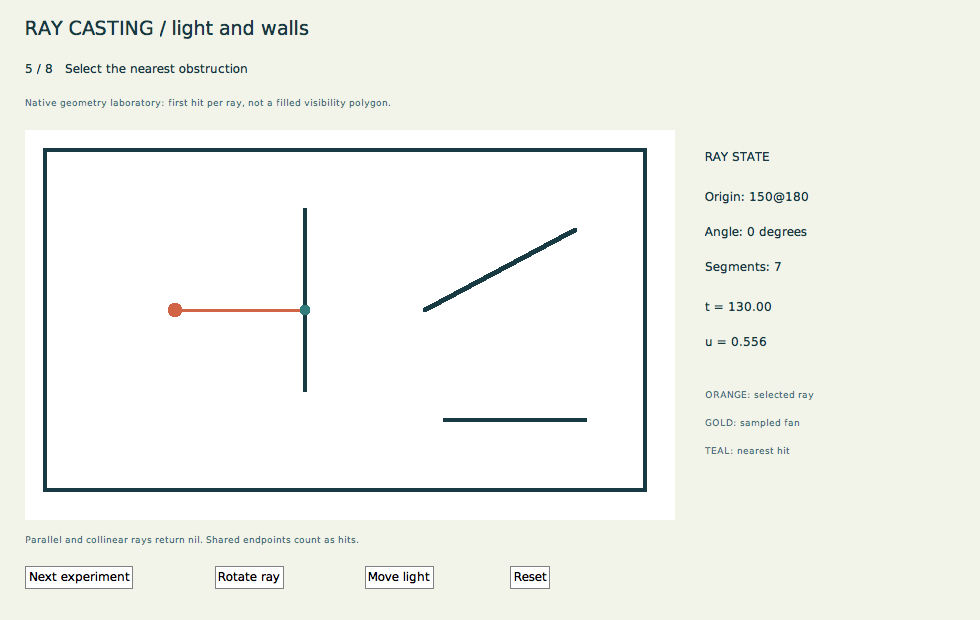
Check the model
(LRCRays new nearestFrom: 0@0 direction: 1@0 segments: {{20 @ -5. 20@5}. {10 @ -5. 10@5}}) firstExpected: 10
06 · Sample a fan without claiming exact visibility
Cast 24 evenly spaced directions around the source. The interval starts at zero and ends at count - 1, so it does not duplicate both zero and 360 degrees. For each direction, reuse the same nearest-hit operation. Each gold spoke ends at its first wall. The scene enclosure ensures a hit for the sample light positions, but the model can still return nil for an open scene.
The fan is a finite sample, not a complete visibility polygon. Narrow openings can fall between neighboring rays, and more rays reduce but do not eliminate that sampling issue. Joining these points into a filled shape would require careful handling of wall endpoints and discontinuities; this lesson intentionally draws spokes only. The correct claim is that each sampled ray stops at its nearest accepted intersection.
fanFrom:count:segments: accepts an integer from 3 through 720 to bound accidental work. The direct algorithm performs count times segmentCount intersection checks. It is easy to test but is not an accelerated spatial index. Compare 24 rays with the 120-ray later views before considering a grid or tree. The view count is a rendering choice; the solver remains the same.
Read or accept the model method
fanFrom: origin count: count segments: segments
 (count isInteger and: [count between: 3 and: 720]) ifFalse: [self error: 'Use 3 to 720 rays'].
 ^ (0 to: count - 1) collect: [:index |
  self nearestFrom: origin direction: (self directionAt: index * 360 / count) segments: segments]
Open this experiment
| app |
app := LRCLab open.
app stage: 6.
app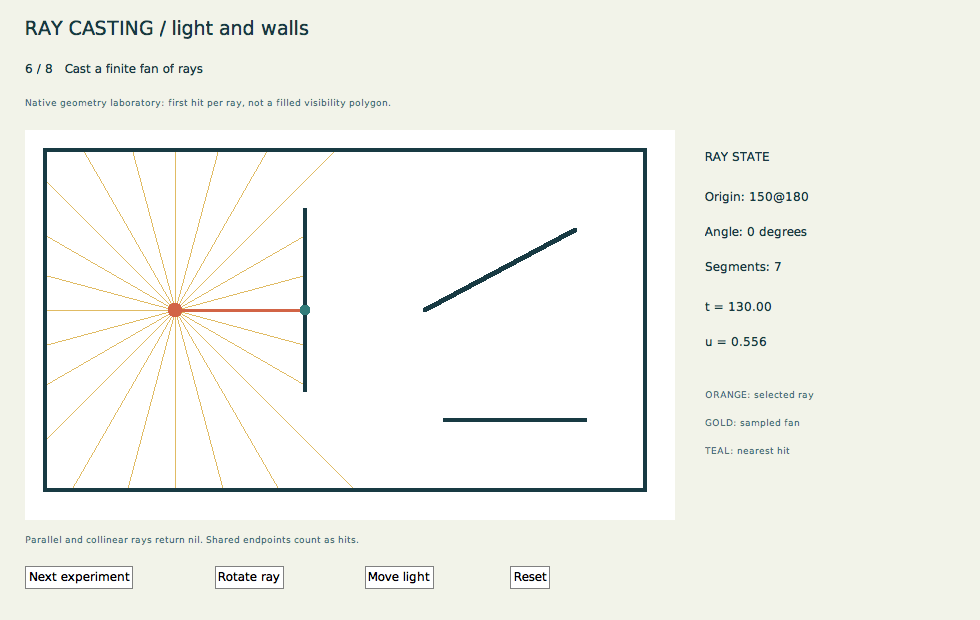
Check the model
(LRCRays new fanFrom: 150@180 count: 24 segments: LRCRays new walls) sizeExpected: 24
07 · Move the origin and recompute the scene
The Move light button toggles between 150@180 and 350@150. There is no saved shadow map to translate. Every drawing recalculates the chosen ray and the 120-ray fan from the current origin. At the second origin, a horizontal ray first hits the diagonal wall at 456.25@150, with t = 106.25 and u = 0.375.
The source sits on the opposite side of the tall internal wall, so the visible spoke pattern changes substantially. Rotate ray advances the selected angle by 15 degrees; Next experiment cycles the eight explanatory views. These are native SimpleButtonMorph controls sending messages to the lab. No autonomous animation timer is implemented. Close the Morph with its halo when finished, or send delete to a retained app reference.
The animation beneath this lesson is a sequence of genuine native Morph renders after scripted rotateRay calls, with one moveLight call halfway through. It illustrates deterministic states, not a recorded person clicking the mouse and not a real-time performance benchmark. The browser Play demo button controls that GIF, not an embedded Squeak interpreter.
Read or accept the model method
nearestFrom: origin direction: direction segments: segments
 | nearest hit |
 nearest := nil.
 segments do: [:segment |
  hit := self hitFrom: origin direction: direction segment: segment.
  hit ifNotNil: [(nearest isNil or: [hit first < nearest first]) ifTrue: [nearest := hit]]].
 ^ nearest
Open this experiment
| app |
app := LRCLab open.
app stage: 7.
app moveLight.
app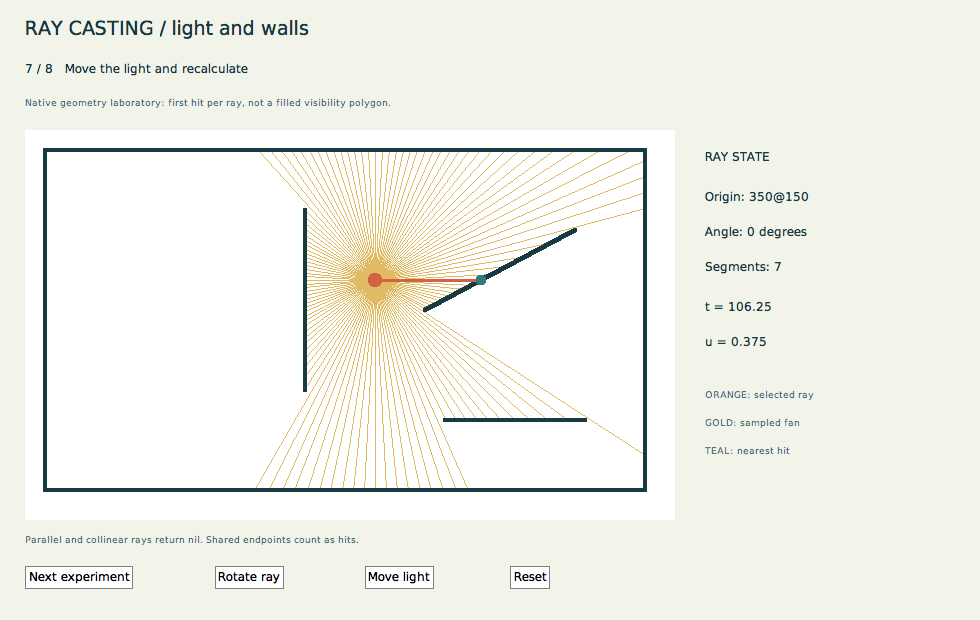
Check the model
(LRCRays new nearestFrom: 350@150 direction: 1@0 segments: LRCRays new walls) firstExpected: 106.25 (exactly 425/4 before Float formatting)
08 · Test the boundaries and name the limitations
The download includes 20 native SUnit tests. They check cross-product orientation, forward and backward intersections, off-segment rejection, endpoints, origin contact, parallel and collinear policy, zero-length segments, zero direction, scaled direction, nearest selection, empty scenes, reversed endpoints, fan bounds, an enclosed 360-ray fan and a cardinal-angle direction. The captured run reports 20 passes and no failures or errors.
The absolute determinant threshold is 1e-9. It is convenient for this bounded demonstration, not scale-invariant robustness. Very large or very small coordinates, nearly parallel walls, Float rounding near endpoints and rays beginning on walls need an explicit numerical strategy in production. The u comparisons have no additional tolerance. A self-hit at t = 0 is accepted; a renderer launching secondary rays would need a deliberate offset or minimum-t policy.
Use independent exact examples before trusting an animation. The tests include integer geometry with rational answers, and the article’s exact Print It checks were executed in native Squeak. A successful finite suite is evidence for the stated cases, not proof for every real-number input. As an extension, introduce a scale-aware tolerance and add counterexamples first; separately implement collinear overlap if your application requires it.
Read or accept the model method
hitFrom: origin direction: direction segment: segment
 | a edge offset denominator t u |
 (direction = (0@0)) ifTrue: [self error: 'A ray needs a nonzero direction'].
 a := segment first. edge := segment second - a.
 denominator := self cross: direction with: edge.
 denominator abs < 0.000000001 ifTrue: [^ nil].
 offset := a - origin.
 t := (self cross: offset with: edge) / denominator.
 u := (self cross: offset with: direction) / denominator.
 (t >= 0 and: [u between: 0 and: 1]) ifFalse: [^ nil].
 ^ {t. origin + (direction * t). u}
Open this experiment
| app |
app := LRCLab open.
app stage: 8.
app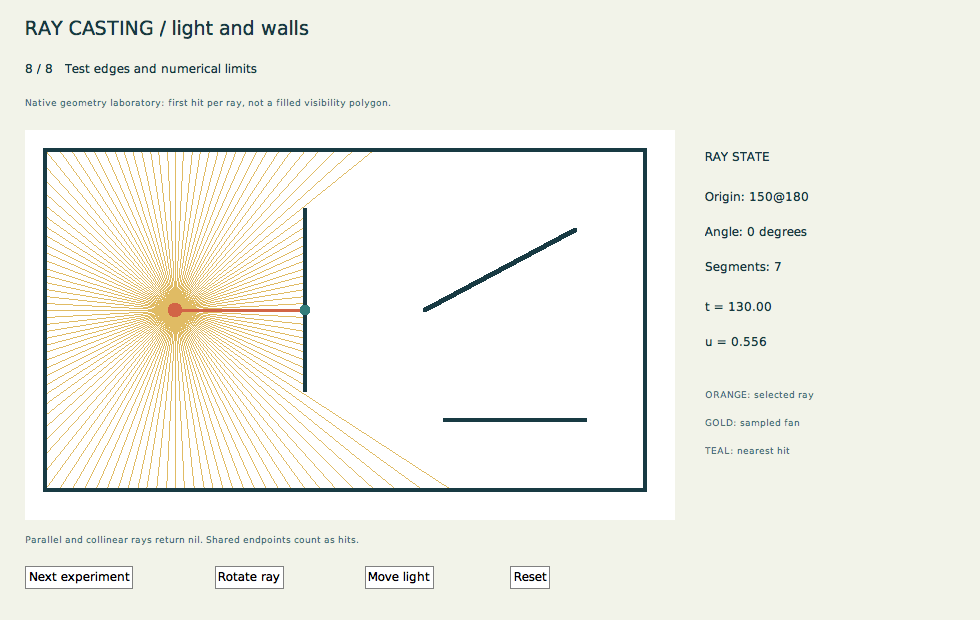
Check the model
LRCRayTest suite runExpected: 20 passes, 0 failures, 0 errors
Watch a ray sweep and the light move
Run and extend the tests
LRCRayTest suite runCaptured native SUnit results · Exact article snippet results
Try reversing every wall’s endpoints; nearest hit positions should remain unchanged, though u becomes 1-u. Add a test for a shared corner and decide how a future normal vector should be selected. Then test very different coordinate scales before changing the epsilon. These are extension exercises, not features already supplied.
Connect geometry and performance
Point arithmetic and Bézier construction · Spatial indexing for candidate selection · SUnit testing · Arrays and collections
Primary implementation references: inspect Point, Float, Morph, SimpleButtonMorph and TestCase in your installed Squeak 6.1 System Browser. See the official Squeak documentation for language and environment guides.