ABSOLUTE BEGINNER
Your first Smalltalk commands
Ask Squeak a question. See the answer right beside it.
STEP 1
Open a Workspace
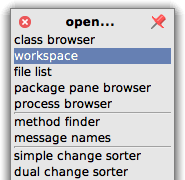
Start in Squeak 6.1. Click an empty part of its desktop to open the World menu. Choose open… then workspace.
A Workspace is a little window where you can type and run Smalltalk.
STEP 2
Ask it to add
Type this line. Drag across the whole line to select it. Right-click the selected text and choose print it (p). Some Squeak setups use middle-click for this menu.
Use the menu for now; the letter in parentheses is a shortcut hint.
3 + 4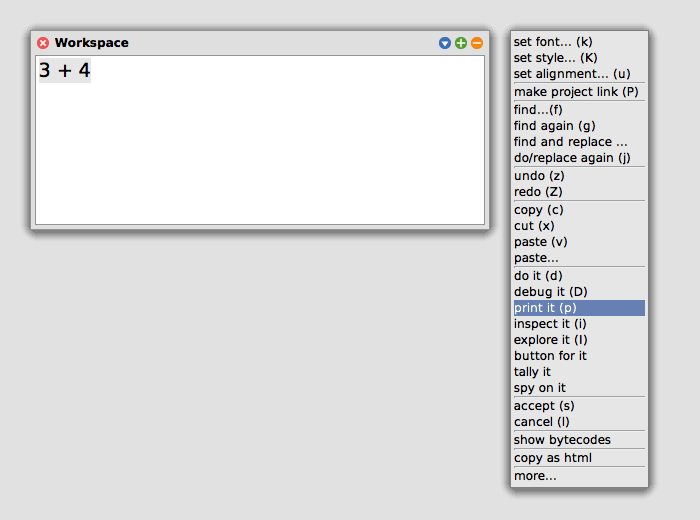
STEP 3
Read the answer
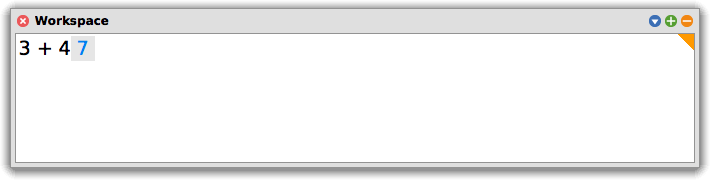
Squeak inserts 7 after your code and selects the answer. You just ran your first Smalltalk expression!
Press Backspace while 7 is selected to remove just the answer. Your original 3 + 4 stays.
STEP 4
Try some words
Drag across ALL the Workspace text, including any old answer. Replace it with this line, select the new line, and choose print it (p).
The single quotes mark some text. asUppercase asks that text for an uppercase version. The answer is 'HELLO, SQUEAK!'.
'hello, squeak!' asUppercase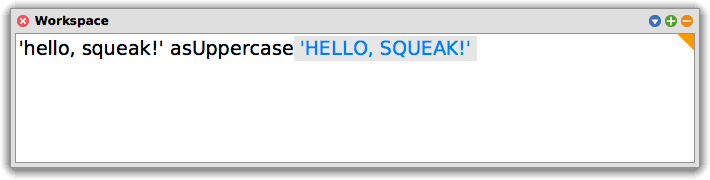
STEP 5
Make one change
Select ALL the Workspace text and replace it with this line. Select the new line and use print it (p). The * means multiply. You should see 48.
Now change 8 to another number and try it again. Select only the expression, without an old answer.
8 * 6YOU DID IT
A small step. A real result.
Type a small expression, select it, then Print it to see its answer.
Next, make a rectangle that lives on the Squeak desktop.
Optional code download: open it as text and copy one example into Workspace.
Next: make your first Morph →