The separate playground loads the real Smalltalk image on demand. This lesson keeps its native setup instructions; browser compatibility notes appear beside each demo.
Before you start
Create an editable native grid with a bounded arithmetic language, cell references, dependency recalculation and recoverable errors.
Save a copy of your Squeak image. Each checkpoint is a complete cumulative .st source file that loads independently into a fresh Squeak 6.1 image.
Download a checkpoint beside your image, open the File List, select the .st file and choose fileIn. Close an older checkpoint window before installing a later checkpoint.
Method definitions belong in the named class in the System Browser; checkpoint fileIn already installs them. Execute each complete Workspace block after installation.
To run verification, file in LearningFormula.st and LearningFormulaTests.st, then open TestRunner and select LFFormulaTest. Tests use synthetic cells and do not write sheet data to disk.
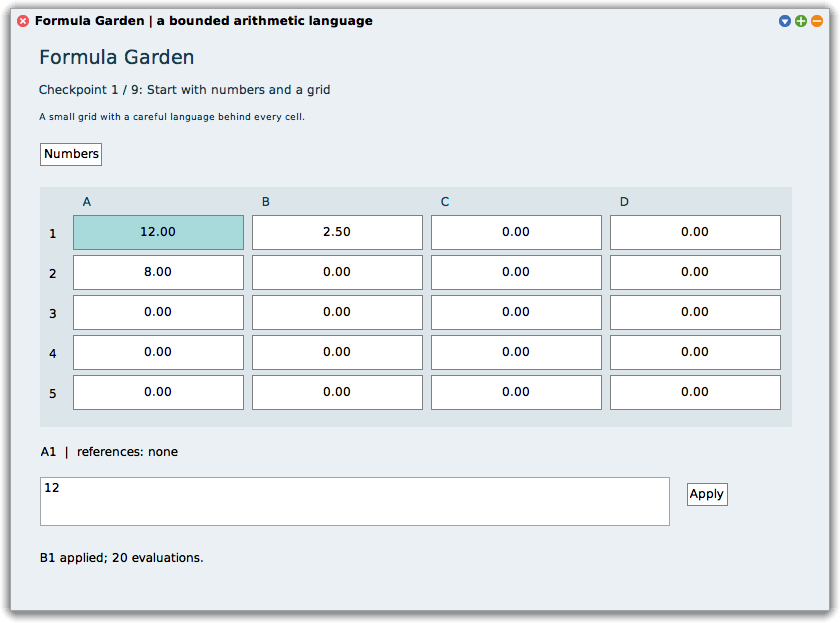
Formula Garden starts with twenty cells, A1 through D5, and one native text editor. Click a cell, type a number, and use Apply or Return. LFSheet stores the original text separately from its numeric value; that distinction becomes essential when formulas arrive. LFFormulaApp displays the model and routes actions to it. A fixed-size native window keeps this teaching layout predictable.
The first parser accepts signed decimal numbers. It walks characters and builds a tagged syntax tree; it never asks the Smalltalk compiler to interpret cell text. The digit counter bounds numeric input, and the whole parser also has length, syntax-node and nesting limits from the first checkpoint. Blank cells have value zero. The method below accumulates whole digits, then adds decimal digits with a growing scale.
Where to run this
System Browser, LFParser, instance side. The complete checkpoint installs this method and its supporting classes. Read or accept the method here; its definition is not a Workspace expression.
Construction code · follow the run instructions above
number
 | value digits scale |
 self skipSpaces. value := 0.0. digits := 0. scale := 1.0.
 [position <= source size and: [(source at: position) isDigit]] whileTrue: [
  digits := digits + 1. digits > 12 ifTrue: [self error: '#LIMIT: 12 number digits'].
  value := (value * 10) + (source at: position) digitValue. position := position + 1].
 (position <= source size and: [(source at: position) = $.]) ifTrue: [
  position := position + 1.
  [position <= source size and: [(source at: position) isDigit]] whileTrue: [
   digits := digits + 1. digits > 12 ifTrue: [self error: '#LIMIT: 12 number digits'].
   scale := scale * 10. value := value + ((source at: position) digitValue / scale). position := position + 1]].
 digits = 0 ifTrue: [self fail: 'Expected a number'].
 ^ self node: {#number. value}
File in this checkpoint, then select the complete block in a Workspace and choose Do it (Ctrl+D / Cmd+D). The final expression returns the open app.
number reads consecutive digits directly. It deliberately does not merge separate tokens such as 1 2
value starts as a Float; scale divides each fractional digit by its decimal position
At least one digit is required. A decimal point alone produces a syntax error
node: creates a tagged #number array and counts it against the syntax budget
The Workspace block opens the app, uses sampleNumbers to enter three ordinary cell sources, and returns the app for inspection
Only signed decimal numbers work in this checkpoint. Every later download is complete: you may start it in a fresh image without installing earlier checkpoints.
Expected result
A1 shows 12.00, A2 shows 8.00 and B1 shows 2.50; A1 is selected
Native Squeak 6.1 checkpoint 01, captured after evaluating the exact Workspace block shown here.
02 · Give arithmetic a deliberate grammar
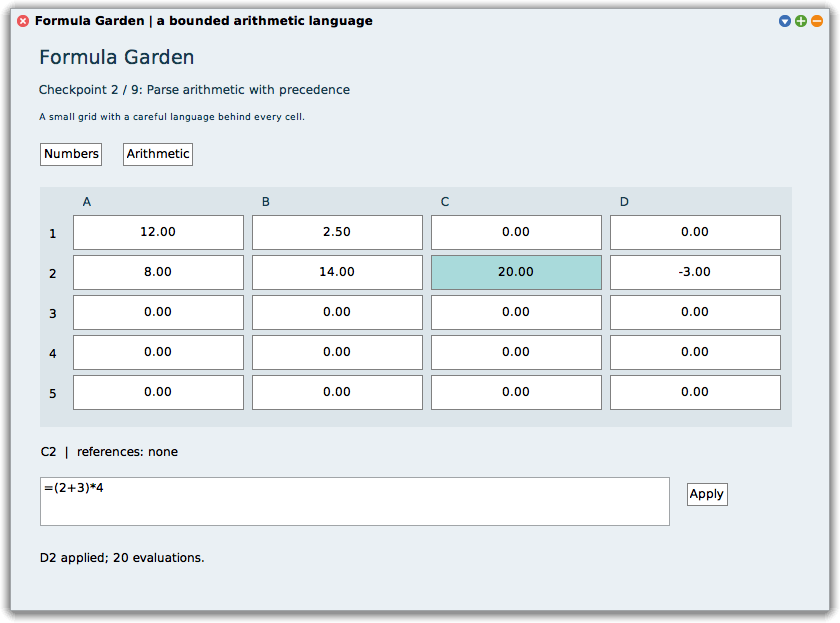
A leading equals sign marks a formula. Recursive descent divides the grammar into expression, term, unary and primary. expression reads addition and subtraction; term reads multiplication and division; unary handles signs; primary reads a number or a parenthesized expression. This creates a small syntax tree whose structure encodes precedence.
The loops make operators of equal precedence left-associative: 20/2/5 means (20/2)/5. Parentheses call expression again, while the unary recursion counts nesting to prevent runaway input. The evaluator dispatches only the four arithmetic operators. Ordinary text such as 2+3 must begin with = to become a formula.
System Browser · LFParser instance side · supporting method
term
 | left operator |
 left := self unary.
 [(self peek = $*) or: [self peek = $/]] whileTrue: [
  operator := self peek. position := position + 1.
  left := self node: {#binary. operator. left. self unary}].
 ^ left
System Browser · LFParser instance side · supporting method
primary
 | result |
 (self take: $() ifTrue: [
  result := self expression. (self take: $)) ifFalse: [self fail: 'Expected closing parenthesis']. ^ result].
 ^ self number
Where to run this
System Browser, LFParser, instance side. The complete checkpoint installs this method and its supporting classes. Read or accept the method here; its definition is not a Workspace expression.
Construction code · follow the run instructions above
expression
 | left operator |
 left := self term.
 [(self peek = $+) or: [self peek = $-]] whileTrue: [
  operator := self peek. position := position + 1.
  left := self node: {#binary. operator. left. self term}].
 ^ left
File in this checkpoint, then select the complete block in a Workspace and choose Do it (Ctrl+D / Cmd+D). The final expression returns the open app.
Native Squeak 6.1 checkpoint 02, captured after evaluating the exact Workspace block shown here.
03 · Introduce bounded cell references
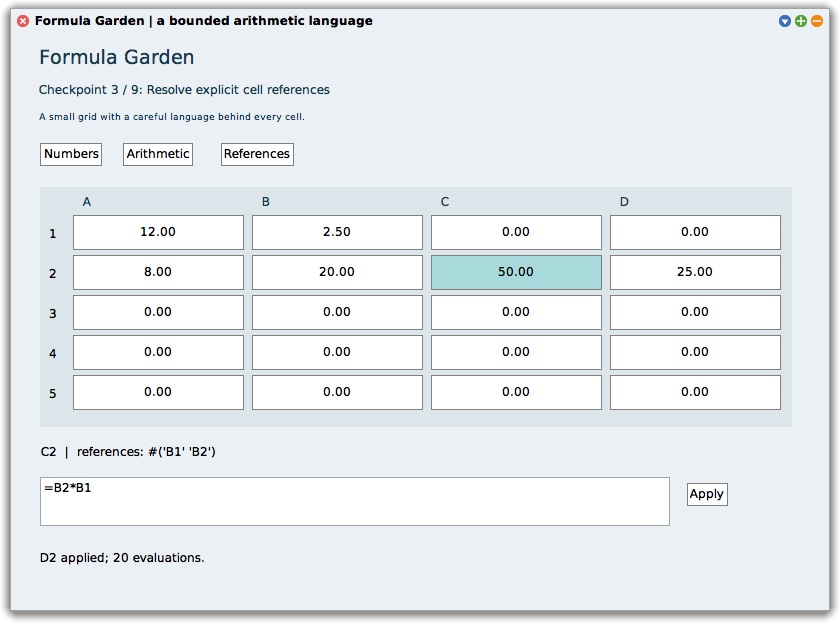
A primary expression may now be a cell name. The parser normalizes letters to uppercase, reads the row digits, and validates the complete name against the fixed grid. A1 and a1 refer to the same cell; A0, A10, Z9 and arbitrary identifiers produce #REF.
The parser records references while constructing #ref nodes. LFSheet retains that set separately from the tree, so the view can list direct dependencies and later recalculation can find dependents. Reading another cell calls the model's evaluator; it never performs a selector named by the source. Cells can refer to blank cells, which contribute zero.
Where to run this
System Browser, LFParser, instance side. The complete checkpoint installs this method and its supporting classes. Read or accept the method here; its definition is not a Workspace expression.
Construction code · follow the run instructions above
primary
 | result name |
 (self take: $() ifTrue: [
  result := self expression. (self take: $)) ifFalse: [self fail: 'Expected closing parenthesis']. ^ result].
 self peek isLetter ifTrue: [
  name := String with: self peek asUppercase. position := position + 1.
  [position <= source size and: [(source at: position) isDigit]] whileTrue: [name := name, (String with: (source at: position)). position := position + 1].
  (LFSheet validCell: name) ifFalse: [self error: '#REF: use A1 through D5'].
  references add: name. ^ self node: {#ref. name}].
 ^ self number
File in this checkpoint, then select the complete block in a Workspace and choose Do it (Ctrl+D / Cmd+D). The final expression returns the open app.
Native Squeak 6.1 checkpoint 03, captured after evaluating the exact Workspace block shown here.
04 · Cache a dependency diamond
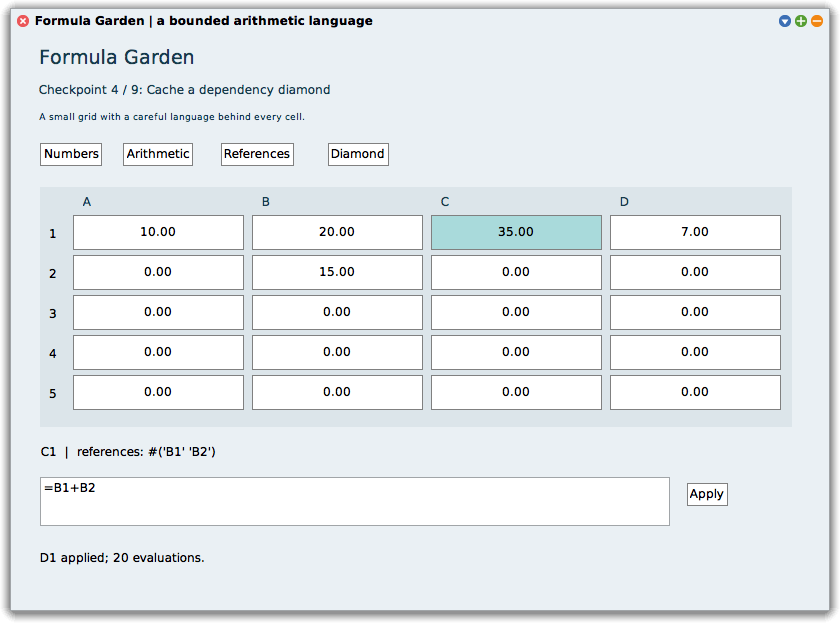
A1 feeds both B1 and B2, and those two branches meet at C1. A naive recursive evaluator recomputes shared ancestors. evaluateCell:path: first checks the current recursion path, then returns a cached value when one exists. A new value enters the cache only after its tree succeeds.
At this checkpoint each change clears the complete twenty-cell cache. The evaluator visits all cells in a stable order, but references can recursively request a cell before that outer traversal reaches it. The path set belongs to the current traversal; it is not a global visited set. A node reached through two independent branches is valid, while a node already on the active path is a cycle.
System Browser · LFSheet instance side · supporting method
evaluateTree: tree path: visiting
 | left right operator value |
 tree first = #number ifTrue: [^ tree second].
 tree first = #neg ifTrue: [^ (self evaluateTree: tree second path: visiting) negated].
 tree first = #ref ifTrue: [^ self evaluateCell: tree second path: visiting].
 left := self evaluateTree: tree third path: visiting. right := self evaluateTree: tree fourth path: visiting. operator := tree second.
 operator = $/ ifTrue: [right = 0 ifTrue: [self error: '#DIV0: denominator is zero']].
 value := operator = $+ ifTrue: [left + right] ifFalse: [operator = $- ifTrue: [left - right] ifFalse: [operator = $* ifTrue: [left * right] ifFalse: [left / right]]].
 value abs > 1.0e12 ifTrue: [self error: '#LIMIT: magnitude exceeds 1e12'].
 ^ value
Where to run this
System Browser, LFSheet, instance side. The complete checkpoint installs this method and its supporting classes. Read or accept the method here; its definition is not a Workspace expression.
Construction code · follow the run instructions above
evaluateCell: name path: visiting
 | result tree |
 (visiting includes: name) ifTrue: [self error: '#CYCLE: circular reference'].
 (values includesKey: name) ifTrue: [result := values at: name. result isString ifTrue: [self error: result]. ^ result].
 evaluations := evaluations + 1. tree := trees at: name. tree isString ifTrue: [self error: tree].
 visiting add: name. [result := self evaluateTree: tree path: visiting] ensure: [visiting remove: name].
 values at: name put: result. ^ result
File in this checkpoint, then select the complete block in a Workspace and choose Do it (Ctrl+D / Cmd+D). The final expression returns the open app.
The visiting check precedes the cache check so an active recursive dependency cannot impersonate a finished result
A cached error string is signaled again, allowing the same cause to propagate to downstream cells
ensure: removes the current name from the path even when a descendant signals an error
evaluateTree:path: interprets #number, #neg, #ref and #binary tags; it never uses evaluate:, perform: on input, or a compiler
The operator branch guards zero before division and checks the magnitude of every arithmetic result
The Workspace block constructs a diamond with sampleDiamond; selecting C1 makes its source and dependencies visible
The evaluations counter measures attempted cell computations. Error paths may attempt a cell more than once before its error is stored by the outer recalculation.
Expected result
A1=10, B1=20, B2=15, C1=35 and D1=7; C1 lists the two branches
Native Squeak 6.1 checkpoint 04, captured after evaluating the exact Workspace block shown here.
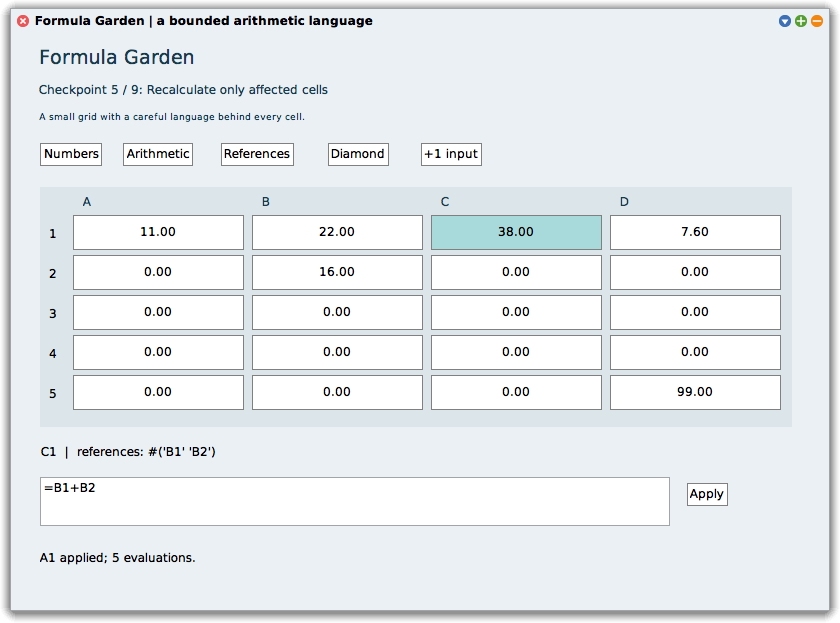
05 · Invalidate only the cells that depend on an edit
Changing A1 should recalculate the diamond while leaving D5 alone. affectedBy: starts with the edited name and repeatedly adds any cell that references a name already in the set. This is a small fixed-point calculation over a bounded twenty-cell graph. It includes transitive dependents and terminates even if a cycle exists.
recalculateFrom: removes only those cached entries, then evaluates the affected cells. The forward dependency set is replaced whenever a source changes: changing B1 from =A1 to a literal removes its old link. A malformed formula temporarily has no outgoing references because it has no usable tree; its own dependents still receive its error.
System Browser · LFSheet instance side · supporting method
recalculateFrom: changed
 evaluations := 0. lastAffected := self affectedBy: changed.
 lastAffected do: [:name | values removeKey: name ifAbsent: []].
 lastAffected do: [:name | [values at: name put: (self evaluateCell: name path: Set new)] on: Error do: [:error | values at: name put: error messageText]]
Where to run this
System Browser, LFSheet, instance side. The complete checkpoint installs this method and its supporting classes. Read or accept the method here; its definition is not a Workspace expression.
Construction code · follow the run instructions above
affected includes the starting cell even when nothing references it
anySatisfy: implements the reverse lookup: find cells whose forward references intersect the growing set
The loop stops once a complete pass adds no cells; the final array uses the fixed row-major order
recalculateFrom: invalidates every affected entry before reading any value, preventing stale ancestors from leaking into results
The Workspace block adds an unrelated D5 value, then bumpInput increments A1 and refreshes the dependent branch
This scans the small dependency table rather than maintaining a separate reverse index. That keeps the teaching code clear; a large sheet would use an indexed graph.
Expected result
C1 becomes 38.00 and D1 becomes 7.60 after A1 rises to 11; D5 remains 99.00, and five evaluations are reported
Native Squeak 6.1 checkpoint 05, captured after evaluating the exact Workspace block shown here.
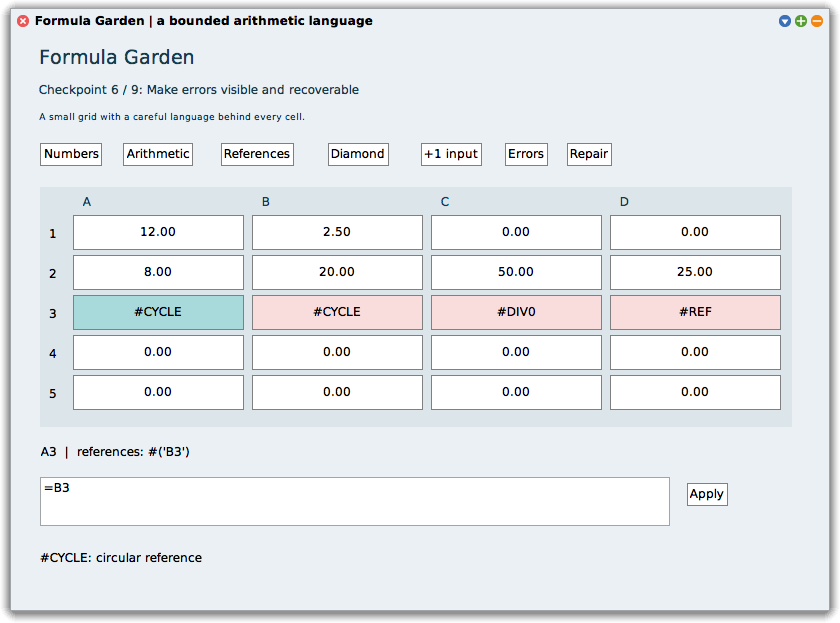
06 · Keep failures in the sheet and recover from them
An invalid expression is a cell result, not an application crash. set:at: normalizes a cell name, checks the source length, parses the text, and catches parser errors as displayable messages. It commits the source and dependency information together, then recalculates. Syntax and reference mistakes therefore stay visible in the editor. Oversized input is rejected before replacing the old source.
Evaluation distinguishes #CYCLE, #DIV0, #REF, #SYNTAX, #VALUE and #LIMIT messages. A cycle is detected by the active-path guard introduced with references, so no checkpoint can loop forever. Errors propagate along dependencies; replacing one member of a cycle with a number repairs every affected downstream value.
Where to run this
System Browser, LFSheet, instance side. The complete checkpoint installs this method and its supporting classes. Read or accept the method here; its definition is not a Workspace expression.
Construction code · follow the run instructions above
set: sourceText at: cell
 | name parser tree formula text |
 name := cell asUppercase.
 (self class validCell: name) ifFalse: [status := 'Rejected: use A1 through D5.'. ^ false].
 (sourceText isString and: [sourceText size <= 256]) ifFalse: [status := 'Rejected: maximum 256 characters; old cell retained.'. ^ false].
 text := sourceText withBlanksTrimmed.
 (raw at: name) = text ifTrue: [status := name, ' unchanged.'. ^ true].
 parser := LFParser new. formula := text notEmpty and: [text first = $=].
 [tree := text isEmpty ifTrue: [{#number. 0.0}] ifFalse: [
  formula ifTrue: [level < 2 ifTrue: [self error: '#SYNTAX: formulas arrive in checkpoint 2']. parser parse: text allButFirst]
   ifFalse: [parser parse: text]].
  (formula not and: [(self literalTree: tree) not]) ifTrue: [self error: '#VALUE: expressions must begin with =']]
 on: Error do: [:error | tree := error messageText].
 raw at: name put: text copy. trees at: name put: tree.
 dependencies at: name put: (tree isString ifTrue: [Set new] ifFalse: [text isEmpty ifTrue: [Set new] ifFalse: [parser references]]).
 self recalculateFrom: name. status := name, ' applied; ', evaluations printString, ' evaluations.'. ^ true
File in this checkpoint, then select the complete block in a Workspace and choose Do it (Ctrl+D / Cmd+D). The final expression returns the open app.
Input longer than 256 characters returns false before touching raw, trees, dependencies or values
withBlanksTrimmed normalizes surrounding whitespace; unchanged sources avoid an unnecessary recalculation
Only a leading = enables expression syntax. literalTree: accepts a numeric node with optional unary minus for ordinary number cells
A parser failure becomes an error string while the exact normalized source is kept for repair
Valid parse trees keep a detached set of references; malformed trees have an empty dependency set
The Workspace block creates a valid chain and four deliberate error cells. Click Repair to replace B3 with 7 and watch both cycle cells recover
A formula error is considered an accepted edit. A source-length rejection is not accepted: the editor retains the draft and blocks navigation until it is shortened.
Expected result
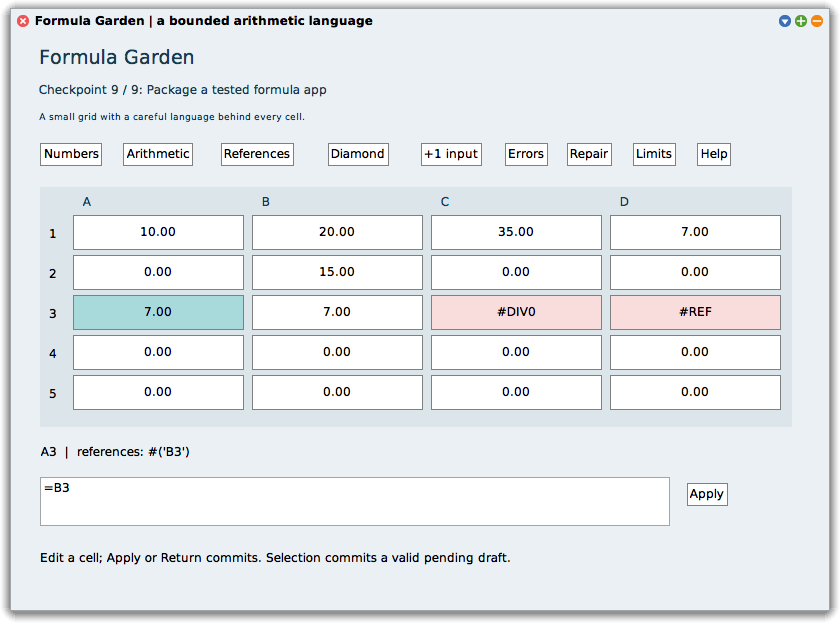
A3 and B3 display #CYCLE, C3 displays #DIV0 and D3 displays #REF; selecting an error reveals its message
Native Squeak 6.1 checkpoint 06, captured after evaluating the exact Workspace block shown here.
07 · Make native editing and navigation cooperate
PluggableTextMorph owns the current text buffer. acceptFormula: bridges its accept protocol to LFSheet and returns whether the model accepted the edit. Applying a malformed formula is allowed: the model stores its source and shows a cell error. Applying more than 256 characters returns false, leaving the editor marked as unaccepted.
selectCell: asks the old editor to accept before changing selection. If that accept fails, the current cell and draft remain in place. runAction: applies the same guard before toolbar examples. This draft protection exists from checkpoint 1; here we expose and test its Morphic boundary explicitly. The native cell buttons send selectCell: with their cell name as an argument.
System Browser · LFFormulaApp instance side · supporting method
acceptFormula: text
 | success | success := sheet set: text asString at: selected. self refresh. ^ success
System Browser · LFFormulaApp instance side · supporting method
System Browser, LFFormulaApp, instance side. The complete checkpoint installs this method and its supporting classes. Read or accept the method here; its definition is not a Workspace expression.
Construction code · follow the run instructions above
applyDraft sends accept to the native editor and refreshes the sheet
hasUnacceptedEdits stays true when acceptFormula: returns false, so selectCell: leaves the old selection intact
changed: #editText requests the newly selected source through editText; resetting the edit flag marks that buffer clean
runAction: treats Apply directly and gates other toolbar actions on a successful editor accept
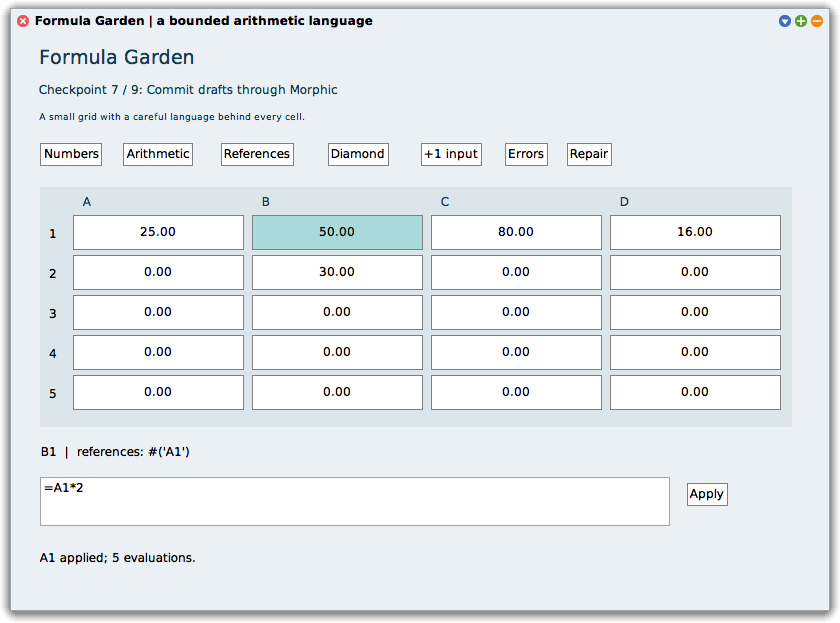
The Workspace block uses setDraft: to populate the real editor buffer and doButtonAction to exercise the same target/action route as clicking B1
The SUnit suite also dispatches real MouseButtonEvent objects through handleMouseDown: and handleMouseUp:, checking the model, selection and focus release
The editor is single-cell, not a grid text widget. The lesson intentionally omits multi-cell selection, clipboard tables and fill handles.
Expected result
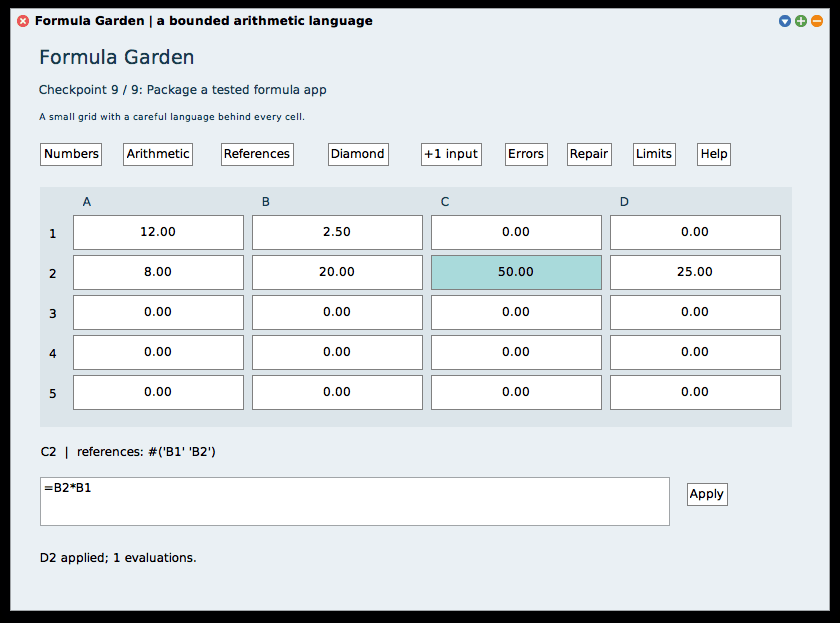
Clicking the B1 action commits A1=25; B1=50, B2=30, C1=80 and D1=16; B1 is selected
Native Squeak 6.1 checkpoint 07, captured after evaluating the exact Workspace block shown here.
08 · Bound every part of the input language
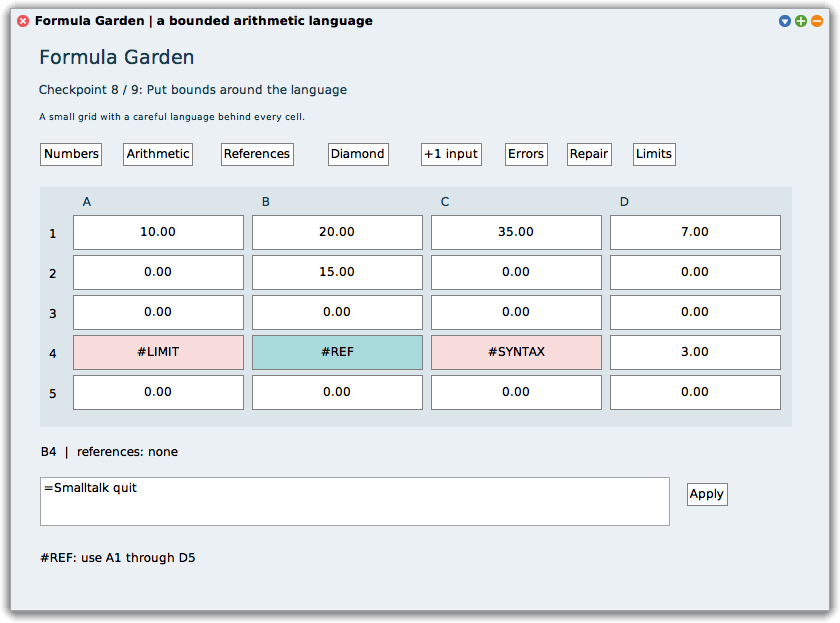
A safe grammar still needs resource limits. The parser accepts at most 256 characters, 128 syntax nodes, 32 nested unary or parenthesized levels, and 12 digits per numeric literal. A grid contains only twenty cells. Arithmetic uses floating point, and every binary result must stay within a magnitude of 1e12. These limits cap both parsing and dependency evaluation work.
The parse entry initializes all counters for each source, parses exactly one expression, skips trailing whitespace, and rejects leftover characters. node: owns the syntax-node budget. unary owns the depth budget and releases its counter with ensure:. This prevents deeply nested parentheses or a long series of signs from exhausting the call stack. No arbitrary compiler evaluation is used for cell sources.
System Browser · LFParser instance side · supporting method
System Browser, LFParser, instance side. The complete checkpoint installs this method and its supporting classes. Read or accept the method here; its definition is not a Workspace expression.
Construction code · follow the run instructions above
parse: aString
 | tree |
 aString size > 256 ifTrue: [self error: '#LIMIT: 256 characters'].
 source := aString. position := 1. depth := 0. nodes := 0. references := Set new.
 tree := self expression. self skipSpaces.
 position <= source size ifTrue: [self fail: 'Unexpected character'].
 ^ tree
File in this checkpoint, then select the complete block in a Workspace and choose Do it (Ctrl+D / Cmd+D). The final expression returns the open app.
All parser state is reset before reading a new source, so a previous failure cannot leave stale references or counters
Checking the final position rejects trailing tokens instead of quietly accepting a prefix
node: centralizes the 128-node limit, covering numbers, references, negations and binary operations
unary increments nesting before recursion and decrements it on both success and error
The Workspace block deliberately tries a huge product, a Smalltalk-looking identifier, a missing parenthesis and a valid decimal expression
Values use Float arithmetic and are displayed to two decimal places; this is a language and UI lesson, not a financial spreadsheet. There are no functions, file access, network operations or external references in formulas.
Expected result
A4 shows #LIMIT, B4 shows #REF, C4 shows #SYNTAX and D4 safely evaluates to 3.00
Native Squeak 6.1 checkpoint 08, captured after evaluating the exact Workspace block shown here.
09 · Package the app with behavior tests
The final source installs the parser, model, view and fixed window. The separate SUnit file exercises grammar, precedence, caching, graph changes, cycles, downstream error recovery, resource bounds, editor rejection, toolbar actions, real mouse routing and native close cancellation. The nine checkpoint scripts and every exercise are also run in separate unsaved launches of the official Squeak image.
The display method below keeps presentation at the edge: it shortens an error to its stable tag for the grid and formats successful numbers to two decimals. The selected cell retains its complete formula in the editor and its error detail beneath it. Closing asks before discarding this in-memory practice sheet; Cancel preserves even an unaccepted draft.
System Browser · LFFormulaApp instance side · supporting method
okToClose
 ^ self confirm: 'Close this practice sheet? Its cells are kept only in this window.'
System Browser · LFFormulaApp instance side · supporting method
windowIsClosing
 window := nil
Where to run this
System Browser, LFFormulaApp, instance side. The complete checkpoint installs this method and its supporting classes. Read or accept the method here; its definition is not a Workspace expression.
Construction code · follow the run instructions above
displayValue: value
 value isString ifTrue: [^ value copyUpTo: $:]. ^ value printShowingDecimalPlaces: 2
File in this checkpoint, then select the complete block in a Workspace and choose Do it (Ctrl+D / Cmd+D). The final expression returns the open app.
displayValue: tests the model result type; it never changes or rounds the stored numeric value
copyUpTo: $: keeps grid errors compact while refresh displays the full selected error in the status line
okToClose delegates the final decision to a native confirmation dialog; windowIsClosing clears the stale window reference only after closure
The Workspace cascade fills the diamond, adds failures, repairs the cycle, then displays the editing guidance
For the full suite, file in LearningFormulaTests.st after LearningFormula.st and run LFFormulaTest in Squeak TestRunner
The sheet lives only in its window. Closing discards it after confirmation. Save the downloadable source to recreate the app; no file persistence is claimed.
Expected result
The complete app displays a dependency diamond, a repaired A3/B3 pair of 7.00 values and remaining division/reference errors
Native Squeak 6.1 checkpoint 09, captured after evaluating the exact Workspace block shown here.
Watch the workflow
Every screenshot and animation frame is exported from the real Squeak Morphic window. Animations use scripted editor buffers, native button actions and dispatched MouseButtonEvent objects; they are not browser recreations or human screen recordings.
NATIVE SQUEAK CAPTURE
Scripted native Squeak execution: build a dependency diamond, commit an editor draft with a real cell click, then recalculate only its five affected cells.
NATIVE SQUEAK CAPTURE
Scripted native Squeak execution: show cycle/division/reference errors, repair a cycle, reject an oversized editor draft without losing it, then apply a valid correction.
Practice with tested solutions
1. Build an average and update its input
Put three readings in A1, A2 and A3. Compute their average in B1, double that average in C1, then change the middle reading. Assert the new results.
Replacing a source replaces its dependency set. C1 still depends on B1, but there is no longer a path from A1 to either B1 or C1.
The exact solutionRun block was evaluated in a fresh Squeak 6.1 launch; every assertion passed.
3. Repair a cycle and its downstream error
Create a two-cell cycle and a dependent total. Assert that the total reports a cycle. Break the loop by setting one member to 7, then assert that all three cells recover.
The affected closure includes every cell in the old cycle and its descendants. Once B1 becomes a literal, reevaluation follows an acyclic dependency path.
The exact solutionRun block was evaluated in a fresh Squeak 6.1 launch; every assertion passed.
When something looks wrong
Typing changes the editor but not the cells
Choose Apply or press Return. Selecting another cell also accepts the current draft. An oversized draft remains in the editor and blocks navigation until shortened.
A cell shows an error tag
Select it to inspect the source and full error message. Formula expressions need a leading =. References must be A1-D5. Repair the source and apply it; dependents update automatically.
The test class is missing
File in LearningFormulaTests.st after the complete application source, then refresh the TestRunner class list.
Verification, cleanup and next steps
49 SUnit tests passed on Squeak 6.1 with zero failures or errors. All nine exact checkpoint blocks and three exact exercise solutions passed in fresh launches.