The separate playground loads the real Smalltalk image on demand. This lesson keeps its native setup instructions; browser compatibility notes appear beside each demo.
Before you start
Build a native grid of editable cells, validate each draft, total integer cents, sort by stable identity, and round-trip a bounded CSV format.
Save a copy of your Squeak image first. Each numbered .st file is a complete cumulative checkpoint that can be filed into a fresh Squeak 6.1 image.
Download the checkpoint beside your image. In File List, select it and choose fileIn. The method excerpt below is for the System Browser; it is already installed by the file. The separate Workspace block opens the exact demonstrated state.
Close the previous checkpoint window before moving to the next. The app uses a fixed-size SystemWindow; its rows and appointment lists scroll. File the final app before its test source, then use Test Runner to run LQExpenseTests.
All examples use fictional data and local files. Snapshot examples create UUID-named new files beside your image. Keep any snapshots you want; no example overwrites a previous snapshot.
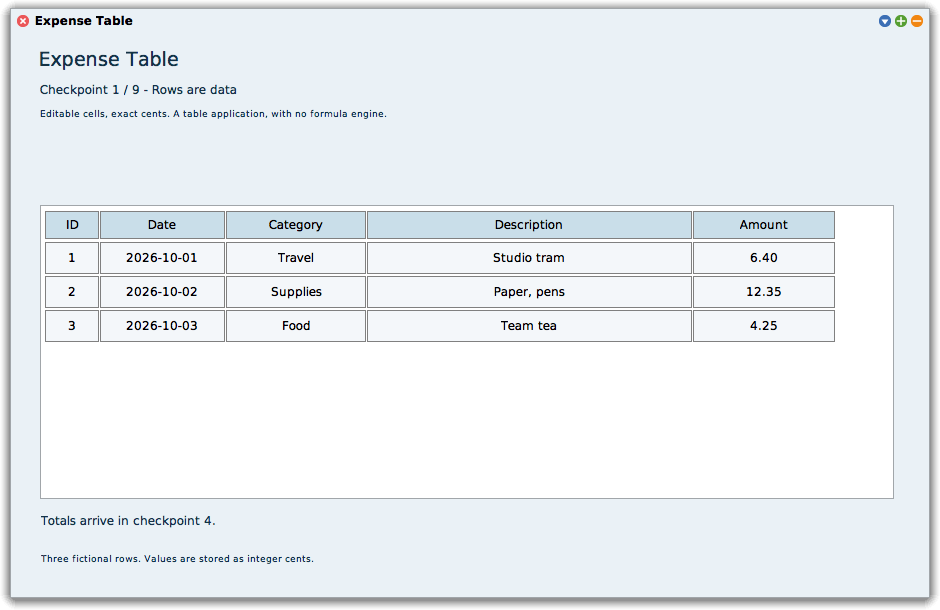
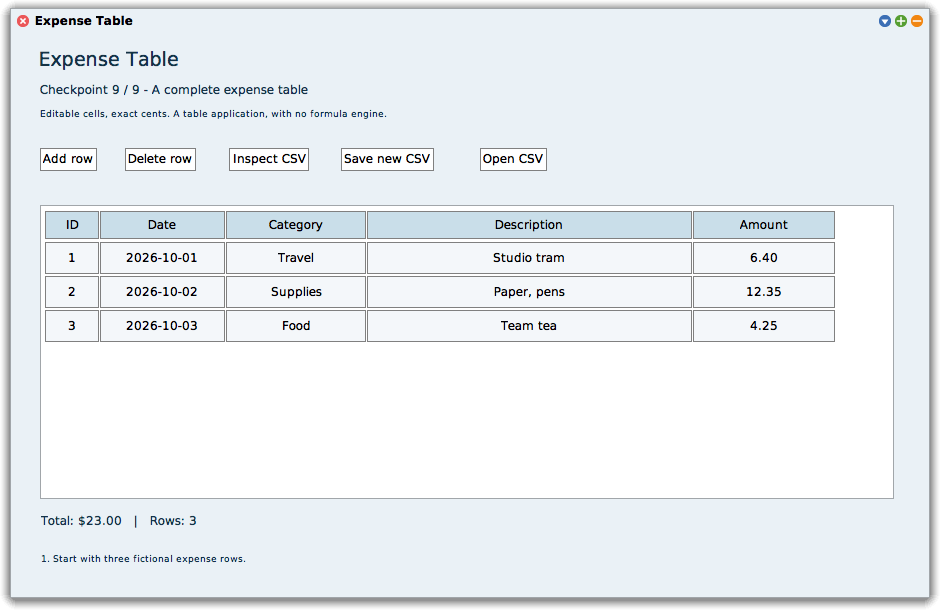
The book owns an ordered collection of five-element arrays: ID, date text, category, description, and integer cents. The view builds one native button for each cell, so the table has a real row and column structure. A sample population method adds three fictional purchases when the window opens. The ID is created once and stays with the record; a screen row number is only a temporary position.
Where to run this
System Browser, LQExpenseBook, instance side. Find the method beginning initialize. This excerpt is already installed by checkpoint 01; do not paste a method definition into Workspace.
Construction code · follow the run instructions above
initialize
 super initialize.
 rows := OrderedCollection new.
 nextId := 1.
 selectedId := nil.
 sortColumn := 1.
 ascending := true.
 dirty := false.
 status := 'Fictional expenses. Click a cell to edit at checkpoint 2.'.
 io := LQCalendarTableIO new
After filing in this checkpoint, evaluate the complete block in Workspace with Do it (Ctrl+D / Cmd+D). It returns the app.
Workspace · run after installing this checkpoint
LQExpenseApp open
nextId creates monotonically increasing row keys
rows deepCopy prevents callers from changing the stored arrays by accident
The first checkpoint can select an ID; subsequent checkpoints unlock editing and sorting
Amounts are stored as cents from the first checkpoint, even before the total is displayed. This is an expense table with dialog-based cell editing, not a spreadsheet formula engine.
Expected result
Three fictional rows appear, with ID, Date, Category, Description, and Amount columns.
Native Squeak 6.1 checkpoint 01, rendered after executing the exact Workspace block above.
02 · Edit one cell
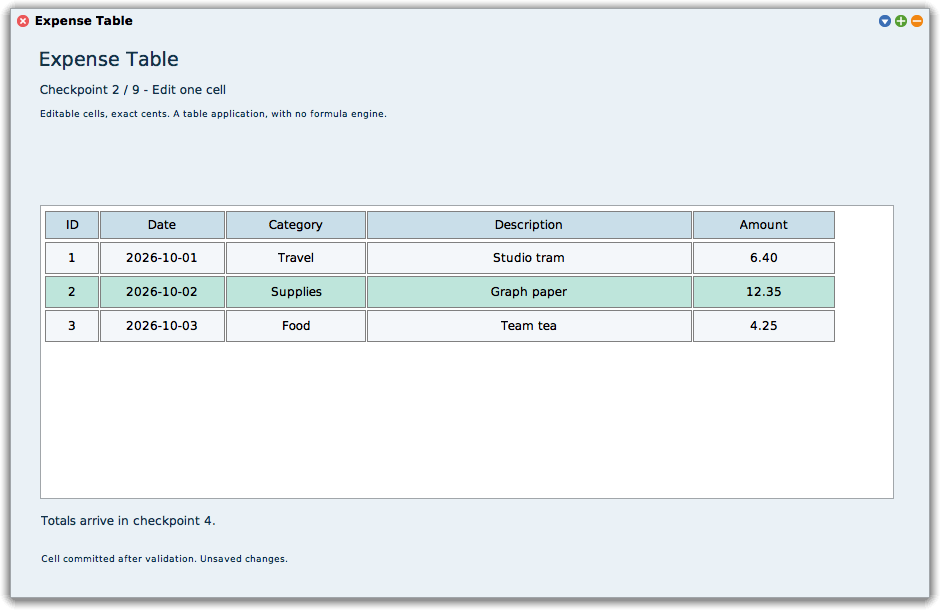
A cell button sends its permanent ID and column number to the app. The app asks for a replacement string with the existing value prefilled. The model copies the four editable values into a draft and replaces one draft field. Only after the whole draft validates does it replace the original row. Cancelling produces nil, which is distinct from an empty string. IDs are deliberately read-only.
Where to run this
System Browser, LQExpenseBook, instance side. Find the method beginning editId:. This excerpt is already installed by checkpoint 02; do not paste a method definition into Workspace.
Construction code · follow the run instructions above
editId: id column: column text: text
 | original fields draft |
 text ifNil: [status := 'Edit cancelled. The cell is unchanged.'. ^ false].
 (column between: 2 and: 5) ifFalse: [status := 'ID is read-only.'. ^ false].
 original := self rowId: id.
 original ifNil: [status := 'Row no longer exists.'. ^ false].
 fields := {original second. original third. original fourth. self money: original fifth}.
 fields at: column - 1 put: text.
 draft := self draftDate: fields first category: fields second description: fields third amount: fields fourth.
 draft ifNil: [^ false].
 rows at: (rows indexOf: original) put: ({id}, draft).
 selectedId := id.
 dirty := true.
 status := 'Cell committed after validation. Unsaved changes.'.
 ^ true
After filing in this checkpoint, evaluate the complete block in Workspace with Do it (Ctrl+D / Cmd+D). It returns the app.
The original record is looked up by ID, not by its current sorted position
column - 1 maps the table column into the four-field draft
The single rows at:put: message is the commit point
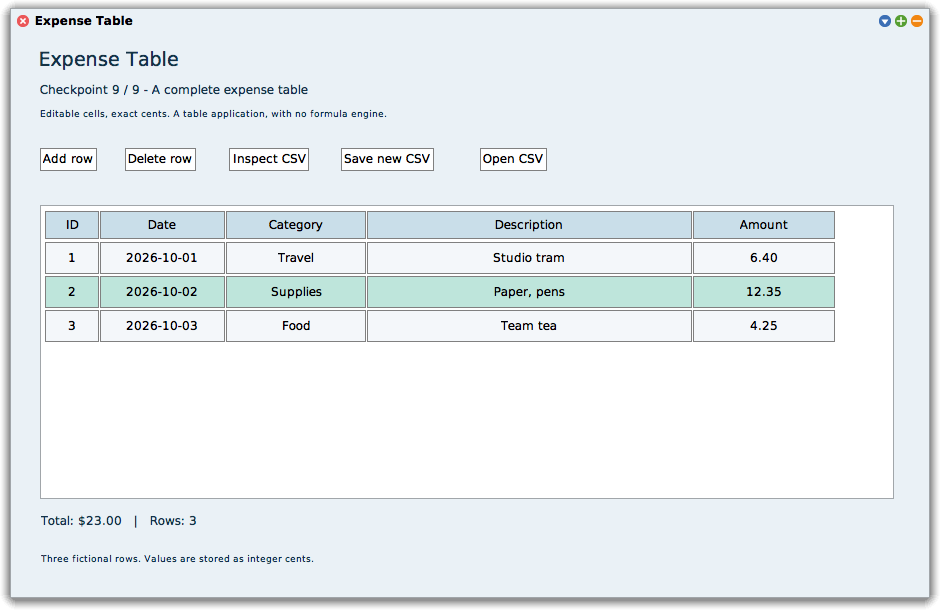
Click any Date, Category, Description, or Amount cell to edit. Click its ID to select without opening a dialog. Cancel keeps its value; an empty required cell is rejected.
Expected result
Row 2 now says Graph paper and is highlighted as the selected row.
Native Squeak 6.1 checkpoint 02, rendered after executing the exact Workspace block above.
03 · Validate the draft
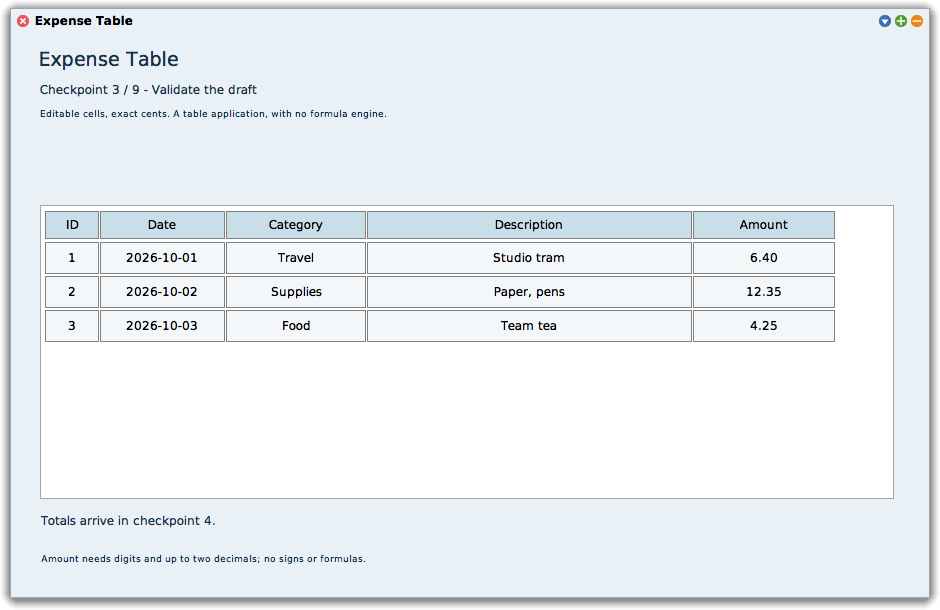
The same validator handles Add, cell edits, and CSV import. It trims surrounding blanks, validates an actual Gregorian date, bounds text, and converts an amount into integer cents. Parsing the amount examines digits and decimal places; it never evaluates Smalltalk. Text beginning with an equals sign is rejected in the amount column because formulas are outside this app’s scope.
Where to run this
System Browser, LQExpenseBook, instance side. Find the method beginning draftDate:. This excerpt is already installed by checkpoint 03; do not paste a method definition into Workspace.
Construction code · follow the run instructions above
draftDate: dateText category: categoryText description: descriptionText amount: amount
 | cents date category description |
 date := dateText withBlanksTrimmed.
 category := categoryText withBlanksTrimmed.
 description := descriptionText withBlanksTrimmed.
 (io dateFrom: date) ifNil: [status := 'Use a real date: YYYY-MM-DD, years 1900-2100.'. ^ nil].
 (io oneLine: category max: 18) ifFalse: [status := 'Category needs 1-18 printable ASCII characters.'. ^ nil].
 (io oneLine: description max: 48) ifFalse: [status := 'Description needs 1-48 printable ASCII characters.'. ^ nil].
 cents := self centsFrom: amount.
 cents ifNil: [status := 'Amount needs digits and up to two decimals; no signs or formulas.'. ^ nil].
 ^ {date. category. description. cents}
After filing in this checkpoint, evaluate the complete block in Workspace with Do it (Ctrl+D / Cmd+D). It returns the app.
dateFrom: rejects impossible dates instead of allowing normalization into the following month
Category is 1-18 printable ASCII characters and description is 1-48
Invalid data updates a status message while preserving records, IDs, selection, and dirty state
Supported dates are 1900-01-01 through 2100-12-31. Amounts are nonnegative digits with zero, one, or two decimal places, up to 9,999,999.99. Currency symbols, commas, exponents, and negative refunds are excluded.
Expected result
The amount formula attempt is rejected, and the original 6.40 remains in row 1.
Native Squeak 6.1 checkpoint 03, rendered after executing the exact Workspace block above.
04 · Exact cents and totals
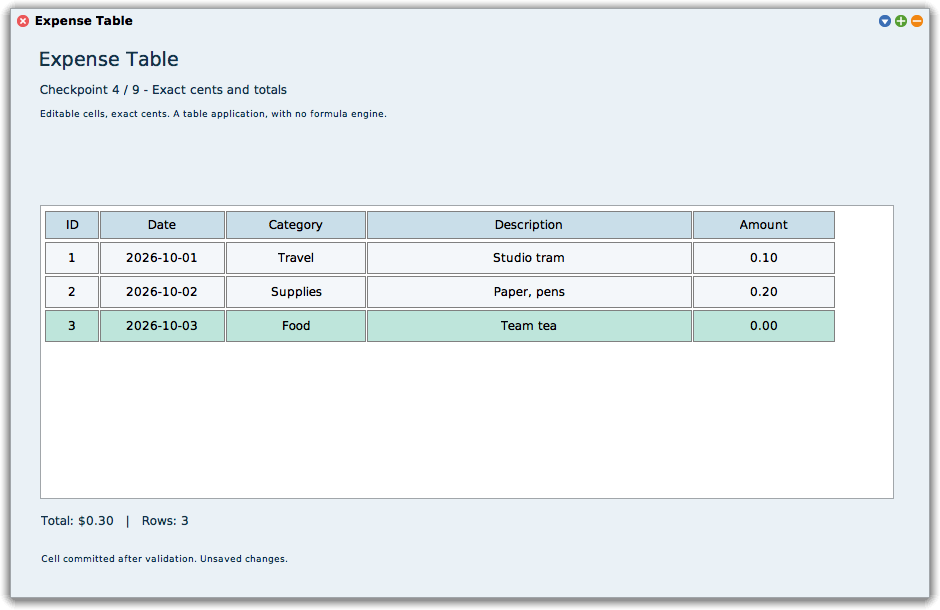
Decimal currency inputs become integers before they enter a row. Summing 10 and 20 cents produces exactly 30 cents; it never depends on binary floating-point approximations. inject:into: folds the row collection into one accumulator. The display divides whole dollars from the remainder and pads cents to two digits, without changing the underlying value.
Where to run this
System Browser, LQExpenseBook, instance side. Find the method beginning totalCents. This excerpt is already installed by checkpoint 04; do not paste a method definition into Workspace.
Construction code · follow the run instructions above
The accumulator starts at integer zero, so an empty table totals zero
row fifth is the integer-cents field
The run block changes the three amounts to 0.10, 0.20, and 0.00
The dollar sign is a display convention for this fictional one-currency exercise. There is no currency conversion, tax model, accounting advice, or financial account connection.
Native Squeak 6.1 checkpoint 04, rendered after executing the exact Workspace block above.
05 · Sort without losing identity
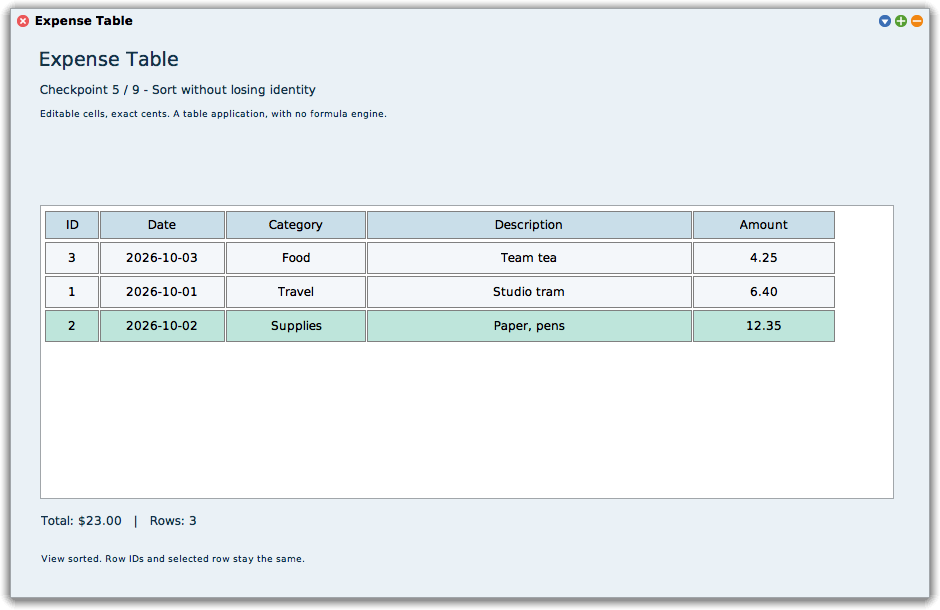
Sorting returns a new ordered view of existing records. Numeric amounts compare as integers, dates compare correctly because their fixed-width ISO representation sorts chronologically, and text compares case-sensitively. Clicking a column header selects ascending order; clicking it again reverses direction. Equal values use ascending ID as a deterministic tie-breaker. Sorting never changes the selected ID or the saved row order.
Where to run this
System Browser, LQExpenseBook, instance side. Find the method beginning visibleRows. This excerpt is already installed by checkpoint 05; do not paste a method definition into Workspace.
Construction code · follow the run instructions above
visibleRows
 ^ (rows asSortedCollection: [:a :b | | left right |
  left := a at: sortColumn. right := b at: sortColumn.
  left = right ifTrue: [a first <= b first]
   ifFalse: [ascending ifTrue: [left < right] ifFalse: [left > right]]]) asArray
After filing in this checkpoint, evaluate the complete block in Workspace with Do it (Ctrl+D / Cmd+D). It returns the app.
Native Squeak 6.1 checkpoint 05, rendered after executing the exact Workspace block above.
06 · Add and delete rows
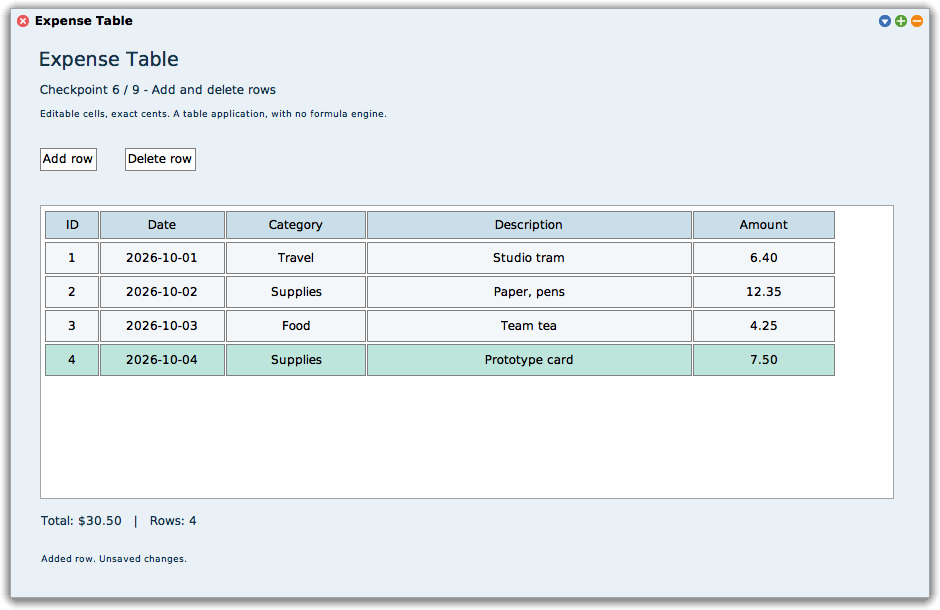
Add uses four native request dialogs. Each answer stays in local variables until every prompt completes, so cancelling the last dialog cannot leave an incomplete row in the collection. A valid draft goes through the same model validator as cell editing. Delete acts on the selected ID and asks before removal; a cancelled deletion preserves both selection and data.
Where to run this
System Browser, LQExpenseApp, instance side. Find the method beginning askForRow. This excerpt is already installed by checkpoint 06; do not paste a method definition into Workspace.
Construction code · follow the run instructions above
Native Squeak 6.1 checkpoint 06, rendered after executing the exact Workspace block above.
07 · Quote CSV correctly
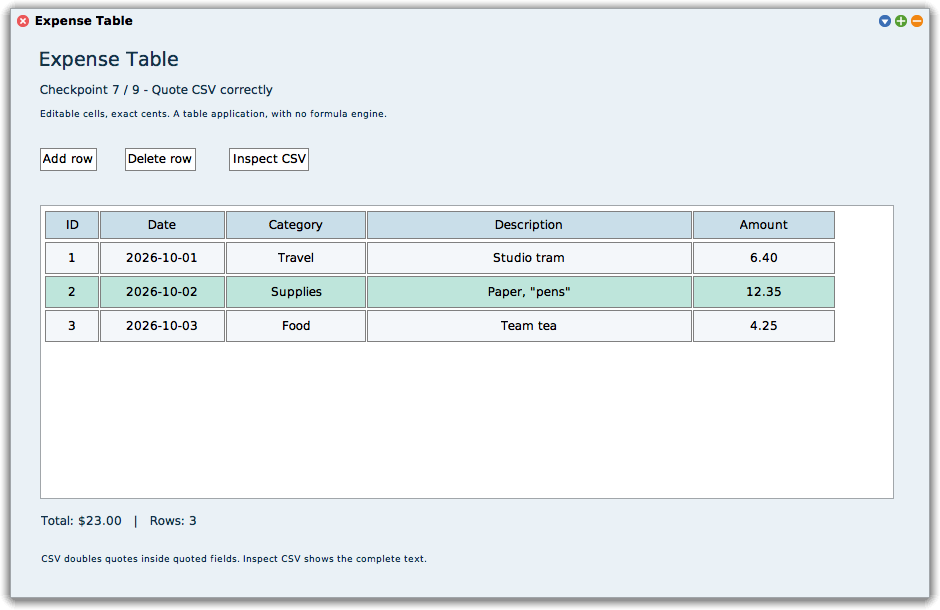
CSV fields can contain commas and double quotes, so joining strings with commas is not enough. This serializer quotes every field and doubles each embedded quote. The header is fixed and unquoted. Rows are one physical line each, and the parser accepts CR, LF, or CRLF row endings. Printable ASCII field limits exclude multiline fields, tabs, and other control characters. This deliberately bounded dialect is described so importing is predictable.
Where to run this
System Browser, LQExpenseBook, instance side. Find the method beginning serialized. This excerpt is already installed by checkpoint 07; do not paste a method definition into Workspace.
Construction code · follow the run instructions above
csvLine: quotes every value, including IDs and amounts
quote: turns one literal quote into two quotes inside a quoted field
parseLine: uses start, plain, quoted, and closed states and rejects text after a closing quote
The parser accepts quoted or unquoted fields, empty fields at the syntax level, and doubled quotes. Model validation still rejects empty required cells. It rejects unmatched quotes, quote characters inside unquoted fields, malformed IDs, duplicate IDs, and extra columns. The text is never evaluated.
Expected result
Row 2 displays Paper, "pens"; Inspect CSV opens a native Inspector on the serialized string.
Native Squeak 6.1 checkpoint 07, rendered after executing the exact Workspace block above.
08 · Save and load snapshots
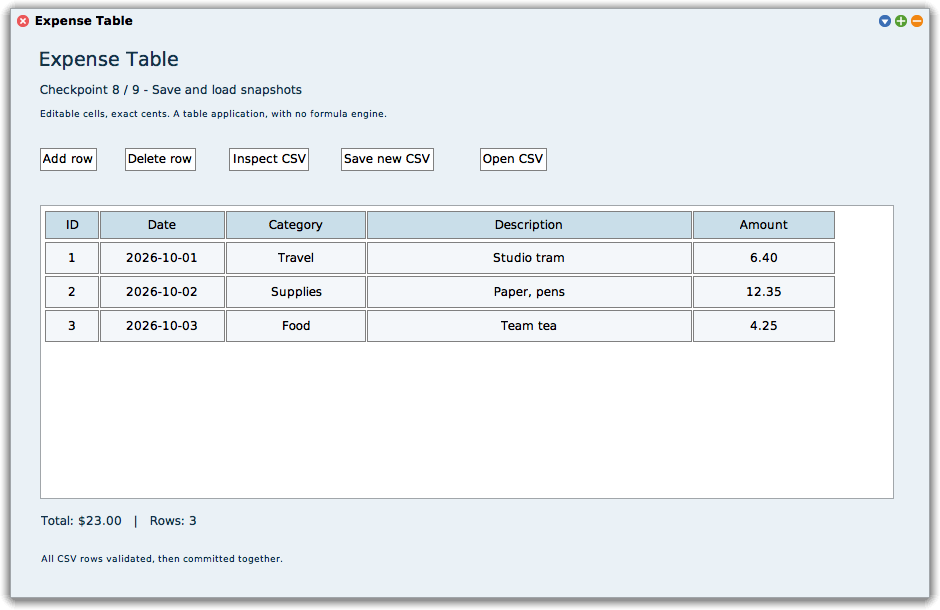
Import first checks the exact five-column header and then builds a temporary collection. Every ID must be positive, at most nine digits, and unique. Every data field passes the same validator as interactive editing. A bad last row returns before the final assignment, preserving the current table. Save creates a new snapshot through a temporary sibling file and refuses an existing destination file or directory.
Where to run this
System Browser, LQExpenseBook, instance side. Find the method beginning importCSV:. This excerpt is already installed by checkpoint 08; do not paste a method definition into Workspace.
Construction code · follow the run instructions above
importCSV: text replaceUnsaved: confirmed
 | input temporary fields id draft largest |
 text ifNil: [status := 'Read failed or cancelled. Table kept.'. ^ false].
 (dirty and: [confirmed not]) ifTrue: [status := 'Import cancelled. Unsaved table kept.'. ^ false].
 input := text readStream.
 input nextLine = 'id,date,category,description,amount' ifFalse: [status := 'Wrong CSV header. Table kept.'. ^ false].
 temporary := OrderedCollection new. largest := 0.
 [input atEnd] whileFalse: [
  fields := io parseLine: input nextLine.
  (fields isNil or: [fields size ~= 5]) ifTrue: [status := 'Malformed CSV row. Table kept.'. ^ false].
  ((io digits: fields first) and: [fields first size <= 9]) ifFalse: [status := 'Bad row ID. Table kept.'. ^ false].
  id := fields first asNumber.
  (id < 1 or: [temporary anySatisfy: [:row | row first = id]]) ifTrue: [status := 'Invalid or duplicate ID. Table kept.'. ^ false].
  draft := self draftDate: fields second category: fields third description: fields fourth amount: fields fifth.
  draft ifNil: [^ false].
  temporary add: ({id}, draft). largest := largest max: id].
 rows := temporary. nextId := largest + 1. selectedId := nil. dirty := false.
 status := 'All CSV rows validated, then committed together.'.
 ^ true
After filing in this checkpoint, evaluate the complete block in Workspace with Do it (Ctrl+D / Cmd+D). It returns the app.
temporary is separate from rows until the entire file is valid
nextId becomes one larger than the greatest imported ID
dirty becomes false only after a successful save or complete import
The run writes a new lq-expenses-UUID.csv beside the image on each execution. The UI asks before replacing unsaved data on Open. Save never overwrites a prior snapshot. Ordinary write/install failures clean up temporary bytes and preserve dirty state; simultaneous writers and crash-proof durability are outside this example.
Expected result
A uniquely named CSV snapshot is written and loaded; the original three rows are intact.
Native Squeak 6.1 checkpoint 08, rendered after executing the exact Workspace block above.
09 · A complete expense table
The app is a SystemWindow model. Its normal close action asks okToClose; a clean table closes immediately, while a dirty one asks whether to discard. Cancelling keeps the window and records intact. The final tests combine model invariants with app-level cancellation, fixed sizing, and window closing, so the guard is tested through the actual SystemWindow path.
Where to run this
System Browser, LQExpenseApp, instance side. Find the method beginning okToClose. This excerpt is already installed by checkpoint 09; do not paste a method definition into Workspace.
Construction code · follow the run instructions above
okToClose
 ^ book isDirty not or: [self confirm: 'Close and discard unsaved tutorial data?']
After filing in this checkpoint, evaluate the complete block in Workspace with Do it (Ctrl+D / Cmd+D). It returns the app.
isDirty is true after successful additions, edits, and deletions
A failed save never clears dirty
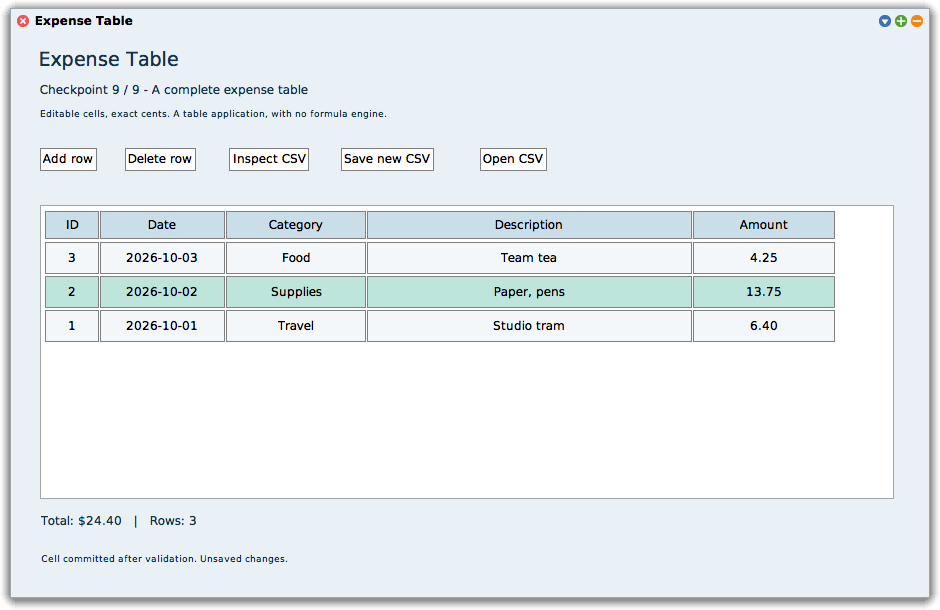
The example changes row 2 after sorting by category, demonstrating identity through a view change
Save a new snapshot before closing if you want to keep your fictional data. Direct developer deletion can bypass normal application safeguards. This app has no formulas, undo history, multiple sheets, or external account access.
Expected result
ID 2 is highlighted after its amount becomes 13.75; the new total is $24.40.
Native Squeak 6.1 checkpoint 09, rendered after executing the exact Workspace block above.
Watch the workflow
These are real Squeak 6.1 Morphic renders. The demonstrations replay app messages; they are not screen recordings of a person typing. Each poster is the first native frame of its matching GIF.
NATIVE SQUEAK CAPTURE
Native scripted frames: edit a cell, sort amounts, then edit the same permanent row ID in its new position.
NATIVE SQUEAK CAPTURE
Native scripted frames: reject an invalid edit, cancel a cell edit, save a new snapshot, then load it.
Practice with tested solutions
1. Add a fractional expense
Add a fourth fictional expense for 0.05 and prove that the total becomes exactly 2305 cents.
Show a tested solution
File in the final app source, then evaluate this exact complete Workspace block with Do it. The assertion is part of the solution.
Store identity independently from display position. Numeric sorting does not rewrite the IDs.
This exact block was executed in the reference image; the harness also checked the returned model state.
3. Prove a bad import is transactional
Append an invalid amount in a later CSV row and assert that importing it preserves every current record.
Show a tested solution
File in the final app source, then evaluate this exact complete Workspace block with Do it. The assertion is part of the solution.
Exercise solution
| app before accepted bad |
app := LQExpenseApp open.
before := app book rows.
bad := app book serialized, '4,2026-10-04,Food,Lunch,not-money', String cr.
accepted := app book importCSV: bad replaceUnsaved: true.
(accepted not and: [app book rows = before]) ifFalse: [self error: 'Bad import mutated data'].
app refresh.
app
Expected
The original three rows remain, with an amount-validation message.
Valid earlier rows were added only to a temporary collection, so rejecting the last row is safe.
This exact block was executed in the reference image; the harness also checked the returned model state.
When something looks wrong
A method gives a syntax error in Workspace
File in the complete checkpoint. Method definitions belong on the named class and side in System Browser. Only the separate run block belongs in Workspace.
Save refuses my filename
Choose a new name in an existing writable folder. The snapshot writer refuses existing files and directories; it never replaces them.
The table or appointment list looks stale after a Workspace edit
Send refresh to the app after changing its book. Native buttons do this automatically.
Verification, cleanup and next steps
Every displayed method excerpt was recompiled in its named class. Every exact Workspace stage and exercise solution was executed in Squeak 6.1. Screenshots and GIF frames come from native Morphic window imageForm renders, produced by scripted messages to the running apps.
35 SUnit tests passed in Squeak 6.1 with zero failures and errors. Nine independently loaded checkpoints, nine method excerpts, nine exact run blocks, and three exact exercise solutions were also executed.
Close tutorial windows through their close boxes. Keep source and useful snapshots separately from your image. If you remove practice snapshots later, delete only the lq-expenses-UUID.csv or lq-calendar-UUID.csv files that this lesson created.