Turn prime-number discovery into an observable native Squeak application with honest candidate states, one-event stepping and a visible stopping proof.
8 construction stagesTested source & checkpointsNative screenshots & demos
Before you start
Build Sieve Lab in eight cumulative runnable checkpoints. Start with the integers 2..N, distinguish prime from composite, cross multiples from p squared, animate a resumable model, then prove when the remaining candidates are prime.
Each checkpoint .st is a complete cumulative file-in. Install it with File List, accept the highlighted complete Browser methods, then evaluate the exact Workspace block. Run checkpoints independently in a clean Squeak 6.1 image or progress forward in order.
Squeak 6.1 with bundled Morphic and SUnit; no external packages, accounts or network data
Workspace Do It / Print It, Browser Accept, Arrays, blocks, loops and one-based indexing
Use a copy of your learning image; close the previous Sieve Lab window before installing another checkpoint.
File List → select the downloaded checkpoint .st → fileIn. Chunk delimiters belong in File List, not Workspace.
Accept only the displayed complete methods on the named instance side. Select the entire temporary-declaring Workspace block when running it.
File-in adds or replaces methods; it does not remove later methods. Revisit earlier checkpoints in a clean image.
N is an inclusive integer bound from 10 through 200. Presets are 10, 30, 100 and 200. Invalid bounds are rejected atomically.
Optional prime-sieve-launch-NN.st files evaluate each exact Workspace block after that checkpoint is installed.
Install prime-sieve-final.st before prime-sieve-tests.st. Print It: LPSieveTest suite run. The two exercise files are extensions installed after final source.
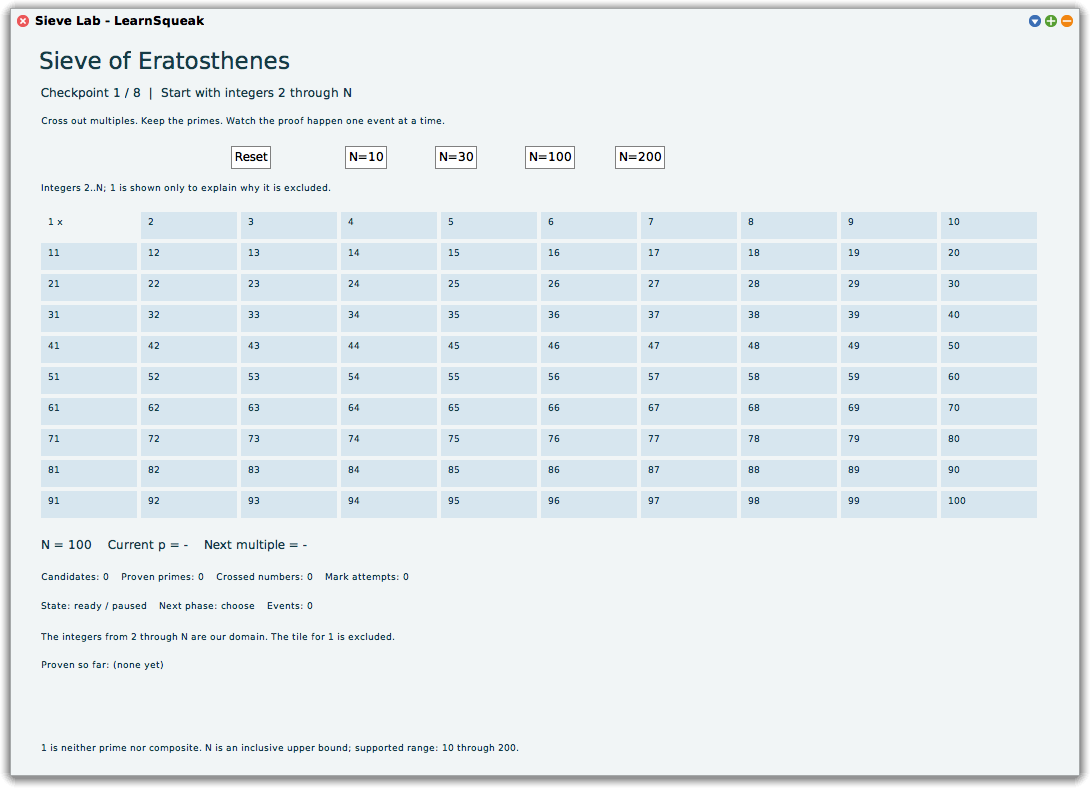
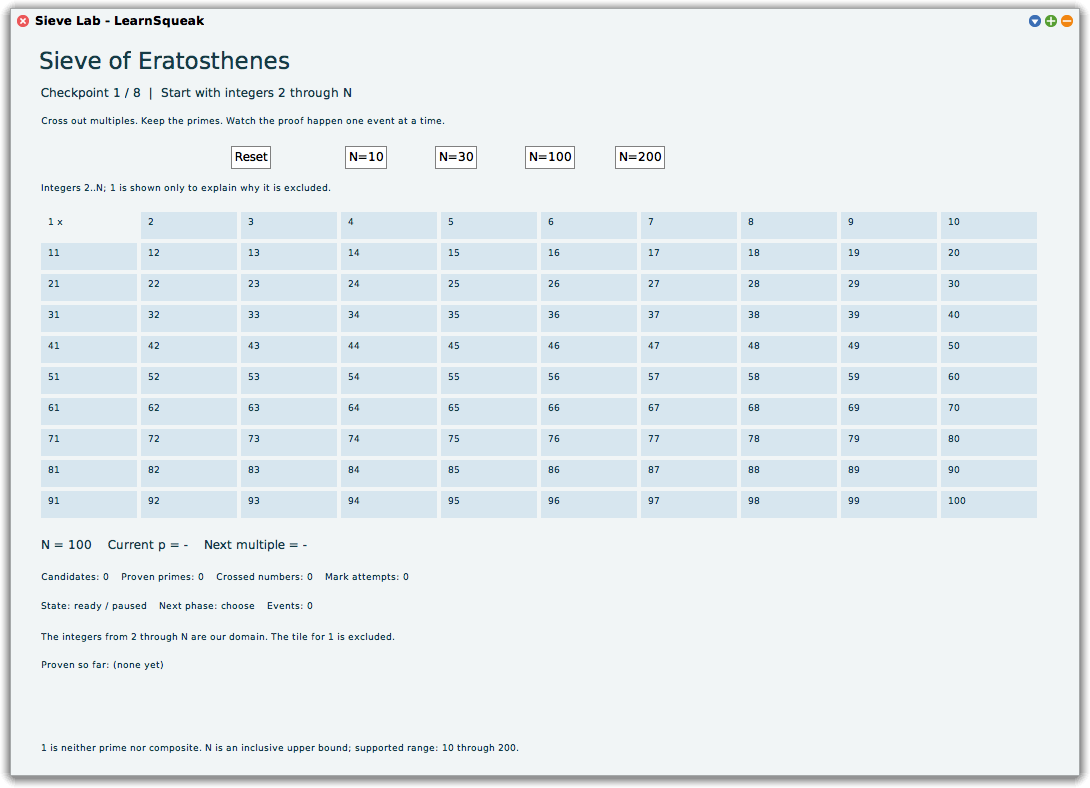
A sieve begins with a finite domain: every integer from 2 through an inclusive upper bound N. For N = 100 that is 99 numbers. The extra tile labeled 1 x is a teaching reminder, not a candidate. Changing N rebuilds the same domain; no input is silently rounded or clamped.
LPSieve owns the numbers and algorithm state. LPGrid draws a snapshot of that state, and LPApp connects native buttons to model messages. LPWindow keeps the teaching layout at a fixed size. Keeping arithmetic out of drawOn: means repainting cannot accidentally advance the algorithm. A model can also be tested without opening a window.
validLimit: accepts only integers from 10 through 200. loadLimit: validates before changing the model, so a rejected input preserves the old limit and progress. The presets are 10, 30, 100 and 200; the model also accepts every integer between them. numbers returns a new Array, so modifying that returned collection cannot alter the model. The visual bound keeps every cell legible; the sieve itself is not mathematically limited to 200.
At this first checkpoint the cells represent numbers only. No prime/composite inference has been made, so the candidate and result counters remain zero. Reset and the N presets work immediately. The next two checkpoints define the classification and make unresolved status explicit.
Actual native Squeak 6.1 window after evaluating the exact checkpoint 1 Workspace block.
02 · Separate prime, composite and neither
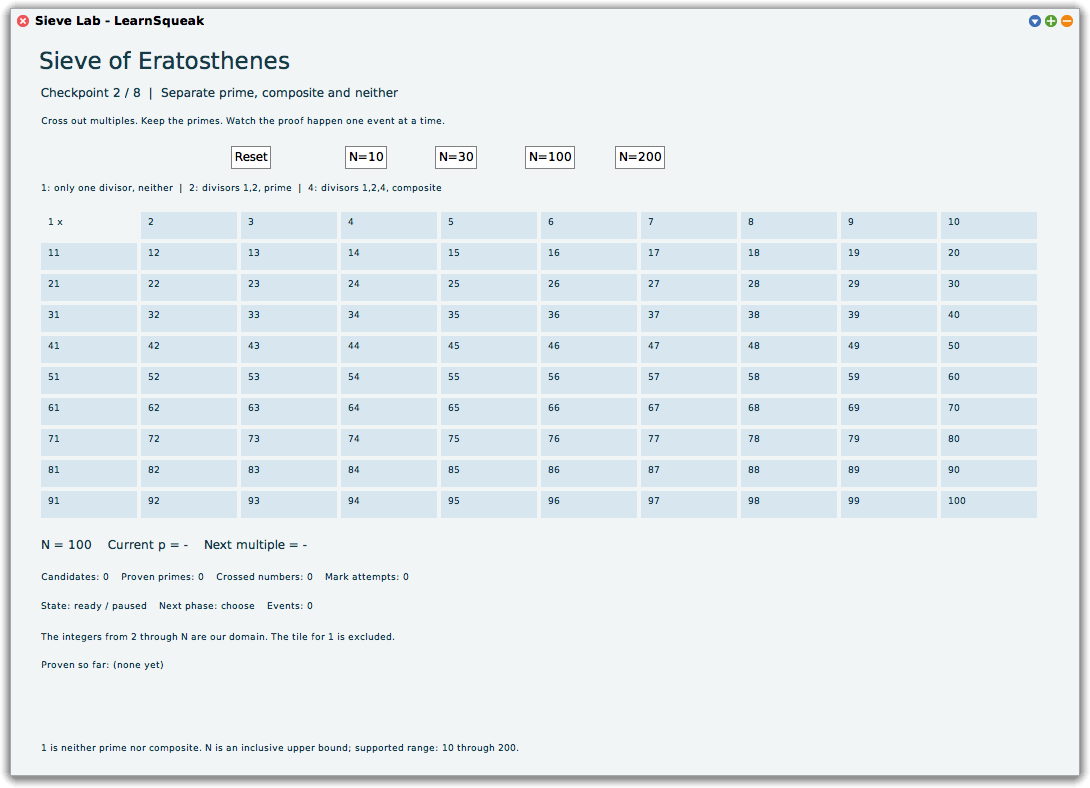
A prime is an integer greater than 1 with exactly two positive divisors: 1 and itself. A composite is an integer greater than 1 with an additional positive divisor. The number 1 has only one positive divisor, so it is neither prime nor composite. This distinction is the reason our algorithm starts at 2.
The small divisorsOf: helper makes the definition tangible. It enumerates positive divisors for a valid number from 1 through N: 1 gives #(1), 2 gives #(1 2), and 4 gives #(1 2 4). The double-backslash message computes the remainder; remainder zero means the divisor divides exactly. Invalid input answers an empty array, and this helper changes no sieve state.
This is a definition experiment, not the implementation of the sieve. The future sieve will avoid testing every divisor of every number. It will prove composites in batches by visiting multiples of a known prime. The grid stays unclassified at this checkpoint, and the toolbar legend now shows the three examples so you can explain why an unmarked number is not automatically a proven prime.
Try 9: its divisors include 3 even though it is odd. Try 97: its divisors are only 1 and 97. These observations will give us useful independent checks later, while the visual algorithm follows its own explicit state transitions.
Where to run this
System Browser → LPSieve → instance side → tutorial. Accept this complete method after filing in the checkpoint.
LPSieve · instance-side method
divisorsOf: number
(number isInteger and: [number between: 1 and: limit]) ifFalse: [^ #()].
^ ((1 to: number) select: [:divisor | number \\ divisor = 0]) asArray
File List → fileIn prime-sieve-02.st. Then Workspace → select the entire block → Do It.
Workspace · run after installing this checkpoint
| app |
app := LPApp open.
app
Watch for: Never color every unmarked cell green. Before the sieve has proved it, 9 is still a candidate, despite being composite.
Try it: Print It: LPSieve new divisorsOf: 9. Expect #(1 3 9). Explain why “odd” and “prime” mean different things.
Expected result
The legend explains 1, 2 and 4; the grid remains unclassified. No search event or mark has occurred.
Actual native Squeak 6.1 window after evaluating the exact checkpoint 2 Workspace block.
03 · Give every candidate a visible status
Replace the undifferentiated numbers with explicit statuses. reset allocates an Array with one slot for each integer through N, initializes every slot to candidate, then overrides slot 1 with excluded. Smalltalk Arrays are one-based, so a number can be used directly as its status index without subtracting 2.
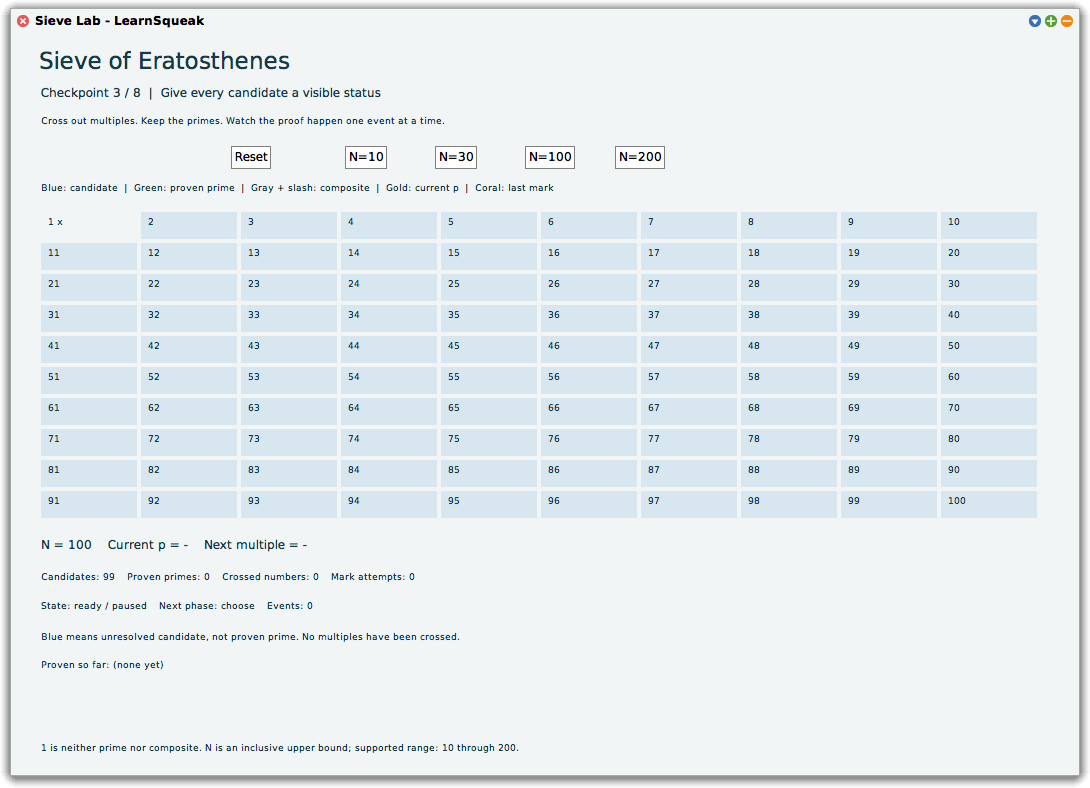
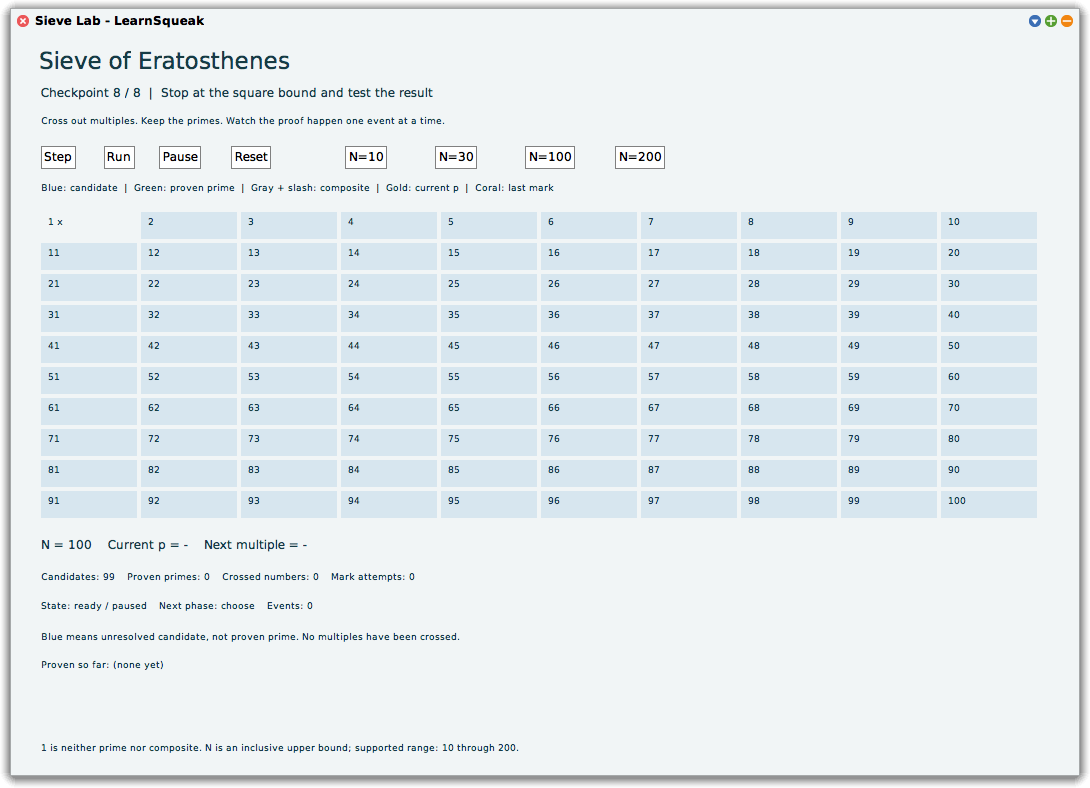
Blue means candidate: neither proved prime nor crossed as composite yet. Green will mean proven prime. Gray with a slash will mean composite. Gold will identify the current prime p, and coral the last multiple visited. Active colors can cover a prime or composite base color, so the state and counters remain visible in text as well.
The model tracks p, the next multiple, the last mark, the scan cursor, phase, state and three counters. An event is one visible algorithm transition. A mark attempt is one multiple visited, even if it was crossed earlier. crossedCount counts distinct numbers first classified as composite. All three begin at zero, and Reset preserves N while clearing every transient field.
statusAt: treats 1 as excluded and answers outside for invalid indexes. That prevents accidental Array access at zero or above N. The counters now say 99 candidates, zero proven primes and zero crossed numbers for N = 100. At every later step those three disjoint groups must still total N - 1. That conservation rule becomes an invariant in the SUnit suite.
LPSieve · instance-side method
statusAt: number
(number isInteger and: [number between: 1 and: limit]) ifFalse: [^ #outside].
^ statuses at: number
LPSieve · instance-side method
candidateCount
^ statuses count: [:status | status = #candidate]
Where to run this
System Browser → LPSieve → instance side → tutorial. Accept this complete method after filing in the checkpoint.
LPSieve · instance-side method
reset
statuses := Array new: limit withAll: #candidate. statuses at: 1 put: #excluded.
p := nil. nextMultiple := nil. lastMarked := nil. scan := 2.
phase := #choose. state := #ready. events := 0. markAttempts := 0. crossedCount := 0.
note := 'Blue means unresolved candidate, not proven prime. No multiples have been crossed.'
File List → fileIn prime-sieve-03.st. Then Workspace → select the entire block → Do It.
Workspace · run after installing this checkpoint
| app |
app := LPApp open.
app
Watch for: A blue candidate may be prime or composite. The status describes what the algorithm has established so far.
Try it: Select N=200: there are 199 candidates and 20 columns. Reset preserves 200 and restores all 199 unresolved candidates.
Expected result
The status panel shows 99 candidates, no proven primes and no crossed numbers. The excluded 1 tile is outside these counts.
Actual native Squeak 6.1 window after evaluating the exact checkpoint 3 Workspace block.
04 · Choose the smallest uncrossed candidate
The first candidate is 2. It is prime because no integer greater than 1 and smaller than 2 can divide it. Later choices use the same invariant: all multiples of previously chosen smaller primes have been processed. The smallest remaining candidate cannot have any smaller prime factor, so it too is prime.
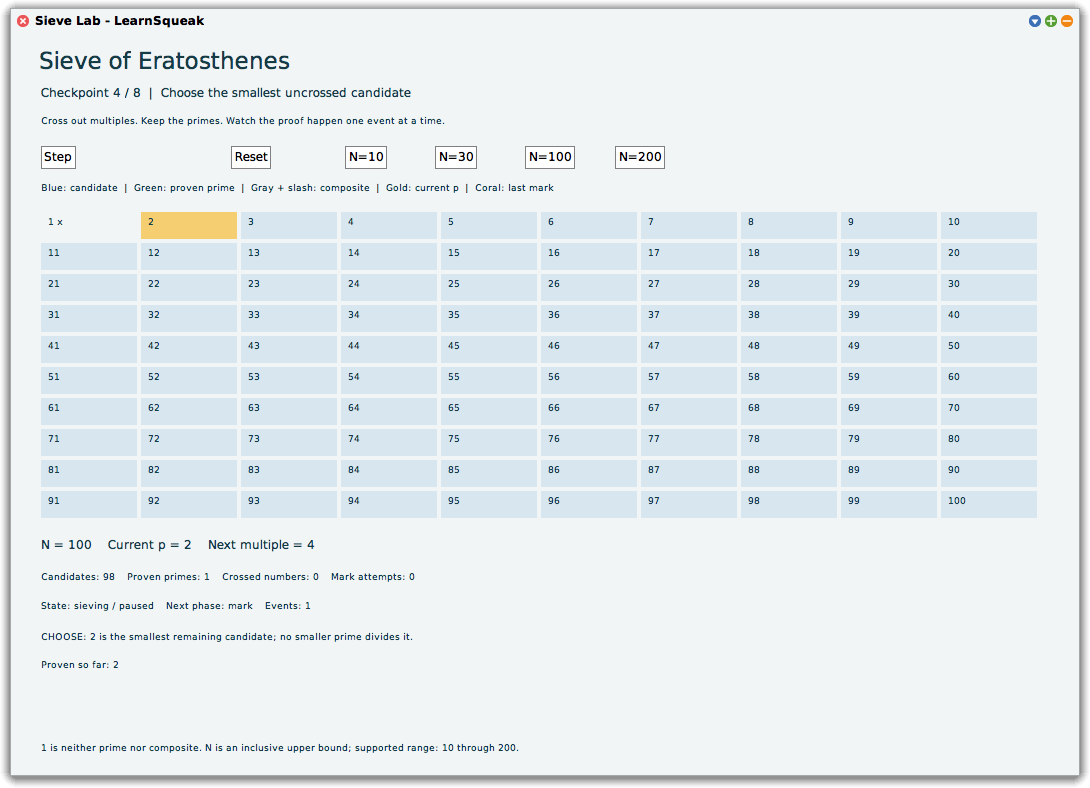
choosePrime scans forward past resolved statuses, records the smallest candidate in p, changes that cell to prime and prepares the first multiple p * p. It also sets phase to mark and increments the event count. Choosing is one event; crossing a multiple is another. The screenshot therefore shows gold p = 2, the next multiple 4 and zero mark attempts.
The phase guard refuses a second choice while marking is pending. At this checkpoint Step performs only the choice and then stops: it cannot silently move to the next candidate before crossing the previous prime's multiples. Reset lets you replay that single transition. This deliberate boundary makes the correctness argument visible before we add the marking loop.
The scan cursor moves monotonically in later checkpoints. We never delete cells or renumber the domain: cell 37 always represents the integer 37. A gold highlight is a current-role overlay on a proven prime; the Proven so far line explicitly lists 2 while all other unresolved cells remain blue.
Actual native Squeak 6.1 window after evaluating the exact checkpoint 4 Workspace block.
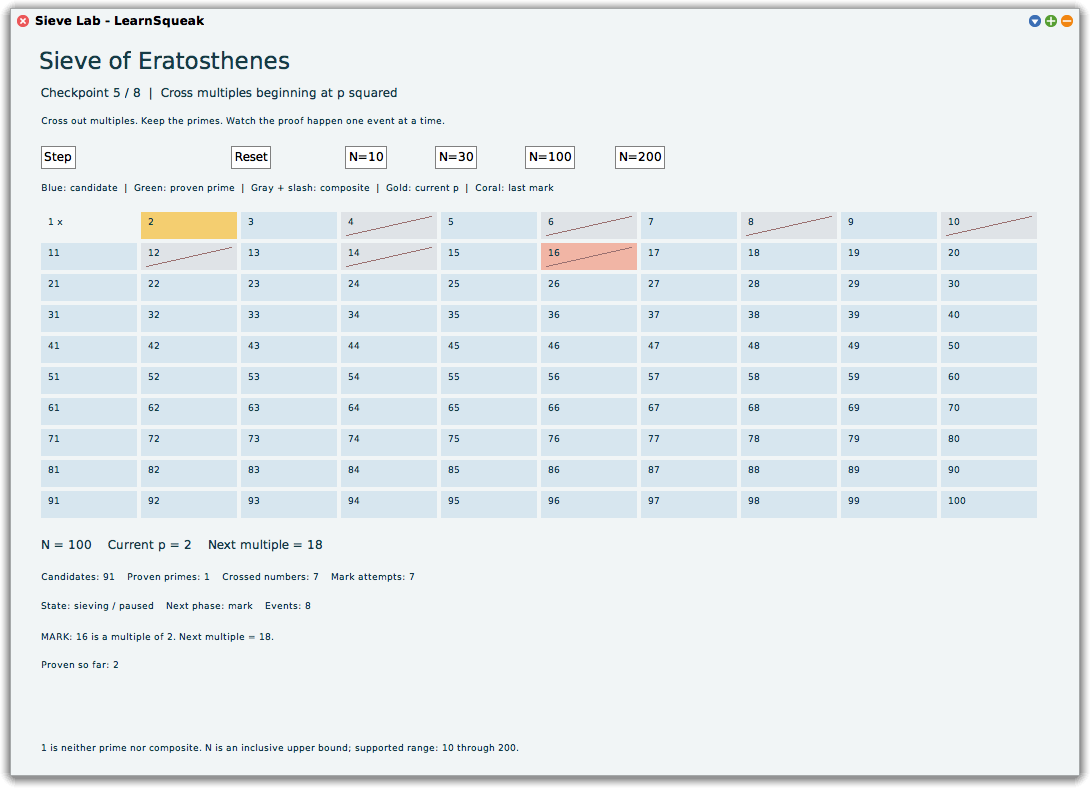
05 · Cross multiples beginning at p squared
For a prime p, all smaller multiples 2 p, 3 p, and so on up to (p - 1)p already have a smaller prime factor. Those factors were processed in earlier passes. The first multiple that can still need crossing is therefore p * p. For p = 2 start at 4; for p = 3 start at 9; for p = 5 start at 25.
markNext performs one bounded event. It remembers nextMultiple as lastMarked, counts one mark attempt, changes that number to composite, and advances the cursor by p. crossedCount increases only when the number was not already composite. The number 12 will later be visited by both p = 2 and p = 3, so two attempts must not imply two distinct crossed numbers.
The upper bound is inclusive. If N itself is a multiple, it must be processed before the cursor moves beyond N. The following Step is a separate pass-complete event, making the boundary easy to inspect. This checkpoint stops after the first prime’s pass; checkpoint 6 adds the transition back to choosing.
The exact block chooses 2 and marks 4, 6, 8, 10, 12, 14 and 16. The current prime stays gold and the latest mark is coral; older composites are gray with slashes. No prime is crossed, and primes greater than 2 are still unresolved blue candidates.
LPSieve · instance-side method
finishPass
 (phase ~= #mark or: [nextMultiple <= limit]) ifTrue: [^ false].
 events := events + 1. phase := #checkpoint. state := #passComplete.
 nextMultiple := nil. lastMarked := nil.
 note := 'First pass complete. Checkpoint 6 adds the transition to the next prime.'. ^ true
Actual native Squeak 6.1 window after evaluating the exact checkpoint 5 Workspace block.
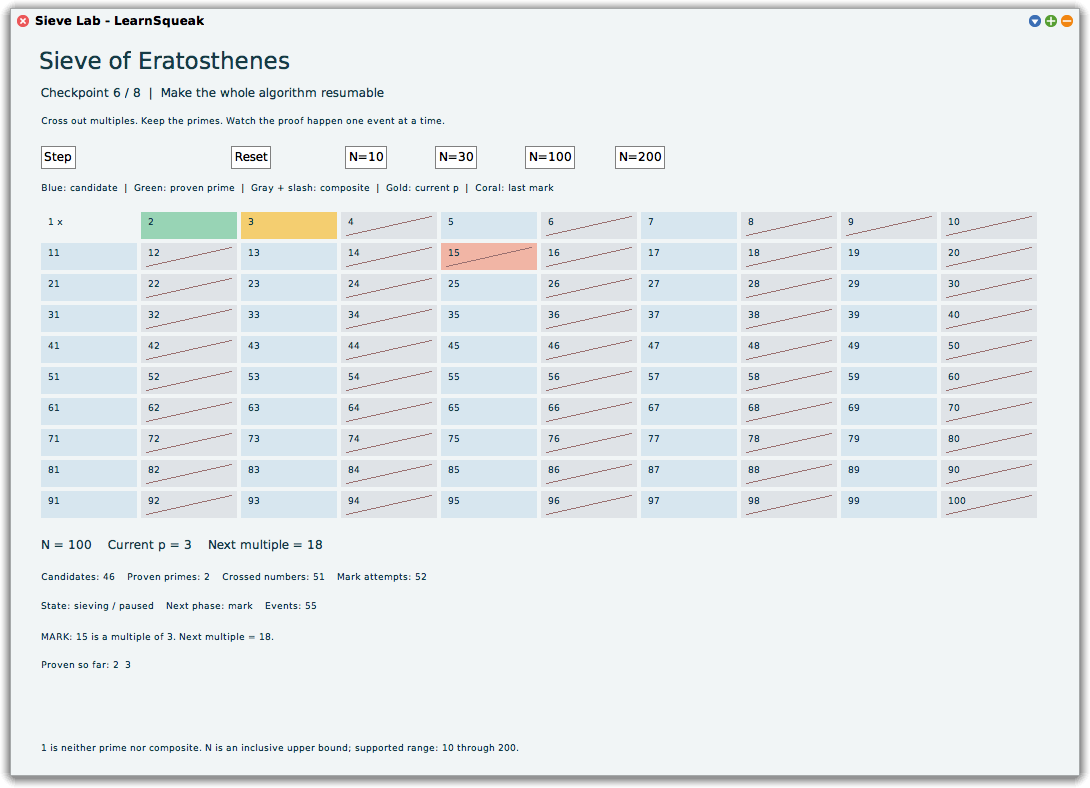
06 · Make the whole algorithm resumable
A resumable algorithm stores its progress instead of hiding it inside one long button callback. phase is either choose, mark or done. stepSieve dispatches one event to the corresponding model method. The other fields carry everything needed to continue after an arbitrary pause: current p, nextMultiple, scan and statuses.
finishPass now returns to choose after the multiple cursor exceeds N. It advances scan to p + 1, clears the transient mark, and leaves all classifications intact. The next choose scans past composites and earlier primes. For N = 100 it moves from 2 to 3; that pass begins at 9. After marking 9, the visit to 12 increments attempts but does not increase the distinct composite count.
At this checkpoint the algorithm deliberately continues selecting remaining candidates until every number has been resolved. Primes above the square-root bound have no in-range multiples at p * p, so their passes finish immediately. This is correct but performs unnecessary choice and pass events. Checkpoint 8 will replace that exhaustive finish with the square-bound proof.
solve is a model-only convenience for tests and tiny deterministic examples. It repeats exactly the same stepSieve events with a defensive budget, and errors if progress stops. The animated interface will use Morphic callbacks instead, allowing other windows and buttons to keep responding. The exact block stops during the second pass so you can inspect the repeated mark and predict the next multiple.
Actual native Squeak 6.1 window after evaluating the exact checkpoint 6 Workspace block.
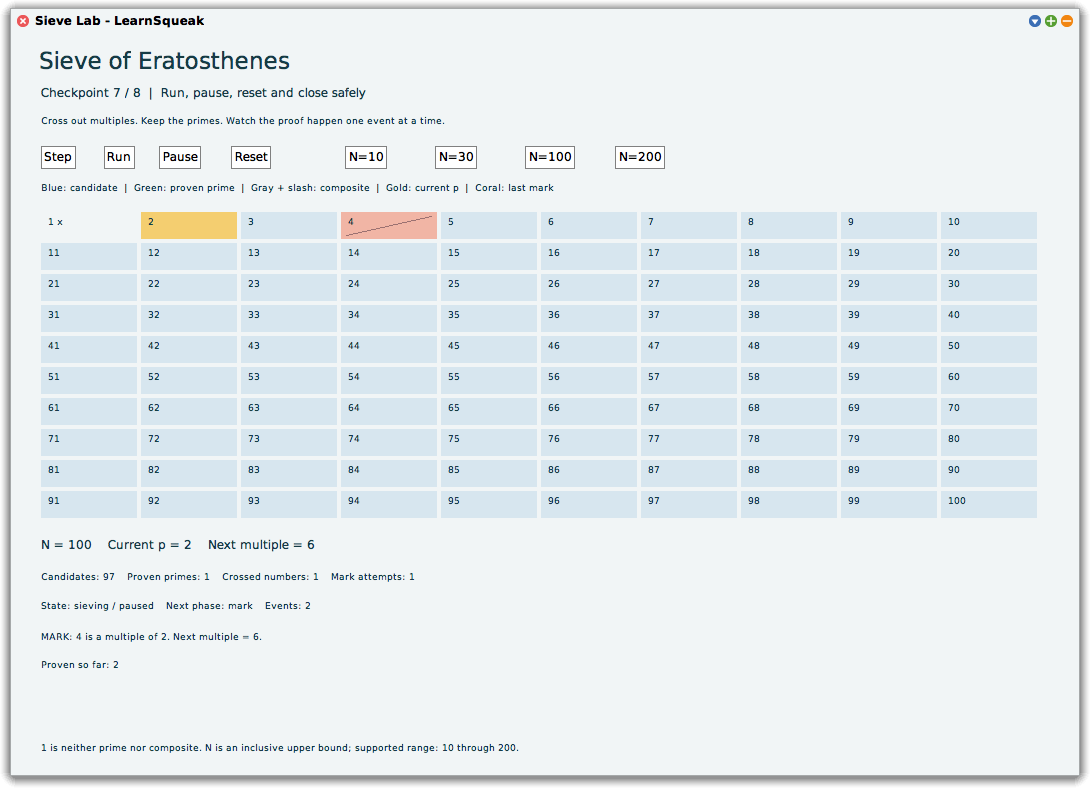
07 · Run, pause, reset and close safely
Run registers LPApp for Morphic stepping. Each step sends one stepSieve event and refreshes the grid. stepTime requests 300 milliseconds, but cooperative scheduling may run later when the image is busy. The interval is a presentation choice, not a benchmark. Repeated Run presses do not reset the model or create extra work.
Pause removes the schedule without changing progress. Step first pauses, then performs exactly one event. Reset and a valid N change stop scheduling before replacing model state. An invalid N is rejected before either operation, preserving the current model and running state. Completion automatically stops Run, and running an already completed model does nothing until Reset.
Closing or collapsing a native window can detach the app from its world. scheduledWorld remembers the world that registered the callback, so stopActivity can remove the entry from that original scheduler even when self world is nil. wantsSteps is false while idle; simply opening the window cannot start work. A late step callback checks running and returns without mutating the model.
Closing preserves the retained model object but clears the window reference. Sending open to that retained app restores a paused view; Run refuses an app with no open window. The native tests also pump real World cycles, collapse and expand windows, exercise actual button mouse events, and verify cleanup on Pause, Reset and Close. The exact block uses one direct callback then pauses to produce a stable, reproducible screenshot.
Actual native Squeak 6.1 window after evaluating the exact checkpoint 7 Workspace block.
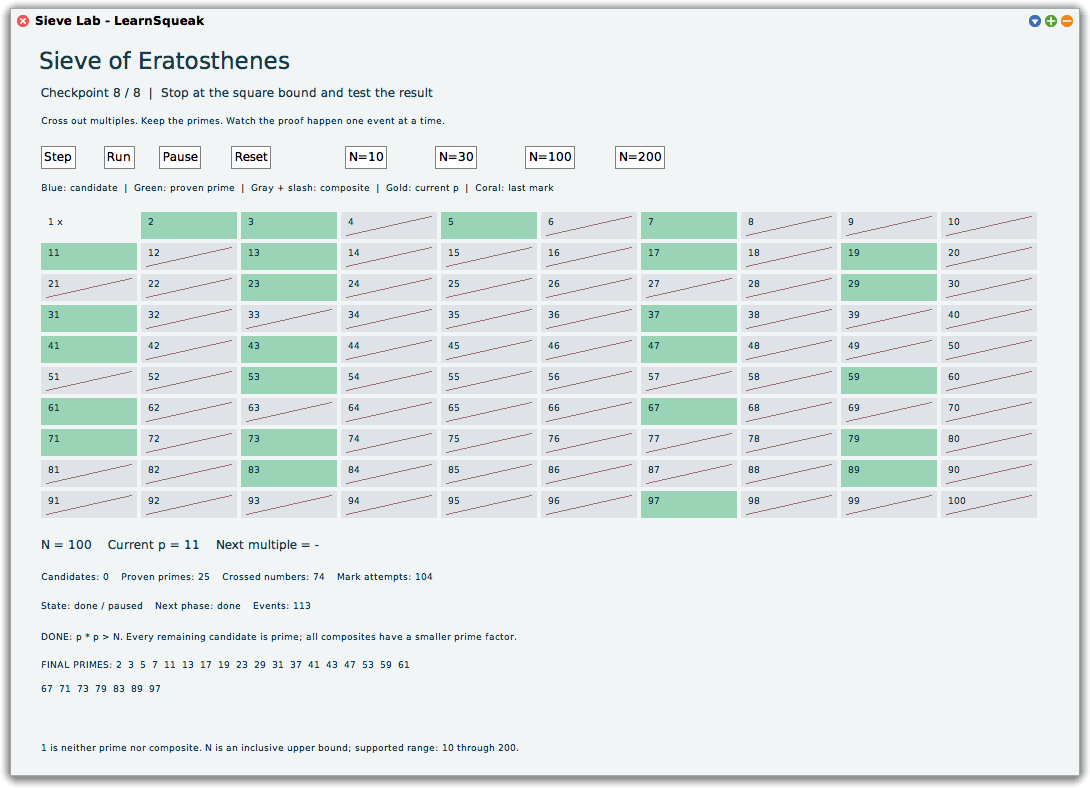
08 · Stop at the square bound and test the result
Every composite n has a factor at most its square root: if both factors were greater than that, their product would exceed n. Consequently, after all primes p with p * p <= N have been processed, no remaining candidate can be composite. The sieve can stop and promote all remaining candidates to proven primes at once.
The comparison is strictly greater than. At N = 49, p = 7 must still cross 49. The final choosePrime scans to the next candidate, sets p, and tests p * p > N before opening another marking pass. For N = 100, the marking primes are 2, 3, 5 and 7; the next candidate is 11, and 121 > 100 finishes the sieve. The final promotion is one explicit event.
The completed view reports 25 primes, 74 distinct composites and zero candidates. There were 104 mark attempts: 49 for p = 2, 31 for p = 3, 16 for p = 5, and 8 for p = 7. Four choices, four pass boundaries and one final proof make 113 visible events altogether. These are logical counters, not CPU timings; repeated visits account for attempts exceeding distinct composites.
The SUnit suite checks every supported bound 10..200 against an independent trial-division oracle, including perfect squares. It also checks intermediate claims: anything colored prime must really be prime, anything crossed must be composite, and the three status counts sum to N - 1. Terminal calls are no-ops, Reset clears every cursor and counter, and lifecycle tests protect the live image. The two exercises reuse the finished result without changing it.
LPSieve · instance-side method
finishSieve
 (self finished or: [phase ~= #choose or: [scan <= limit and: [scan * scan <= limit]]]) ifTrue: [^ false].
 self numbers do: [:number | (statuses at: number) = #candidate ifTrue: [statuses at: number put: #prime]].
 events := events + 1. phase := #done. state := #done. nextMultiple := nil. lastMarked := nil.
 note := 'DONE: p * p > N. Every remaining candidate is prime; all composites have a smaller prime factor.'.
 ^ true
Where to run this
System Browser → LPSieve → instance side → tutorial. Accept this complete method after filing in the checkpoint.
LPSieve · instance-side method
choosePrime
 (self finished or: [phase ~= #choose]) ifTrue: [^ false].
 [scan <= limit and: [(statuses at: scan) ~= #candidate]] whileTrue: [scan := scan + 1].
 scan > limit ifTrue: [^ self finishSieve].
 p := scan.
 p * p > limit ifTrue: [^ self finishSieve].
 statuses at: p put: #prime. nextMultiple := p * p. lastMarked := nil.
 phase := #mark. state := #sieving. events := events + 1.
 note := 'CHOOSE: ', p printString, ' is prime. Start marking at p * p = ', nextMultiple printString, '.'.
 ^ true
File List → fileIn prime-sieve-08.st. Then Workspace → select the entire block → Do It.
Actual native Squeak 6.1 window after evaluating the exact checkpoint 8 Workspace block.
Watch the workflow
All eight screenshots and every GIF frame are genuine native SystemWindow imageForm renders from Squeak 6.1 build 23976. Each checkpoint was installed separately in an unsaved private copy of the baseline image, its displayed methods were recompiled and its exact Workspace block evaluated. The control demo sends native button mouse events and advances the same bounded step callback used by Morphic. It is a scripted native demonstration, not a human screen recording. GIF encoding combines those PNG frames; playback timing is chosen for readability and is not a performance measurement.
NATIVE SQUEAK CAPTURE
Eight exact native checkpoint outputs show the progression from unclassified integers to a fully proved prime list.
NATIVE SQUEAK CAPTURE
Actual native buttons choose N=100, Step, Run, Pause and resume. Bounded callbacks cross multiples, stop at the square bound, and Reset restores the original candidate grid.
Practice with tested solutions
1. Measure the gaps between consecutive primes
Add primeGaps to LPSieve. Return nil until the sieve is complete; afterward return one difference for each neighboring pair of primes. Preserve the model and its counters. For N=30 the largest gap is 6 between 23 and 29. Do not include a gap from 1, because 1 is not prime.
Hint
Get the finished ordered prime list. For indexes 2 through its size, subtract the previous prime. The number of gaps is one less than the number of primes.
Show a tested solution
File in prime-sieve-final.st, then accept this complete LPSieve instance-side method in the Browser. Or file in the exercise source.
Workspace · Print it after installing the solution
Check the solution
| model |
model := LPSieve new.
model loadLimit: 30; solve.
model primeGaps asArray = #(1 2 2 4 2 4 2 4 6)
true
The tests cover every supported N: gaps telescope to lastPrime - 2, only the initial gap is odd, and querying gaps preserves event counters.
2. Factor a number using the finished prime list
Add primeFactorizationOf: to LPSieve. Accept an integer 2..N only after completion; otherwise answer nil. Return repeated prime factors in ascending order, so 84 becomes #(2 2 3 7). The product of the returned factors must equal the original input. Keep the sieve result and counters unchanged.
Hint
Keep a local remaining value and an OrderedCollection. For each prime, divide repeatedly while the remainder is zero, adding that factor each time. Guard remaining > 1 so division cannot loop after the number is exhausted.
Show a tested solution
After prime-sieve-final.st, accept this complete LPSieve instance-side method. Or file in the exercise source.
Workspace · Print it after installing the solution
Check the solution
| model |
model := LPSieve new solve.
(model primeFactorizationOf: 84) = #(2 2 3 7)
true
The tests factor every integer 2..200, multiply the factors back, check each factor independently by trial division, and verify that repeated queries preserve the sieve.
When something looks wrong
Blue numbers include obvious composites
Blue means unresolved candidate. A number such as 9 stays blue until the p=3 pass proves it composite.
Step stops after choosing 2 or after its first pass
That is the checkpoint boundary: stage 4 adds choosing, stage 5 adds the first marking pass, and stage 6 adds repetition. Install the next complete checkpoint.
Attempts exceed crossed numbers
A number such as 12 is a multiple of both 2 and 3. Every visit counts as an attempt; only its first crossing increases the distinct count.
Run does nothing after completion
Press Reset or choose N to create a fresh candidate set. Pause is the control that preserves a resumable position.
A prime looks gold instead of green
Gold overlays the current prime role. The Proven so far list and count still include it. The coral overlay similarly identifies the most recent composite mark.
The final current p is 11 for N=100
11 is the next uncrossed candidate, used to establish 121>100. It opens no marking pass; the final proof promotes every remaining candidate.
An older checkpoint has later controls or behavior
Use a clean image for older checkpoints. File-in does not remove methods introduced by later sources.
Verification, cleanup and next steps
Original tutorial and Smalltalk source. Inputs are synthetic integer bounds. No personal data, external services, packages, sounds or background processes are used.
35 native SUnit regression tests and 8 exercise tests pass with zero failures or errors.
Every supported N from 10 through 200 matches a separate trial-division oracle. All eight checkpoint files, highlighted methods and exact Workspace blocks are independently executed in the clean baseline image. Both visible exercise checks are also evaluated.
Primary suite: file in prime-sieve-final.st, then prime-sieve-tests.st. Workspace → LPSieveTest suite run → Print It. Expected: 35 passes, zero failures and errors.
Exercise suite: after final source, file in both exercise solutions and prime-sieve-exercise-tests.st. Workspace → LPExerciseTest suite run → Print It. Expected: 8 passes.
Boundary limits, invalid types and values, 1 excluded, perfect squares, independent final prime lists, intermediate prime/composite truth and conservation of status counts
Starting each pass at p*p, inclusive N, repeated marking counts, explicit pass events, terminal no-ops, data ownership and complete reset
Actual button mouse events, real World scheduling, repeated Run, pause/resume, late callbacks, preset changes, reset while running, close/reopen and cleanup while collapsed
Close the Sieve Lab window to remove its scheduled callback. Keep the .st sources outside the image so you can reproduce the lesson from a clean baseline. Closing retains no saved document or external state.
Official Squeak downloads — Squeak 6.1 build 23976 Linux image and VM used for native execution and captures
Bundled Squeak image source — Morph, SystemWindow, SimpleButtonMorph, MouseButtonEvent, Array, PNGReadWriter and TestCase APIs were compiled and exercised in the supplied image
N is an integer from 10 through 200; the lesson does not expose empty or singleton sieves. Invalid bounds preserve the current state.
The first two checkpoints deliberately show unclassified numbers. Candidate/prime/composite status becomes active in checkpoint 3.
Checkpoint 5 completes only the first prime pass. Checkpoint 6 completes by exhausting candidates; checkpoint 8 adds the square-bound shortcut.
Mark attempts, distinct crossed numbers and visible events are different units. They do not measure CPU time.
The model uses O(N) status storage. Repainting and result labels also scan the bounded domain, so animation cost is not an algorithmic timing benchmark.
Fixed native window layout; no persistence, undo, keyboard shortcuts, imported data, custom zoom or accessibility certification.
Morphic intervals are requested, not guaranteed. Native GIF playback has its own explanatory timing.