ABSOLUTE BEGINNER
Your first true or false
Ask a yes-or-no question, then use the answer to choose some text.
STEP 1
Open a Workspace
In Squeak 6.1, click an empty part of the desktop. Choose open… then workspace.
A Workspace is a small window for trying code. To see an answer, select your code, right-click it, and choose print it (p). Some setups use middle-click for this menu. Each example below works on its own.
STEP 2
Ask which number is smaller
Replace ALL the Workspace text, including any old code or answer, with this line. Select the whole new line and choose print it (p).
The < asks whether the number on the left is smaller. Is 3 smaller than 5? Yes, so the answer is true. Squeak uses true for yes and false for no.
3 < 5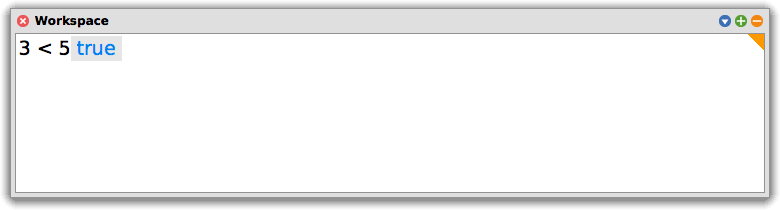
true
STEP 3
Ask if two numbers are equal
Replace ALL the Workspace text, including the old code and answer, with this line. Select the new line and choose print it (p).
The = asks whether the two numbers are equal. Both numbers are 4, so the answer is true. Use just one equals sign.
4 = 4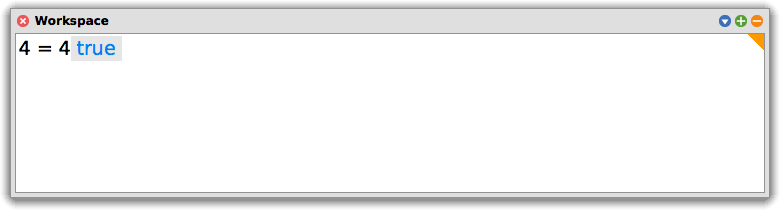
true
STEP 4
Ask if two numbers are different
Replace ALL the Workspace text, including the old code and answer, with this line. Select the new line and choose print it (p).
The ~= asks whether the numbers are different. Type ~ followed by = with no gap. Are 4 and 4 different? No, so the answer is false.
4 ~= 4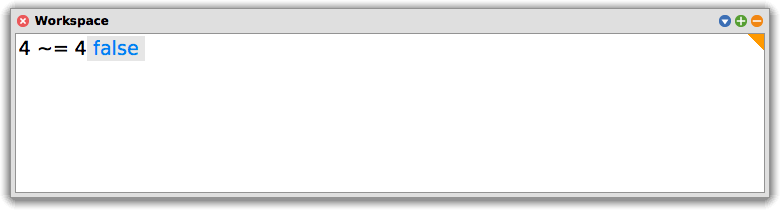
false
STEP 5
Let the answer choose some text
Replace ALL the Workspace text, including the old code and answer, with these three lines. Select all three new lines and choose print it (p).
The question inside ( ) gives true. ifTrue: picks the text in the first pair of square brackets, so the answer is 'yes'. If the question gave false, ifFalse: would pick 'no' instead.
Keep both colons and the capital T and F. Use straight single quotes around yes and no, not curly quotes. The quotes mark text, and Squeak includes them in the printed answer.
(3 < 5)
    ifTrue: ['yes']
    ifFalse: ['no']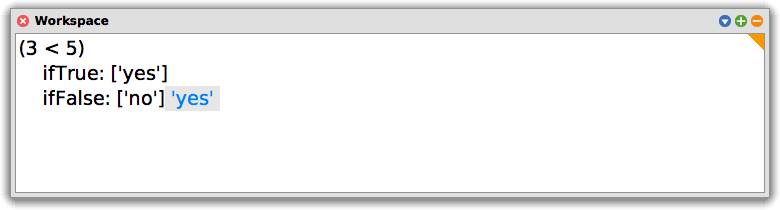
'yes'
YOU DID IT
A little question can make a choice.
< asks whether a number is smaller. = asks whether two numbers are equal. ~= asks whether they are different. The answer is true or false, and it can choose which text to give you.
Try the last example with 8 < 5 inside the parentheses. It will choose 'no'. Replace all the old code and answer before each try, then select all three new lines and Print it.
Optional code download: open it as text and copy one example into Workspace.