REAL COORDINATES. A SMALL RENDERER.
From points to
a rotating 3D cube.
Learn vertices, edges, rotation, camera distance, and perspective one runnable stage at a time.
This is a real 3D geometry lesson implemented as a tiny educational software renderer. Smalltalk transforms the coordinates; an ordinary Morphic Canvas draws the resulting 2D lines. It is not an OpenGL tutorial or a full 3D engine.
Run in the SqueakJS playground
The separate playground loads the real Smalltalk image on demand. This lesson keeps its native setup instructions; browser compatibility notes appear beside each demo.
Load the small renderer
This lesson was run in Squeak 6.1, 64-bit, build 23976. It needs only ordinary Morphic classes already in that image. Download the file, open Squeak’s File List, select it, and choose fileIn. It installs one tutorial class, LearnSqueakWireframeCube.
Download the complete 3D source
Use a learning image and check that this class name is unused in your work. Re-filing replaces the tutorial methods. This is a chunk-format Smalltalk file-in, not a complete Workspace expression. The six stage downloads below are Workspace expressions. Every stage starts fresh; close or remove its result before running another.
After filing in, open Tools → Workspace, paste a complete stage, select all of it, and choose do it (usually Ctrl+D / Cmd+D). Method listings explain the installed class; read or edit those in the System Browser. They are not standalone Workspace programs.
Morph subclass: #LearnSqueakWireframeCube
    instanceVariableNames: 'angle speed running projectionMode showEdges'
    classVariableNames: ''
    poolDictionaries: ''
    category: 'LearnSqueak-Wireframe'
The Morph owns its angle, speed, running flag, projection choice, and edge-visibility flag. Its drawing code reads that state; it never changes the angle while drawing.
01 · Start with eight 3D vertices
A cube centered at the origin has coordinates −1 or +1 on each axis. Store each vertex as a three-element Array. An ordinary Squeak x@y Point is two-dimensional; we create Points only after projection.
vertices
    ^ #((-1 -1 -1) (1 -1 -1) (1 1 -1) (-1 1 -1)
(-1 -1 1) (1 -1 1) (1 1 1) (-1 1 1))"Stage 1: eight 3D vertices become four visible amber points.
The front/back vertex pairs overlap in this orthographic front view."
| cube |
cube := LearnSqueakWireframeCube new.
cube orthographic; angle: 0.0; showEdges: false.
cube openInWorld.
cube position: 230@160.
cube
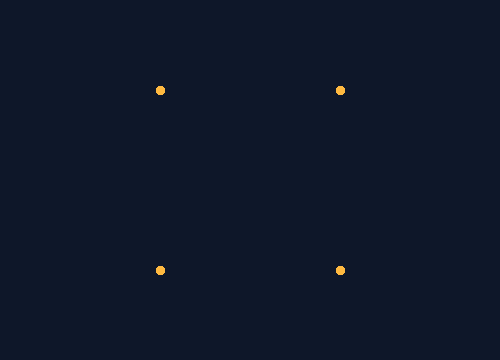
The stage hides edges and uses angle zero. Orthographic projection ignores depth for size, so vertices differing only in z land at the same x/y location. Four visible dots are expected, not missing data.
02 · Join the vertices with edges
An edge is a pair of one-based vertex indices. Draw two squares, then join their corresponding corners. This creates twelve edges without duplicating the vertex data.
edges
    ^ #((1 2) (2 3) (3 4) (4 1)
        (5 6) (6 7) (7 8) (8 5)
(1 5) (2 6) (3 7) (4 8))"Stage 2: twelve edges, viewed straight on with orthographic projection.
The front and back squares overlap, so only one square is visible."
| cube |
cube := LearnSqueakWireframeCube new.
cube orthographic; angle: 0.0; showEdges: true.
cube openInWorld.
cube position: 230@160.
cube
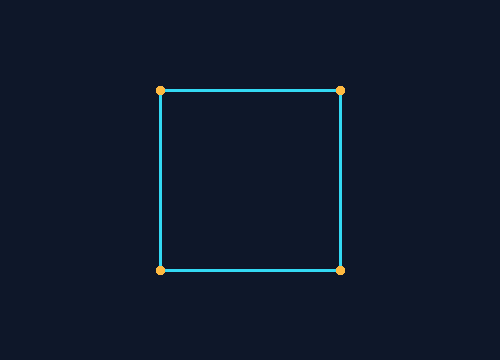
The drawing method looks up each projected endpoint and asks Canvas to draw a line:
self edges do: [:edge |
    aCanvas
        line: (points at: edge first) rounded
        to: (points at: edge second) rounded
        width: 3
        color: (Color r: 0.2 g: 0.85 b: 0.95)].
There are still twelve mathematical edges even though only a square is visible from this viewpoint. The next step rotates the object so its depth becomes apparent.
03 · Rotate before projecting
Rotate each 3D vertex around X, then Y. A rotation changes coordinates while preserving distance from the origin. The example couples the X tilt to 0.65 times the Y angle, giving a readable moving view with one control.
rotateVertex: vertex
    | x y z tilt y1 z1 x2 z2 |
    x := vertex first. y := vertex second. z := vertex third.
    tilt := angle * 0.65.
    y1 := (y * tilt cos) - (z * tilt sin).
    z1 := (y * tilt sin) + (z * tilt cos).
    x2 := (x * angle cos) + (z1 * angle sin).
    z2 := (z1 * angle cos) - (x * angle sin).
^ {x2. y1. z2}"Stage 3: rotate X and Y before orthographic projection.
All eight vertices and the twelve connecting edges now separate."
| cube |
cube := LearnSqueakWireframeCube new.
cube orthographic; angleDegrees: 35; showEdges: true.
cube openInWorld.
cube position: 230@160.
cube
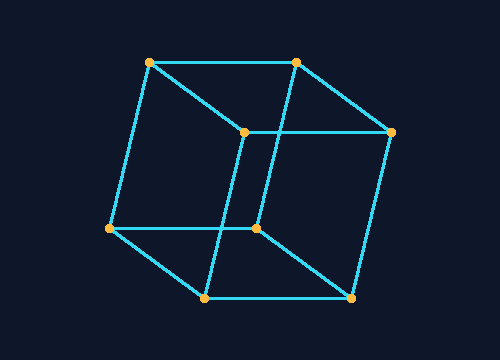
Smalltalk’s sin and cos take radians. angleDegrees: is a convenience that converts degrees using π/180. Rotation order matters: X then Y generally differs from Y then X. This stage still uses orthographic projection, so equally sized near and far edges do not shrink just because they are farther away.
04 · Add a camera and perspective
Place a mathematical camera on the positive z axis, looking toward the origin. A larger z value is nearer the camera. Scale x and y by distance / (distance − z), then translate the result to the Morph’s center.
projectVertex: vertex
    | factor denominator offset |
    factor := self projectionScale.
    projectionMode = #perspective ifTrue: [
        denominator := (self cameraDistance - vertex third) max: 0.1.
        factor := factor * self cameraDistance / denominator].
    offset := (vertex first * factor) @ (vertex second * factor) negated.
^ self center + offset"Stage 4: perspective makes the nearer square larger.
The cube is still paused, with no rotation."
| cube |
cube := LearnSqueakWireframeCube new.
cube perspective; angle: 0.0; showEdges: true.
cube openInWorld.
cube position: 230@160.
cube
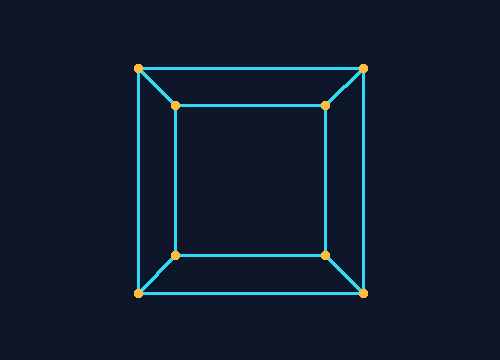
The camera distance is 5. The unit cube’s radius is √3, so no rotated vertex can reach the camera. The 0.1 denominator clamp is a division safeguard, not near-plane clipping. It is never reached by the supplied cube. If you change the geometry, reconsider camera distance and clipping rather than assuming this guard makes every scene valid.
Screen y increases downward, so the projected vertical coordinate is negated. self center is a Point in world coordinates; Canvas drawing uses those coordinates too. projectionScale is one quarter of the smaller Morph dimension, leaving margins when resized.
05 · Combine rotation and perspective
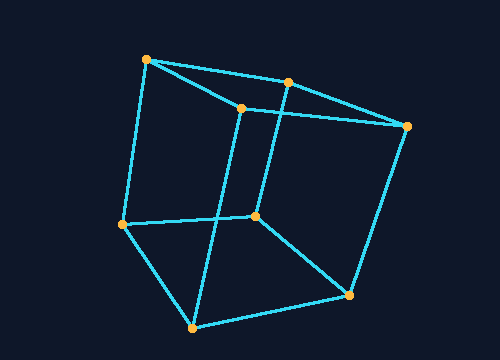
The rendering pipeline now has four small jobs: keep 3D model vertices, rotate them, project them to 2D Points, and draw the indexed edges. Compare this stage with stage3 to see what perspective changes.
"Stage 5: rotate X and Y, then project with perspective.
The near side appears larger than the far side."
| cube |
cube := LearnSqueakWireframeCube new.
cube perspective; angleDegrees: 35; showEdges: true.
cube openInWorld.
cube position: 230@160.
cube
projectedVertices
    ^ self vertices collect: [:vertex |
        self projectVertex: (self rotateVertex: vertex)]
The renderer redraws all edges and vertex markers. It does not fill faces, shade surfaces, hide rear lines, or keep a depth buffer. Those omissions make this a useful first projection lesson, rather than a general-purpose 3D engine.
06 · Animate it in a control window
Open the finished native window. This checkpoint starts animation automatically. The class’s simpler open method alone opens a paused cube.
"Stage 6: a real Squeak window with Start, Pause, Reset and speed.
This stage starts the animation; Pause freezes the current angle."
| window |
window := LearnSqueakWireframeCube open.
window position: 200@110.
window model start.
window
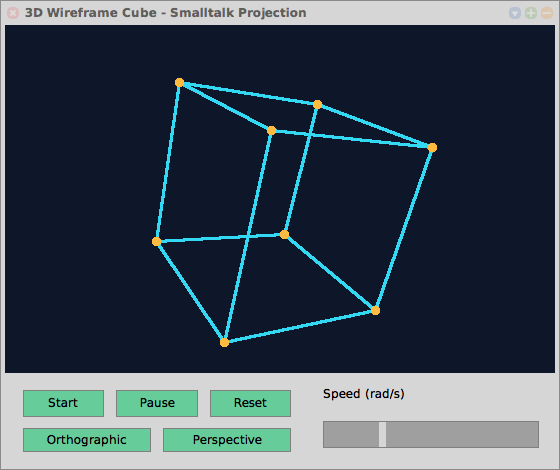
The window has Start, Pause, Reset, Orthographic, Perspective, and a speed slider. Pause keeps the current angle. Reset pauses and returns to the front view, while preserving speed and projection. A speed of zero leaves the running flag on but produces no rotation.
stepTime
^ 40step
self running ifFalse: [^ self].
self angle: (angle + (speed * self stepTime / 1000.0))
\\ (40.0 * Float pi)At a requested 40ms interval, the model adds speed × 0.04 radians per step. This beginner implementation is not elapsed-time corrected; it can slow under load. It wraps after 40π radians, when both twenty Y rotations and thirteen X rotations close, avoiding a tilt jump at the wrap.
start
    running := true.
self startSteppingpause
running := false.
self stopSteppingangle: calls changed, requesting a redraw. This keeps animation in Morphic’s event loop. Do not replace stepping with a tight [true] whileTrue: loop in the UI process.
Connect and exercise the controls
Each native button targets the cube and sends one selector. The speed slider sends speed: with a value between 0 and 3 radians per second.
SimpleButtonMorph new
label: 'Pause';
target: cube;
actionSelector: #pause;
yourselfslider := SimpleSliderMorph new
orientation: #horizontal;
minVal: 0.0; maxVal: 3.0;
target: cube; actionSelector: #speed:;
adjustToValue: cube speed;
yourself.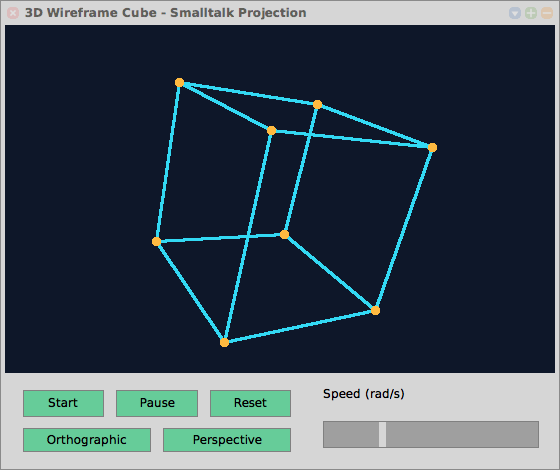
Try Pause, switch projection twice, drag the speed thumb, then Start and Reset. Switching projection preserves the current 3D angle. Reset does not reset the slider. The renderer does not implement drag-to-orbit; its controls deliberately stay small and explicit.
The window uses a light control panel and a dark drawing Morph. Its full source sets setWindowColor: explicitly, so title and speed labels remain legible instead of inheriting the renderer’s dark color.
Test, resize, and clean up
The class passed 19 SUnit tests in the running Squeak 6.1 image. They cover vertex/edge topology, rotation length, screen-y direction, perspective scaling, safe bounds over the shared rotation period, angle conversion, speed limits, reset, pause, and wrap behavior. All six exact stage files were executed too.
Download the test class, file it in after the renderer, then Print it on this expression:
LearnSqueakWireframeCubeTest suite runExpect 19 passes, zero failures, and zero errors; timing in the printed TestResult varies. Native UI checks also exercised live Start/Pause, both projection buttons, the slider callback, Reset, resizing, and window closure. The GIFs record real rendered frames from that image.
- Stages 1–5: these are paused Morphs. Remove them with the halo’s red delete handle.
- Stage 6: click Pause, then the window’s red close control. The model’s
windowIsClosingalso pauses it when the window closes. - Keep the code: save your learning image or retain the source file. Closing a window does not remove its class.
The two GIFs are recordings, not live embedded apps. Play/Stop here controls only the recording. Run the source in Squeak to experiment. Animation timing in a GIF is approximate, and the looping excerpt need not close at the same angle.
Read the complete implementation
The downloadable file below is the same tested implementation. It includes initialization, geometry, drawing, animation controls, and the native window builder.
Show the complete Smalltalk file-in
"File into Squeak 6.1. Then evaluate: LearnSqueakWireframeCube open.
This is educational software projection drawn by an ordinary Morphic Canvas."
Morph subclass: #LearnSqueakWireframeCube
instanceVariableNames: 'angle speed running projectionMode showEdges'
classVariableNames: ''
poolDictionaries: ''
category: 'LearnSqueak-Wireframe'!
!LearnSqueakWireframeCube methodsFor: 'initialization'!
initialize
super initialize.
angle := 0.0.
speed := 0.8.
running := false.
projectionMode := #perspective.
showEdges := true.
self extent: 500@360.
self color: (Color r: 0.055 g: 0.09 b: 0.16)! !
!LearnSqueakWireframeCube methodsFor: 'geometry'!
vertices
"Eight (x y z) arrays. Each coordinate is -1 or +1."
^ #((-1 -1 -1) (1 -1 -1) (1 1 -1) (-1 1 -1)
(-1 -1 1) (1 -1 1) (1 1 1) (-1 1 1))!
edges
"Twelve pairs of vertex indices: two squares and four joins."
^ #((1 2) (2 3) (3 4) (4 1)
(5 6) (6 7) (7 8) (8 5)
(1 5) (2 6) (3 7) (4 8))!
rotateVertex: vertex
"Rotate about X, then Y. Smalltalk sin and cos take radians."
| x y z tilt y1 z1 x2 z2 |
x := vertex first.
y := vertex second.
z := vertex third.
tilt := angle * 0.65.
y1 := (y * tilt cos) - (z * tilt sin).
z1 := (y * tilt sin) + (z * tilt cos).
x2 := (x * angle cos) + (z1 * angle sin).
z2 := (z1 * angle cos) - (x * angle sin).
^ {x2. y1. z2}!
cameraDistance
"5 exceeds the unit cube's radius, sqrt(3), at every rotation."
^ 5.0!
projectionScale
"Leave a generous margin, including when the window is resized."
^ (self width min: self height) / 4.0!
projectVertex: vertex
"Project an already rotated vertex to a 2D Point in the world.
The camera is on +Z. Larger Z is nearer and appears larger."
| factor denominator offset |
factor := self projectionScale.
projectionMode = #perspective ifTrue: [
denominator := (self cameraDistance - vertex third) max: 0.1.
factor := factor * self cameraDistance / denominator].
"Screen Y grows down; mathematical Y grows up."
offset := (vertex first * factor) @ (vertex second * factor) negated.
^ self center + offset!
projectedVertices
^ self vertices collect: [:vertex |
self projectVertex: (self rotateVertex: vertex)]! !
!LearnSqueakWireframeCube methodsFor: 'drawing'!
drawOn: aCanvas
| points |
super drawOn: aCanvas.
points := self projectedVertices.
showEdges ifTrue: [
self edges do: [:edge |
aCanvas
line: (points at: edge first) rounded
to: (points at: edge second) rounded
width: 3
color: (Color r: 0.2 g: 0.85 b: 0.95)]].
points do: [:point |
aCanvas
fillOval: (Rectangle center: point rounded extent: 9@9)
color: (Color r: 1.0 g: 0.73 b: 0.25)]! !
!LearnSqueakWireframeCube methodsFor: 'controls'!
angle
"Angle in radians, used for the Y rotation. X uses 0.65 times this."
^ angle!
angle: radians
"Set radians explicitly; use angleDegrees: for a degree value."
angle := radians asFloat.
self changed!
angleDegrees: degrees
self angle: degrees * Float pi / 180.0!
projectionMode
^ projectionMode!
projectionMode: aSymbol
(#(orthographic perspective) includes: aSymbol)
ifFalse: [self error: 'Choose #orthographic or #perspective'].
projectionMode := aSymbol.
self changed!
orthographic
self projectionMode: #orthographic!
perspective
self projectionMode: #perspective!
showEdges
^ showEdges!
showEdges: aBoolean
showEdges := aBoolean.
self changed!
speed
"Radians per second; the speed slider covers 0 to 3."
^ speed!
speed: radiansPerSecond
speed := (radiansPerSecond asFloat max: 0.0) min: 3.0!
running
^ running = true!
start
running := true.
self startStepping!
pause
    running := false.
self stopStepping!
reset
"Pause and return to the front view; preserve speed and projection."
self pause.
self angle: 0.0! !
!LearnSqueakWireframeCube methodsFor: 'stepping'!
wantsSteps
^ self running!
stepTime
"Request one update every 40 milliseconds (about 25 per second)."
^ 40!
step
"An angle update requests a redraw. DrawOn: itself changes no state."
self running ifFalse: [^ self].
"Both rotations repeat after 20 Y turns and 13 X turns: 40*pi."
self angle: (angle + (speed * self stepTime / 1000.0))
\\ (40.0 * Float pi)!
windowIsClosing
self pause! !
!LearnSqueakWireframeCube class methodsFor: 'opening'!
button: aLabel target: aTarget action: aSelector
^ SimpleButtonMorph new
label: aLabel;
target: aTarget;
actionSelector: aSelector;
yourself!
open
"A paused, already rotated cube. Press Start to animate."
| cube window slider |
cube := self new angleDegrees: 35; yourself.
window := SystemWindow new
model: cube;
setLabel: '3D Wireframe Cube - Smalltalk Projection';
yourself.
window addMorph: cube frame: (0@0 corner: 1@0.8).
window addMorph: (self button: 'Start' target: cube action: #start)
frame: (0.025@0.83 corner: 0.18@0.9).
window addMorph: (self button: 'Pause' target: cube action: #pause)
frame: (0.195@0.83 corner: 0.35@0.9).
window addMorph: (self button: 'Reset' target: cube action: #reset)
frame: (0.365@0.83 corner: 0.52@0.9).
window addMorph: (StringMorph contents: 'Speed (rad/s)')
frame: (0.57@0.82 corner: 0.97@0.875).
slider := SimpleSliderMorph new
    orientation: #horizontal;
    minVal: 0.0; maxVal: 3.0;
    target: cube; actionSelector: #speed:;
    adjustToValue: cube speed;
    yourself.
window addMorph: slider frame: (0.57@0.9 corner: 0.97@0.97).
window addMorph: (self button: 'Orthographic' target: cube action: #orthographic)
frame: (0.025@0.915 corner: 0.265@0.98).
window addMorph: (self button: 'Perspective' target: cube action: #perspective)
frame: (0.28@0.915 corner: 0.52@0.98).
window openInWorld; extent: 560@470.
window setWindowColor: (Color gray: 0.92).
cube color: (Color r: 0.055 g: 0.09 b: 0.16).
^ window! !
Download source · Review form controls · Explore the separate Pen Studio 3D project
The Pen Studio collection is a separate Squeak 6.0 project with filled software-rendered scenes. This tutorial is a small standalone Squeak 6.1 wireframe class, with no dependency on that collection.
References
- Official Squeak downloads
- Squeak documentation
- Squeak 6.1 release notes
- A separate OpenGL project for future exploration
This lesson uses ordinary Canvas line/oval primitives verified in the installed image. No OpenGL package was installed or used. It makes no claim that software projection is the only 3D option in Squeak.
Put it into practice.
Try an exercise before revealing its hints and tested solution.
Turn projection into a game
Use these 3D coordinates and perspective ideas in a complete native game. The 3D corridor game tutorial adds player controls, near-plane guards, collectible objects, collision rules, scoring and a safe animation clock.