The separate playground loads the real Smalltalk image on demand. This lesson keeps its native setup instructions; browser compatibility notes appear beside each demo.
Before you start
Build Eight Queens Lab in native Squeak: a labeled chessboard, attack-ray probes, a row-by-row search model, an explicit event state machine, Run / Pause / Step / Reset, speed controls, and a gallery of every solution. Each checkpoint teaches a new responsibility and produces a working native window.
The ten .st checkpoints are complete cumulative file-ins. Install one, read and accept the highlighted Browser method, then evaluate its exact Workspace block. You can build forward or run any checkpoint by itself in a clean Squeak 6.1 image. Exclamation-delimited file-in source belongs in File List; only the short run block belongs in Workspace.
Squeak 6.1 and its bundled SUnit; no additional packages or network access
Workspace Do It / Print It, Browser Accept, arrays, Points, blocks, and basic classes
Use a copy of your learning image. Close the previous Eight Queens window before filing in a later checkpoint.
File List → choose the downloaded .st → fileIn. The download installs every class the checkpoint requires.
The Browser snippets are complete methods. Accept them on the named instance side after installing that checkpoint.
To revisit an earlier checkpoint independently, start from a clean image; older file-ins do not remove methods introduced later.
The board uses (column @ row), numbered 1 through 8. Rows increase downward. This lesson uses array coordinates, not chess algebraic notation.
app is a temporary inside each Workspace block. Add later example messages using app before its final app line, or Inspect It on the returned object and use self in the Inspector.
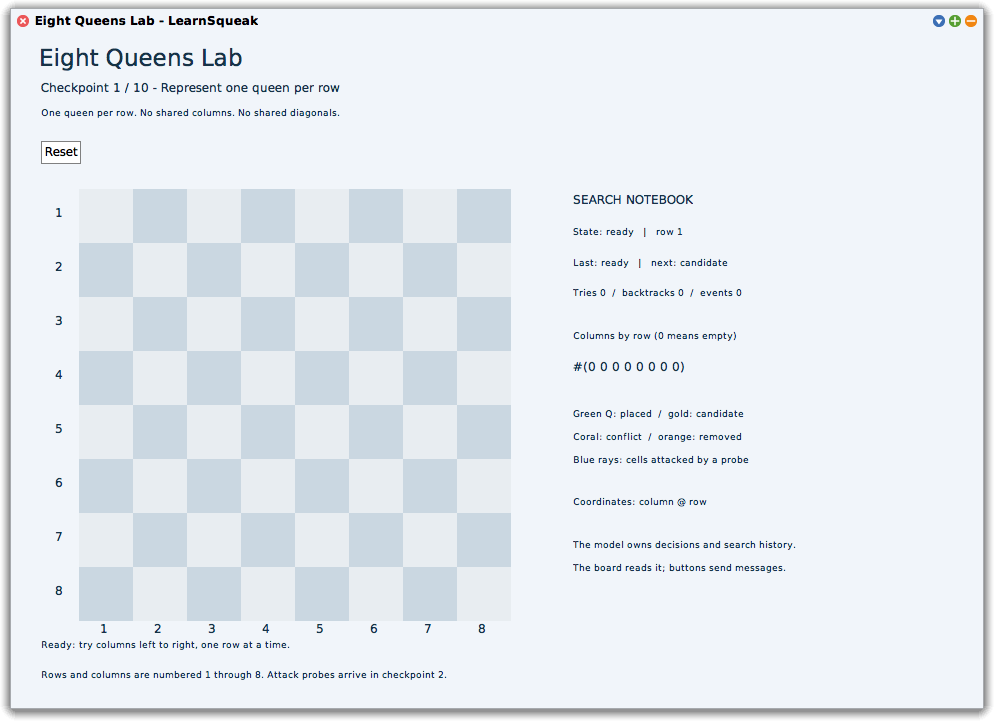
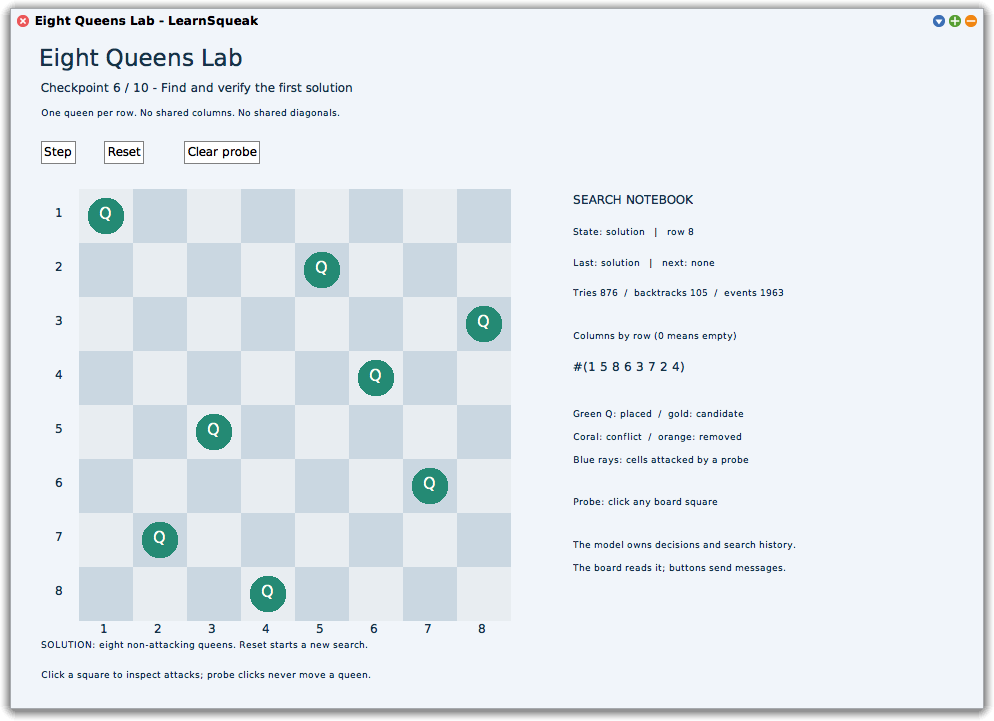
Begin with the representation. queens is an eight-element Array; the value at index r is the column occupied in row r. Zero means that row is empty. The solved vector #(1 5 8 6 3 7 2 4), for example, places the first queen at 1@1 and the second at 5@2. The board reads this array and converts each pair into a rectangle. It does not own the answer.
A legal partial board is a prefix: occupied rows come first, followed by empty rows. This representation rules out two queens in one row before search begins. We still have to reject shared columns and diagonals. LQSearch owns that invariant and returns a copy from queens so callers cannot accidentally edit its internal array. LQBoard draws; LQApp wires the model to a native window and controls; LQWindow keeps the small teaching layout at a fixed size.
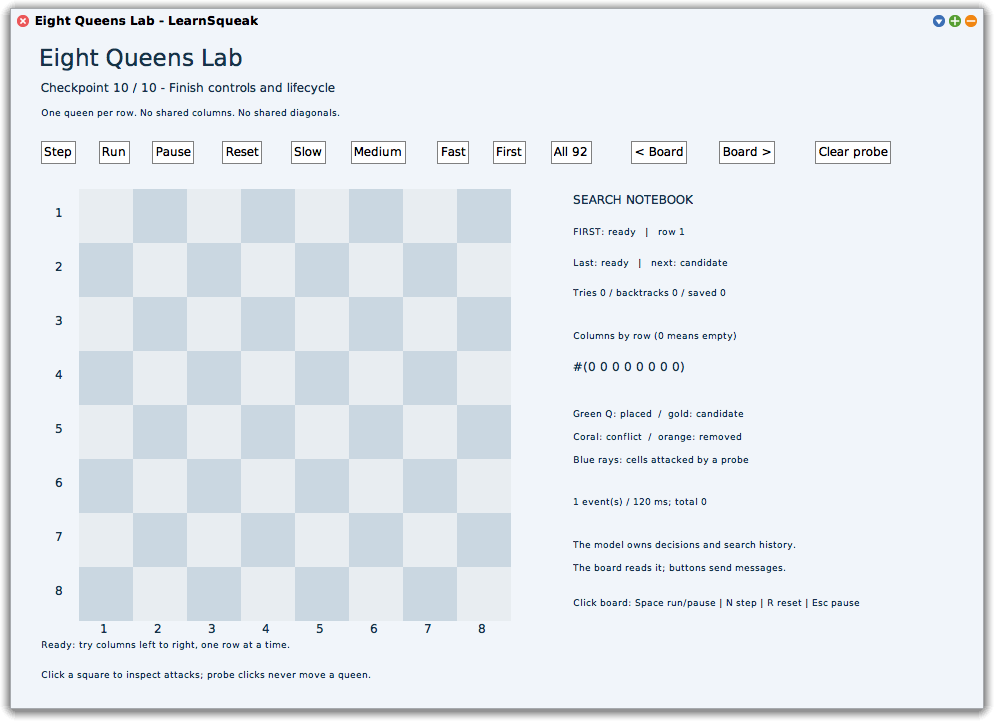
loadPrefix: gives us reproducible teaching fixtures. It checks the input and rejects an illegal prefix without changing the existing search. For an accepted prefix it resets transient state, fills the occupied rows, and starts at the next empty row. nextColumns remembers where each row should resume after a later undo. A loaded prefix is a starting path, not fixed constraints: later backtracking may remove those queens. In this first window the board is intentionally empty; Reset returns to that state. Read the model independently of the renderer before adding a search loop.
LQSearch · supporting instance-side method, included in this checkpoint
Actual Squeak 6.1 window produced by the exact checkpoint 1 Workspace block above.
02 · See rows, columns and diagonals
A queen attacks another square if either coordinate is equal, or the absolute coordinate differences are equal. Equal x means the same column. Equal y means the same row. A diagonal changes column and row by the same amount, so abs(delta column) = abs(delta row), in either diagonal direction. The formula works without tracing individual squares or consulting the view.
The highlighted method combines those three Boolean conditions with short-circuit or: blocks. Two coincident cells satisfy the geometry too; safety will separately reject occupied rows. conflictsAt: scans the placed queens and returns their coordinates, excluding the queried square itself. This gives the visualizer concrete objects to highlight rather than only a true/false answer.
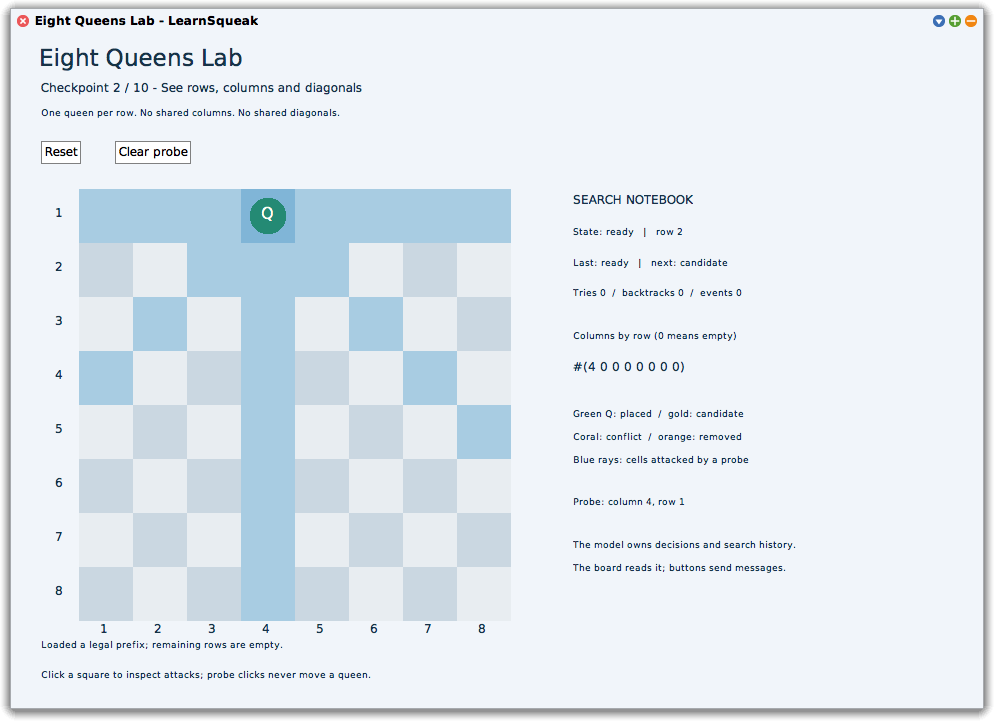
Load one queen at column 4 of row 1 and probe that square. Its row, column and both diagonals turn blue. Click other squares and follow their rays; probe clicks inspect geometry, never place queens or change search decisions. A probe also pauses an active animation so the explanation stays still. Clear probe removes the blue overlay. At this checkpoint every visible ray comes from the same attacks:with: method that the later solver will use.
LQSearch · supporting instance-side method, included in this checkpoint
System Browser → LQSearch → instance side → tutorial. Accept this complete method after filing in this checkpoint.
LQSearch · instance-side method
attacks: firstCell with: secondCell
 ^ firstCell x = secondCell x
  or: [firstCell y = secondCell y
  or: [(firstCell x - secondCell x) abs = (firstCell y - secondCell y) abs]]
File List → fileIn eight-queens-02.st. Then Workspace → select this entire block → Do It.
Watch for: The row test still belongs in the general geometric predicate, even though the search representation prevents two placed queens sharing a row.
Try it: Print It: LQSearch new attacks: 2@6 with: 5@3. It is true because both absolute differences are 3.
Expected result
One green queen at 4@1; blue cells show its horizontal, vertical and diagonal attack lines.
Actual Squeak 6.1 window produced by the exact checkpoint 2 Workspace block above.
03 · Ask whether a placement is safe
A geometric attack test is necessary but not sufficient for a public placement query. safeAt: first checks that the argument is an integer Point on the board, then checks that its row is empty, then asks whether any placed queen attacks it. Bad coordinates and occupied rows return false. A caller never needs to infer safety from a painted color.
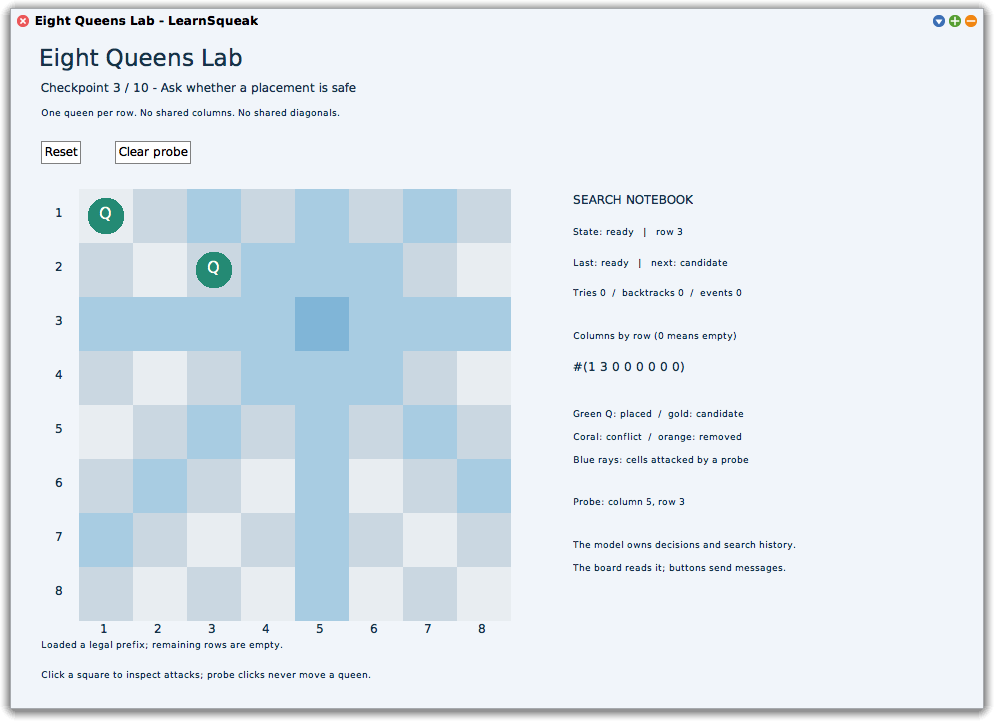
With the legal prefix #(1 3), row 3 has four safe columns: 5, 6, 7 and 8. Column 1 is occupied in row 1; column 2 is diagonally attacked by row 2; column 3 is occupied in row 2; column 4 is diagonally attacked by row 2. Column 5 is safe against both earlier queens. The blue probe on 5@3 illustrates its geometry while the two green queens remain unchanged.
This separates a query from a command. safeAt: answers a question; loadPrefix: changes model data; refresh tells the view to reread it. Search can now use a trustworthy Boolean decision, and SUnit can check that decision without opening any Morph. The first exercise later packages these individual questions into a list of safe columns.
Where to run this
System Browser → LQSearch → instance side → tutorial. Accept this complete method after filing in this checkpoint.
Actual Squeak 6.1 window produced by the exact checkpoint 3 Workspace block above.
04 · Try, reject and place one candidate
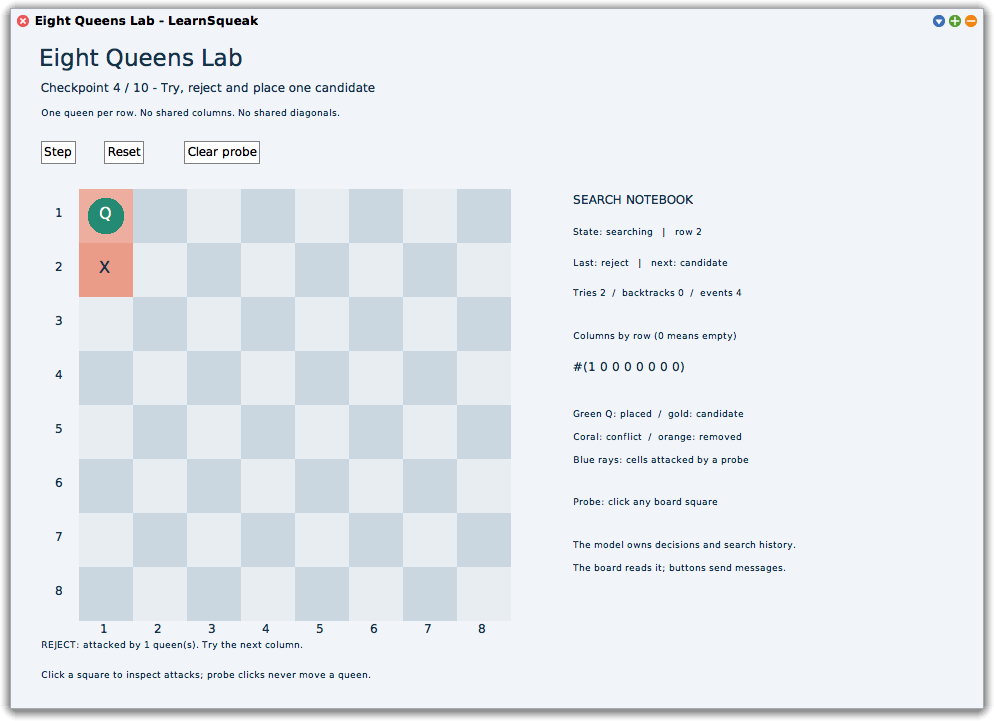
Make each decision observable. A candidate event selects nextColumns at the current row, records its Point and attacking queens, increments attempts, and changes phase to decision. It does not place anything yet. The next event decides: place a safe candidate and advance one row, or reject an attacked candidate and increment that row’s next column. Step therefore means one event, not one whole row or one complete solution.
Walk through the first eight events: 1 TRY 1@1; 2 PLACE it; 3 TRY 1@2; 4 REJECT the shared column; 5 TRY 2@2; 6 REJECT the diagonal; 7 TRY 3@2; 8 PLACE it. The resulting prefix is #(1 3). Four candidates required eight events. The gold question mark means inspection is pending; a coral X means rejection; a green Q means a committed safe placement.
The phase variable names what happens next. The event variable names what just happened. Keeping both prevents captions from being one step ahead of the board. The highlighted decideCandidate method performs only one bounded transition. This checkpoint intentionally stops at the first dead end with state blocked. Pressing Step again cannot invent a safe square; the next checkpoint will teach how to undo a previous decision.
LQSearch · supporting instance-side method, included in this checkpoint
Actual Squeak 6.1 window produced by the exact checkpoint 4 Workspace block above.
05 · Undo a choice with backtracking
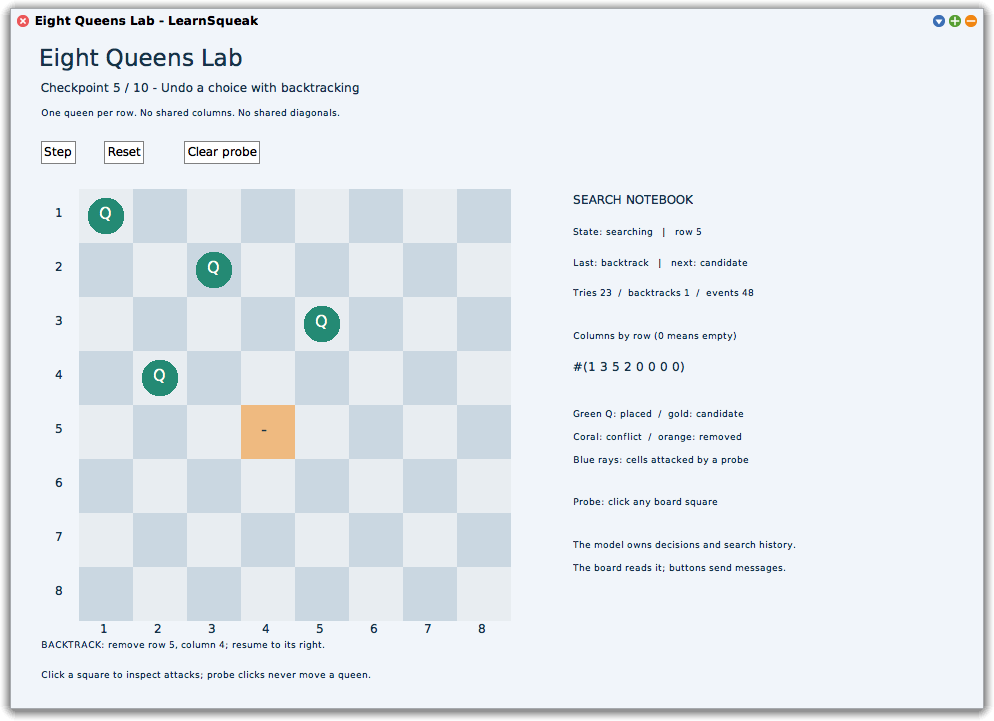
The first greedy path reaches #(1 3 5 2 4) and finds no safe square in row 6. After all eight columns have been tried, an exhausted event leaves the board intact and schedules backtrack. The following event removes the queen in row 5, returns row to 5, and resumes at the column immediately to the right of the removed queen. Earlier queens remain fixed.
That remembered next column is the heart of depth-first backtracking. Restarting row 5 at column 1 would revisit the same failed subtree forever. Leaving its queen in place would incorrectly reject its own alternative positions. Clearing deeper rows follows naturally because we remove one last queen at a time; the occupied rows remain a legal prefix after every event.
At event 47, row 6 is exhausted. At event 48, the queen at 4@5 is removed and the next candidate is 5@5. The orange cell and minus sign mark the removed choice, while row 1 through row 4 remain #(1 3 5 2). If alternatives also fail, the same rule climbs farther toward the root. Exhausting row 1 completes the tree traversal. This explicit state machine is the iterative equivalent of recursive calls and returns; row and nextColumns hold the information a recursive call stack would remember.
LQSearch · supporting instance-side method, included in this checkpoint
Actual Squeak 6.1 window produced by the exact checkpoint 5 Workspace block above.
06 · Find and verify the first solution
When row becomes 9, eight safe queens have been placed. A solution event copies the array into solutions and enters the terminal solution state. Copying matters: later backtracking will mutate the working array. Saving the same mutable object repeatedly would make the gallery show later edits instead of the boards we found.
solve is a convenience for tests and this small Workspace demonstration. It repeatedly sends stepSearch until a terminal state and has a defensive event budget. The UI’s later Run button will use bounded callbacks instead of a blocking solve loop. With left-to-right columns, the first solution is #(1 5 8 6 3 7 2 4), after 876 candidates, 105 backtracks and 1,963 events. This is a deterministic consequence of the traversal order, not an optimality or speed claim.
Check the answer independently. It must have eight columns in range, eight distinct column values, and no pair of rows r and s whose column difference has magnitude abs(r - s). Our tests inspect these properties rather than accepting the solver’s own legalPrefix result as proof. Repeated Step calls after success leave the board and counters unchanged. Reset clears the saved answer and restores the empty search.
Backtracking saves work by rejecting invalid prefixes early. General n-queens search is exponential; a loose bound for this array-based implementation is O(n squared × n!) work, including tried columns and O(n) conflict scans. The live search stack is O(n); storing S complete solutions uses O(S × n) additional space. Rendering is separate work.
Where to run this
System Browser → LQSearch → instance side → tutorial. Accept this complete method after filing in this checkpoint.
LQSearch · instance-side method
recordSolution
 solutions add: queens copy. state := #solution. candidate := nil. conflicts := #(). event := #solution.
 note := 'SOLUTION: eight non-attacking queens. Reset starts a new search.'. ^ true
File List → fileIn eight-queens-06.st. Then Workspace → select this entire block → Do It.
Actual Squeak 6.1 window produced by the exact checkpoint 6 Workspace block above.
07 · Animate with bounded Morphic steps
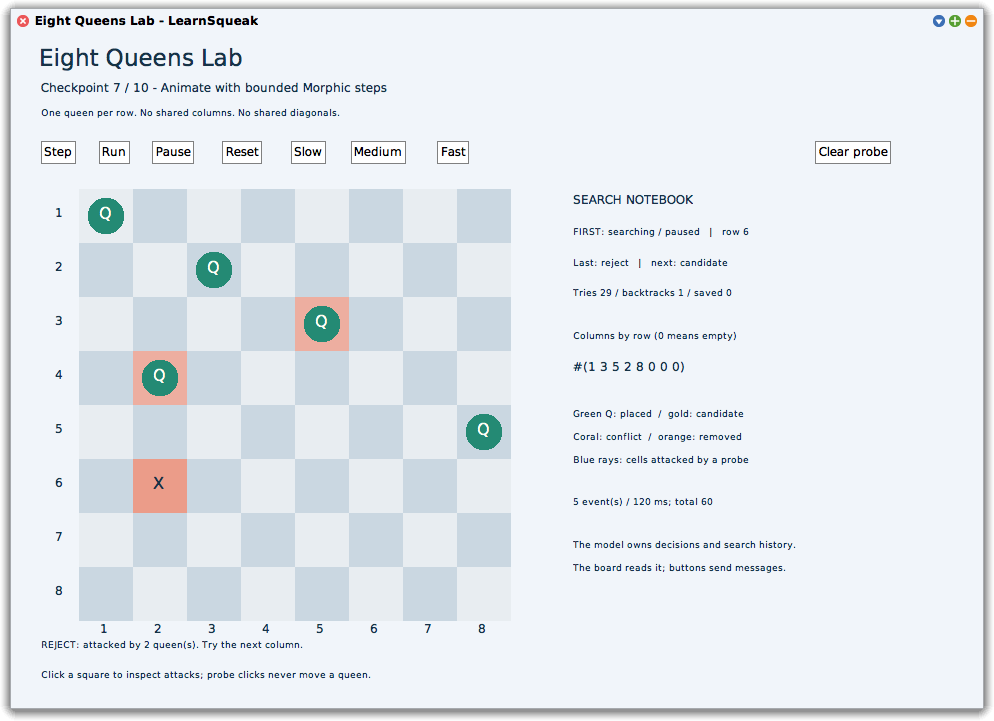
Morphic stepping gives the UI its animation clock. Run registers the app with startStepping; stepTime requests a delay; step performs a bounded batch of model events and refreshes once. No background process or long search loop is created. A second Run press sees running already true and leaves the existing progress alone.
Pause unregisters stepping but keeps row, phase, nextColumns, queens and counters intact. Run resumes that exact state. Step first pauses and then performs exactly one model event, regardless of the speed setting. Reset stops stepping and returns to an empty board. Terminal states automatically unregister the callback, so a finished solver does not keep consuming animation ticks.
Slow requests one event per 500 ms; Medium five per 120 ms; Fast one hundred per 30 ms. Faster modes deliberately skip rendering intermediate events while preserving every model transition and counter. These are requested scheduler delays, not real-time guarantees. Use Slow or Step to study a rejection; Fast to finish a search. The exact run block below calls the same native step callback twelve times at Medium speed and then pauses, yielding sixty events reproducibly without waiting for a wall clock.
Clicking a square pauses and probes; Clear probe removes only that overlay. Starting or stepping clears the probe to keep the next solver event visible. The controls manage the animation lifecycle; all chess rules remain in LQSearch.
LQApp · supporting instance-side method, included in this checkpoint
Actual Squeak 6.1 window produced by the exact checkpoint 7 Workspace block above.
08 · Enumerate every solution
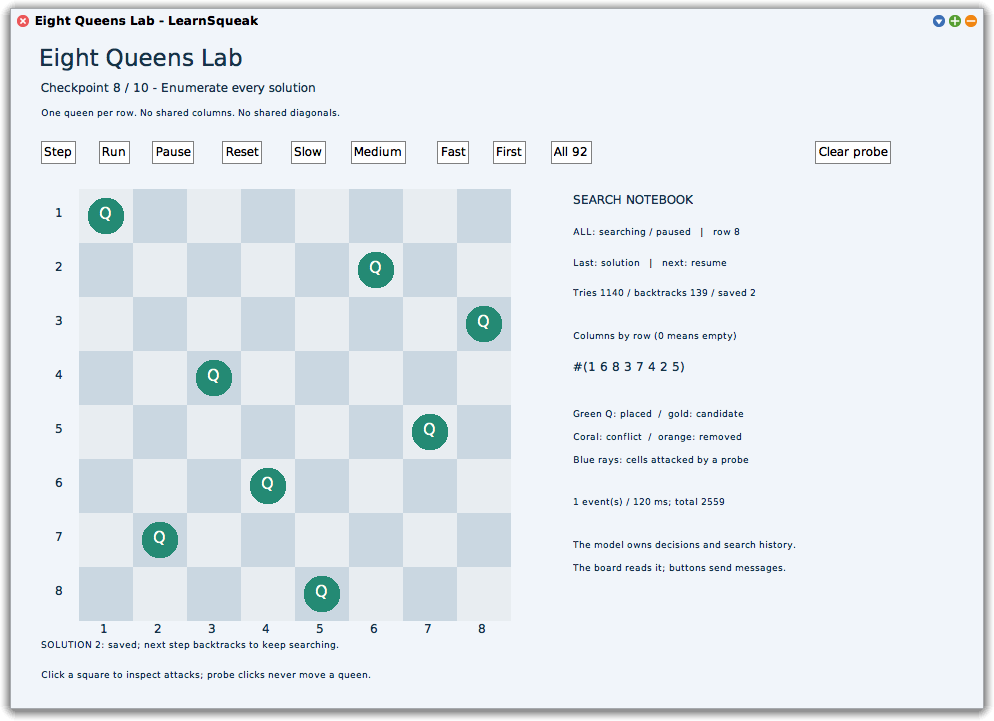
Finding one answer does not exhaust the search tree. All mode changes what happens after a solution event: save the vector, leave the model searching, and set phase to resume. On the next event, resumeAfterSolution uses the existing backtrack operation to remove the last queen and try its next column. No separate enumeration algorithm is needed.
A complete board is emitted exactly once because each row’s alternatives move strictly left to right before returning to its parent. Eventually the final alternative in row 1 is exhausted; state becomes complete and the working board is empty. Starting from an empty board, this traversal finds 92 distinct solutions. Every stored vector is checked for legality and uniqueness. An independent checker also enumerated all 8! column permutations and found exactly the same 92 vectors in the same lexicographic order.
The count includes rotations and reflections as distinct boards in this fixed coordinate system. We do not implement symmetry reduction, and we do not claim a count of fundamental solutions. The complete native run visits 15,720 candidates, removes 2,056 queens while backtracking, and emits 35,554 total events. These counts describe this particular event design and traversal order.
First and All 92 are mode selectors: either one pauses and resets before choosing how future search will stop. Press Run afterward. The run block stops just after saving solution 2, before its resume event, so you can inspect a complete board while the model is still searching.
LQSearch · supporting instance-side method, included in this checkpoint
Actual Squeak 6.1 window produced by the exact checkpoint 8 Workspace block above.
09 · Inspect the 92 saved boards
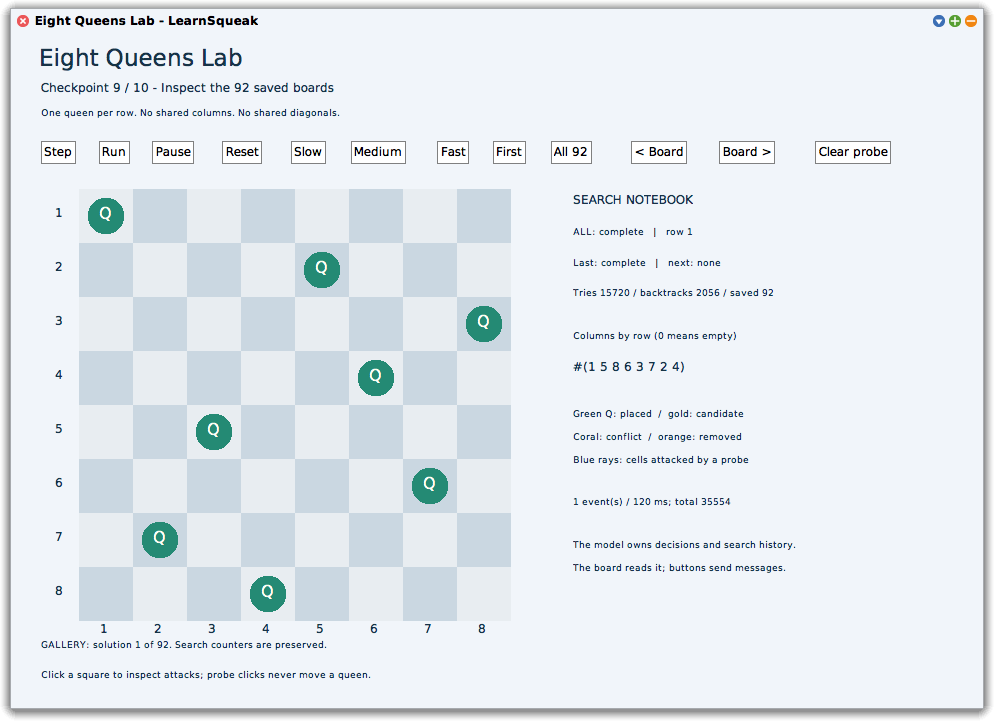
Separate the search state from the displayed solution. The working queens array must become empty when enumeration exhausts the tree. A gallery should not write an old answer back into that array. displayQueens instead returns either a copied saved solution or the current search prefix. viewing is zero for the live search and 1 through solutionCount for the gallery.
Board > moves forward and < Board moves backward, wrapping at the ends. On the first gallery action, forward selects board 1 and backward selects the last saved board. A gallery click pauses any active search, clears the probe, and changes only viewing. The counters, saved solutions and next search event remain intact. If you browse while a search is paused and then press Run or Step, the app returns to the live search before advancing.
The highlighted method uses Squeak’s two-backslash remainder message to wrap a nonnegative index into the gallery range. It first handles an empty gallery, then the special zero value, then ordinary wraparound. Those boundary cases have dedicated tests. The exact block enumerates all boards and selects the first; native Run at Fast is the interactive route to the same result.
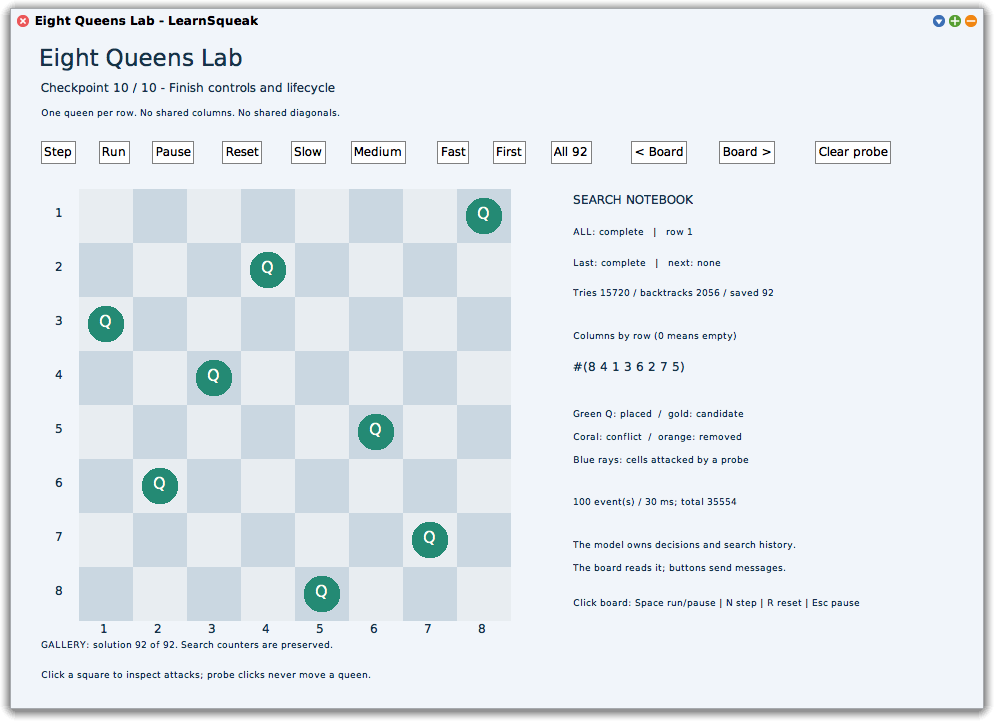
Use the gallery to compare shape and symmetry. Board 92 is the left-right reflection of board 1. The final exercise computes such a reflection and checks that every reflected solution appears in the enumerated set. A reflection preserves legality but is still a distinct board in the count of 92.
LQApp · supporting instance-side method, included in this checkpoint
Actual Squeak 6.1 window produced by the exact checkpoint 9 Workspace block above.
10 · Finish controls and lifecycle
A small application is not finished when its algorithm works once. The final checkpoint adds keyboard controls after clicking the board: Space toggles Run / Pause; N performs one event; R resets; Escape pauses. Mouse buttons remain available without focus. These shortcuts send the same app messages as the visible buttons, avoiding a second implementation of the search controls.
Closing the native window calls windowIsClosing. It stops stepping, clears keyboard focus if the board owns it, and releases the window reference. The same app object can open a new window later. Run on a closed app does nothing; repeated Run cannot create independent loops. Reset while running and mode changes while running also stop the current scheduler before changing model state.
The test suite covers all of these boundaries alongside attacks, invalid input, the worked trace, every intermediate legal-prefix invariant, first-solution determinism, all 92 answers, saved-array independence, real button mouse events, exact board edges, gallery wraparound, and keyboard shortcuts. The exercises add six separate tests. All were executed in native Squeak 6.1; the independent oracle checks the answer set without reusing the solver’s attack method.
The final run block uses Fast’s bounded callback four hundred times, which is more than enough for the 35,554-event traversal. Completion stops the app before later callbacks do any work. It then shows the last saved board. Keep the model code and source downloads alongside your image so you can rebuild or adapt this application later.
LQBoard · supporting instance-side method, included in this checkpoint
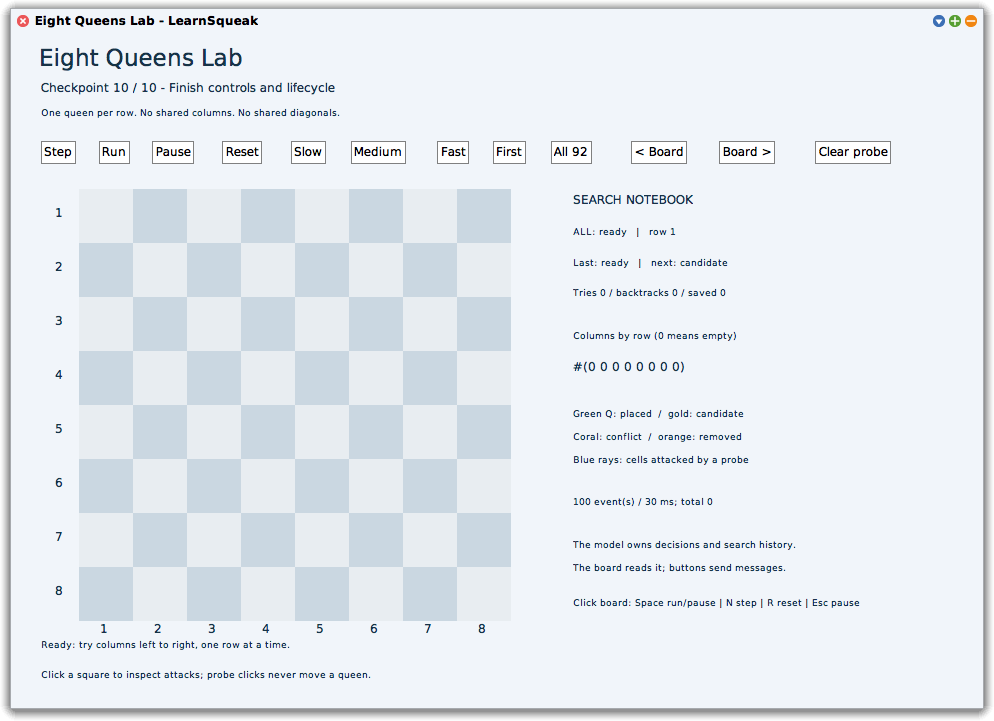
Actual Squeak 6.1 window produced by the exact checkpoint 10 Workspace block above.
Watch the workflow
All ten PNGs and every animation frame are genuine SystemWindow imageForm renders from Squeak 6.1 build 23976, using the supplied native source in isolated unsaved baseline images. Stage capture scripts recompile the displayed Browser method and evaluate the exact Workspace block. The GIFs are scripted native executions, not human screen recordings: button clicks send native Morphic mouse events and animation invokes the same step callback as Morphic stepping. Only frame timing and GIF encoding are applied; the interface is not recreated or composited. Posters copy the first native frame.
NATIVE SQUEAK CAPTURE
Scripted native Squeak execution: 52 consecutive Step button events from an empty board, including the first exhausted row at event 47 and the first backtrack at event 48. Every event is shown; playback is slowed for reading.
NATIVE SQUEAK CAPTURE
Scripted native Squeak control demonstration: choose All 92 and Fast, Run, Pause with an unchanged callback, resume to complete enumeration, browse saved boards, then Reset. Fast advances 100 model events per callback; later frames sample groups of callbacks. This is a time-compressed native execution, not a real-time screen recording.
Practice with tested solutions
1. Safe columns for the next row
Add safeColumnsForRow: to LQSearch. Return the columns that could accept a new queen in that row, or an empty collection for an invalid or occupied row. Use the public safeAt: query; do not duplicate diagonal logic. With prefix #(1 3), row 3 must return #(5 6 7 8).
Hint
Select from 1 to: self size, passing column@rowNumber to safeAt:.
After the final checkpoint, first add this test to the named exercise TestCase subclass (or install the solution file for the complete runnable class).
After filing in the exercise solution, Workspace → Print It on:
Check the solution
LQExercise1Test suite run
2 tests run, 2 passes, 0 failures, 0 errors.
The downloadable solution includes the method and both independently runnable SUnit tests.
2. Explain each conflict
Add conflictReasonsFrom:to: to explain a pair of valid board coordinates using the symbols column, row and diagonal. Return every applicable reason in that order and an empty array for unrelated or invalid cells. A coincident pair satisfies all three geometric conditions; placement safety remains a separate question.
Hint
Use an OrderedCollection because a pair can satisfy more than one geometric condition.
After the final checkpoint, first add this test to the named exercise TestCase subclass (or install the solution file for the complete runnable class).
Write the test first
testConflictReasons
 | model |
 model := LQSearch new.
 self assert: (model conflictReasonsFrom: 1@1 to: 1@4) = #(column).
 self assert: (model conflictReasonsFrom: 1@4 to: 6@4) = #(row).
 self assert: (model conflictReasonsFrom: 2@6 to: 5@3) = #(diagonal).
 self assert: (model conflictReasonsFrom: 1@1 to: 2@4) isEmpty
Show a tested solution
System Browser → LQSearch → instance side → exercises. Accept the method below, or file in the complete solution download after the final checkpoint.
Exercise solution
conflictReasonsFrom: firstCell to: secondCell
 | reasons |
 ((self validCell: firstCell) and: [self validCell: secondCell]) ifFalse: [^ #()].
 reasons := OrderedCollection new.
 firstCell x = secondCell x ifTrue: [reasons add: #column].
 firstCell y = secondCell y ifTrue: [reasons add: #row].
 (firstCell x - secondCell x) abs = (firstCell y - secondCell y) abs ifTrue: [reasons add: #diagonal].
 ^ reasons asArray
Expected
2@6 and 5@3 share a diagonal; the answer is #(diagonal).
After filing in the exercise solution, Workspace → Print It on:
Check the solution
LQExercise2Test suite run
2 tests run, 2 passes, 0 failures, 0 errors.
The downloadable solution includes the method and both independently runnable SUnit tests.
3. Reflect a solved board
Add mirrorOf: to reflect a full column vector across the board’s vertical axis. Keep row order and replace column c by 9 - c. Reject malformed vectors with nil. This utility transforms board coordinates; it does not itself promise that an arbitrary input board was legal. Test that reflecting twice recovers the original and that all 92 legal solutions have a reflected partner.
Hint
Reflection preserves column differences in magnitude, so the same no-diagonal condition survives.
After the final checkpoint, first add this test to the named exercise TestCase subclass (or install the solution file for the complete runnable class).
After filing in the exercise solution, Workspace → Print It on:
Check the solution
LQExercise3Test suite run
2 tests run, 2 passes, 0 failures, 0 errors.
The downloadable solution includes the method and both independently runnable SUnit tests.
When something looks wrong
Step does nothing after the first solution or complete enumeration
That is a terminal state. Press Reset, or choose First / All 92 to begin a new search. In an early checkpoint, blocked means the next backtracking lesson is needed.
All mode ends on an empty board
The search has removed every working queen while exhausting the tree. Use Board > or < Board from checkpoint 9 onward to inspect saved solutions; the solution count is retained.
The animation moves too fast to see each rejection
Choose Slow, or Pause and use Step. Medium and Fast intentionally process several model events per paint.
The board turns blue and the search pauses
You clicked an attack probe. Clear probe removes its geometry. Run or Step also clears it before continuing the search.
Keyboard shortcuts do nothing
Click the board to give it keyboard focus, then press Space, N, R or Escape. The visible buttons also work without board focus.
An earlier checkpoint still has later behavior
Use a clean learning image for independent earlier checkpoints. Filing in older source does not uninstall methods added by later file-ins.
A prefix is rejected without changing the board
loadPrefix: accepts only an Array of 1–8 integer columns, at most eight entries, with no shared columns or diagonal attacks. It preserves the prior search on invalid input.
Verification, cleanup and next steps
The lesson, checkpoints, captures, tests, exercise solutions and independent comparison were built together. Media depicts this exact implementation, including the separate candidate and decision events.
Native Squeak 6.1: 35 primary tests passed, 0 failures, 0 errors. Each of three exercise suites passed both tests: 6 exercise tests in total.
All ten checkpoints were installed independently from a clean baseline and captured after accepting the displayed method and evaluating the exact Workspace block. The final solver’s complete list of 92 boards also matches an independent Python permutation oracle.
The independent native review checks all 4,096 board-coordinate attack pairs and the legal-prefix invariant after every event
Run / Pause / resume, repeated Run, Step during Run, Reset, speed changes, terminal no-ops, close / reopen, keyboard shortcuts, native button events, board boundaries and gallery navigation are tested
Run tests yourself: file in eight-queens-final.st, then eight-queens-tests.st; Workspace → Print It: LQSearchTest suite run
Close Eight Queens Lab to unregister stepping. Keep the .st sources separately from your image. Reload the final checkpoint in a fresh image when you want a clean rebuild.
Supplied Squeak 6.1 build 23976 source and runtime — Native Morphic SystemWindow, SimpleButtonMorph, World stepping, imageForm, PNGReadWriter and bundled SUnit
Downloadable LQSearch and LQApp methods — The implemented state machine and its native tests are the source of all reported counts
Independent permutation oracle — Tests every permutation of columns 1 through 8 and rejects diagonal conflicts; the complete ordered answer set matches native output