The separate playground loads the real Smalltalk image on demand. This lesson keeps its native setup instructions; browser compatibility notes appear beside each demo.
Before you start
Build Vector / Voyage, an original object-oriented flight through a three-dimensional corridor. Collect gold rings, avoid coral blocks and unlock the finish gate. This workshop continues the camera and projection ideas from the /three-d lesson and turns them into a complete playable program.
This is real 3D world data projected by software onto a native Morphic canvas. It does not use hardware acceleration or a third-party game engine. The web page is a construction guide and source download; the game runs in Squeak 6.1 after file-in, not in browser JavaScript. Every game image below comes from native Squeak.
Follow ten complete cumulative checkpoints. Each file contains all classes and methods needed at its stage, without later-stage behavior. Read the highlighted method, file in the checkpoint, run its exact Workspace block, and inspect the result. Earlier stages use manual updates so each new responsibility remains visible.
Squeak 6.1 with bundled Morphic and SUnit; no extra graphics packages or assets
Workspace Do It / Print It and Browser instance/class sides; the /three-d projection lesson is a helpful starting point
About 90–120 minutes for ten checkpoints, plus exercises
Save a copy of your learning image. The lesson adds classes in LearnSqueak-Game3D.
Download a checkpoint .st and use Squeak File List → fileIn. Chunk-format source files should not be pasted wholesale into a Workspace.
Do It the exact Workspace block shown for that checkpoint. For a method edit, select the specified class and side, replace the whole method and Accept.
Close the old game before the next file-in. Move forward in order. Use a clean image for an isolated earlier checkpoint; filing older source over newer source does not remove later classes or methods.
For immediate play, file in game-3d-final.st and Do It: LS3DApp open. Click the scene if necessary. Enter starts/pauses, arrows or WASD steer, Escape pauses, and R restarts.
First try the 3D wireframe and perspective basics. This game applies those camera coordinates to input, collectible objects and collision rules.
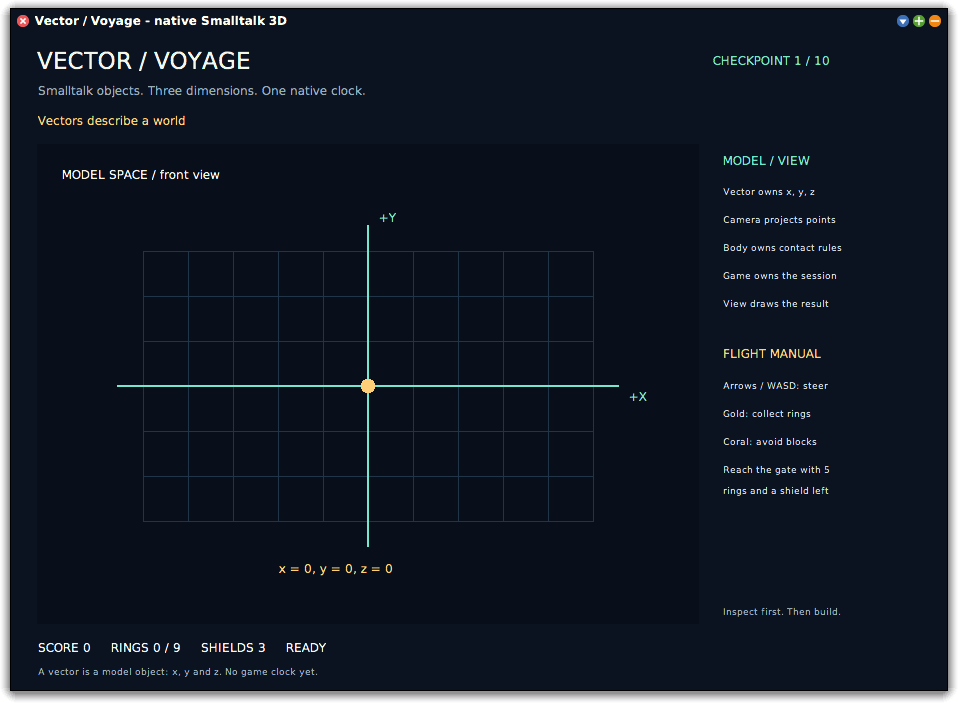
Begin with coordinates, not pixels. LS3DVector stores x, y and z as three ordinary Smalltalk numbers. Positive X means right, positive Y means up, and positive Z means forward along the corridor. The first view intentionally draws a front-view coordinate grid: it is a diagnostic view of model space, before perspective arrives in the next checkpoint. The origin is a real vector object even though the diagnostic picture is flat.
The + method creates a new vector. It never changes either operand. A movement can therefore keep the old position for collision testing while constructing the new one. Smalltalk sends + to the left-hand vector, which reads the other vector through messages. Multiplying by a scalar and subtracting a vector follow the same pattern. This tiny value-object protocol is enough for the projection and swept collision algorithms used later.
LS3DGame already owns session fields, while LS3DApp assembles a native SystemWindow and LS3DView draws. No timer, keyboard controller or bodies exist yet. These boundaries matter: a test can instantiate and inspect the model without a window. The class list grows as the tutorial introduces new responsibilities. All coordinates are in arbitrary world units; they are not screen pixels.
Where to run this
System Browser → LS3DVector → instance side → tutorial. Inspect or Accept this complete method after filing in the checkpoint.
LS3DVector · complete method
+ other
 ^ self class x: x + other x y: y + other y z: z + other z
File List → fileIn game-3d-01.st. Then Workspace → select this complete block → Do It.
Workspace · run after installing this checkpoint
| app |
app := LS3DApp open.
app
LS3DVector owns coordinates and returns fresh vectors for arithmetic
LS3DGame owns authoritative state
LS3DView paints; LS3DApp assembles the native interface
X/Y units and Z depth are independent of window position
Genuine native Squeak SystemWindow capture from this exact checkpoint source and Workspace block.
02 · A camera turns depth into pixels
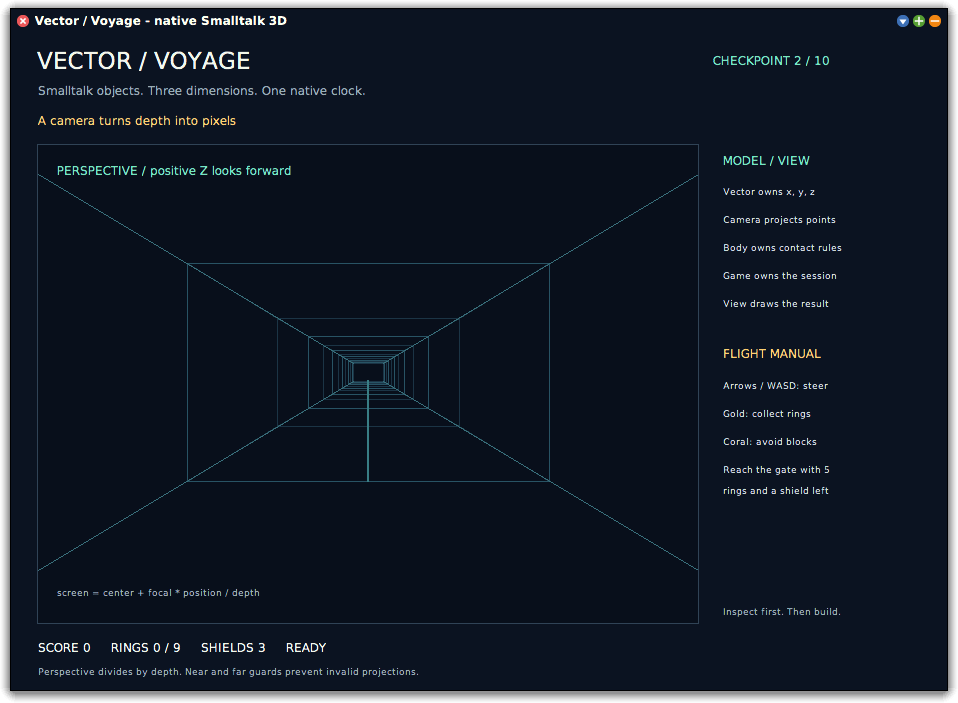
Continue the projection idea from the /three-d lesson and make it a camera object. LS3DCamera has a position, a focal length in pixels, a screen center, and near/far distances. For a world point, subtract the camera position first. A point twice as far away has half the screen displacement. This division by Z is what makes this a perspective projection of three-dimensional coordinates, rather than a flat scaling trick.
Screen Y increases downward in Morphic. The model uses positive Y upward, so project: negates relative Y before it constructs the Point. rounded is applied only at the end, where continuous world positions become native canvas pixels. A point nearer than 0.5 units or farther than 110 units returns nil. The view must check that answer before drawing. Behind-camera and zero-depth points never reach division.
The tunnel contains rectangular cross-sections every eight world units, linked by rails. The camera initially sits at Z = -8. Canvas clipping keeps lines inside the viewport even when a nearby point projects far beyond the screen. This renderer rejects near-crossing primitives instead of computing new clipped 3D vertices. That conservative limitation is useful to understand before extending it into a general renderer.
Where to run this
System Browser → LS3DCamera → instance side → tutorial. Inspect or Accept this complete method after filing in the checkpoint.
LS3DCamera · complete method
project: point
 | relative |
 relative := point - position.
 (relative z < near or: [relative z > far]) ifTrue: [^ nil].
 ^ center + (((relative x * focal / relative z) rounded) @ ((relative y negated * focal / relative z) rounded))
File List → fileIn game-3d-02.st. Then Workspace → select this complete block → Do It.
Workspace · run after installing this checkpoint
| app |
app := LS3DApp open.
app
World point → camera-relative vector → perspective division → screen Point
No GPU, OpenGL, external engine or graphics package is used
nil is an explicit not-visible answer, not a coordinate
Canvas clipping and 3D near-plane handling solve different problems
Try it: Inspect LS3DCamera new. Project x = 2 at Z = 2 and Z = 12: depths are 10 and 20, so horizontal displacement halves.
Expected result
A perspective wire corridor. Distant sections shrink toward the center; positive model Y appears upward.
Genuine native Squeak SystemWindow capture from this exact checkpoint source and Workspace block.
03 · Bodies become projected geometry
Add model objects for visible things. LS3DBody stores position and a spent flag. LS3DBlock and LS3DRing specialize the renderKind and size protocol. At this stage these are still inert scenery: they have no collision or score behavior. Keeping model objects separate from drawing makes it possible to add gameplay rules without teaching the camera about scoring.
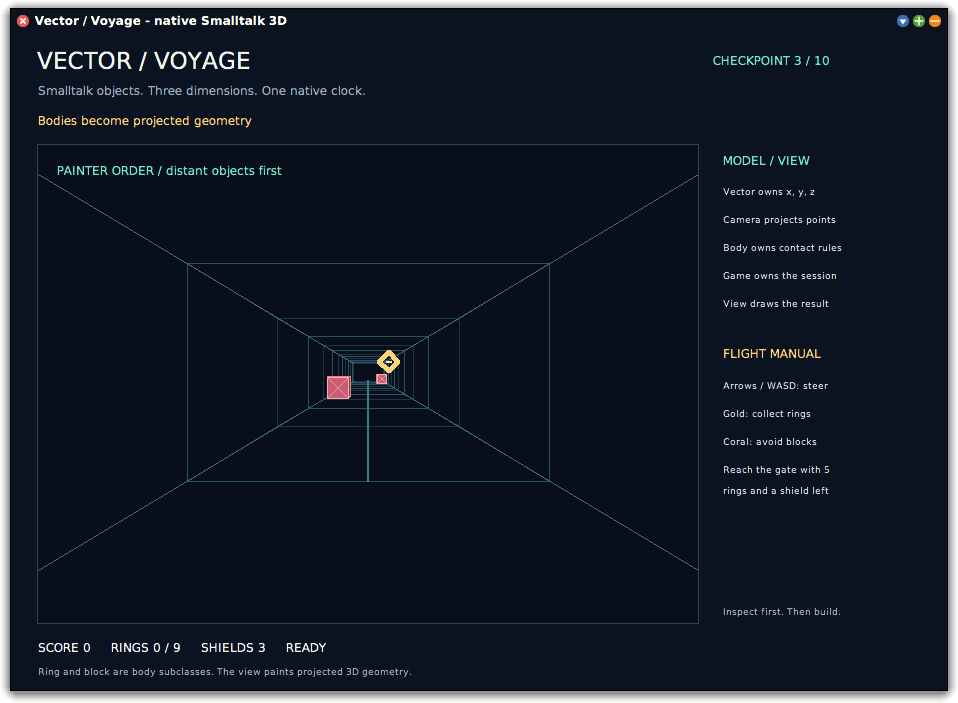
The view projects eight cube corners and draws native shaded polygon faces. Rings are diamond-shaped wire targets at a single Z plane. visibleBodies first rejects an entire body if its nearest or farthest extent lies outside the camera interval. It then sorts by world Z from far to near. Because the camera looks along positive Z without rotating, world-Z order is also camera-depth order. Painting distant objects first lets nearby objects cover them.
This is a deliberately bounded painter renderer. Authored bodies are spaced apart in depth, and equal-depth ring/block pairs do not overlap. There is no depth buffer, face intersection splitting, texture mapping, lighting engine or general polygon clipping. The cube shading is a fixed color choice. Those limits are honest design choices for a short Smalltalk game, and they make the geometry and object messages easy to inspect.
Where to run this
System Browser → LS3DView → instance side → tutorial. Inspect or Accept this complete method after filing in the checkpoint.
LS3DView · complete method
visibleBodies
 ^ (app game bodies select: [:body | body spent not and: [
  (camera depthOf: body position) - body halfSize >= camera near and: [
  (camera depthOf: body position) + body halfSize <= camera far]]]) sorted: [:a :b | a position z > b position z]
File List → fileIn game-3d-03.st. Then Workspace → select this complete block → Do It.
Workspace · run after installing this checkpoint
| app |
app := LS3DApp open.
app
Each body retains its own 3D position
Cube corners are projected separately; the artwork is native canvas geometry
Painter order is correct for this fixed forward camera and separated course
Model objects do not store canvas handles or screen rectangles
Try it: Inspect app view visibleBodies and compare each position z. The sequence must be farthest first.
Expected result
Two coral 3D blocks and a gold ring occupy different depths inside the corridor. The nearer block appears larger.
Genuine native Squeak SystemWindow capture from this exact checkpoint source and Workspace block.
04 · A ship moves inside bounds
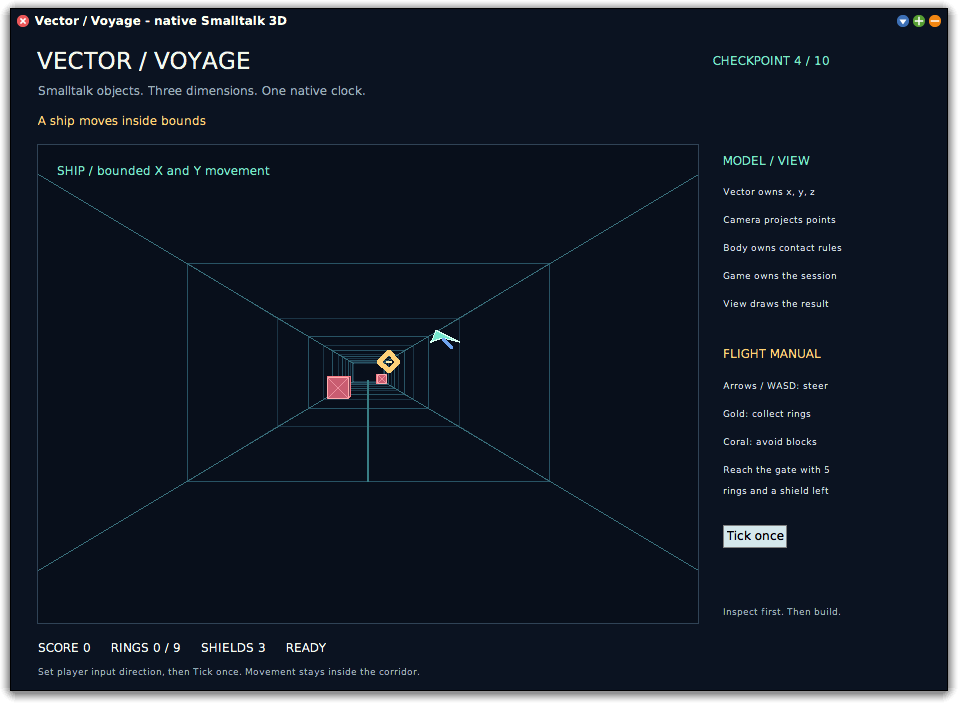
The ship is another model object, with a position and an LS3DInput. An input direction is an intention, not a direct position update. advanceBy: turns that direction into an X/Y displacement. Each component is bounded to -1 through 1; diagonal input is normalized so holding two directions does not make the ship faster. The speed policy returns 0.25 world units per simulation tick.
After movement, X is clamped to -4.5 through 4.5 and Y to -2.5 through 2.5. The corridor wall lies at ±5 and ±3, leaving room for the ship. The forward argument is zero in this checkpoint, so Z does not change. A single Tick once button gives one model update. No automatic scheduler or keyboard event protocol is active yet; use the exact Workspace sequence to choose direction and observe the result.
The view draws a small original four-vertex ship from projected 3D points. It places the ship between body groups in painter order, so an object with smaller Z can cover it. The view never writes the player's position. This separation lets later keyboard code merely set intentions, while the model remains the only place that applies movement and bounds.
Where to run this
System Browser → LS3DShip → instance side → tutorial. Inspect or Accept this complete method after filing in the checkpoint.
LS3DShip · complete method
advanceBy: forward
 | delta length dx dy |
 delta := input direction. length := (delta x squared + delta y squared) sqrt max: 1.
 dx := delta x / length * self speed. dy := delta y / length * self speed.
 position := LS3DVector x: ((position x + dx max: -4.5) min: 4.5)
  y: ((position y + dy max: -2.5) min: 2.5) z: position z + forward
File List → fileIn game-3d-04.st. Then Workspace → select this complete block → Do It.
Workspace · run after installing this checkpoint
| app |
app := LS3DApp open.
app game player input direction: 1@0.
8 timesRepeat: [app tickOnce].
app game player input direction: 0@1.
4 timesRepeat: [app tickOnce].
app game player input clear.
app
Input owns the requested direction; Ship owns movement
A diagonal direction is divided by its length
The old immutable position remains available for later collision checks
The renderer orders the ship against the other 3D objects
Try it: Hold a model direction of 1@1 for 100 manual steps, then inspect the position. X and Y stop at 4.5 and 2.5.
Expected result
The ship has moved to x = 2, y = 1, z = 0, after exactly 12 manual ticks.
Genuine native Squeak SystemWindow capture from this exact checkpoint source and Workspace block.
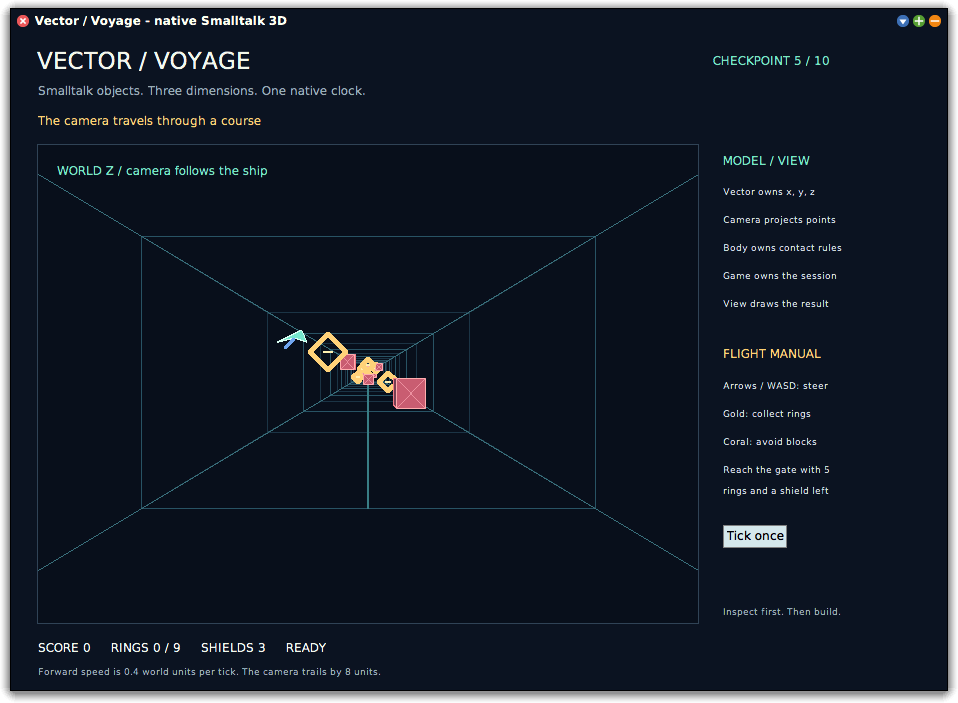
05 · The camera travels through a course
Now the world has an authored course. LS3DCourse creates nine ring/block pairs from simple coordinate triples. Each gold target has a coral obstacle at the opposite X/Y position at the same Z. This layout leaves a legal route through every ring while giving the player a reason to steer. The course answers fresh body objects on each call, so restarting later will not reuse spent objects.
The ship advances 0.4 units along positive Z on each model tick. The camera's X and Y stay at zero; its Z becomes ship Z minus eight. This is a trailing camera with fixed orientation, not a camera that rotates or follows lateral steering. Rendering repeatedly subtracts that camera position from stationary world geometry. The objects expand and pass behind the ship because their relative depth changes; the course does not slide a collection of flat pictures.
Collisions still have no effect at this checkpoint. This is useful for inspecting projection through the whole scene without losing. Forward motion is unbounded here because the finish gate arrives with the session rules. The run below makes a legal steering sequence toward the first ring and stops at Z = 9.6, close enough to see the perspective change clearly.
LS3DView · instance-side camera update
updateCamera
 camera position: (LS3DVector x: 0 y: 0 z: app game distance - 8)
Where to run this
System Browser → LS3DCourse class → class side → tutorial. Inspect or Accept this complete method after filing in the checkpoint.
LS3DCourse class · complete method
bodies
 | result | result := OrderedCollection new.
 self ringCoordinates do: [:row | | p | p := LS3DVector x: row first y: row second z: row third.
  result add: (LS3DRing at: p).
  result add: (LS3DBlock at: (LS3DVector x: p x negated y: p y negated z: p z))].
 ^ result asArray
File List → fileIn game-3d-05.st. Then Workspace → select this complete block → Do It.
Workspace · run after installing this checkpoint
| app |
app := LS3DApp open.
app game player input direction: -1@0.
8 timesRepeat: [app tickOnce].
app game player input direction: 0@1.
4 timesRepeat: [app tickOnce].
app game player input clear.
12 timesRepeat: [app tickOnce].
app
LS3DCourse builds deterministic data, not UI objects
The world remains stationary; camera-relative depth changes
Forward speed is a model policy, independent of wall-clock timing
A fresh course gives each session independent body identity
Try it: Compare a ring's model position before and after ten ticks. It stays fixed; its projected screen coordinates change.
Expected result
The ship is at x = -2, y = 1, z = 9.6 and the camera is at z = 1.6 when rendered. The approaching first ring has grown.
Genuine native Squeak SystemWindow capture from this exact checkpoint source and Workspace block.
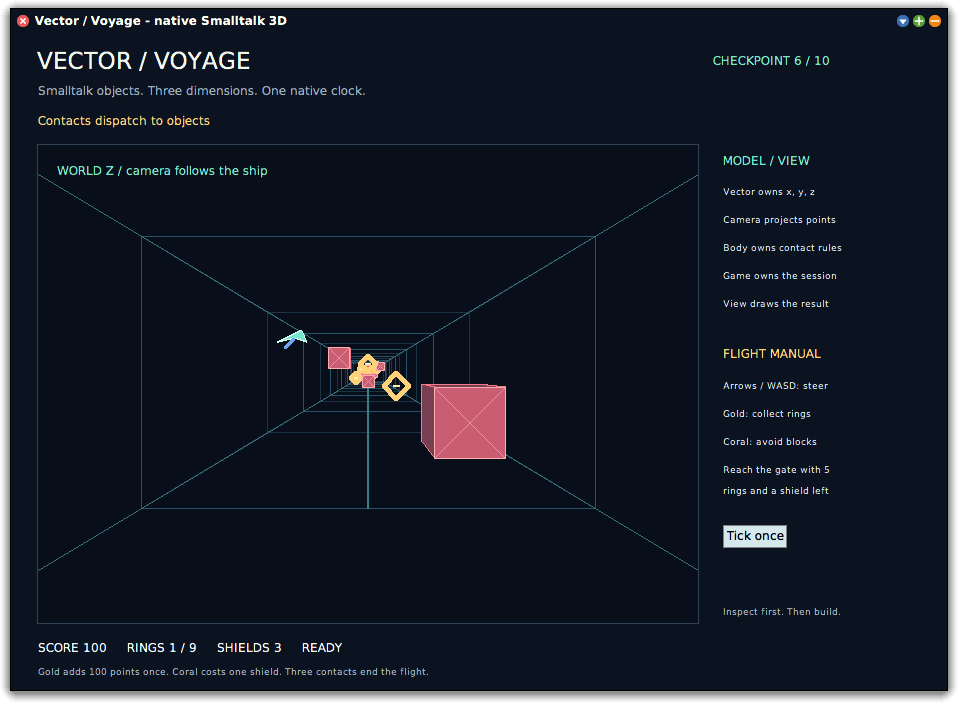
06 · Contacts dispatch to objects
A moving ship can cross an object between two ticks. Checking only its final position can miss that contact. The body therefore tests the entire segment from the previous position to the next one against a three-dimensional box. For each X/Y/Z slab, the method computes when the segment enters and leaves it. All three intervals must overlap between zero and one. A parallel segment outside a slab is an immediate miss; a parallel segment inside contributes no restriction.
A block's collision box has half-size 0.95, combining its visible half-size of 0.7 with the ship's simplified 0.25 collision radius. A ring uses a square acceptance region of ±0.9 in X/Y and exactly its Z plane. This generous square target is a gameplay rule; it is not a claim of pixel-perfect collision with the diamond artwork. Even a high-speed segment cannot skip a block entirely.
After a hit, the game sends contactIn: to the body. A once-only guard marks it spent, then polymorphic applyTo: either adds 100 points and one ring or removes one shield. The game does not ask the body's class to choose that effect. Spent objects disappear from the view. Three different obstacle contacts exhaust shields and stop this checkpoint's model updates.
LS3DBody · once-only dispatch
contactIn: game
 spent ifTrue: [^ self]. spent := true. self applyTo: game
LS3DRing · polymorphic reward
applyTo: game
 game collectRingWorth: self points
LS3DBlock · polymorphic damage
applyTo: game
 game damage
Where to run this
System Browser → LS3DBody → instance side → tutorial. Inspect or Accept this complete method after filing in the checkpoint.
LS3DBody · complete method
segmentFrom: start to: finish intersectsHalf: half
 | enter leave a b centerValues size delta low high t1 t2 swap |
 enter := 0.0. leave := 1.0. a := start asArray. b := finish asArray.
 centerValues := position asArray. size := half asArray.
 1 to: 3 do: [:axis |
  delta := (b at: axis) - (a at: axis).
  low := (centerValues at: axis) - (size at: axis). high := (centerValues at: axis) + (size at: axis).
  delta abs < 0.000001 ifTrue: [
   ((a at: axis) < low or: [(a at: axis) > high]) ifTrue: [^ false]]
  ifFalse: [
   t1 := (low - (a at: axis)) / delta. t2 := (high - (a at: axis)) / delta.
   t1 > t2 ifTrue: [swap := t1. t1 := t2. t2 := swap].
   enter := enter max: t1. leave := leave min: t2. enter > leave ifTrue: [^ false]]].
 ^ true
File List → fileIn game-3d-06.st. Then Workspace → select this complete block → Do It.
Workspace · run after installing this checkpoint
| app |
app := LS3DApp open.
app game player input direction: -1@0.
8 timesRepeat: [app tickOnce].
app game player input direction: 0@1.
4 timesRepeat: [app tickOnce].
app game player input clear.
32 timesRepeat: [app tickOnce].
app
Continuous segment testing avoids tunneling between simulation ticks
Ring acceptance uses an explicit square region at one depth
contactIn: owns the once-only guard
LS3DRing and LS3DBlock implement different applyTo: behavior
Try it: Create one LS3DRing, send contactIn: twice to the same game, and verify it awards only 100 points.
Expected result
The legal steering sequence collects the first ring. Score is 100, rings 1, shields 3, Z = 17.6.
Genuine native Squeak SystemWindow capture from this exact checkpoint source and Workspace block.
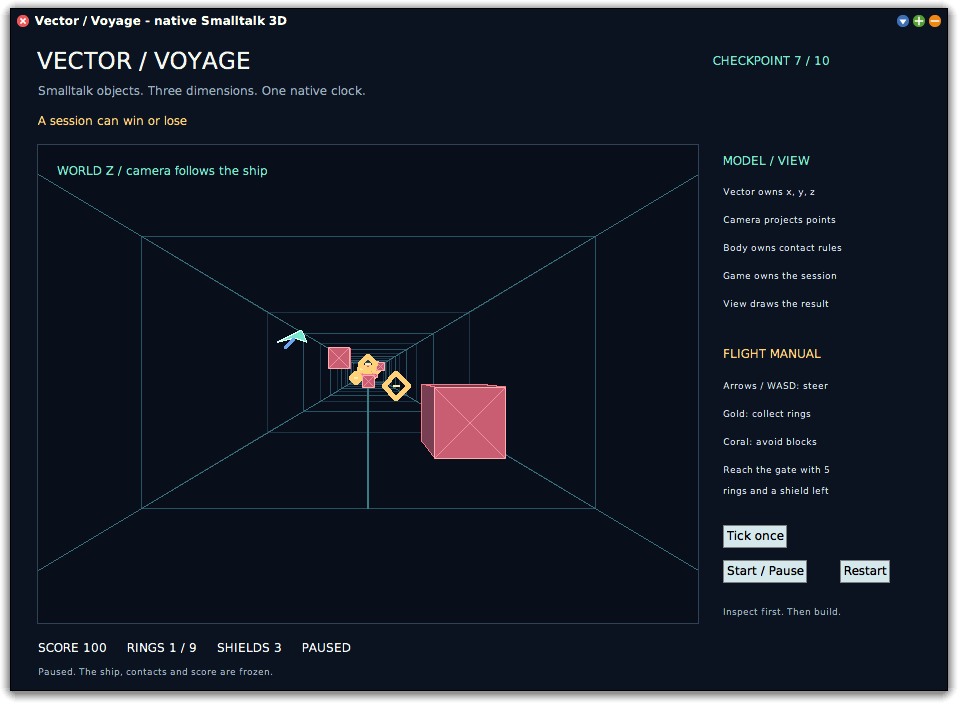
07 · A session can win or lose
Make the session explicit: ready, running, paused, won and lost are the five states. tick first checks isRunning, so a paused or terminal session cannot accidentally move or score. Start / Pause changes only nonterminal states. stepOnce temporarily runs exactly one update, then leaves the session paused unless that update already chose a terminal state. The manual button is a real debugging tool, not an extra uncontrolled clock.
LS3DGate is another body subclass. Crossing its Z = 140 plane sends finish to the game. At least five of the nine rings and a surviving ship produce won; arriving with too few rings produces lost. Shields reaching zero also produces lost. Contact resolution stops immediately when a loss occurs. The authored gate lies beyond every ring and obstacle, so contact order at the gate is unambiguous.
Restart builds a new ship and course, clears score and ticks, restores three shields and returns to ready. Pause preserves every earned point and body state. This checkpoint adds native buttons for those transitions, while the next one adds real keyboard events. The sample run below collects one ring and deliberately uses the single-step operation: its final PAUSED state demonstrates that model time is under explicit control.
LS3DGame · authoritative update
tick
 self isRunning ifFalse: [^ self]. previous := player position.
 player advanceBy: self forwardSpeed. ticks := ticks + 1.
 self resolveContactsFrom: previous to: player position
LS3DGame · finish policy
finish
 state := rings >= self requiredRings ifTrue: [#won] ifFalse: [#lost]. player input clear
Where to run this
System Browser → LS3DGame → instance side → tutorial. Inspect or Accept this complete method after filing in the checkpoint.
Genuine native Squeak SystemWindow capture from this exact checkpoint source and Workspace block.
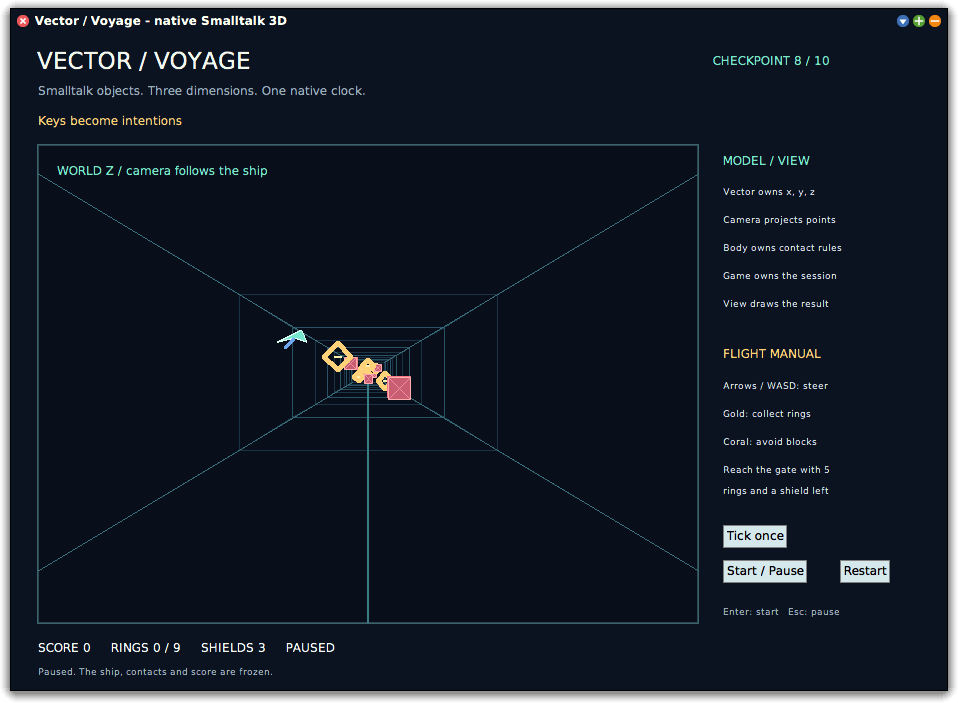
08 · Keys become intentions
Translate native key events into intentions. LS3DController owns a Set of pressed logical keys. A repeated key-down for a key already in the set returns immediately, preventing Enter from toggling pause on every operating-system repeat. Releasing a key removes it and recomputes direction. Opposite directions cancel, while alternate spellings such as A and Left can coexist without one release canceling the other.
Squeak keyDown: and keyUp: expose raw key codes. The view looks them up in EventSensor virtualKeyTable and forwards only Character results. Unknown or Symbol keys are ignored safely. keyStroke: is intentionally a no-op, so one physical key press cannot apply both a raw event and a text event. Enter starts/pauses, Escape pauses, and R restarts. Arrows or WASD control X/Y.
Clicking the view requests focus. Losing focus pauses and clears held keys, preventing a ship from drifting after an Alt-Tab or click into another window. Closing also stops scheduling, releases mouse/keyboard focus and clears controller state. Reopening the same app preserves the paused model and creates a new native window; repeated open while already open reuses the existing one. Automatic scheduling is still introduced separately in the next checkpoint.
Genuine native Squeak SystemWindow capture from this exact checkpoint source and Workspace block.
09 · One clock owns simulation
Connect the running session to Morphic's cooperative scheduler. The app requests a 40 ms step interval, approximately 25 simulation updates per second in a lightly loaded image. Each callback advances exactly one fixed model tick. Forward motion remains 0.4 world units per tick and steering remains 0.25. If the image is busy, simulation slows; the lesson deliberately has no elapsed-time accumulator or catch-up burst.
synchronizeStepping registers the app only when its window exists and the game is running. Its isStepping guard is essential. Replacing an already active StepMessage during every callback can reset scheduling and distort the cadence. The app also answers false to wantsStepsIn:, preventing SystemWindow from installing a second model update path. There is one owner of simulated time.
step checks focus before advancing the model, refreshes the HUD and reconciles scheduling after win, loss or pause. Native focus events pause immediately, and this check also protects against focus changes missed between callbacks. Closing stops the clock; reopening leaves the preserved session paused. Use the buttons or Enter to fly now. Tick once stops the ordinary clock after its one update and remains useful for inspecting collisions.
Genuine native Squeak SystemWindow capture from this exact checkpoint source and Workspace block.
10 · A complete native flight deck
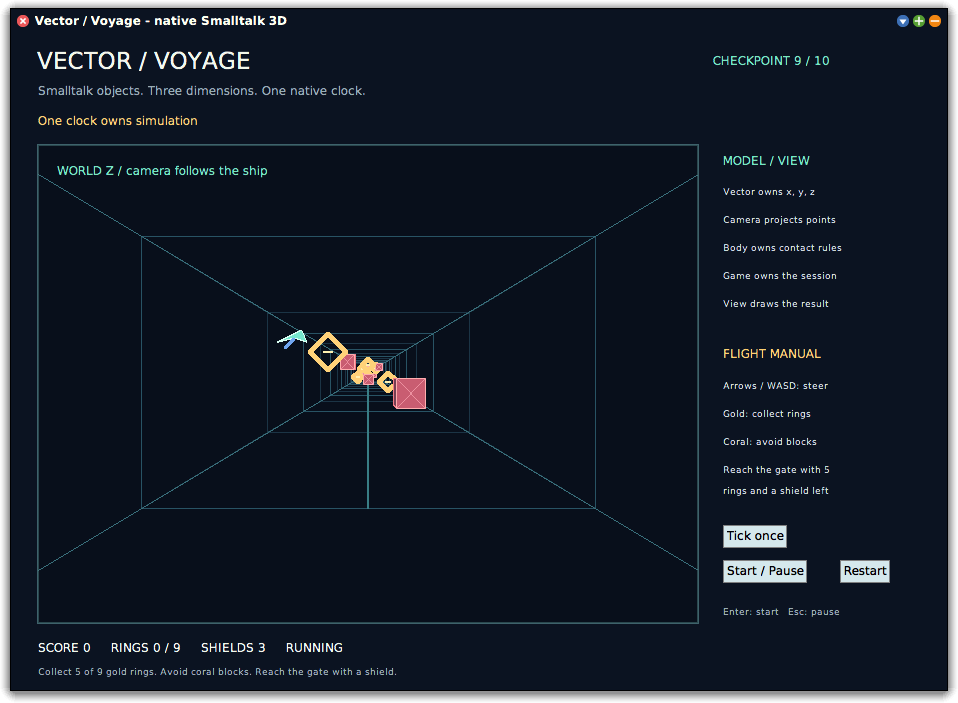
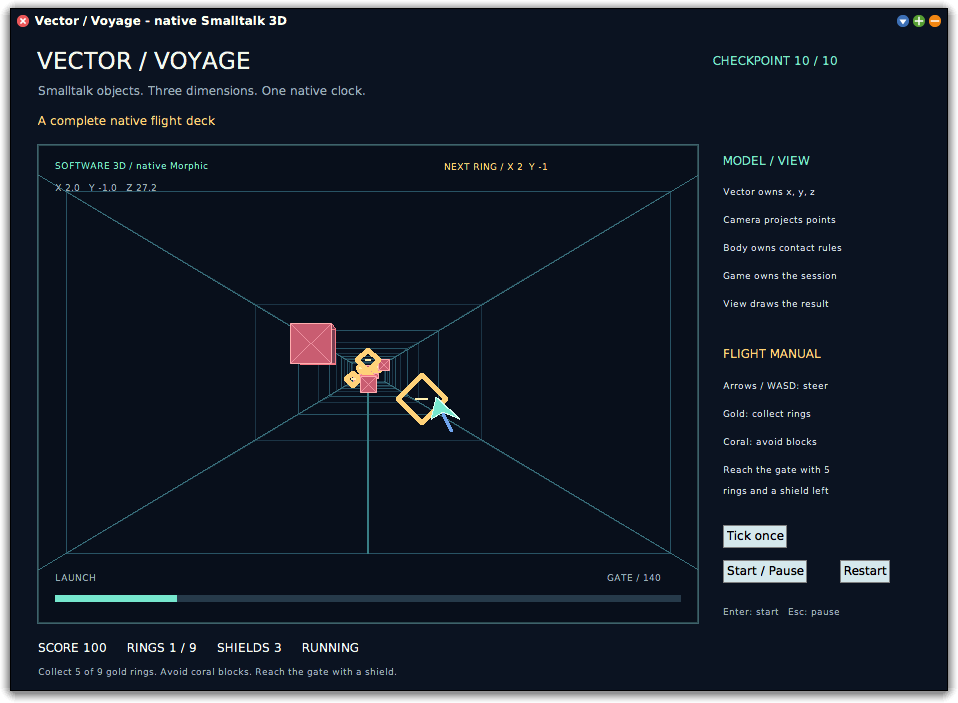
Finish the flight deck with a readable overlay, a progress strip and a next-ring hint. The HUD reads ship coordinates and session state without changing them. The progress strip maps Z = 0 through Z = 140 into its pixel width. The next target label exposes the upcoming ring's X/Y coordinates, making this short course learnable instead of demanding blind guesses about depth.
drawSceneOn: describes the view's responsibilities in four messages: draw the world in painter order, draw the HUD, and conditionally draw a state overlay. The window's score, ring count and shields are also derived directly from the model. Restart rebuilds all game objects; the view keeps drawing the replacement model through its app reference. There is no second score or collision list hidden in the UI.
You now have a complete original native software-projected 3D game. Fly toward each gold target and avoid the coral block opposite it. Hold your line until you have passed a pair, then aim for the next target. Reach the gate with five rings and at least one shield. Enter starts or pauses, Escape pauses, and R restarts. The page is the construction guide; file in the source to play in Squeak itself.
Where to run this
System Browser → LS3DView → instance side → tutorial. Inspect or Accept this complete method after filing in the checkpoint.
14 production classes collaborate through small protocols
The final source contains the whole playable program
Projection and drawing are CPU canvas operations in native Squeak
The legal gameplay demo reaches the gate using ordinary input only
Try it: Change the camera focal length through the first exercise. Predict whether the same ring appears larger or smaller before running it.
Expected result
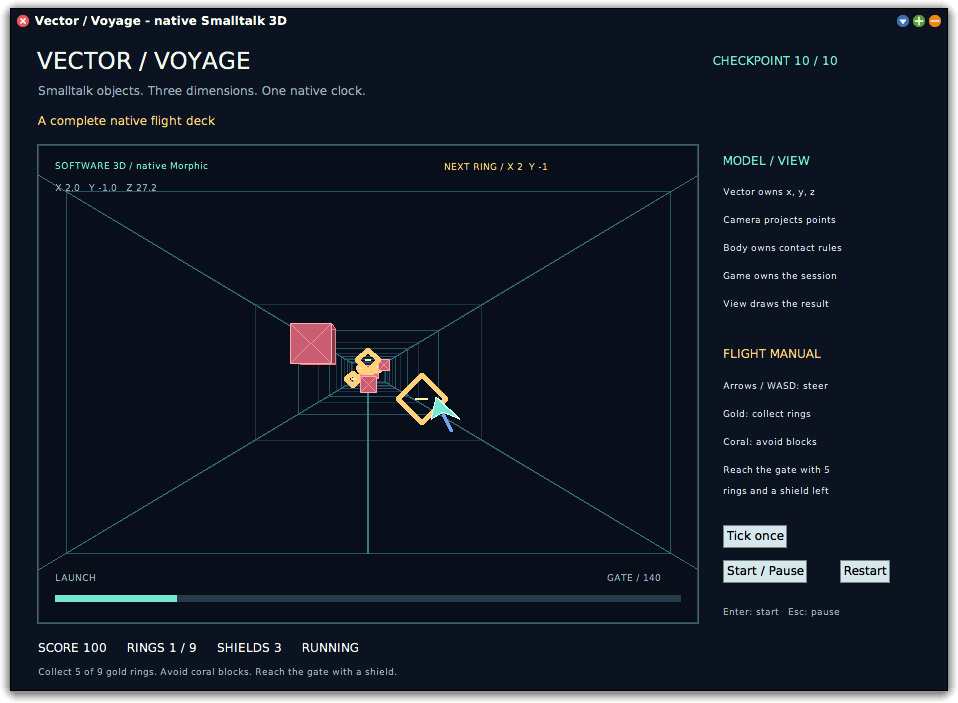
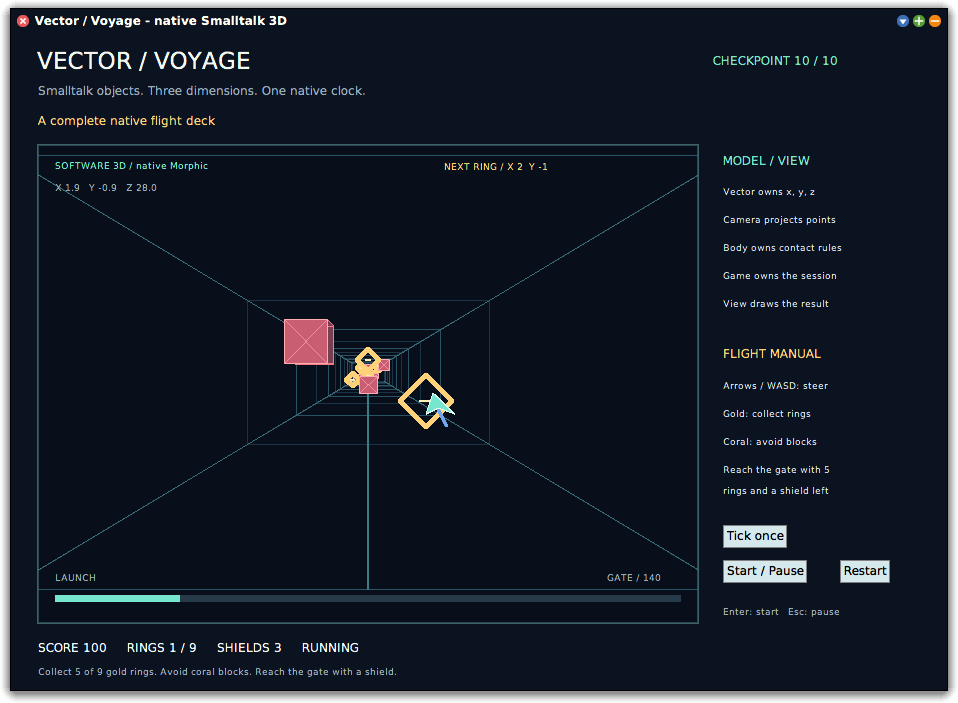
The final RUNNING flight deck at Z = 27.2. One ring has been collected, all shields remain, and the ship is lined up with the second ring. The native clock continues after the Workspace block returns.
Genuine native Squeak SystemWindow capture from this exact checkpoint source and Workspace block.
Watch the workflow
All checkpoint PNGs are actual native Squeak SystemWindow imageForm captures. GIFs assemble genuine native PNG frames. The construction sequence shows independently installed checkpoints; the flight sequence is a deterministic legal input replay from the initial state to victory. It does not teleport the ship, remove hazards or alter scoring. Playback pacing is edited for readability and is not a performance benchmark.
NATIVE SQUEAK CAPTURE
The ten independently executed construction checkpoints, from model-space vectors to a complete native flight deck.
NATIVE SQUEAK CAPTURE
Genuine native frames from ordinary key-down/key-up steering and model steps. The ship collects all nine rings, preserves all three shields and reaches the gate. The script uses no direct position writes.
Practice with tested solutions
1. Widen the camera view
Make the camera focal length 220 pixels. Keep the model, near/far guards and collisions unchanged. A smaller focal length should show more of the corridor at the same depth.
Hint
Change the defaultFocal policy method. Compare displacement from the camera center, not the absolute screen coordinate.
Show a tested solution
File in game-3d-exercise-1.st first, then Browser → LS3DCamera → instance side → tutorial.
Workspace · Print it after installing the solution
Check the solution
| camera point |
camera := LS3DCamera new.
point := camera project: (LS3DVector x: 2 y: 0 z: 2).
(point x - camera center x = 44) and: [(camera project: (LS3DVector x: 2 y: 0 z: -8)) isNil]
Print It result: true
At depth 10, 220 × 2 / 10 is 44 pixels. The invalid-depth guard still protects the projection.
2. Create a shorter collection goal
Change the finish policy to require three rings. Preserve the boundary: two must lose, three must win, and both sessions must stop.
Hint
Only Game owns the finish requirement; no collision or gate rewrite is necessary.
Show a tested solution
File in game-3d-exercise-2.st first, then Browser → LS3DGame → instance side → tutorial.
Workspace · Print it after installing the solution
Check the solution
| short ready |
short := LS3DGame new. ready := LS3DGame new.
2 timesRepeat: [short collectRingWorth: 100].
3 timesRepeat: [ready collectRingWorth: 100].
short finish; tick. ready finish; tick.
(short state = #lost) and: [(ready state = #won) and: [short ticks = 0 and: [ready ticks = 0]]]
Print It result: true
The tests exercise both sides of the new threshold and verify terminal updates remain frozen. This solution also updates the displayed goal text to three.
3. Add a bonus ring subclass
Declare LS3DBonusRing as a subclass of LS3DRing and make it worth 250 points. Reuse the inherited once-only contact and collection behavior.
Hint
Override points. The inherited applyTo: sends self points to the actual receiver, so no Game change is needed.
Show a tested solution
File in game-3d-exercise-3.st first, then Browser → LS3DBonusRing → instance side → tutorial.
The complete exercise file declares the subclass. The same object earns one ring and one reward even after two contact messages.
When something looks wrong
The .st source will not run in a Workspace
Use File List → fileIn for the full chunk-format download. Use Workspace only for the smaller displayed run/check blocks.
The early checkpoint does not move automatically
This is intentional. Checkpoints 4–8 expose manual stepping; the native clock arrives in checkpoint 9. Keyboard event handling begins in checkpoint 8.
The ship stops when I click away
Focus loss intentionally pauses and clears held keys. Click the scene and press Enter to resume.
A nearby object disappears instead of being sliced by the screen
The renderer conservatively culls whole bodies crossing its near/far depth guard. Canvas clipping handles the viewport edges, but this lesson does not implement general 3D polygon clipping.
I passed the last gate but lost
You need at least five collected rings. The HUD shows the total. Keep steering toward gold coordinates and hold the line until you have passed each pair.
The native game runs slower in a busy image
One scheduler callback advances one fixed tick. The cooperative scheduler may run below the requested 25 updates per second under load. There is no catch-up loop.
The clock gets faster after an edit
Keep isStepping before startStepping and return false from wantsStepsIn:. Those two safeguards prevent replacing the active timer or adding a second model clock.
An old checkpoint still has later features
Use a fresh learning-image copy. Earlier file-ins cannot remove newer methods already installed.
Verification, cleanup and next steps
Verified using native Squeak 6.1 build 23976, 64-bit, packaged 2026-06-27. Executions use isolated image, changes and sources copies. No baseline image is saved and no browser imitation is substituted.
Primary native SUnit: 41 tests passed. Independent native SUnit: 28 tests passed. Total: 69 tests, zero failures and zero errors. A complete 350-tick legal replay wins with all nine rings, score 900 and three shields. The actual Morphic scheduler produced 28 ticks over 1,200 ms at a requested 40 ms cadence; pause and close prevented further ticks.
Native SUnit tests cover vectors, perspective, culling, movement bounds, swept 3D contacts, once-only scoring, states, complete legal gameplay, keys and Morphic lifecycle. Every displayed method, Workspace block and exercise check is executed in isolated native baseline sessions.
Behind-camera/near/far guards and perspective scaling
Continuous segment versus 3D box collision, parallel slabs and high-speed tunneling
Deterministic legal flight from start to gate with all nine rings and three shields
Native key repeat, focus loss, close/reopen and one scheduler cadence
Ten exact checkpoint runs and three exact exercise solutions
Close the native game window to stop its clock and release focus. Re-file the final source after exercises to restore the original policies. Save the source separately to recreate the program in a clean image.
Squeak 6.1 bundled native source — Morph, SystemWindow, FormCanvas, KeyboardEvent, EventSensor virtualKeyTable, StepMessage, WorldState and SUnit inspected and executed locally.
A bounded original educational 3D corridor game: one authored 140-unit course, nine rings, nine static blocks, one gate and three shields; no sound, enemies, persistence or procedural levels
Software perspective through CPU-rendered Morphic canvas operations; no hardware acceleration, GPU API, general 3D engine or textured meshes
Camera translates only along positive Z and does not rotate; painter order relies on the authored nonintersecting course, with no depth buffer or face splitting
Whole-body near/far rejection plus viewport canvas clipping; geometry crossing the depth planes is culled, not polygon-clipped
Cube shading is fixed artwork. Ship collisions use a radius-expanded AABB and rings use a square ±0.9 acceptance region at their Z plane, not exact mesh collisions
One fixed tick per requested 40 ms callback; a busy image slows simulated time rather than increasing movement deltas
Keyboard verification uses native KeyboardEvent dispatch with the bundled X11, Windows and macOS key maps; the headless VM needs those maps installed temporarily. Physical OS key presses are outside automated verification. position: is an explicit teaching/test setup seam; the complete legal replay never uses it
Fixed native viewport and layout; no window resizing or mobile control scheme
Keep the world going
The 3D endless runner tutorial extends software perspective into three-lane controls, jump and slide actions, fair obstacle generation and bounded world cleanup.