Move a small model between readable text, quoted CSV, JSON, and UTF-8 files. Build an explicit import pipeline, preserve good data when input is malformed, and save fresh snapshots without overwriting old ones.
9 construction stagesTested source & checkpointsNative screenshots & demos
Before you start
Move a small model between readable text, quoted CSV, JSON, and UTF-8 files. Build an explicit import pipeline, preserve good data when input is malformed, and save fresh snapshots without overwriting old ones.
Install the complete support application once, then run nine small independent experiments. The focused methods beside each stage explain the implementation; full file-in sources include all UI and helper methods. Workspace blocks are expressions; chunk-format .st class files are for File List → fileIn.
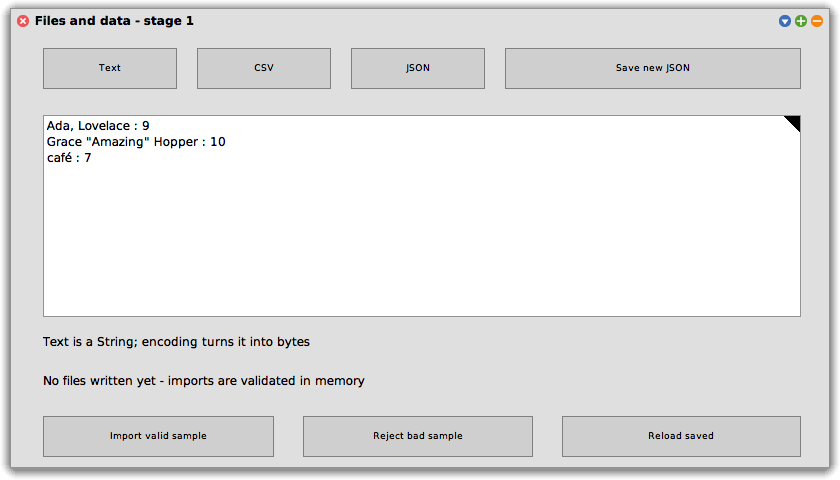
Build a tiny data workbench for pairs of name and score. A record is a two-element Array: a String and an Integer from 0 through 10. The model begins with Ada, Lovelace; Grace "Amazing" Hopper; and café. These names deliberately exercise commas, quotes, and non-ASCII text.
The model owns its records and returns copies. Formatting, parsing, validation, file operations, and Morphic display are separate methods. That separation lets us test corrupt input without clicking through a dialog. No file is created by opening the app.
File in LQDataLab.st from the File List first.
Run the block and inspect lab records if you want to see the actual arrays.
Use Text, CSV, and JSON to look at the same model in different representations.
Browser · LQDataLab · instance side · Accept this method
initialize
    super initialize.
    records := {{'Ada, Lovelace'. 9}. {'Grace "Amazing" Hopper'. 10}. {'caf', (Unicode value: 233) asString. 7}}.
    status := 'Ready: three records in memory'.
    preview := ''.
    stage := 1
Browser · LQDataLab · instance side · Accept this method
records
    ^ records collect: [:row | {row first copy. row second}]
Where to run this
Workspace · select the complete block · Do it (Ctrl/Cmd+D). Each stage creates its own model. Close earlier tutorial windows before opening the next stage.
Construction code · follow the run instructions above
Stage 1 in the actual Squeak 6.1 image. The supplied Workspace block sets the state; this is a native Morphic imageForm capture.
02 · Turn characters into UTF-8 bytes
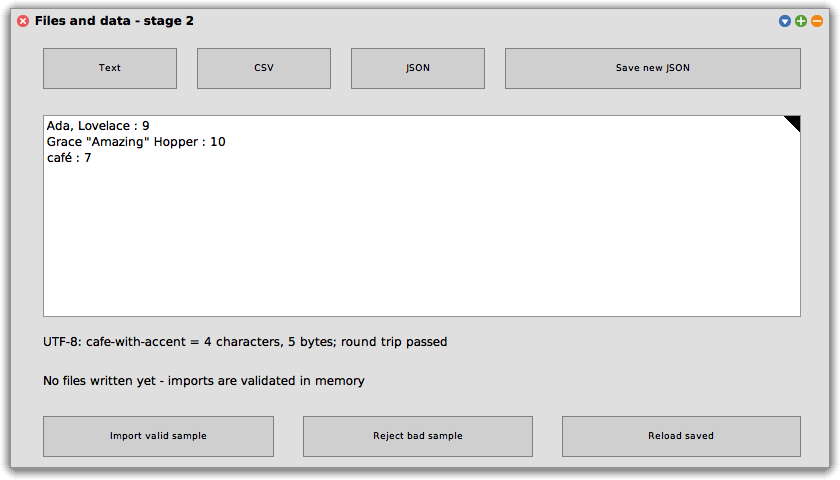
A String contains characters; a file stores bytes. ASCII characters use one byte in UTF-8, while é uses the two bytes 195 and 169. The source constructs the character from its Unicode value so the tutorial source itself remains plain ASCII.
The supplied encoder writes UTF-8 without a byte-order mark and normalizes line endings to LF. Its strict decoder accepts an optional leading BOM, preserves an interior U+FEFF, and rejects invalid continuations, overlong encodings, surrogate code points, and values above U+10FFFF. This explicit codec avoids the permissive behavior of some image converters.
Keep binary I/O and character decoding as distinct operations. Using a text stream with an unknown default converter can silently apply a different encoding. The helper methods are deliberately explicit so a round trip means what you think it means.
Browser · LQDataLab · instance side · Accept this method
Workspace · select the complete block · Do it (Ctrl/Cmd+D). Each stage creates its own model. Close earlier tutorial windows before opening the next stage.
Construction code · follow the run instructions above
Stage 2 in the actual Squeak 6.1 image. The supplied Workspace block sets the state; this is a native Morphic imageForm capture.
03 · Write and parse quoted CSV
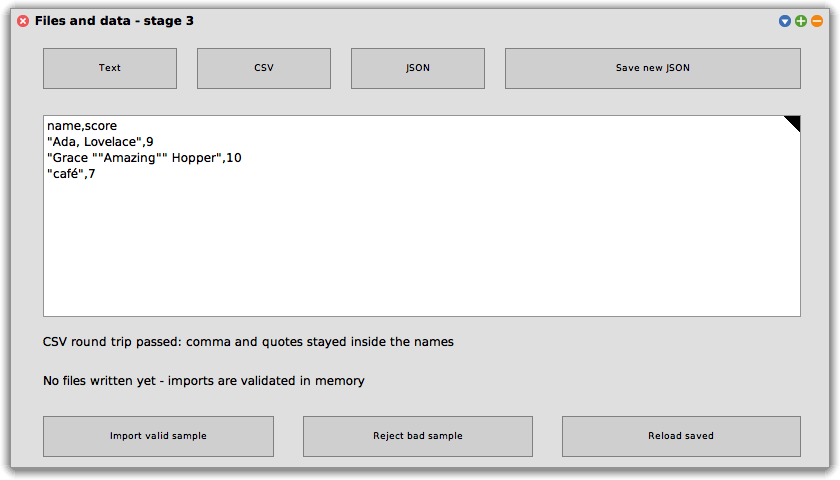
CSV is a state machine, not a simple split on commas. The name Ada, Lovelace must be one field. A literal quote inside a quoted field is doubled, so Grace "Amazing" Hopper is written with doubled internal quotes.
This lesson chooses a specific dialect: a required name,score header, comma separators, double-quoted string fields, LF output, and LF, CR, or CRLF input. Embedded newlines inside quotes are allowed. Spaces outside quotes are data. A closing quote must be followed by a separator, line ending, or end of input.
The parser first creates rows of Strings. Then parseCSV: checks the header, requires exactly two fields, converts a digits-only score, and validates the complete record array. A semicolon-separated export needs an explicit dialect change; guessing from an arbitrary file is outside this small parser.
Browser · LQDataLab · instance side · Accept this method
csvField: aString
    "Always quote strings. A quote inside a field is doubled."
    ^ String streamContents: [:out |
        out nextPut: $".
        aString do: [:ch | ch = $" ifTrue: [out nextPut: $"]. out nextPut: ch].
        out nextPut: $"]
Browser · LQDataLab · instance side · Accept this method
csvText
    ^ String streamContents: [:out |
        out nextPutAll: 'name,score'; lf.
        records do: [:row |
            out nextPutAll: (self csvField: row first); nextPut: $,; print: row second; lf]]
Browser · LQDataLab · instance side · Accept this method
Workspace · select the complete block · Do it (Ctrl/Cmd+D). Each stage creates its own model. Close earlier tutorial windows before opening the next stage.
Construction code · follow the run instructions above
Watch for: Always quoting a field does not make arbitrary CSV safe to open as spreadsheet formulas. These tutorial names are fixed examples; production spreadsheet exports need a documented formula-handling policy.
Try it: Read the complete csvRows: method in the download. Follow its four states: start, bare, quoted, and afterQuote.
Expected result
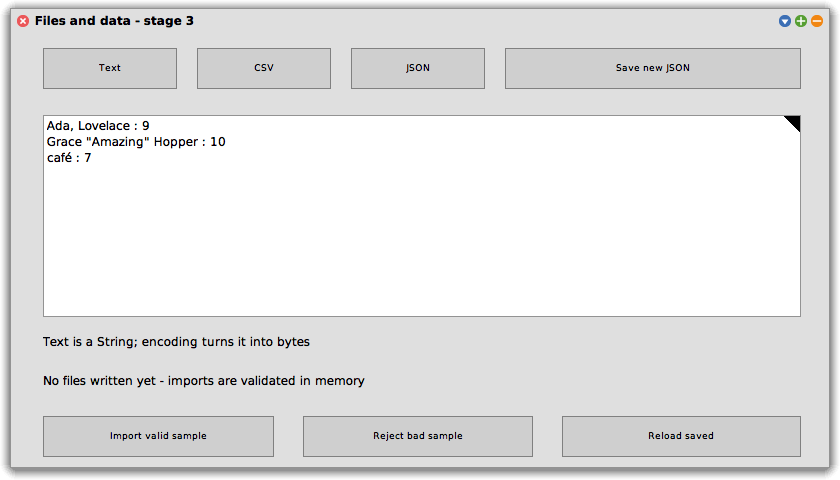
The preview shows the header and three rows. Ada’s comma is quoted; Grace’s embedded quotes are doubled. Reading the CSV returns the original records.
Stage 3 in the actual Squeak 6.1 image. The supplied Workspace block sets the state; this is a native Morphic imageForm capture.
04 · Validate all rows, then replace the model
An import has two phases: build a candidate value, then commit it. The importer does not append records while it parses. If the last row is invalid, the earlier valid rows never leak into the model.
Our schema is intentionally small: at most 1,000 records; each record has exactly two fields; names contain 1–120 characters; scores are integers from 0 through 10. These are application rules, separate from the CSV or JSON syntax. The functions return fresh arrays so imported data cannot accidentally alias mutable caller data.
Browser · LQDataLab · instance side · Accept this method
validateRecords: candidates
    "Return fresh validated records. Do not mutate the live model here."
    (candidates isArray and: [candidates size <= 1000])
        ifFalse: [self error: 'Expected an array of at most 1000 records'].
    ^ candidates collect: [:row | | name score |
        (row isArray and: [row size = 2]) ifFalse: [self error: 'Each record needs a name and score'].
        name := row first. score := row second.
        (name isString and: [name size between: 1 and: 120])
            ifFalse: [self error: 'Name must contain 1 to 120 characters'].
        (score isInteger and: [score between: 0 and: 10])
            ifFalse: [self error: 'Score must be an integer from 0 to 10'].
        {name copy. score}]
Browser · LQDataLab · instance side · Accept this method
Workspace · select the complete block · Do it (Ctrl/Cmd+D). Each stage creates its own model. Close earlier tutorial windows before opening the next stage.
Construction code · follow the run instructions above
| lab |
lab := LQDataLab open.
lab stage: 4.
lab importGoodSample ifFalse: [self error: 'Import should succeed'].
lab records = #(('Imported, safely' 8))
    ifFalse: [self error: 'The committed records are wrong'].
lab
Watch for: The transaction here is an in-memory replacement after validation. It is not a database transaction and does not promise isolation against arbitrary external writers.
Try it: Change the sample’s score from 8 to 99. The importer should return false and keep the three original records.
Expected result
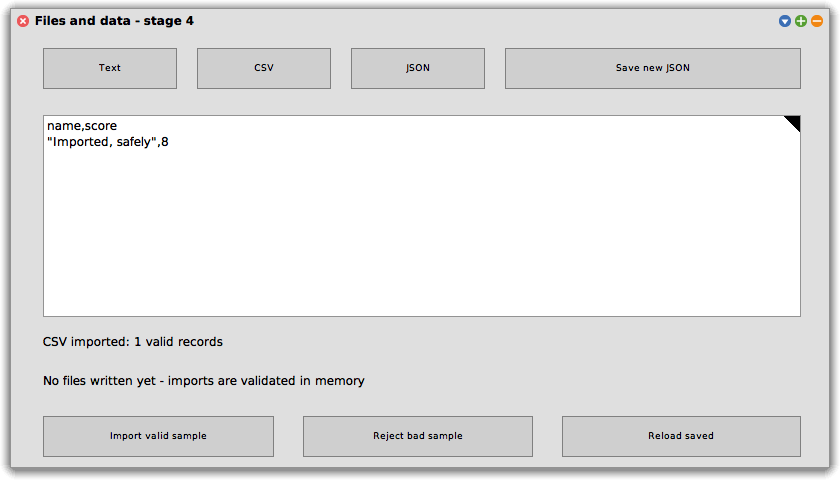
The model is replaced by exactly one record: Imported, safely with score 8. The comma remains part of the name.
Stage 4 in the actual Squeak 6.1 image. The supplied Workspace block sets the state; this is a native Morphic imageForm capture.
05 · Use JSON with a versioned schema
JSON carries explicit arrays, objects, strings, booleans, null, and numbers. Our document has version and records keys. The version field gives future code a clear place to reject or migrate a changed format.
The tested Squeak 6.1 image includes Json. LQDataJSONReader subclasses it to reject raw control characters in strings and validate Unicode surrogate escapes. The reader sets ctorMap: nil and dictionaryClass: Dictionary, so the import returns ordinary data rather than constructing application objects. No imported text is evaluated as Smalltalk.
Object-key order is not significant. Json may render records before version, and integral numeric spellings may normalize to an Integer. Validate the parsed value. Unknown object properties are ignored by this small schema; this is not a full JSON Schema engine or a parser hardened for unbounded hostile nesting.
Browser · LQDataLab · instance side · Accept this method
Browser · LQDataLab · instance side · Accept this method
parseJSON: aString
    | document |
    aString size > 100000 ifTrue: [self error: 'JSON text is too large'].
    document := (LQDataJSONReader new ctorMap: nil; dictionaryClass: Dictionary; yourself)
        readFromString: aString withBlanksTrimmed.
    (document isKindOf: Dictionary) ifFalse: [self error: 'Expected a JSON object'].
    ((document at: 'version' ifAbsent: [nil]) isInteger and: [(document at: 'version') = 1])
        ifFalse: [self error: 'Expected format version 1'].
    ^ self validateRecords: (document at: 'records' ifAbsent: [self error: 'Missing records'])
Where to run this
Workspace · select the complete block · Do it (Ctrl/Cmd+D). Each stage creates its own model. Close earlier tutorial windows before opening the next stage.
Construction code · follow the run instructions above
| lab |
lab := LQDataLab open.
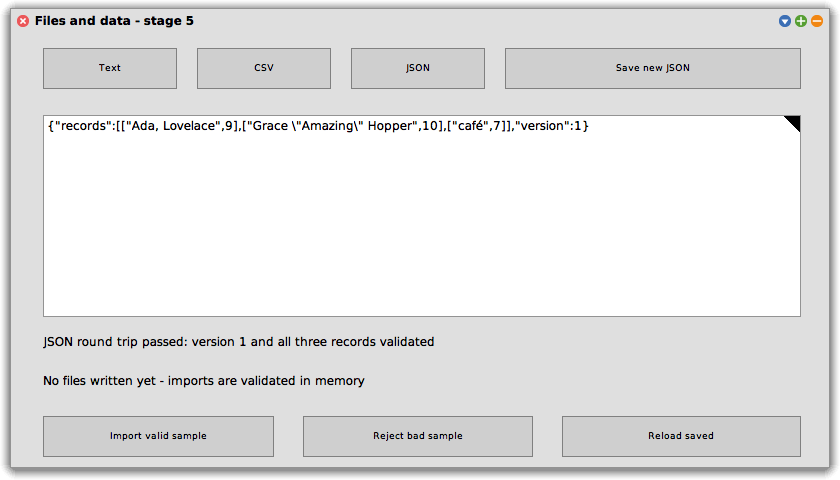
lab stage: 5; showJSON.
(lab parseJSON: lab jsonText) = lab records
    ifFalse: [self error: 'JSON round trip failed'].
lab report: 'JSON round trip passed: version 1 and all three records validated'.
lab
Watch for: Json is the class tested here. Other Squeak images may have different JSON packages or APIs. Check the class before filing in this lesson; do not replace it blindly with an unrelated JSON library.
Try it: Print Smalltalk at: #Json ifAbsent: [nil]. If it is nil, use the tested Squeak 6.1 release or adapt the importer to the documented parser in your image.
Expected result
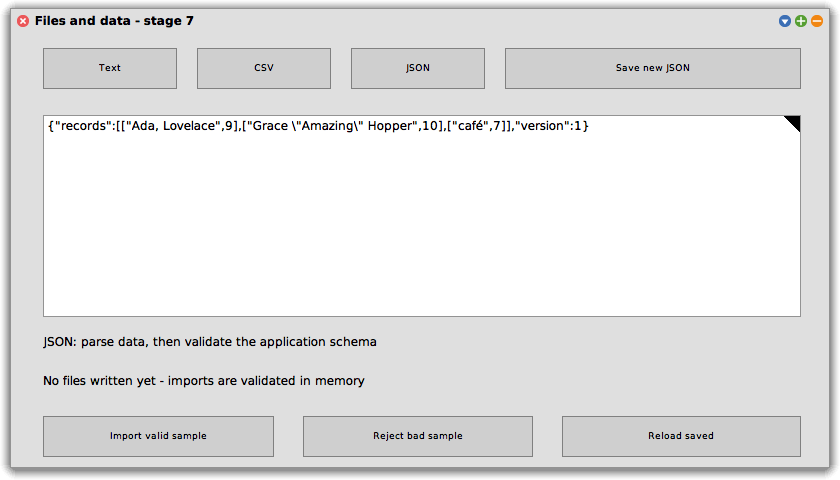
The preview contains a JSON object with version 1 and three records. Escaped quotes and Unicode text survive the round trip.
Stage 5 in the actual Squeak 6.1 image. The supplied Workspace block sets the state; this is a native Morphic imageForm capture.
06 · Stage a complete file before publishing it
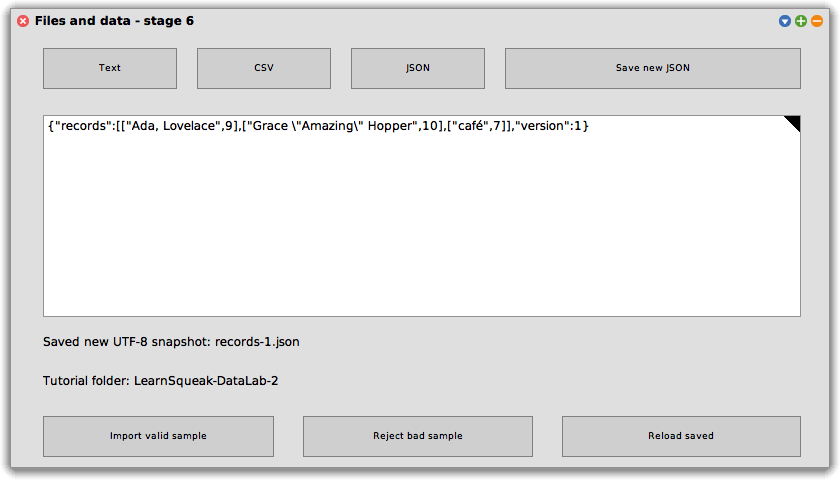
The first save creates a fresh LearnSqueak-DataLab-N directory under FileDirectory default. The code chooses an unused directory name and never adopts an existing folder. Each Save new JSON creates a new numbered snapshot, so repeated saves preserve earlier snapshots.
safeSaveText:named: encodes the whole String, writes a .pending file in the same directory, flushes and closes it with ensure:, reads the bytes back, and checks equality before renaming it to the final name. A collision is reported instead of opening an overwrite dialog. On a normal failed staging operation, the temporary file owned by this attempt is removed.
This strategy prevents a partially written file from being presented as a completed snapshot in the normal flow. It does not promise crash durability, atomic overwrite on every filesystem, symlink isolation, or safe concurrent access by arbitrary writers. For this lesson use the fresh tutorial-owned directory. Production replacement needs a platform-specific policy for backup, rename, locking, and recovery.
Print FileDirectory default fullName to locate the output folder on your machine.
Click Save new JSON again: a second file is created.
Keep these sample files if useful; the app never scans or imports personal folders.
Browser · LQDataLab · instance side · Accept this method
prepareDirectory
    "A fresh, tutorial-owned directory. Never adopt or clear an existing directory."
    | base prefix leaf index |
    directory ifNotNil: [^ directory].
    base := FileDirectory default.
    prefix := 'LearnSqueak-DataLab-'. index := 1.
    [leaf := prefix, index printString.
     (base directoryExists: leaf) or: [base fileExists: leaf]] whileTrue: [index := index + 1].
    base createDirectory: leaf.
    directory := base directoryNamed: leaf.
    ^ directory
Browser · LQDataLab · instance side · Accept this method
safeSaveText: aString named: leaf
    "Write a new snapshot. Never overwrite an existing destination.
    A same-directory rename is used only after verifying staged bytes.
    This is not a crash-durability guarantee or a general concurrent file service."
    | bytes temporary stream |
    self prepareDirectory.
    self validateLeaf: leaf.
    ((directory fileExists: leaf) or: [directory directoryExists: leaf])
        ifTrue: [self error: 'Snapshot already exists; choose a new name'].
    temporary := leaf, '.pending'.
    ((directory fileExists: temporary) or: [directory directoryExists: temporary])
        ifTrue: [self error: 'Staging name already exists; choose a new name'].
    bytes := self encodedTextBytes: aString.
    [
        stream := FileStream newFileNamed: (directory fullNameFor: temporary).
        stream ifNil: [self error: 'Staging file could not be created'].
        [stream binary; nextPutAll: bytes; flush] ensure: [stream close].
        (self readBytesNamed: temporary) = bytes ifFalse: [self error: 'Staged bytes did not verify'].
        ((directory fileExists: leaf) or: [directory directoryExists: leaf])
            ifTrue: [self error: 'Destination changed while saving'].
        [directory rename: temporary toBe: leaf]
            on: ReplaceExistingFileException do: [:error | self error: 'Destination changed while saving'].
        ((directory fileExists: leaf) and: [(directory fileExists: temporary) not])
            ifFalse: [self error: 'Snapshot rename did not complete']
    ] on: Error do: [:error |
        (directory fileExists: temporary) ifTrue: [directory deleteFileNamed: temporary].
        error pass].
    lastSaved := leaf.
    ^ directory fullNameFor: leaf
Where to run this
Workspace · select the complete block · Do it (Ctrl/Cmd+D). Each stage creates its own model. Close earlier tutorial windows before opening the next stage.
Construction code · follow the run instructions above
Watch for: Do not use forceNewFileNamed: for a user-selected destination without an explicit overwrite policy. It can truncate an existing file before the write succeeds.
Try it: Try saving changed text as records-1.json in the same model. It must reject the collision and preserve the original bytes.
Expected result
A new tutorial folder contains records-1.json. The saved bytes decode and validate to the same records. No .pending file remains.
Stage 6 in the actual Squeak 6.1 image. The supplied Workspace block sets the state; this is a native Morphic imageForm capture.
07 · Reject malformed data without losing good state
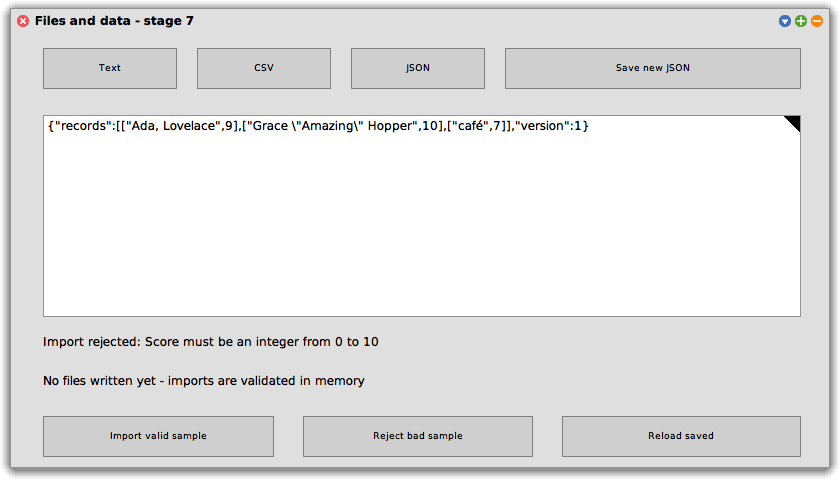
A parse error, an encoding error, and a schema error are different failures, but none should replace valid live data. The supplied example has a valid first row followed by score 99. The complete import is rejected, and all three original records remain.
Errors become a readable status message at the application boundary. The lower-level parser still signals Error, which makes it testable and composable. The file reader closes the stream even when a size check fails. The limit is 1 MiB of bytes on disk and 100,000 characters in each CSV or JSON parse call.
The tests also exercise an unclosed CSV quote, garbage after the JSON document, unescaped JSON controls, malformed UTF-8, and unpaired surrogate escapes. Bounded input is useful, but this teaching parser is not a complete defense against hostile deeply nested JSON.
Browser · LQDataLab · instance side · Accept this method
Workspace · select the complete block · Do it (Ctrl/Cmd+D). Each stage creates its own model. Close earlier tutorial windows before opening the next stage.
Construction code · follow the run instructions above
| lab before |
lab := LQDataLab open.
lab stage: 7; showJSON.
before := lab records.
lab rejectBadSample ifTrue: [self error: 'Invalid data was accepted'].
lab records = before ifFalse: [self error: 'Failed import changed the model'].
lab
Watch for: Catching an error is not enough if you already changed the model. Keep the commit assignment after all parsing and validation.
Try it: Replace the bad JSON with a syntactically broken document. Confirm that the same keep-old-data rule still holds.
Expected result
The status says the score must be 0–10. The preview and model still contain all three original records; the valid first candidate row was not committed.
Stage 7 in the actual Squeak 6.1 image. The supplied Workspace block sets the state; this is a native Morphic imageForm capture.
08 · Reload a verified snapshot and test repeat saves
The application remembers the leaf name of its last successful snapshot. Reload reads bytes from that tutorial directory, decodes UTF-8, validates JSON, and only then replaces the model.
This checkpoint saves twice, imports a different valid sample into memory, then reloads the last snapshot. It demonstrates the boundary between live state and persisted state. Saving a Squeak image is a separate operation: an image snapshot preserves the running object memory, while these JSON files exchange a small portable data format.
Browser · LQDataLab · instance side · Accept this method
saveJSONSnapshot
    | index leaf |
    self prepareDirectory.
    index := 1.
    [leaf := 'records-', index printString, '.json'.
     (directory fileExists: leaf) or: [directory directoryExists: leaf]] whileTrue: [index := index + 1].
    [self safeSaveText: self jsonText named: leaf]
        on: Error do: [:error | ^ self report: 'Save failed: ', error messageText].
    status := 'Saved new UTF-8 snapshot: ', leaf.
    preview := self jsonText.
    self refresh.
    ^ true
Browser · LQDataLab · instance side · Accept this method
loadLastSnapshot
    | text |
    lastSaved ifNil: [^ self report: 'Save a snapshot first'].
    [text := self decodeUTF8Bytes: (self readBytesNamed: lastSaved)]
        on: Error do: [:error | ^ self report: 'Read failed: ', error messageText].
    ^ self importJSON: text
Where to run this
Workspace · select the complete block · Do it (Ctrl/Cmd+D). Each stage creates its own model. Close earlier tutorial windows before opening the next stage.
Construction code · follow the run instructions above
| lab original |
lab := LQDataLab open.
lab stage: 8.
original := lab records.
lab saveJSONSnapshot; saveJSONSnapshot; importGoodSample.
lab loadLastSnapshot ifFalse: [self error: 'Reload failed'].
lab records = original ifFalse: [self error: 'Reload did not restore the snapshot'].
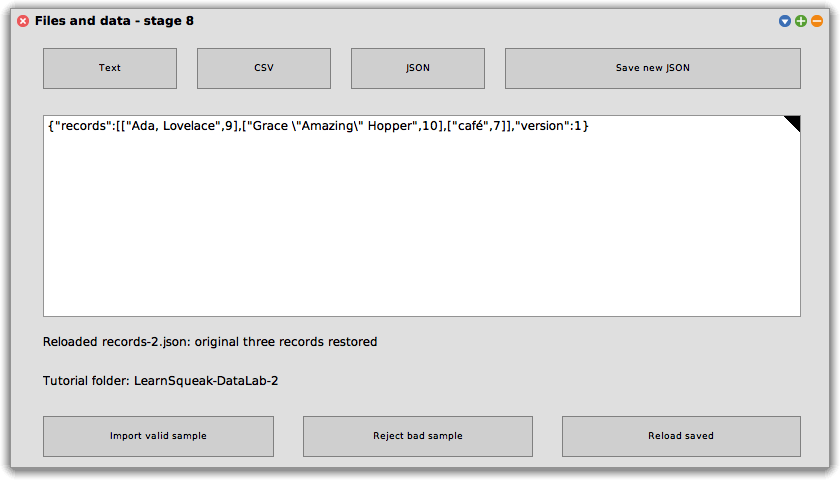
lab report: 'Reloaded records-2.json: original three records restored'.
lab
Watch for: The saved file is the model at save time. Editing a JSON file outside Squeak does not alter the live model until you explicitly reload.
Try it: Save once more after a successful import. Observe that the new snapshot preserves the imported model while previous snapshots remain available.
Expected result
Two separate JSON files exist. The live model returns to the original three records after reload, and the last snapshot is records-2.json.
Stage 8 in the actual Squeak 6.1 image. The supplied Workspace block sets the state; this is a native Morphic imageForm capture.
09 · Run the regression tests and extend the workbench
File in LQDataLabTests.st after the application source. Run the suite from a Workspace or select LearnSqueak-Files-Tests in the Test Runner. The suite covers round trips, field quoting, malformed inputs, Unicode, preservation of prior data, no-overwrite behavior, staging collisions, and simulated verification failure.
Each file test creates its own fresh tutorial directory. tearDown removes only that directory’s test files and the empty directory. The tests do not touch personal files or the sample directories from your manual experiments.
The three exercises below build on these same boundaries: compute a total, export a filtered CSV without changing the model, and load a named JSON file through the existing validation path.
Where to run this
Workspace · select the complete block · Do it (Ctrl/Cmd+D). Each stage creates its own model. Close earlier tutorial windows before opening the next stage.
Construction code · follow the run instructions above
| lab result |
result := LQDataLabTests suite run.
lab := LQDataLab open.
lab stage: 9; showCSV.
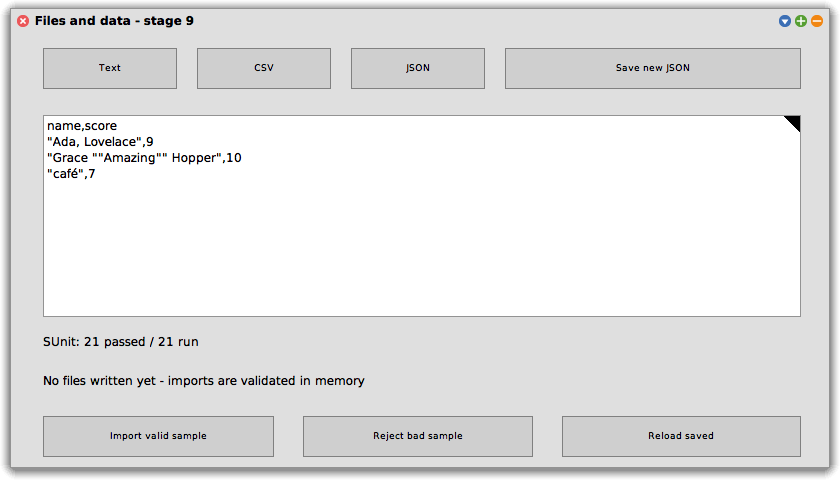
lab report: 'SUnit: ', result passedCount printString, ' passed / ', result runCount printString, ' run'.
(result failures isEmpty and: [result errors isEmpty])
    ifFalse: [self error: 'Open the Test Runner to inspect failures'].
lab
Watch for: A green suite verifies the listed cases in the tested image. It does not establish universal CSV dialect support or crash-safe file replacement.
Try it: Introduce a deliberate parser mistake, run the relevant test, then restore the source and return to green.
Expected result
21 tests run and 21 pass in the tested image. The native workbench reports the suite counts.
Stage 9 in the actual Squeak 6.1 image. The supplied Workspace block sets the state; this is a native Morphic imageForm capture.
Watch the workflow
Screenshots are native Morphic imageForm captures produced by the real Squeak VM. GIFs assemble those native frames from scripted message sequences. They are not mouse recordings, browser re-creations, or performance benchmarks.
NATIVE SQUEAK CAPTURE
Scripted native-render demonstration: the same three records are shown as text, CSV, and JSON, then saved to a new tutorial snapshot. Frames come from actual Squeak Morphic rendering.
NATIVE SQUEAK CAPTURE
Scripted native-render demonstration: a bad import preserves the old model, a valid sample replaces it, and reloading restores the saved snapshot. These are model messages, not recorded clicks.
Practice with tested solutions
1. Compute a score total
Add scoreTotal to LQDataLab using inject:into:. Do not format and then reparse the preview.
Show a tested solution
Browser · LQDataLab · instance side · exercise solutions protocol · Accept the one method. Alternatively, file in FilesExercises-Solutions.st.
Exercise solution
scoreTotal
    ^ records inject: 0 into: [:total :row | total + row second]
Expected
The initial total is 26. Importing only a record with score 8 changes the total to 8.
Workspace · select the entire check block · Print it (Ctrl/Cmd+P), after installing the solution.
Check the solution
| lab before |
lab := LQDataLab new. before := lab records.
{(lab parseCSV: lab highScoresCSV) = (before first: 2). lab records = before}
#(true true)
3. Import a named snapshot transactionally
Add loadJSONNamed: for simple leaf names in the existing tutorial directory. Reuse the byte reader, strict decoder, and importJSON:; do not mutate records directly.
Show a tested solution
Browser · LQDataLab · instance side · exercise solutions protocol · Accept the one method. Alternatively, file in FilesExercises-Solutions.st.
Exercise solution
loadJSONNamed: leaf
    | text |
    [text := self decodeUTF8Bytes: (self readBytesNamed: leaf)]
        on: Error do: [:error | ^ self report: 'Read failed: ', error messageText].
    ^ self importJSON: text
Expected
A malformed file returns false and leaves all records untouched. A valid file replaces the model only after validation.
CSV quoting and embedded line breaks; malformed CSV/JSON/UTF-8; Unicode surrogate pairs; immutable record copies; validated imports; fresh snapshots; refusal to overwrite; staging collisions; simulated staging verification failure; repeat-save/reload.
Close tutorial windows. Keep or remove only the LearnSqueak-DataLab-N directories you created for this lesson. The SUnit/exercise checks clean up only their own fresh directories. Saving your image keeps the installed classes; the source files let you recreate them.
Squeak official downloads — The tested image family; local source inspection verified Json, FileDirectory, FileStream, and Morphic APIs.
RFC 4180: CSV format conventions — Quoted fields, doubled quotes, headers, and line ending conventions. This lesson explicitly uses a small LF-output dialect.
RFC 8259: JSON — JSON data syntax and interoperability. Application schema validation remains a separate step.