Grow a native Morphic tree from one endpoint calculation. Understand base cases, recursive calls, branch geometry and exponential work.
8 construction stagesTested source & checkpointsNative screenshots & demos
Before you start
Build a recursive tree you can inspect and control in Squeak 6.1. Start with one segment, add a terminating recursive spine, fork into two subtrees, and finish with bounded depth and angle controls. This lesson makes the recursion visible and explains why it stops.
Each checkpoint is a complete cumulative native .st file. File in the checkpoint, inspect or re-enter the highlighted methods, then run the exact Workspace block. The first checkpoint includes a small window/canvas shell so the teaching code stays focused on recursion. Continue forward in one learning image, or use a fresh copy to run an earlier checkpoint independently.
A native Squeak 6.1 image and VM; basic comfort with Workspace Do it / Print it and accepting methods in the System Browser
Familiarity with messages, temporary variables, arrays, blocks and Point notation such as 10@20
No Pen package, external graphics library or browser runtime is required; the custom Morph draws with the native canvas
Save a separate learning copy of your image before filing in the sources.
Download checkpoint 1, open Squeak’s File List, select the .st file and choose fileIn. The classes appear in category LearnSqueak-RecursiveTree.
Close the previous lab window before installing the next checkpoint, then evaluate its complete Workspace block. Do not merely accept a method header in a Workspace; methods belong in the named class in the System Browser.
The finished application can be opened at any time after the final file-in with LRTApp open. Local temporary variables disappear after Do it; to experiment through a persistent Workspace variable, use app := LRTApp open without a surrounding | app | declaration.
There is no new SqueakJS launcher for this lesson. Screenshots, controls and tests here were executed in native Squeak 6.1.
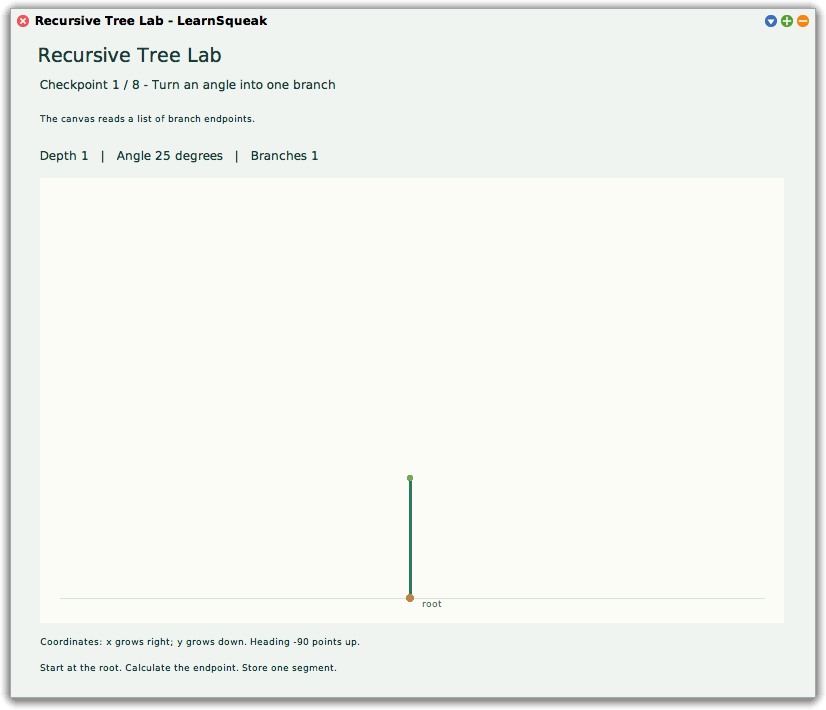
A recursive drawing still needs an ordinary geometric operation: given a start point, a length and a heading, find the endpoint. We begin with one vertical trunk. There is no recursion yet. The tree model stores a branch as a three-element array: start point, endpoint and remaining depth. The canvas reads those arrays and draws them; it does not decide where branches go.
Squeak’s display coordinates grow to the right and downward. Heading 0 points right, 90 points down and -90 points up. The horizontal displacement is length times cosine; the vertical displacement is length times sine. Squeak’s trigonometric functions expect radians, so convert degrees before calling cos and sin.
The supplied shell contains a SystemWindow, labels and an LRTCanvas Morph. Its drawOn: method adds the Morph’s screen position to each local point. Keeping the model’s points local lets the window move without changing the tree. You will concentrate on the tree algorithm while the small shell makes each stage visible.
LRTTree · instance-side method · accept in the System Browser
File in recursive-tree-01.st with the File List. The download contains every class and method required through checkpoint 1. In the System Browser, inspect or re-enter the methods above on the named class, instance side. Then open a Workspace, select the complete block below and Do it.
Workspace · evaluate the complete block after filing in this checkpoint
| app |
app := LRTApp open.
app
A Point is written x@y. Subtracting 120 from the y coordinate moves upward on this screen.
The local temporary finish holds the computed endpoint. The array {start. finish. remaining} records the branch without drawing it immediately.
Even the first version returns before drawing when remaining is zero. This guard becomes the recursion base case next.
Watch for: Floating-point cosine of -90 degrees is very close to zero, so geometric tests compare with a tolerance instead of demanding identical floating-point coordinates.
Try it: In a Workspace, Print it on: LRTTree new endFrom: 10@20 length: 30 heading: 0. Expect approximately 40@20. Change the heading to 90 and expect 10@50.
Expected result
One branch runs from 370@420 to approximately 370@300 inside the canvas. The status reads Depth 1 and Branches 1. The gold dot marks the root; the green dot marks the endpoint.
Native Squeak 6.1 imageForm capture of checkpoint 1, after evaluating the exact Workspace block above.
02 · Stop a recursive spine at zero
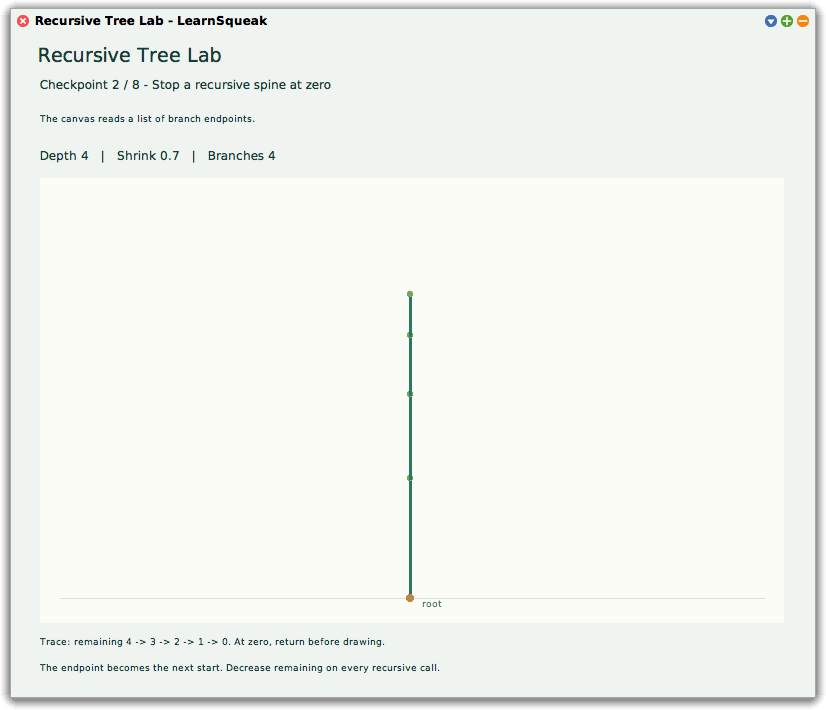
Now the branch method calls itself once. It draws a segment, then continues from that endpoint with a shorter length and one fewer remaining level. The heading stays unchanged, producing a straight spine with four visible segment tips.
The first line of the method is the base case. When remaining <= 0, ^ self returns from that invocation before calculating or recording another endpoint. The recursive call uses remaining - 1, so an initial nonnegative integer must eventually reach zero. Shrinking the line alone would not guarantee termination: positive lengths can keep getting smaller for a long time. The integer countdown is the stopping argument.
At depth 4, trace remaining values 4, 3, 2, 1 and 0. Four calls draw; the fifth only returns. After the deepest call finishes, the earlier calls finish in reverse order. No global cursor needs to be restored because each invocation receives its own start, length and heading.
LRTTree · instance-side method · accept in the System Browser
File in recursive-tree-02.st with the File List. The download contains every class and method required through checkpoint 2. In the System Browser, inspect or re-enter the methods above on the named class, instance side. Then open a Workspace, select the complete block below and Do it.
Workspace · evaluate the complete block after filing in this checkpoint
length * shrink gives each following segment 70% of its parent’s length.
rebuild replaces the old collection before invoking the recursive method. A new drawing cannot accumulate old branches.
The depth argument counts levels that are still allowed to draw, including the current level. Depth zero means an empty drawing.
Watch for: Do not remove remaining - 1 or move the base case below the recursive call. The lesson never needs an intentionally nonterminating example.
Try it: Run app tree depth: 0. app refresh. after keeping app in a Workspace variable. The tree disappears but the root marker remains. Restore depth 4 to see the spine again.
Expected result
The spine contains four segments with lengths 120, 84, 58.8 and 41.16. Their endpoint y coordinates are approximately 300, 216, 157.2 and 116.04. Branches reads 4.
Native Squeak 6.1 imageForm capture of checkpoint 2, after evaluating the exact Workspace block above.
03 · Fork into two smaller trees
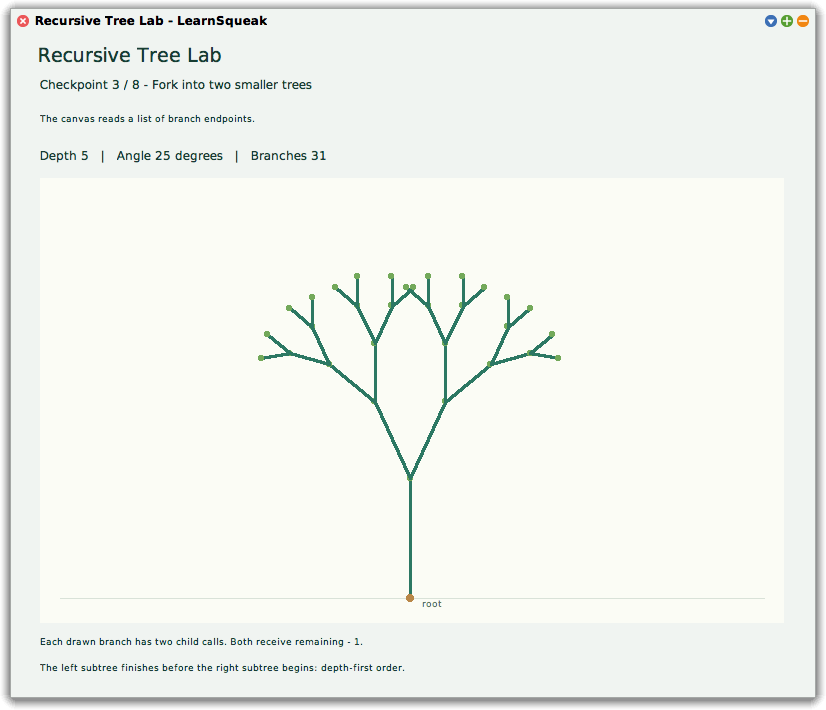
Replace the one recursive continuation with two. Both children begin at the parent’s endpoint and use the same shortened length and decremented depth. The first child turns left by subtracting angle; the second turns right by adding angle. This simple local rule creates the whole branching form.
Read the two recursive sends in order. Squeak completes the entire left subtree before it starts the right subtree. This is depth-first traversal, not a level-by-level animation. The model finishes constructing the list synchronously; the canvas then displays that list.
Depth 1 draws a trunk. Depth 2 draws a trunk and two children, for three branches. Depth 3 adds four more, for seven. The default here is depth 5, giving 1 + 2 + 4 + 8 + 16 = 31 branches. The same method is reused for every subtree; no separate left-tree or right-tree algorithm is needed.
LRTTree · instance-side method · accept in the System Browser
File in recursive-tree-03.st with the File List. The download contains every class and method required through checkpoint 3. In the System Browser, inspect or re-enter the methods above on the named class, instance side. Then open a Workspace, select the complete block below and Do it.
Workspace · evaluate the complete block after filing in this checkpoint
Both calls use finish, so both child branches are connected to the parent tip.
The recursive parameters are values for the child call. Returning from the left call leaves the parent’s heading available for the right call.
Angles alter the geometry; they do not alter how many calls are made. The depth countdown still controls the size of the tree.
Watch for: An accidental remaining value instead of remaining - 1 in either child would remove that path’s termination guarantee. Check both calls.
Try it: Change depth to 2, refresh and identify the three stored segments. Then set angle to 40 and refresh; the count stays three while the fork opens wider.
Expected result
A symmetric branching tree appears with depth 5, angle 25 degrees and 31 branches. At depth 3 the stored remaining-depth sequence is #(3 2 1 1 2 1 1).
Native Squeak 6.1 imageForm capture of checkpoint 3, after evaluating the exact Workspace block above.
04 · Draw the remaining depth
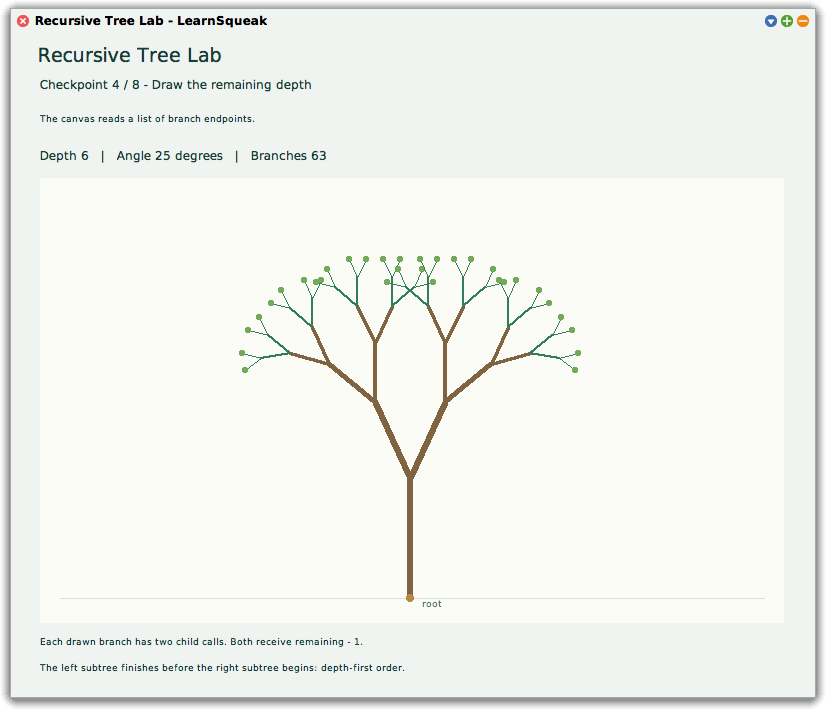
The algorithm already stores remaining depth as the third field of every segment. Use that information to make the structure readable: branches with more than two levels remaining are brown; the last two levels are green; the final level has small green tip markers. The line width is the remaining depth, capped at seven pixels.
This is a change to presentation, not to recursion. LRTTree still computes the same point pairs. LRTCanvas chooses colors and widths when drawOn: is called. The canvas must not add branches or change the model, because Morphic may repaint a view repeatedly after moving, exposing or capturing it.
Be careful about two ways of naming a level. At total depth 6, the root branch has remaining depth 6 but generation 0. Its children have remaining depth 5 and generation 1. Remaining depth moves down toward the stopping condition; generation moves up away from the root. The exercises later turn between those two views.
LRTCanvas · instance-side method · accept in the System Browser
File in recursive-tree-04.st with the File List. The download contains every class and method required through checkpoint 4. In the System Browser, inspect or re-enter the methods above on the named class, instance side. Then open a Workspace, select the complete block below and Do it.
Workspace · evaluate the complete block after filing in this checkpoint
Native Squeak 6.1 imageForm capture of checkpoint 4, after evaluating the exact Workspace block above.
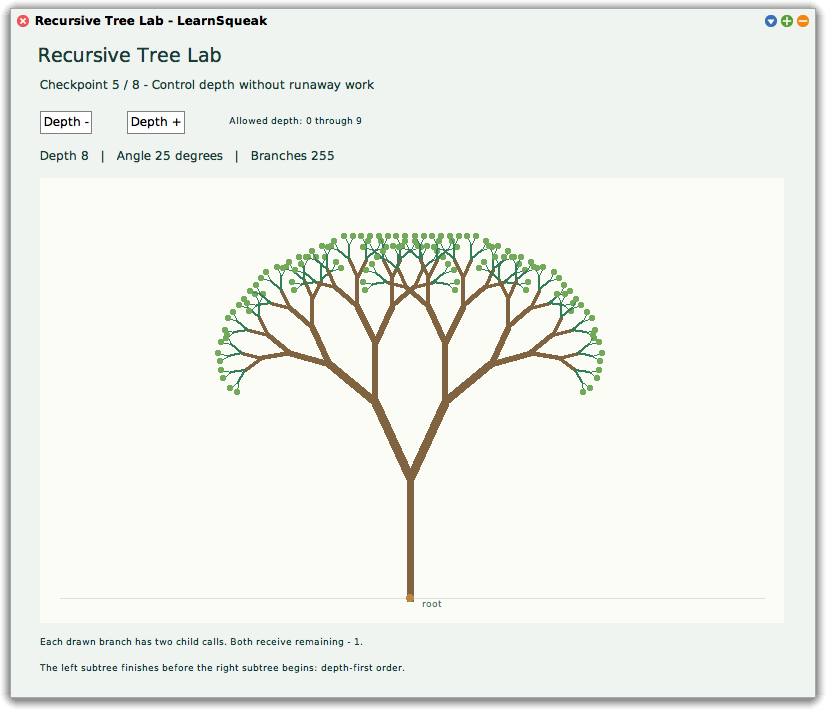
05 · Control depth without runaway work
Add native Depth - and Depth + buttons. Each button sends changeDepth: to the application. That action clamps the requested value into the supported range, asks the tree model to change depth and refreshes the view.
The model validates its own public setter as well. depth: accepts only an Integer from 0 through 9 and returns false for invalid input without changing any state. This check has been included in every checkpoint so Workspace experiments are bounded from the start; here it becomes part of the interface design. UI clamping and model validation serve different callers: a button at the boundary stays there, while malformed direct input is explicitly rejected.
The maximum is a deliberate workload budget. Binary branching grows exponentially even though the recursive method is short. At depth 9 there are 511 drawn branches. The synchronous rebuild is suitable for this bounded demonstration; lifting the limit substantially would need a different execution strategy and a new performance review.
LRTTree · instance-side method · accept in the System Browser
LRTApp · instance-side method · accept in the System Browser
changeDepth: delta
 tree depth: (((tree depth + delta) max: 0) min: tree maximumDepth).
 self refresh
Where to run this
File in recursive-tree-05.st with the File List. The download contains every class and method required through checkpoint 5. In the System Browser, inspect or re-enter the methods above on the named class, instance side. Then open a Workspace, select the complete block below and Do it.
Workspace · evaluate the complete block after filing in this checkpoint
isInteger deliberately rejects both 3.5 and 3.0: this interface requires the Integer representation for its discrete countdown.
Short-circuit and: prevents a non-integer such as nil or a string from reaching the numeric range test.
The parentheses around the complete clamped expression matter: depth: receives one value, not a nonexistent depth:min: message.
Watch for: Do not use a huge depth to test that recursion works. Use the provided boundary tests; the accepted input range is part of the application contract.
Try it: Print it on app tree depth: 10. Expect false, with the existing tree unchanged. Try a negative value and a string; both must also be rejected.
Expected result
The two depth buttons are visible. This Workspace example shows depth 8 with 255 branches. Repeated Depth + stops at depth 9; repeated Depth - stops at 0.
Native Squeak 6.1 imageForm capture of checkpoint 5, after evaluating the exact Workspace block above.
06 · Explore branching angles
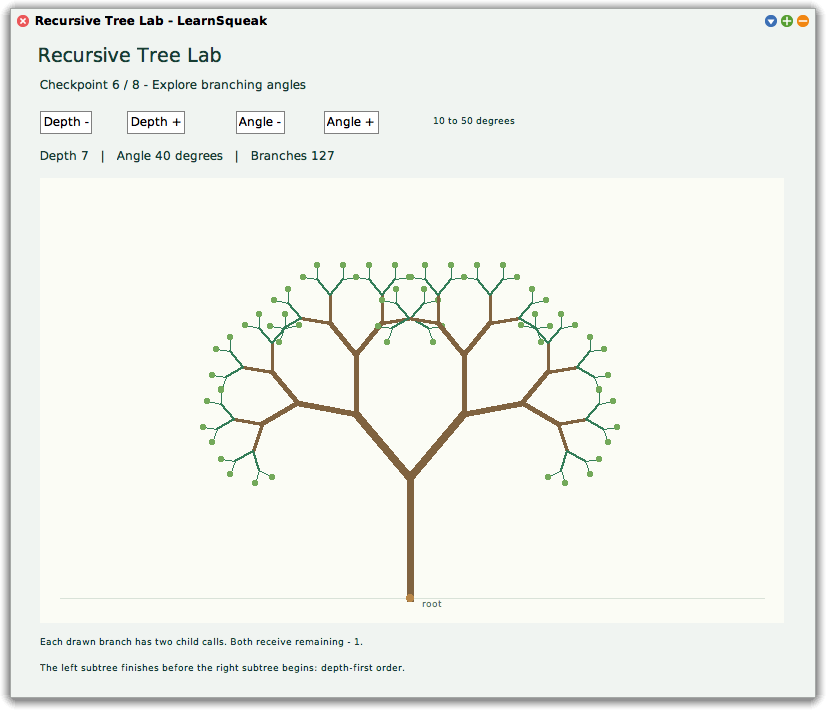
The Angle - and Angle + buttons change the branch angle in five-degree steps. The valid model range is 10 through 50 degrees, and direct Workspace input may use any Integer in that interval. The UI clamps at those boundaries just as it does for depth.
An angle is an offset from the parent’s heading, not an absolute direction. At a parent heading of -90 and angle 40, the two child headings are -130 and -50. Their children apply the same rule again. Wider forks spread the branches differently and can create crossings; these intersections are a visual consequence of the geometry, not an extra node or a collision test.
Compare two trees with the same depth and different angles. Every branch still has two child calls and each child still receives one fewer remaining level. The topology and counts are unchanged. Only endpoints change. The model rebuilds from the original root every time, avoiding the drift that would occur if old pixel endpoints were repeatedly rotated.
LRTTree · instance-side method · accept in the System Browser
File in recursive-tree-06.st with the File List. The download contains every class and method required through checkpoint 6. In the System Browser, inspect or re-enter the methods above on the named class, instance side. Then open a Workspace, select the complete block below and Do it.
Workspace · evaluate the complete block after filing in this checkpoint
| app |
app := LRTApp open.
app tree depth: 7.
app tree angle: 40.
app refresh.
app
The setter returns true for an accepted angle, rebuilds from scratch, and returns false before mutation for an invalid value.
Using the same sine/cosine endpoint helper for every branch keeps the geometry consistent across the whole tree.
The supported depth and angle ranges keep every endpoint inside this fixed canvas; native tests sweep the permitted controls.
Watch for: Increasing angle does not always make the complete tree wider. Later branches can turn inward, downward or across other branches.
Try it: Try 10, 25 and 50 degrees at the same depth. Find a branch that turns inward. Then Print it on app tree angle: 90; the rejected input leaves the current tree intact.
Expected result
Four native buttons are visible. The captured example has depth 7, angle 40 degrees and 127 branches. Changing the angle keeps the count at 127.
Native Squeak 6.1 imageForm capture of checkpoint 6, after evaluating the exact Workspace block above.
07 · Count the cost of recursion
Instrument the recursive method with two counters. calls increments on entry, including entries that stop immediately. baseCases increments only when remaining is zero or less. rebuild clears both counters before constructing a new tree, so they describe one current drawing.
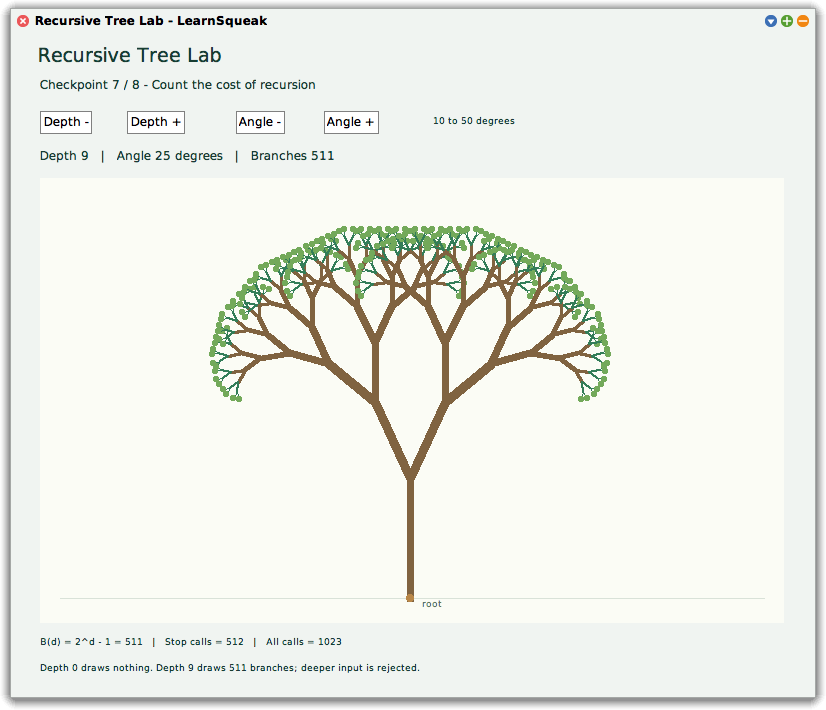
Let B(d) be the number of drawn branches. B(0) = 0, and B(d) = 1 + 2 * B(d - 1). The solution is B(d) = 2^d - 1. The number of stopping calls is 2^d, so total calls are 2^(d + 1) - 1. At depth 9, that means 511 drawn branches, 512 stopping calls and 1,023 total calls. A zero-depth tree still makes one call: the initial invocation immediately stops.
This explains two different resource costs. The call stack grows only along the current path, so its maximum depth is proportional to d. Total work and the stored segment list grow proportionally to 2^d. A short recursive method can therefore describe a great deal of work. The displayed formula is a prediction; the incremented counters are measurements to compare with it.
LRTTree · instance-side method · accept in the System Browser
LRTTree · instance-side method · accept in the System Browser
expectedBranches
 ^ (2 raisedTo: depth) - 1
LRTTree · instance-side method · accept in the System Browser
expectedBaseCases
 ^ 2 raisedTo: depth
Where to run this
File in recursive-tree-07.st with the File List. The download contains every class and method required through checkpoint 7. In the System Browser, inspect or re-enter the methods above on the named class, instance side. Then open a Workspace, select the complete block below and Do it.
Workspace · evaluate the complete block after filing in this checkpoint
The counter increment occurs before the guard, otherwise stopping invocations would be missing from calls.
A depth-6 tree has 32 visible tips but 64 stopping calls: each final drawn branch calls the empty left and right subtrees.
Increasing depth by one doubles the previous branch count and adds one: B(d + 1) = 2 * B(d) + 1.
Watch for: These counters measure invocations and stored line segments, not elapsed milliseconds. Drawing speed depends on the VM, machine and current UI load.
Try it: Lower the depth to 0. Predict the three counts before refreshing: zero branches, one stopping call and one total call. Then compare depth 8 with depth 9.
Expected result
The status shows 511 branches. The bottom line shows B(d) = 2^d - 1 = 511, Stop calls = 512 and All calls = 1023.
Native Squeak 6.1 imageForm capture of checkpoint 7, after evaluating the exact Workspace block above.
08 · Finish redraw, reset and keyboard controls
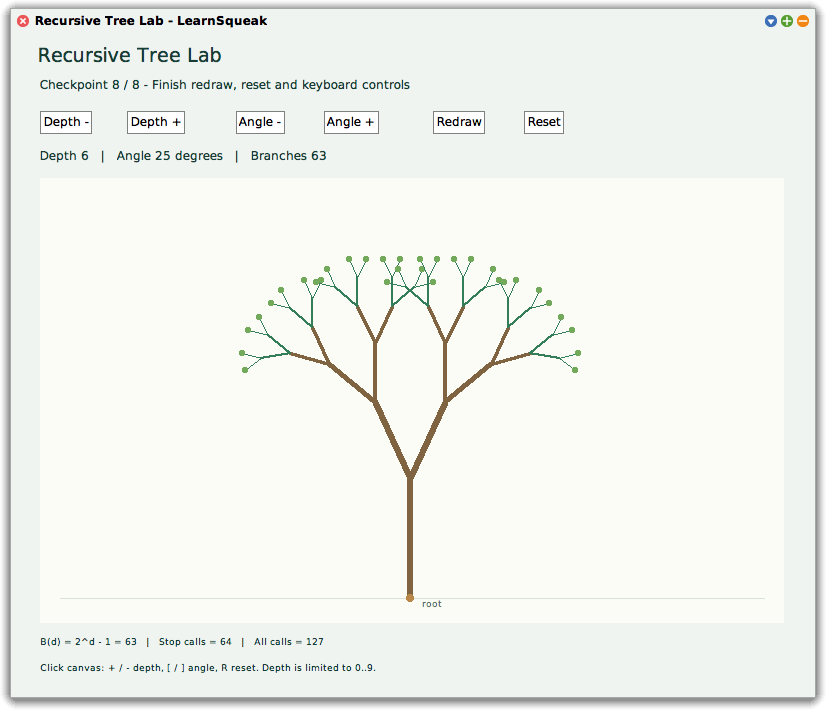
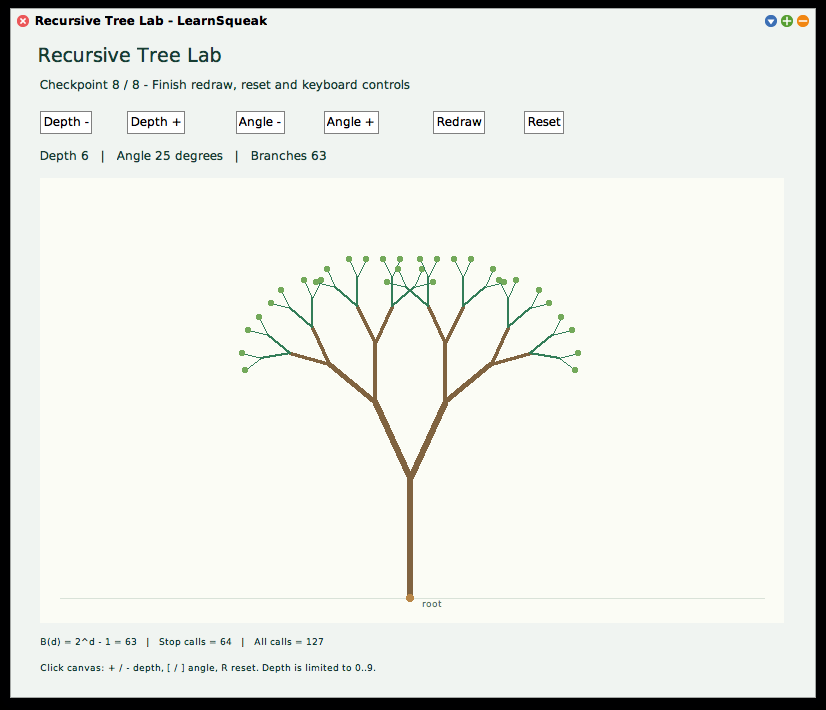
Redraw rebuilds the current parameters from an empty segment collection. Reset restores depth 6, angle 25 and shrink 0.7 before rebuilding. They have different purposes: Redraw demonstrates that geometry is reproducible; Reset returns the experiment to a known starting point.
After clicking the canvas to give it keyboard focus, + (or =) increases depth, - decreases depth, [ and ] change the angle, and R resets. These keys call the same application methods as the buttons. One control path keeps clamping and redraw behavior consistent. Unrecognized keys do nothing.
The window shell also handles lifecycle details: opening the same app twice brings its existing window forward, closing it clears canvas keyboard focus, and reopening the app builds a fresh window around the same model. This application has no stepping process or timer. A rebuild finishes within the fixed depth budget, and repainting only reads a defensive copy of the geometry. Repeated resets or screenshots must not grow the segment list.
LRTTree · instance-side method · accept in the System Browser
File in recursive-tree-08.st with the File List. The download contains every class and method required through checkpoint 8. In the System Browser, inspect or re-enter the methods above on the named class, instance side. Then open a Workspace, select the complete block below and Do it.
Workspace · evaluate the complete block after filing in this checkpoint
| app |
app := LRTApp open.
app reset.
app
rebuild computes new model state; changed asks Morphic to repaint the existing view. A repaint alone does not rerun the recursive construction.
Reset assigns all default parameters before one rebuild, so it cannot leave a mixture of old and new geometry.
The final test suite exercises real native button events, keyboard events, repeated redraw/reset, close/reopen, and focus cleanup.
Watch for: Keyboard shortcuts require canvas focus. Click inside the drawing first, or use the visible buttons.
Try it: Change both controls, press Redraw twice, then Reset twice. Counts and geometry should remain stable after each repeated action. Close and reopen the lab, then run the downloadable SUnit tests.
Expected result
The finished lab has six native buttons. Reset returns to depth 6, angle 25, 63 branches, 64 stopping calls and 127 total calls. Redraw preserves the selected depth and angle.
Native Squeak 6.1 imageForm capture of checkpoint 8, after evaluating the exact Workspace block above.
Watch the workflow
Every still and animation frame is a genuine imageForm capture from this exact native Squeak 6.1 application. Pillow only encodes the captured PNGs into a GIF; it does not draw the tree or controls.
NATIVE SQUEAK CAPTURE
Scripted native Squeak interaction: real button mouse events reduce depth to 0, increase it to 9, return to 6, sweep angle from 10 to 50 degrees, Redraw, then Reset. The 32 imageForm captures are played at an explanatory pace; this is not a real-time screen recording. The unchanged Redraw image shares a longer GIF frame.
Practice with tested solutions
1. Count the visible tips
Add tipCount to LRTTree. Count stored branches whose remaining depth is 1. Do not return baseCases: a terminal drawn branch makes two stopping calls. Handle depth 0, which has no visible tips.
Hint
The third field holds remaining depth. At total depth d > 0, the expected tip count is 2^(d - 1).
After the final checkpoint, create a TestCase subclass named LRTExercise1Test with no instance variables and accept this instance-side test in the System Browser. The solution download includes the class and both tests.
Write the test first
testTipCountsAtEveryDepth
 | model expected |
 model := LRTTree new.
 0 to: 9 do: [:depth |
  model depth: depth.
  expected := depth = 0 ifTrue: [0] ifFalse: [2 raisedTo: depth - 1].
  self assert: model tipCount = expected]
Show a tested solution
System Browser → LRTTree → instance side → exercises. Accept this method, or file in the complete solution download after the final checkpoint.
Exercise solution
tipCount
 ^ segments count: [:branch | branch third = 1]
Expected
At depth 6 there are 32 visible tips; at depth 0 there are none.
After filing in the solution download, Workspace → Print it on:
Check the solution
LRTExercise1Test suite run
2 tests run, 2 passes, 0 failures, 0 errors.
Both native SUnit tests are included in the downloadable solution. The second test extends the example with boundaries or parameter sweeps.
2. Measure the total branch length
Add totalBranchLength to LRTTree. Sum the geometric length of every stored segment. Use the difference between endpoint and start; a Point’s r gives its magnitude. Check that angle changes alter directions without changing the total length.
Hint
inject:into: accumulates one answer from a collection. For depth 2, total length is 120 + 2 * 84 = 288.
After the final checkpoint, create a TestCase subclass named LRTExercise2Test with no instance variables and accept this instance-side test in the System Browser. The solution download includes the class and both tests.
Write the test first
testSmallTreeLengths
 | model |
 model := LRTTree new.
 model depth: 0. self assert: model totalBranchLength = 0.
 model depth: 1. self assert: (model totalBranchLength - 120) abs < 0.000001.
 model depth: 2. self assert: (model totalBranchLength - 288) abs < 0.000001
Show a tested solution
System Browser → LRTTree → instance side → exercises. Accept this method, or file in the complete solution download after the final checkpoint.
Exercise solution
totalBranchLength
 ^ segments inject: 0 into: [:sum :branch |
  sum + (branch second - branch first) r]
Expected
Depth 0 returns 0; depth 1 returns approximately 120; depth 2 returns approximately 288. Angle does not affect length.
After filing in the solution download, Workspace → Print it on:
Check the solution
LRTExercise2Test suite run
2 tests run, 2 passes, 0 failures, 0 errors.
Both native SUnit tests are included in the downloadable solution. The second test extends the example with boundaries or parameter sweeps.
3. Select a generation of branches
Add branchesAtGeneration:. Generation 0 is the root, generation 1 is its children, and so on. Return all segment records at that generation, or an empty collection for invalid input or an empty tree. Use the public segments snapshot so callers cannot mutate stored geometry.
Hint
remaining depth = total depth - generation. Validate that generation is an Integer from 0 up to depth - 1.
After the final checkpoint, create a TestCase subclass named LRTExercise3Test with no instance variables and accept this instance-side test in the System Browser. The solution download includes the class and both tests.
After filing in the solution download, Workspace → Print it on:
Check the solution
LRTExercise3Test suite run
2 tests run, 2 passes, 0 failures, 0 errors.
Both native SUnit tests are included in the downloadable solution. The second test extends the example with boundaries or parameter sweeps.
When something looks wrong
The tree vanishes at depth 0
That is the correct base case. Zero levels remain to draw. The root marker and canvas remain visible. Increase depth or press Reset.
Angle or depth input returns false
Use an Integer depth from 0 to 9 or an Integer angle from 10 to 50. Fractions, floating-point values such as 3.0, strings and out-of-range values are rejected without changing the current tree.
The tree changes in the model but the visible label has not changed
When changing parameters directly through app tree in a Workspace, send app refresh afterward. The supplied buttons already do this.
A method is rejected in the Workspace
Select the class and instance side in the System Browser and accept the full method there. Workspace blocks send messages to the installed classes; they do not install method definitions.
A previous checkpoint behaves like the final version
File-in replaces included methods but does not remove methods added later. Run older checkpoints in a clean learning image to reproduce their exact independent state.
Typing R or the angle keys has no effect
Click the canvas to give it keyboard focus, then type the shortcut. The native buttons always provide the same actions.
The GIF seems to pause on Redraw
Redraw deliberately reproduces identical geometry. The encoder combines the identical captures into one longer frame; Reset follows and restores the defaults.
Verification, cleanup and next steps
The implementation, cumulative checkpoints, lesson snippets, tests and media were built together against the supplied Squeak 6.1 build 23976. Native execution is the source of the reported counts and images.
Native Squeak 6.1: 37 primary tests passed with 0 failures and 0 errors. A separately authored independent suite passed 9 tests; three exercise suites passed 2 tests each, for 6 additional passing tests.
All eight checkpoint files were independently installed in an unsaved clean image process. Every displayed method was recompiled and every stage Workspace block was evaluated before its screenshot was captured.
Endpoint tests cover cardinal and diagonal directions with a 0.000001 tolerance.
Counts are checked at every supported depth: branches 2^d - 1, stopping calls 2^d, total calls 2^(d + 1) - 1.
Invalid depths and angles preserve state; repeated redraw/reset is stable; returned segment arrays and Points cannot mutate the model.
Native button and keyboard events, focus release, close/reopen and repeated open are exercised.
The independent suite additionally checks all 410 accepted depth/angle pairs, mirror symmetry, NaN/infinity rejection, 20 lifecycle cycles and 100 maximum-depth/reset cycles.
Run the primary suite yourself: file in recursive-tree-final.st and recursive-tree-tests.st, then Print it on LRTTreeTest suite run.
Close the lab window when finished. Keep the .st downloads separately from your image. To revisit an earlier checkpoint without later methods lingering, start from a fresh learning image copy.
Supplied Squeak 6.1 build 23976 runtime and image source — Morphic canvas drawing, SimpleButtonMorph, SystemWindow, Point trigonometry, imageForm, PNGReadWriter and SUnit
Downloadable LRTTree, LRTCanvas and LRTApp source — The executable recurrence and geometry are printed in the lesson and included in each cumulative checkpoint