The separate playground loads the real Smalltalk image on demand. This lesson keeps its native setup instructions; browser compatibility notes appear beside each demo.
Before you start
Combine editable notes, tasks and fictional contacts behind shared navigation, validation and local persistence.
Save a copy of your Squeak image. Each checkpoint is a complete cumulative .st file that can be loaded into a fresh Squeak 6.1 image.
Put the downloaded .st file beside your image. Open the File List, select it and choose fileIn. Close the previous checkpoint window before loading a later checkpoint.
After filing in a checkpoint, evaluate its exact Workspace block with Do it (Ctrl+D / Cmd+D). Method excerpts belong in the named class in the System Browser; they are already installed.
For final verification, file in LearningOrganizer.st, then LearningOrganizerTests.st. Evaluate TestRunner openForSuite: LOOrganizerTest suite. Tests create only UUID-named practice files beneath the image directory.
The capstone contains one editable note, a task list and fictional contacts. These are intentionally smaller than the earlier full Notepad, To-do and Contact Book applications. The goal is integration: one navigation surface, one dirty check and one persistence boundary. LOStore owns data; LOOrganizerApp builds views from that data.
Where to run this
System Browser, LOStore, instance side. This method is installed by checkpoint 01. Read it here or accept it in that class; do not paste the definition into a Workspace.
Construction code · follow the run instructions above
initialize
 super initialize. notes := ''. tasks := OrderedCollection new. contacts := OrderedCollection new.
 savedSnapshot := self snapshot. status := 'A small local organizer for fictional data.'. fileStore := LOFiles new
After filing in this checkpoint, evaluate the complete block in a Workspace with Do it. It returns the native app.
Workspace · run after installing this checkpoint
| app |
app := LOOrganizerApp open.

app
Model data survives rebuilding a page
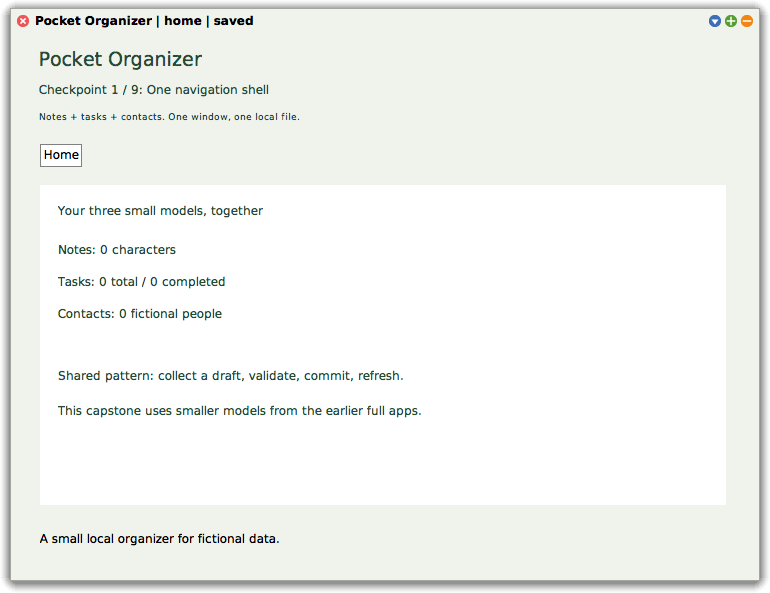
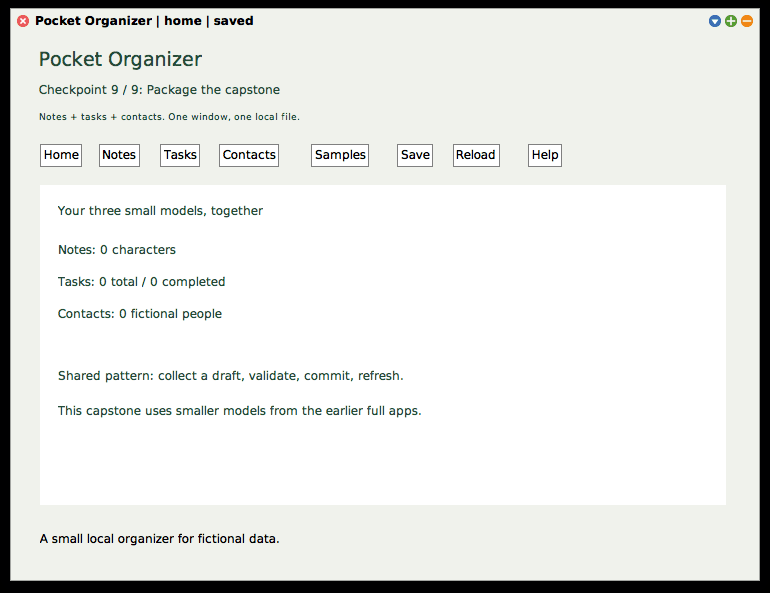
The home dashboard derives totals from the model
The view has one current page symbol: home, notes, tasks or contacts
This lesson reuses the earlier model/view, validation, dialog-cancel and file-transaction patterns. It does not embed the full previous apps or their complete feature sets.
Expected result
An empty dashboard reports note length, task count and contact count
Native Squeak 6.1 checkpoint 01; generated by executing the exact Workspace block shown here.
02 · Keep a note in a real editor
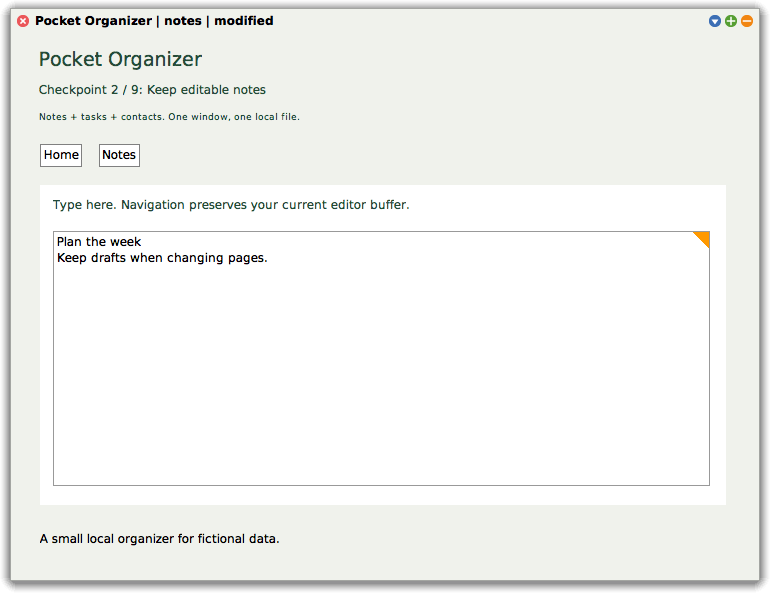
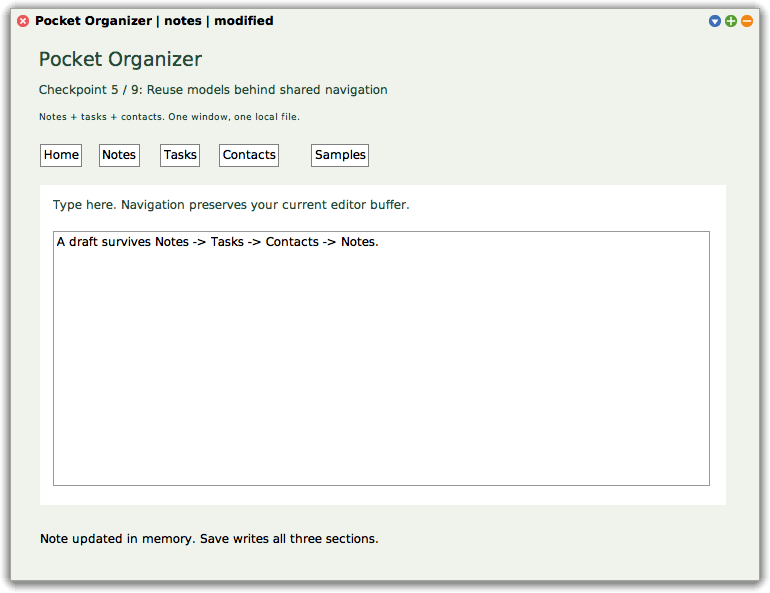
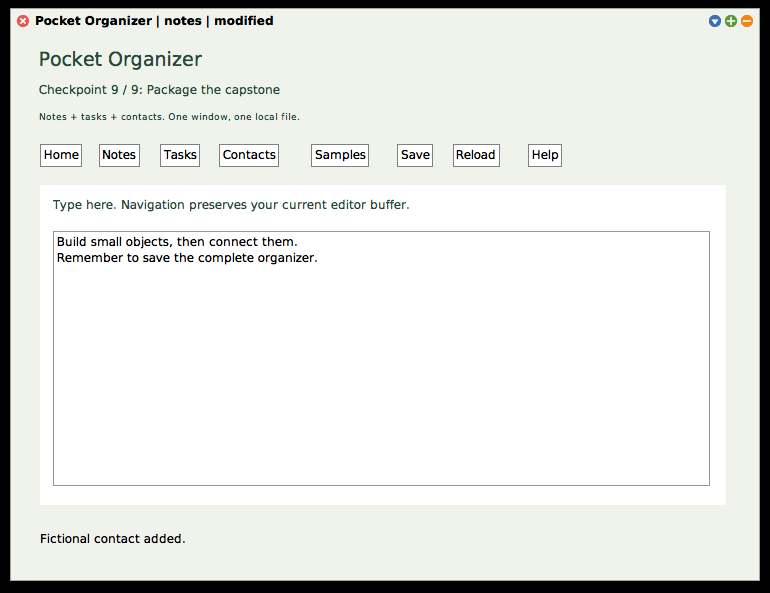
PluggableTextMorph has an editor buffer that can be newer than the accepted model value. Before navigating, flushDraft reads editor text asString and validates it. Only a valid note is committed; an oversized draft blocks navigation and stays on screen. Closing also considers the unaccepted buffer.
Where to run this
System Browser, LOOrganizerApp, instance side. This method is installed by checkpoint 02. Read it here or accept it in that class; do not paste the definition into a Workspace.
Construction code · follow the run instructions above
flushDraft
 editor ifNil: [^ true].
 ^ store notes: editor text asString
After filing in this checkpoint, evaluate the complete block in a Workspace with Do it. It returns the native app.
Native Squeak 6.1 checkpoint 02; generated by executing the exact Workspace block shown here.
03 · Add tasks and toggle completion
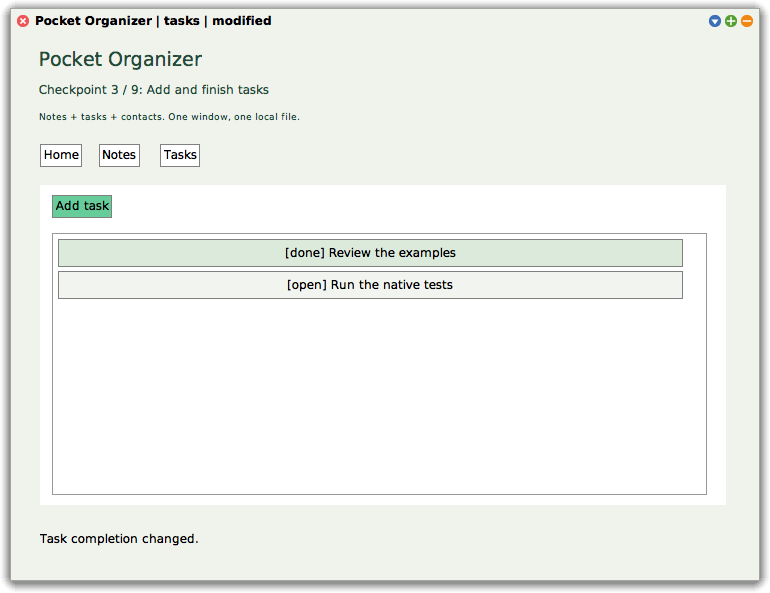
Each task is a two-field record: title and Boolean completion state. Add task collects a temporary dialog answer and validates its trimmed length before insertion. The row button sends toggleTask: with an index from the current list, then rebuilds the page. Task lists scroll independently of the fixed window.
Where to run this
System Browser, LOStore, instance side. This method is installed by checkpoint 03. Read it here or accept it in that class; do not paste the definition into a Workspace.
Construction code · follow the run instructions above
Native Squeak 6.1 checkpoint 03; generated by executing the exact Workspace block shown here.
04 · Bring in fictional contacts
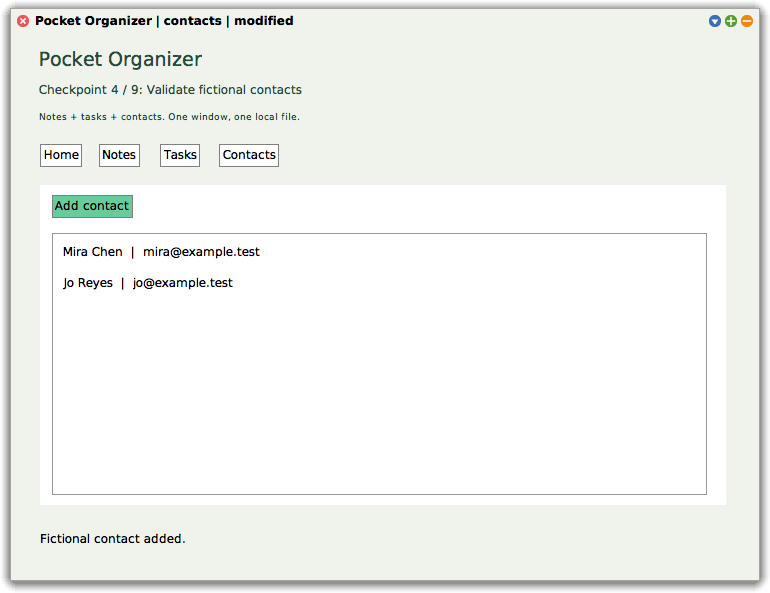
A contact has a trimmed display name and normalized email. The two dialogs form one draft: canceling the email dialog must not create a partial contact. The model rejects duplicate emails case-insensitively and validates basic address shape. The contacts view scrolls and displays only synthetic example data.
Where to run this
System Browser, LOStore, instance side. This method is installed by checkpoint 04. Read it here or accept it in that class; do not paste the definition into a Workspace.
Construction code · follow the run instructions above
addContact: name email: email
 | cleanName cleanEmail parts |
 cleanName := name withBlanksTrimmed. cleanEmail := email withBlanksTrimmed asLowercase.
 (cleanName isEmpty or: [cleanName size > 80]) ifTrue: [status := 'A name needs 1 to 80 characters.'. ^ false].
 ((cleanEmail size > 120) or: [(cleanEmail includes: Character space) or: [(cleanEmail occurrencesOf: $@) ~= 1]]) ifTrue: [status := 'Use one complete email address.'. ^ false].
 parts := cleanEmail findTokens: '@'.
 (parts size ~= 2 or: [parts first isEmpty or: [(parts second includes: $.) not]]) ifTrue: [status := 'Use name@example.test.'. ^ false].
 ((parts second beginsWith: '.') or: [parts second endsWith: '.']) ifTrue: [status := 'Email domain is incomplete.'. ^ false].
 (cleanEmail anySatisfy: [:char | char asciiValue < 33]) ifTrue: [status := 'Email cannot contain whitespace.'. ^ false].
 (contacts anySatisfy: [:each | each second = cleanEmail]) ifTrue: [status := 'That email already exists.'. ^ false].
 contacts size >= 500 ifTrue: [status := 'Limit: 500 contacts.'. ^ false].
 contacts addLast: {cleanName copy. cleanEmail copy}. status := 'Fictional contact added.'. ^ true
After filing in this checkpoint, evaluate the complete block in a Workspace with Do it. It returns the native app.
Validation lives in LOStore so file imports use the same rules
Normalization makes MIRA@EXAMPLE.TEST duplicate mira@example.test
No insertion occurs until both dialogs return valid values
The smaller capstone contact model supports add/list and duplicate protection. Search, sorting, editing and deletion remain in the standalone Contact Book lesson.
Native Squeak 6.1 checkpoint 04; generated by executing the exact Workspace block shown here.
05 · Switch views without losing work
All navigation buttons use navigate:. It flushes the current note draft, records the next page symbol, rebuilds that page and refreshes the shared status. A view can be discarded because durable data belongs to LOStore. Samples populate only an empty organizer, so pressing Samples cannot silently replace an existing draft.
Where to run this
System Browser, LOOrganizerApp, instance side. This method is installed by checkpoint 05. Read it here or accept it in that class; do not paste the definition into a Workspace.
Construction code · follow the run instructions above
Native Squeak 6.1 checkpoint 05; generated by executing the exact Workspace block shown here.
06 · Save all sections in one file
The file contains a version header, one note row, task rows and contact rows. Each string is encoded as comma-terminated Unicode scalar numbers, so tabs and line breaks inside notes cannot become structural delimiters. Save stages complete ASCII bytes in a temporary sibling, moves the existing file aside and installs the replacement. Only a committed replacement updates savedSnapshot. If deleting the old backup fails after commit, the save still succeeds and reports the retained backup instead of falsely claiming the destination was unchanged.
Where to run this
System Browser, LOStore, instance side. This method is installed by checkpoint 06. Read it here or accept it in that class; do not paste the definition into a Workspace.
Construction code · follow the run instructions above
savedSnapshot is updated only after the file helper succeeds
The toolbar reads the editor buffer before saving
Save asks before replacing a file that already exists
The numeric format is deliberately simple and data-only. It is not Smalltalk source and is never evaluated. UTF-8 JSON is a sensible production alternative with a separately validated parser.
Expected result
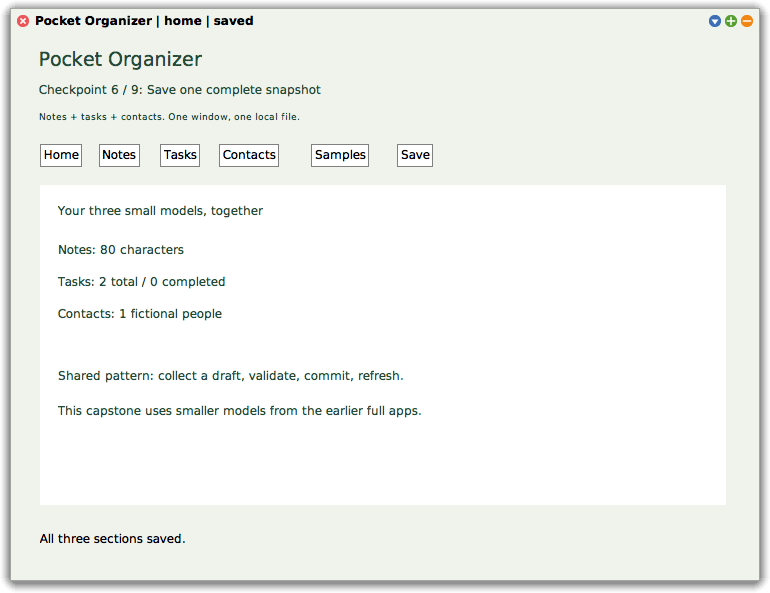
The dashboard is marked saved after all sections are written
Native Squeak 6.1 checkpoint 06; generated by executing the exact Workspace block shown here.
07 · Load into a temporary organizer
loadFrom:discardChanges: reads a bounded file and asks parse: to build a fresh LOStore. That temporary store applies the same note/task/contact validators. Unknown row types, invalid flags, duplicate contacts, malformed Unicode scalars or a bad later row reject the entire file. The live store changes only after every row succeeds.
Where to run this
System Browser, LOStore, instance side. This method is installed by checkpoint 07. Read it here or accept it in that class; do not paste the definition into a Workspace.
Construction code · follow the run instructions above
The caller must explicitly allow discarding dirty state
A file is limited to 2,000,000 bytes before reading its contents
A single commit replaces notes, tasks and contacts together
Limits: 20,000 note characters, 500 tasks, 500 contacts; task titles 120 characters; names 80 and emails 120. Unicode tests include U+1F642 as well as Greek and embedded delimiters.
Expected result
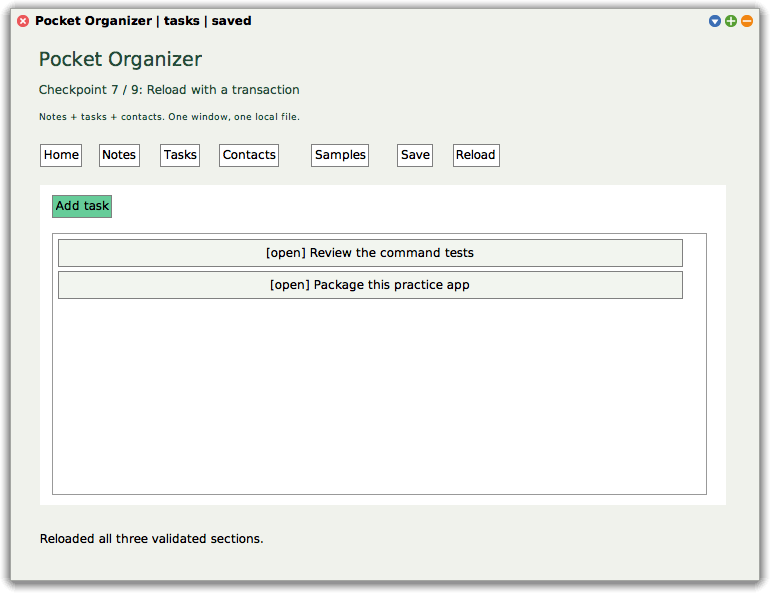
The saved task list returns and the title is clean
Native Squeak 6.1 checkpoint 07; generated by executing the exact Workspace block shown here.
08 · Guard cancellation and unsaved drafts
The native window asks okToClose before closing. The guard includes both committed model changes and unaccepted editor text. Reload offers a discard confirmation when dirty. Save and Reload cancel paths leave data in place, and a failed save remains dirty. Tests also inject a partial temporary write and failures at both rename steps.
Where to run this
System Browser, LOOrganizerApp, instance side. This method is installed by checkpoint 08. Read it here or accept it in that class; do not paste the definition into a Workspace.
Construction code · follow the run instructions above
isDirty
 ^ store isDirty or: [editor notNil and: [editor text asString ~= store notes]]
After filing in this checkpoint, evaluate the complete block in a Workspace with Do it. It returns the native app.
Workspace · run after installing this checkpoint
| app |
app := LOOrganizerApp open.
app addSamples; showNotes; setDraft: 'This draft has not been accepted or saved.'.
app
The raw editor buffer participates in isDirty immediately
Declining Reload retains both the live model and the editor draft
A failed write never announces a successful save
The file helper recovers from ordinary write/rename failures before commit. Once new bytes are installed, failed backup cleanup is nonfatal: save returns true, the model becomes clean, and a status warning identifies the retained backup. It does not provide power-loss atomicity, file locking or multi-process synchronization. A failed recovery may leave a .backup-UUID file for manual recovery.
Expected result
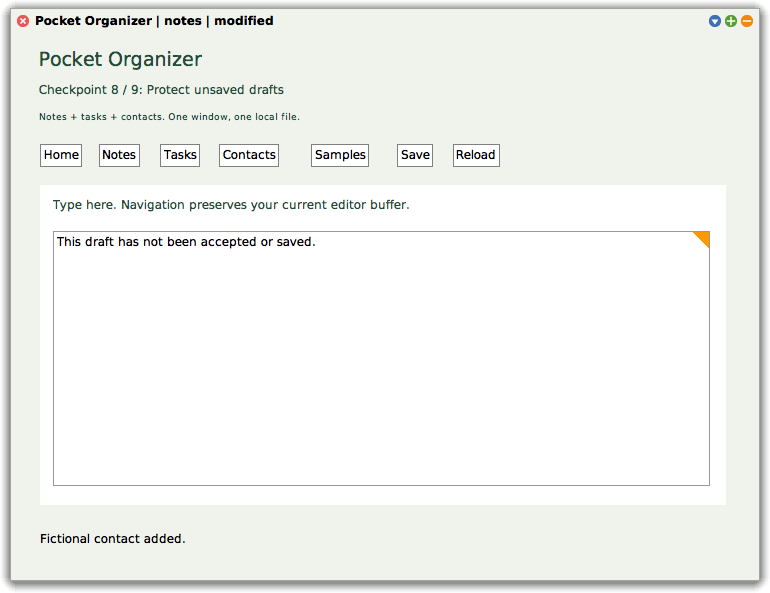
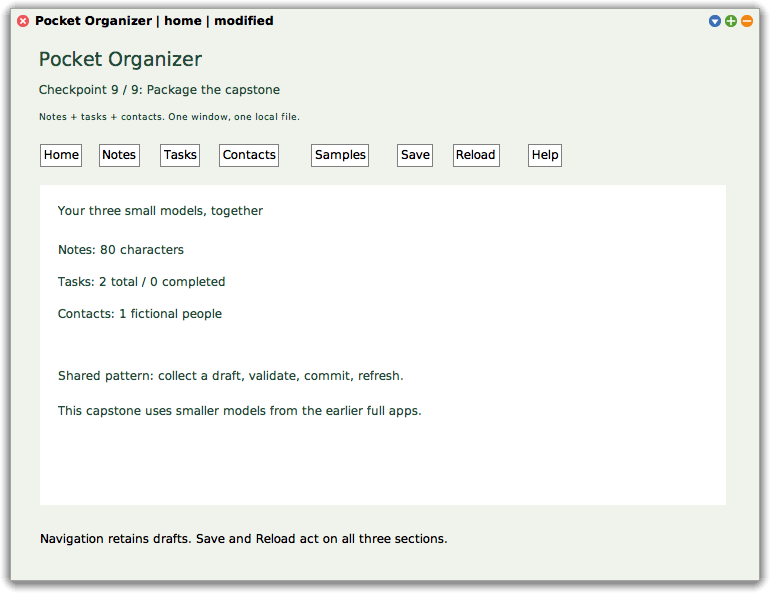
An unaccepted note buffer makes the native title modified
Native Squeak 6.1 checkpoint 08; generated by executing the exact Workspace block shown here.
09 · Package a capstone you can rebuild
The final .st file contains the compact data model, safe file helper, fixed window and Morphic adapter. Load it into a fresh Squeak 6.1 image, then load the independent SUnit source. Keep synthetic data in a separate .lso file and keep your source under version control. The capstone’s value is the shared invariants across features: drafts are preserved, validation is reused and load commits once.
Where to run this
System Browser, LOOrganizerApp, instance side. This method is installed by checkpoint 09. Read it here or accept it in that class; do not paste the definition into a Workspace.
Construction code · follow the run instructions above
okToClose
 ^ self isDirty not or: [self confirm: 'Close and discard unsaved organizer changes?']
After filing in this checkpoint, evaluate the complete block in a Workspace with Do it. It returns the native app.
Run LOOrganizerTest to verify data, UI routes and failure paths
The source is a rebuild recipe; the image is your running development environment
Each feature can grow behind LOStore without replacing the navigation contract
The complete app offers note editing, task addition/completion and contact addition/listing. See the earlier full apps for richer feature-specific behavior; this lesson focuses on their integration.
Expected result
The completed dashboard summarizes notes, two tasks and one fictional contact
The same normalized validation serves both dialog entry and file parsing; a rejected contact cannot disturb task data.
The exact solutionRun block was evaluated in a fresh Squeak 6.1 image and its assertions passed.
3. Round-trip the complete organizer
Save synthetic data to a unique tutorial file, change the note, then reload. Verify every section and clean state, and remove only the file created by this exercise.
Show a tested solution
| app path original |
app := LOOrganizerApp open.
app addSamples.
original := app store snapshot.
path := FileDirectory default fullNameFor: 'organizer-exercise-', UUID new asString, '.lso'.
[
 (app store saveTo: path) ifFalse: [self error: 'Save failed'].
 app store notes: 'Temporary edit'.
 (app store loadFrom: path discardChanges: true) ifFalse: [self error: 'Reload failed'].
 (app store snapshot = original and: [app store isDirty not]) ifFalse: [self error: 'Round trip mismatch']
] ensure: [(FileDirectory default fileExists: path) ifTrue: [FileDirectory default deleteFileNamed: path]].
app showHome.
app
Exercise solution
| app path original |
app := LOOrganizerApp open.
app addSamples.
original := app store snapshot.
path := FileDirectory default fullNameFor: 'organizer-exercise-', UUID new asString, '.lso'.
[
(app store saveTo: path) ifFalse: [self error: 'Save failed'].
app store notes: 'Temporary edit'.
(app store loadFrom: path discardChanges: true) ifFalse: [self error: 'Reload failed'].
(app store snapshot = original and: [app store isDirty not]) ifFalse: [self error: 'Round trip mismatch']
] ensure: [(FileDirectory default fileExists: path) ifTrue: [FileDirectory default deleteFileNamed: path]].
app showHome.
app