The separate playground loads the real Smalltalk image on demand. This lesson keeps its native setup instructions; browser compatibility notes appear beside each demo.
Before you start
Build Maze / Message, a playable keyboard-controlled maze-chase game written in genuine Smalltalk. This is an original educational Pac-Man-style implementation with simple drawn artwork, two ghosts, and a compact maze. It is not an official Pac-Man product.
This web page is the construction guide and source download. The game runs in native Squeak 6.1 after you file in the source; the page does not run a JavaScript imitation or an embedded Smalltalk VM. All screenshots below show the actual Smalltalk application.
Follow nine complete cumulative checkpoints. Each file contains all classes and current method implementations required at that stage, without later-stage behavior. Read the highlighted message, file in the checkpoint, and execute its exact Workspace block. Model state remains separate from event handling and drawing throughout.
Squeak 6.1 with bundled Morphic and SUnit; no extra packages or commercial assets
Familiarity with Workspace Do It / Print It, Browser instance/class sides, and accepting a complete method
About 60–90 minutes to explore all nine stages, plus time for exercises
Save a copy of your learning image before experimenting. The lesson adds classes in LearnSqueak-MazeChase.
Download a checkpoint .st file. In Squeak File List, select it and choose fileIn. Chunk-format .st files are not pasted wholesale into a Workspace.
Run the shown Workspace block with Do It. To inspect a model, select an expression and use Inspect It. To replace a method, choose the named class and instance side in a Browser, paste the entire method, and Accept.
Close the previous game before installing the next checkpoint. Move forward in order. To revisit an earlier checkpoint in isolation, use a clean image; filing older code over newer code does not remove later classes or methods.
For immediate play, file in maze-chase-final.st and Do It: LSMCApp open. Click the board if it needs focus. Space starts, arrows/WASD steer, Escape pauses, and R restarts.
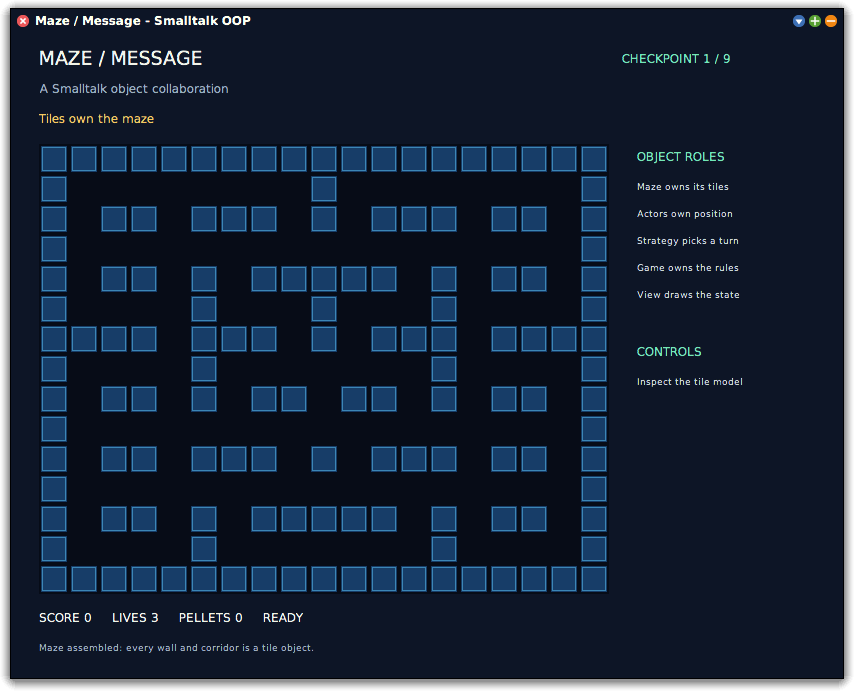
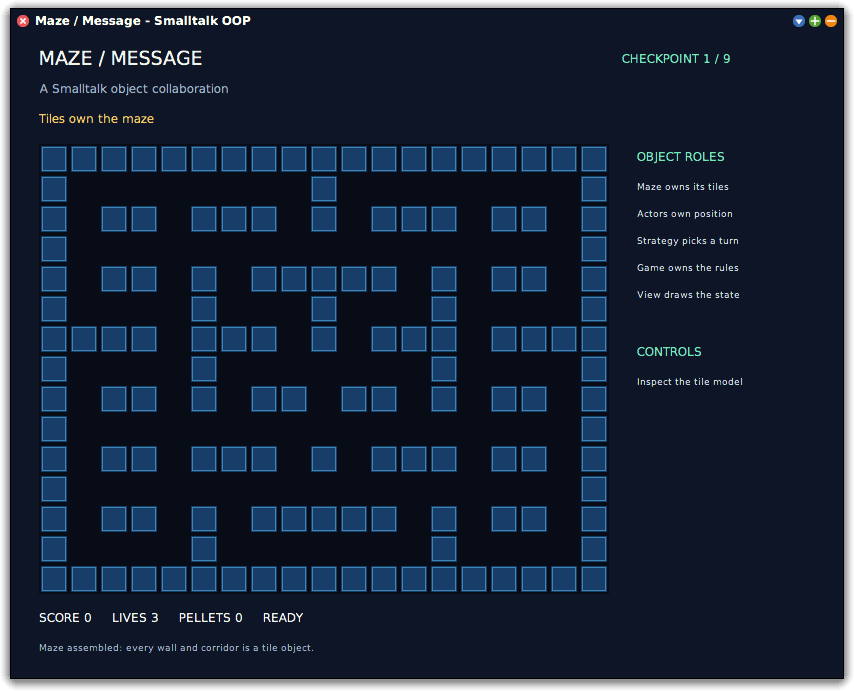
Start with the world, before adding a clock or a player. LSMCMaze owns a rectangular Array of tile objects. LSMCWallTile answers false to isWalkable; LSMCFloorTile answers true. Both share the LSMCTile protocol. The board asks that question instead of decoding wall characters while it draws. This is polymorphism: the receiver decides which behavior runs.
The literal rows are only a construction format. The # character creates a wall object; every other character becomes a corridor at this checkpoint. Coordinates are one-based Points. tileAt: converts a Point to an Array index, while an out-of-bounds request returns a blocking wall. Maze geometry never depends on the position of the Morphic window.
File in this first complete checkpoint, then browse the four model classes. The new category is LearnSqueak-MazeChase. The view contains only drawing and layout. LSMCGame is the session object; later steps give it more rules. You can inspect LSMCMaze new in a Workspace without opening any window.
Native Squeak 6.1 checkpoint 1, rendered from the exact Workspace block above.
02 · A player owns movement
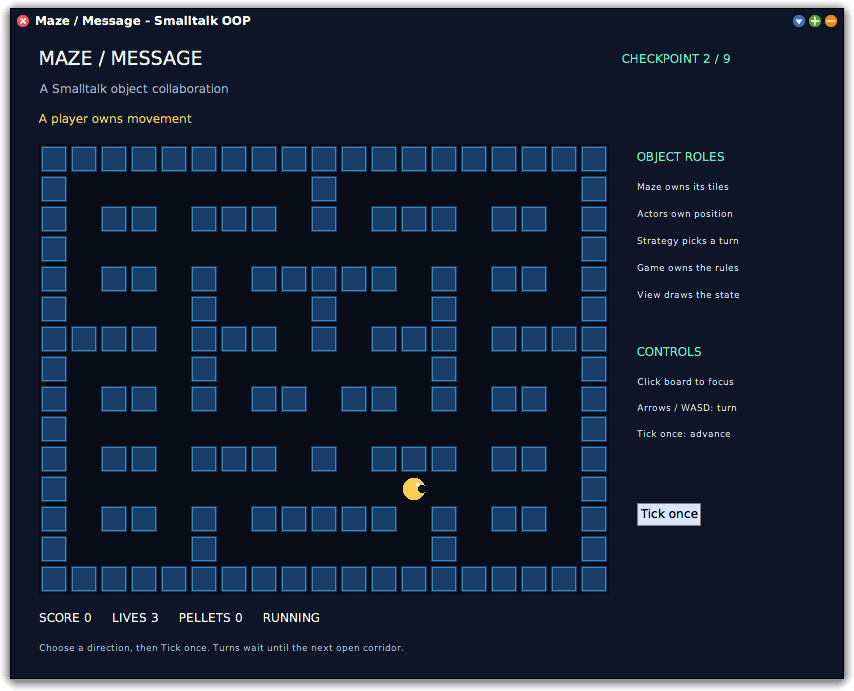
An actor has a cell, a spawn cell, and a direction. LSMCPlayer inherits these fields and the wall-checked moveBy:in: message from LSMCActor, then adds desiredDirection. Keeping the requested turn separate from the current direction is the key to comfortable maze controls. Pressing Up too early should not cancel horizontal movement; the request waits until the next legal opening.
advanceIn: first asks whether the requested destination is walkable. If it is, desiredDirection becomes the current direction. Then it sends the ordinary movement message. A blocked straight move leaves the player in its cell. Diagonal and multi-cell moves are rejected by the actor, so callers cannot skip through a wall.
Click the board, then use an arrow key or WASD to choose a direction. At this checkpoint the Tick once button is the only clock: every click advances one cell. The screenshot below makes three manual steps to the right. Automatic motion arrives in checkpoint 8. The player is drawn with simple native canvas shapes, with a direction notch rather than imported artwork.
Where to run this
System Browser → LSMCPlayer → instance side → tutorial. Inspect or Accept this complete method after installing the checkpoint.
LSMCPlayer · instance-side method
advanceIn: game
(game maze isWalkable: cell + desiredDirection) ifTrue: [direction := desiredDirection].
self moveBy: direction in: game maze
File List → fileIn maze-chase-02.st, then Workspace → select the complete block → Do It.
Native Squeak 6.1 checkpoint 2, rendered from the exact Workspace block above.
03 · Pellets receive messages
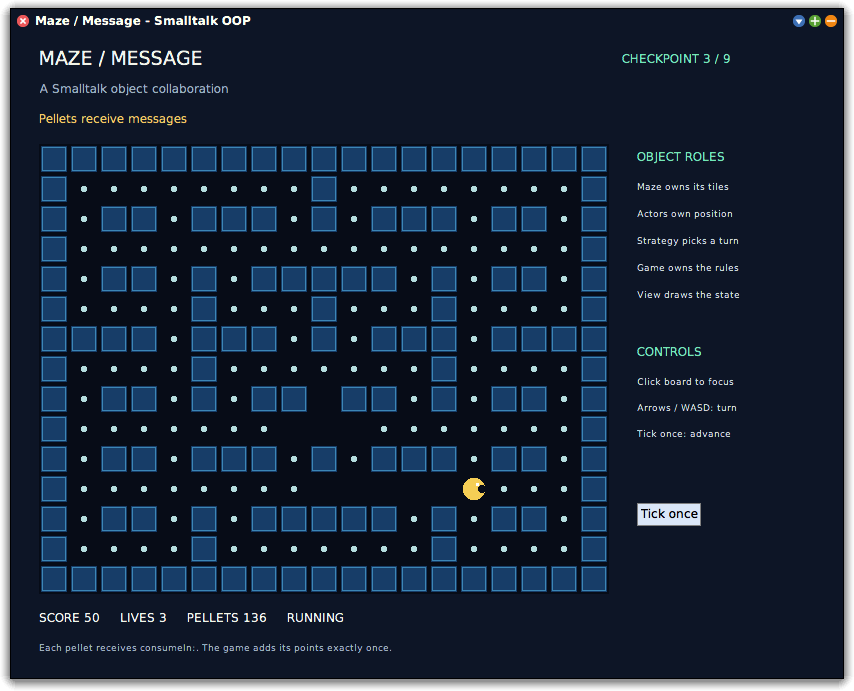
Now corridors can hold another object: a pellet. The maze creates LSMCPellet instances for both . and o characters in this early stage. The o markers become specialized power pellets in checkpoint 6. A pellet knows its point value and understands consumeIn:. It does not know about labels, sounds, or keyboard input.
After the player moves, the game asks the tile for takePellet. That message returns the current pellet and clears the tile in one place. The game sends consumeIn: only when the answer is not nil. Revisiting a cleared cell therefore cannot award points again. Score changes belong to LSMCGame; the pellet asks the game to add its points. This small interaction is the core object collaboration: game → tile → pellet → game.
The board redraws from model state. There is no second collection of visible dots to keep synchronized. The screenshot below takes five steps to the right, giving 50 points and removing five dots. Notice that the player spawn itself starts empty. Try inspecting a corridor before and after collection: the tile object remains, while its pellet reference changes to nil.
Where to run this
System Browser → LSMCPellet → instance side → tutorial. Inspect or Accept this complete method after installing the checkpoint.
LSMCPellet · instance-side method
consumeIn: game
game addScore: self points
File List → fileIn maze-chase-03.st, then Workspace → select the complete block → Do It.
Native Squeak 6.1 checkpoint 3, rendered from the exact Workspace block above.
04 · Ghosts delegate decisions
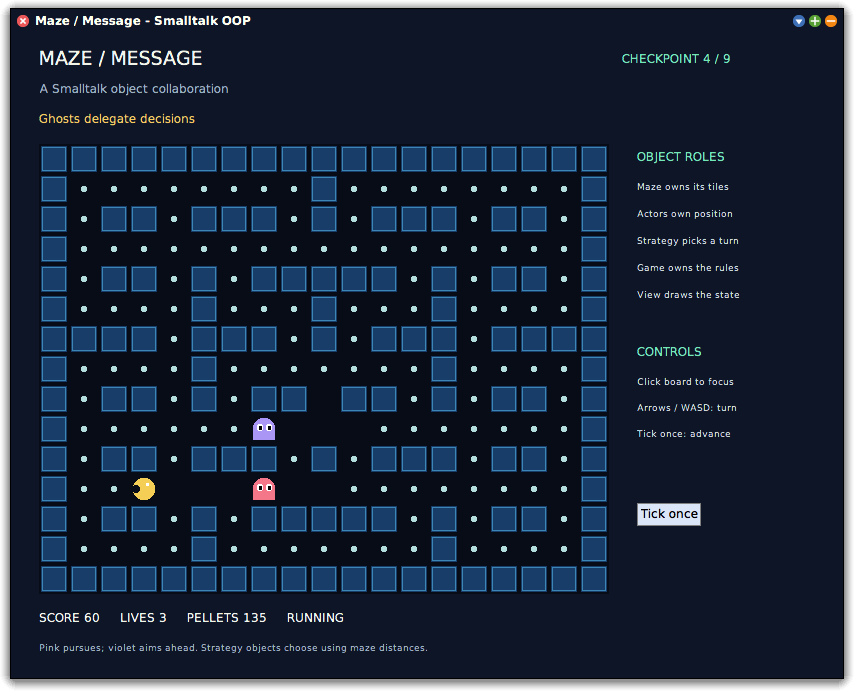
A ghost is another LSMCActor, not a branch inside the player. LSMCGhost owns a strategy object. Its advanceIn: message asks that strategy to choose the next cell, then reuses the actor’s wall-checked movement. Pink uses LSMCChaseStrategy; violet uses LSMCAmbushStrategy. The first targets the player’s current cell, while the second looks up to three legal cells ahead along the player’s current direction.
LSMCStrategy supplies the shared decision algorithm. It asks the maze for neighboring cells, avoids reversing when another exit exists, and chooses the candidate with the shortest path to its target. distanceFrom:to: is a breadth-first search over walkable cells, not a straight-line distance. Dictionary remembers discovered cells and OrderedCollection acts as a FIFO queue. Ties follow the maze’s fixed Up, Left, Down, Right ordering. There is no randomness, so the same input sequence gives the same result.
Ghosts move every second simulation tick, while the player moves every tick. This makes a small educational maze manageable and keeps speed logic in the game rather than individual UI timers. At this checkpoint ghosts can overlap the player without consequences; the next stage defines collision policy.
Native Squeak 6.1 checkpoint 4, rendered from the exact Workspace block above.
05 · A game owns lives
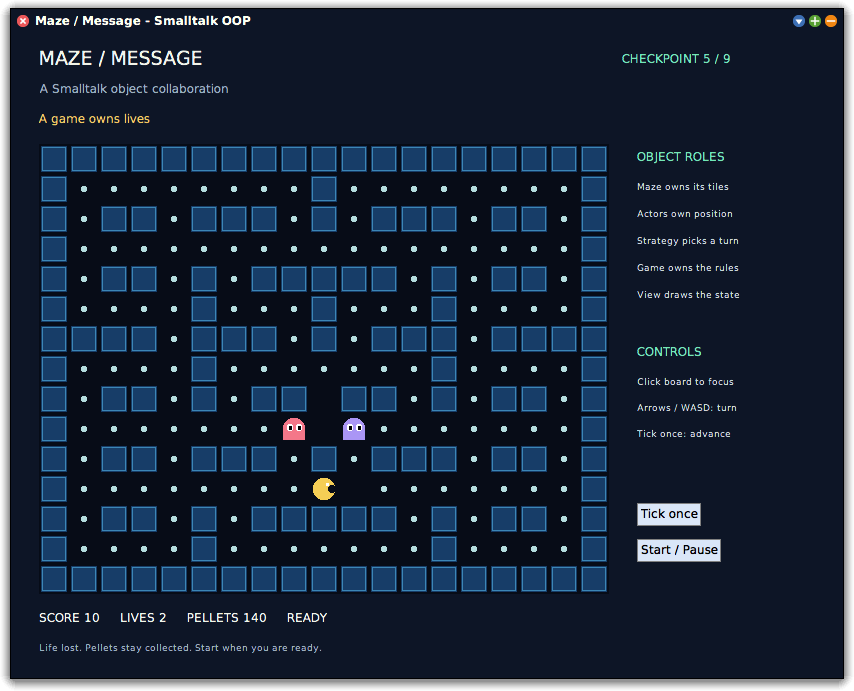
The session, not a sprite, decides what a collision means. When a ghost shares the player’s cell, LSMCGame loses exactly one life, resets actors to their spawns, and changes state to ready. It preserves score and cleared pellets. With zero lives, the state becomes lost. You must explicitly start after a lost life, so the player never suffers an immediate chain of unavoidable deaths.
Collision is checked after the player moves and again after each ghost moves. If the player enters a cell currently occupied by a ghost, the collision is resolved before the ghost gets a chance to move away. That ordering also prevents adjacent actors from swapping cells without a collision. Once a life is lost, isRunning becomes false and the remaining ghost updates stop.
Use the native Start / Pause button to resume. Keyboard start, pause, and restart shortcuts arrive in checkpoint 8. For a reproducible demonstration, the Workspace block deliberately places the pink ghost one cell right of the spawn, then advances the player into it. cell: is a model setup seam used by tests and demonstrations; ordinary play reaches cells only through movement. The resulting screenshot is an honest scripted collision, not a captured human playthrough.
Where to run this
System Browser → LSMCGame → instance side → tutorial. Inspect or Accept this complete method after installing the checkpoint.
Native Squeak 6.1 checkpoint 5, rendered from the exact Workspace block above.
06 · Power changes ghost behavior
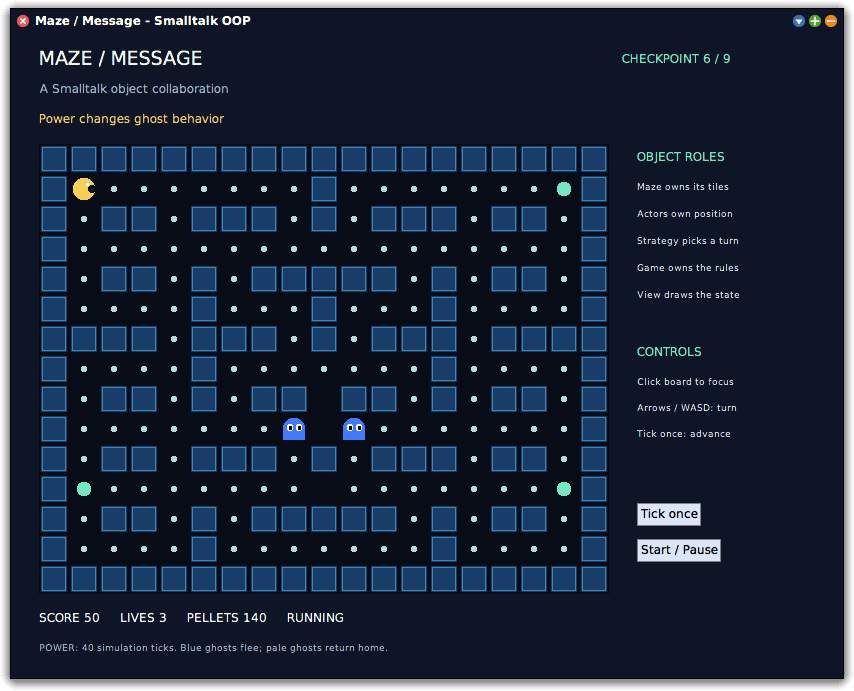
LSMCPowerPellet is a subclass of LSMCPellet. It overrides points to answer 50 and extends consumeIn: with super consumeIn: game followed by game activatePower. The game does not need to ask what kind of pellet it collected. The pellet’s own implementation chooses its effect.
Power lasts 40 simulation ticks. Frightened ghosts use LSMCFleeStrategy, which selects the neighboring cell farthest from the player by maze distance. Touching a blue ghost earns 200 points, then 400 for a second ghost in the same power period. Eaten ghosts turn pale and use LSMCHomeStrategy to return to their own spawn. Returning ghosts are harmless and cannot be scored again until they arrive home. A returning ghost ignores a new frighten message. At home it becomes frightened if power is still active, otherwise chasing.
The game ages power at the beginning of a running tick; collecting a power pellet later in that tick resets the counter to 40. A paused session does not age it. Refreshing power also resets the scoring chain. The counter is a simulation duration, not a wall-clock guarantee. This checkpoint still advances manually. The demonstration places the player on the upper-left power tile and takes one tick, so the screenshot visibly connects a specialized pellet to changed ghost behavior.
Native Squeak 6.1 checkpoint 6, rendered from the exact Workspace block above.
07 · Explicit session states
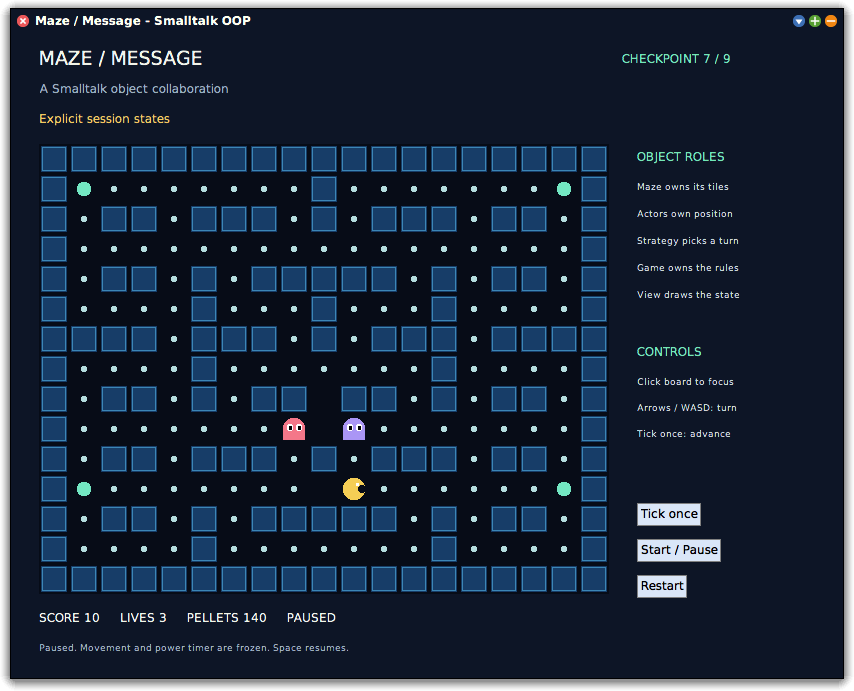
A game has five explicit states: ready, running, paused, won, and lost. Ordinary tick only changes a running session. Pause freezes positions, score, ghost behavior, and the power counter together because they all advance through that one method. Win and loss are terminal until restart. The final collectible triggers won after collision resolution; if that same move is fatal, the collision takes precedence.
Restart constructs a fresh maze, player, and ghost collection. It resets score, lives, counters, and buffered direction, then waits in ready. Rebuilding owned objects is simpler than trying to restore hundreds of mutable tiles individually. It also makes isolation easy to test: an old maze reference is not the new game’s maze.
Tick once becomes a proper debugging control here. It temporarily allows a ready or paused game to execute one simulation tick, then leaves it paused unless a collision or terminal transition chose another state. It also pauses a running game after that single step. You can examine an object in the Inspector without racing a clock. Start / Pause switches between running and paused; the automatic scheduler itself is introduced next.
LSMCGame · the authoritative order of one simulation tick
Native Squeak 6.1 checkpoint 7, rendered from the exact Workspace block above.
08 · Events and one native clock
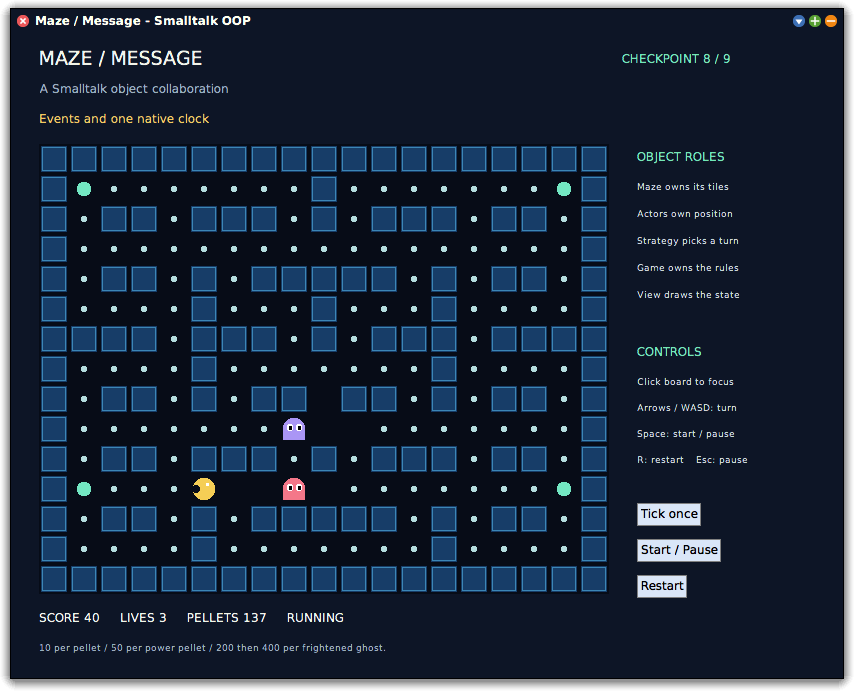
LSMCController translates keyboard values into messages to the app: arrows or WASD request a turn, Space toggles start/pause, R restarts, and Escape pauses. The board receives genuine Morphic KeyboardEvent objects and forwards only the key value. The model has no knowledge of event objects, focus, buttons, or key codes. You can test exactly the same game rules without a window.
Morphic supplies the single clock. The app’s stepTime answers 170 milliseconds; step asks the game to tick, refreshes labels and drawing, then synchronizes registration. The scheduler should be active only while a live window contains a running game. Do not restart stepping inside every step. In Squeak, startStepping replaces its current scheduled message; doing that repeatedly can accidentally run at World-cycle speed instead of the requested cadence. The isStepping guard preserves the existing schedule. The app also answers false to wantsStepsIn: so SystemWindow does not install its own separate model clock. The app alone owns the simulation scheduler.
The screenshot is produced by exact calls to the same native step method after starting the app. Interactive play uses Morphic’s scheduler. The test suite separately drives actual World stepping over elapsed time to verify cadence, rather than merely asserting registration. At 170 ms, power’s 40 ticks take roughly 6.8 seconds under normal load; a busy image may run more slowly because the simulation does not catch up with skipped frames.
LSMCApp · prevent a second SystemWindow model clock
Native Squeak 6.1 checkpoint 8, rendered from the exact Workspace block above.
09 · Focus, cleanup and polish
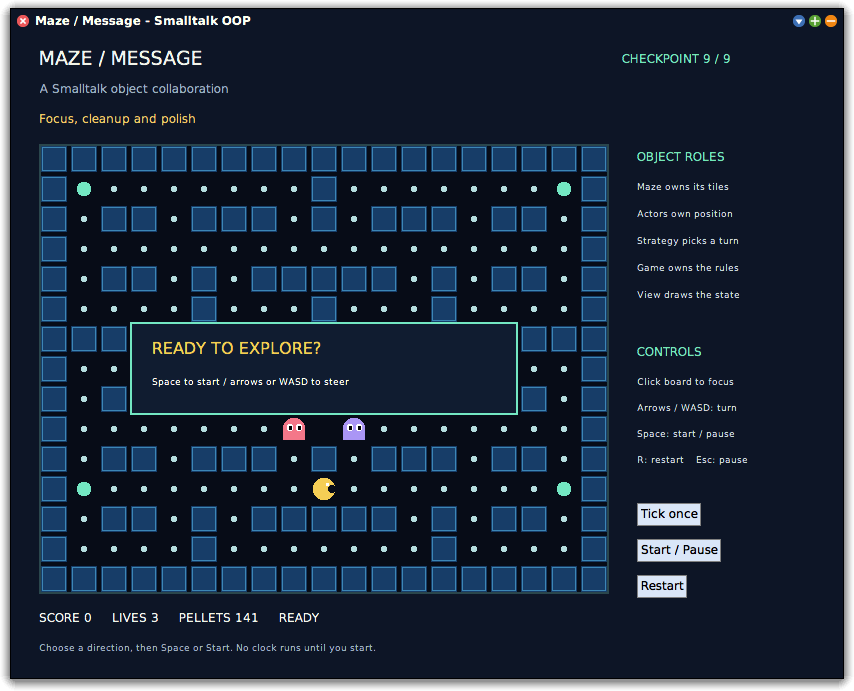
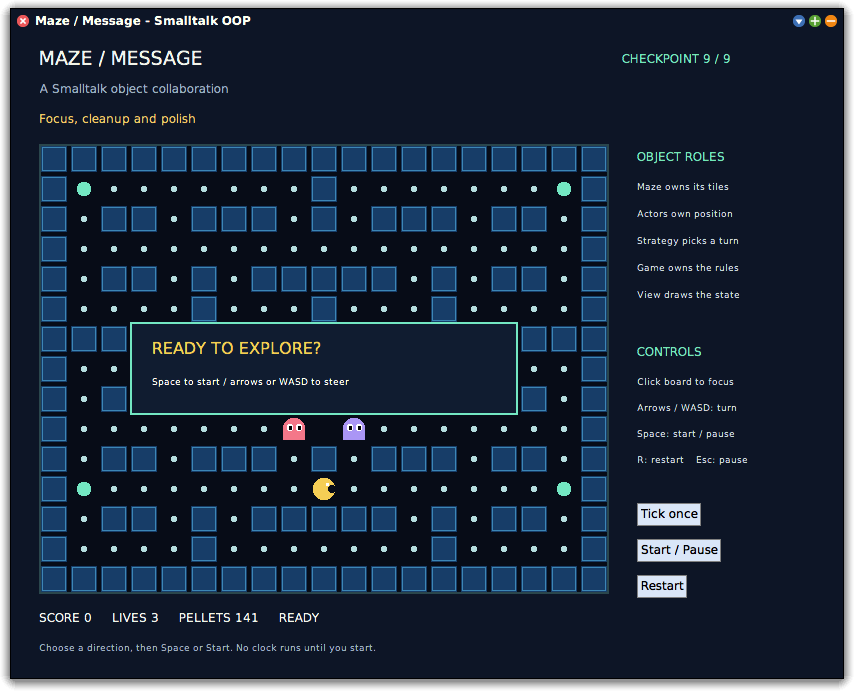
Finish the program as a small native tool you can open, inspect, close, and reopen safely. Opening the app gives keyboard focus to its board. Clicking the board restores focus after you use another tool. A repeated open brings the existing window forward rather than creating a second clock. Closing the window stops stepping, pauses a running game, and releases keyboard or mouse focus if a hand still targets this board. Reopening the same app leaves its session paused until you explicitly resume.
LSMCBoard draws a compact ready, paused, win, or loss overlay from the game’s state. The labels and colors are view concerns. The model remains usable in a Workspace with LSMCGame new, which is why most of the SUnit tests do not need Morphic at all. The fixed-size layout deliberately keeps coordinate arithmetic visible; it is not a responsive game engine.
File in the final source and run the block below to play. Arrow keys or WASD steer continuously, Space starts or pauses, Escape pauses, and R rebuilds the game. The small dots are worth 10, green power pellets 50, and blue ghosts 200 then 400 during one power period. Clear every pellet to win. Keep the tests close: behavior such as collision order, one-time scoring, and window cleanup is much easier to preserve with runnable examples than screenshots alone.
Workspace · file in final source and maze-chase-tests.st, then Print It
LSMCTest suite run.
Workspace · also file in maze-chase-independent-tests.st, then Print It
LSMCIndependentTests suite run.
Where to run this
System Browser → LSMCApp → instance side → tutorial. Inspect or Accept this complete method after installing the checkpoint.
LSMCApp · instance-side method
windowIsClosing
self stopStepping.
game isRunning ifTrue: [game togglePause].
World hands do: [:hand |
hand keyboardFocus == board ifTrue: [hand newKeyboardFocus: nil].
hand mouseFocus == board ifTrue: [hand newMouseFocus: nil]].
window := nil
File List → fileIn maze-chase-09.st, then Workspace → select the complete block → Do It.
Workspace · run after installing this checkpoint
| app |
app := LSMCApp open.
app
LSMCWindow applies local title styling and a fixed extent
LSMCApp coordinates controls, focus, redraw, and scheduler lifecycle
LSMCBoard converts model state into original canvas artwork
Message flow: KeyboardEvent → LSMCBoard → LSMCController → app steer: → player desiredDirection; next app step → game tick → player advanceIn: → maze isWalkable: → tile isWalkable → movement, pellet/collision messages → app refresh → board drawOn:
Composition: a game owns maze/actors; a maze owns tiles; a tile holds a pellet; a ghost holds a strategy. Inheritance shares actor movement and pellet/strategy protocols, while polymorphism selects the receiver’s implementation.
All ordinary gameplay remains genuine Smalltalk executing in Squeak
Try it: Open the game, start it, close the window, and inspect app isStepping. It must be false. Reopen it and resume explicitly.
Expected result
The finished native Squeak game opens in READY with keyboard focus and no active clock until you start.
Native Squeak 6.1 checkpoint 9, rendered from the exact Workspace block above.
Watch the workflow
Every screenshot is an actual Squeak 6.1 SystemWindow imageForm rendered to PNG. The GIFs assemble native frames from scripted interactions. The gameplay sequence dispatches actual Morphic KeyboardEvent objects and calls the same native step method used by the scheduler. The construction sequence opens each independent checkpoint. These are reproducible scripted demonstrations, not recordings of a person playing. No mock browser UI or synthetic game screenshots are used. Each poster is an exact copy of its GIF’s first PNG frame.
NATIVE SQUEAK CAPTURE
Build sequence: real native renders of nine cumulative checkpoints, from tile objects to the completed game.
NATIVE SQUEAK CAPTURE
Scripted native gameplay: keyboard-driven steering, small and power pellets, frightened/returning ghosts, pause, and restart. A controlled test setup near a power pellet makes the ghost-state transition visible.
Practice with tested solutions
1. Create a bonus pellet
Introduce a new pellet worth 100 points without changing the game’s collection method. Make LSMCBonusPellet a subclass of LSMCPellet, then override points. The downloadable solution includes the final app and class declaration.
Hint
Inheritance lets the new pellet reuse consumeIn: and isPower. Only the point value needs to change.
Show a tested solution
File in maze-chase-exercise-1.st first, then Browser → LSMCBonusPellet → instance side → tutorial. This is the complete solution method.
Workspace · Print it after installing the solution
Check the solution
| game |
game := LSMCGame new.
(game maze tileAt: 11@12) pellet: LSMCBonusPellet new.
game player cell: 11@12.
game collectPellet.
game score
Print It result: 100
This demonstrates substitutability: the game sends the same consumeIn: message to both pellet classes.
2. Make power last 60 ticks
Override the policy method powerDuration so a new power period lasts 60 simulation ticks. Keep the decrement, pause, and reset rules unchanged. Use a fresh image for each exercise or reinstall the final source before starting another.
Hint
Change the duration policy, not every place that consumes or displays the counter.
Show a tested solution
File in maze-chase-exercise-2.st first, then Browser → LSMCGame → instance side → tutorial. This is the complete solution method.
Workspace · Print it after installing the solution
Check the solution
| game |
game := LSMCGame new.
game activatePower.
60 timesRepeat: [game agePower].
game powerTicks = 0 and: [game ghosts allSatisfy: [:ghost | ghost mode = #chasing]]
Print It result: true
The fixed policy seam changes behavior without altering timer bookkeeping or any view code.
3. Add a corner-seeking strategy
Make LSMCCornerStrategy a subclass of LSMCStrategy. Aim at 2@14, a legal corridor cell. Configure a ghost with this strategy to reuse the same path selection algorithm. The downloadable solution declares the new class.
Hint
The common strategy already chooses among legal neighboring cells. Override only targetFor:in:.
Show a tested solution
File in maze-chase-exercise-3.st first, then Browser → LSMCCornerStrategy → instance side → tutorial. This is the complete solution method.
Workspace · Print it after installing the solution
Check the solution
| game ghost strategy next |
game := LSMCGame new.
ghost := game ghosts first.
strategy := LSMCCornerStrategy new.
ghost strategy: strategy kind: #pursuer.
next := strategy chooseFor: ghost in: game.
(strategy targetFor: ghost in: game) = (2@14)
 and: [(game maze neighborsOf: ghost cell) includes: next]
Print It result: true
A new decision policy needs no edits to the session loop, actor movement, collision rules, or controller.
When something looks wrong
The downloaded file looks like text, or pasting it produces syntax errors
That is expected for Smalltalk source. Use File List → select the .st file → fileIn. Only the short Workspace block should be pasted into a Workspace. Check that you have installed the checkpoint matching the method shown.
Arrow keys move a text cursor instead of the player
Click the dark board to give it keyboard focus. In the finished app, Space starts the clock. Earlier checkpoints use the Tick once button; automatic motion is added only in checkpoint 8.
A requested turn happens later than the key press
The turn is buffered. It becomes active when that neighboring cell is walkable. This is intentional and makes intersections easier to navigate. The player continues in its current direction when possible.
The game is too fast after changing its clock code
Do not call startStepping unconditionally from every step. synchronizeStepping must check isStepping first, preserving the existing scheduled message. Start from the tested checkpoint 8 implementation.
A pale ghost does not award another score immediately
A pale ghost is returning home and harmless. Only #frightened ghosts can be eaten. Reaching home selects frightened or chasing according to the remaining power timer.
An old checkpoint still has later controls or behavior
File-ins replace named methods but do not remove later methods or classes. Use a clean learning-image copy when running an earlier checkpoint in isolation.
Verification, cleanup and next steps
Verified against Squeak 6.1 build 23976, 64-bit, packaged 2026-06-27, in isolated copies of the baseline image. No image modifications or commercial assets are required. Tests use synthetic in-memory game data and do not access external services.
The final native SUnit suite passes 50 tests with zero failures and zero errors. A separate independently written suite passes 51 more tests: 101 native tests in total. The independent suite also exercises actual Morphic cadence, long deterministic replay, complete maze reachability, and all nine checkpoint files. A natural event-loop measurement observed 7 ticks in 1,201 ms at the configured 170 ms cadence.
Model tests check objects and messages directly. UI tests dispatch real keyboard and mouse events, inspect native stepping registration, and close/reopen the actual SystemWindow. The exact displayed methods, Workspace blocks, and three exercise solutions are compiled and executed in Squeak.
All 146 walkable cells reachable; all 141 pellets collectable in the connected graph
Wall, bounds, diagonal and teleport rejection; buffered turns; deterministic ghost target and tie order
Pellet consumption once, power duration and refresh, frightened and returning behavior, scoring chain
Collision order before ghost movement, one life per tick, terminal win/loss freeze, restart ownership
Ready/paused single-step, scheduler start/stop and elapsed-time cadence, genuine keys/click focus, repeated open and close/reopen cleanup
Close the game window when finished; it unregisters its clock and releases board focus. Keep the .st source separately if you want to recreate the app in another image. Exercise 2 replaces a policy method, so re-file the final source or use a fresh image to restore the standard 40-tick duration.
Squeak 6.1 bundled source — SystemWindow, Morph, FormCanvas, KeyboardEvent, MouseButtonEvent, WorldState, StepMessage, and SUnit inspected and executed in the local baseline.
A compact educational maze-chase game, not an arcade-accurate Pac-Man clone: one fixed maze, two deterministic ghosts, three lives, no tunnels, fruit, sound, levels, or original commercial artwork
Tile-by-tile motion without subpixel interpolation; the player moves every tick and ghosts every second tick
The 170 ms Morphic clock is cooperative and can run slower in a busy image; power is measured in simulation ticks
Ghost BFS recalculates on this small map for clarity. A larger engine would cache paths or distance fields
Fixed-size native window. No browser-playable runtime is embedded in this page, and no score is persisted
Native keyboard and mouse event APIs, focus, and real scheduling were tested; physical operating-system key presses were not part of automated verification
cell: and direct model access are deliberate teaching/test seams, not validated save-file or network APIs