The separate playground loads the real Smalltalk image on demand. This lesson keeps its native setup instructions; browser compatibility notes appear beside each demo.
Before you start
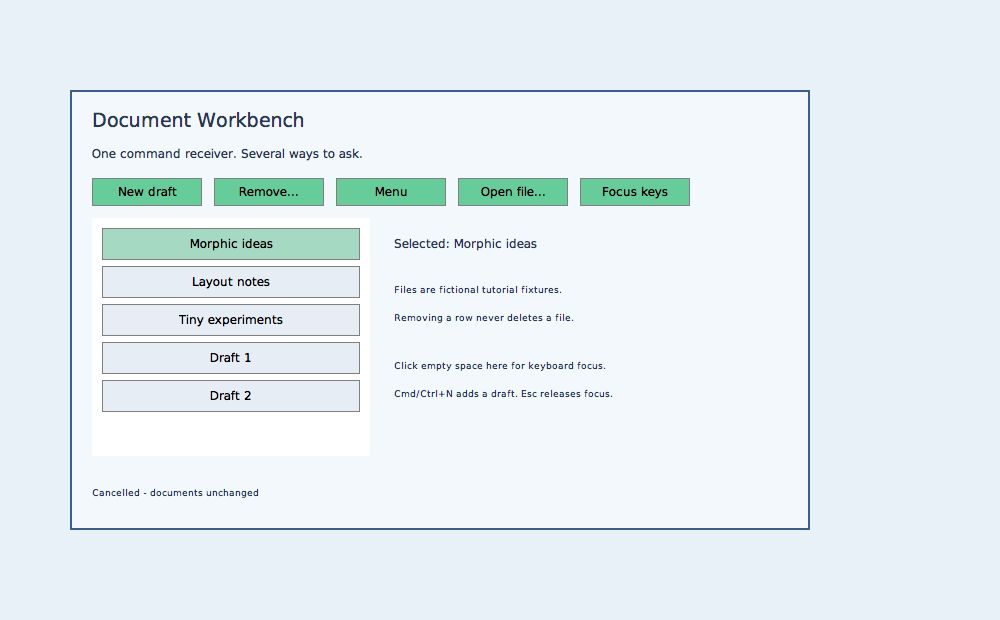
Build a small fictional document workbench and learn how native Morphic interactions fit together. Eight checkpoints cover buttons, a context menu, Yes/No confirmation, the real file chooser, and keyboard focus. The screenshots follow an executed sequence: add from the toolbar, add from the menu, decline a removal, accept another removal, choose a fixture file, and add via a focused keyboard event. Individual checkpoints start from three rows, so their counts may differ from later sequence screenshots.
Download LearnSqueakCommands.st and file it in with Squeak File List → fileIn. It installs LSCommandWorkbench; it does not open a dialog.
Open a Workspace and Do it on LSCommandWorkbench open. This returns the app morph. Close a demo with its halo’s delete handle or send delete to a Workspace variable holding the app.
Each numbered checkpoint is self-contained and opens its stage automatically. Checkpoints 4 and 6 intentionally display modal dialogs; answer or cancel the dialog to continue. Close the old demo before opening another.
The file-choice example creates two fictional .txt files under LearnSqueak-Dialog-Fixtures in the image’s working directory. It never deletes files and only displays the selected name. The verification suite selects only those tutorial fixtures.
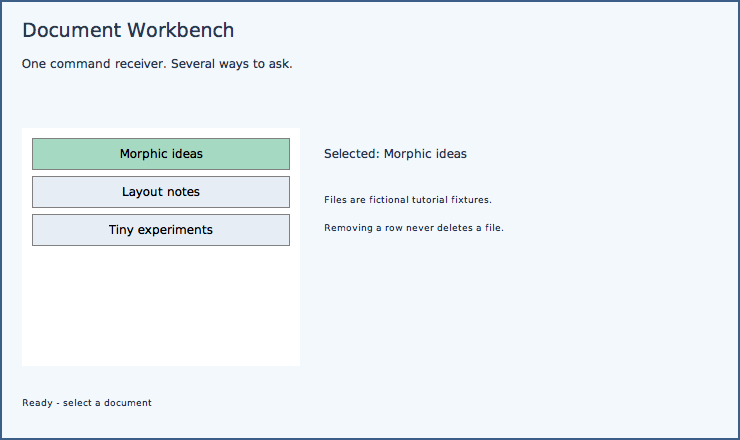
The workbench owns an OrderedCollection of fictional document names, a selected index, and a status string. A zero index means no selection. The rows are native SimpleButtonMorph instances whose action sends selectIndex:. refresh rebuilds the short row list and highlights the selected document. The example intentionally caps the list at five rows so every state remains visible; a production app would usually use a scrolling list.
Where to run this
File List → fileIn commands-stage-01.st. The checkpoint installs the definitions and runs the stage action. The displayed method code belongs in the Browser on LSCommandWorkbench’s instance side. If the final source is already loaded, use Workspace → Do it on: LSCommandWorkbench openStage: 1.
Construction code · follow the run instructions above
Native Squeak 6.1 capture of executed Morphic code. The checkpoint is rendered directly by the native image.
02 · Wire a button to one method
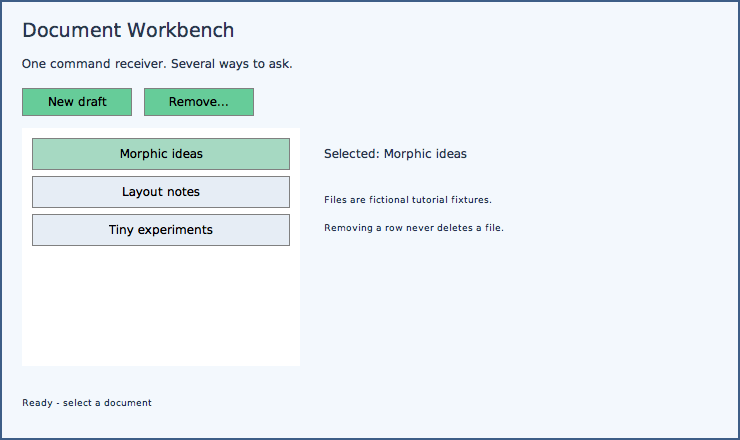
The New draft button has target: self and actionSelector: #newDocument. The method performs the model update once, selects the new row, and refreshes the view. This keeps application behavior separate from the widget that requested it. Repeated New commands stop at five rows with a status message instead of drawing rows outside the panel.
Where to run this
File List → fileIn commands-stage-02.st. The checkpoint installs the definitions and runs the stage action. The displayed method code belongs in the Browser on LSCommandWorkbench’s instance side. If the final source is already loaded, use Workspace → Do it on: LSCommandWorkbench openStage: 2.
Construction code · follow the run instructions above
newDocument
    documents size >= 5 ifTrue: [status := 'Five rows fit this small demo. Remove a row first.'. self refresh. ^ false].
    serial := serial + 1.
    documents add: 'Draft ', serial printString.
    selectedIndex := documents size.
    status := 'Created draft ', serial printString.
    self refresh.
    ^ true
Expected result
New draft adds Draft 1 and highlights it. The same command will later be reused by the menu and keyboard.
Native Squeak 6.1 capture of executed Morphic code. The checkpoint is rendered directly by the native image.
03 · Create a native context menu
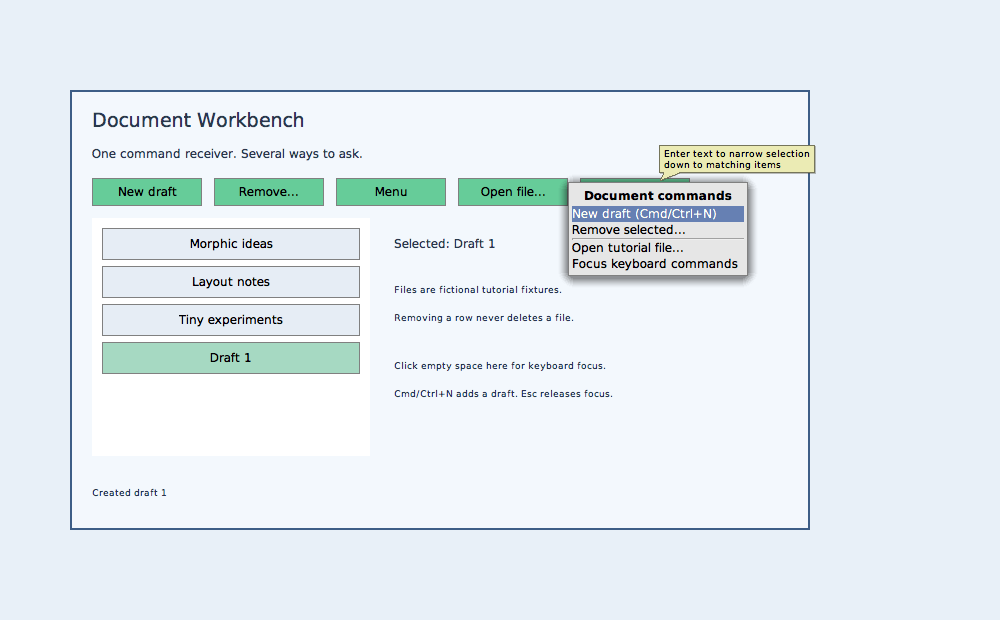
MenuMorph stores a receiver and a selector for each item. defaultTarget: self saves repeating the same receiver. addLine separates related command groups. showCommandMenu sends popUpInWorld to this menu, and mouseDown: also opens it for a yellow-button event on empty workbench space. The Menu button is a discoverable alternative to a platform-dependent mouse gesture.
Where to run this
File List → fileIn commands-stage-03.st. The checkpoint installs the definitions and runs the stage action. The displayed method code belongs in the Browser on LSCommandWorkbench’s instance side. If the final source is already loaded, use Workspace → Do it on: (LSCommandWorkbench openStage: 3) showCommandMenu.
Construction code · follow the run instructions above
commandMenu
    | menu |
    menu := MenuMorph new defaultTarget: self.
    menu addTitle: 'Document commands'.
    menu add: 'New draft (Cmd/Ctrl+N)' action: #newDocument.
    menu add: 'Remove selected...' action: #removeDocument.
    menu addLine.
    menu add: 'Open tutorial file...' action: #chooseFile.
    menu add: 'Focus keyboard commands' action: #focusForCommands.
    ^ menu
Expected result
A native popup with New, Remove, Open file and Focus commands. Choosing New invokes exactly the same newDocument method as the toolbar.
Native Squeak 6.1 capture of executed Morphic code. The real MenuMorph is open after the toolbar added a draft.
04 · Ask before changing the selection
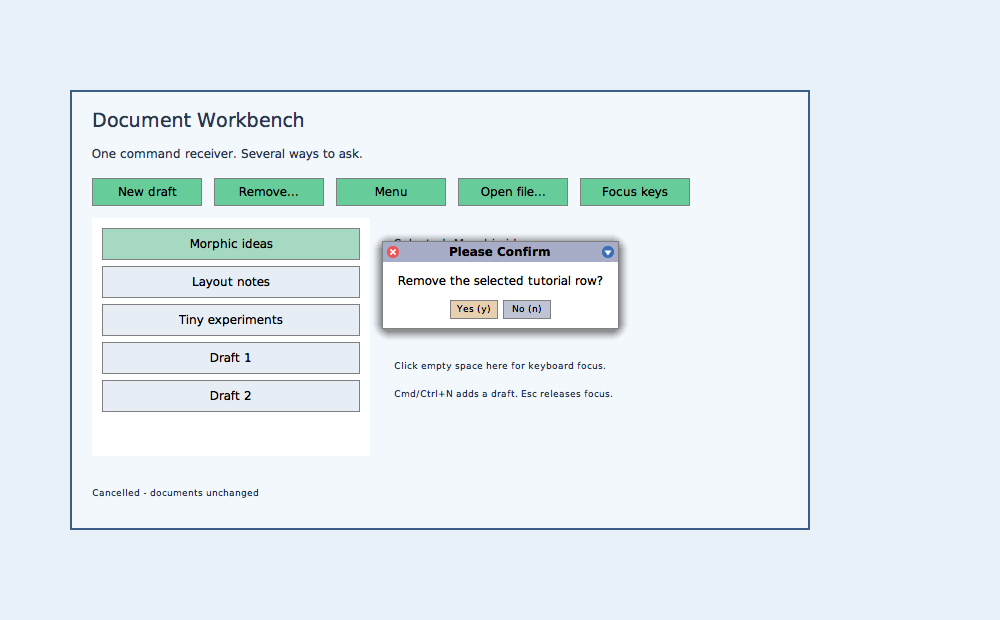
Guard the no-selection case before displaying anything. UIManager default confirm: opens Squeak’s actual modal Yes/No question and returns an answer. A modal call pauses this command while Morphic continues processing the dialog. The answer then goes to a separate method that owns the mutation. This small separation lets you test the state change without inventing a second behavior.
Where to run this
File List → fileIn commands-stage-04.st. The checkpoint installs the definitions and runs the stage action. The displayed method code belongs in the Browser on LSCommandWorkbench’s instance side. This checkpoint opens a modal dialog; answer it to finish the file-in. If the final source is already loaded, use Workspace → Do it on: (LSCommandWorkbench openStage: 4) removeDocument.
Construction code · follow the run instructions above
Native Squeak 6.1 capture of executed Morphic code. The actual UIManager confirmation; the capture script positions it centrally before answering No.
05 · Treat cancellation as ordinary control flow
Only the Boolean true authorizes the removal. false, nil and unexpected answers return false with an unchanged collection. The command also checks selection again at the point of mutation. After a removal it selects a valid neighbor; after removing the last row it stores zero. These branches prevent out-of-bounds indexing and keep the empty state usable.
Where to run this
File List → fileIn commands-stage-05.st. The checkpoint installs the definitions and runs the stage action. The displayed method code belongs in the Browser on LSCommandWorkbench’s instance side. If the final source is already loaded, use Workspace → Do it on: (LSCommandWorkbench openStage: 5) removeSelectionConfirmed: false.
Construction code · follow the run instructions above
Native Squeak 6.1 capture of executed Morphic code. After a real No response, the collection is unchanged.
06 · Open Squeak’s actual file chooser
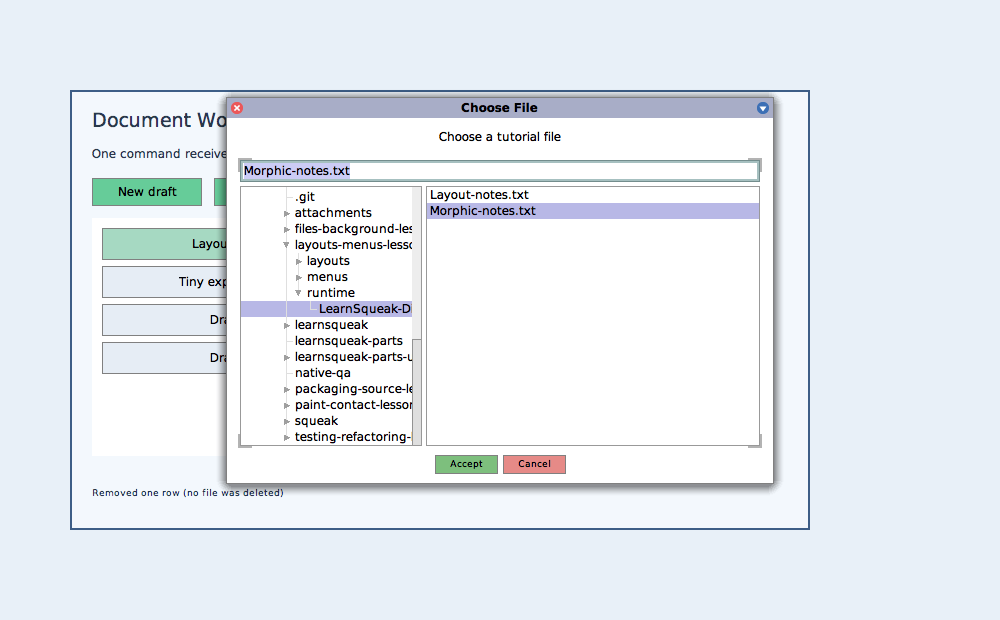
chooseFileFrom:matching:label: starts the native chooser in a known directory and filters for *.txt. prepareFixtures creates only two fictional files in LearnSqueak-Dialog-Fixtures beside the image, and preserves either file if it already exists. The directory is a starting location, not a security sandbox: the native chooser can navigate elsewhere. For this lesson choose only the supplied fixtures.
Where to run this
File List → fileIn commands-stage-06.st. The checkpoint installs the definitions and runs the stage action. The displayed method code belongs in the Browser on LSCommandWorkbench’s instance side. This checkpoint opens a modal dialog; answer it to finish the file-in. If the final source is already loaded, use Workspace → Do it on: (LSCommandWorkbench openStage: 6) chooseFile.
Construction code · follow the run instructions above
Native Squeak 6.1 capture of executed Morphic code. The real FileChooserDialog over tutorial-owned fixtures; the capture script selects a row and positions the dialog.
07 · Validate the returned path
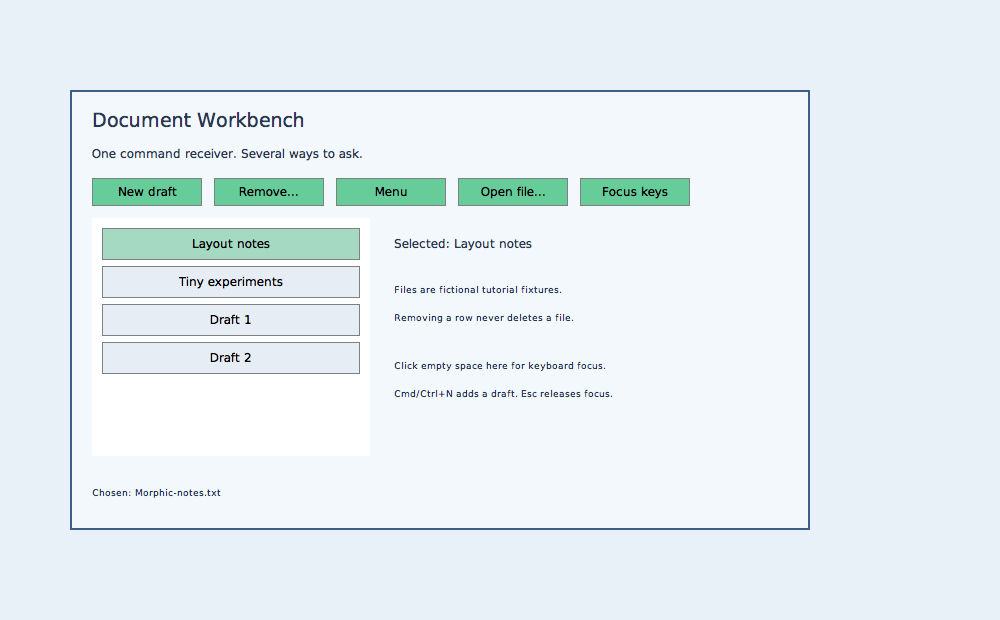
A file chooser returns a filename or nil; it does not make that filename permanently valid. Test the answer’s type, reject an empty string, and check that the file still exists. Only after those checks should a command proceed. This tutorial displays the chosen filename without loading its contents, so file selection can be studied independently of text decoding and editing.
Where to run this
File List → fileIn commands-stage-07.st. The checkpoint installs the definitions and runs the stage action. The displayed method code belongs in the Browser on LSCommandWorkbench’s instance side. If the final source is already loaded, use Workspace → Do it on: | app |
app := LSCommandWorkbench openStage: 7.
app acceptChosenPath: (app prepareFixtures fullNameFor: 'Morphic-notes.txt').
Construction code · follow the run instructions above
acceptChosenPath: path
    "The chooser returns a path or nil. Validate before touching the model."
    (path isString and: [path notEmpty]) ifFalse: [status := 'File choice cancelled'. self refresh. ^ false].
    (FileDirectory default fileExists: path) ifFalse: [status := 'That file no longer exists'. self refresh. ^ false].
    status := 'Chosen: ', (FileDirectory localNameFor: path).
    self refresh.
    ^ true
Expected result
Accepting Morphic-notes.txt updates the status. Cancel and a vanished file produce clear status messages and leave the document rows unchanged.
Native Squeak 6.1 capture of executed Morphic code. After accepting the existing fictional text file.
08 · Give shortcuts an explicit focus owner
Morphic sends keyboard events through a HandMorph to its keyboardFocus. Clicking Focus keys, or empty workbench space, makes this panel the receiver. handlesKeyboard: accepts only Escape and the New combination; keyStroke: dispatches New and marks it handled. Escape releases focus, and delete releases focus before removing the morph. Both commandKeyPressed and controlKeyPressed are checked. Their physical keys depend on the VM and host OS; the toolbar and menu remain available when a host reserves a shortcut.
Where to run this
File List → fileIn commands-stage-08.st. The checkpoint installs the definitions and runs the stage action. The displayed method code belongs in the Browser on LSCommandWorkbench’s instance side. If the final source is already loaded, use Workspace → Do it on: (LSCommandWorkbench openStage: 8) focusForCommands.
Construction code · follow the run instructions above
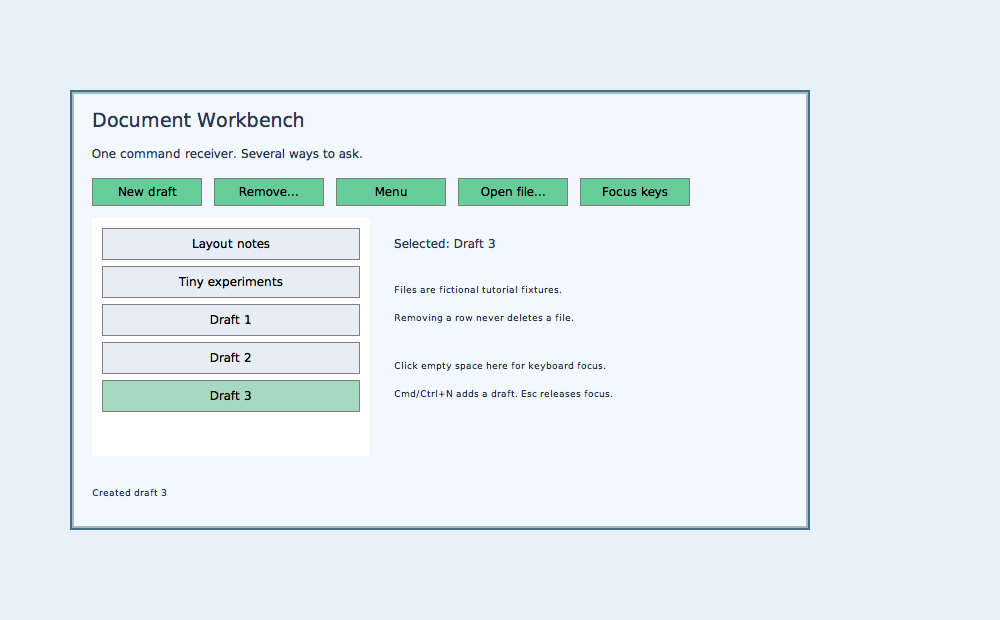
Focus the workbench, then try your platform’s command/control modifier with N. A new draft appears. Escape releases focus. Typing in a different focused morph does not invoke this workbench.
Native Squeak 6.1 capture of executed Morphic code. After HandMorph dispatches a scripted control-modified key event to the focused panel.
Watch the workflow
The demonstrations below use the real Squeak image. Each caption explains the recorded interaction. Animations stay paused until you choose Play demo.
NATIVE SQUEAK CAPTURE
Native scripted sequence: toolbar New, native menu New, focused keyboard New, then Escape. Each frame comes from the actual isolated Morphic world. This is an action-driven animation, not a human mouse recording.
NATIVE SQUEAK CAPTURE
Native scripted sequence: real confirmation No, confirmation Yes, real file chooser selection, then file Cancel. The script answers the dialogs through their native APIs and captures the resulting states.
Practice with tested solutions
1. Exercise the no-selection guard
A destructive command must handle an empty selection before indexing the collection or opening a dialog.
Show a tested solution
Workspace → Print it after filing in LearnSqueakCommands.st. No dialog should open.
Click Focus keys or empty panel space first. Squeak only sends the event to the current focus owner. Try the command or control modifier supported by your VM/host; use the New button if the OS reserves that key.
Right-click does not open this menu
The example handles Squeak’s yellow-button event, whose physical mouse mapping varies. Use the Menu button; this calls the same menu method.
New stops adding rows
The teaching panel deliberately limits itself to five visible rows. Remove a row, or extend it with a scrolling list as a next project.
The chooser shows folders outside the fixture directory
Its initial directory is a starting point, not a sandbox. Choose the provided fictional .txt files for this lesson.
A file-in appears to wait
Stages 4 and 6 intentionally open modal dialogs. Answer the confirmation or Accept/Cancel the file choice. Other checkpoints complete immediately.
Verification, cleanup and next steps
51 native checks passed, plus all eight fresh-image checkpoints and the three exact published exercises.
Native toolbar and MenuItemMorph dispatch to the same receiver
Real UIManager confirmation Yes and No
Native FileChooserDialog selects an existing fixture and cancels
Nil, empty and missing path handling
No selection, empty collection and row-limit recovery
Control and command modifier events dispatched via HandMorph
Other focus prevents workbench shortcuts; Escape and delete release focus
Close the tutorial windows when finished. Save the source separately from the image if you want to recreate the application in a clean image.