Build a native Squeak lab that shows sorted data, inclusive bounds, midpoint comparisons and the shrinking search interval.
8 construction stagesTested source & checkpointsNative screenshots & demos
Before you start
Build Binary Search Lab in eight cumulative runnable checkpoints. You will turn a short algorithm into an observable native Morphic application with candidate cells, one-event Step, Run, Pause, Reset, edge-case scenarios and explicit comparison counts.
Each checkpoint .st is a complete cumulative file-in. Install it with File List, accept the highlighted complete Browser methods, then evaluate the exact Workspace block. You can work forward or run any checkpoint independently in a clean Squeak 6.1 image.
Squeak 6.1 with its bundled Morphic and SUnit; no extra packages or network access
Arrays, blocks, Boolean messages, Browser Accept and Workspace Do It / Print It
Use a copy of your learning image; close the previous Binary Search Lab window before installing another checkpoint.
File List → select the downloaded checkpoint .st → fileIn. File-in delimiters belong in File List, not Workspace.
The highlighted methods go on the named instance side. Each Workspace block declares a temporary app; send extra messages before its last app line or inspect the returned object.
To revisit an older checkpoint, use a clean image. Filing in an older source does not remove later methods.
Every array is sorted nondecreasing, has at most 15 integers, and keeps values and target within -999..999. Array indexes are one-based.
Optional binary-search-launch-NN.st files evaluate the corresponding exact Workspace block after that checkpoint has been installed.
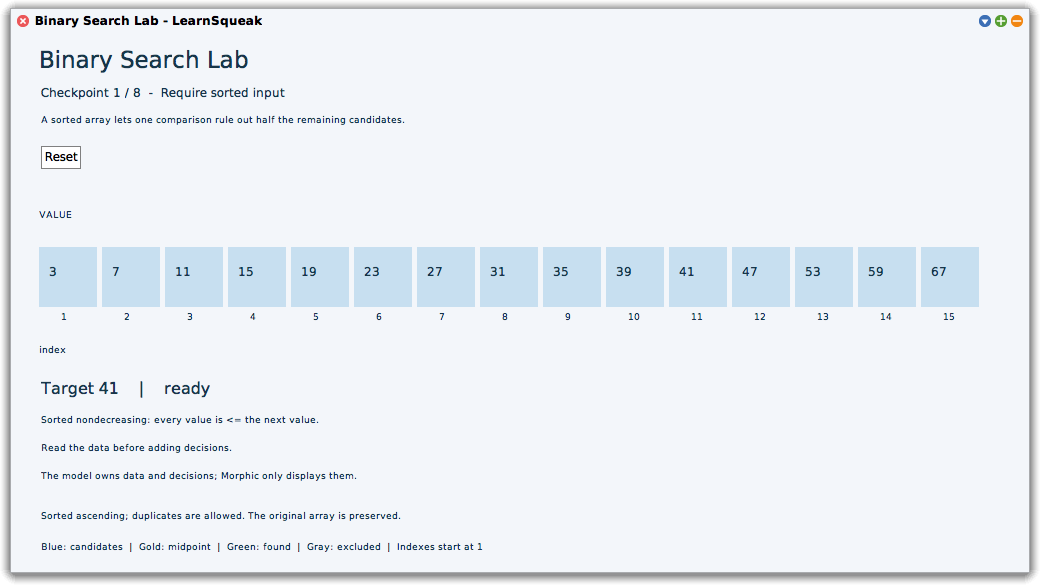
Binary search gets its power from an ordering promise. Our data is an Array sorted from small to large, with equal neighbors allowed. If the candidate value is too small, every earlier value is too small too. Without that promise, discarding a half can throw away the answer. The first checkpoint therefore validates the input before it changes any state; it never silently sorts your array or changes its indexes.
LBSearch owns the data and algorithm. LBCells turns its values and indexes into a native Morphic drawing. LBApp connects the view, model and buttons, and LBWindow keeps the teaching layout at a fixed size. Blue cells are values; the smaller numbers underneath are their one-based Array indexes. The target is a value to find, not an index.
validData:target: checks the container, the 15-cell visual limit, integer values from -999 through 999, and nondecreasing neighbors. An empty array is valid. load:target: returns false for invalid input without changing the existing search, and copies accepted input so a caller cannot mutate it later. These limits make the drawing predictable; the binary-search idea is not limited to 15 items. Validation itself scans the data, a separate O(n) cost that we will account for when discussing comparisons.
Actual Squeak 6.1 window from the exact checkpoint 1 Workspace block.
02 · Mark inclusive bounds
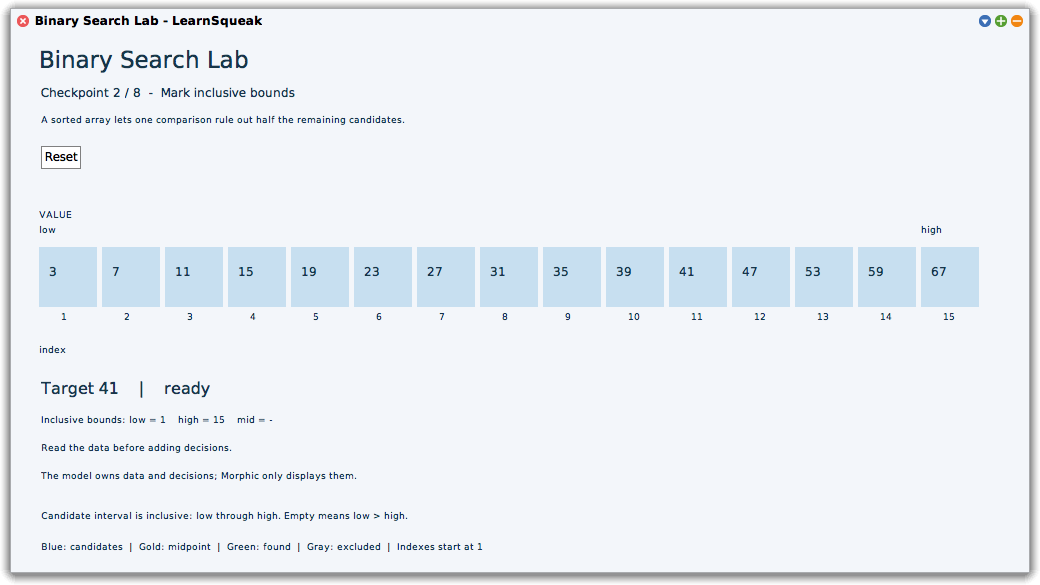
Keep two indexes, low and high, that include both ends of the candidate interval. Initially low is 1 and high is the array size. The central invariant is: if the target exists and we have not returned it, at least one matching index remains between low and high. Values outside that interval have already been ruled out.
The same representation handles emptiness without special sentinels inside the array. With zero elements, low is 1 and high is 0. The interval is empty whenever low > high. We must check that condition before reading an element. A singleton starts with low = high = 1; it still contains one candidate and must be examined.
Reset clears the midpoint, result, phase and counters while preserving the selected data and target. A result index of zero will mean no match, which is distinct from every valid Squeak Array index. The native low/high labels now mark the ends of the full interval. A later discard will gray out excluded cells without deleting them; the original array stays intact.
LBSearch · supporting instance-side method
finished
^ #(found missing) includes: state
Where to run this
System Browser → LBSearch → instance side → tutorial. Accept this complete method after filing in the checkpoint.
LBSearch · instance-side method
reset
low := 1. high := data size. mid := nil. relation := nil.
phase := #choose. state := #ready. foundIndex := 0. comparisons := 0. events := 0.
note := 'Candidate interval is inclusive: low through high. Empty means low > high.'
File List → fileIn binary-search-02.st. Then Workspace → select the whole block → Do It.
Workspace · run after installing this checkpoint
| app |
app := LBApp open.
app
Watch for: This lesson uses inclusive bounds throughout. Mixing high := size with a half-open loop condition skips or rereads endpoints.
Try it: Print It on a model after load: #() target: 4: low is 1, high is 0. Explain why low = high must not mean empty.
Expected result
low is 1 and high is 15. Both endpoint labels sit above the blue candidate interval.
Actual Squeak 6.1 window from the exact checkpoint 2 Workspace block.
03 · Choose the midpoint
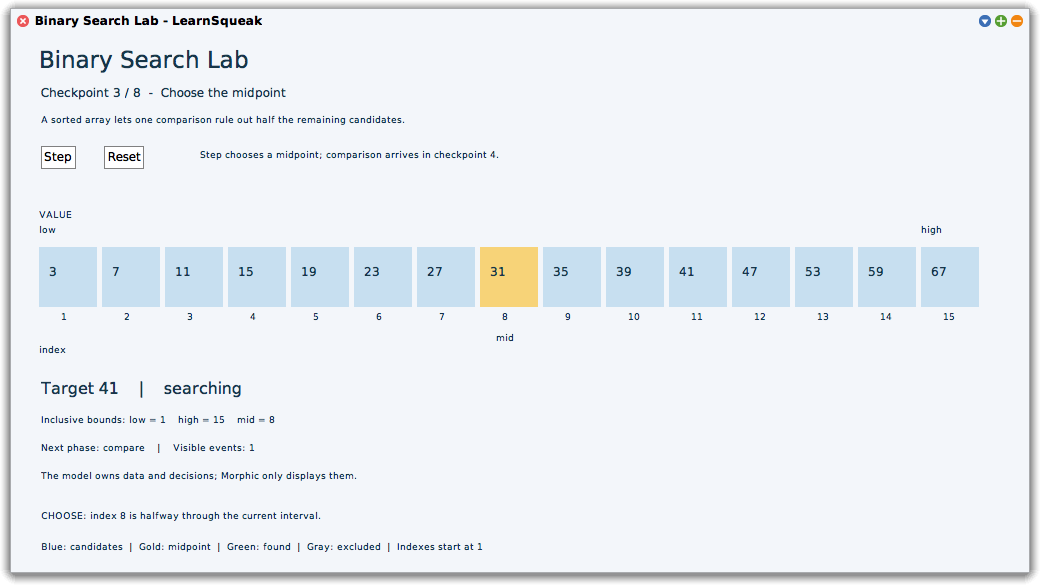
Choose an integer index near the center of the current interval: low + ((high - low) // 2). The // message performs integer division. For low 1 and high 15, the midpoint is 8. With an even number of candidates, this formula chooses the lower of the two center indexes.
Choosing an index and comparing its value are separate visible events. chooseMidpoint does not change the bounds or increment the comparison count. It records mid and changes the next phase to compare. The gold cell tells you which value will be inspected. This makes the algorithm observable instead of hiding the entire search inside a button callback.
The guard refuses to choose twice in the wrong phase, and the empty-interval check precedes all Array access. Smalltalk integers can grow beyond machine width, so the offset form is not required to avoid overflow here; it also transfers well to languages with fixed-width indexes. At this checkpoint Step chooses once and then stops. Reset restores the initial state. Comparison arrives in the next checkpoint.
Where to run this
System Browser → LBSearch → instance side → tutorial. Accept this complete method after filing in the checkpoint.
LBSearch · instance-side method
chooseMidpoint
(self finished or: [phase ~= #choose]) ifTrue: [^ false].
events := events + 1.
low > high ifTrue: [state := #missing. phase := #done. note := 'NOT FOUND: the candidate interval is empty.'. ^ true].
mid := low + ((high - low) // 2). state := #searching. phase := #compare.
note := 'CHOOSE: index ', mid printString, ' is halfway through the current interval.'. ^ true
File List → fileIn binary-search-03.st. Then Workspace → select the whole block → Do It.
Workspace · run after installing this checkpoint
| app |
app := LBApp open.
app stepOnce.
app
Watch for: mid is an index. Compare data at: mid to the target; comparing the index number itself solves a different problem.
Try it: Before pressing Step, calculate the midpoint for 1..14 and for 9..15. They are 7 and 12.
Expected result
Index 8, value 31, is gold. Bounds remain 1..15 and the next phase is compare.
Actual Squeak 6.1 window from the exact checkpoint 3 Workspace block.
04 · Compare one candidate
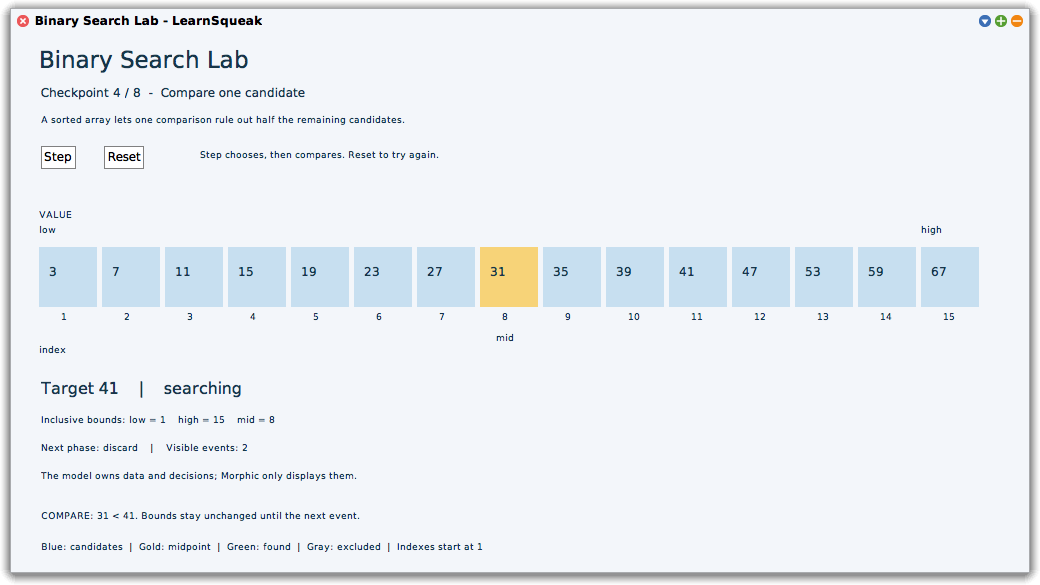
Now inspect the value at mid and classify it as less, equal or greater than the target. In the worked search, data at: 8 is 31, which is less than 41. The candidate and bounds remain unchanged while the comparison result is visible. The next event will act on that result.
comparisons counts one candidate probe: one value classified relative to the target. It does not count individual Smalltalk = and < message sends. An equality success uses one relational message; an unequal probe uses two in this implementation. Making the unit explicit prevents misleading performance claims later.
The phase guard matters. Calling compareMidpoint again while phase is discard returns false and cannot increment the counter twice. Step now chooses and compares, but deliberately stops before modifying bounds. That pause lets you predict which half can be excluded and explain why sorted order justifies it. Reset is always available to replay the two events.
Where to run this
System Browser → LBSearch → instance side → tutorial. Accept this complete method after filing in the checkpoint.
Actual Squeak 6.1 window from the exact checkpoint 4 Workspace block.
05 · Discard half and repeat
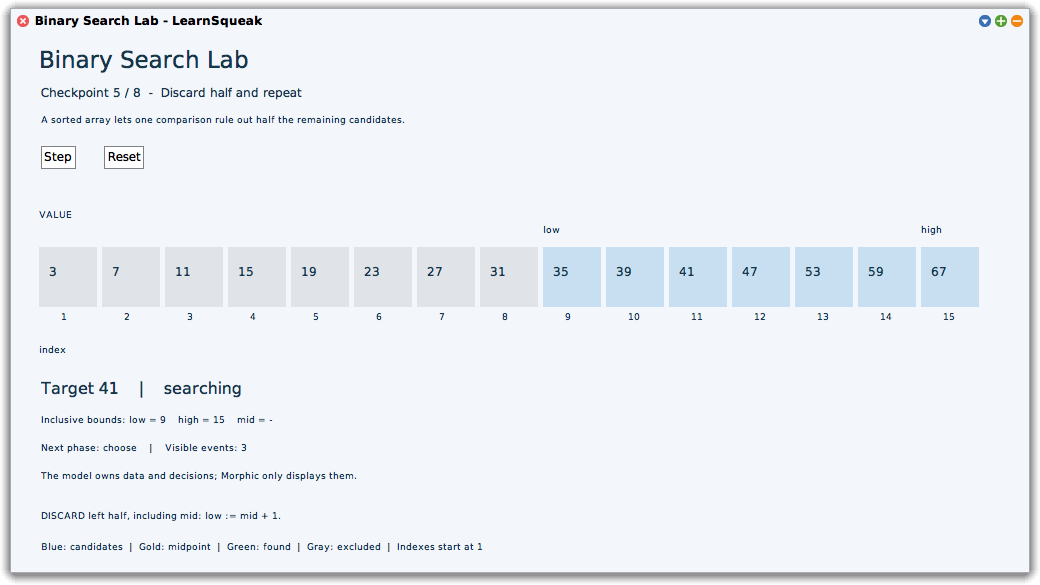
The three comparison outcomes now complete the algorithm. Equality records the matching index and enters found. If data at: mid is too small, set low to mid + 1. If it is too large, set high to mid - 1. The midpoint is excluded because it has just been proved unequal. Leaving it in the interval can prevent progress on a singleton.
After discarding, clear mid and return to the choose phase. If low has crossed high, enter missing immediately: there is no remaining candidate. Each unsuccessful probe strictly shrinks the interval. The search therefore terminates, even when the target lies below the smallest value, above the largest, or between two neighbors.
Step now dispatches choose, compare and discard in a small state machine. For target 41, the midpoint indexes are 8, 12, 10 and 11; the candidate intervals are 1..15, 9..15, 9..11 and 11..11. The exact block below stops after the first discard so you can see indexes 1..8 turn gray. The model-only solve method repeats the same events with a defensive budget for tests. We will use Morphic stepping, not that blocking loop, for animation.
Actual Squeak 6.1 window from the exact checkpoint 5 Workspace block.
06 · Define outcomes and duplicate policy
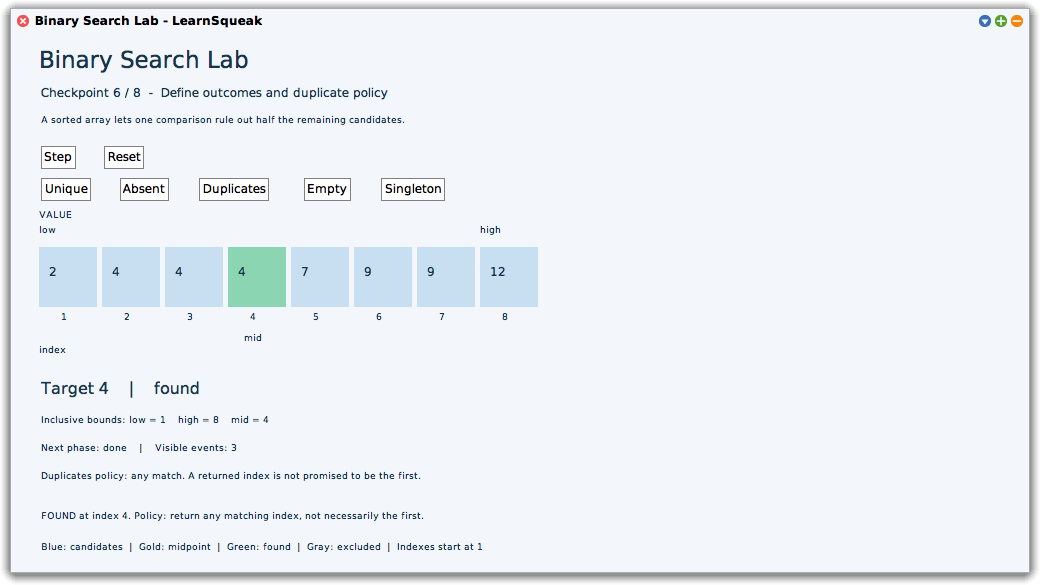
A useful visualizer should demonstrate its edge cases. The scenario buttons select unique data, an absent target, duplicates, an empty array or a singleton. Changing a valid scenario resets all transient state. Invalid inputs are rejected atomically. An empty search reports missing without any element access or comparison; a singleton needs exactly one probe.
Our contract is to return any matching index. With #(2 4 4 4 7 9 9 12) and target 4, the initial midpoint is index 4, so that is the answer. Index 2 is also a match, but this algorithm does not promise the first occurrence. The deterministic lower-midpoint formula makes the demonstration repeatable; that does not change the public any-match contract. A later exercise changes the invariant to find the first duplicate.
foundIndex is a valid one-based index only when state is found; it remains zero for missing. Terminal Step calls leave the result and counters unchanged. Reset starts a fresh search for the same scenario. The exact block solves the tiny duplicate fixture synchronously for a reproducible screenshot. In a larger application you would keep the view responsive with bounded callbacks, which we add next.
Actual Squeak 6.1 window from the exact checkpoint 6 Workspace block.
07 · Run, pause, reset and close safely
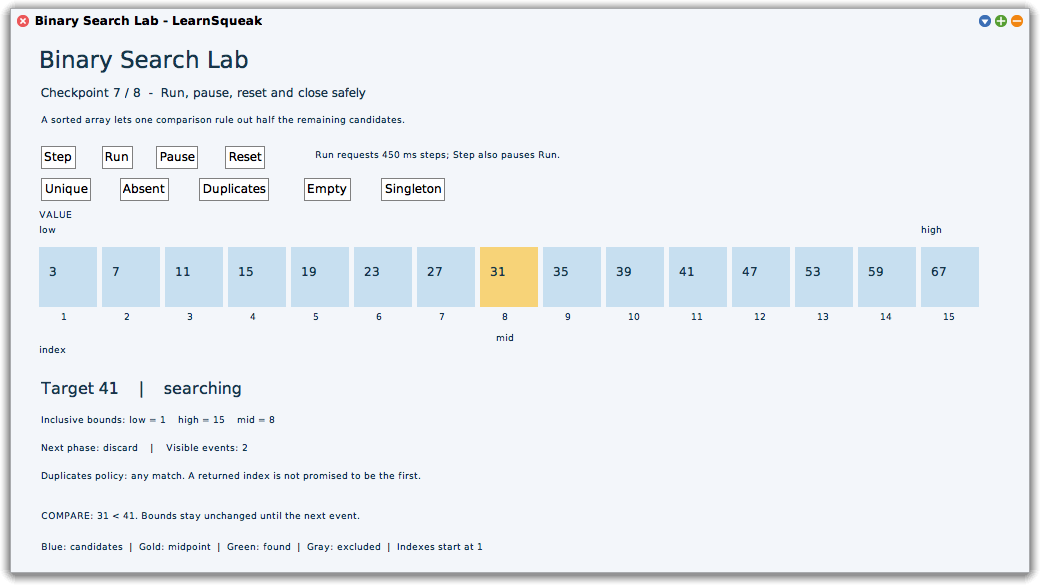
Run registers the app with the Morphic scheduler. stepTime requests a 450 ms interval; cooperative scheduling may run later when the image is busy. Each step performs one small search event, refreshes the labels and drawing, and stops scheduling when the search finishes. Pause unregisters the app without changing the current interval. Step first pauses Run, then performs exactly one event. Repeated Run presses neither reset the search nor create additional work.
Lifecycle details matter in a live image. wantsSteps answers true only while running, so merely opening a window does not register idle callbacks. We remember scheduledWorld when Run starts: a collapsed or closing window may detach the app from its world before cleanup runs. stopActivity explicitly unregisters from that original world as well as calling stopStepping. Reset, scenario changes and window closing all use that same cleanup path.
Closing clears the window reference and refreshes status; reopening the retained app restores a paused view. Run refuses a detached app, so Inspector messages cannot start invisible work. The block below runs one callback and pauses to produce a stable checkpoint image. Separate native tests pump real World cycles, verify that scheduled events occur, and verify that Pause, Reset and Close remove registration even when the window is collapsed.
Watch for: self world may be nil during closing or collapse. Removing a callback only through the current world can leave an old scheduled entry.
Try it: Run, pause midway, then resume. Reset during Run. Collapse the window, pause through an Inspector, and confirm it stays paused after expansion.
Expected result
Run and Pause controls are present. Two events have happened; the comparison is visible and the app is paused before discard.
Actual Squeak 6.1 window from the exact checkpoint 7 Workspace block.
08 · Count probes and compare linear search
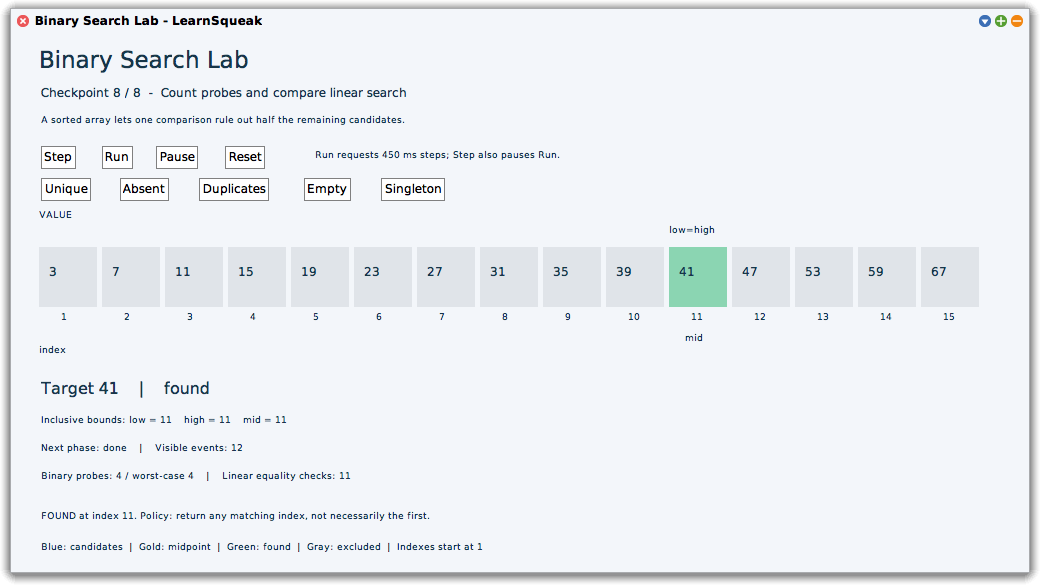
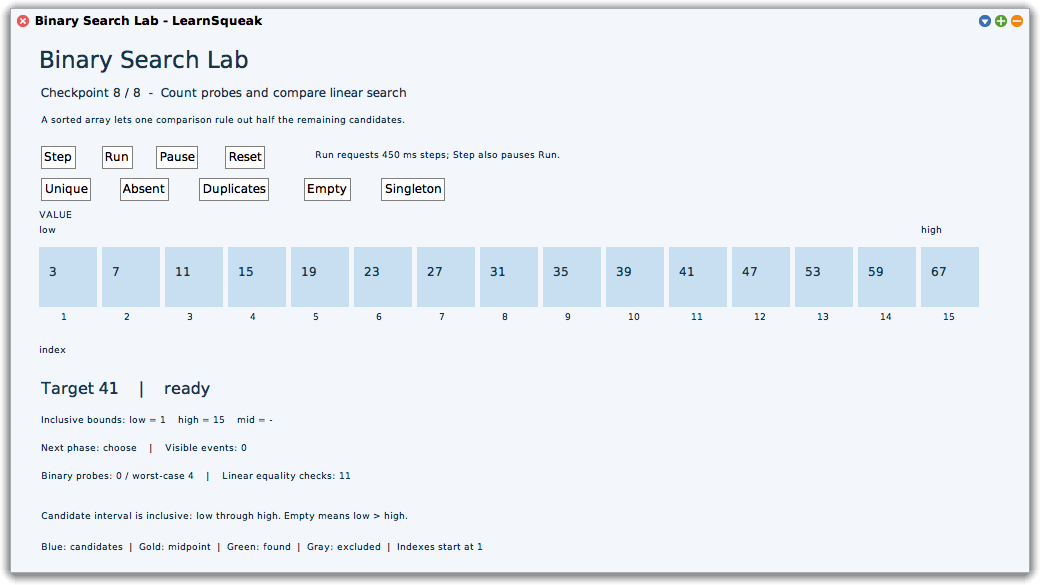
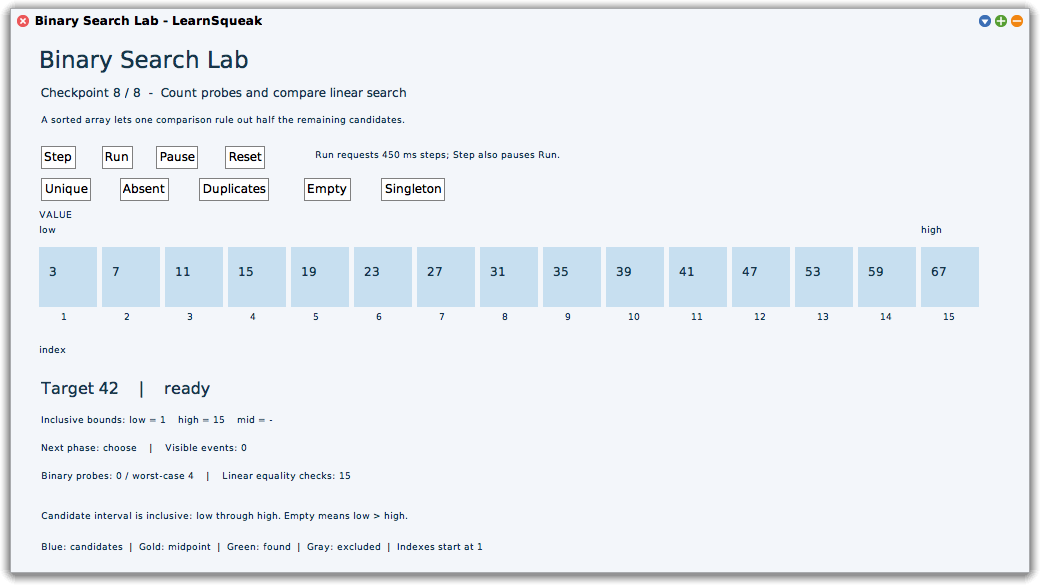
The final notebook shows binary candidate probes beside a simple left-to-right linear search. For our target 41, binary search probes four indexes, while the linear scan checks eleven elements before finding it. For an absent target in the same 15-element array, binary uses at most four probes and linear checks all fifteen.
For n > 0, this inclusive binary search uses at most floor(log2(n)) + 1 probes; in Squeak, n highBit gives that integer value. Empty input needs zero. Search work is O(log n), with O(1) algorithm state beyond the input. Our visualizer additionally stores a copied O(n) array, validates sorted order in O(n), redraws O(n) cells, and computes an O(n) linear baseline. Those teaching costs are not part of the binary probe count. For one query on data that still needs sorting or validation, fewer probes do not automatically imply a faster end-to-end operation.
The units also differ deliberately: a binary probe is a three-way classification, whereas the linear counter counts equality checks. The UI compares inspected elements, not elapsed time or primitive operations. With duplicates, linear search stops at the first match while binary may find another. The native test suite checks this distinction, all bounded lengths, absent targets, duplicates, endpoint cases and lifecycle behavior. Keep the sorted-data invariant, the inclusive interval, and the progress proof together when adapting the algorithm.
LBSearch · supporting instance-side method
linearComparisons
 1 to: data size do: [:index | (data at: index) = target ifTrue: [^ index]].
 ^ data size
Where to run this
System Browser → LBSearch → instance side → tutorial. Accept this complete method after filing in the checkpoint.
LBSearch · instance-side method
comparisonLimit
 data isEmpty ifTrue: [^ 0].
 ^ data size highBit
File List → fileIn binary-search-08.st. Then Workspace → select the whole block → Do It.
Watch for: The counters are not a speed benchmark. Validation, painting and the linear baseline perform additional work outside the binary probe count.
Try it: Choose Absent and Run: expect 4 binary probes versus 15 linear checks. Then explain why a measured runtime comparison would need a different benchmark.
Expected result
Target 41 is found at index 11. Binary probes: 4 / worst-case 4. Linear equality checks: 11.
Actual Squeak 6.1 window from the exact checkpoint 8 Workspace block.
Watch the workflow
Every PNG and GIF frame is an actual LBWindow imageForm render from Squeak 6.1 build 23976 in a disposable unsaved baseline image. Checkpoint capture recompiles every displayed Browser method and evaluates the exact Workspace block. Animations are scripted native demonstrations, not human screen recordings: native mouse events operate the buttons and controlled calls invoke the same step callback used by Morphic. Only frame timing and GIF encoding are applied; no interface is recreated or composited. Separate tests exercise the real World scheduler.
NATIVE SQUEAK CAPTURE
Scripted native Step-button events reveal choose, compare and discard. Midpoint indexes 8 → 12 → 10 → 11 find 41 with four probes.
NATIVE SQUEAK CAPTURE
Scripted native Run/Pause/Reset controls, an absent result, the any-match duplicate policy and an empty-array outcome. Animation callbacks are advanced under script control; real scheduling is tested separately.
Practice with tested solutions
1. Find the first duplicate
Change the any-match contract into first occurrence. Add a class-side firstIndexOf:in: helper that returns the leftmost matching index, or zero. When equality occurs, remember that index and continue searching to its left.
Hint
An equal midpoint is a valid answer, but an earlier equal value may remain in low..mid-1. Keep an answer variable and shrink high.
Show a tested solution
System Browser → LBSearch → class side → exercises. Accept the complete method. Install the final source first.
Exercise solution
firstIndexOf: value in: values
 | low high mid answer |
 (self new validData: values target: value) ifFalse: [self error: 'Use a sorted bounded integer Array'].
 low := 1. high := values size. answer := 0.
 [low <= high] whileTrue: [
  mid := low + ((high - low) // 2).
  (values at: mid) < value
   ifTrue: [low := mid + 1]
   ifFalse: [
    (values at: mid) = value ifTrue: [answer := mid].
    high := mid - 1]].
 ^ answer
Expected
Returns 2 for the duplicate fixture; 0 for no match and empty input. A fixture containing only 5s returns 1.
Keep the saved answer while excluding that midpoint from future work. The remaining search is strictly to its left, preserving termination. Validation remains O(n); the search loop itself is O(log n).
Four native SUnit tests compare the helper with the first-occurrence linear oracle across every supported length and check boundaries, duplicates and invalid order.
2. Search descending data
Adapt the algorithm to an Array sorted from largest to smallest. Add a class-side descendingIndexOf:in: helper returning any matching index or zero. Validate the opposite ordering, then decide which boundary moves when the midpoint is too large.
Hint
In descending data, a midpoint value larger than the target means the target can only be to its right: low := mid + 1.
Show a tested solution
System Browser → LBSearch → class side → exercises. Accept the complete method. Install the final source first.
The midpoint formula and inclusive termination rule are unchanged; the order implication reverses. Reversing a copy is used only by this exercise’s validator, not to change the search array or returned indexes.
Four native SUnit tests verify descending membership across every supported length, reject ascending data, and cover empty, singleton, missing and duplicate cases.
When something looks wrong
Step stops after one or two events
Checkpoints 3 and 4 intentionally stop after midpoint selection or comparison. Install checkpoint 5 or later to discard and repeat.
An apparently valid input is rejected
Use an Array, not an OrderedCollection or string. Keep it sorted nondecreasing, at most 15 elements, with only integers in -999..999; the target must be in that integer range too.
A duplicate result is not the first occurrence
The main app returns any match. The duplicate fixture returns index 4. Use the first-occurrence exercise when the leftmost index is required.
Buttons or methods seem to belong to a later checkpoint
Close the app and start a fresh image for independent earlier checkpoints. File-in replaces listed methods; it does not delete methods added by later checkpoints.
Run does nothing after completion
A found or missing result is terminal. Reset or select another scenario before running again.
A closed app retains a scheduled callback
Use the final source, which stores the original scheduledWorld and unregisters from it in stopActivity. An app may already be detached when windowIsClosing executes.
Verification, cleanup and next steps
Executed with the bundled Squeak 6.1 build 23976 Linux x64 image and VM. Native source, SUnit suites, reproducible capture scripts, per-stage reports, GIF frame manifests and the downloadable ZIP accompany this lesson.
39 application SUnit tests and 8 exercise SUnit tests pass in native Squeak 6.1, with zero failures and errors.
Eight independent checkpoint executions recompile all displayed methods and evaluate the exact Workspace launch blocks.
Exhaustive bounded fixtures cover sizes 0..15 and targets below, within and above their ranges; results are checked against independent membership tests.
Empty arrays, singletons, endpoints, absent targets, all-equal arrays, duplicate any-match behavior, strict interval shrinkage and comparison bounds are tested.
Native mouse-button events, real World stepping, repeated Run, Pause, Reset, terminal stop, scenario changes, collapse, close and reopening are tested.
Both displayed exercise solutions and check expressions run in native Squeak; their separate eight-test suite checks edge cases and oracles.
Close the tutorial window. Window closing stops and unregisters scheduled work, including when the window is collapsed. Keep the source files to reproduce the lesson; the automation does not save its disposable test image.
Squeak 6.1 shipped image: Array, Integer>>highBit, Morph stepping and SystemWindow lifecycle — Inspected and executed in the bundled image; no external packages.
Supplied LBSearch and LBApp source plus native SUnit evidence — All application and exercise behavior is checked against the exact distributed sources.
A fixed 15-cell teaching layout with integers from -999 to 999; not a general collection-search library.
The main algorithm promises any match. First occurrence is an explicit separate exercise.
Probe counts compare inspected elements, not time or individual relational message sends. Sorted validation, array copying, rendering and baseline calculation add separate work.
The visualizer uses a fixed-size native SystemWindow; it does not implement responsive resizing or arbitrary text input.