Home/Blocks and closures: from value to reliable callbacks
PRACTICAL SQUEAK WORKSHOP
Blocks and closures: from value to reliable callbacks
Understand arguments, captured state, control flow, iteration, and the lifetime of a callback.
10 construction stagesTested source & checkpointsNative screenshots & demos
Before you start
A Smalltalk block is executable behavior packaged as an object. We will start by delaying one addition, then pass arguments, retain state, implement control flow, and expose a callback capture mistake. Each stage is independent and prints its own observations. The lesson’s 10 example tests and 3 exercise tests check the exact displayed answers in Squeak 6.1.
You can select a complete Workspace expression and use Do It, Print It, or Inspect It
Squeak 6.1; all used collection, block, and SUnit classes are included
Use a learning image. Open a Workspace, paste one complete stage including its temporary declaration, select it all, and choose Print It. Remove the inserted answer before rerunning. Inspect It opens the last answer in an Inspector. The numbered .st downloads are independent file-in checkpoints: in File List select one and choose fileIn; the checkpoint runs and writes its answer to Transcript. File-in chunk delimiters (!) belong in File List, not a Workspace. The optional 11-tested-exercises.st installs the example suite and three class-side exercise solutions. No external packages are needed.
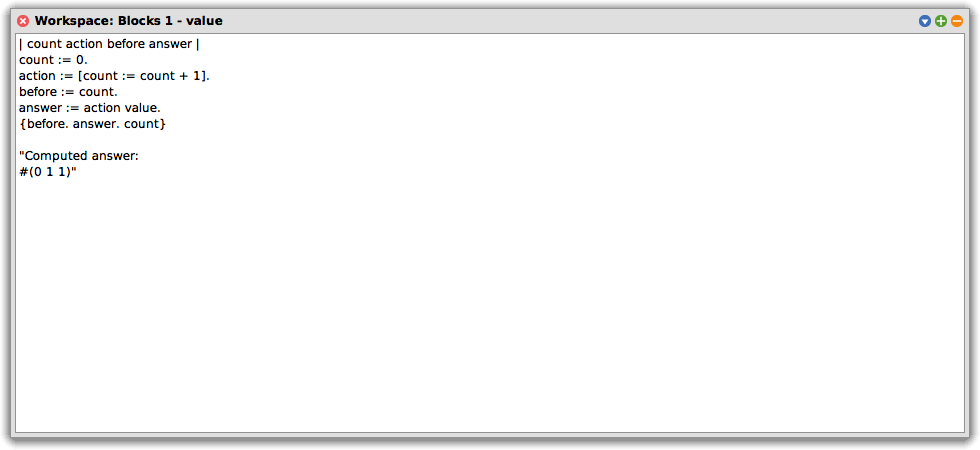
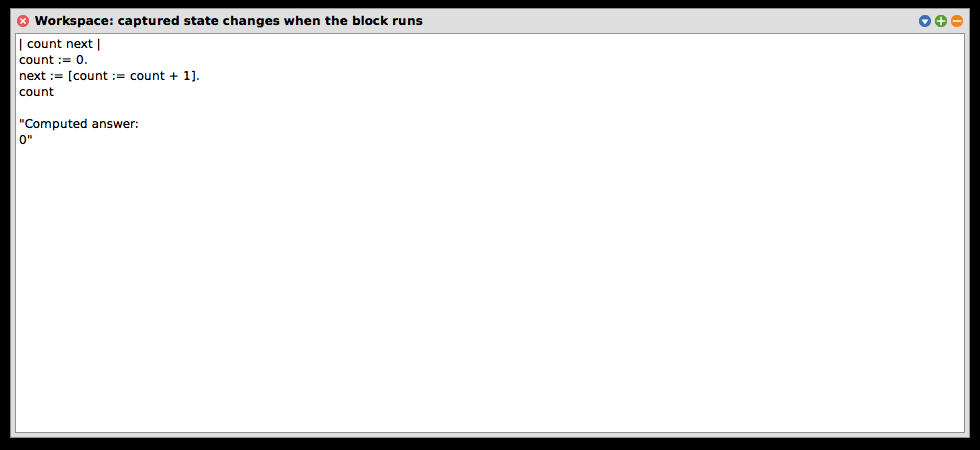
Square brackets construct a BlockClosure. Creating a block does not run its body. Sending value evaluates a block with no arguments. In this example count is still zero after the block is created; the body changes it only when value is sent. The result contains the before value, the answer from the block, and the current count. A block normally answers its last expression, so no return arrow is needed. Store blocks in variables, pass them to methods, or save them as callbacks. Those uses all depend on the same distinction between constructing an object and later asking it to execute.
Where to run this
Workspace → select the complete expression → Print It. For an Inspector, select the same expression and choose Inspect It.
Construction code · follow the run instructions above
Native Squeak 6.1 Workspace showing the independently executed expression and its computed answer.
02 · Match value messages to block arguments
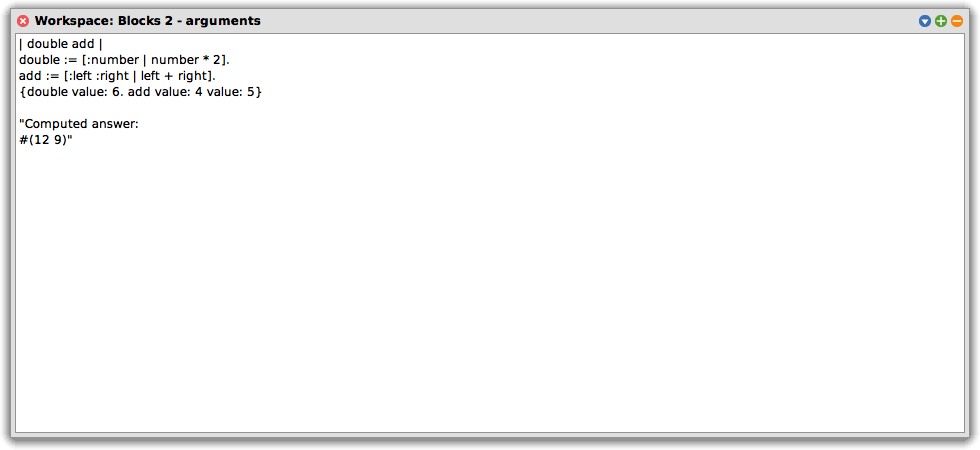
A colon introduces a block argument; the vertical bar ends the argument list. A one-argument block receives value:, while a two-argument block receives value:value:. The message arity must match the number of declared arguments. These arguments are temporary names local to the block; use them to make a reusable calculation instead of hard-coding an outside variable. The last expression is the answer. Parentheses around sends make the evaluation order visible, though the dynamic Array also evaluates each expression separately. If a callback framework promises to pass an event, write a one-argument block rather than silently assuming a no-argument callback.
Where to run this
Workspace → select the complete expression → Print It. For an Inspector, select the same expression and choose Inspect It.
Construction code · follow the run instructions above
Native Squeak 6.1 Workspace showing the independently executed expression and its computed answer.
03 · Closures share captured variables
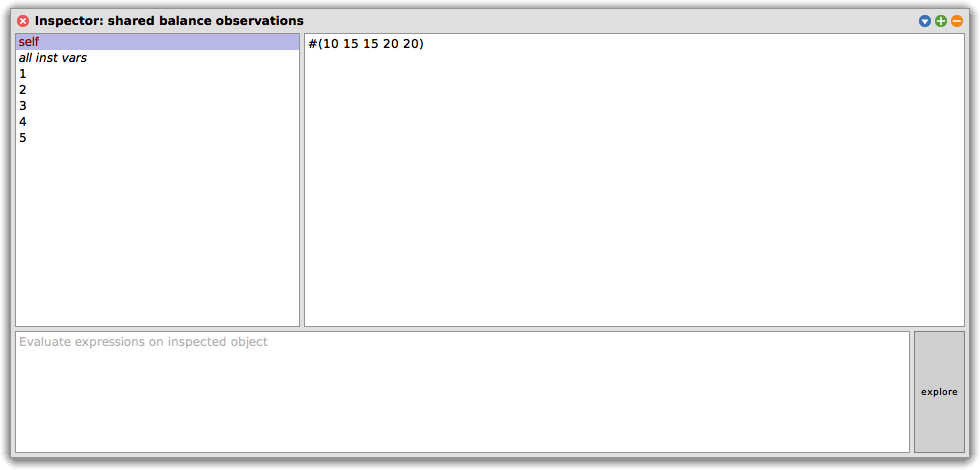
A block retains access to lexical variables from where it was created. The read and addFive blocks close over the same balance variable. They do not each receive a frozen copy of the number ten. Changing balance through one block becomes visible to the other. The Array evaluates its elements from left to right, so the sequence records the starting balance and both later updates. This is useful for a small callback, but a growing application may deserve an explicit model object with named methods. Capturing a mutable object has a similar sharing effect: another reference can modify that object later.
Where to run this
Workspace → select the complete expression → Print It. For an Inspector, select the same expression and choose Inspect It.
Construction code · follow the run instructions above
Native Array Inspector of the five observations from this exact expression: 10, 15, 15, 20, 20. Select self for the full result or an index for one observation.
04 · Make independent stateful closures
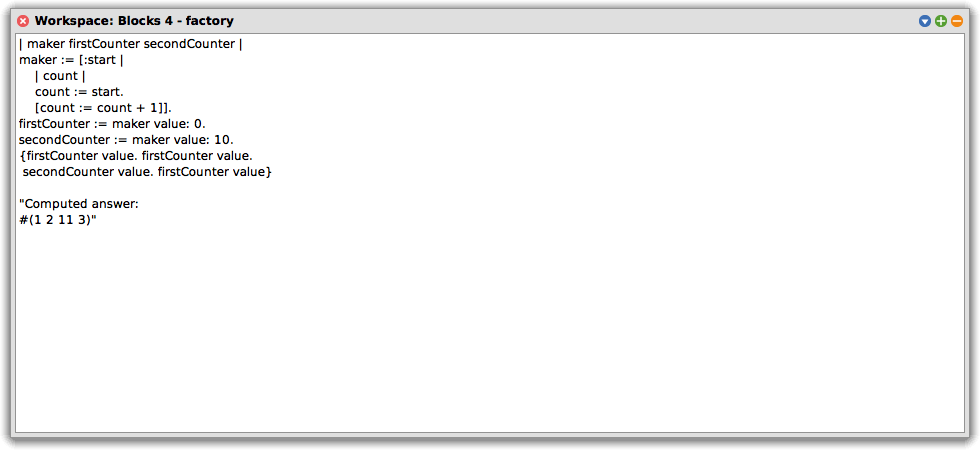
Each evaluation of maker creates a fresh activation and a fresh count temporary. The returned inner block retains that particular count after maker has finished. Consequently firstCounter and secondCounter advance independently. The outer block’s argument chooses an initial value; the inner block increments it whenever value is sent. Notice the absence of ^. Inside a method, ^ in a nested block tries to return from the enclosing method, not merely from the block; invoking such a block after that method has returned can raise BlockCannotReturn. Use the block’s final expression for an ordinary later callback answer.
Where to run this
Workspace → select the complete expression → Print It. For an Inspector, select the same expression and choose Inspect It.
Construction code · follow the run instructions above
Native Squeak 6.1 Workspace showing the independently executed expression and its computed answer.
05 · Choose one branch lazily
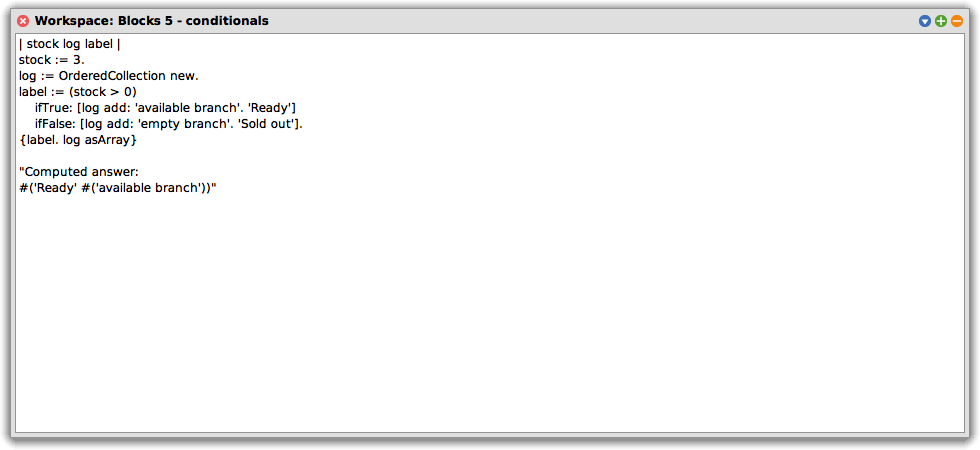
Control flow is expressed through messages and blocks. The Boolean receiver of ifTrue:ifFalse: selects exactly one of the two blocks to evaluate. We record side effects so you can see that the unchosen branch never runs. Each branch also provides an answer, making the conditional an expression. Only true and false act as Booleans here; a nonempty String or a nonzero integer is not automatically true. The parentheses make it clear that >= is evaluated first and its Boolean answer receives the keyword message. Put expensive or conditional work inside the block so it happens only when selected.
Where to run this
Workspace → select the complete expression → Print It. For an Inspector, select the same expression and choose Inspect It.
Construction code · follow the run instructions above
Native Squeak 6.1 Workspace showing the independently executed expression and its computed answer.
06 · Repeat a condition and update it
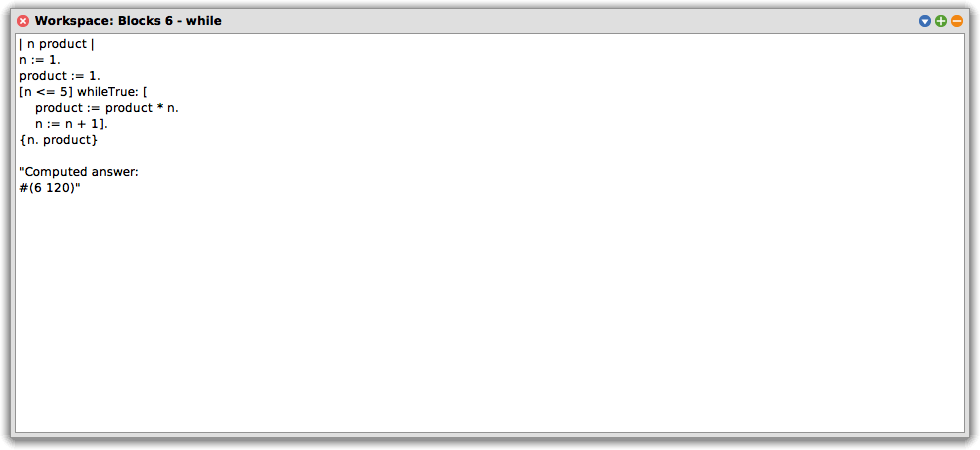
whileTrue: repeatedly evaluates its receiver block. If that answers true, it evaluates the body, then asks the condition again. The body must eventually change something that makes the condition false, unless indefinite looping is intentional. Here n advances from one through five while product accumulates the factorial. The final n is six because the condition has just become false; the final product is 120. The multiplication happens before incrementing n. Keep bounded examples while learning so a typo cannot freeze your image in an endless loop. Prefer a collection iteration message when the problem already has a collection to visit.
Where to run this
Workspace → select the complete expression → Print It. For an Inspector, select the same expression and choose Inspect It.
Construction code · follow the run instructions above
| n product |
n := 1.
product := 1.
[n <= 5] whileTrue: [
    product := product * n.
    n := n + 1].
{n. product}
Native Squeak 6.1 Workspace showing the independently executed expression and its computed answer.
07 · Use iteration blocks for bounded work
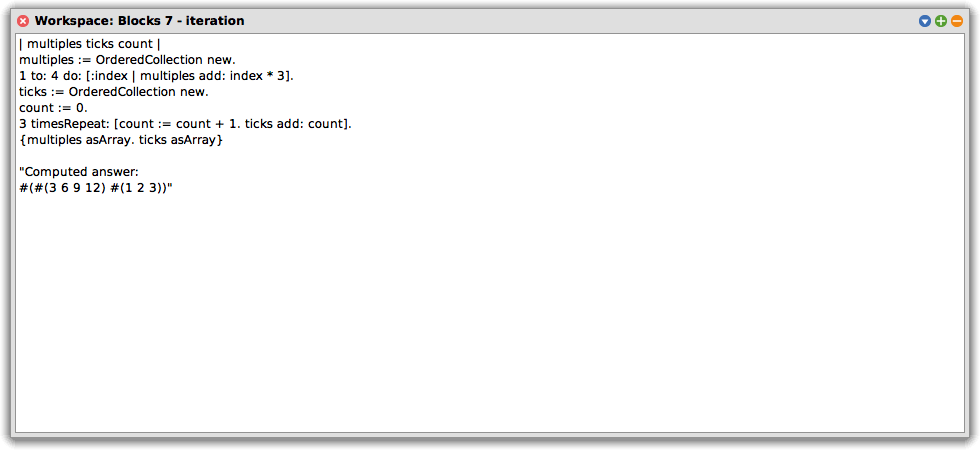
to:do: passes each integer in the inclusive range to a one-argument block. timesRepeat: evaluates a no-argument block a fixed number of times. Collection do: similarly passes each element to its block and is typically used for effects. None of these should be confused with collect:, whose purpose is to build a new collection from block answers. Here an OrderedCollection records each visited multiple, while another records three ticks. We explicitly answer the recorded values at the end instead of relying on the return value of an iteration message. This is also a good pattern for observing a small algorithm without a debugger.
Where to run this
Workspace → select the complete expression → Print It. For an Inspector, select the same expression and choose Inspect It.
Construction code · follow the run instructions above
Native Squeak 6.1 Workspace showing the independently executed expression and its computed answer.
08 · Guard work with and: and or:
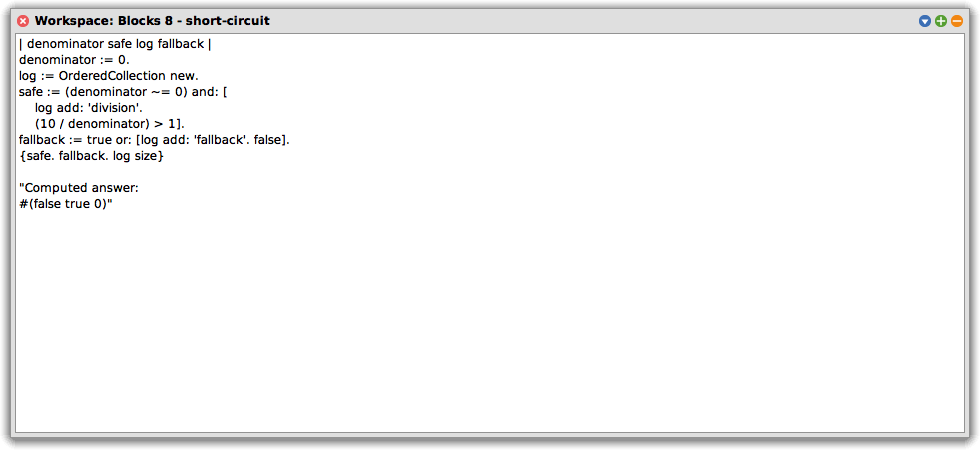
and: and or: accept a block and can skip evaluating it. false and: does not evaluate the block, while true or: does not evaluate it. This makes and: a natural guard for a denominator or other precondition. The log also proves that neither skipped branch runs. By contrast, & and | receive already evaluated arguments; using them does not protect an expression that would raise an error while computing that argument. Keep the guarded calculation inside brackets, and make both evaluated conditions answer Booleans. The branch is delayed computation, not just a grouped expression.
Where to run this
Workspace → select the complete expression → Print It. For an Inspector, select the same expression and choose Inspect It.
Construction code · follow the run instructions above
Native Squeak 6.1 Workspace showing the independently executed expression and its computed answer.
09 · Avoid a shared-variable callback trap
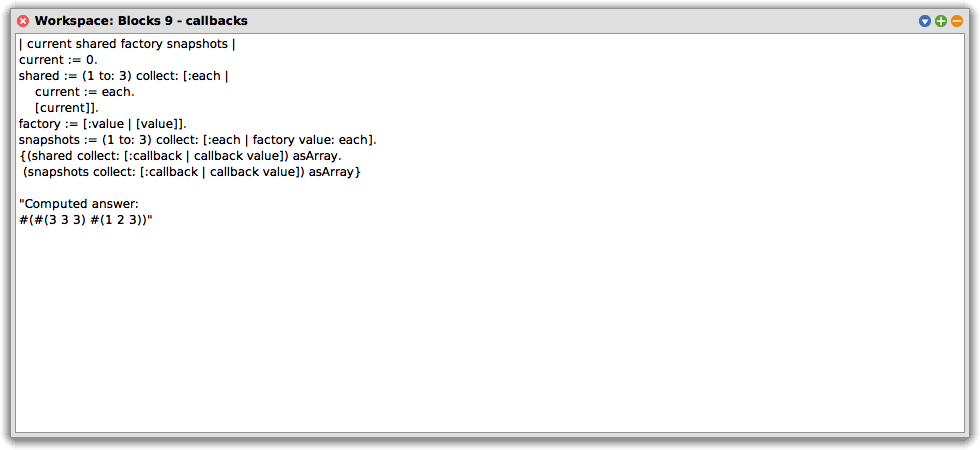
The first group of callbacks all closes over the same explicit current variable. Constructing the callbacks changes current three times; running them later therefore answers three each time. This is not a special rule that all Smalltalk loop arguments are shared. The example deliberately uses one outside temporary. The second version passes each value through a factory block. Each factory evaluation gets its own value binding, which its returned block retains. That produces one, two, three when invoked later. In a UI, decide whether a callback should read current model state at click time or remember a value from construction time; both behaviors can be valid.
Where to run this
Workspace → select the complete expression → Print It. For an Inspector, select the same expression and choose Inspect It.
Construction code · follow the run instructions above
Native Squeak 6.1 Workspace showing the independently executed expression and its computed answer.
10 · Clean up with ensure: and handle errors
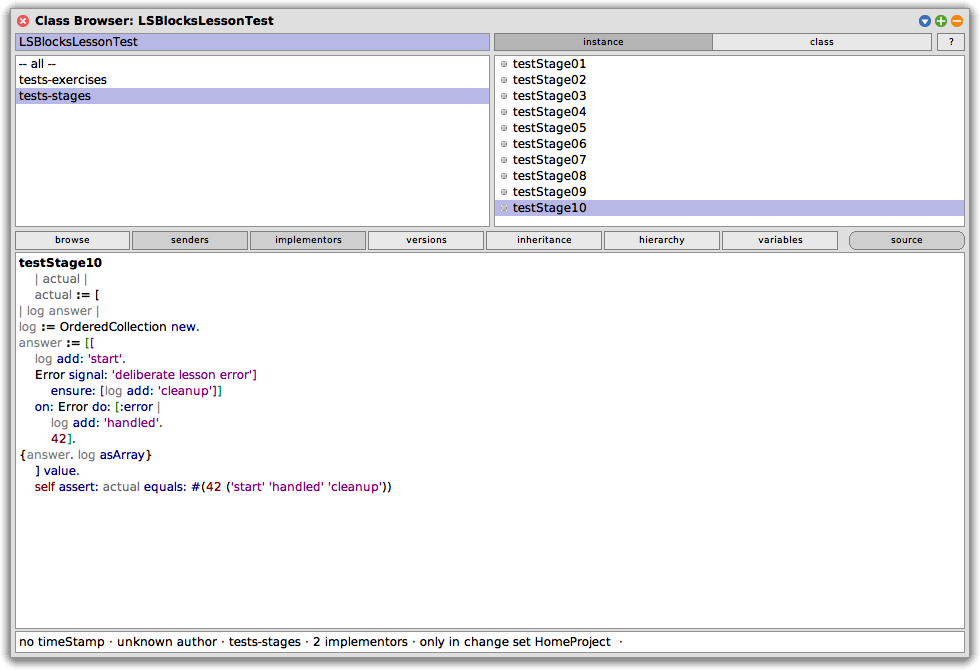
ensure: evaluates its cleanup block whether the protected block finishes normally or unwinds because of an exception. Here the protected code deliberately signals Error. Squeak first evaluates the surrounding on:do: handler while the exception context is available. The handler records handled and supplies 42; cleanup then runs as the protected stack unwinds. The final trace is start, handled, cleanup. This ordering is important for resources such as streams and temporary windows. The example is self-contained and catches its own intentional error, so it does not open a debugger. In real code handle only the exceptions you intend to recover from; an overly broad Error handler can hide programming defects. Use ensure: for cleanup, not as a substitute for validating the result.
Where to run this
Workspace → select the complete expression → Print It. For an Inspector, select the same expression and choose Inspect It.
Construction code · follow the run instructions above
To verify every stage and exercise, file in source/11-tested-exercises.st, then Print It LSBlocksLessonTest suite run in a Workspace. Expect 13 runs, 13 passes, 0 failures, and 0 errors. For a native runner, Do It TestRunner openForSuite: LSBlocksLessonTest suite, then choose Run Selected.
Native Squeak 6.1 Browser showing the accepted instance-side test for this exact final expression. All 13 tests pass.
Watch the workflow
Every image is rendered by the actual Squeak 6.1 image using native Workspace, Inspector, Browser, or TestRunner windows. GIFs are scripted sequences of real native states, not recordings of a person typing. Workspace result comments contain answers computed by the Squeak compiler; Inspector frames display real live objects. The poster is the first GIF frame.
NATIVE SQUEAK CAPTURE
Scripted native Workspace states showing count before evaluation and after one, two, and three calls. Each displayed answer is computed from the same live captured variable.
NATIVE SQUEAK CAPTURE
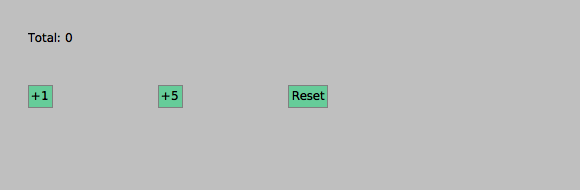
Scripted native Morphic sequence: +1, +5, +1, Reset. Each frame follows the real button’s doButtonAction; its target is a closure receiving value. File in source/12-callback-panel.st to try it yourself.
Practice with tested solutions
1. Compose two blocks
Make a block that applies double, then adds three. Check two inputs and ensure the order of composition is visible.
Show a tested solution
Workspace → select the whole solution, including temporary declarations → Print It. Or file in source/11-tested-exercises.st and browse LSBlocksExercises → class side → examples → example1.
After filing in source/11-tested-exercises.st: Workspace → Print It this check.
Check the solution
LSBlocksExercises example1 = #(11 23)
true
Parentheses make double run before plusThree. Reversing the order would produce 14 for input four, so the first assertion distinguishes the two behaviors.
2. Give callbacks a remembered amount
Create callbacks that add one and five to a shared total. Use a factory to keep each amount while deliberately sharing total. Invoke +1, +5, +1.
Show a tested solution
Workspace → select the whole solution, including temporary declarations → Print It. Or file in source/11-tested-exercises.st and browse LSBlocksExercises → class side → examples → example2.
After filing in source/11-tested-exercises.st: Workspace → Print It this check.
Check the solution
LSBlocksExercises example2 = #(1 6 7 7)
true
The amount belongs to the factory activation. total belongs to the surrounding expression, so both callbacks update the same counter.
3. Stop a search with a bounded loop
Find the first square at least 30, starting from one and stopping at ten even if no match appears. Return the index and its square. Keep the upper bound in a short-circuit guard.
Show a tested solution
Workspace → select the whole solution, including temporary declarations → Print It. Or file in source/11-tested-exercises.st and browse LSBlocksExercises → class side → examples → example3.
Exercise solution
| index limit |
index := 1.
limit := 10.
[(index < limit) and: [(index * index) < 30]]
    whileTrue: [index := index + 1].
{index. index * index}
After filing in source/11-tested-exercises.st: Workspace → Print It this check.
Check the solution
LSBlocksExercises example3 = #(6 36)
true
The condition changes on every iteration and is bounded. This particular target is found at six; a larger target could exhaust the bound, so a general search should separately report whether the target was reached.
When something looks wrong
Nothing happens when I create the block.
Square brackets create a block object. Send value, value:, or value:value: with the correct number of arguments to execute it.
Every saved callback gives the final value.
Check whether they capture one shared outside temporary. If each should retain a construction-time value, pass that value through a factory block.
My condition is a number or String.
Smalltalk conditions require true or false. Produce a Boolean with a comparison or a predicate before sending ifTrue:ifFalse:.
I see BlockCannotReturn in a delayed callback.
Look for ^ inside the callback’s source method. It attempts a non-local return to that method’s activation. For ordinary callback answers, use the final expression without ^.
My loop never stops.
Check that the body changes a variable used by the condition. Start with bounded examples and use Squeak’s interrupt command to reach a debugger if necessary.
Verification, cleanup and next steps
Verified in official Squeak 6.1 build 23976, using an isolated copied image. All 10 Workspace expressions ran independently and matched their expected results; all 10 numbered file-ins ran; all three standalone exercise solutions and displayed checks passed; the SUnit suite passed 13/13. Native animation frames came from actual evaluated objects. The blocks callback demo also passed five real button-action assertions and three retained-state assertions. These are scripted native captures, not physical mouse/keyboard recordings.
Close Workspace, Inspector, Browser, and TestRunner windows when done. These examples create only local objects; rerunning them starts with fresh data. The optional test and exercise classes remain in the LearnSqueak category if you save the image.
Squeak 6.1 image source — Collection, SequenceableCollection, Array, OrderedCollection, Set, Bag, Dictionary, BlockClosure, Boolean, and SUnit methods shipped in build 23976. All claims used here were checked against actual execution.