A NINE-PART GAME PROGRAMMING SERIES
Build Breakout with Morphic
Draw a court, handle input, animate a ball, resolve collisions, and add bricks, score, lives and restart. Build each part in the native Squeak image.
Run in the SqueakJS playground
The separate playground loads the real Smalltalk image on demand. This lesson keeps its native setup instructions; browser compatibility notes appear beside each demo.
Choose a checkpoint or the finished game
Download the complete workshop
- Basic Smalltalk messages, blocks, and instance variables
- Know how to open a Workspace, System Browser, and File List
- Save your image before experimenting. Each checkpoint has a distinct class name, so all nine can coexist.
- Download the checkpoint .st file. In Squeak, open File List from the World menu, select the file, and use fileIn. The file contains a complete class, instance methods, and class-side opener.
- In a Workspace, evaluate the checkpoint opener with Do it. The finished source file instead defines LearnSqueakBreakout; evaluate LearnSqueakBreakout open.
- The code cards below show method definitions. To edit one, select the stated class and category in System Browser, replace the method source, and Accept. Do not evaluate an entire method definition as an ordinary Workspace expression.
- Workspace checks are complete expressions. Evaluate each with Print it to see true. They create isolated models and pause any model they start.
Download the finished game · Download SUnit tests
LearnSqueakBreakout openThis is a nine-part native game series. Every numbered checkpoint defines its own class and can be loaded independently. The finished game uses the separate LearnSqueakBreakout class. The website displays the tutorial and recordings; play the game inside Squeak.
Part 1 · Draw the playfield
Open a real Squeak window and draw a dark playfield inside it.
Morphic asks a Morph to draw itself by sending drawOn: a Canvas. The canvas is a drawing surface, not the game model. Keep drawing separate from decisions about movement, scoring, and input; a repaint should never move the ball.
The game uses a logical 640 by 460 coordinate system. X increases to the right and Y increases downward. The field begins at 16@70 and ends at 624@416. A Point is made with @; a Rectangle can be made by sending corner: or extent: to a Point.
viewPoint: converts logical points into actual screen positions. It adds the Morph position and scales each coordinate to the Morph extent. This keeps the later physics independent of window size. The simple example scales X and Y independently, so stretching the window can stretch the ball into an ellipse; gameplay still uses the original logical coordinates.
Create the Morph
Create the checkpoint class as a subclass of Morph. The downloaded file contains this declaration and every method, so it is also a safe recovery point.
Morph subclass: #LearnSqueakBreakoutStage01
    instanceVariableNames: ''
    classVariableNames: ''
    poolDictionaries: ''
    category: 'LearnSqueak-Breakout'
Set up appearance
initialize runs when new creates the instance. Always send super initialize before configuring a Morph. extent: receives a Point; color: receives a Color.
initialize
    super initialize.
    self extent: 640@460.
    self color: (Color r: 0.035 g: 0.055 b: 0.11).
Choose a coordinate system
Keep the logical field separate from the actual bounds. This conversion is the bridge between the model and the view.
viewPoint: aPoint
    "Map logical coordinates to the Morph's current position and size."
    ^ self position +
        ((aPoint x * self width / 640) @ (aPoint y * self height / 460))
Paint the board
super drawOn: paints the Morph background. Then the game paints a darker field, its outline, and two labels. All later pieces are added to this method.
drawOn: aCanvas
    super drawOn: aCanvas.
    aCanvas fillRectangle: (self viewRectangle: self field)
        color: (Color r: 0.06 g: 0.095 b: 0.17).
    aCanvas frameRectangle: (self viewRectangle: self field)
        width: 2 color: (Color r: 0.18 g: 0.28 b: 0.40).
    self drawText: 'BREAKOUT / MORPHIC' at: 22@12
        color: Color white on: aCanvas.
    self drawText: '01  Draw the playfield' at: 22@40
        color: (Color r: 0.37 g: 0.84 b: 0.91) on: aCanvas.


    self drawText: 'A native Canvas, Points, Rectangles, and color'
at: 22@435 color: self ink on: aCanvasLearnSqueakBreakoutStage01 open| game | game := LearnSqueakBreakoutStage01 new. game position: 30@50; extent: 1280@920. (game viewPoint: 320@230) = (670@510)Expected: A native SystemWindow with a dark, empty court, the BREAKOUT / MORPHIC title, and a short footer.
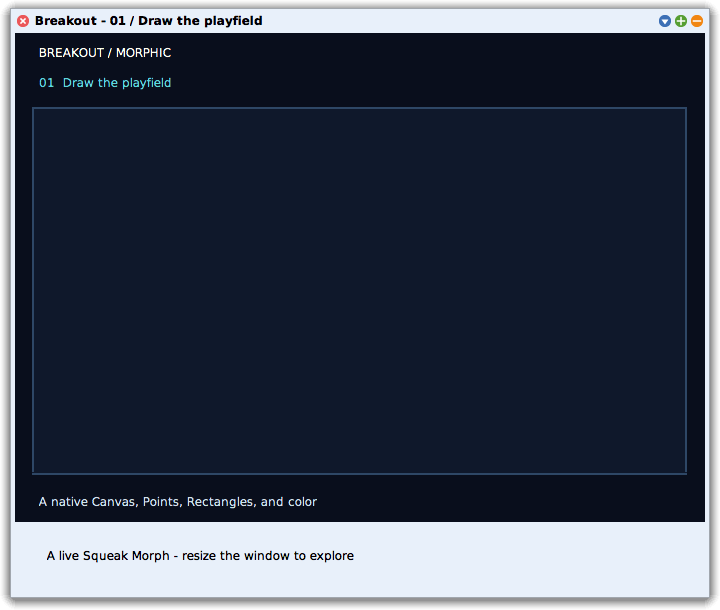
Try it: Change the field outline color, then resize and move the window. The outline should remain inside the game area.
Watch for: A Canvas expects positions in the Morphic world. Forgetting self position makes a game appear in the wrong place after its window moves.
Part 2 · Add a paddle and ball
Represent the paddle and ball as state, then draw their shapes.
The paddle needs one changing number: the X coordinate of its center. Its width is 96 and its Y position is 388. The ball needs a Point for its center and a radius of 7. Keeping these values in instance variables makes the model easy to inspect.
paddleBounds computes a Rectangle from paddleX. It does not store another rectangle that could disagree with the center. The ball uses Rectangle center:extent: to create its drawing bounds. Multiplying the radius by two gives the diameter.
The paddle is a filled rectangle with a narrow highlight. The ball is a filled oval. These are ordinary Canvas operations, not sprites or imported images. The palette stays readable against the dark board.
Initialize the pieces
The new instance variables are ball and paddleX. The ball begins directly above the paddle.
initialize
    super initialize.
    self extent: 640@460.
    self color: (Color r: 0.035 g: 0.055 b: 0.11).
    paddleX := 320.0.
    ball := paddleX @ 368.0
Compute a useful rectangle
Subtract half the paddle width from its center to get its left edge. The result can be reused by drawing and collisions.
paddleBounds
    ^ (paddleX - 48) @ 388 extent: 96@12
Draw both shapes
viewRectangle: maps both corners into actual screen coordinates. Paint the small highlight after the body so it stays visible.
drawPaddleAndBallOn: aCanvas
    aCanvas fillRectangle: (self viewRectangle: self paddleBounds)
        color: (Color r: 0.20 g: 0.82 b: 0.88).
    aCanvas fillRectangle: (self viewRectangle:
        (self paddleBounds origin extent: 96@3))
        color: (Color r: 0.65 g: 0.97 b: 1.0).

    aCanvas fillOval: (self viewRectangle:
        (Rectangle center: ball extent: (self ballRadius * 2) asPoint))
color: (Color r: 1.0 g: 0.86 b: 0.39)LearnSqueakBreakoutStage02 open| game | game := LearnSqueakBreakoutStage02 new. (game ballPosition = (320@368)) and: [game paddleBounds = (272@388 extent: 96@12)]Expected: A turquoise paddle and a yellow ball appear near the bottom of the court. Neither moves yet.
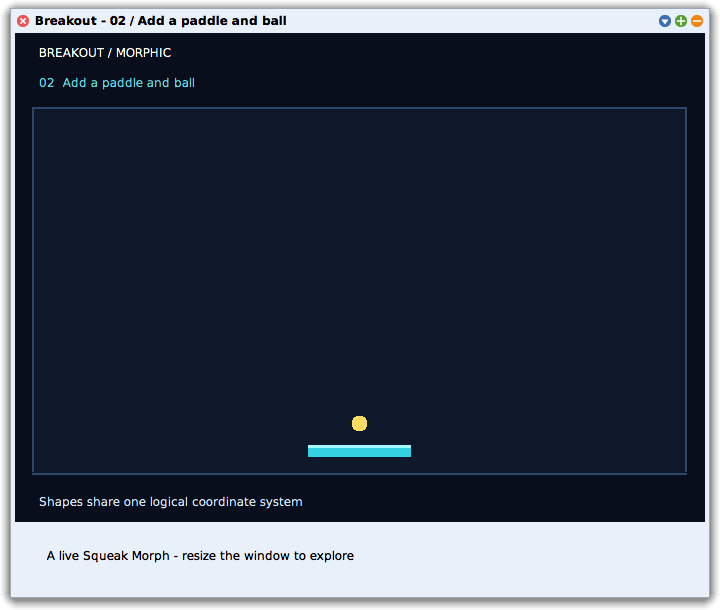
Try it: Make the ball radius 10. Notice that the drawing uses twice the radius; a later collision lesson will use the same radius.
Watch for: Do not confuse a center Point with a Rectangle origin. The ball is centered on ball, but a paddle Rectangle starts at its upper-left corner.
Part 3 · Follow the mouse
Steer the paddle with the mouse and stop it at the side walls.
Morphic sends mouseMove: an event containing a position in world coordinates. logicalXFor: performs the inverse of the drawing transform: subtract the game left edge, then scale back to the 640-unit logical width.
wantsEveryMouseMove answers true so moving across the game can steer without holding a button. The handler delegates to movePaddleTo:, which owns the boundary rule. This same message will later be useful for keyboard input and deterministic tests.
Clamp the paddle center, not the mouse position. Its minimum is field left plus half its width; its maximum is field right minus half its width. The ready ball follows the paddle in this checkpoint. changed requests a redraw after changing state.
Convert the event position
This inverse transform also works after the native window has moved or resized.
logicalXFor: aPoint
    ^ (aPoint x - self left) * 640 / (self width max: 1)
Keep the whole paddle inside
max: enforces the lower limit and min: enforces the upper limit. Parentheses preserve the intended Smalltalk message grouping.
movePaddleTo: anX
    paddleX := (anX max: self field left + 48)
        min: self field right - 48.
    ball := paddleX @ 368.0.
    self changed
Receive the mouse event
The event handler stays short. Its job is to translate the event, then call the model operation.
mouseMove: anEvent
    self movePaddleTo: (self logicalXFor: anEvent position)
Opt into hover movement
Without this method, ordinary Morphic mouse-move delivery usually depends on mouse focus and a pressed button.
wantsEveryMouseMove
^ trueLearnSqueakBreakoutStage03 open| game | game := LearnSqueakBreakoutStage03 new. game movePaddleTo: 999. (game paddleCenter = 576) and: [game ballPosition = (576@368)]Expected: Moving the mouse over the game moves the paddle and its waiting ball. The screenshot shows the paddle moved to the right.
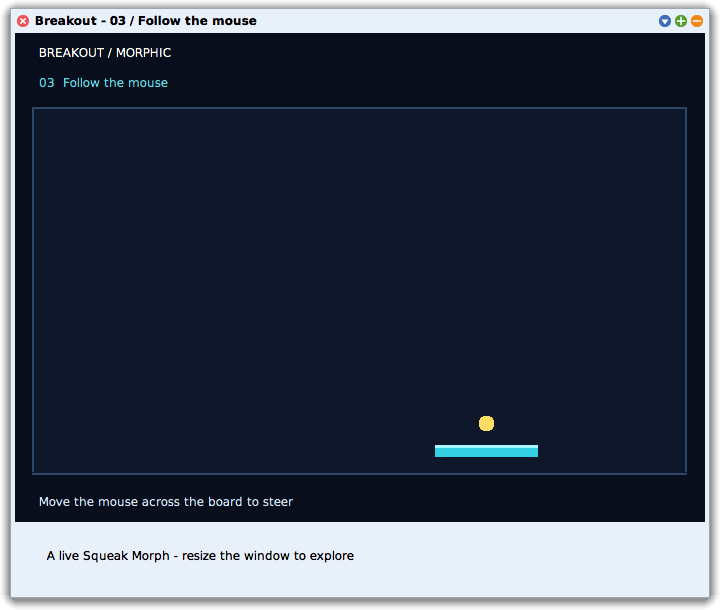
Try it: Move rapidly past both edges of the window. The paddle should stop flush with each inner wall, with no part outside it.
Watch for: Use event position only after converting it. Feeding a world X directly into the model makes the paddle jump when the window moves.
Part 4 · Animate and bounce
Animate a ball that reflects from all four walls, with Start and Pause controls.
A velocity is another Point. Its X component says how many logical units the ball travels horizontally per second; its Y component does the same vertically. A negative Y velocity travels upward. Multiplying velocity by a time interval gives displacement.
Morphic stepping calls step at the interval requested by stepTime. This lesson requests 20 milliseconds and advances the simulation by 0.02 seconds per tick. It is a fixed-step teaching model: under heavy load animation slows rather than making one giant catch-up jump.
advanceBy: splits a tick into smaller pieces so no axis moves farther than half the ball radius in one piece. That becomes important when thin bricks and paddles arrive. Requests are bounded to 50 milliseconds, and rendering is requested only after the update.
A reflection changes the sign of one velocity component. After crossing a wall, also put the ball back at the legal boundary. Merely reversing velocity while leaving it embedded creates repeated or sticky collisions.
Start the existing Morphic scheduler
Keep the world that owns the stepping entry in stepWorld. It will be needed when a SystemWindow closes after detaching its model.
start
    (#(won gameOver) includes: state) ifTrue: [^ self].
    state := #playing.
    running := true.
    stepWorld := self world.
    self startStepping.
    self changed
Take one fixed tick
stepTime returns 20. The running guard makes an accidentally delivered paused tick harmless.
step
    "One deterministic 20 ms simulation tick, requested by Morphic."
    running ifFalse: [^ self].
    self advanceBy: self stepTime / 1000.0
Subdivide movement
Use the faster axis to choose the count. Each small movement will have its own collision checks.
advanceBy: seconds
    "Small moves prevent crossing a wall, paddle, or brick in one jump.
    Bound external requests to 50 ms; ordinary steps use 20 ms."
    | dt count slice |
    running ifFalse: [^ self].
    dt := (seconds max: 0.0) min: 0.05.
    dt = 0 ifTrue: [^ self].
    count := (((velocity x abs max: velocity y abs) * dt /
        (self ballRadius / 2)) ceiling) max: 1.
    slice := dt / count.
    1 to: count do: [:ignored |
        running ifTrue: [self moveBy: slice]].
    self changed
Reflect at side walls
The legal center is one radius inside the field. abs chooses the inward sign without repeatedly flipping a ball that is already traveling away.
bounceSideWalls
    | low high |
    low := self field left + self ballRadius.
    high := self field right - self ballRadius.
    ball x < low ifTrue: [
        ball := low @ ball y.
        velocity := velocity x abs @ velocity y].
    ball x > high ifTrue: [
        ball := high @ ball y.
        velocity := velocity x abs negated @ velocity y]
Stop completely
stopStepping unregisters an attached Morph. The saved world handles the close-after-detach case, then is released.
pause
    running := false.
    self stopStepping.
    stepWorld ifNotNil: [stepWorld stopStepping: self].
    stepWorld := nil.
self changedLearnSqueakBreakoutStage04 open| game answer | game := LearnSqueakBreakoutStage04 new. game start; ballPosition: 300@280 velocity: 100@(-200); step; pause. answer := (game ballPosition x - 302) abs < 0.000001 and: [(game ballPosition y - 276) abs < 0.000001]. answerExpected: The ball crosses the court and bounces from every edge. The paddle is visible but does not yet return it; the floor is still a temporary wall.
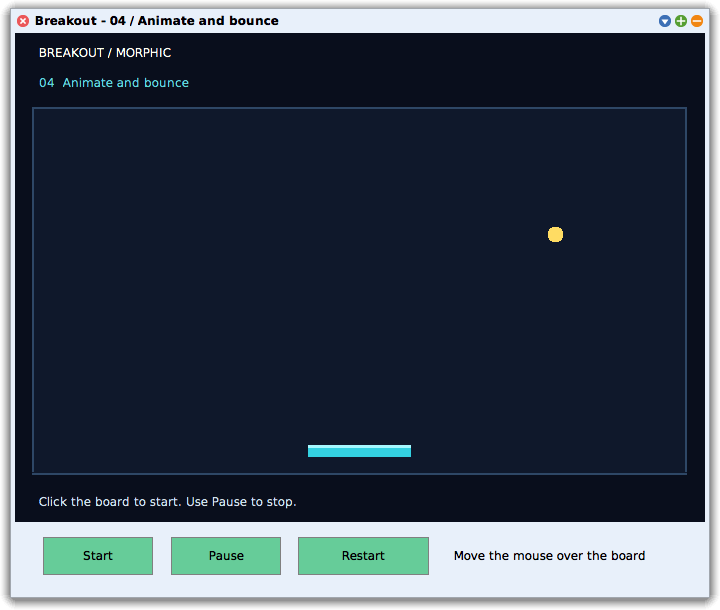
Try it: Press Start twice, pause, resize the window, then resume. Starting twice should not create two animation loops, and pausing should preserve the ball position.
Watch for: Do not put movement in drawOn: or create a forever loop with fork. Native redraw frequency is not a physics clock, and an unmanaged Process can survive a closed window.
Part 5 · Return the ball
Turn the decorative paddle into a collision surface and allow misses.
Remove the temporary bottom-wall bounce. The paddle now returns a descending ball, and a ball that passes below the court ends the current serve. At this stage there is no life counter; each miss pauses and prepares another ball.
The paddle test needs both the old and new Y positions. The old ball bottom must be above the paddle top, and the new bottom must reach it. It also needs horizontal overlap. This crossing test avoids catching a ball coming up from below the paddle.
Place the ball center exactly one radius above the paddle, then point Y velocity upward. The next substep moves away from the contact. At the final checkpoint the horizontal hit position will control the outgoing angle; here reflection keeps the original horizontal velocity.
Remember the previous Y
moveBy: integrates X first, then Y. oldY is captured before the vertical movement so the paddle can detect a genuine downward crossing.
moveBy: dt
    | oldX oldY |
    oldX := ball x.
    ball := (ball x + (velocity x * dt)) @ ball y.
    self bounceSideWalls.


    oldY := ball y.
    ball := ball x @ (ball y + (velocity y * dt)).
    self bounceTop.


    self bouncePaddleFrom: oldY.
    self checkMiss
Return only a descending ball
The conditions combine direction, crossing, and horizontal overlap. The radius is used on both sides of the center.
bouncePaddleFrom: oldY
    | paddle  |
    velocity y <= 0 ifTrue: [^ self].
    paddle := self paddleBounds.
    ((oldY + self ballRadius <= paddle top)
        and: [ball y + self ballRadius >= paddle top]
        and: [ball x + self ballRadius >= paddle left]
        and: [ball x - self ballRadius <= paddle right]) ifTrue: [
        ball := ball x @ (paddle top - self ballRadius).
        velocity := velocity x @ velocity y abs negated]
Treat a miss as a state transition
Wait until the entire ball has passed below the field. Pause first, set ready, and place a new serve above the paddle.
checkMiss
    ball y - self ballRadius > self field bottom ifTrue: [
        self pause.
        state := #ready.
self serve]LearnSqueakBreakoutStage05 open| game answer | game := LearnSqueakBreakoutStage05 new. game start; ballPosition: 320@378 velocity: 0@450; step. answer := game ballVelocity y < 0. game pause. answerExpected: The ball bounces upward when it lands on the paddle. Passing the paddle no longer produces a floor bounce.
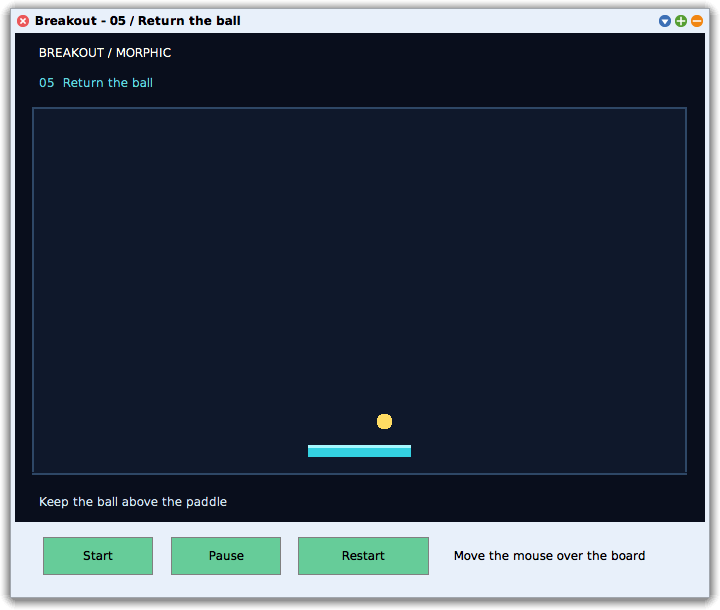
Try it: Move away from the ball to miss deliberately. The game should pause with READY TO SERVE, and Start should launch a new ball.
Watch for: A plain intersects: check does not distinguish a downward landing from an upward pass. Direction and the previous position make the collision intentional.
Part 6 · Break the brick wall
Build 32 bricks and remove each one when the ball hits it.
The brick model is an OrderedCollection of Rectangles. Two loops build four rows and eight columns. Each brick is 65 units wide and 19 high; the step between columns is 73 and between rows is 28, leaving visible gaps.
Drawing iterates over the current collection, so removing a Rectangle removes its next rendering automatically. A row-derived color gives the brick wall four bands without storing a separate color in every brick.
For accessible collision code, the drawn circular ball uses a square collision box with half-width equal to its radius. This is intentionally a small approximation near a brick corner, not exact circle-versus-rectangle geometry. A hit must cross a face from outside while moving toward it; the transverse axis must overlap strictly.
The game integrates and tests one axis at a time. A hit during the X move reverses X; a hit during the Y move reverses Y. Separation places the ball outside the hit face, then the brick is removed. A stationary axis and a departing tangent contact cannot hit. The small substeps prevent jumping across the thin wall in one move.
Generate the grid
The outer loop chooses a row, and the inner loop chooses a column. The resulting collection is the only source of truth for remaining bricks.
buildBricks
    bricks := OrderedCollection new.
    0 to: 3 do: [:row |
        0 to: 7 do: [:column |
            bricks add: ((32 + (column * 73)) @ (100 + (row * 28))
                extent: 65@19)]]
Find a face crossing
detect:ifNone: returns the first matching Rectangle or nil. Compare the previous and current coordinates to reject zero movement and travel away from a face; strict transverse overlap rejects a neighboring tangent brick.
brickAtBallOn: axis from: previous
    "The square hitbox must cross a face while moving toward it.
    Strict transverse overlap excludes a neighboring brick's tangent edge."
    | current movement radius |
    current := axis = #x ifTrue: [ball x] ifFalse: [ball y].
    movement := current - previous.
    movement = 0 ifTrue: [^ nil].
    radius := self ballRadius.
    ^ bricks detect: [:brick |
        axis = #x
            ifTrue: [
                (ball y + radius > brick top)
                and: [ball y - radius < brick bottom]
                and: [movement > 0
                    ifTrue: [(previous + radius <= brick left)
                        and: [current + radius >= brick left]]
                    ifFalse: [(previous - radius >= brick right)
                        and: [current - radius <= brick right]]]]
            ifFalse: [
                (ball x + radius > brick left)
                and: [ball x - radius < brick right]
                and: [movement > 0
                    ifTrue: [(previous + radius <= brick top)
                        and: [current + radius >= brick top]]
                    ifFalse: [(previous - radius >= brick bottom)
                        and: [current - radius <= brick bottom]]]]]
        ifNone: [nil]
Reflect and remove
The axis symbol and previous coordinate identify a real crossing. Remove the exact Rectangle only after finding and resolving it.
collideBrickOn: axis from: previous
    | brick |
    brick := self brickAtBallOn: axis from: previous.
    brick ifNil: [^ self].
    axis = #x
        ifTrue: [
            ball := (velocity x > 0
                ifTrue: [brick left - self ballRadius]
                ifFalse: [brick right + self ballRadius]) @ ball y.
            velocity := velocity x negated @ velocity y]
        ifFalse: [
            ball := ball x @ (velocity y > 0
                ifTrue: [brick top - self ballRadius]
                ifFalse: [brick bottom + self ballRadius]).
            velocity := velocity x @ velocity y negated].
    bricks remove: brick.
self changedLearnSqueakBreakoutStage06 open| game answer | game := LearnSqueakBreakoutStage06 new. game start; ballPosition: 64@85 velocity: 0@900; step. answer := game brickCount = 31. game pause. answerExpected: A colorful four-row wall appears. Bricks disappear on contact and the ball changes direction. The screenshot comes from actual simulation ticks.
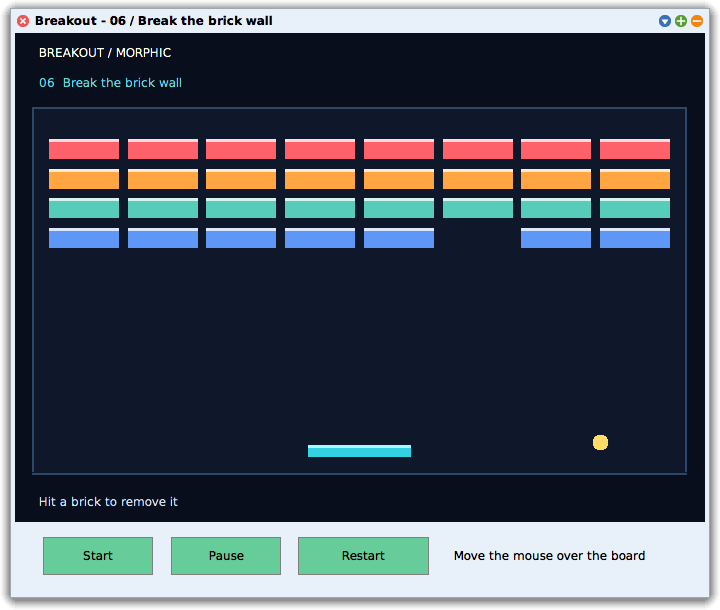
Try it: Change the row spacing from 28 to 32 in both buildBricks and brickColor:. Keep the grid inside the field and observe how gaps affect travel.
Watch for: Overlap alone also matches a ball that is touching a brick while moving away, or an axis that never moved. Require a directional face crossing, resolve that axis, and separate the ball before removing the brick.
Part 7 · Count points and win
Award ten points for each brick and stop when none remain.
Scoring belongs in the operation that removes a brick. If score were updated in drawOn:, every redraw could award points again. Here each successful removal adds exactly ten, so a full 32-brick game has a maximum score of 320.
A game state symbol records whether the game is ready, playing, or won. The running flag records whether Morphic should advance it right now. Those are related but different: a paused game keeps state #playing so Start can resume the same serve.
Removing the last brick sets state to #won and pauses the stepper. The start method refuses to restart a terminal state. Restart rebuilds the wall and begins a fresh ready game. A separate status drawing method shows the outcome without changing it.
Award points at the event
These last three lines are the new behavior: add ten, detect an empty collection, then transition to won and pause.
collideBrickOn: axis from: previous
    | brick |
    brick := self brickAtBallOn: axis from: previous.
    brick ifNil: [^ self].
    axis = #x
        ifTrue: [
            ball := (velocity x > 0
                ifTrue: [brick left - self ballRadius]
                ifFalse: [brick right + self ballRadius]) @ ball y.
            velocity := velocity x negated @ velocity y]
        ifFalse: [
            ball := ball x @ (velocity y > 0
                ifTrue: [brick top - self ballRadius]
                ifFalse: [brick bottom + self ballRadius]).
            velocity := velocity x @ velocity y negated].
    bricks remove: brick.
    score := score + 10.
    bricks isEmpty ifTrue: [state := #won. self pause]
Render the score
printString converts the numeric model value to text. Drawing reads the current state and stays side-effect free.
drawScoreOn: aCanvas
    self drawText: 'SCORE  ', score printString at: 430@12
        color: Color white on: aCanvas.
    self drawText: 'BRICKS  ', bricks size printString at: 535@40
        color: (Color r: 1.0 g: 0.78 b: 0.34) on: aCanvas
Choose an outcome message
The status is derived from the model. The ready and paused messages also make the controls understandable.
statusText
    state = #won ifTrue: [^ 'YOU CLEARED THE WALL!'].
    state = #gameOver ifTrue: [^ 'GAME OVER'].
    state = #ready ifTrue: [^ 'READY TO SERVE'].
    running ifFalse: [^ 'PAUSED'].
^ ''LearnSqueakBreakoutStage07 open| game | game := LearnSqueakBreakoutStage07 new. game bricks: {200@150 extent: 65@19}. game start; ballPosition: 230@185 velocity: 0@(-900); step. (game score = 10) and: [game gameState = #won] and: [game running not]Expected: A score appears at the top. Each broken brick adds 10, and clearing the final brick displays YOU CLEARED THE WALL! and stops motion.
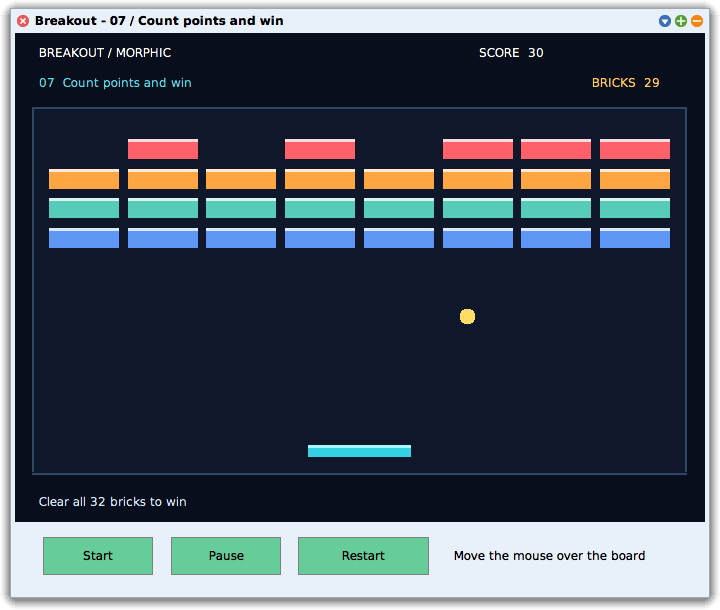
Try it: Use the one-brick Workspace check to reach the win state immediately. Start should leave it stopped; Restart should restore 32 bricks and score zero.
Watch for: Do not equate not running with game over. A ready serve, a pause, and a finished game are different states that need different actions.
Part 8 · Give the player three lives
Give the player three lives, preserve progress between serves, and reset everything on Restart.
A miss now decrements lives exactly once. The game pauses immediately, so later step messages cannot drain additional lives while the ball is below the court. With lives remaining, it becomes ready and serves again; with zero lives, it becomes gameOver.
serve only positions a ball and assigns its initial velocity. restart has a wider responsibility: pause, reset score and lives, rebuild bricks, center the paddle, and serve. Keeping these messages separate prevents a lost life from restoring all the bricks.
The game-over state blocks Start. Restart is the explicit way to abandon that outcome and begin again. This is also a useful repeated-flow test: lose, restart, pause, resume, lose again, and confirm each transition stays consistent.
Count one missed serve
The entire ball must leave the field. pause happens before deciding which state comes next.
checkMiss
    ball y - self ballRadius > self field bottom ifTrue: [
        self pause.
        lives := lives - 1.
        lives = 0
            ifTrue: [state := #gameOver]
            ifFalse: [state := #ready. self serve]]
Serve without erasing progress
This method has no score, life, or brick changes. It is small enough to reason about on its own.
serve
    ball := paddleX @ 368.0.
    velocity := 180.0 @ -270.0.
    self changed
Reset the whole model
Restart is deterministic. A fresh game always has the same paddle, velocity, score, lives, and brick layout.
restart
    self pause.
    score := 0.
    lives := 3.
    state := #ready.
    paddleX := 320.0.
    self buildBricks.
    self serve.
self changedLearnSqueakBreakoutStage08 open| game | game := LearnSqueakBreakoutStage08 new. 1 to: 3 do: [:ignored | game start; ballPosition: 100@430 velocity: 0@300; step]. (game lives = 0) and: [game gameState = #gameOver] and: [game running not]Expected: The header shows LIVES 3 initially. A miss changes it to 2 and pauses for a new serve; the third miss displays GAME OVER.
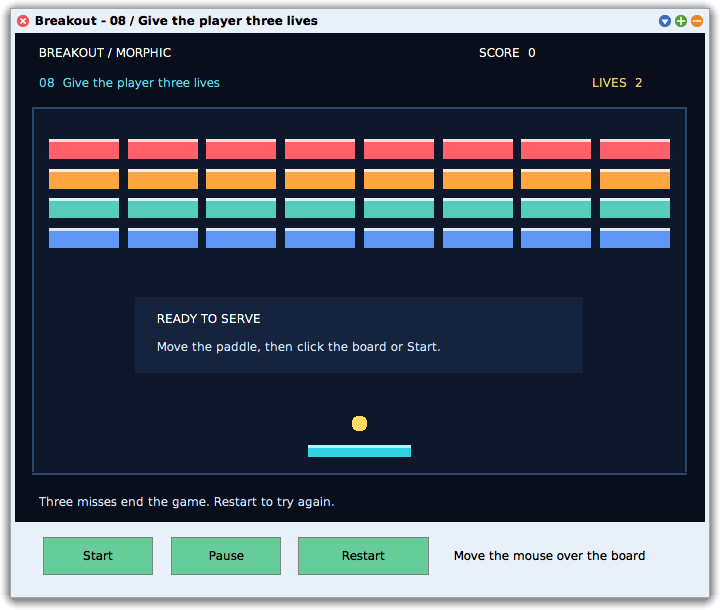
Try it: Miss once and inspect the wall and score. They should stay as they were. Then press Restart and confirm all progress is reset.
Watch for: If the miss test runs every frame without pausing or changing state, a single falling ball can consume all three lives. Make it a one-time transition.
Part 9 · Finish a playable game
Finish a playable native application and verify its behavior without waiting for lucky collisions.
The final game supports mouse steering, A/D or left/right arrow keystrokes, Space to start or pause, and R to restart. Click inside the game to give it keyboard focus. Keyboard movement advances 28 units per delivered keystroke, including the operating system key repeat; mouse steering is continuous while the pointer is over the board.
A paddle hit now aims the outgoing ball. Subtract the paddle center from the ball X and divide by half the paddle width to obtain a normalized hit offset. Clamp to -1 through 1, then multiply by 280 for horizontal velocity. A fixed -290 Y component guarantees an upward return.
The native Start, Pause, and Restart buttons target the game model. The window also uses the game as its model, so SystemWindow sends windowIsClosing when closed. Squeak detaches a window before that callback; stepWorld retains the registration owner long enough to unregister the game even after detachment.
The test suite arranges exact positions and velocities through explicit testing messages. It checks fast collisions, state transitions, coordinate conversion, native event objects, and the actual world step list after a real window closes. This is stronger than only checking that a running flag became false.
Interpret keys in one place
keyStroke: delegates the native event character to this method. Character values 28 and 29 represent the left and right arrows in Squeak.
handleKey: aCharacter
    | key |
    key := aCharacter asLowercase.
    ((key = $a) or: [aCharacter asciiValue = 28])
        ifTrue: [^ self movePaddleTo: paddleX - 28].
    ((key = $d) or: [aCharacter asciiValue = 29])
        ifTrue: [^ self movePaddleTo: paddleX + 28].
    key = Character space ifTrue: [^ self togglePause].
    key = $r ifTrue: [^ self restart]
Aim the return
An edge hit sends the ball sideways; a center hit sends it straight upward. This changes the angle without introducing a nearly horizontal, stuck serve.
bouncePaddleFrom: oldY
    | paddle offset |
    velocity y <= 0 ifTrue: [^ self].
    paddle := self paddleBounds.
    ((oldY + self ballRadius <= paddle top)
        and: [ball y + self ballRadius >= paddle top]
        and: [ball x + self ballRadius >= paddle left]
        and: [ball x - self ballRadius <= paddle right]) ifTrue: [
        ball := ball x @ (paddle top - self ballRadius).
        offset := (((ball x - paddleX) / 48) max: -1.0) min: 1.0.
        velocity := (offset * 280.0) @ -290.0]
Release focus and stepping
Closing the window clears keyboard focus when it belongs to the game and pauses its stepper. The pause method explicitly unregisters from the saved world.
windowIsClosing
    "The window owns the game's lifetime. Never fork an animation Process."
    self activeHand keyboardFocus == self ifTrue: [
        self activeHand newKeyboardFocus: nil].
    self pause
Connect native controls
The class-side open method returns a SystemWindow. Buttons use target/action messages, and the game occupies the main layout frame.
open
    | game window |
    game := self new.
    window := SystemWindow new
        model: game;
        setLabel: 'Breakout - 09 / Finish a playable game';
        paneColor: (Color r: 0.91 g: 0.94 b: 0.98);
        yourself.
    window addMorph: game frame: (0@0 corner: 1@0.88).
    window addMorph: (self button: 'Start' target: game action: #start)
        frame: (0.035@0.9 corner: 0.20@0.975).
    window addMorph: (self button: 'Pause' target: game action: #pause)
        frame: (0.22@0.9 corner: 0.385@0.975).
    window addMorph: (self button: 'Restart' target: game action: #restart)
        frame: (0.405@0.9 corner: 0.60@0.975).
    window addMorph: (StringMorph contents: 'Click the board for keyboard focus')
        frame: (0.63@0.92 corner: 0.98@0.97).
    window openInWorld; extent: 700@590.
^ windowLearnSqueakBreakoutStage09 open| game | game := LearnSqueakBreakoutStage09 new. game handleKey: $a; handleKey: Character space; handleKey: Character space; handleKey: $r. (game gameState = #ready) and: [game running not] and: [game paddleCenter = 320]Expected: A complete silent Breakout game with 32 bricks, ten points per brick, three lives, aimed returns, explicit pause/reset controls, and clean close behavior.
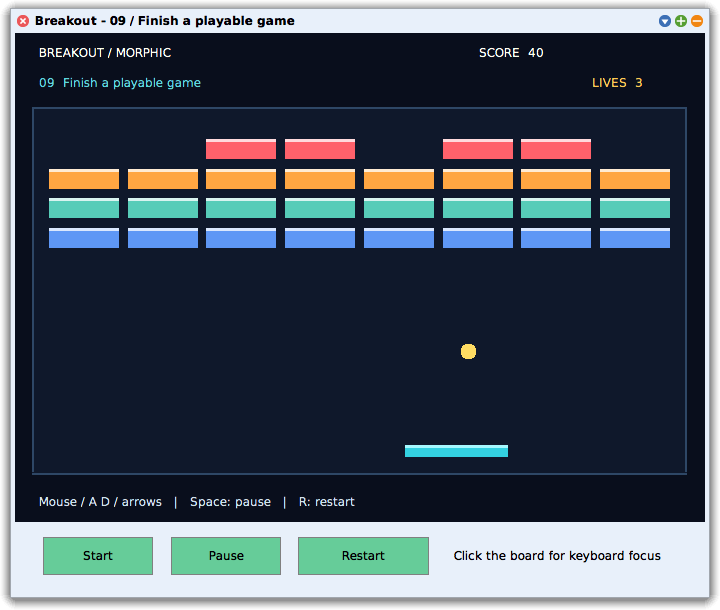
Try it: Play using the mouse, then click the board and try A/D, arrows, Space, and R. Repeatedly Start and Pause, then close the window while the ball is moving.
Watch for: Calling stopStepping after owner removal can miss the original world registration. Keep the registration world until pause removes it, then clear that reference.
Play, pause and restart
- Start: launch a ready serve or resume a pause
- Mouse: move over the board to place the paddle
- Click the board: give keyboard focus and launch a ready serve
- A/D or left/right arrows: move the paddle by 28 logical units per keystroke
- Space: start or pause; R: restart
- Pause: freeze the current serve; Restart: reset score, lives, bricks, and position
- Close: remove the native window, keyboard focus, and Morphic stepping registration
Click the board before using keyboard controls. Start launches a ready serve or resumes a pause. When a life is lost, start the next serve. Restart restores the original score, lives, bricks and positions. Closing the window unregisters stepping and releases keyboard focus.
Recognize the game states
These native captures exercise explicit game states using controlled test setup. They are not evidence of a complete human-played match.
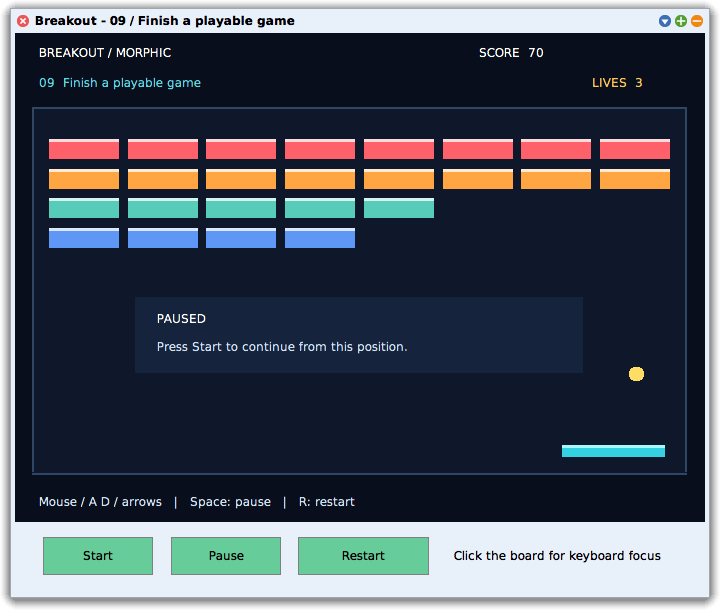
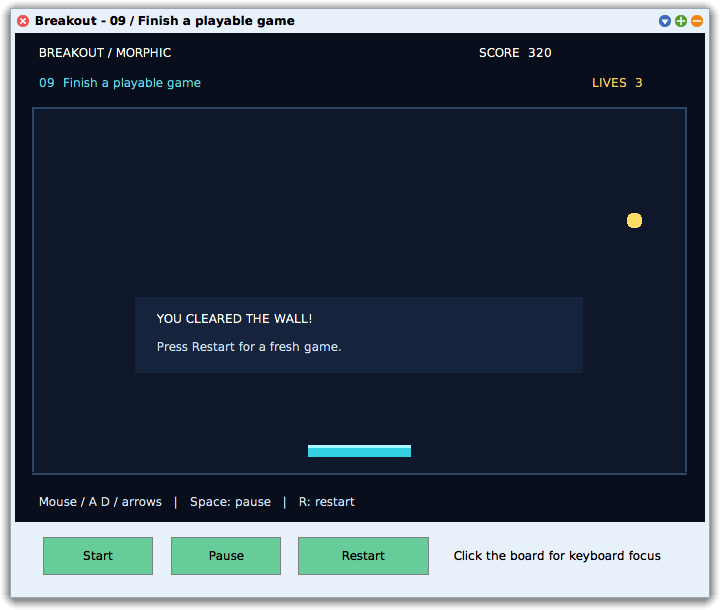
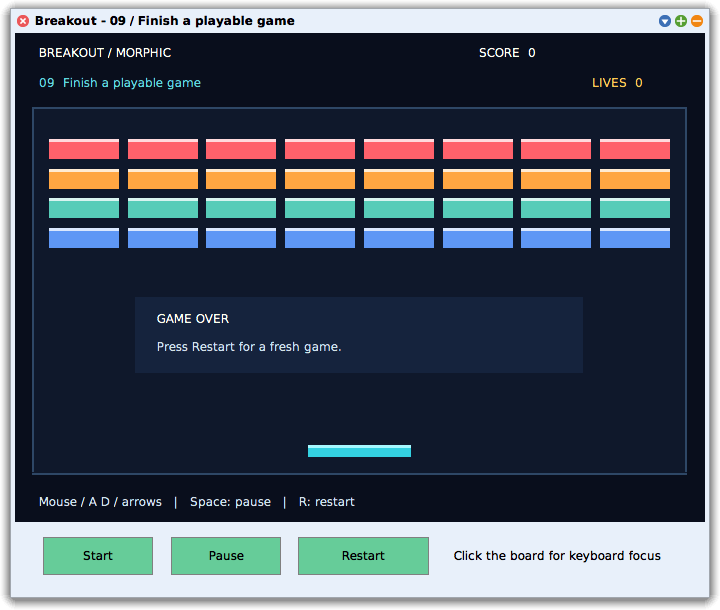
Understand the model and its limits
- Graphics are drawn by Squeak Canvas. The PNGs and GIF frames are native SystemWindow imageForm renders.
- The GIF advances the real game simulation with scripted paddle steering. It is a native-rendered demonstration, not a recording of a person moving a mouse.
- Physics use a fixed 20 ms simulation tick, adaptive small substeps, and a square ball hitbox for brick collisions. This deliberately simple corner approximation is explained in Part 6.
- Resizing scales logical geometry independently along X and Y. Text keeps the native font size; use the default 700 by 590 window for the best layout.
- The game is silent and uses no external images, packages, audio player, background Process, or network.
The render method draws the current state. The simulation method updates it. Keeping these apart makes collisions testable without waiting for real time and prevents a repaint from accidentally moving the ball.
The step interval is a scheduling request, not a hard real-time guarantee. The game advances one fixed simulation interval per tick. Collision substeps limit travel distance; the simplified square hitbox is useful teaching code, not a general physics engine.
Keep the game reproducible
LearnSqueakBreakoutTest suite runAll 40 main SUnit tests and 16 independent scenarios passed. The included SUnit suite checks walls, paddle aim, brick scoring, high-speed movement, life loss, win/loss states, restart, keyboard input, resize-coordinate conversion and actual native close cleanup. Each independent checkpoint was filed in and rendered in a fresh baseline image, and its published Workspace checks were evaluated.
Read the finished game source
"LearnSqueak Breakout, checkpoint 09: Finish a playable game.
Standalone: file in this entire file, then evaluate LearnSqueakBreakout open.
Verified with Squeak 6.1 (23976, 64-bit). No external packages or sound."

Morph subclass: #LearnSqueakBreakout
    instanceVariableNames: 'ball velocity paddleX running state stepWorld bricks score lives'
    classVariableNames: ''
    poolDictionaries: ''
    category: 'LearnSqueak-Breakout'!

!LearnSqueakBreakout methodsFor: 'initialization'!
initialize
    super initialize.
    self extent: 640@460.
    self color: (Color r: 0.035 g: 0.055 b: 0.11).
    running := false.
    self restart! !

!LearnSqueakBreakout methodsFor: 'state'!
restart
    self pause.
    score := 0.
    lives := 3.
    state := #ready.
    paddleX := 320.0.
    self buildBricks.
    self serve.
    self changed! !

!LearnSqueakBreakout methodsFor: 'state'!
serve
    ball := paddleX @ 368.0.
    velocity := 180.0 @ -270.0.
    self changed! !

!LearnSqueakBreakout methodsFor: 'geometry'!
field
    "All game geometry uses a fixed 640 by 460 logical coordinate system."
    ^ 16@70 corner: 624@416! !

!LearnSqueakBreakout methodsFor: 'geometry'!
paddleBounds
    ^ (paddleX - 48) @ 388 extent: 96@12! !

!LearnSqueakBreakout methodsFor: 'geometry'!
ballRadius
    ^ 7.0! !

!LearnSqueakBreakout methodsFor: 'geometry'!
viewPoint: aPoint
    "Map logical coordinates to the Morph's current position and size."
    ^ self position +
        ((aPoint x * self width / 640) @ (aPoint y * self height / 460))! !

!LearnSqueakBreakout methodsFor: 'geometry'!
viewRectangle: aRectangle
    ^ (self viewPoint: aRectangle origin)
        corner: (self viewPoint: aRectangle corner)! !

!LearnSqueakBreakout methodsFor: 'geometry'!
logicalXFor: aPoint
    ^ (aPoint x - self left) * 640 / (self width max: 1)! !

!LearnSqueakBreakout methodsFor: 'drawing'!
ink
    ^ Color r: 0.82 g: 0.88 b: 0.97! !

!LearnSqueakBreakout methodsFor: 'drawing'!
drawText: aString at: aPoint color: aColor on: aCanvas
    aCanvas drawString: aString
        at: (self viewPoint: aPoint) rounded
        font: (TextStyle defaultFont)
        color: aColor! !

!LearnSqueakBreakout methodsFor: 'drawing'!
drawOn: aCanvas
    super drawOn: aCanvas.
    aCanvas fillRectangle: (self viewRectangle: self field)
        color: (Color r: 0.06 g: 0.095 b: 0.17).
    aCanvas frameRectangle: (self viewRectangle: self field)
        width: 2 color: (Color r: 0.18 g: 0.28 b: 0.40).
    self drawText: 'BREAKOUT / MORPHIC' at: 22@12
        color: Color white on: aCanvas.
    self drawText: '09  Finish a playable game' at: 22@40
        color: (Color r: 0.37 g: 0.84 b: 0.91) on: aCanvas.
    self drawPaddleAndBallOn: aCanvas.
    self drawBricksOn: aCanvas.
    self drawScoreOn: aCanvas.
    self drawStatusOn: aCanvas.
    self drawText: 'Mouse / A D / arrows   |   Space: pause   |   R: restart'
        at: 22@435 color: self ink on: aCanvas! !

!LearnSqueakBreakout methodsFor: 'drawing'!
drawPaddleAndBallOn: aCanvas
    aCanvas fillRectangle: (self viewRectangle: self paddleBounds)
        color: (Color r: 0.20 g: 0.82 b: 0.88).
    aCanvas fillRectangle: (self viewRectangle:
        (self paddleBounds origin extent: 96@3))
        color: (Color r: 0.65 g: 0.97 b: 1.0).
    state = #gameOver ifTrue: [^ self].
    aCanvas fillOval: (self viewRectangle:
        (Rectangle center: ball extent: (self ballRadius * 2) asPoint))
        color: (Color r: 1.0 g: 0.86 b: 0.39)! !

!LearnSqueakBreakout methodsFor: 'input'!
movePaddleTo: anX
    paddleX := (anX max: self field left + 48)
        min: self field right - 48.
    state = #ready ifTrue: [ball := paddleX @ 368.0].
    self changed! !

!LearnSqueakBreakout methodsFor: 'input'!
handlesMouseDown: anEvent
    ^ true! !

!LearnSqueakBreakout methodsFor: 'input'!
wantsEveryMouseMove
    ^ true! !

!LearnSqueakBreakout methodsFor: 'input'!
mouseMove: anEvent
    self movePaddleTo: (self logicalXFor: anEvent position)! !

!LearnSqueakBreakout methodsFor: 'input'!
mouseDown: anEvent
    anEvent hand newKeyboardFocus: self.
    self movePaddleTo: (self logicalXFor: anEvent position).
    state = #ready ifTrue: [self start]! !

!LearnSqueakBreakout methodsFor: 'control'!
pause
    running := false.
    self stopStepping.
    stepWorld ifNotNil: [stepWorld stopStepping: self].
    stepWorld := nil.
    self changed! !

!LearnSqueakBreakout methodsFor: 'control'!
windowIsClosing
    "The window owns the game's lifetime. Never fork an animation Process."
    self activeHand keyboardFocus == self ifTrue: [
        self activeHand newKeyboardFocus: nil].
    self pause! !

!LearnSqueakBreakout methodsFor: 'control'!
delete
    self windowIsClosing.
    super delete! !

!LearnSqueakBreakout methodsFor: 'control'!
wantsSteps
    ^ running = true! !

!LearnSqueakBreakout methodsFor: 'control'!
start
    (#(won gameOver) includes: state) ifTrue: [^ self].
    state := #playing.
    running := true.
    stepWorld := self world.
    self startStepping.
    self changed! !

!LearnSqueakBreakout methodsFor: 'stepping'!
stepTime
    ^ 20! !

!LearnSqueakBreakout methodsFor: 'stepping'!
step
    "One deterministic 20 ms simulation tick, requested by Morphic."
    running ifFalse: [^ self].
    self advanceBy: self stepTime / 1000.0! !

!LearnSqueakBreakout methodsFor: 'stepping'!
advanceBy: seconds
    "Small moves prevent crossing a wall, paddle, or brick in one jump.
    Bound external requests to 50 ms; ordinary steps use 20 ms."
    | dt count slice |
    running ifFalse: [^ self].
    dt := (seconds max: 0.0) min: 0.05.
    dt = 0 ifTrue: [^ self].
    count := (((velocity x abs max: velocity y abs) * dt /
        (self ballRadius / 2)) ceiling) max: 1.
    slice := dt / count.
    1 to: count do: [:ignored |
        running ifTrue: [self moveBy: slice]].
    self changed! !

!LearnSqueakBreakout methodsFor: 'physics'!
moveBy: dt
    | oldX oldY |
    oldX := ball x.
    ball := (ball x + (velocity x * dt)) @ ball y.
    self bounceSideWalls.
    self collideBrickOn: #x from: oldX.
    running ifFalse: [^ self].
    oldY := ball y.
    ball := ball x @ (ball y + (velocity y * dt)).
    self bounceTop.
    self collideBrickOn: #y from: oldY.
    running ifFalse: [^ self].
    self bouncePaddleFrom: oldY.
    self checkMiss! !

!LearnSqueakBreakout methodsFor: 'physics'!
bounceSideWalls
    | low high |
    low := self field left + self ballRadius.
    high := self field right - self ballRadius.
    ball x < low ifTrue: [
        ball := low @ ball y.
        velocity := velocity x abs @ velocity y].
    ball x > high ifTrue: [
        ball := high @ ball y.
        velocity := velocity x abs negated @ velocity y]! !

!LearnSqueakBreakout methodsFor: 'physics'!
bounceTop
    ball y < (self field top + self ballRadius) ifTrue: [
        ball := ball x @ (self field top + self ballRadius).
        velocity := velocity x @ velocity y abs]! !

!LearnSqueakBreakout methodsFor: 'drawing'!
drawStatusOn: aCanvas
    | message |
    message := self statusText.
    message isEmpty ifFalse: [
        aCanvas fillRectangle: (self viewRectangle: (112@249 extent: 416@72))
            color: (Color r: 0.085 g: 0.14 b: 0.24).
        self drawText: message at: 132@262 color: Color white on: aCanvas.
        self drawText: self statusHint at: 132@289 color: self ink on: aCanvas]! !

!LearnSqueakBreakout methodsFor: 'drawing'!
statusText
    state = #won ifTrue: [^ 'YOU CLEARED THE WALL!!'].
    state = #gameOver ifTrue: [^ 'GAME OVER'].
    state = #ready ifTrue: [^ 'READY TO SERVE'].
    running ifFalse: [^ 'PAUSED'].
    ^ ''! !

!LearnSqueakBreakout methodsFor: 'drawing'!
statusHint
    (#(won gameOver) includes: state) ifTrue: [^ 'Press Restart for a fresh game.'].
    state = #ready ifTrue: [^ 'Move the paddle, then click the board or Start.'].
    ^ 'Press Start to continue from this position.'! !

!LearnSqueakBreakout methodsFor: 'physics'!
bouncePaddleFrom: oldY
    | paddle offset |
    velocity y <= 0 ifTrue: [^ self].
    paddle := self paddleBounds.
    ((oldY + self ballRadius <= paddle top)
        and: [ball y + self ballRadius >= paddle top]
        and: [ball x + self ballRadius >= paddle left]
        and: [ball x - self ballRadius <= paddle right]) ifTrue: [
        ball := ball x @ (paddle top - self ballRadius).
        offset := (((ball x - paddleX) / 48) max: -1.0) min: 1.0.
        velocity := (offset * 280.0) @ -290.0]! !

!LearnSqueakBreakout methodsFor: 'physics'!
checkMiss
    ball y - self ballRadius > self field bottom ifTrue: [
        self pause.
        lives := lives - 1.
        lives = 0
            ifTrue: [state := #gameOver]
            ifFalse: [state := #ready. self serve]]! !

!LearnSqueakBreakout methodsFor: 'bricks'!
buildBricks
    bricks := OrderedCollection new.
    0 to: 3 do: [:row |
        0 to: 7 do: [:column |
            bricks add: ((32 + (column * 73)) @ (100 + (row * 28))
                extent: 65@19)]]! !

!LearnSqueakBreakout methodsFor: 'drawing'!
brickColor: aBrick
    | row |
    row := ((aBrick top - 100) / 28) rounded + 1.
    ^ {Color r: 1.0 g: 0.38 b: 0.42.
        Color r: 1.0 g: 0.65 b: 0.26.
        Color r: 0.34 g: 0.80 b: 0.72.
        Color r: 0.37 g: 0.59 b: 0.96} at: row! !

!LearnSqueakBreakout methodsFor: 'drawing'!
drawBricksOn: aCanvas
    bricks do: [:brick |
        aCanvas fillRectangle: (self viewRectangle: brick)
            color: (self brickColor: brick).
        aCanvas fillRectangle: (self viewRectangle: (brick origin extent: brick width@3))
            color: (self brickColor: brick) muchLighter]! !

!LearnSqueakBreakout methodsFor: 'bricks'!
brickAtBallOn: axis from: previous
    "The square hitbox must cross a face while moving toward it.
    Strict transverse overlap excludes a neighboring brick's tangent edge."
    | current movement radius |
    current := axis = #x ifTrue: [ball x] ifFalse: [ball y].
    movement := current - previous.
    movement = 0 ifTrue: [^ nil].
    radius := self ballRadius.
    ^ bricks detect: [:brick |
        axis = #x
            ifTrue: [
                (ball y + radius > brick top)
                and: [ball y - radius < brick bottom]
                and: [movement > 0
                    ifTrue: [(previous + radius <= brick left)
                        and: [current + radius >= brick left]]
                    ifFalse: [(previous - radius >= brick right)
                        and: [current - radius <= brick right]]]]
            ifFalse: [
                (ball x + radius > brick left)
                and: [ball x - radius < brick right]
                and: [movement > 0
                    ifTrue: [(previous + radius <= brick top)
                        and: [current + radius >= brick top]]
                    ifFalse: [(previous - radius >= brick bottom)
                        and: [current - radius <= brick bottom]]]]]
        ifNone: [nil]! !

!LearnSqueakBreakout methodsFor: 'bricks'!
collideBrickOn: axis from: previous
    | brick |
    brick := self brickAtBallOn: axis from: previous.
    brick ifNil: [^ self].
    axis = #x
        ifTrue: [
            ball := (velocity x > 0
                ifTrue: [brick left - self ballRadius]
                ifFalse: [brick right + self ballRadius]) @ ball y.
            velocity := velocity x negated @ velocity y]
        ifFalse: [
            ball := ball x @ (velocity y > 0
                ifTrue: [brick top - self ballRadius]
                ifFalse: [brick bottom + self ballRadius]).
            velocity := velocity x @ velocity y negated].
    bricks remove: brick.
    score := score + 10.
    bricks isEmpty ifTrue: [state := #won. self pause]! !

!LearnSqueakBreakout methodsFor: 'drawing'!
drawScoreOn: aCanvas
    self drawText: 'SCORE  ', score printString at: 430@12
        color: Color white on: aCanvas.
    self drawText: 'LIVES  ', lives printString at: 535@40
        color: (Color r: 1.0 g: 0.78 b: 0.34) on: aCanvas! !

!LearnSqueakBreakout methodsFor: 'control'!
togglePause
    running ifTrue: [self pause] ifFalse: [self start]! !

!LearnSqueakBreakout methodsFor: 'input'!
handlesKeyboard: anEvent
    ^ true! !

!LearnSqueakBreakout methodsFor: 'input'!
keyStroke: anEvent
    self handleKey: anEvent keyCharacter! !

!LearnSqueakBreakout methodsFor: 'input'!
handleKey: aCharacter
    | key |
    key := aCharacter asLowercase.
    ((key = $a) or: [aCharacter asciiValue = 28])
        ifTrue: [^ self movePaddleTo: paddleX - 28].
    ((key = $d) or: [aCharacter asciiValue = 29])
        ifTrue: [^ self movePaddleTo: paddleX + 28].
    key = Character space ifTrue: [^ self togglePause].
    key = $r ifTrue: [^ self restart]! !

!LearnSqueakBreakout methodsFor: 'accessing'!
ballPosition
    ^ ball! !

!LearnSqueakBreakout methodsFor: 'accessing'!
ballVelocity
    ^ velocity! !

!LearnSqueakBreakout methodsFor: 'accessing'!
paddleCenter
    ^ paddleX! !

!LearnSqueakBreakout methodsFor: 'accessing'!
score
    ^ score! !

!LearnSqueakBreakout methodsFor: 'accessing'!
lives
    ^ lives! !

!LearnSqueakBreakout methodsFor: 'accessing'!
gameState
    ^ state! !

!LearnSqueakBreakout methodsFor: 'accessing'!
running
    ^ running! !

!LearnSqueakBreakout methodsFor: 'accessing'!
brickCount
    ^ bricks size! !

!LearnSqueakBreakout methodsFor: 'testing'!
ballPosition: aPoint velocity: aVelocity
    "Deterministic examples and tests can arrange a collision without waiting."
    ball := aPoint.
    velocity := aVelocity! !

!LearnSqueakBreakout methodsFor: 'testing'!
bricks: aCollection
    "Copy the test fixture; do not retain a mutable collection supplied by a caller."
    bricks := aCollection asOrderedCollection copy! !

!LearnSqueakBreakout class methodsFor: 'opening'!
button: aLabel target: aTarget action: aSelector
    ^ SimpleButtonMorph new
        label: aLabel;
        target: aTarget;
        actionSelector: aSelector;
        yourself! !

!LearnSqueakBreakout class methodsFor: 'opening'!
open
    | game window |
    game := self new.
    window := SystemWindow new
        model: game;
        setLabel: 'Breakout - 09 / Finish a playable game';
        paneColor: (Color r: 0.91 g: 0.94 b: 0.98);
        yourself.
    window addMorph: game frame: (0@0 corner: 1@0.88).
    window addMorph: (self button: 'Start' target: game action: #start)
        frame: (0.035@0.9 corner: 0.20@0.975).
    window addMorph: (self button: 'Pause' target: game action: #pause)
        frame: (0.22@0.9 corner: 0.385@0.975).
    window addMorph: (self button: 'Restart' target: game action: #restart)
        frame: (0.405@0.9 corner: 0.60@0.975).
    window addMorph: (StringMorph contents: 'Click the board for keyboard focus')
        frame: (0.63@0.92 corner: 0.98@0.97).
    window openInWorld; extent: 700@590.
    ^ window! !
Review Morphic animation · Debug a calculation first · Official Squeak documentation
Put it into practice.
Try an exercise before revealing its hints and tested solution.