Explore Color objects, bounded RGB bytes, native channel controls, numeric interpolation and generated palettes.
8 construction stagesTested source & checkpointsNative screenshots & demos
Before you start
Build a native Squeak application that makes RGB values inspectable. Eight cumulative checkpoints take you from one Color object to a validated model with sliders, isolated channels, captured endpoints and an ordered palette.
Each checkpoint is a complete .st file-in. Install it, accept the displayed Browser methods on their named classes, and execute the exact Workspace block. Every stage runs independently in a clean Squeak 6.1 image. The interface and all calculations are native Smalltalk and Morphic.
Squeak 6.1 and its bundled SUnit; no extra packages or network access
Workspace Do It / Print It, Browser Accept, message sends, Arrays and blocks
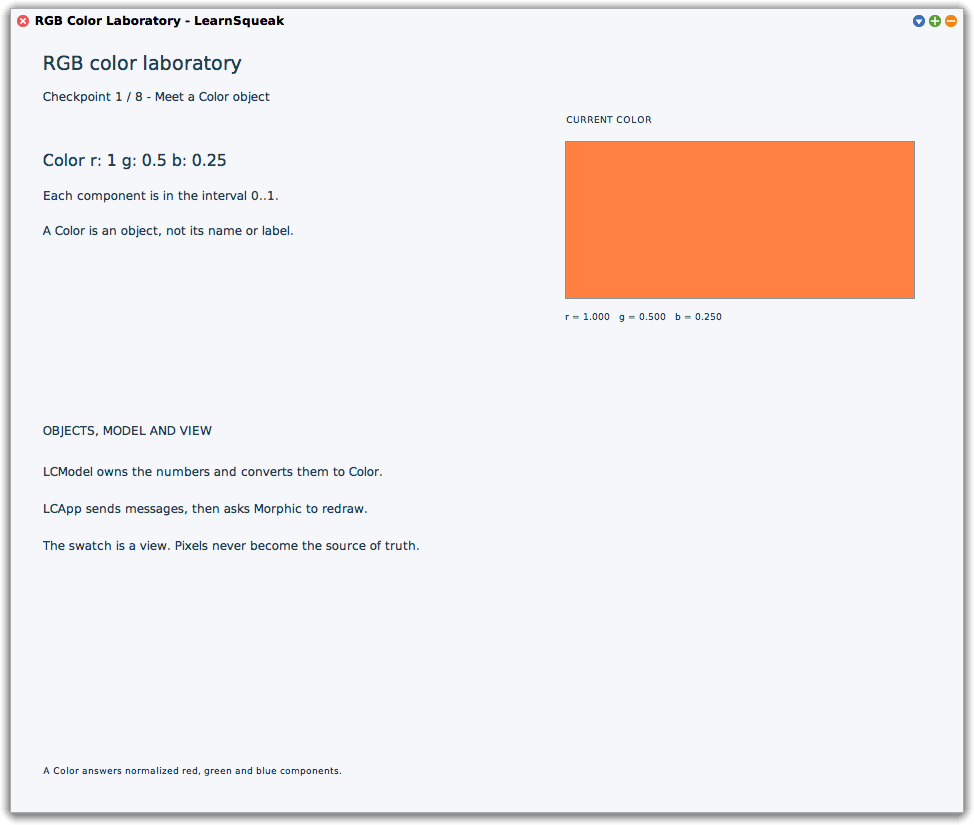
Squeak represents colors with objects. Color r: 1 g: 0.5 b: 0.25 sends one keyword message, r:g:b:, to the Color class. It supplies red, green and blue components in the normalized interval from zero to one. Zero contributes none of that channel; one contributes its maximum. The answer is a Color that Morphic can use directly to paint a rectangle.
The first checkpoint introduces three small classes. LCModel owns a sample Color. LCApp is the Morph that draws the laboratory, and LCWindow supplies a fixed-size SystemWindow for this teaching example. The model's color method answers its Color; the app asks for that object when drawing the swatch. A label such as 'orange' would only be text. The swatch needs a Color object.
Read normalizedText below. Messages red, green and blue ask the Color for its components. printShowingDecimalPlaces: produces a readable String for each number; it does not alter the Color. The supplied image stores finite component values internally, so reading a component back can give a small quantization difference from the number used to construct it. A three-place display also rounds its text. Neither is a reason to use the displayed String as numeric data.
This checkpoint intentionally has no editing controls. First establish the relationship between an object, its queries and a view. In a Workspace, Print It on (Color r: 1 g: 0.5 b: 0.25) class. The result is Color. Then Print It on (Color r: 1 g: 0.5 b: 0.25) green to examine the stored normalized component rather than its rounded label.
LCModel · instance-side supporting method, included in the checkpoint
color
 ^ sample
Where to run this
System Browser → LCModel → instance side → tutorial. Accept this complete method after filing in the matching checkpoint.
LCModel · instance-side method
normalizedText
 | value |
 value := self color.
 ^ 'r = ', (value red printShowingDecimalPlaces: 3), '   g = ',
  (value green printShowingDecimalPlaces: 3), '   b = ',
  (value blue printShowingDecimalPlaces: 3)
File List → fileIn color-lab-01.st. Then Workspace → select the whole block → Do It.
Workspace · run after installing this checkpoint
| app |
app := LCApp open.
app
Watch for: Color r:g:b: expects normalized components. The familiar 0..255 byte convention is a separate representation introduced next.
Try it: Print It on Color black red and Color white blue. The answers are 0.0 and 1.0.
Expected result
A warm orange swatch and normalized r, g and b labels. The left side shows the Color constructor.
Actual native Squeak 6.1 window from checkpoint 1, after the exact Workspace block above.
02 · Store RGB as bounded integers
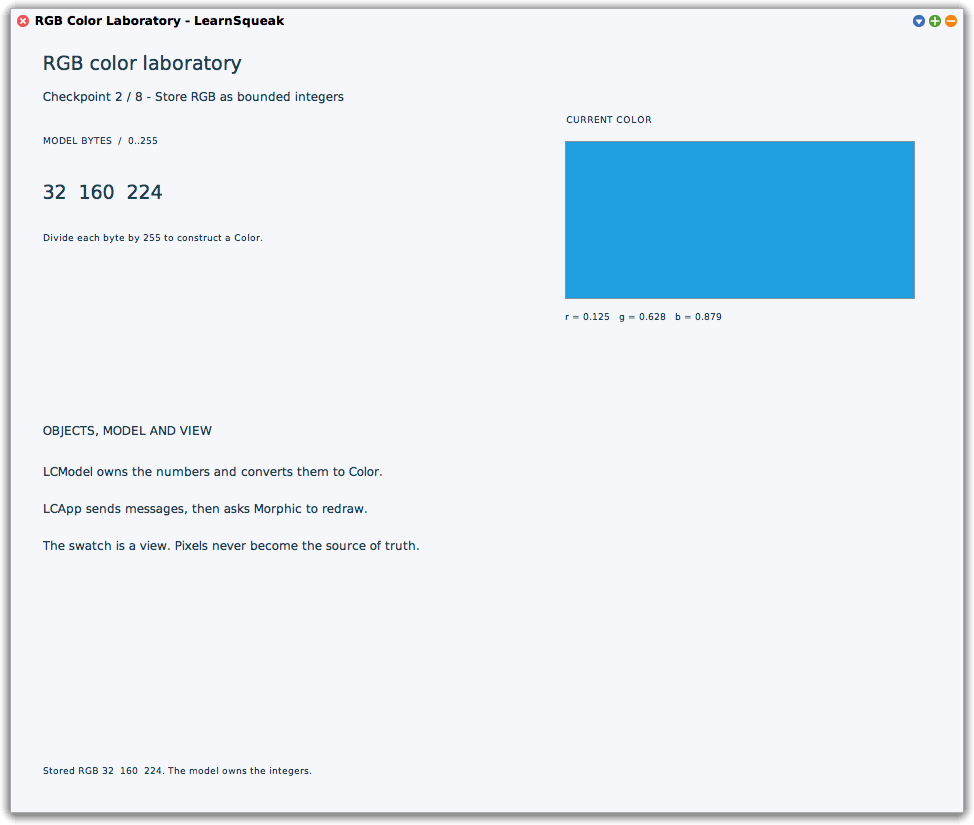
Many tools describe RGB with three integers from 0 through 255. That gives 256 possible values per channel. Our model now stores these integers in an Array called rgb. The order is always red, green, blue. The model begins with #(64 128 224); the run block changes it to #(32 160 224), a blue-cyan example.
colorFromRGB: constructs a Color by dividing each integer by 255. Squeak's Integer division may produce exact Fractions, which Color then converts into its own finite internal representation. The authoritative editable values remain the integer Array. Reading Color components back and multiplying by 255 is unnecessary for this model and can introduce rounding concerns.
setRGB: is the single gate for replacing the complete color. validRGB: first requires an Array of exactly three values. Each must be an Integer between zero and 255, inclusive. Validation finishes before rgb is assigned, so a failure cannot partly update red while keeping old green and blue. The method returns true on success or false on failure. message holds the explanation for the view.
The successful assignment copies its input. The rgb query also returns a copy. Those two copies protect the model from accidental outside changes: a caller cannot mutate an Array it supplied, or an Array it retrieved, and bypass validation. Color conversion and validation can therefore be tested without opening a window. This is a useful model/view boundary in any small application, not just a color tool.
LCModel · instance-side supporting method, included in the checkpoint
Actual native Squeak 6.1 window from checkpoint 2, after the exact Workspace block above.
03 · Connect native channel controls
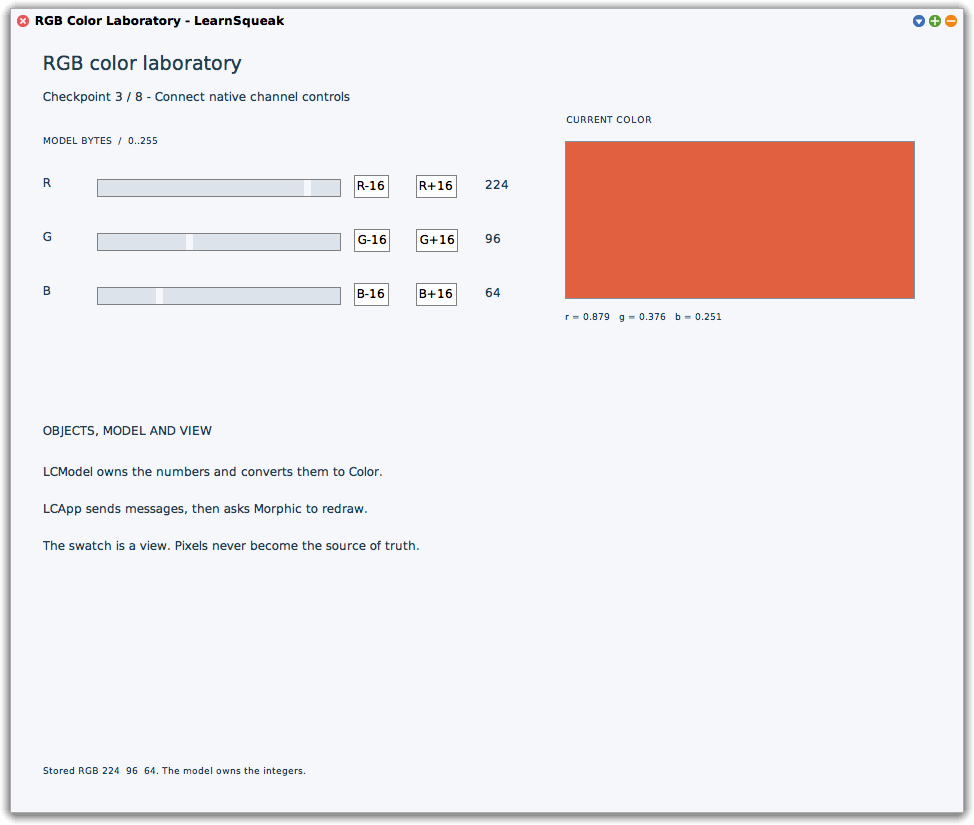
The next layer connects people to the model. Each channel gains a native SimpleSliderMorph and two native SimpleButtonMorph buttons. The slider is configured with minimum zero, maximum 255, a target, an action selector and an Array of fixed arguments. When its value changes, it sends changeChannel:value: to the app. The fixed channel index comes first; the slider appends the current numeric value.
A pointer position need not correspond to an Integer. changeChannel:value: rounds the incoming slider value once, asks the model to store that channel, and refreshes the view. The model still enforces its strict integer range. The +/-16 buttons use adjustChannel:by:, which deliberately clamps at zero and 255. Repeated clicks therefore stop at the boundary instead of wrapping around or creating invalid values.
A refresh travels in the opposite direction: it reads model rgb and calls adjustToValue: on each slider. In this Squeak 6.1 class, adjustToValue: moves the control without sending its action back to the target. setScaledValue:, by contrast, does invoke the target callback. Knowing that difference prevents a feedback loop where refreshing a control changes the model and requests another refresh.
The app is now a controller as well as a view. It translates UI details such as a rounded pointer position into a model message. LCModel knows nothing about buttons, slider widths or screen coordinates. The exact run block below exercises the same app messages used by the sliders and leaves a warm red sample with bytes 224, 96, 64.
LCModel · instance-side supporting method, included in the checkpoint
Actual native Squeak 6.1 window from checkpoint 3, after the exact Workspace block above.
04 · Read numbers beside the swatch
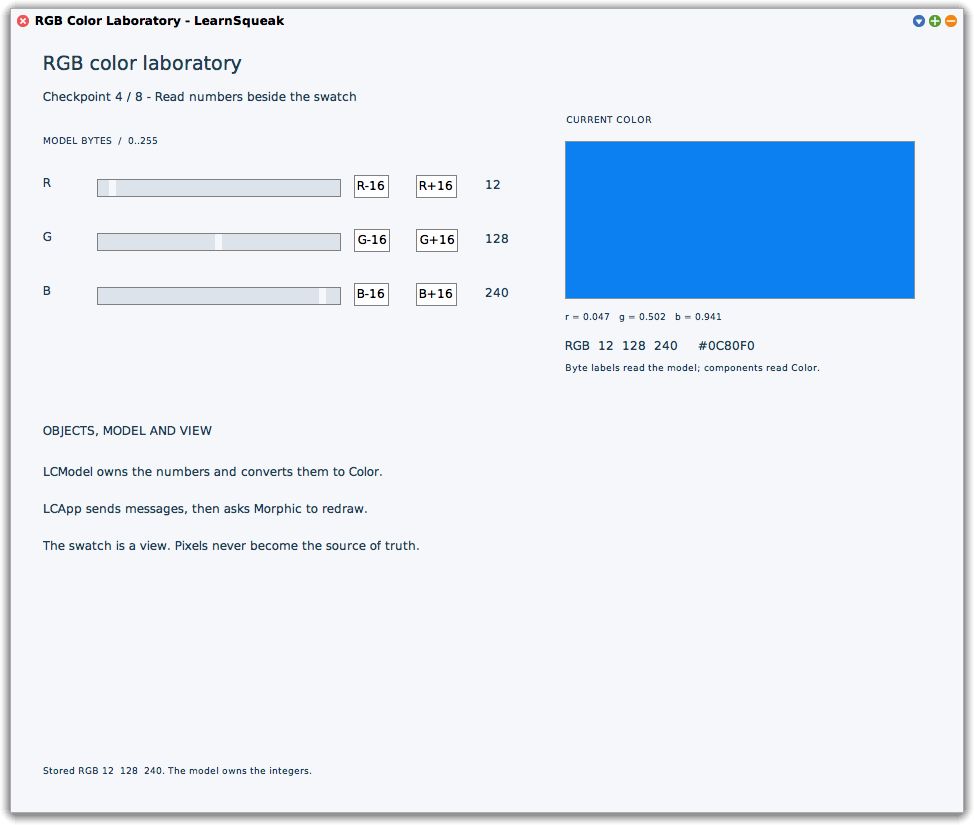
A swatch is useful for seeing a color, but it is a poor way to recover exact values. This checkpoint adds the authoritative RGB byte triplet and a six-digit hexadecimal label beneath the normalized component display. Both byte representations come from the model. You can now compare what the model stores with what the Color object reports.
Hexadecimal uses sixteen digits: 0 through 9 followed by A through F. One byte needs two hexadecimal digits. Integer division by 16 gives the high digit; subtracting that high digit times 16 leaves the low digit. The lookup String is one-based because Smalltalk collections are one-based, so each digit value has one added before at:. The leading # belongs to the familiar label format; it is not part of the Color object itself.
The helper hexFor: rounds channel values only while formatting. Current RGB values are already Integers, but later interpolation can produce fractional byte values. That rounding is a display policy, and it must not replace the unrounded values used for subsequent calculations. For example, a midpoint channel of 127.5 formats as byte 128 while the interpolation model retains 127.5.
The native drawing method swatch:at:extent:on: fills a rectangle using the Color it receives. It adds a neutral outline so black, white and light colors keep a visible boundary. The text is outside the swatch, so its readability does not depend on the chosen color. The run block uses #(12 128 240): hexadecimal 0C, 80 and F0, combined as #0C80F0.
LCApp · instance-side supporting method, included in the checkpoint
Watch for: A hexadecimal String is an output format. It does not replace the numeric model, and the displayed rounded channels are not used for later interpolation.
Try it: Set RGB to #(0 15 255), refresh, and predict the label before looking: #000FFF.
Expected result
The swatch shows RGB 12 128 240 and #0C80F0, with normalized components in a separate line.
Actual native Squeak 6.1 window from checkpoint 4, after the exact Workspace block above.
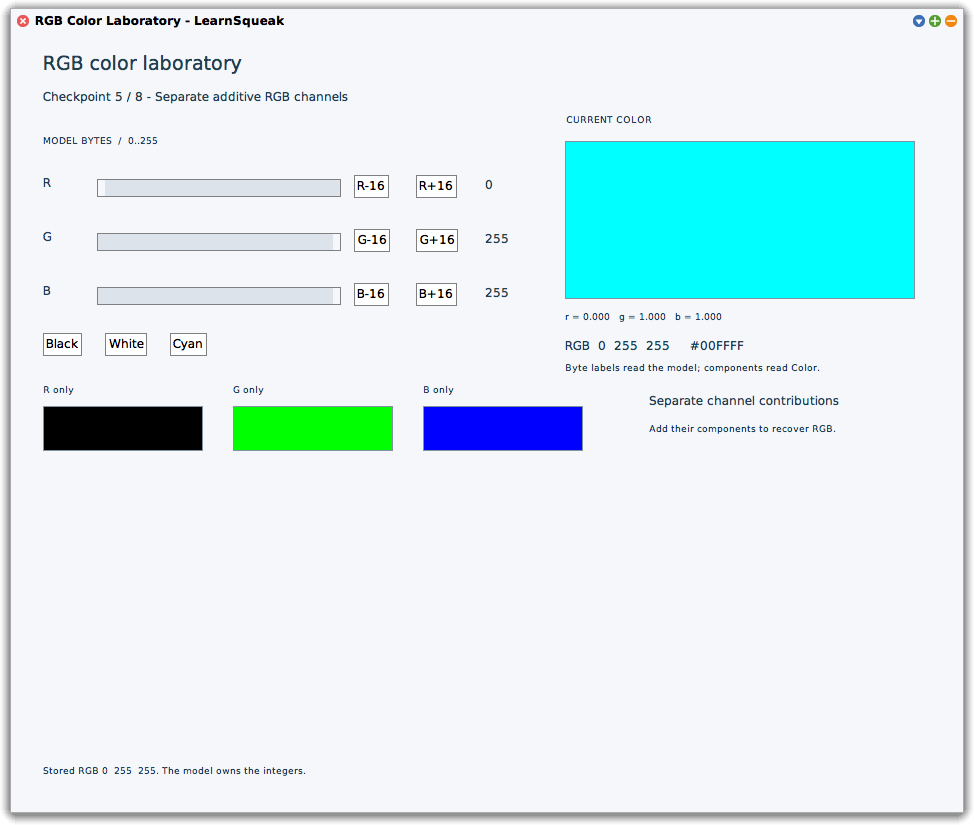
05 · Separate additive RGB channels
RGB combines channel contributions. To inspect the red contribution, preserve the current red byte and set green and blue to zero. component: performs that operation on a fresh three-element Array, then converts it to a Color. The original rgb Array is never edited. The green and blue contributions work the same way.
The three new strips show R only, G only and B only. Adding their component triplets reconstructs the current RGB triplet: (r,0,0) + (0,g,0) + (0,0,b) = (r,g,b). The code constructs each strip independently; it does not rely on transparent overlapping rectangles or a paint program's compositing rule. Because the three contributions occupy different channels, recombining them does not overflow any component.
The Black, White and Cyan buttons provide useful experiments. Black is #(0 0 0), so all three strips are black. White is #(255 255 255), so the strips are full red, green and blue while the combined swatch is white. Cyan is #(0 255 255): red contributes nothing, and green plus blue produce the cyan swatch. These are additive RGB channel examples, not rules for mixing ink or paint.
Use the channel controls while watching the strips. Changing red should affect only R only and the combined current-color swatch. The other two isolated strips remain unchanged. This gives a concrete way to inspect the dependency structure of a view: each strip queries one model channel, while the combined swatch queries all three. Keep the physical interpretation modest; this laboratory works with RGB numbers and ordinary Color rendering.
LCApp · instance-side supporting method, included in the checkpoint
preset: values
 model setRGB: values. self refresh
Where to run this
System Browser → LCModel → instance side → tutorial. Accept this complete method after filing in the matching checkpoint.
Watch for: Adding arbitrary RGB colors can overflow their channel range. This exercise recombines disjoint R, G and B contributions, each within bounds.
Try it: Choose White, then press R-16 several times. Only the red-only strip dims; the combined swatch shifts toward cyan.
Expected result
Cyan is selected. The red-only strip is black; the green-only and blue-only strips are fully active. The current swatch is cyan.
Actual native Squeak 6.1 window from checkpoint 5, after the exact Workspace block above.
06 · Blend between two captured colors
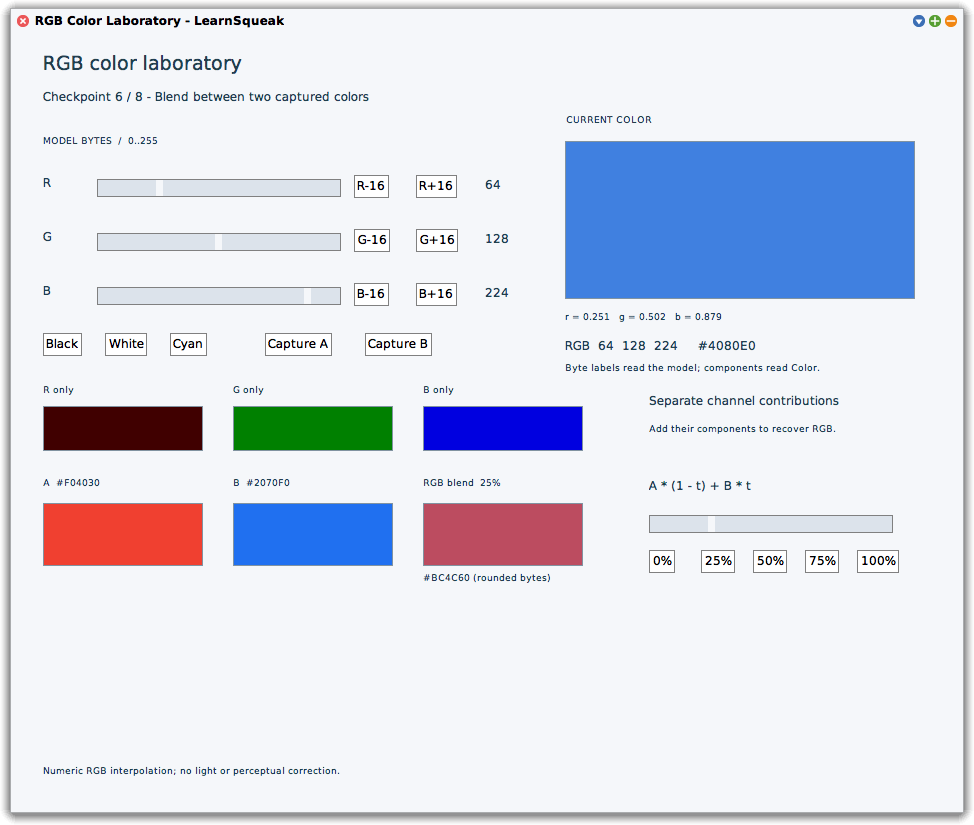
Capture A and Capture B copy the current RGB triplet into two independent endpoints. Subsequent slider edits do not change either captured endpoint. This separates the current editable color from the two colors used in an experiment. The default A is #(240 64 48), a warm red, and B is #(32 112 240), a blue.
For a fraction t between zero and one, blendRGBAt: computes A * (1 - t) + B * t independently for each channel. At t = 0 the answer is exactly A; at t = 1 it is exactly B. At t = 1/2 each channel is the arithmetic mean. The result is an Array of numbers, which may include Fractions. blend converts that result to a Color only when the view needs it.
The percent: setter accepts an Integer from 0 through 100. The app's native slider rounds its numeric callback, and the percentage buttons provide exact repeatable samples. Dividing percent by 100 converts that user-facing percentage into the fraction expected by blendRGBAt:. The helper assumes a valid fraction supplied by these validated callers; it is not a general extrapolation API.
This is numeric interpolation of RGB component values. It is not a simulation of physically mixed light, a gamma-correct blend, or a perceptually uniform color path. Equal steps in t do not promise equal changes in perceived brightness or color difference. Keeping those limits explicit makes the arithmetic both useful and honest. At 25%, the default endpoints yield #(188 76 96), shown as #BC4C60. The current-color swatch remains independently editable.
LCModel · instance-side supporting method, included in the checkpoint
capture: name
 (#(a b) includes: name) ifFalse: [^ false].
 name = #a ifTrue: [endpointA := rgb copy] ifFalse: [endpointB := rgb copy].
 message := 'Captured current RGB as endpoint ', name asString asUppercase, '.'.
 ^ true
LCModel · instance-side supporting method, included in the checkpoint
percent: value
 (value isInteger and: [value between: 0 and: 100]) ifFalse: [^ false].
 percent := value. message := 'Numeric RGB interpolation; no light or perceptual correction.'.
 ^ true
LCModel · instance-side supporting method, included in the checkpoint
Watch for: This formula interpolates the numbers passed to Color. It does not claim linear physical intensity or uniform perception.
Try it: Choose Black and Capture A, then White and Capture B. Compare 0%, 50% and 100%. The middle byte-space values are 127.5, not a rounded model byte 128.
Expected result
A and B appear beside a 25% RGB blend with #BC4C60. The slider and percentage buttons select positions along the same numeric path.
Actual native Squeak 6.1 window from checkpoint 6, after the exact Workspace block above.
07 · Generate an ordered palette
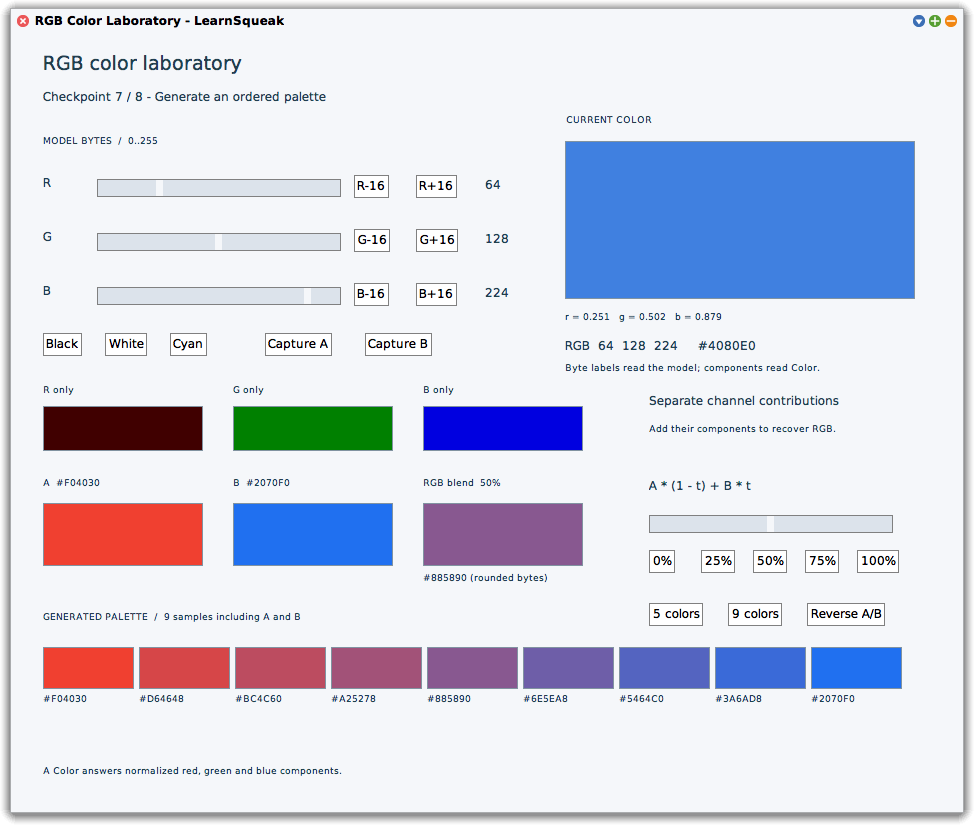
A palette is a collection of samples. For n colors including both endpoints, the fractions are 0/(n-1), 1/(n-1), and so on through (n-1)/(n-1). Dividing by n would omit B. The model permits two through nine colors, so n-1 is never zero and the native teaching layout remains readable.
paletteRGB collects one unrounded RGB triplet per fraction. palette then maps those triplets to Color objects. This is a small example of a reusable data pipeline: generate sample positions, interpolate numeric values, convert to a rendering representation. The list of hex labels is produced from the same triplets, rounding only for display. No screen pixels are sampled to make the palette.
The 5 colors and 9 colors buttons change how many samples are generated. Each palette is computed from the captured endpoints; changing the current RGB controls has no effect until Capture A or Capture B is pressed. Moving the blend percentage also leaves the palette alone because its samples cover the full interval. These deliberately separate dependencies make the tool easier to reason about and test.
Reverse A/B swaps the endpoints. The generated list reverses its order, while retaining the same samples. Reversing twice restores the original experiment. If A and B are identical, all samples are identical, which is a valid palette rather than a special failure. The run block chooses nine colors, making the intermediate steps easier to inspect. You can also Inspect It on app model paletteRGB to study the exact numeric arrays behind the colored tiles.
LCModel · instance-side supporting method, included in the checkpoint
Watch for: Use n - 1 as the divisor when n samples include both endpoints. Validate n before generating the interval.
Try it: Click Reverse A/B twice. The palette first reverses, then returns exactly to its original order. Set A and B to the same color to test the constant case.
Expected result
Nine ordered color tiles run from the default red A to blue B. Each has a six-digit hex label. Both endpoints are included.
Actual native Squeak 6.1 window from checkpoint 7, after the exact Workspace block above.
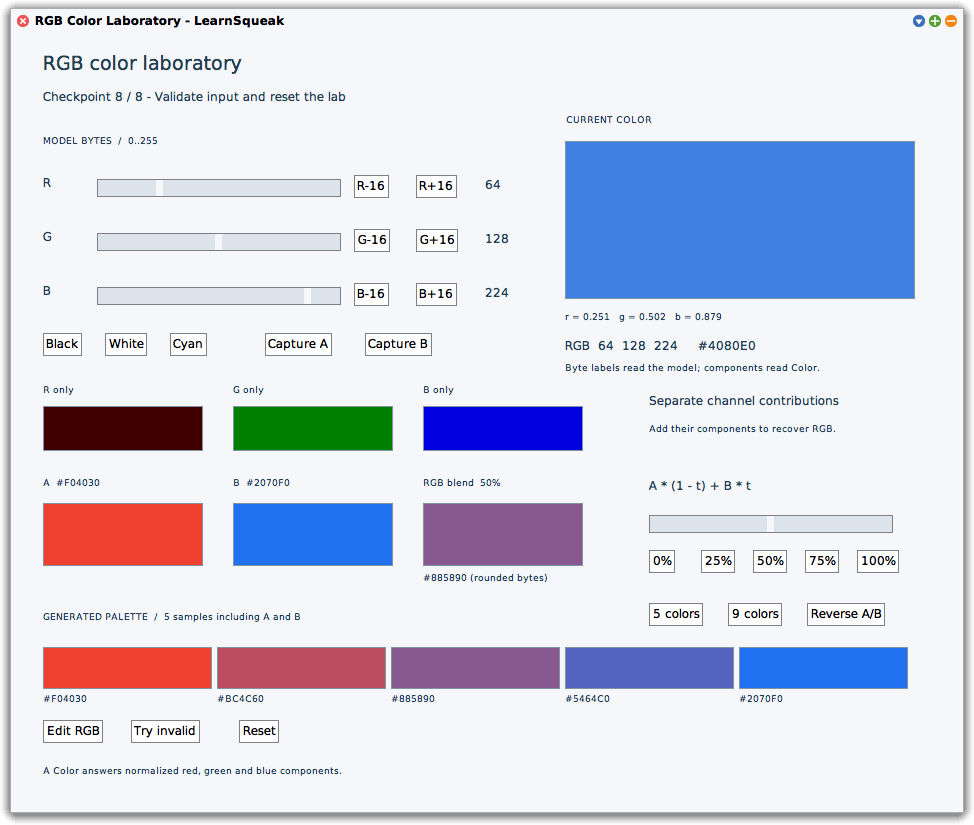
08 · Validate input and reset the lab
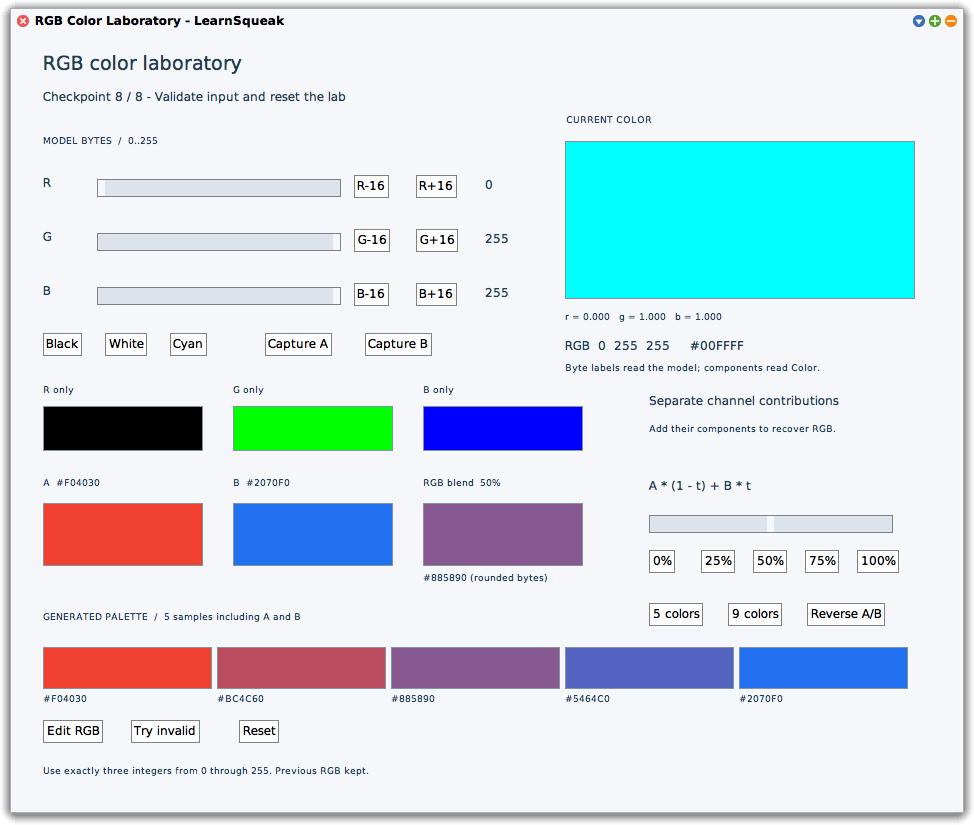
The final checkpoint adds Edit RGB, Try invalid and Reset. Edit RGB opens a native text request with the current byte values. The accepted format is three unsigned whole-number tokens separated by whitespace, each at most three digits and in the range zero through 255. Leading zeros are allowed. Fractions, signs, decimal points, exponent notation, commas and Smalltalk expressions are rejected.
setRGBText: is a parser, not an evaluator. It splits the text at whitespace, validates every character as an ASCII digit, limits each token's length, and only then converts the tokens to numbers. The final setRGB: call applies the same numeric validation used by the sliders and presets. This order makes invalid input atomic: none of the three channels changes unless the entire request is valid. Cancelling the request also preserves the previous color.
Try invalid supplies '12 99 300' directly to the parser. It makes a rejection reproducible without automating a modal dialog: blue exceeds 255, so the previous RGB remains and the status line explains the problem. The run block first chooses cyan, then makes that invalid request. Cyan must survive unchanged. The message is allowed to change because it describes the rejected operation; the numerical experiment must not.
Reset restores all related state together: current RGB #(64 128 224), default A and B, 50% interpolation and a five-color palette. Refresh then synchronizes every native slider from the model. Repeated Reset clicks have the same result. Closing the SystemWindow releases the app's window reference; reopening the same app preserves its model. The tool has no scheduled activity, so it needs no background loop or stop button.
LCModel · instance-side supporting method, included in the checkpoint
Watch for: Never pass user-entered RGB text to Compiler evaluate:. Parsing three bounded integers is the full input contract.
Try it: Use Edit RGB to enter 12 34 56, then try 12 34 256. The second edit must leave 12 34 56 unchanged. Press Reset twice.
Expected result
The current swatch remains cyan (0 255 255). The status line rejects 300 and says the previous RGB was kept. Reset restores the complete default experiment.
Actual native Squeak 6.1 window from checkpoint 8, after the exact Workspace block above.
Watch the workflow
All eight checkpoint PNGs and all GIF frames are genuine SystemWindow imageForm renders in native Squeak 6.1 build 23976. Each checkpoint capture recompiles every displayed Browser method and evaluates its exact Workspace run block. The GIF is a scripted native execution using real SimpleButtonMorph mouse events and SimpleSliderMorph setScaledValue: callbacks; it does not pretend to record a person dragging. Only frame encoding and timing are applied. Modal Edit RGB typing is not automated.
NATIVE SQUEAK CAPTURE
Scripted native workflow: choose and adjust RGB, capture A and B, sample the numeric blend, generate nine colors, reverse the endpoints, reject an invalid edit, then Reset. Buttons receive native mouse events; slider changes use the real slider target callback.
Practice with tested solutions
1. Compute a channel-wise complement
Add complementRGB to LCModel. Answer a new RGB Array by subtracting each current byte from 255. Keep the model unchanged. This is a channel-wise numerical complement, not a claim about a unique artistic opposite or perceptually opposite color.
Hint
Use collect: on rgb; do not write into rgb. Applying the complement twice should recover the original values.
Show a tested solution
System Browser → LCModel → instance side. Accept the complete method after installing color-lab-final.st.
| model |
model := LCModel new.
{model complementRGB. model rgb}
#(#(191 127 31) #(64 128 224))
The result is a fresh Array. The included tests check both boundaries and the double-complement identity for all 256 equal-channel byte values.
The supplied LCExerciseTest suite executes these examples and boundary cases in native Squeak 6.1.
2. Choose the nearest palette sample numerically
Add nearestPaletteIndexTo: to LCModel. Accept a valid byte RGB Array and return the one-based index whose generated palette triplet has the smallest sum of squared channel differences. On a tie, choose the earliest index. Return nil for invalid input and leave the experiment unchanged. This distance is purely numeric RGB distance, not a perceptual color metric.
Hint
Keep the best distance and index while using withIndexDo:. Update only when a new distance is strictly smaller, which preserves the first index on ties.
Show a tested solution
System Browser → LCModel → instance side. Accept the complete method after installing color-lab-final.st.
| model |
model := LCModel new.
{model nearestPaletteIndexTo: #(240 64 48).
 model nearestPaletteIndexTo: #(136 88 144).
 model nearestPaletteIndexTo: #(32 112 240)}
#(1 3 5)
There is no need for a square root because it preserves the ordering of nonnegative distances. The test suite includes endpoint matches, the exact midpoint, a tied two-color example and invalid input.
The supplied LCExerciseTest suite executes these examples and boundary cases in native Squeak 6.1.
When something looks wrong
A Color component differs slightly from byte / 255
The model stores exact integer bytes. Color stores finite normalized component values, and the label rounds to three decimal places. Inspect model rgb for the authoritative editable values.
The palette does not change when I move an RGB slider
The palette uses captured A and B. Capture the current RGB as A or B to change an endpoint. The percentage control chooses one blend sample; it does not change the full palette.
The text request rejects a number that Smalltalk can evaluate
The input contract accepts only three whitespace-separated unsigned whole numbers, at most three digits each, in 0..255. It intentionally rejects expressions, signs, decimals and exponent notation.
An earlier stage still responds to later methods
File-in replaces methods but does not remove later additions. Use a clean image copy for an earlier checkpoint and close old tutorial windows.
Verification, cleanup and next steps
Executed with the native Squeak 6.1-23976 64-bit image and VM. The kit includes source generators, native capture scripts, SUnit reports, exact-code checks and a manifest of artifact hashes.
Native Squeak: 36 application tests and 5 exercise tests pass with zero failures and zero errors. All eight clean checkpoints compile, execute their displayed methods and launchers, and render native screenshots.
Coverage includes all 256 equal-channel byte conversions, valid boundaries, invalid atomicity, defensive copies, slider callbacks, real button events, capture isolation, interpolation endpoints and fractions, palettes, strict parsing, repeated reset, close/reopen and drawing.
Color read-back checks allow the shipped implementation’s finite component quantization; byte storage is checked exactly.
All displayed Browser methods, exercise methods and exact Workspace check blocks are executed in native Squeak.
Real buttons are tested repeatedly at channel boundaries and through capture, blend, palette, invalid and reset flows.
Rendering tests call drawOn: directly so Morphic cannot silently replace an errored view with a red error rectangle.
Close the Color Laboratory windows when finished. Keep the .st sources separately from the image. No periodic scheduler is used. Reopen an existing app to retain its experiment, or evaluate LCApp open to start a new one.
Shipped Squeak 6.1 source: Color class>>r:g:b: and Color>>red/green/blue — Inspected in the supplied native image; constructor and component queries use normalized values.
Shipped Squeak 6.1 source: SimpleSliderMorph>>setScaledValue:, setValue: and adjustToValue: — Verified callback argument order and non-callback synchronization in the supplied image.
Shipped Squeak 6.1 Morphic and SUnit classes — SimpleButtonMorph, SystemWindow, Form, PNGReadWriter and TestCase execute the supplied application and verification.
RGB interpolation and squared RGB distance are numerical operations, not physical light simulation, gamma correction or perceptual metrics.
There is no alpha/transparency, color-space conversion, color management or contrast/readability score.
The fixed-size teaching window supports palettes of two through nine entries. It is a laboratory for Color and model/view design, not a painting application.
The GIF scripts supported native interactions; modal text-entry typing was not recorded.