REPRODUCE · INSPECT · STEP · FIX
Debug a real Squeak calculation
Follow two deliberate defects through the native Debugger, then turn the expected behavior into a regression test.
A safe, reproducible failure
Prerequisites: classes and methods, Workspace evaluation, and a disposable Squeak 6.1 image. This workshop uses integer cents and a tiny cart calculation. It does not make payments or access files.
File in the deliberately buggy starting application and the six regression tests. Do not install the fixed checkpoint until its step; the lesson depends on seeing both defects.
Download the complete workshop
DebuggingCart sample openThe Calculate button uses a separate process. A deliberate failure suspends that calculation and opens a native debugger while the image remains available. Use one failing calculation at a time, and abandon any suspended demonstration process when finished.
01 · Make the failure small and repeatable
Establish one sample and one expected answer before opening the debugger.
The sample cart is three items at 1000 cents each, with a 20 percent discount. Its subtotal is 3000 cents and its correct total is 2400 cents. Prices and results are integer cents; the final implementation rounds a fractional discount down to whole cents. This is a calculation exercise, with no payments or file writes.
- File in source/DebuggingCart-buggy.st and source/DebuggingCartTest.st using the File List or FileStream. Use a disposable image copy.
- In a Workspace, evaluate DebuggingCart sample open to see the tiny native app. The Calculate button runs in a separate process.
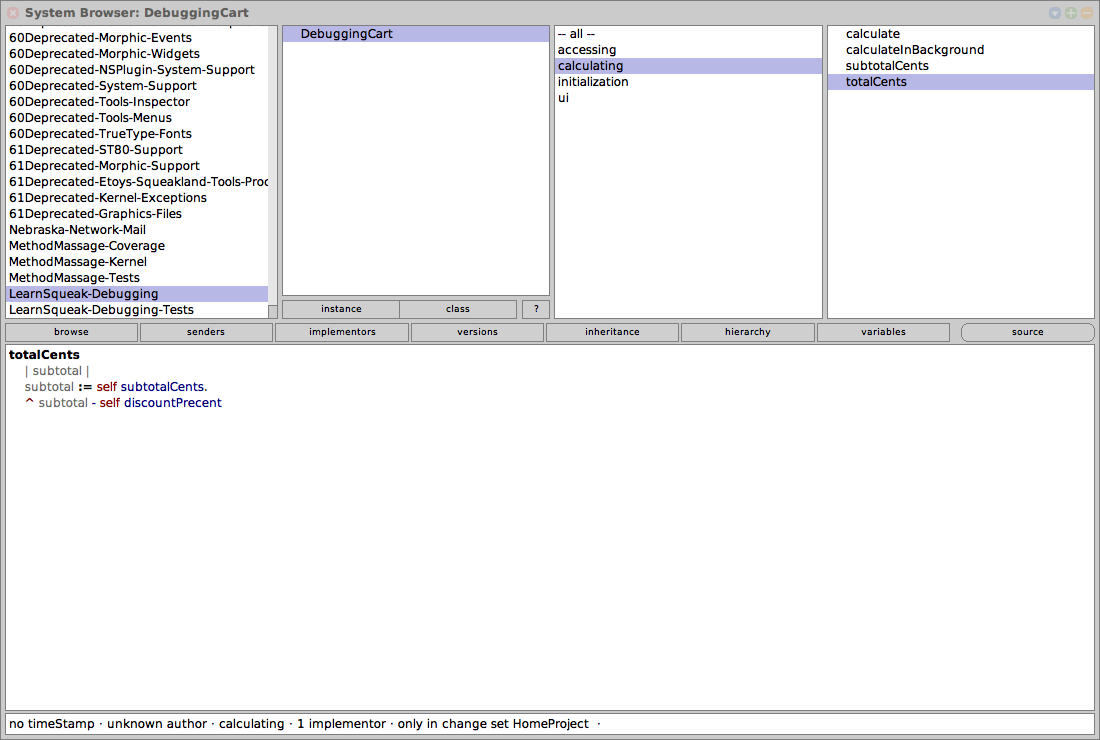
- Open the class in the System Browser and select calculating → totalCents. Read the four-line method before running it.
Browser fullOnClass: DebuggingCart selector: #totalCents.Expected: The browser shows subtotalCents followed by discountPrecent. Do not fix anything yet.
A reproducible input separates a code defect from a changed environment or changed data. The expected amount will later detect the bug that does not raise an exception.
02 · Read the exception and find your stack frame
Connect the missing message, its receiver, and the application code that sent it.
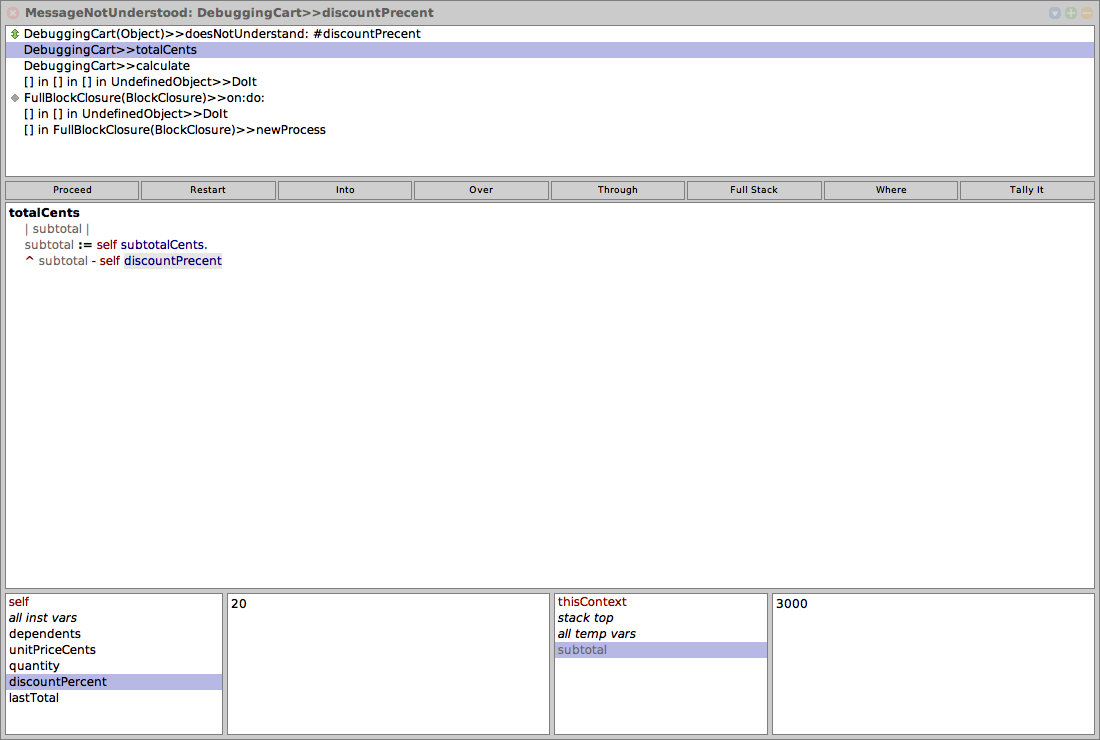
MessageNotUnderstood means that this receiver has no implementation for the message it received. Here the receiver is a DebuggingCart and the missing selector is discountPrecent. That is different from an undefined variable or a syntax error. The newest calls are at the top of the debugger stack; senders are below.
- Click Calculate in a separate process, or evaluate the Workspace expression below.
- If Squeak opens a compact notifier, click Debug to expand it.
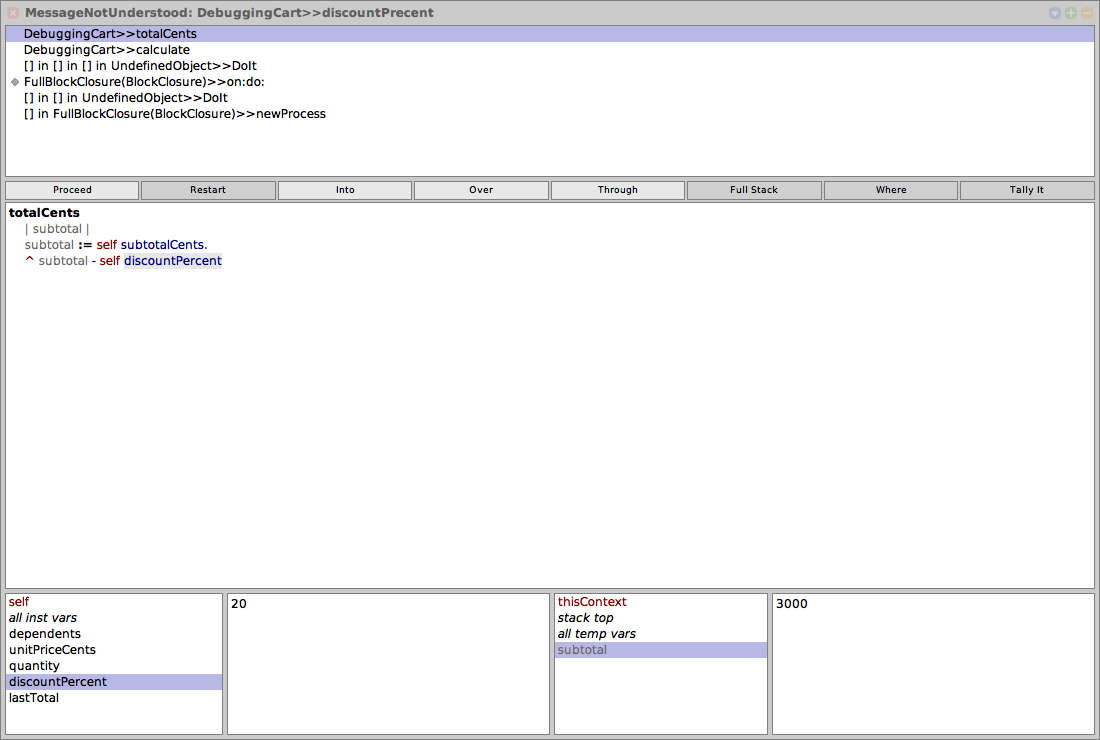
- Select DebuggingCart>>totalCents below doesNotUnderstand:. The highlighted expression is the failed send. calculate is the caller below it.
- Read subtotal in the temporary-variable inspector at the bottom right. It is already 3000, so the multiplication finished before the exception.
DebuggingCart sample calculateInBackground.Expected: A native debugger opens for discountPrecent. The calculation process is suspended; the image UI remains available.
Begin with the first relevant application frame, then look at its caller. Editing Object>>doesNotUnderstand: would change error behavior for the entire image and would not repair this cart.
03 · Inspect the receiver and the live values
Distinguish receiver state from frame-local temporary variables.
The debugger’s bottom-left fields belong to the selected receiver. The bottom-right fields belong to the selected execution context. discountPercent is an instance variable on the cart; subtotal is a temporary variable in this invocation of totalCents. Selecting a different stack frame changes the receiver and local scope used by debugger evaluations.
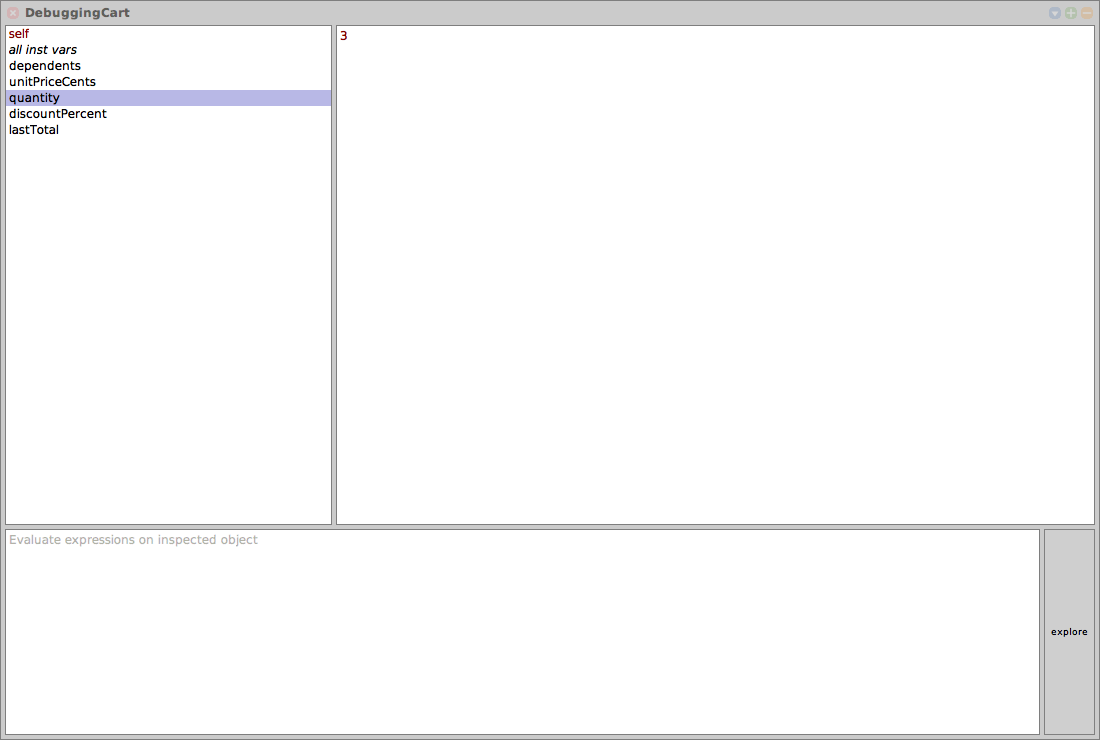
- In the totalCents frame, select discountPercent in the receiver inspector. Its value is 20.
- Inspect self from the selected frame to open a full Inspector for this same object. Select quantity; it is 3. unitPriceCents is 1000 and lastTotal is still nil.
- Use the expression below in the selected frame’s evaluation context. Its key is false and its value is true: one spelling is absent, the other is implemented.
- Use read-only inspection first. Changing an Inspector field mutates the live object and can conceal the original cause.
(self respondsTo: #discountPrecent) -> (self respondsTo: #discountPercent)Expected: false -> true; quantity 3; unitPriceCents 1000; discountPercent 20; subtotal 3000
The receiver is the object handling a message, not necessarily the object you last created in a Workspace. Evaluating self in an ordinary Workspace does not access this cart.
04 · Repair the selector in the suspended method
Make a small live repair while keeping the failing invocation available.
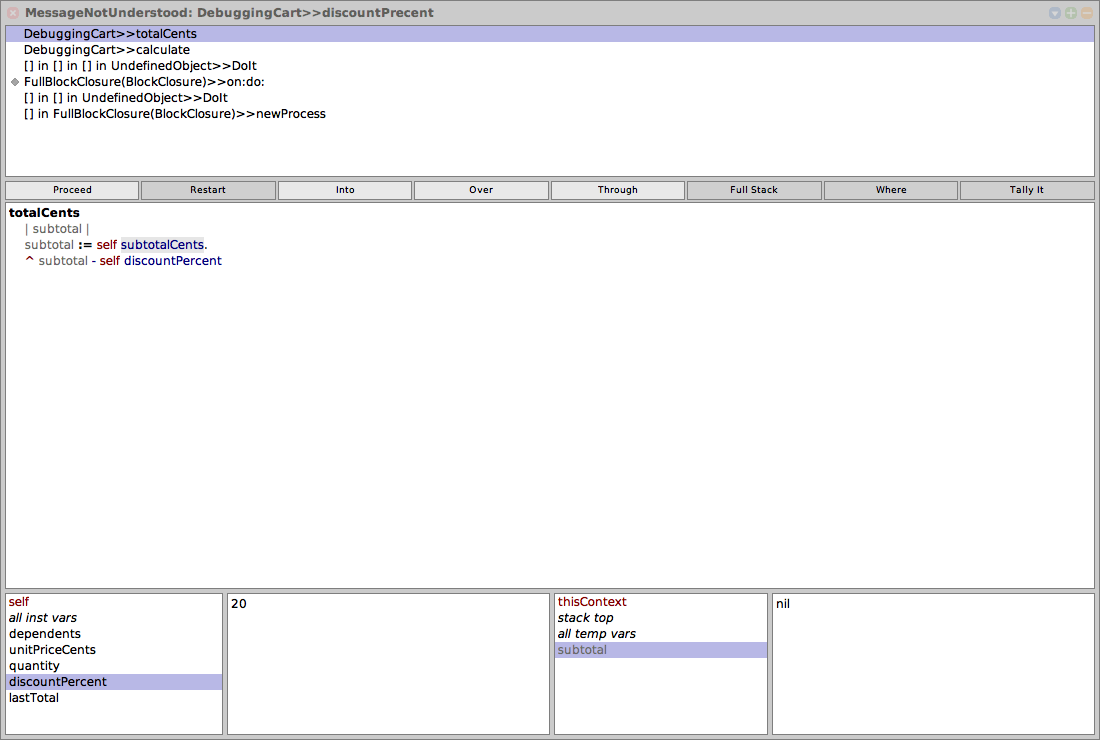
Change only discountPrecent to discountPercent. Accepting the method compiles the replacement and, for this ordinary method frame, replaces and restarts the selected frame. In the captured Squeak 6.1 session, subtotal is nil immediately afterward because this new invocation has not assigned it yet. The window title can still show the original exception.
- Keep DebuggingCart>>totalCents selected. Replace its method source with the code below.
- Choose Accept from the code pane’s menu. The editor command shortcut is s; physical modifiers vary by platform and preferences.
- If this is the image’s first method edit, supply your author initials when Squeak asks. This is a changes-file attribution prompt, not a runtime error.
- Do not press Proceed yet. The source is paused at the first send, ready for stepping.
totalCents
    | subtotal |
    subtotal := self subtotalCents.
    ^ subtotal - self discountPercent
Expected: Accept succeeds. The next send is self subtotalCents. subtotal is nil until assignment runs.
Accept changes the class method used by every instance. It does not undo arbitrary earlier object mutations, I/O, or actions in caller frames.
05 · Step Into the helper message
Follow a message send into the called method.
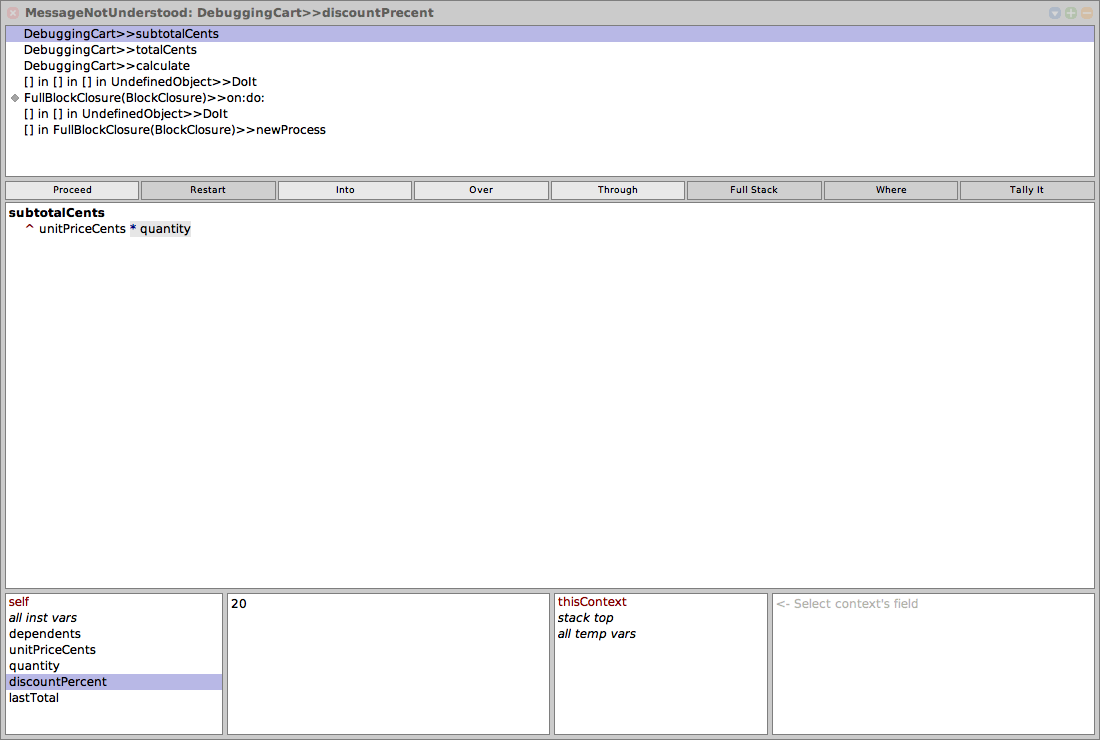
The native button is Into, implemented by Debugger>>stepInto. Here it sends subtotalCents and opens the helper frame, whose receiver is the same cart. The source shows unitPriceCents * quantity. Arguments and temporaries shown in the debugger are specific to the currently selected frame.
- With the freshly accepted totalCents frame selected, click Into once.
- Confirm that subtotalCents is now the selected top frame and totalCents is immediately below it.
- Inspect unitPriceCents and quantity on the receiver. Predict 1000 * 3 = 3000 before continuing.
subtotalCents
    ^ unitPriceCents * quantity
Expected: The selected frame is DebuggingCart>>subtotalCents; totalCents remains its caller.
Into is useful when the called method is the part you need to understand. Primitive or quick methods may complete without leaving an inspectable nested frame.
06 · Step Over, restart a frame, then run
Know which execution controls advance code and which reset a frame.
Over completes the current send without keeping you inside its implementation. In this exact capture, three Over actions after Into finish the multiplication, return from subtotalCents, and execute the caller’s assignment until the next send. Do not treat that click count as a universal statement count: source highlights and primitive returns affect where the debugger stops.
- Click Over and watch the selected source and stack. Continue until totalCents is selected and subtotal reads 3000.
- Restart resets the selected frame to its beginning. On the baseline image restartAlsoProceeds is false, so it remains paused. Some images use Proceed Here and combine restart with resuming.
- For a safe demonstration, the harness temporarily changes receiver quantity to 4, restarts, and observes subtotal=nil while quantity remains 4. It then restores quantity to 3 before continuing.
- Click Proceed to resume the remaining calculation. The debugger closes and the worker terminates. The result is 2980 cents, which is still wrong.
subtotalExpected: subtotal=3000. After Proceed, total=2980, not the required 2400.
Restart is not a transaction rollback. Re-execution can repeat increments, file writes, or external effects. For a changed caller, stale object state, block/unwind complications, or doubtful side effects, terminate the calculation and retry on a fresh sample.
07 · Turn the remaining wrong answer into a regression test
Distinguish a completed calculation from a correct calculation.
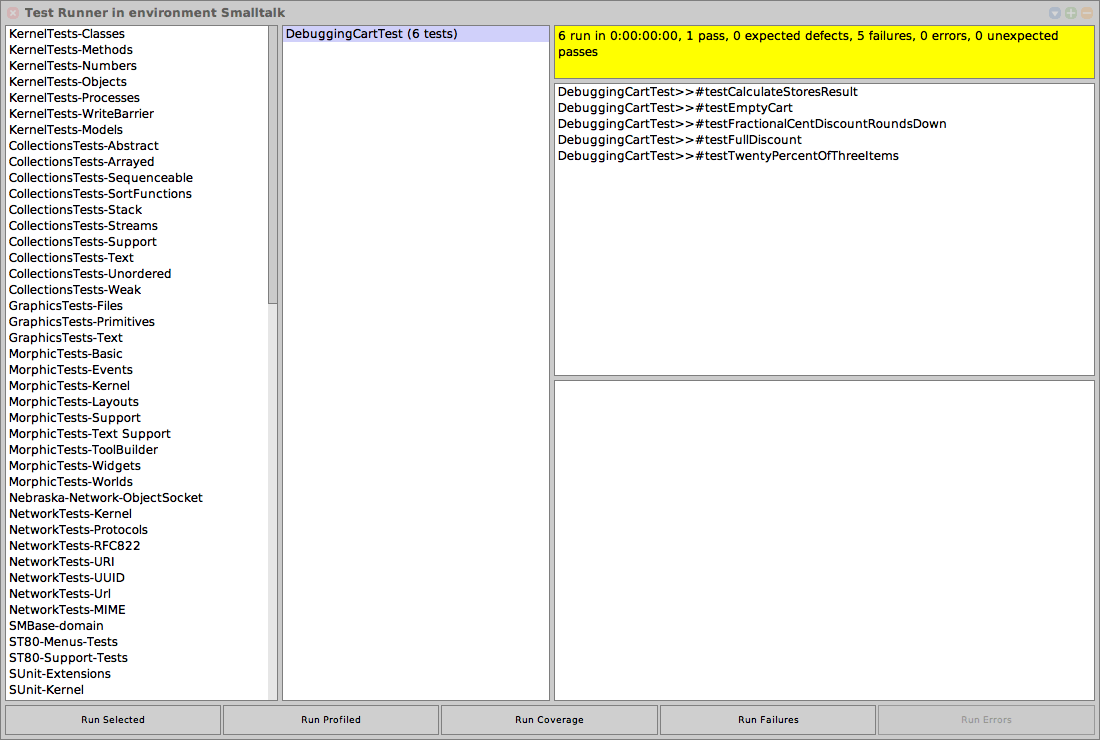
The repaired method subtracts 20 cents from 3000 cents. A 20 percent discount is 600 cents. SUnit now reports assertion failures, not runtime errors. In this Squeak Test Runner, failures produce a yellow status panel; errors would use red. Messages execute, but their answers violate the expected behavior. One zero-discount test passes by coincidence; that does not prove the formula correct.
- File in DebuggingCartTest.st if you have not already.
- Open the Test Runner with the expression below, then click Run Selected.
- Inspect the failing names. The main case expects 2400; the full-discount and empty-cart cases expose other consequences of subtracting a percent as if it were cents.
- Keep the failing tests while fixing the implementation. Do not change the expected answer to match 2980.
TestRunner openForSuite: DebuggingCartTest suite.Expected: 6 runs; 1 pass; 5 failures; 0 errors
A runtime exception is only one kind of bug. Assertions capture the intended behavior and preserve it after you close the debugger.
08 · Fix the arithmetic and verify the complete behavior
Finish with a small, explained correction and repeatable evidence.
Compute the discount in the same unit as subtotal: subtotal * discountPercent // 100. Integer division floors the discount to whole cents. For the sample, 3000 * 20 // 100 is 600; subtracting it gives 2400. The explicit parentheses also make the intended grouping clear because Smalltalk binary messages have equal precedence and associate left to right.
- Select DebuggingCart>>totalCents in the System Browser. Replace the method with the code below and Accept.
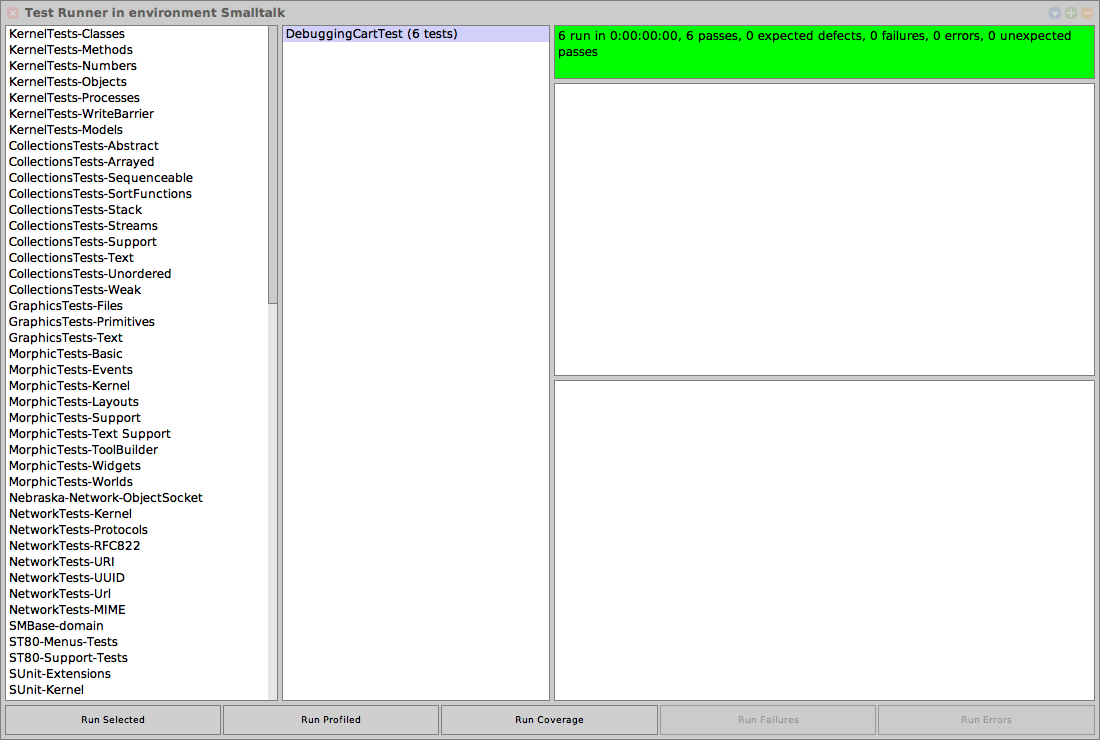
- Run Selected again in the Test Runner. All six tests should pass.
- Evaluate DebuggingCart sample calculate on a fresh sample and Print it: 2400.
- Reopen the native demo and click Calculate. Save or file out your changes only if you want to keep this exercise. Keep the buggy checkpoint for future practice.
totalCents
    | subtotal |
    subtotal := self subtotalCents.
    ^ subtotal - (subtotal * self discountPercent // 100)
Expected: 6 runs; 6 passes; 0 failures; 0 errors. A fresh sample calculates 2400 cents.
The suite covers the original case, zero and full discount, an empty cart, fractional-cent rounding, and storage of the result by calculate. It is a focused regression suite, not a claim that all possible cart inputs are validated.
Watch the native debugging sequence
The demonstration exercised the actual Debugger Accept, Into, Over, Restart and Proceed operations, then Browser Accept and Test Runner execution. It is not a mouse/keyboard screencast.
Understand the stepping controls
| Control | Meaning here |
|---|---|
| Into | Enter the next message send and inspect its execution. |
| Over | Complete the next send, then regain control. |
| Restart | Reset the selected frame. It does not undo changes already made to objects. |
| Proceed | Close the debugger and resume the suspended process. |
“Run” is called Proceed in this debugger. Run Selected belongs to the Test Runner. Accepting the ordinary method in this example replaces and restarts its selected frame. Editing a block or a different active stack can require rewinding, a confirmation, or a different recovery path. An unrelated Browser edit does not rewrite every active frame.
Exception>>retry is a separate exception-handler operation. This workshop retries a whole calculation with a new DebuggingCart sample to avoid reusing partially modified state.
Clean up and keep the regression test
The selector repair returns 2980 and produces five assertion failures out of six tests. The correct formula returns 2400 and all six tests pass. In Squeak’s Test Runner, assertion failures are yellow; errors are a different outcome.
Restart was verified to clear the frame-local subtotal while retaining the receiver’s quantity. It is not a transaction rollback. Inspect before modifying live fields, and use a new receiver when repeating the whole scenario.
Close or explicitly abandon every demonstration debugger so suspended workers do not accumulate. The close behavior can depend on image preferences; choose termination/abandon when offered. Saving an image is separate from finishing a debugger session.
Download the corrected application · Review SUnit basics · Official Squeak documentation
Put it into practice.
Try an exercise before revealing its hints and tested solution.