PLAY WITH THE SYSTEM YOU ALREADY HAVE
Built-in demos.
Real objects to explore.
Atoms, clocks, flashing lights, and games are already inside this Squeak image.
Launch six bundled examples, watch how they behave, then inspect their classes. Every launch block was executed in the standard Squeak 6.1 image used here. No add-on package was installed for these demos.
TWO WAYS TO OPEN A DEMO
Use the catalog, or send a message.
- Click an empty part of Squeak’s desktop to open the World menu.
- Choose objects, then categories.
- Choose Just for Fun for BouncingAtoms, Digital Clock, and Flasher; choose Games for Tetris, Same, and Mines. Drag the desired tile into the world.
In this image, these examples are not all in the category named Demo. The screenshots show their actual catalog placement. Smaller or customized images may omit them.
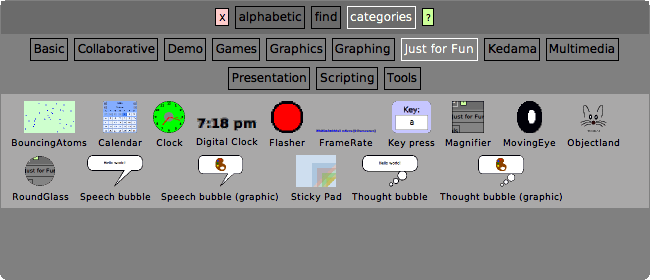
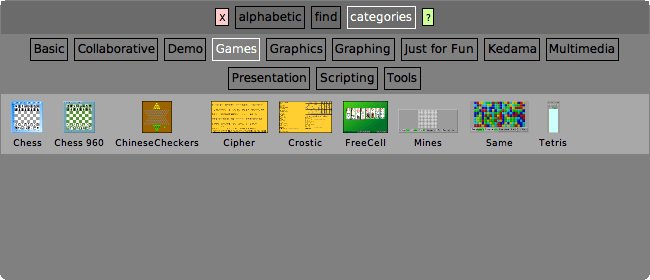
For code, open Tools → Workspace, paste one complete block, select it, and choose do it. Try one demo at a time; each starts at 100@100 and may overlap another. The final demo returns the object, so you can choose inspect it instead of do it if you want an Inspector.
Run in the SqueakJS playground
The separate playground loads the real Smalltalk image on demand. This lesson keeps its native setup instructions; browser compatibility notes appear beside each demo.
BouncingAtomsMorph
Bouncing atoms
Thirty tiny atoms move inside a bounded Morph. This is John Maloney’s built-in bouncing-atoms simulation, not the ball class from our earlier tutorial.
| demo |
demo := BouncingAtomsMorph new.
demo position: 100@100; openInWorld; startStepping.
demo
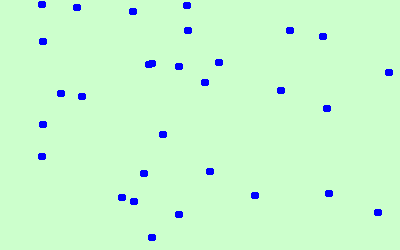
Use its halo menu to find start bouncing, set atom count, start infection, and show infection history. The infection option is a visual simulation. Start with the default 30 atoms; its stepTime requests updates as fast as possible, so large counts can make the image busy.
ClockMorph
A digital clock
A small live object that reads the Squeak machine’s current time. The code below enables seconds, uses 24-hour format, and requests a larger font from the image’s default text style.
| demo |
demo := ClockMorph new.
demo font: (TextStyle default fontOfSize: 24);
    showSeconds: true;
    show24hr: true;
    position: 100@100;
    openInWorld;
    startStepping.
demo

Change the showSeconds: or show24hr: argument to false to change the display. The catalog also has an analog item named Clock; this example intentionally uses the separate Digital Clock class. The GIF is a recording, not your current local time.
Flasher
A blinking Morph
Flasher alternates its on color with a darker version every 500 milliseconds. initializeToStandAlone supplies the setup used by a standalone catalog object; we then choose orange and a 60-pixel size.
| demo |
demo := Flasher new.
demo initializeToStandAlone;
    onColor: Color orange;
    extent: 60@60;
    position: 100@100;
    openInWorld;
    startStepping.
demo

Change onColor: to another Color. The animation is opt-in and can be stopped immediately with the web control. This demo contains blinking color. Skip Play if blinking is uncomfortable. Starting or stopping the website GIF does not control the Squeak object.
Tetris
Tetris: controls and stepping
The bundled falling-block game combines a board, score display, buttons, keyboard handling, and stepping. It starts a game when created.
| demo |
demo := Tetris new.
demo position: 100@100; openInWorld.
demo
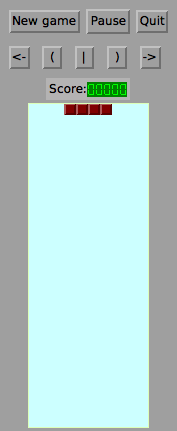
Use the visible movement/rotation/drop buttons, or give the game keyboard focus by moving into it: left/right move, up/down rotate, and Space drops. Click Pause before switching tasks, New game to restart, or Quit to remove it. The GIF records actual falling pieces.
SameGame
Same: groups and board state
Select connected tiles of the same color, then remove the group to score points. This is labeled Same in the catalog, while its class is SameGame.
| demo |
demo := SameGame new.
demo position: 100@100; openInWorld.
demo
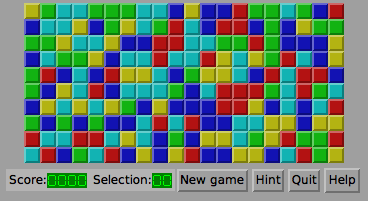
Click a group once to select it; click again within that group to remove it. Adjacent means up, down, left, or right. Tiles slide down and right to fill gaps. Hint finds a group, New game resets the board, and the built-in help explains scoring.
Mines
Mines: inspect before you click
Squeak’s bundled mine-finding game has a board of concealed tiles. Revealed numbers count adjacent mines, including diagonals. It is useful for studying stateful tiles and event handling.
| demo |
demo := Mines new.
demo position: 100@100; openInWorld.
demo
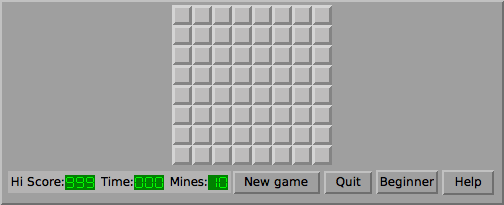
Click a tile to reveal it. Shift-click a suspected mine to flag it; the help also describes the configured yellow-button gesture. Use New game to restart. Read the in-game help, but use the actual board’s counters for the current level rather than assuming a fixed mine count.
KEEP THE IMAGE RESPONSIVE
Stop, remove, then investigate.
Use a game’s own Pause or Quit control where supplied. Otherwise open the outer Morph’s halo (commonly Alt-click on Windows/Linux or Option-click on macOS) and use its red delete handle. Gesture mappings can vary. Remove the whole game, not an individual tile.
For controlled cleanup, evaluate the launch block with inspect it so you keep an Inspector on the returned demo. In that Inspector’s evaluation pane, the following stops stepping for the demo and its children, then removes the demo:
self allMorphsDo: [:each | each stopStepping].
self delete.
Use this only in an Inspector on your tutorial demo. In an ordinary Workspace, self is not that Morph. The temporary demo variable from an earlier do-it does not survive into a new evaluation.
Open a Browser on the named class to read initialize, step, stepTime, and event-handling methods. Read core classes freely; experiment in a subclass or copied tutorial class rather than changing the bundled game for everyone in the image.
Learn the development toolsWhere these examples come from
Names, catalog categories, launch behavior, and controls were checked against the running Squeak 6.1 image and each class’s descriptionForPartsBin, initialization, stepping, and help methods. These methods are available in your image’s Browser.
Put it into practice.
Try an exercise before revealing its hints and tested solution.