Build a native scalar-field experiment with honest boundaries, stable local averaging, separate buffers and one safe Morphic clock.
8 construction stagesTested source & checkpointsNative screenshots & demos
Before you start
Construct Diffusion Lab in eight cumulative runnable checkpoints. Store and color a scalar grid, inspect neighbors, choose insulated boundaries, prove a bounded simultaneous update, then animate it and add heat with native mouse input.
Each checkpoint .st is a complete cumulative file-in. Install it through File List, accept the displayed complete Browser methods, and evaluate the exact Workspace block. Run checkpoints independently in a clean Squeak 6.1 image or progress forward in order.
Squeak 6.1 with bundled Morphic and SUnit; no packages, accounts or external data
Workspace Do It / Print It, Browser Accept, Arrays, blocks, loops, and one-based indexing
Use a copy of your learning image. Close old Diffusion Lab windows before replacing methods.
File List → select the downloaded checkpoint .st → fileIn. File-in chunk delimiters belong in File List, not Workspace.
Select the entire Workspace block, including temporary declarations. The optional diffusion-lab-launch-NN.st files evaluate those same blocks.
A file-in adds and replaces methods but does not remove later methods. Use a clean image to revisit an earlier checkpoint.
The grid is fixed at 17×17. Scalars and alpha accept Integer, Float or Fraction values in 0..1; stored values use floating-point arithmetic. Coordinates are integers 1..17.
Step arrives in checkpoint 6, Run/Pause in checkpoint 7, and presets/click input in checkpoint 8. Earlier checkpoints intentionally expose only the controls they have implemented.
Install diffusion-lab-final.st before diffusion-lab-tests.st. Print It: LDFDiffusionTest suite run. Exercise solution files extend the final model.
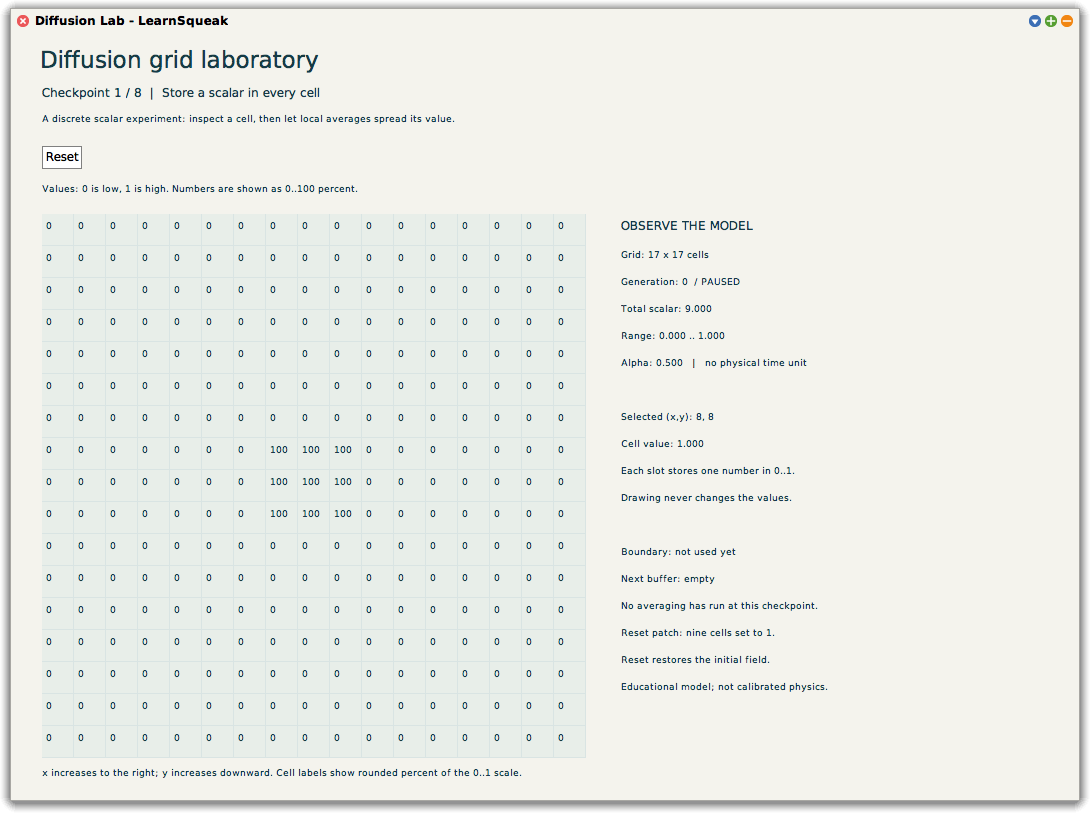
A field is a table of numbers, one value for each location. In this laboratory the table is 17 cells wide and 17 cells high. Every value lies between 0 and 1 and has no assigned physical unit. Think of it as a concentration-like scalar. Calling a bright cell “hot” is a useful visual metaphor, but this is not a calibrated temperature simulation.
LDFField stores the table in a flat Array. The address formula ((y - 1) * size) + x turns two one-based coordinates into one one-based Array index. Cell (1,1) occupies slot 1; (17,1) occupies slot 17; (1,2) occupies slot 18. The y coordinate increases downward to match the native window. Keeping one consistent convention prevents a transposed picture from disguising a model bug.
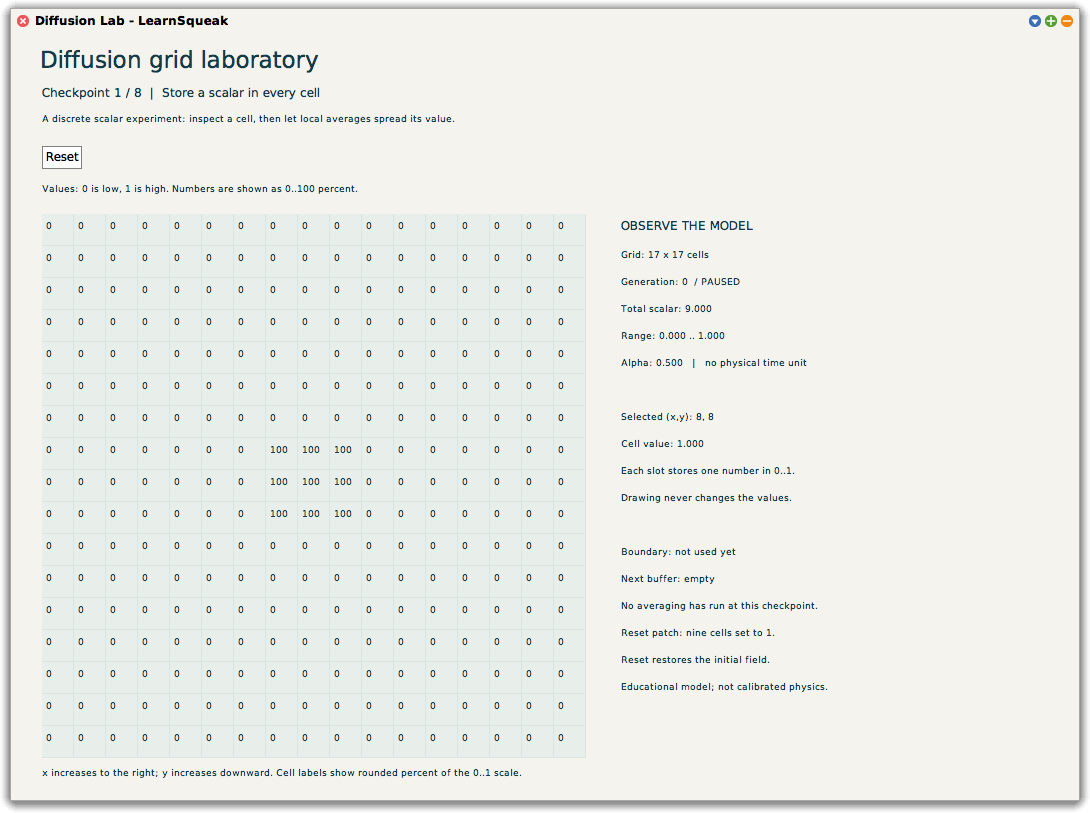
reset fills the grid with zeros and sets a central 3-by-3 patch to 1. The total scalar is therefore 9. The model owns the Array; values returns a copy so an Inspector experiment cannot mutate its private storage accidentally. put:atX:y: validates a value and both coordinates before writing anything.
The view prints each number as a rounded percentage. It does not evolve the field. Repainting, moving the window, or inspecting a cell cannot create a generation. At this checkpoint only Reset is needed: first make the state understandable, then teach the transformation.
LDFField · instance-side method
indexX: x y: y
 ^ ((y - 1) * size) + x
LDFField · instance-side method
put: value atX: x y: y
 ((self validUnit: value) and: [(self validCoordinate: x) and: [self validCoordinate: y]]) ifFalse: [^ false].
 cells at: (self indexX: x y: y) put: value asFloat. next := nil. ^ true
LDFField · instance-side method
reset
 self fill: 0. generation := 0. inputCount := 0.
 8 to: 10 do: [:y | 8 to: 10 do: [:x | self put: 1 atX: x y: y]]
Where to run this
System Browser → LDFField → instance side → tutorial. Accept this complete method after filing in the checkpoint.
LDFField · instance-side method
atX: x y: y
 ((self validCoordinate: x) and: [self validCoordinate: y]) ifFalse: [^ nil].
 ^ cells at: (self indexX: x y: y)
File List → fileIn diffusion-lab-01.st. Then Workspace → select the entire temporary-declaring block → Do It.
Workspace · run after installing this checkpoint
| app |
app := LDFApp open.
app
Watch for: An Array is one-based. Subtract one from y before multiplying; do not shift x to zero as well.
Try it: Print It: LDFField new values size. Expect 289. Print It: LDFField new total. Expect 9.0. Explain the index of cell (1,2).
Expected result
A native 17×17 grid has nine cells labeled 100 and all others 0. Total scalar is 9.000, generation is 0, and Reset reproduces it.
Actual native Squeak 6.1 window after executing the exact checkpoint 1 Workspace block.
02 · Give numbers a fixed color scale
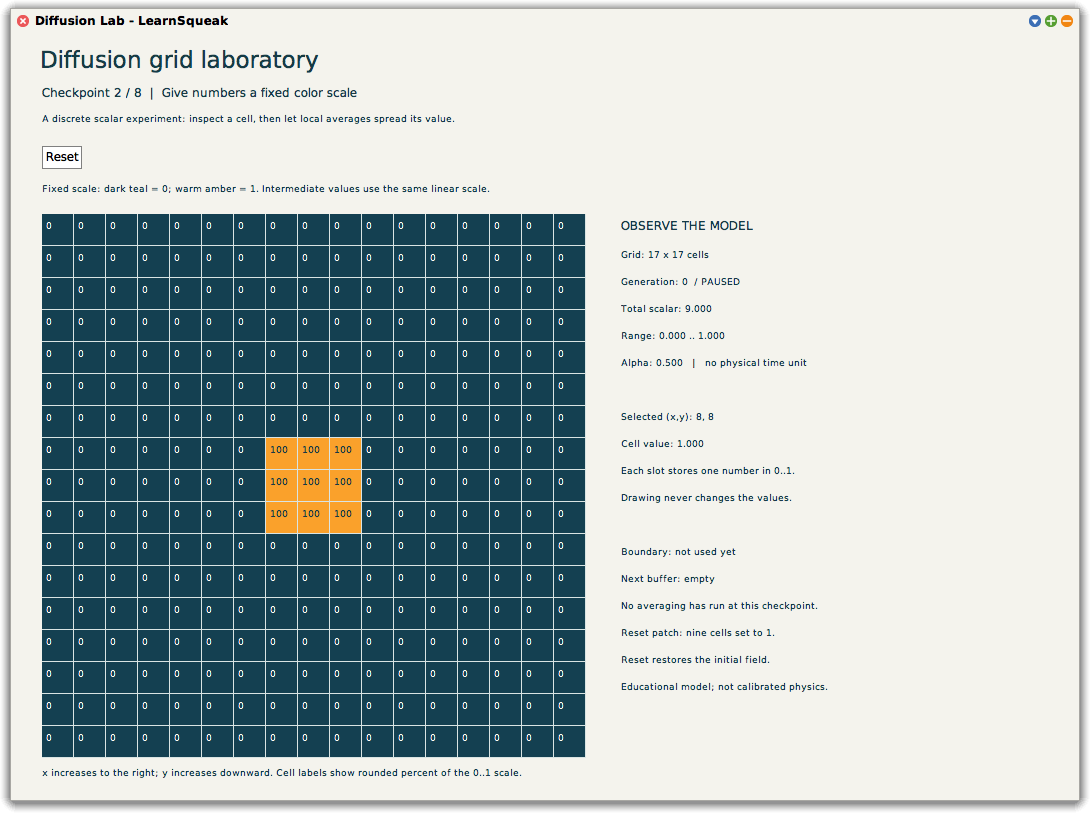
Color makes a spatial pattern easier to see, but it must retain a stable meaning. Use the same scale in every frame: 0 is dark teal and 1 is warm amber. A value halfway between them uses the midpoint of three RGB component formulas. There is no automatic rescaling to the brightest remaining cell.
The formulas keep all three channels inside 0..1 for every allowed scalar. Red rises from 0.08 to 0.98, green rises from 0.25 to 0.63, and blue falls from 0.32 to 0.17. This is a simple display mapping in RGB space, not a perceptually uniform scientific color map. Keep the printed percentages and numeric side panel so the lesson does not depend on color alone.
LDFGrid asks the model for values while drawOn: paints cell rectangles. Arithmetic that changes the field belongs elsewhere. A fixed color scale is especially useful later: as a peak spreads, its color visibly darkens instead of being stretched back to the brightest amber every frame.
The initial field is identical to checkpoint 1. There are still nine cells at 1 and 280 cells at 0, and the total remains 9. Compare the two screenshots: only the representation has changed. Try an intermediate value through the Workspace and call refresh. The cell number, color and total should all tell the same story.
Where to run this
System Browser → LDFGrid → instance side → tutorial. Accept this complete method after filing in the checkpoint.
Actual native Squeak 6.1 window after executing the exact checkpoint 2 Workspace block.
03 · Read the four neighbors
Diffusion is local. For each cell, inspect the four cells immediately west, east, north and south. Diagonal cells are not members of this neighborhood. This four-neighbor stencil is a deliberate modeling choice; an eight-neighbor average would define a different update and would need its own explanation and tests.
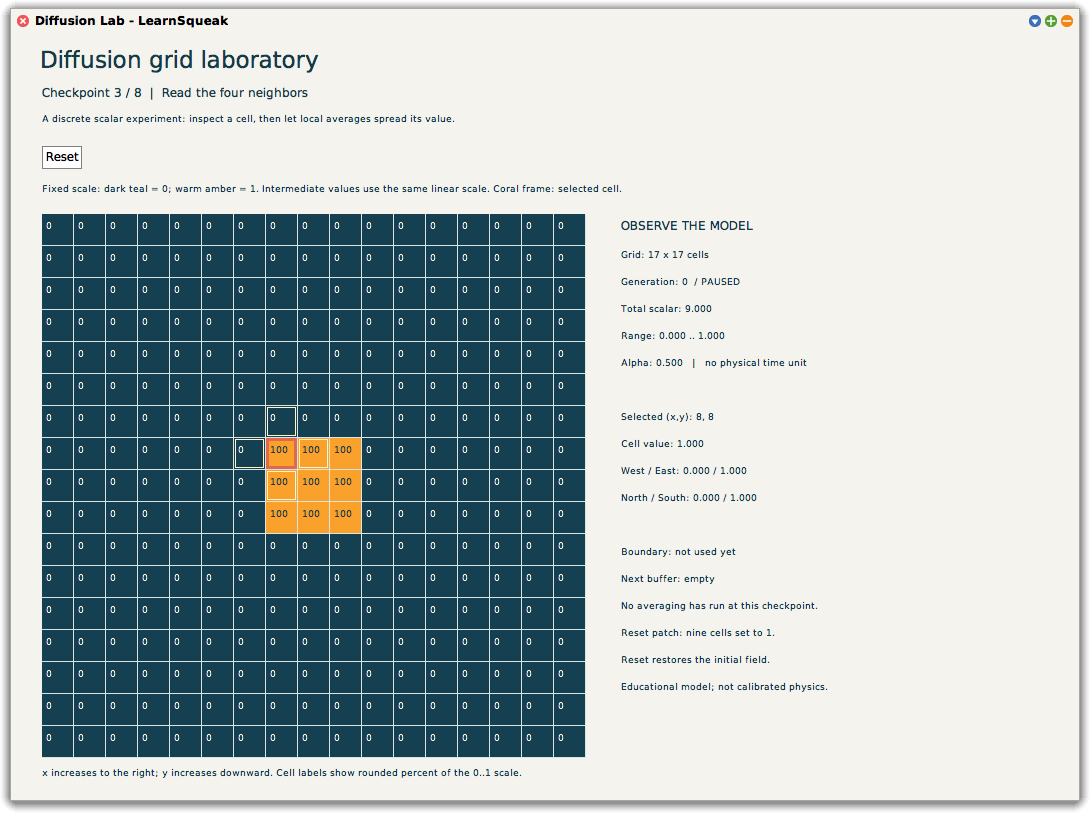
neighborValuesAtX:y: returns a new four-element Array in the order west, east, north, south. That order matches the sidebar. At the selected cell (8,8), the west and north values are 0, while east and south are 1. The cell itself is 1. Its four-neighbor mean is therefore 0.5, but no value changes yet.
A coral outline marks the selected cell. Thin pale outlines mark its nearby grid neighbors. The selection is a view concern: changing selected does not alter the model, its total or its generation count. The screenshot comes from the exact launcher selecting (8,8), making the numbers and colored pattern directly comparable.
This checkpoint intentionally defines the neighborhood only for interior cells. Returning an empty Array at an edge makes the missing rule explicit. Silently omitting missing neighbors and dividing by the remaining count would change the numerical model and can destroy the simple conservation argument. Before an averaging update can be correct everywhere, the boundary must have a stated behavior. That is the next construction step.
LDFApp · instance-side method
selectCell: point
 selected := point. self refresh
Where to run this
System Browser → LDFField → instance side → tutorial. Accept this complete method after filing in the checkpoint.
LDFField · instance-side method
neighborValuesAtX: x y: y
 ((x between: 2 and: size - 1) and: [y between: 2 and: size - 1]) ifFalse: [^ #()].
 ^ {self atX: x - 1 y: y. self atX: x + 1 y: y.
    self atX: x y: y - 1. self atX: x y: y + 1}
File List → fileIn diffusion-lab-03.st. Then Workspace → select the entire temporary-declaring block → Do It.
Actual native Squeak 6.1 window after executing the exact checkpoint 3 Workspace block.
04 · Choose an insulated edge rule
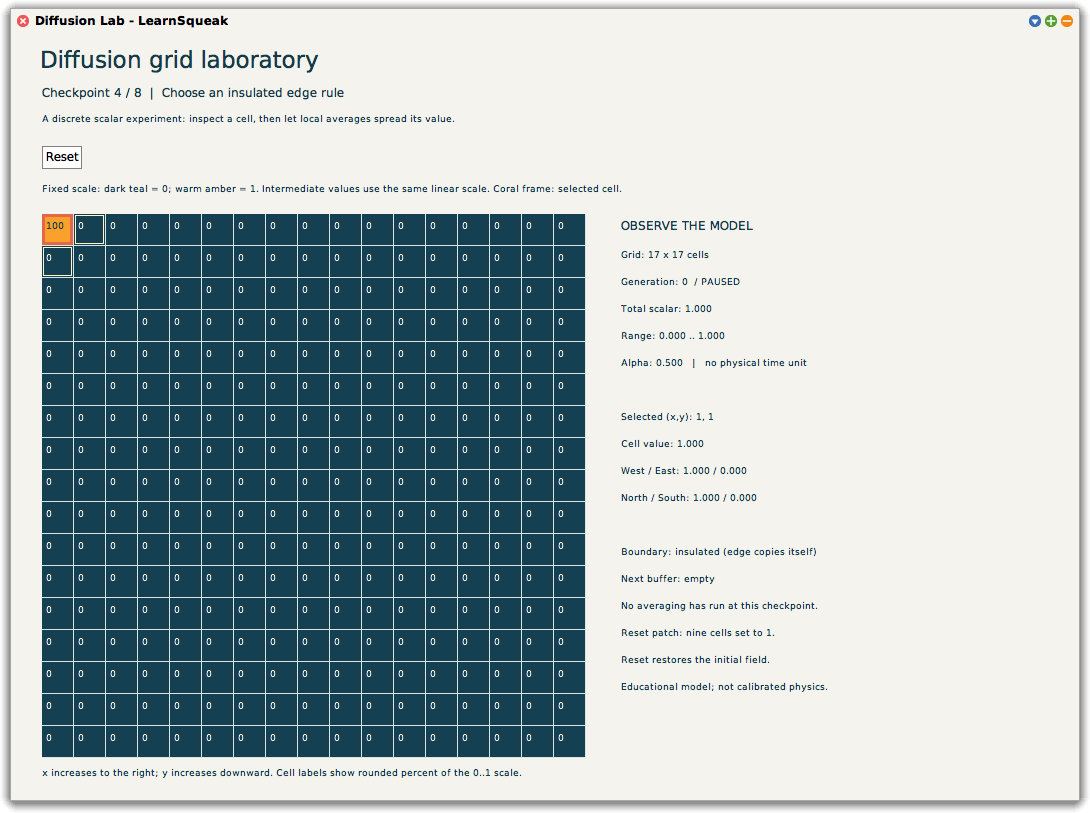
A grid has edges. Here they are insulated: scalar does not leave through the boundary. sampleX:y: clamps an out-of-range coordinate to the nearest valid coordinate. A request immediately west of the leftmost cell therefore reads that same edge cell. A request north of the top row likewise reads the top-row cell. These repeated samples are often called ghost-cell values.
The exact launcher clears the field and puts a single value of 1 at the top-left corner. Its west, east, north and south samples are 1, 0, 1 and 0. The four-neighbor mean is 0.5. Do not divide by two because only two distinct adjacent cells are inside the picture: the update always uses four samples, and the repeated self-values express zero outward flux.
With the later default alpha of 0.5, one update will leave 0.75 at that corner and put 0.125 in each of its two interior neighbors. Those values total 1. Every interior exchange has an equal reverse exchange, and a missing outward exchange becomes a self-copy, so the total is conserved, apart from floating-point roundoff.
Other boundaries tell different stories. A fixed zero exterior allows scalar to escape; wrapping connects opposite edges. Neither is what this program does. The array still stores only the visible cells. Ghost values are calculated on demand, not stored as an extra border.
LDFField · instance-side method
neighborValuesAtX: x y: y
 ((self validCoordinate: x) and: [self validCoordinate: y]) ifFalse: [^ #()].
 ^ {self sampleX: x - 1 y: y. self sampleX: x + 1 y: y.
    self sampleX: x y: y - 1. self sampleX: x y: y + 1}
Where to run this
System Browser → LDFField → instance side → tutorial. Accept this complete method after filing in the checkpoint.
Actual native Squeak 6.1 window after executing the exact checkpoint 4 Workspace block.
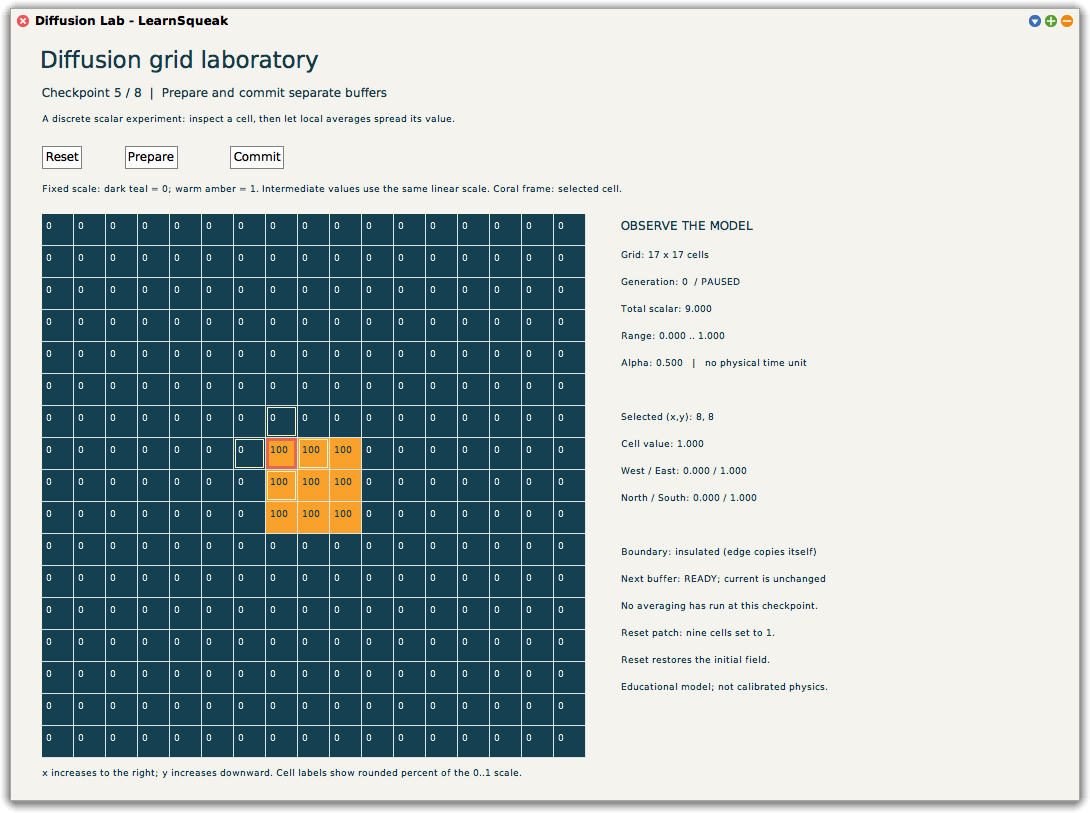
05 · Prepare and commit separate buffers
The field at the next generation must be computed entirely from one old generation. If you overwrite cells as you scan, later cells read some already-updated neighbors. The result then depends on whether you scan left-to-right, right-to-left, top-to-bottom or another order. That is a different process from the simultaneous update we intend.
Introduce a second Array before adding the formula. prepareNext currently copies the current cells into next. It leaves the displayed cells and generation counter unchanged. commitNext replaces the current reference only when a complete next Array exists, clears the pending reference, and increments the generation count once. A second Commit without another Prepare is a no-op.
At this checkpoint the copy deliberately contains the same values. Prepare followed by Commit demonstrates ownership and publication, not diffusion. The screenshot shows “Next buffer: READY” and generation 0; pressing Commit changes the generation to 1 without changing the picture or total. Reset clears the preview and restores the initial patch.
Both values and previewValues answer defensive copies. Writing into a returned Array cannot corrupt either internal buffer. Direct model edits also invalidate a pending preview, so a stale computation cannot overwrite a newer edit. The next checkpoint replaces the copy operation with a complete computation into a separate target Array while retaining the same commit protocol.
LDFField · instance-side method
commitNext
 next ifNil: [^ false].
 cells := next. next := nil. generation := generation + 1. ^ true
LDFField · instance-side method
previewValues
 ^ next ifNil: [nil] ifNotNil: [next copy]
Where to run this
System Browser → LDFField → instance side → tutorial. Accept this complete method after filing in the checkpoint.
LDFField · instance-side method
prepareNext
 next := cells copy. ^ next copy
File List → fileIn diffusion-lab-05.st. Then Workspace → select the entire temporary-declaring block → Do It.
Watch for: Copying an Array is a teaching step here. Checkpoint 5 intentionally performs an identity update, not diffusion.
Try it: Click Commit twice. Only the first click advances the generation. Prepare again, Reset, then Commit: Reset discarded the preview, so generation stays 0.
Expected result
The panel shows Next buffer: READY; current is unchanged. Generation remains 0 until Commit. Commit once gives generation 1 with identical values.
Actual native Squeak 6.1 window after executing the exact checkpoint 5 Workspace block.
06 · Advance by a bounded local average
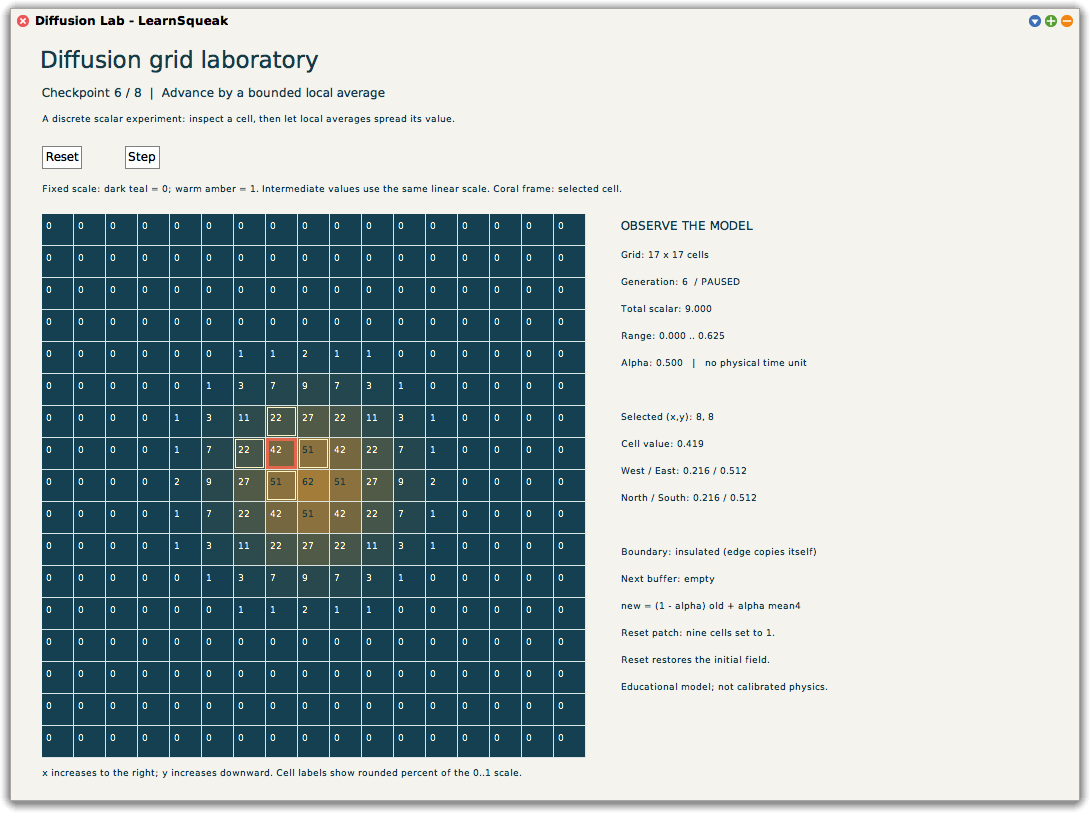
Let old be a cell's current value and mean4 the average of its four boundary-aware neighbor samples. Define new = (1 - alpha) * old + alpha * mean4. Alpha is restricted to 0..1 and defaults to 0.5. Equivalently, the four neighbors each receive weight alpha / 4 and the center receives weight 1 - alpha.
All weights are nonnegative and sum to one. Each new value therefore stays within the previous global minimum and maximum. A nonnegative field stays nonnegative. This boundedness argument is much stronger than hoping that a colorful animation looks smooth. In the common Laplacian form, the neighbor coefficient is alpha / 4, which must not exceed 0.25 for this explicit two-dimensional stencil.
prepareNext allocates a fresh target Array and fills every slot by reading cells. Only commitNext publishes it. The tests compute an independent result in reverse traversal order and compare every cell; they also check mass, symmetry, constant fields and corner values. No clipping hides numerical instability.
The exact launcher performs six complete generations. The peak spreads into neighboring cells, the total stays 9, and the brightest value decreases. Alpha 0 gives no evolution; alpha 1 is bounded but can alternate strongly. Even periodic grids can retain checkerboard oscillations at alpha 1. This finite insulated grid has boundary self-copies and eventually mixes; the interior default 0.5 damps those oscillations more directly.
LDFField · instance-side method
neighborMeanAtX: x y: y
 | values |
 values := self neighborValuesAtX: x y: y.
 values size = 4 ifFalse: [^ nil].
 ^ (values inject: 0.0 into: [:sum :value | sum + value]) / 4.0
LDFField · instance-side method
nextValueAtX: x y: y
 | old mean |
 old := self atX: x y: y. old ifNil: [^ nil].
 mean := self neighborMeanAtX: x y: y.
 ^ ((1.0 - alpha) * old) + (alpha * mean)
LDFField · instance-side method
alpha: value
 (self validUnit: value) ifFalse: [^ false].
 alpha := value asFloat. next := nil. ^ true
LDFField · instance-side method
stepField
 self prepareNext. ^ self commitNext
Where to run this
System Browser → LDFField → instance side → tutorial. Accept this complete method after filing in the checkpoint.
LDFField · instance-side method
prepareNext
 | target |
 target := Array new: size * size.
 1 to: size do: [:y | 1 to: size do: [:x |
  target at: (self indexX: x y: y) put: (self nextValueAtX: x y: y)]].
 next := target. ^ next copy
File List → fileIn diffusion-lab-06.st. Then Workspace → select the entire temporary-declaring block → Do It.
Watch for: Updating cells in place breaks simultaneous semantics. Clamping unstable output afterward would conceal the error and can destroy conservation.
Try it: Print It: | m | m := LDFField new. m alpha: 0. m stepField. m total. Expect 9.0 and an unchanged field. Invalid alpha values leave the old coefficient intact.
Expected result
Six simultaneous generations have run. Total scalar is still 9.000; the peak has spread and decreased, with no negative values.
Actual native Squeak 6.1 window after executing the exact checkpoint 6 Workspace block.
07 · Control one native clock
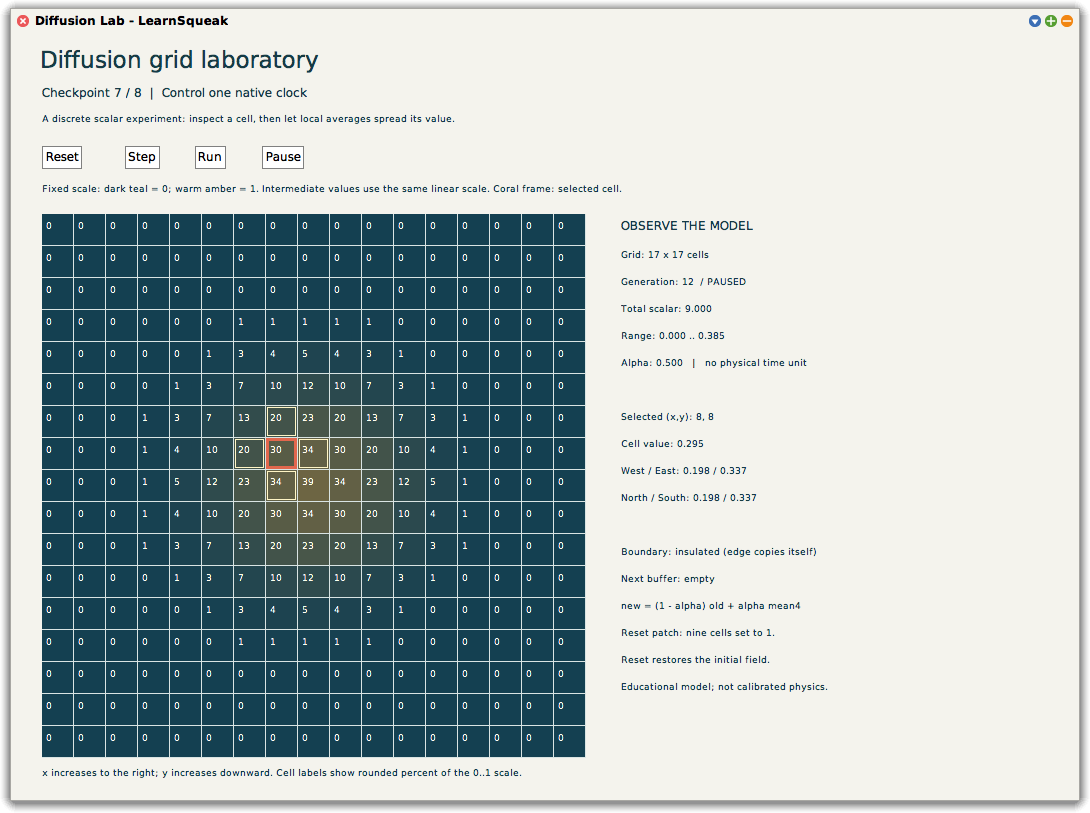
One native Morphic clock now drives the same bounded operation used by Step. Run marks the app running and registers its step callback. Every callback computes one complete generation and refreshes the view. Run checks whether it is already active, so repeated clicks do not create extra clocks. There are no forked animation processes.
Pause stops the callback while retaining the field and generation. Step first pauses, then advances exactly once. Reset stops activity, restores the selected preset and zeroes the generation count. A late callback checks running before touching the model, so a queued callback after Pause cannot advance it.
The requested interval is 120 milliseconds. That is a user-interface scheduling preference, not a physical time step or a guaranteed frame rate. Busy image activity can delay callbacks. The model uses generation count as its discrete time coordinate; GIF playback uses a separately chosen explanatory pace. The launcher starts Run, invokes twelve of the actual step callbacks, then pauses to produce a reproducible screenshot.
Window cleanup saves the original World used to register the clock. Collapsing a window may change ownership, so asking only the app's current world during cleanup can miss the old registration. Pause, Reset and Close remove that saved registration. Reopening the same app preserves its model but starts paused. Native tests pump real World cycles and exercise closing and pausing while collapsed, not merely the visible button labels.
LDFApp · instance-side method
step
 running ifFalse: [^ self].
 field stepField. self refresh
LDFApp · instance-side method
stepOnce
 self stopActivity. field stepField. self refresh
Watch for: The 120 ms clock is requested scheduling, not elapsed physical time. Keeping the original World matters when the window is collapsed.
Try it: Click Run several times, then Pause and Step. Step adds exactly one generation. Run again, collapse the window, then close it; reopening the retained app starts paused.
Expected result
The exact scripted launcher ends PAUSED after generation 12. Run resumes, Pause freezes the field, and Step pauses then advances once.
Actual native Squeak 6.1 window after executing the exact checkpoint 7 Workspace block.
08 · Explore presets and add heat
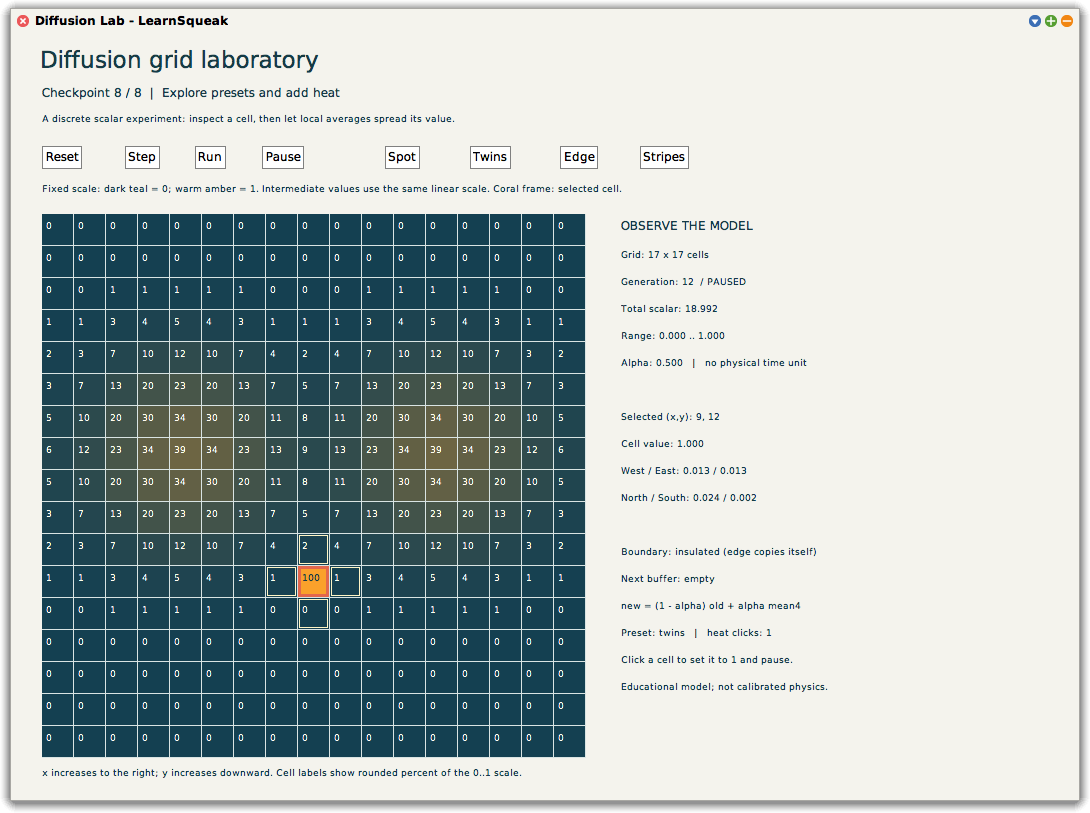
Presets make it easier to ask a specific question. Spot begins with one central 3-by-3 patch, Twins with two separated patches, Edge with a patch against the top-left boundary, and Stripes with repeated vertical bands. Each preset pauses the clock, builds a new field and resets generation and heat-click counters. Reset restores the currently selected preset while preserving alpha.
Left-clicking a cell sets that cell to 1 and pauses. It does not add 1, create a permanent heater, or change surrounding cells directly. The added scalar is exactly 1 minus the previous value. Clicking a cell already at 1 adds nothing, although it still records a heat-input event. Resume Run to observe the new contribution spread.
LDFGrid converts the native event position into a grid coordinate using its own position and the 32-pixel cell pitch. The bounds check includes the top-left pixel and excludes the right and bottom outside edges. The tests send real MouseButtonEvent objects to the native grid and buttons, including outside and non-left-button cases.
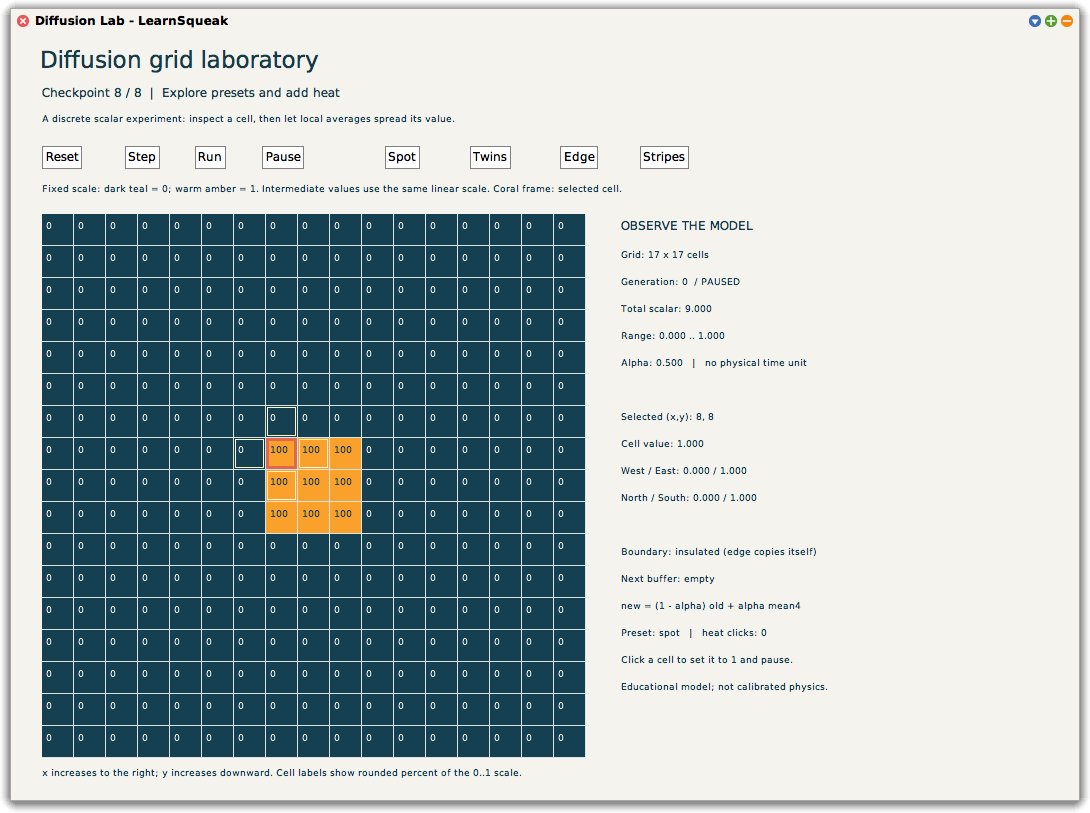
The launcher diffuses Twins for twelve generations and sets cell (9,12) to 1. Its total increases by the amount inserted. Conservation applies between edits; it cannot apply across an external heat input or a preset replacement. Compare the fixed colors, numeric range and total as you experiment. With fixed boundaries, no new inputs and alpha 0.5, this connected finite grid tends toward the uniform mean of its current scalar.
LDFGrid · instance-side method
cellAtPoint: point
 | local |
 (self bounds containsPoint: point) ifFalse: [^ nil].
 local := point - self position.
 ^ ((local x // 32) + 1)@((local y // 32) + 1)
LDFApp · instance-side method
heatCell: point
 ((field validCoordinate: point x) and: [field validCoordinate: point y]) ifFalse: [^ false].
 self stopActivity. selected := point. field heatX: point x y: point y. self refresh. ^ true
LDFField · instance-side method
heatX: x y: y
 ((self validCoordinate: x) and: [self validCoordinate: y]) ifFalse: [^ false].
 self put: 1 atX: x y: y. inputCount := inputCount + 1. ^ true
LDFApp · instance-side method
loadPreset: name
 (field validPreset: name) ifFalse: [^ false].
 self stopActivity. field loadPreset: name. self refresh. ^ true
Where to run this
System Browser → LDFGrid → instance side → tutorial. Accept this complete method after filing in the checkpoint.
Watch for: A click sets a value to 1 once. It is an external input, so total scalar can change at that event; it is not a permanently maintained heater.
Try it: Choose Edge, Run briefly, then Pause. Total stays 9. Click a dark cell: total increases by 1 minus its old value. Reset restores Edge and clears the click counter.
Expected result
Twins has diffused for twelve generations. Cell (9,12) is now 1 and coral-framed, heat clicks is 1, the app is paused, and total scalar includes the new input.
Actual native Squeak 6.1 window after executing the exact checkpoint 8 Workspace block.
Watch the workflow
All eight screenshots and every GIF frame are genuine native SystemWindow imageForm renders from Squeak 6.1 build 23976. Each checkpoint was installed separately in an unsaved private baseline image, its displayed methods recompiled and its exact Workspace block evaluated. The controls demonstration sends MouseButtonEvent objects to actual native buttons and the native grid, and advances the same step callback used by Morphic. It is a scripted native demonstration, not a human screen recording. GIF encoding combines those PNG frames; playback pace is chosen for explanation, not measured performance.
NATIVE SQUEAK CAPTURE
Scripted native checkpoint progression: scalar storage, fixed colors, neighbors, insulated boundaries, a separate buffer, averaging, one clock and editable presets.
NATIVE SQUEAK CAPTURE
Scripted native interaction: Step, Run, Pause, a left-click heat input, resume, Edge and Stripes presets, and Reset. Every frame is rendered by the native Squeak window.
Practice with tested solutions
1. Measure how uneven the field is
Add variance to LDFField. Compute the mean of all 289 cells, then the mean squared deviation from it. A uniform field has variance zero. With this symmetric averaging rule, variance cannot increase between external edits, up to floating-point tolerance. Preserve the field, generation and any pending preview.
Hint
Use a local mean and inject:into:. Divide the sum of squared deviations by the number of cells, not by one fewer; this is a population statistic for the whole grid.
Show a tested solution
After filing in diffusion-lab-final.st, accept this complete LDFField instance-side method. Or file in the exercise solution.
Exercise solution
variance
 | mean |
 mean := self total / cells size.
 ^ (cells inject: 0.0 into: [:sum :value | sum + ((value - mean) squared)]) / cells size
Expected
A uniform field has variance 0 within roundoff. A single cell at 1 in an otherwise zero 17×17 grid has variance 1/289 - (1/289) squared.
Workspace · Print it after installing the solution
Check the solution
| model before |
model := LDFField new.
before := model variance.
model stepField.
model variance < before
true
Four native tests cover uniform fields, the independent impulse formula, nonincreasing variance across all presets, and unchanged model/preview state.
2. Detect near-uniformity without advancing time
Add isNearlyUniform: to LDFField. Answer whether maximum minus minimum is at most a valid tolerance in 0..1. Reject an invalid tolerance by answering false. This is a spread criterion for the current field, not proof of a physical equilibrium or an automatic stopping clock.
Hint
Reuse validUnit:, minimum and maximum. Use <= so equality with the threshold counts. Do not step the model inside a query.
Show a tested solution
After filing in diffusion-lab-final.st, accept this complete LDFField instance-side method. Or file in the exercise solution.
Workspace · Print it after installing the solution
Check the solution
| model |
model := LDFField new.
model fill: 0.25.
model put: 0.5 atX: 1 y: 1.
(model isNearlyUniform: 0.25) and: [(model isNearlyUniform: 0.24) not]
true
Four tests cover the inclusive threshold, invalid inputs, eventual numerical mixing with the default coefficient, and preservation of generation, values and preview.
When something looks wrong
Prepare does not change the picture
That is intentional. Checkpoint 5 makes an identical copy into a pending buffer. Commit publishes it. Averaging begins in checkpoint 6.
Values near an edge do not leak away
The boundary is insulated. Missing neighbors copy the edge cell itself; the total scalar stays in the grid between external inputs.
The total changed after a click
A click sets a cell to 1. The added scalar is 1 minus that cell’s old value. Conservation applies to diffusion steps between input events.
A cell says 0 but still changes later
Cell labels are rounded percentages. Use the selected-value side panel or the model to inspect small positive values.
Run keeps going after the field looks uniform
There is no automatic equilibrium stop. Pause when desired. The second exercise adds a non-mutating spread query that could support a later stop rule.
The displayed colors barely change at alpha 0
Alpha 0 gives the identity update. Generations still count commits, but values remain unchanged. Use the default 0.5 for diffusion.
An earlier checkpoint has later behavior
Install it in a clean image. File-in does not remove methods from a later checkpoint. Close older windows before replacing class methods.
Verification, cleanup and next steps
Original tutorial and Smalltalk source. Inputs are synthetic scalar fields. No personal data, imported measurements, external services, sounds or worker processes are used.
42 native SUnit regression tests and 8 exercise tests pass with zero failures or errors.
All eight checkpoints, displayed methods and exact launchers run separately in clean copies of the baseline image. Both displayed exercise checks are compiled and executed. Numerical checks use analytic impulses, a separate reverse-order oracle and invariants, alongside real native controls and World scheduling.
Primary suite: final source, then diffusion-lab-tests.st. Print It: LDFDiffusionTest suite run. Expected: 42 passes.
Exercise suite: final source, both exercise solutions, then diffusion-lab-exercise-tests.st. Print It: LDFExerciseTest suite run. Expected: 8 passes.
Prepare/commit separation, no in-place order dependence, stale-preview invalidation, nonnegativity, extrema, conserved total, symmetry, uniform invariance, coefficient endpoints and default long-run mixing
Actual button and grid mouse events, hit testing and non-left/outside input, repeated Run, real scheduler progress, Pause, Step, Reset, presets, late callbacks, close/reopen and collapsed-window cleanup
The archive includes Python regeneration/capture scripts, native scripts and result logs. The extracted archive is rerun separately before delivery.
Close the Diffusion Lab window to remove its registered callback. Reopening a retained app starts paused. Keep the source files outside your image so you can reproduce every checkpoint from a clean baseline.
Official Squeak downloads — Squeak 6.1 build 23976 Linux image and VM used for native execution and captures
Bundled Squeak image source — Morph, SystemWindow, SimpleButtonMorph, MouseButtonEvent, Color, Array, PNGReadWriter and TestCase APIs compiled and exercised in the supplied image
Educational discrete scalar model, not a calibrated physical simulator: no temperature unit, material diffusivity, cell spacing or physical time is assigned.
Fixed 17×17 grid, four-neighbor stencil and insulated edge copies. There is no boundary-mode selector, obstacle mask, advection, reaction or permanent heat source.
For 0≤alpha≤1 each update is bounded. The default 0.5 favors smoothing. Boundedness alone is not convergence for every topology: even periodic grids can preserve checkerboard oscillation at alpha=1; this finite insulated grid has boundary self-loops.
With no edits, the symmetric insulated update conserves total scalar within floating-point tolerance. Presets, fill/put operations and click inputs change the total deliberately.
Cell text rounds values to whole percentages, while the side panel shows three decimals. A displayed zero can therefore represent a small positive value.
No undo, persistence, imported data, variable dimensions, custom zoom or accessibility certification. Fixed native window layout; only left-click input is implemented.
Morphic intervals are requested, not guaranteed. GIF playback uses its own explanatory timing. No browser-hosted Squeak compatibility claim is made.