The separate playground loads the real Smalltalk image on demand. This lesson keeps its native setup instructions; browser compatibility notes appear beside each demo.
Before you start
Build Aurora / Relay, an original endless runner through a floating skyway. Switch lanes, jump orange hurdles, slide under violet arches, dodge coral walls and collect gold sparks as the pace rises. This workshop applies object-oriented design to a complete playable game.
The three-dimensional road, courier and obstacles are software-projected XYZ geometry drawn by native Squeak Morphic. The page is a construction tutorial and source download. The game runs inside Squeak 6.1, not in browser JavaScript. All screenshots and replay frames below come from the real native Squeak window.
Each checkpoint is a full, cumulative, runnable source file. File in the stage, read and Accept its highlighted methods, then run the exact Workspace block. Start with manually observable changes; add native input and scheduling only after the model is testable.
Squeak 6.1 with Morphic and SUnit; no plugins, game engine, assets or network services required
Workspace Do It / Print It, Browser instance and class sides, and basic Smalltalk messages
About two hours for ten construction stages, then the three tested exercises
Save a copy of your learning image. These classes use the LearnSqueak-AuroraRelay category.
Use Squeak File List → fileIn for .st chunk-format sources. Paste only the shown Workspace blocks into a Workspace.
Close the old game before the next checkpoint. Move forward in order; use a clean image to revisit an earlier checkpoint, since older source does not remove later methods.
For immediate play: fileIn endless-runner-final.st, then Do It ARApp open. Click the scene and press Enter.
Allow about 1000×735 pixels for the fixed native window, frame and shadow. It opens near the World’s top-left so both sidebar buttons fit a 1024×749 desktop.
Aurora / Relay is an original three-lane runner on a floating skyway. The game shares the familiar lane-switch, jump and slide rhythm of an endless runner, with its own geometric courier, skyline and color language. We start with an ordinary object: ARVector stores x, y and z. Positive X goes right, positive Y goes up, and positive Z goes farther along the skyway. The runner will stay around z = 0 while the scenery moves toward it. A separate distance counter records travel.
The + message creates a new vector rather than changing either operand. That small choice will let collision code retain the previous position while calculating the next. Unary messages such as x run before binary +; the three keyword parts x:y:z: form one constructor message. The class-side constructor sends new and then the instance-side setter, which returns self.
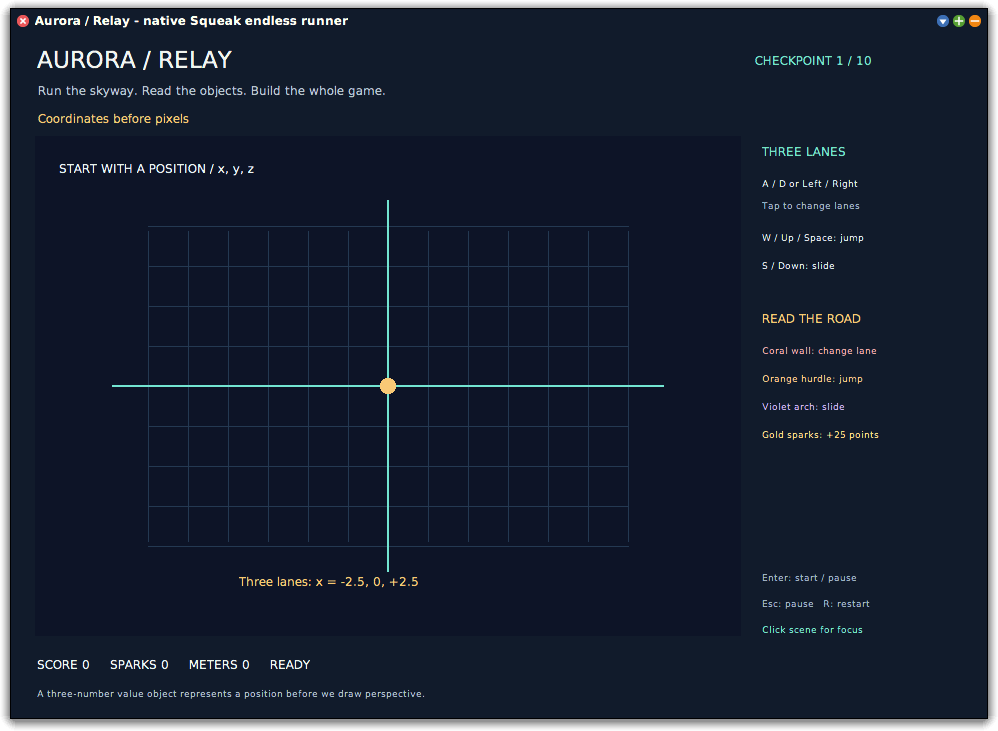
The first checkpoint draws a front-view diagnostic grid with the origin in gold. It is intentionally not perspective yet. ARRun owns session state, ARView owns drawing, and ARApp builds the native window and labels. ARWindow fixes the content size so projection coordinates remain simple. There is no clock and there are no keyboard controls yet. You can inspect these small objects before adding motion.
ARVector class · complete method
x: a y: b z: c
 ^ self new setX: a y: b z: c
Where to run this
System Browser → ARVector → instance side → tutorial. Read or Accept this complete method after filing in the checkpoint.
ARVector · complete method
+ other
 ^ self class x: x + other x y: y + other y z: z + other z
File List → fileIn endless-runner-01.st. Then Workspace → select this entire block → Do It.
Workspace · run after installing this checkpoint
| app |
app := ARApp open.
app
ARVector is an immutable-by-protocol value object; arithmetic returns another vector
ARRun is the authoritative model; its state can be tested without a window
ARView paints only; ARApp connects the model to native Morphic widgets
Watch for: Chunk-format .st files belong in File List → fileIn. A Workspace should receive only the small construction blocks shown here.
Try it: Print It: (ARVector x: 1 y: 2 z: 3) + (ARVector x: 4 y: 0 z: 1). Inspect its x, y and z fields.
Expected result
A native window with an XY grid, a gold origin and CHECKPOINT 1 / 10. The model starts at (0, 0, 0); score, sparks and distance are zero.
Captured from this checkpoint’s exact source and Workspace block using the native Squeak SystemWindow imageForm.
02 · Project a three-lane skyway
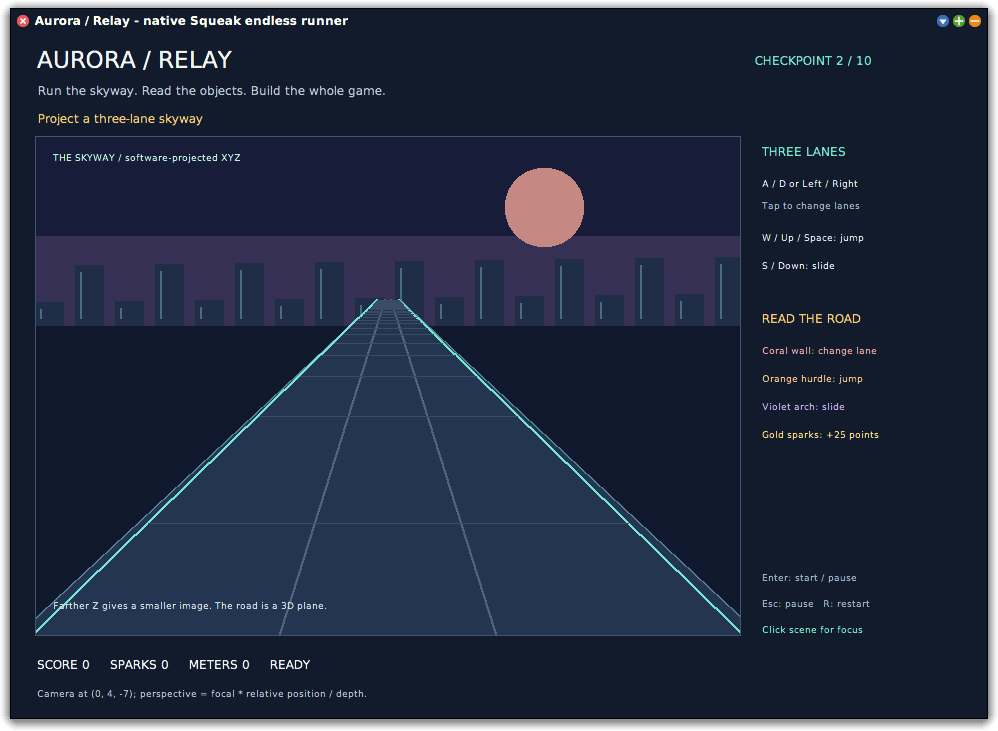
ARCamera turns a world-space point into a screen-space Point. First subtract the camera position. Then divide relative X and Y by relative Z and multiply by the focal length. Adding the screen center translates this projected offset into the view. We negate Y because Morphic screen coordinates increase downward. The camera sits at (0, 4, -7), looking along positive Z, so it sees the road and the runner from above and behind.
The projection has a real depth divide: doubling camera-space Z halves the projected distance from the center. Three lane centers at X = -2.5, 0 and 2.5 therefore converge in the distance. ARView draws the road as a four-vertex polygon and projects cross-stripes and lane lines. The skyline and moon are decorative canvas shapes; the road and later moving bodies use XYZ geometry. This is a small software renderer, not a hardware 3D engine.
The near and far tests happen before division. Points behind the camera or closer than 0.5 units return nil. Polygon and line helpers discard shapes with an invalid vertex. That is deliberate coarse rejection, not full near-plane clipping: an object can disappear as it crosses the near plane. Canvas clipping keeps the remaining projected pixels inside the native view.
Captured from this checkpoint’s exact source and Workspace block using the native Squeak SystemWindow imageForm.
03 · Give obstacles their own behavior
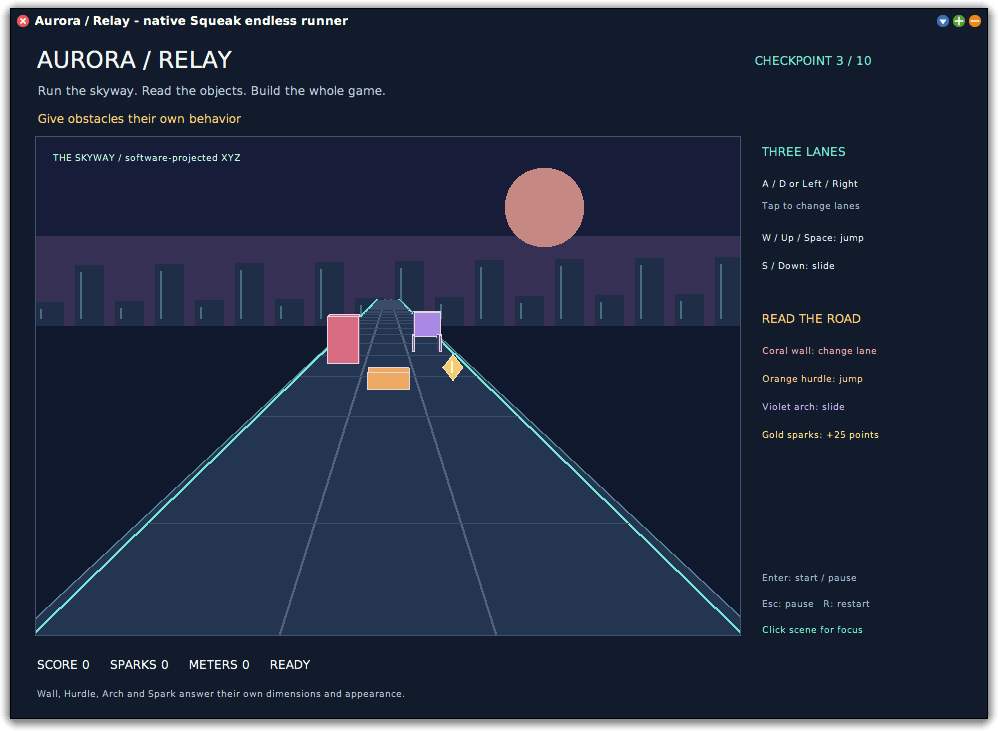
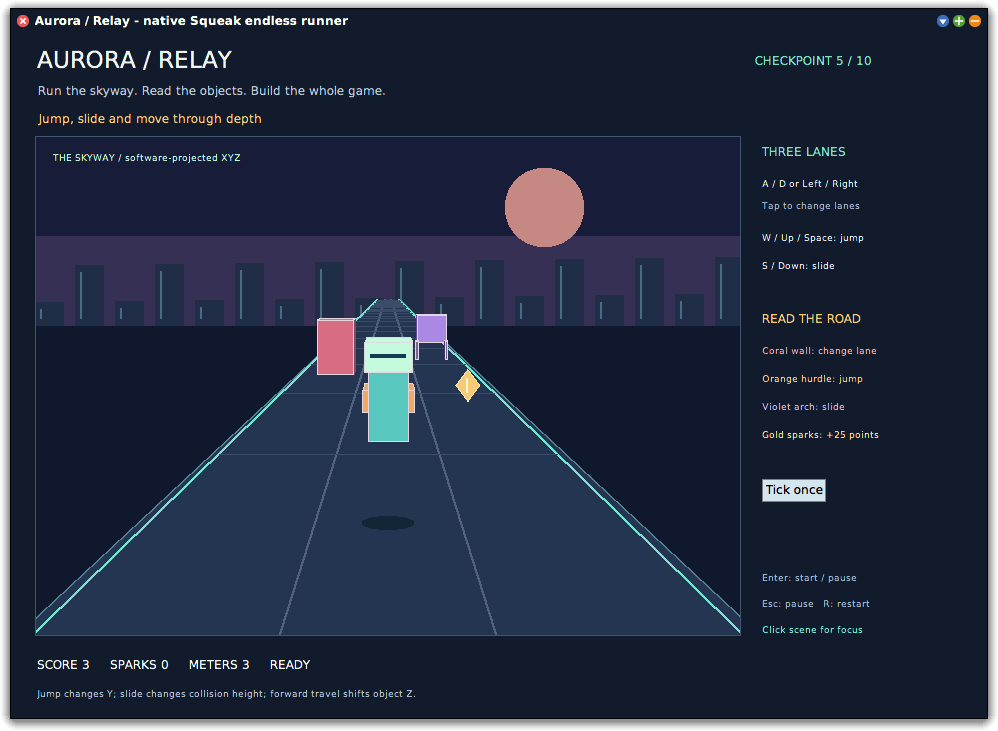
A lane index is -1, 0 or 1. The class-side lane:z: constructor multiplies it by 2.5 and creates a world position. ARObstacle owns position and a spent flag. ARWall, ARHurdle, ARArch and ARSpark specialize a small protocol instead of copying the session or view: kind, bottom, top, halfWidth, halfDepth and appearance. A wall reaches from ground to 2.6; a hurdle is 0.72 high; an arch starts at 1.04 above ground. A spark is a narrow collectible centered at height 1.
The scene asks each object what it is and draws a cuboid or a gold diamond. Cuboid corners are genuine XYZ points. Front, side and top faces have different colors to make depth legible. This is intentionally simple painter rendering: far objects are drawn first and near objects can paint over them. The dimensions also become collision data later, so the model’s geometry matters beyond appearance.
The teaching arrangement is fixed: a left wall, a central hurdle, a right arch and a right spark. Nothing moves yet. Inspect the collection and see how four different classes respond to the same messages. Rendering does not own gameplay rules; when contacts arrive in checkpoint 6, contactIn: will send applyTo: to the contacted object.
ARView · complete method
visibleObjects
^ (app game objects select: [:body | body spent not and: [(camera depthOf: body position) - body halfDepth >= camera near and: [(camera depthOf: body position) + body halfDepth <= camera far]]]) sorted: [:a :b | a position z > b position z]
ARView · complete method
boxAtX: x y: y z: z width: w height: h depth: d on: canvas face: face side: side
| front back |
front := {ARVector x: x-(w/2) y: y z: z-(d/2). ARVector x: x+(w/2) y: y z: z-(d/2). ARVector x: x+(w/2) y: y+h z: z-(d/2). ARVector x: x-(w/2) y: y+h z: z-(d/2)}.
back := front collect: [:p | p + (ARVector x: 0 y: 0 z: d)].
self polygon: {front first. back first. back fourth. front fourth} on: canvas color: side border: side.
self polygon: {front second. back second. back third. front third} on: canvas color: side border: side.
self polygon: {front third. back third. back fourth. front fourth} on: canvas color: face border: '#E3D6DE'.
self polygon: front on: canvas color: face border: '#E3D6DE'
Where to run this
System Browser → ARObstacle class → class side → tutorial. Read or Accept this complete method after filing in the checkpoint.
ARObstacle class · complete method
lane: lane z: depth
^ self new position: (ARVector x: lane * 2.5 y: 0 z: depth); yourself
File List → fileIn endless-runner-03.st. Then Workspace → select this entire block → Do It.
Workspace · run after installing this checkpoint
| app |
app := ARApp open.
app
An obstacle class supplies shape data; a run owns the collection of live instances
visibleObjects removes out-of-depth geometry and sorts far to near
Arch support posts are drawn now and receive matching collision boxes in checkpoint 6
Watch for: A renderer is a consumer of model data. Do not change score or delete objects from drawOn:. Repainting may happen at any time.
Try it: Inspect: ARRun new objects collect: [:each | {each class. each kind. each bottom. each top}].
Expected result
Four native projected objects: coral wall on the left, low orange hurdle in the center, violet arch and gold spark on the right.
Captured from this checkpoint’s exact source and Workspace block using the native Squeak SystemWindow imageForm.
04 · One runner, three target lanes
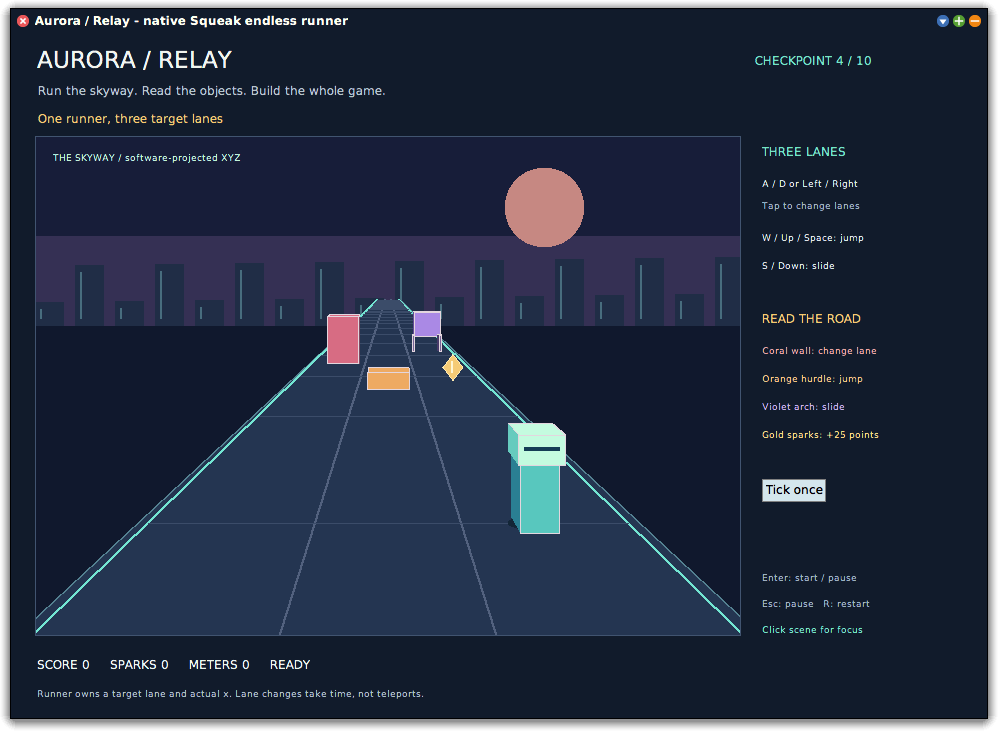
ARRunner replaces the origin vector as the player model. It owns a target lane and a continuously changing x coordinate. changeLane: modifies the target, clamped to -1 through 1. advance: moves actual X toward that target at 18 world units per second, snapping only the final fractional step so it cannot overshoot. A complete adjacent lane change takes 2.5 / 18 seconds, about 0.139 seconds.
Separating target from current position prevents a lane switch from teleporting through a nearby obstacle. It also makes the later collision sweep meaningful: the run can compare old and new X. At this stage feet, vertical speed and slide time already exist but remain at zero; the standing height is 1.65. The courier is drawn from a body and head cuboid with a dark visor. Its shadow is a decorative ground oval.
The Workspace block sends one intention and four manual ticks. Each tick advances 0.04 seconds. The runner reaches the right lane without moving forward. ARApp’s Tick once button is useful for experiments, while ARRun remains usable in an inspector. The eventual keyboard controller will send the same changeLane: message, so input mechanics do not leak into physics.
Captured from this checkpoint’s exact source and Workspace block using the native Squeak SystemWindow imageForm.
05 · Jump, slide and move through depth
A jump sets verticalSpeed to 8.2 only when feet are on the ground and the runner is not sliding. Each physics update integrates feet = feet + velocity * dt - 10 * dt squared, then subtracts 20 * dt from vertical speed. Gravity is therefore 20 world units per second squared. The analytic term makes this constant-acceleration update stable and easy to reason about. Landing clamps feet and vertical speed to zero. Another jump in the air cannot reset the velocity.
A slide starts a 0.72-second timer on the ground. While that timer is positive, height is 0.62 instead of 1.65. This makes sliding a change in geometry, not merely an animation. The same height drives the courier drawing and later contact tests. Holding a key will eventually be edge-triggered by the controller, so a slide does not refresh indefinitely from repeated key-down events.
Forward travel is relative: the courier stays at Z = 0 and every object shifts toward the camera. Distance grows by speed * dt and road stripes use distance modulo 6. This keeps rendered Z near the origin even after a long run. There are still no contacts at this checkpoint, so it is safe to let the courier pass through a hurdle while studying motion. The block captures the rising part of a jump after seven updates.
Captured from this checkpoint’s exact source and Workspace block using the native Squeak SystemWindow imageForm.
06 · Sweep contacts between frames
Checking only the new position can miss an obstacle that was crossed between frames. The slab algorithm instead intersects the whole movement segment with an expanded box. Add the runner’s half-width, half-height and half-depth to the obstacle box; then treat the runner center as a moving point. For X, Y and Z, the method computes the interval of segment time spent inside the corresponding slab. If the three intervals never overlap, there is no contact. A nearly zero delta is handled without division.
ARRun divides each 40 ms tick into four 10 ms slices. Before advancing, it retains old feet and X; afterward it constructs the new center with forward travel as Z. Contacts therefore sweep simultaneous lane, jump and forward movement. The jump curve is approximated by short chords; a larger height is used across a slide-expiry boundary, giving a conservative posture transition. The model has no collision tunneling even if a single forward slice crosses a full obstacle. This is kinematic box collision, not a rigid-body physics engine.
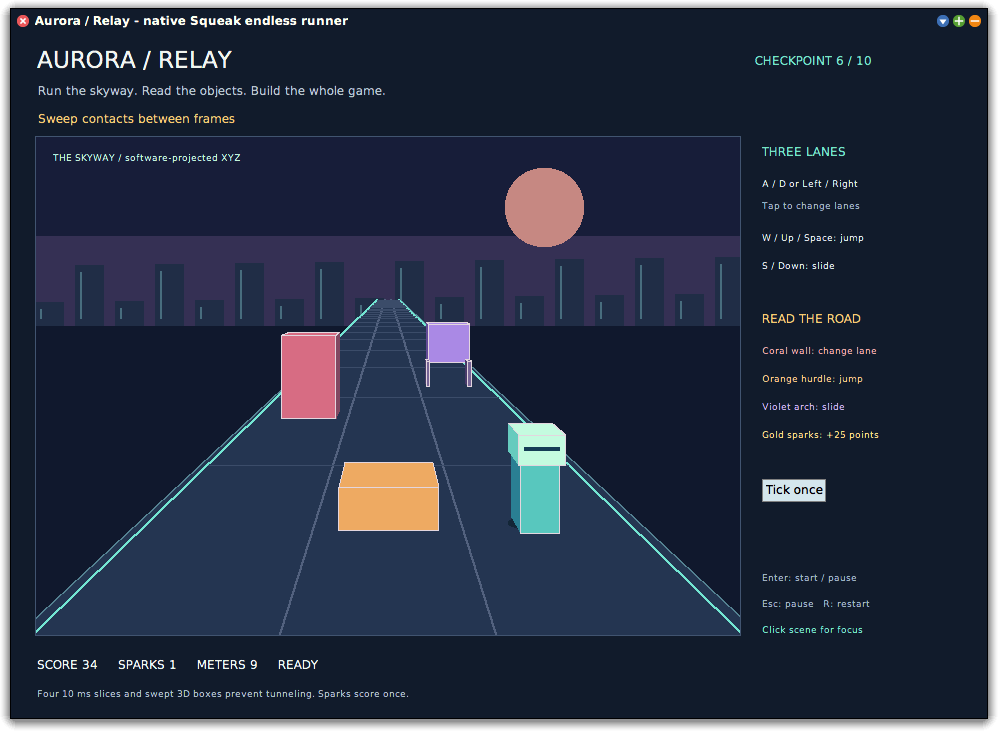
An arch has three collision boxes: the raised beam and both support posts, matching its visual shape. Sliding clears the beam when centered; clipping a post still ends the run. contactIn: marks an object spent before dispatching applyTo:. A spark increments coins, while an obstacle ends the run. Spent objects and objects behind Z = -12 leave the active collection. The sample moves right, collects a spark and demonstrates a one-time score increase without touching the arch.
ARObstacle · complete method
touchesFrom: start to: finish height: height
^ self segmentFrom: start to: finish center: self center half: {self halfWidth + 0.34. (self top-self bottom+height)/2. self halfDepth+0.3}
ARArch · complete method
touchesFrom: start to: finish height: height
(super touchesFrom: start to: finish height: height) ifTrue: [^ true].
^ #(-0.86 0.86) anySatisfy: [:dx |
self segmentFrom: start to: finish center: (ARVector x: position x+dx y: 0.52 z: position z)
half: {0.065+0.34. (1.04+height)/2. 0.3+0.3}]
ARRun · complete method
advanceSlice: dt
| oldFeet oldX start finish travel height |
oldFeet := player feet. oldX := player x. height := player height. player advance: dt.
height := height max: player height.
start := ARVector x: oldX y: oldFeet+(height/2) z: 0.
travel := self speed*dt. finish := ARVector x: player x y: player feet+(height/2) z: travel.
objects do: [:body |
(state ~= #over and: [body spent not and: [body touchesFrom: start to: finish height: height]]) ifTrue: [body contactIn: self]].
objects do: [:body | body advanceBy: travel]. distance := distance + travel.
objects := objects select: [:body | body spent not and: [body position z > -12]]
Where to run this
System Browser → ARObstacle → instance side → tutorial. Read or Accept this complete method after filing in the checkpoint.
ARObstacle · complete method
segmentFrom: start to: finish center: center half: half
| enter leave a b c delta lo hi t1 t2 swap |
enter := 0.0. leave := 1.0. a := start asArray. b := finish asArray. c := center asArray.
1 to: 3 do: [:axis |
delta := (b at: axis)-(a at: axis). lo := (c at: axis)-(half at: axis). hi := (c at: axis)+(half at: axis).
delta abs < 0.0000001 ifTrue: [((a at: axis) < lo or: [(a at: axis) > hi]) ifTrue: [^ false]]
ifFalse: [t1 := (lo-(a at: axis))/delta. t2 := (hi-(a at: axis))/delta.
t1 > t2 ifTrue: [swap := t1. t1 := t2. t2 := swap].
enter := enter max: t1. leave := leave min: t2. enter > leave ifTrue: [^ false]]].
^ true
File List → fileIn endless-runner-06.st. Then Workspace → select this entire block → Do It.
Workspace · run after installing this checkpoint
| app |
app := ARApp open.
app game player changeLane: 1.
22 timesRepeat: [app tickOnce].
app
Swept collision tests a path, not just an endpoint
Contact dispatch is polymorphic: Spark collects; walls, hurdles and arches crash
Objects have a one-shot spent flag and leave the live collection promptly
Watch for: Keep oldFeet and oldX before calling advance:. If both endpoints are the new position, the algorithm silently becomes an endpoint test.
Try it: Create an ARWall at Z = 20 and test a segment from Z = 0 to 50. It must hit even though neither endpoint is inside the wall.
Expected result
The courier reaches the right lane and collects the nearby spark: sparks = 1, distance = 9.68 and score = 34. The run has not crashed.
Captured from this checkpoint’s exact source and Workspace block using the native Squeak SystemWindow imageForm.
07 · Generate an endless, fair route
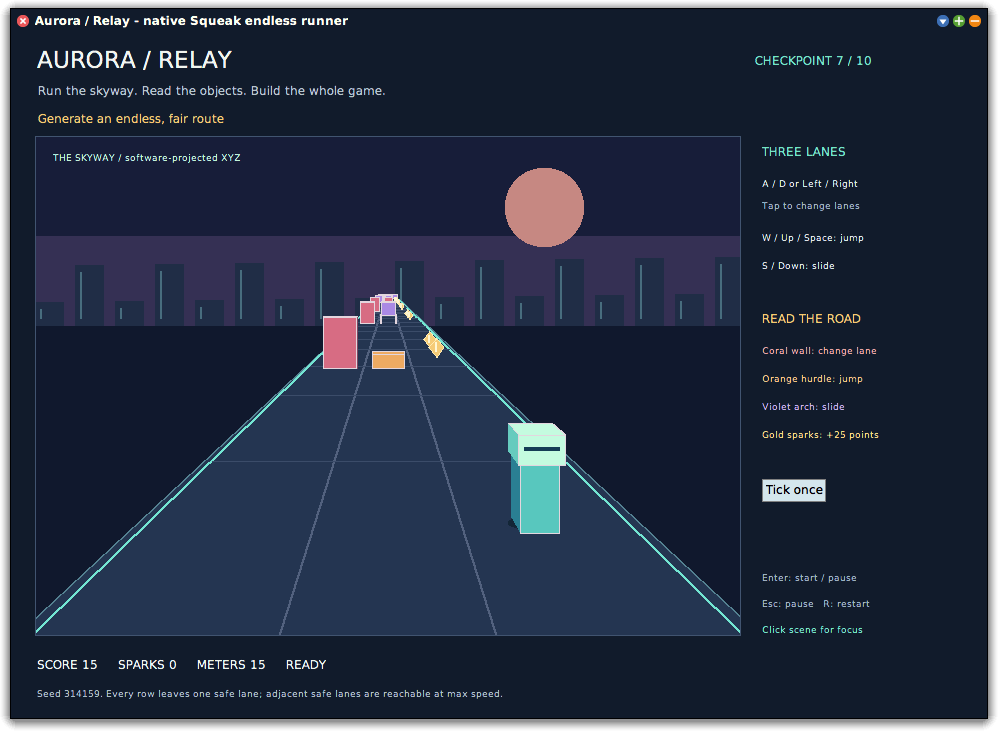
ARGenerator owns deterministic row generation. A small multiplicative pseudorandom sequence maps a seed to the same sequence of choices every time. The first three rows teach a central hurdle, an arch and a wall; the right lane stays open. After that, the open lane may stay where it is or move by one adjacent lane. The other two lanes receive a wall, hurdle or arch, and the open lane carries two sparks. Each row is 28 world units after the previous row.
This guarantees a traversable route, not survival after every late decision. At the maximum forward speed of 22, consecutive row centers are 1.273 seconds apart. An adjacent lane transition needs only 0.139 seconds. Even allowing the 0.8-unit longitudinal collision half-envelope on each side and a 10 ms physics slice, there is ample empty space between rows to change lanes. Following the guaranteed open lane needs no jump or slide. Other lanes are optional challenges, so jump and slide recovery cannot make the promised route impossible.
The generator fills only 155 units ahead. The run discards objects behind -12 and never stores old row histories. With four objects per row, normal active storage stays under 30 objects; generation cost is bounded per tick. Speed increases with distance from 11 to a hard ceiling of 22. A seed stays with the session and restart regenerates the same course, making failures reproducible. This checkpoint already runs endlessly through manual model ticks, but native keyboard input and session pause controls arrive next.
File List → fileIn endless-runner-07.st. Then Workspace → select this entire block → Do It.
Workspace · run after installing this checkpoint
| app |
app := ARApp open.
app game player changeLane: 1.
35 timesRepeat: [app tickOnce].
app
The generator owns randomness, row spacing and the open-lane invariant
ARRun owns distance and the active collection, and asks the generator to refill it
A fixed seed makes a test or gameplay attempt reproducible
Watch for: Random independent obstacles in all three lanes can produce an impossible wall. Generate a route first, then put hazards around it.
Try it: Inspect 150 generated rows for many seeds. Check that the safe lane changes by at most one and no hazard occupies that lane.
Expected result
The courier is in the guaranteed open right lane, several generated rows converge toward the horizon, and distance is about 15.44. The speed has begun to rise slightly above 11.
Captured from this checkpoint’s exact source and Workspace block using the native Squeak SystemWindow imageForm.
08 · Turn key events into a session
ARController translates keys into intentions. Native keyDown: and keyUp: events pass through ARView using Squeak’s platform virtual-key map. The controller stores currently pressed keys in a Set, acting only when a key first goes down. This means a held direction changes one lane, a held jump does not keep bouncing, and Enter does not rapidly toggle pause because of operating-system repeat. Release and tap again for a second action. keyStroke: is deliberately ignored because using both key-down and key-stroke would duplicate actions.
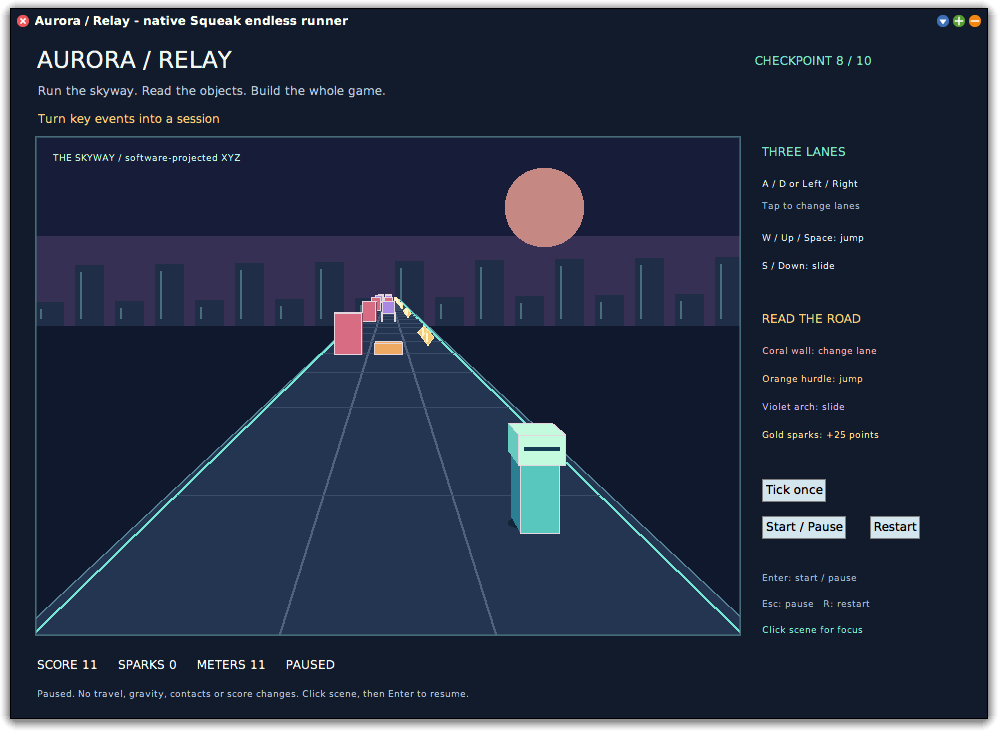
The session has four states: ready, running, paused and over. Only running accepts simulation ticks. Enter toggles ready/paused/running; Escape pauses; R resets the seed, objects, courier and score. Inputs in ready or paused do not move the courier. Game over remains frozen until restart. Manual Tick once briefly enables one model update and returns to paused, which is useful for debugging.
Keyboard focus is explicit. Opening or clicking the scene gives ARView focus. Losing focus pauses and clears pressed keys, preventing a key released in another window from becoming stuck. Closing the SystemWindow stops stepping, clears keyboard and mouse focus, and detaches the old window. The block uses controller messages to show the input boundary without relying on keyboard timing. The native frame loop itself arrives in checkpoint 9.
ARView receives native events; ARController maps them to model messages
The model guards ticks by state, so paused and terminal sessions truly freeze
Focus loss clears keys and pauses immediately; returning focus does not resume without Enter
Start/Pause and Restart restore the scene’s keyboard focus, so sidebar clicks work after focus loss
Watch for: When moving between checkpoints, close the old window first. Old instances retain their state even after their class methods change.
Try it: Press Enter twice without a keyUp:. The state should change only once. Release and press again, then compare.
Expected result
The courier is in the right lane after 25 ticks, then paused with an empty pressed-key set. Distance is about 11.02. No native scheduler is active yet.
Captured from this checkpoint’s exact source and Workspace block using the native Squeak SystemWindow imageForm.
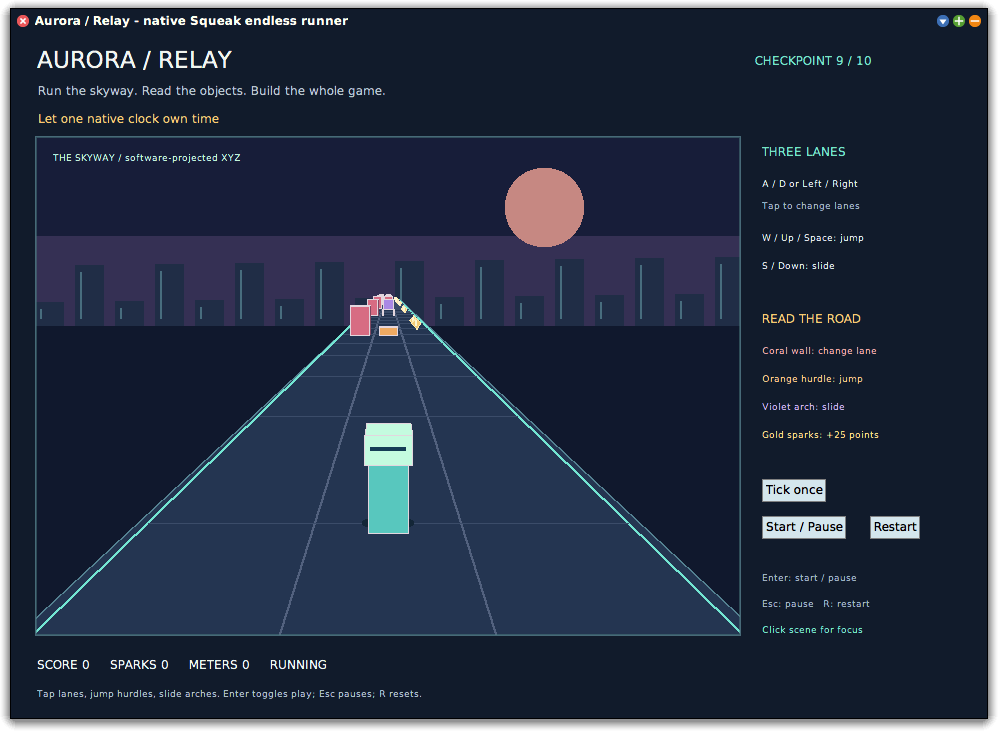
09 · Let one native clock own time
ARApp is the only scheduler owner. stepTime requests 40 milliseconds, and each native step sends one tick to ARRun, refreshes labels, and reconciles scheduling with the new state. The isStepping guard matters: repeatedly calling startStepping can reset the next due time and cause an unexpectedly fast loop. The application starts stepping only when it has an open window and a running model, and stops when paused, over or closed.
Morphic SystemWindow can also arrange model stepping. wantsStepsIn: answers false so it does not add a second route to the clock. This keeps the chain explicit: Morphic scheduler → ARApp step → ARRun tick → four 10 ms slices → runner, collision, cleanup and generator → refresh. Rendering never advances time. Opening the same application twice brings its existing window forward instead of creating a second scheduler.
This is a fixed-step game clock: if rendering or the host is slow, gameplay slows with it. We do not accumulate real-time lag and then leap through many simulation steps. That is a conscious tutorial tradeoff; it keeps controls, collision and replay deterministic. The independent verification observes actual Morphic step scheduling over wall-clock time, then checks pause, resume, close and reopen, rather than merely reading stepTime. In this checkpoint Enter and the Start/Pause button now make the game run by itself.
File List → fileIn endless-runner-09.st. Then Workspace → select this entire block → Do It.
Workspace · run after installing this checkpoint
| app |
app := ARApp open.
app togglePause.
app
40 ms is a scheduler request, not an exact wall-clock guarantee
The step loop checks scene focus before advancing the model
isStepping and wantsStepsIn: prevent repeated starts and secondary window stepping
Watch for: Do not start the view, runner and generator stepping independently. Several clocks make pause and cleanup difficult to reason about.
Try it: Call synchronizeStepping repeatedly while running, then pause and close the window. Verify ticks stop and the application is no longer stepping.
Expected result
The game starts running under one native Morphic clock. Without input, the courier eventually reaches the first central hurdle and the run ends; move right to take the guaranteed safe route.
Captured from this checkpoint’s exact source and Workspace block using the native Squeak SystemWindow imageForm.
10 · Finish the playable relay
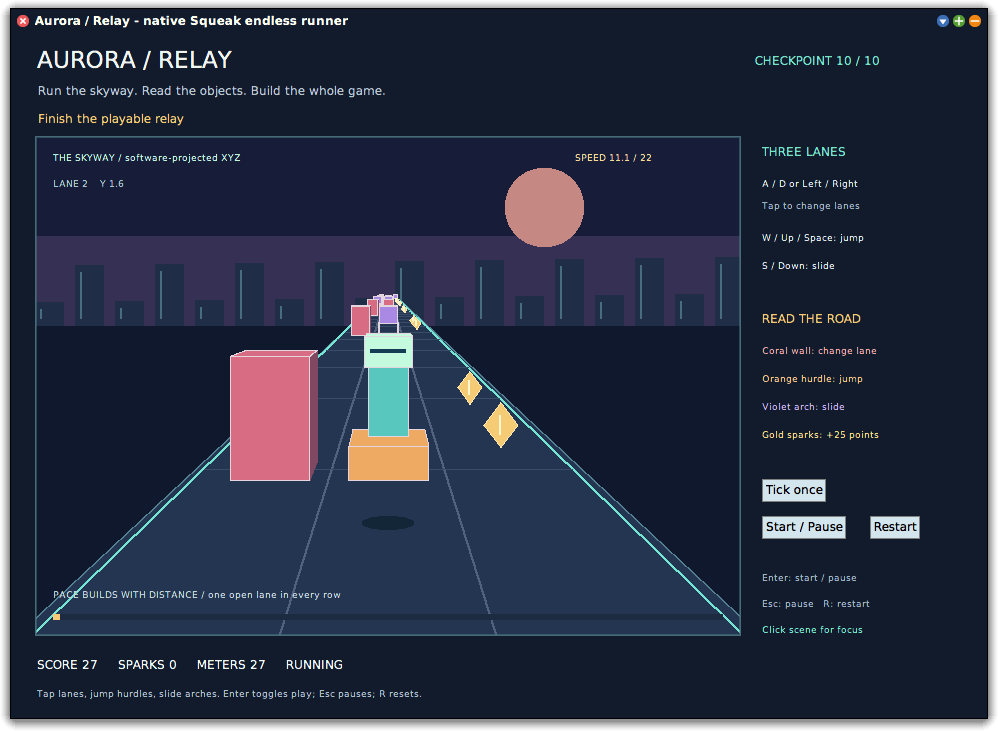
The final checkpoint completes the play surface: clear ready, paused and game-over panels; distance, sparks and score; a speed meter; lane and jump-height readouts; and a short control legend. These are views of existing model state. No new gameplay rule hides inside the overlay. Score is floor(distance) plus 25 per spark. There is no finish gate: survive as long as you can, beat your own distance, and restart the same seed to practice an awkward pattern.
For immediate play, file in endless-runner-final.st and Do It ARApp open. Click the scene, then Enter. Tap A/D or Left/Right to change lanes; W/Up/Space jumps; S/Down slides. The cyan courier is your runner. Orange hurdles can be jumped, violet arches can be slid under through their center, and coral walls require a lane change. Gold sparks mark the guaranteed route. Pause freezes every moving part. Losing focus automatically pauses; R creates a fresh run in ready state.
The exact block below is a short deterministic preview: it advances toward the first hurdle and initiates a jump before capturing the result. It uses only legal model intentions and normal ticks; it does not rewrite positions or scores. In the animated replay further down, the same actions enter through native KeyboardEvent handling, including jump, slide, lane changes, pause and restart. Close the preview and open a fresh run to play from the start.
This remains a deliberately compact Squeak game. It uses native software polygons and painter order, fixed camera orientation, kinematic box contacts and a seeded row grammar. There is no browser game, imported franchise artwork, GPU pipeline, audio, texture mapping, persistent leaderboard or network service. The source is small enough to inspect and extend, and the model can run thousands of tested ticks without opening a window.
ARView · complete method
drawHUDOn: canvas
 | text progress box |
 text := 'SPEED ' , (app game speed printShowingDecimalPlaces: 1), ' / 22'.
 self text: text at: 540@17 size: 12 on: canvas color: '#F8DA9F'.
 self text: ('LANE ', (app game player lane + 2) printString, '    Y ', (app game player feet printShowingDecimalPlaces: 1)) at: 18@43 size: 12 on: canvas color: '#ABC8DA'.
 box := self position + (18@478) extent: 670@6. canvas fillRectangle: box color: (Color fromString: '#1D2B40').
 progress := (app game speed - 11)/11.
 canvas fillRectangle: (box topLeft extent: ((670*progress) rounded)@6) color: (Color fromString: '#F8C976').
 self text: 'PACE BUILDS WITH DISTANCE / one open lane in every row' at: 18@454 size: 11 on: canvas color: '#C2D5E4'
ARRun · complete method
score
 ^ distance floor + (coins * self coinValue)
Where to run this
System Browser → ARView → instance side → tutorial. Read or Accept this complete method after filing in the checkpoint.
ARView · complete method
drawStateOn: canvas
 | box title subtitle |
 box := self position + (109@165) extent: 488@119.
 canvas fillRectangle: box color: (Color fromString: '#132D40').
 canvas frameRectangle: box width: 2 color: (Color fromString: '#73E5D2').
 title := app game state = #over ifTrue: ['RELAY ENDED'] ifFalse: [app game state = #paused ifTrue: ['SKYWAY PAUSED'] ifFalse: ['YOUR NEXT RUN STARTS HERE']].
 subtitle := app game state = #over ifTrue: ['R: restart / the same seed, a fresh chance'] ifFalse: ['Enter: run / arrows or WASD / Space: jump'].
 self text: title at: 132@181 size: 21 on: canvas color: '#F8D28B'.
 self text: subtitle at: 133@225 size: 14 on: canvas color: '#EEF7FF'.
 self text: 'Coral: dodge. Orange: jump. Violet: slide. Gold: collect.' at: 133@253 size: 12 on: canvas color: '#B5CBDC'
File List → fileIn endless-runner-10.st. Then Workspace → select this entire block → Do It.
Workspace · run after installing this checkpoint
| app |
app := ARApp open.
app togglePause.
55 timesRepeat: [app game tick].
app game player jump.
8 timesRepeat: [app game tick].
app refresh.
app
The full model remains independent of Morphic and native keyboard events
A render is side-effect-free; overlays simply read ready/running/paused/over
Use the final source plus both SUnit suites to reproduce the implementation and its regression checks
Watch for: A screenshot is not proof of gameplay. Use the test suites and the legal native replay to verify the actions, score changes and lifecycle.
Try it: Play the first rows twice. First follow the right-hand spark route. Then stay in the center, jump the hurdle, slide the arch, and change lane before the wall.
Expected result
A running native scene with the courier airborne just before the first orange hurdle, 63 model ticks, zero sparks and roughly 27.86 meters. The native scheduler continues when you return to Squeak.
Captured from this checkpoint’s exact source and Workspace block using the native Squeak SystemWindow imageForm.
Watch the workflow
Every PNG is exported directly from ARApp’s native SystemWindow imageForm in an isolated Squeak 6.1 image. GIFs are assembled only from those native PNG frames. The headless VM uses Squeak’s bundled X11 virtual-key table for the legal KeyboardEvent replay, because a null display has no normal letter mapping. This tests the native Morphic event path; it is not a physical human keyboard recording.
NATIVE SQUEAK CAPTURE
Construction replay: ten exact checkpoint captures, from a coordinate grid to the playable native runner. This is a montage of real SystemWindow imageForm snapshots, not continuous gameplay.
NATIVE SQUEAK CAPTURE
Native gameplay replay: KeyboardEvent key-down/up messages drive a jump over the teaching hurdle, a slide under the arch, a lane change before the wall and generated safe lanes. The replay then pauses, restarts, deliberately hits the first hurdle without input, and restarts again. All 120 frames come from the real Squeak window after normal 40 ms model ticks; sampling speeds up the animation. No player-position, obstacle-collection or score writes are used.
Practice with tested solutions
1. A wider skyway view
Change the camera to a wider field of view without changing any collision dimensions. Lower the focal length from 410 to 360. The same world point should project closer to the screen center.
Hint
Find the small policy method, not the drawing or event code.
Show a tested solution
System Browser → ARCamera → instance side → tutorial. File in the final source first, then Accept this complete replacement method. The complete solution download also contains the full game.
Workspace → select this entire check → Print It. Use a fresh run or camera after changing a policy.
Check the solution
| camera point |
camera := ARCamera new.
point := camera project: (ARVector x: 2 y: 4 z: 3).
(camera focal = 360) and: [point x - camera center x = 72]
true
Projection moves the point 72 pixels right of center, instead of 82. Only screen scale changes; the world dimensions and fair route remain identical.
Tested in a fresh native Squeak 6.1 process by compiling this exact solution and evaluating this exact Workspace check. Re-file the final source to restore the original policy before another exercise.
2. Make each spark worth more
Raise the spark bonus to 40, keeping distance scoring and one-time collection intact. Change the scoring policy in the model rather than the HUD string.
Hint
Find the small policy method, not the drawing or event code.
Show a tested solution
System Browser → ARRun → instance side → tutorial. File in the final source first, then Accept this complete replacement method. The complete solution download also contains the full game.
One spark gives 40 points; a repeated contact with the same object still leaves one spark and 40 points. Update the sidebar wording if you keep this variant for play.
Tested in a fresh native Squeak 6.1 process by compiling this exact solution and evaluating this exact Workspace check. Re-file the final source to restore the original policy before another exercise.
3. Cap the late-game pace
Create a gentler variant by capping forward speed at 18. Keep early acceleration intact and verify that late-game speed cannot exceed the new bound. The existing 28-unit row spacing provides even more lane-change time.
Hint
Find the small policy method, not the drawing or event code.
Show a tested solution
System Browser → ARRun → instance side → tutorial. File in the final source first, then Accept this complete replacement method. The complete solution download also contains the full game.
Workspace → select this entire check → Print It. Use a fresh run or camera after changing a policy.
Check the solution
| game early late |
game := ARRun new.
early := game speed.
game instVarNamed: 'distance' put: 100000.
late := game speed.
(early = 11) and: [late = 18]
true
The starting speed stays 11 and the late-game speed is 18. The inspector-style distance assignment is test setup, not gameplay. For a polished variant, derive the HUD denominator and meter from maximumSpeed too.
Tested in a fresh native Squeak 6.1 process by compiling this exact solution and evaluating this exact Workspace check. Re-file the final source to restore the original policy before another exercise.
When something looks wrong
The .st file produces a syntax error when pasted into a Workspace
Use File List → fileIn for the complete source. Chunk-format method delimiters are not a single Workspace expression. Use Workspace only for the construction or check block.
Nothing moves in an early checkpoint
Stages 1–3 are static. Stages 4–7 use Tick once. Stage 8 adds native key input and state but still requires manual model ticks. Stage 9 adds the native clock.
The game pauses when I click elsewhere
Focus loss deliberately pauses and clears pressed keys. Click the scene and press Enter to resume. This prevents stuck controls when the key-up event happens in another window.
Holding a direction does not cross two lanes
Controls are edge-triggered. Release and tap again to request another lane. Automatic key repeat is intentionally ignored.
The runner hits the side of an arch while sliding
The arch has a raised beam and two support posts. Slide through its center; a late lane change across a post can collide. The gold route is always free of hazards.
An earlier checkpoint contains later behavior
File-in adds or replaces methods; it does not delete every later method. Use a fresh image for isolated checkpoints or proceed forward only, closing the old window first.
The window repaints slowly
This is a native software renderer. Close unrelated animated windows or lower visual complexity. The fixed-step loop slows game time on slow hosts rather than making a huge catch-up jump.
Verification, cleanup and next steps
Built and executed in Squeak 6.1 build 23976, 64-bit Linux x64, with a private image and changes file and bundled SqueakV60 sources. No browser game code is shipped.
62 native SUnit tests passed: 38 primary and 24 independent, with zero failures or errors. All ten exact checkpoint method/Workspace combinations and all three exercise solutions passed in fresh native Squeak processes.
The independent legal-input run completed 12,000 ticks (480 simulated seconds), traveled 9,497.6 meters, collected 678 sparks and made 149 lane changes. A separate maximum-speed route replay survived 19,200 ticks across 12 seeds. Generation was checked over 20,000 rows across 100 seeds. The long run retained at most 24 live objects. The media replay peaked at 25 live objects, below the conservative 28-object bound.
All ten displayed method sets and Workspace blocks are compiled/evaluated in fresh native processes before their screenshots are captured
Three exact exercise replacement methods and their checks execute in fresh Squeak processes
Primary and independent SUnit suites are downloadable; both execute against the final source
Long legal gameplay covers jump, slide, lane changes, coins, pause, restart, crash and generated rows
Native media and source files have SHA-256 checksums in verification.json
Real Morphic scheduling produced 10 ticks in 440 ms, with exactly one live step entry while running and none after pause, close or game over
The independent review found and verified fixes for sidebar focus recovery, initial window placement and simultaneous jump/slide input before a physics tick
Final game source SHA-256: e38cba8ed7d7735cb3990af360720982fecc16a03e69d436b208bdaa8f61e5c0
Close the game with its native window close control; this clears focus and removes stepping. Keep the .st files alongside your image so the application can be reconstructed in a fresh Squeak image. To run tests, file in the final game and a test source, then Print It the corresponding test class suite run.
Squeak 6.1 shipped source: Morph, SystemWindow, KeyboardEvent, EventSensor, StepMessage, Canvas and TestCase — Native APIs and behavior were inspected and exercised in the bundled image.
Original Aurora / Relay source and generated checkpoints — No franchise characters, branding or external game assets are used.