Thirty hands-on exercises: one easy, one practical and one challenge after each tutorial. Try the task first, reveal hints gradually, then compare the runnable solution and its checks.
30 exercises90 progressive hints113 assertions
Practice deliberately, then compare
Use a fresh Squeak 6.1 image or a copy of your learning image.
Load the prerequisite files listed for that exercise first. Most .st prerequisites use File List > fileIn. forms-setup.st is a Workspace expression: open it, select all, and do it.
Open a Workspace. Paste the entire solution, including its temporary declaration or class setup, and choose do it (Ctrl+D on Windows/Linux, Command+D on macOS). Use print it for returned values or inspect it for returned models.
Class-building solution snippets compile Exercise-prefixed subclasses and are meant to be evaluated in a Workspace, not installed as chunk file-ins. Run each complete snippet as one selection.
To run a check, assign the solution’s final returned value to answer in a Workspace, then evaluate the test block with value: answer. The packaged verification harness executes these same snippets and tests automatically.
Expected test outcome is true. A failed check raises an Error with the specific assertion message. Tests sometimes change sample state; media captions state when this happens.
All supplied exercises are self-contained after their listed prerequisites and do not write application data files. Close generated sample windows and discard sample edits when appropriate.
Try the task before opening a solution. Hints reveal one at a time. Each solution is self-contained after its listed prerequisites; it can install Exercise-prefixed classes or create sample windows. Use a learning image.
No matching exercises. Clear the search or change a filter.
language · easy
Price a tiny shopping basket
Convert prices in cents #(125 250 375) to a subtotal, add a 10% tax, and return a Dictionary with subtotal, tax and total in cents. Use exact arithmetic; do not convert to Float.
The supplied VerifyAll.st runs each exact solution and matching block automatically. Follow the package README; do not run a one-argument test block without supplying its solution result.
Cleanup: No files are written. Close any sample windows when you finish; use a fresh image or remove only the Exercise-prefixed classes you installed if you want to undo class definitions.
language · practical
Clean and deduplicate names
Given #(' ada ' 'GRACE' 'Ada' '' ' linus '), trim whitespace, remove empty entries, lowercase the remaining names, and return an alphabetically sorted unique Array.
The supplied VerifyAll.st runs each exact solution and matching block automatically. Follow the package README; do not run a one-argument test block without supplying its solution result.
Cleanup: No files are written. Close any sample windows when you finish; use a fresh image or remove only the Exercise-prefixed classes you installed if you want to undo class definitions.
language · challenge
Group words into a frequency table
Write a reusable block that counts case-insensitive whitespace-delimited words. Return a Dictionary for each input, ignore repeated spaces and line breaks, and handle the empty string. Punctuation stays attached to words in this version.
Return a block taking one string, rather than hard-coding a single paragraph.
Hint 2
findTokens: accepts a String of delimiters. Include space, tab, CR and LF.
Hint 3
Use at:ifAbsent: to get zero for a new key, then store count + 1.
Show tested solution and explanation
Complete Workspace solution · Do it / Print it as described
[:text | | counts delimiters |
    counts := Dictionary new.
    delimiters := String with: Character space with: Character tab
        with: Character cr with: Character lf.
    (text asLowercase findTokens: delimiters) do: [:word |
        counts at: word put: (counts at: word ifAbsent: [0]) + 1].
    counts]
Expected: For 'Smalltalk smalltalk' plus a newline and 'Morphic': smalltalk -> 2, morphic -> 1; empty text gives an empty Dictionary.
A dictionary stores the aggregate rather than searching the whole collection repeatedly. This is whitespace tokenization, not linguistic word segmentation.
Read the matching verification block
Test block · evaluate with value: answer after storing the solution result
The supplied VerifyAll.st runs each exact solution and matching block automatically. Follow the package README; do not run a one-argument test block without supplying its solution result.
Cleanup: No files are written. Close any sample windows when you finish; use a fresh image or remove only the Exercise-prefixed classes you installed if you want to undo class definitions.
classes · easy
Give two counters separate jobs
Create a Laps counter starting at 3 and a Breaks counter starting at 0. Increment Laps twice and label Breaks “Rest breaks”. Return both in an Array and prove that changing one does not change the other.
Send startingAt:label: to the class to create each object.
Hint 2
Use a cascade for the two increments.
Hint 3
Keep both instances in separate variables and return {laps. breaks}.
Show tested solution and explanation
Complete Workspace solution · Do it / Print it as described
| laps breaks |
laps := LearningCounter startingAt: 3 label: 'Laps'.
breaks := LearningCounter startingAt: 0 label: 'Breaks'.
laps increment; increment.
breaks label: 'Rest breaks'.
{laps. breaks}
Expected: An Array containing Laps: 5 and Rest breaks: 0. Only Laps changes when you increment it again.
Instance variables belong to an individual object. Both counters have the same class and behavior, but their values are independent.
Read the matching verification block
Test block · evaluate with value: answer after storing the solution result
[:answer |
    answer first value = 5 ifFalse: [self error: 'Laps value'].
    answer second value = 0 ifFalse: [self error: 'Separate state'].
    answer second label = 'Rest breaks' ifFalse: [self error: 'Label'].
    answer first increment.
    answer second value = 0 ifFalse: [self error: 'No shared value'].
    true]
The supplied VerifyAll.st runs each exact solution and matching block automatically. Follow the package README; do not run a one-argument test block without supplying its solution result.
Cleanup: No files are written. Close any sample windows when you finish; use a fresh image or remove only the Exercise-prefixed classes you installed if you want to undo class definitions.
classes · practical
Reset to a configured starting value
Derive ExerciseResetCounter from LearningCounter. Add a startValue instance variable and startAt:. Its reset should restore the configured start instead of zero. Leave LearningCounter unchanged.
Expected: Resetting the subclass returns it to 10. A normal LearningCounter still starts at 0.
Inheritance supplies incrementBy: and printing. The override changes just reset, while the extra variable preserves the configured starting point.
Read the matching verification block
Test block · evaluate with value: answer after storing the solution result
[:answer |
    answer value = 10 ifFalse: [self error: 'Reset to configured start'].
    answer incrementBy: -3.
    answer value = 7 ifFalse: [self error: 'Inherited behavior'].
    answer reset.
    answer value = 10 ifFalse: [self error: 'Repeatable reset'].
    LearningCounter new value = 0 ifFalse: [self error: 'Base class unchanged'].
    true]
The supplied VerifyAll.st runs each exact solution and matching block automatically. Follow the package README; do not run a one-argument test block without supplying its solution result.
Cleanup: No files are written. Close any sample windows when you finish; use a fresh image or remove only the Exercise-prefixed classes you installed if you want to undo class definitions.
classes · challenge
Keep an object valid after rejected edits
Build a LearningCounter subclass whose value must stay from 0 through 10. Reject fractional increments and operations outside that range before changing state. Check both limits and prove a failed edit leaves the old value intact.
The supplied VerifyAll.st runs each exact solution and matching block automatically. Follow the package README; do not run a one-argument test block without supplying its solution result.
Cleanup: No files are written. Close any sample windows when you finish; use a fresh image or remove only the Exercise-prefixed classes you installed if you want to undo class definitions.
morphic · easy
Compose a reusable status badge
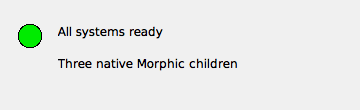
Build a 360-by-110 card containing a green dot, a title and a subtitle. Position the children relative to the card, open it, then move the entire card. Return the card so you can inspect its submorphs.
Add each child before positioning it relative to the parent.
Hint 3
Use StringMorph contents: for labels and EllipseMorph for the status dot.
Show tested solution and explanation
Complete Workspace solution · Do it / Print it as described
| card dot title subtitle |
card := Morph new color: (Color gray: 0.94); extent: 360@110.
dot := EllipseMorph new color: Color green darker; extent: 24@24.
title := StringMorph contents: 'All systems ready'.
subtitle := StringMorph contents: 'Three native Morphic children'.
card addMorph: dot; addMorph: title; addMorph: subtitle.
dot position: card position + (18@24).
title position: card position + (58@24).
subtitle position: card position + (58@56).
card openInWorld; position: 80@80.
card
Expected: A card with a green dot and two labels. Moving the parent preserves the three child offsets.
Composition gives the object a lifetime and coordinate system. You do not need to move each child separately.
NATIVE SQUEAK CAPTURE
Native Squeak 6.1 rendering of the supplied solution. State was set by the test script, not a recording of mouse or keyboard input.Read the matching verification block
Test block · evaluate with value: answer after storing the solution result
[:answer | | before child |
    answer extent = (360@110) ifFalse: [self error: 'Card size'].
    answer submorphs size = 3 ifFalse: [self error: 'Child count'].
    child := answer submorphs first.
    before := child position - answer position.
    answer position: answer position + (35@20).
    child position - answer position = before ifFalse: [self error: 'Relative placement'].
    true]
The supplied VerifyAll.st runs each exact solution and matching block automatically. Follow the package README; do not run a one-argument test block without supplying its solution result.
Cleanup: No files are written. Close any sample windows when you finish; use a fresh image or remove only the Exercise-prefixed classes you installed if you want to undo class definitions.
morphic · practical
Wire a button to an object
Create a model that owns a count and a label. Build a Count one button whose target/action sends increment to that model, and update the label after each click. Keep the count in the model, not in the label text.
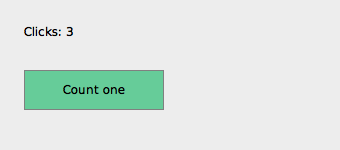
Expected: Each click adds one. After the test sends three native button actions the label reads Clicks: 3.
Target/action is the connection between a UI event and model behavior. The test invokes the native button action without pretending to be a recorded click.
NATIVE SQUEAK CAPTURE
Native Squeak 6.1 rendering of the supplied solution. State was set by the test script, not a recording of mouse or keyboard input.Read the matching verification block
Test block · evaluate with value: answer after storing the solution result
The supplied VerifyAll.st runs each exact solution and matching block automatically. Follow the package README; do not run a one-argument test block without supplying its solution result.
Cleanup: No files are written. Close any sample windows when you finish; use a fresh image or remove only the Exercise-prefixed classes you installed if you want to undo class definitions.
morphic · challenge
Bounce inside a moving parent
Create a ball with velocity and step. Keep its entire extent inside a parent rectangle, reverse the relevant velocity component at each boundary, and work correctly after the parent is moved. Leave animation paused until the learner explicitly starts stepping.
Compare against owner position and owner bottomRight, not the desktop origin.
Hint 2
Subtract the ball extent from the owner’s far corner.
Hint 3
Clamp the proposed position to the legal rectangle, then reverse only the components that hit a boundary.
Show tested solution and explanation
Complete Workspace solution · Do it / Print it as described
EllipseMorph subclass: #ExerciseBouncingDot
    instanceVariableNames: 'velocity'
    classVariableNames: '' poolDictionaries: ''
    category: 'LearnSqueak-Exercises'.
(Smalltalk at: #ExerciseBouncingDot) compile: 'initialize
    super initialize.
    self color: Color orange; extent: 26@26.
    velocity := 5@3'.
(Smalltalk at: #ExerciseBouncingDot) compile: 'velocity
    ^ velocity'.
(Smalltalk at: #ExerciseBouncingDot) compile: 'velocity: aPoint
    velocity := aPoint'.
(Smalltalk at: #ExerciseBouncingDot) compile: 'stepTime
    ^ 30'.
(Smalltalk at: #ExerciseBouncingDot) compile: 'step
    | next dx dy low high |
    self owner ifNil: [^ self].
    low := self owner position.
    high := self owner bottomRight - self extent.
    next := self position + velocity.
    dx := velocity x. dy := velocity y.
    (next x < low x or: [next x > high x]) ifTrue: [dx := dx negated].
    (next y < low y or: [next y > high y]) ifTrue: [dy := dy negated].
    self position: ((next x max: low x) min: high x)
        @ ((next y max: low y) min: high y).
    velocity := dx@dy'.

[| arena ball |
arena := Morph new color: (Color r: 0.08 g: 0.13 b: 0.22); extent: 400@220.
ball := ExerciseBouncingDot new.
arena addMorph: ball.
ball position: arena position + (30@40).
arena openInWorld.
ball stopStepping.
{arena. ball}] value
Expected: The ball remains entirely inside the arena for 201 deterministic steps, including a corner bounce after moving the parent. To animate, send startStepping to the ball; send stopStepping before closing.
This intentionally clamps at a wall rather than preserving overshoot distance. Keep the arena larger than the ball. Motion uses Morphic stepping, not a separately forked loop.
Scope: A small clamped animation exercise, not continuous collision physics.
NATIVE SQUEAK CAPTURE
Native Squeak 6.1 rendering of the supplied solution. State was set by the test script, not a recording of mouse or keyboard input.
NATIVE SQUEAK CAPTURE
Programmatic native-render demonstration: the verifier calls step twice per frame. These are real Morphic imageForm frames, not recorded mouse input or a real-time performance benchmark.Read the matching verification block
Test block · evaluate with value: answer after storing the solution result
The supplied VerifyAll.st runs each exact solution and matching block automatically. Follow the package README; do not run a one-argument test block without supplying its solution result.
Cleanup: No files are written. Close any sample windows when you finish; use a fresh image or remove only the Exercise-prefixed classes you installed if you want to undo class definitions.
forms · easy
Add a greeting option
Derive a form with a fourth greeting, Good evening. Select it, accept a name with leading/trailing spaces, and display the greeting. Preserve the base form’s checkbox, slider and reset behavior.
The existing acceptName: trims spaces and greet reads the selection.
Show tested solution and explanation
Complete Workspace solution · Do it / Print it as described
LearnSqueakFormDemo subclass: #ExerciseGreetingForm
    instanceVariableNames: ''
    classVariableNames: '' poolDictionaries: ''
    category: 'LearnSqueak-Exercises'.
(Smalltalk at: #ExerciseGreetingForm) compile: 'choices
    ^ #(''Hello'' ''Welcome'' ''Good morning'' ''Good evening'')'.

[| model |
model := ExerciseGreetingForm new.
model acceptName: '  Ada  '; choice: 4; greet.
{model. model open}] value
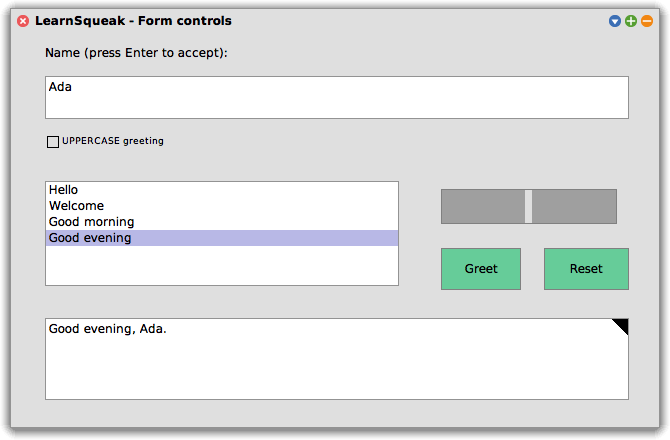
Expected: The fourth list item produces Good evening, Ada.; turning on uppercase produces GOOD EVENING, ADA.
One override extends a data-driven control. The inherited list reads choices dynamically.
NATIVE SQUEAK CAPTURE
Native Squeak 6.1 rendering of the supplied solution. State was set by the test script, not a recording of mouse or keyboard input.Read the matching verification block
Test block · evaluate with value: answer after storing the solution result
[:answer | | model |
    model := answer first.
    model choices size = 4 ifFalse: [self error: 'Fourth choice'].
    model result = 'Good evening, Ada.' ifFalse: [self error: 'Greeting and trim'].
    model toggleLoud; greet.
    model result = 'GOOD EVENING, ADA.' ifFalse: [self error: 'Checkbox still applies'].
    true]
The supplied VerifyAll.st runs each exact solution and matching block automatically. Follow the package README; do not run a one-argument test block without supplying its solution result.
Cleanup: No files are written. Close any sample windows when you finish; use a fresh image or remove only the Exercise-prefixed classes you installed if you want to undo class definitions.
forms · practical
Reject invalid input without losing the last good value
Validate names before accepting them. Empty/whitespace-only names and names longer than 40 characters must return false, show an explanation, and keep the previously accepted name.
PluggableTextMorph’s accept callback returns a Boolean.
Hint 3
On rejection update result and announce changed: #result, but do not assign the name.
Show tested solution and explanation
Complete Workspace solution · Do it / Print it as described
LearnSqueakFormDemo subclass: #ExerciseValidatedForm
    instanceVariableNames: ''
    classVariableNames: '' poolDictionaries: ''
    category: 'LearnSqueak-Exercises'.
(Smalltalk at: #ExerciseValidatedForm) compile: 'acceptName: aText
    | proposed |
    proposed := aText asString withBlanksTrimmed.
    (proposed isEmpty or: [proposed size > 40]) ifTrue: [
        result := ''Use a name from 1 to 40 characters.''.
        self changed: #result.
        ^ false].
    ^ super acceptName: proposed'.

[| model | model := ExerciseValidatedForm new. {model. model open}] value
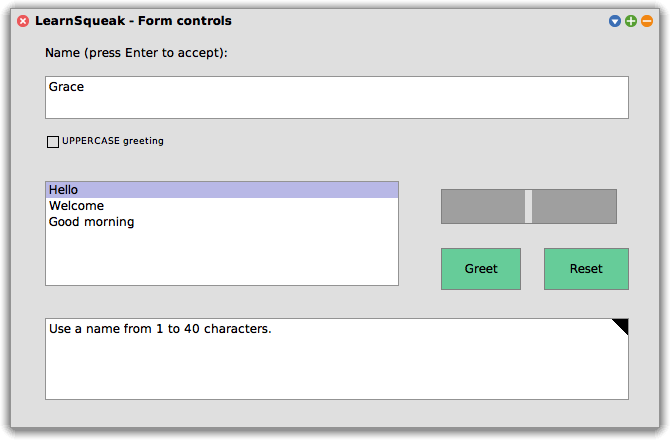
Expected: Grace is accepted. Blank and 41-character names are rejected, leave Grace in the model, and show the 1-to-40-character message.
Validation is a transaction: decide first, assign second. The old valid state survives rejected edits.
NATIVE SQUEAK CAPTURE
Native Squeak 6.1 rendering of the supplied solution. State was set by the test script, not a recording of mouse or keyboard input.Read the matching verification block
Test block · evaluate with value: answer after storing the solution result
[:answer | | model |
    model := answer first.
    (model acceptName: 'Grace') ifFalse: [self error: 'Accept valid name'].
    (model acceptName: '   ') ifTrue: [self error: 'Reject blank'].
    model nameText = 'Grace' ifFalse: [self error: 'Preserve accepted name'].
    (model acceptName: (String new: 41 withAll: $x)) ifTrue: [self error: 'Length limit'].
    model nameText = 'Grace' ifFalse: [self error: 'Preserve after long input'].
    (model result includesSubstring: '1 to 40') ifFalse: [self error: 'Visible explanation'].
    true]
The supplied VerifyAll.st runs each exact solution and matching block automatically. Follow the package README; do not run a one-argument test block without supplying its solution result.
Cleanup: No files are written. Close any sample windows when you finish; use a fresh image or remove only the Exercise-prefixed classes you installed if you want to undo class definitions.
forms · challenge
Build a temperature converter
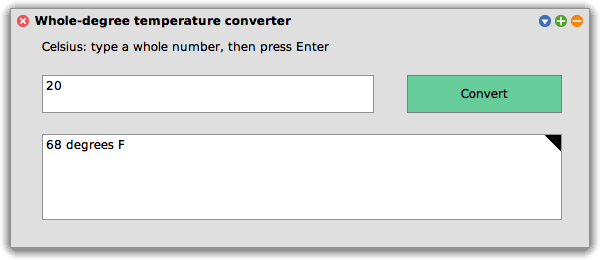
Create a native window with an accepted Celsius field, a Convert button and read-only Fahrenheit output. Accept whole numbers, including negatives, and display a helpful error for invalid input. Parse data without compiling input as code.
Expected: 20 °C becomes 68 degrees F and -40 °C becomes -40 degrees F. Invalid text shows an explanation; entering 20 recovers.
This deliberately supports whole-degree inputs only, and the field must be accepted with Enter before Convert. Some inputs produce exact Fraction output, which is valid for this model; decimal formatting is a further exercise.
NATIVE SQUEAK CAPTURE
Native Squeak 6.1 rendering of the supplied solution. State was set by the test script, not a recording of mouse or keyboard input.Read the matching verification block
Test block · evaluate with value: answer after storing the solution result
[:answer | | model |
    model := answer first.
    model outputText = '68 degrees F' ifFalse: [self error: '20 C'].
    model acceptInput: '-40'; convert.
    model outputText = '-40 degrees F' ifFalse: [self error: 'Negative input'].
    model acceptInput: 'abc'; convert.
    (model outputText beginsWith: 'Enter a whole number') ifFalse: [self error: 'Invalid input'].
    model acceptInput: '-'; convert.
    (model outputText beginsWith: 'Enter a whole number') ifFalse: [self error: 'Bare minus'].
    model acceptInput: '20'; convert.
    model outputText = '68 degrees F' ifFalse: [self error: 'Recovery'].
    true]
The supplied VerifyAll.st runs each exact solution and matching block automatically. Follow the package README; do not run a one-argument test block without supplying its solution result.
Cleanup: No files are written. Close any sample windows when you finish; use a fresh image or remove only the Exercise-prefixed classes you installed if you want to undo class definitions.
calculator · easy
Replay a receipt calculation
Use the calculator model’s press: protocol to compute (12 + 7) * 3. Return each intermediate display string so you can see immediate-execution behavior.
Load LearnSqueakCalculatorModel.st with File List > fileIn.
Hint 1
Each token is a String, including operators and equals.
Hint 2
collect: can capture the display after every press.
Hint 3
This calculator executes pending operations as you select the next operator.
Show tested solution and explanation
Complete Workspace solution · Do it / Print it as described
| model tokens |
model := LearnSqueakCalculatorModel new.
tokens := #('1' '2' '+' '7' '*' '3' '=').
tokens collect: [:token | model press: token]
Expected: #('1' '12' '12' '7' '19' '3' '57')
The * press first finishes 12 + 7. This is a pocket calculator’s immediate-execution model; it does not parse an expression with multiplication precedence.
Read the matching verification block
Test block · evaluate with value: answer after storing the solution result
The supplied VerifyAll.st runs each exact solution and matching block automatically. Follow the package README; do not run a one-argument test block without supplying its solution result.
Cleanup: No files are written. Close any sample windows when you finish; use a fresh image or remove only the Exercise-prefixed classes you installed if you want to undo class definitions.
calculator · practical
Exercise recovery paths
Build a reusable token-replay block. Use it to check three behaviors: CE replaces only the current operand, a digit recovers from division by zero, and repeated equals repeats the last operation.
The supplied VerifyAll.st runs each exact solution and matching block automatically. Follow the package README; do not run a one-argument test block without supplying its solution result.
Cleanup: No files are written. Close any sample windows when you finish; use a fresh image or remove only the Exercise-prefixed classes you installed if you want to undo class definitions.
calculator · challenge
Undo by replaying commands
Wrap the calculator model with a token history and undo. Undo removes exactly the last button press and rebuilds the model by replaying the remaining tokens. Preserve the model’s decimal and error behavior without copying its private variables.
Expected: 12 + 3 = is 15. Undo once shows 3; undo again shows 12. Entering 4 = then gives 16. Repeated undo safely reaches 0.
This is a tested model extension, with no Undo button added to the tutorial’s calculator window. Command replay is easy to reason about for a small history; very long histories would need checkpoints or bounded storage.
Scope: Headless undo model. Adding a UI button and mapping keyboard shortcuts are optional extensions.
Read the matching verification block
Test block · evaluate with value: answer after storing the solution result
The supplied VerifyAll.st runs each exact solution and matching block automatically. Follow the package README; do not run a one-argument test block without supplying its solution result.
Cleanup: No files are written. Close any sample windows when you finish; use a fresh image or remove only the Exercise-prefixed classes you installed if you want to undo class definitions.
notepad · easy
Count words in the live buffer
Extend the status bar with a whitespace-delimited word count. It must count unaccepted editor text, treat tabs/newlines as separators, and return zero for blank text. Do not save any files.
Use currentText instead of text so unaccepted edits count.
Hint 2
Split on spaces, tabs, CR and LF.
Hint 3
Override statusText by appending to super statusText.
Show tested solution and explanation
Complete Workspace solution · Do it / Print it as described
MorphicNotepad subclass: #ExerciseWordCountNotepad
    instanceVariableNames: ''
    classVariableNames: '' poolDictionaries: ''
    category: 'LearnSqueak-Exercises'.
(Smalltalk at: #ExerciseWordCountNotepad) compile: 'wordCount
    | delimiters |
    delimiters := String with: Character space with: Character tab
        with: Character cr with: Character lf.
    ^ (self currentText findTokens: delimiters) size'.
(Smalltalk at: #ExerciseWordCountNotepad) compile: 'statusText
    ^ super statusText, ''  |  '', self wordCount printString, '' words'''.

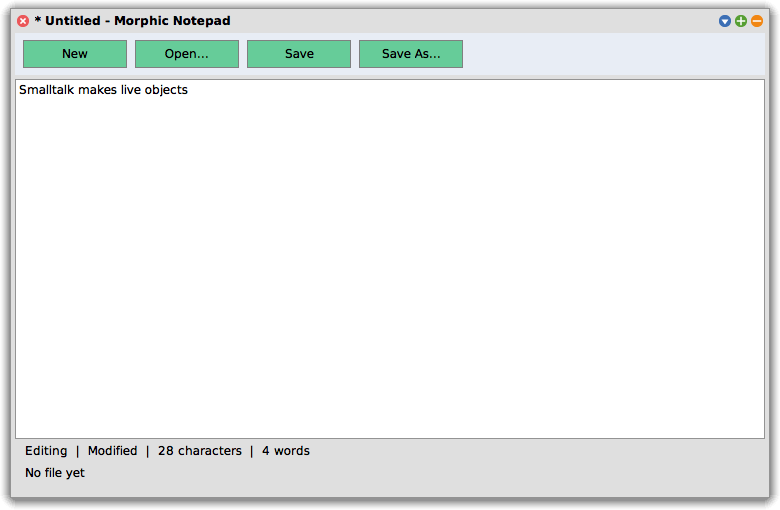
[| app | app := ExerciseWordCountNotepad open. app editor setText: 'Smalltalk makes live objects'. app noteTextEdited: app currentText. app] value
Expected: The live text Smalltalk makes live objects displays 4 words. Accepting or saving the editor is not required.
This is a whitespace count, not a language-specific word counter. Punctuation attached to a token counts as part of the same word.
NATIVE SQUEAK CAPTURE
Native Squeak 6.1 rendering of the supplied solution. State was set by the test script, not a recording of mouse or keyboard input.
NATIVE SQUEAK CAPTURE
Programmatic native-render demonstration: five editor buffers are set by code, then the real status bar is rendered. This does not depict a person typing.Read the matching verification block
Test block · evaluate with value: answer after storing the solution result
The supplied VerifyAll.st runs each exact solution and matching block automatically. Follow the package README; do not run a one-argument test block without supplying its solution result.
Cleanup: No files are written. Close the sample Notepad window and choose Discard if you do not want to keep this generated sample text.
notepad · practical
Find and replace without marking edits saved
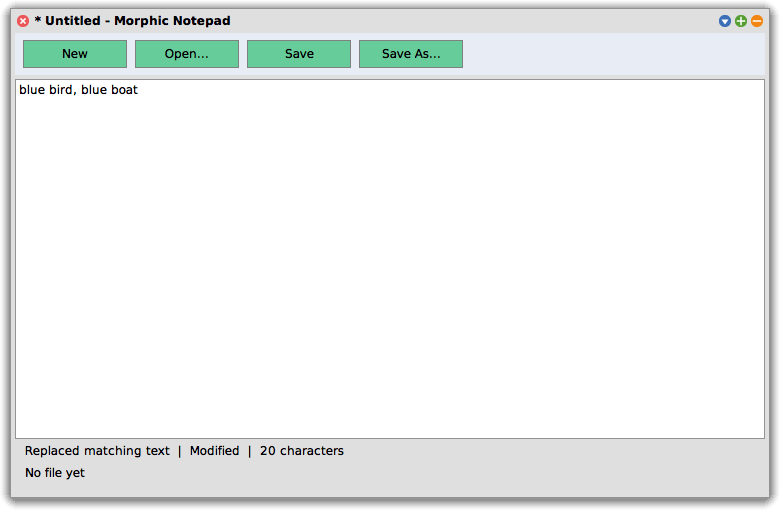
Add a case-sensitive find:startingAt: returning a one-based index or zero, and replaceAll:with: over the live buffer. Reject an empty search string. Preserve savedText so replacement leaves the document dirty.
Expected: “red bird, red boat” becomes “blue bird, blue boat”; the next blue after index 1 is at 12. The window remains marked modified.
The solution provides tested commands callable from a Workspace or Inspector. It does not claim to include a Find dialog, selection highlighting, regex search, or one-step undo.
Scope: Case-sensitive, non-overlapping plain-text search and replacement commands. UI search controls are a separate extension.
NATIVE SQUEAK CAPTURE
Native Squeak 6.1 rendering of the supplied solution. State was set by the test script, not a recording of mouse or keyboard input.Read the matching verification block
Test block · evaluate with value: answer after storing the solution result
The supplied VerifyAll.st runs each exact solution and matching block automatically. Follow the package README; do not run a one-argument test block without supplying its solution result.
Cleanup: No files are written. Close the sample window and choose Discard to remove the generated replacement text.
notepad · challenge
Launch independent document windows
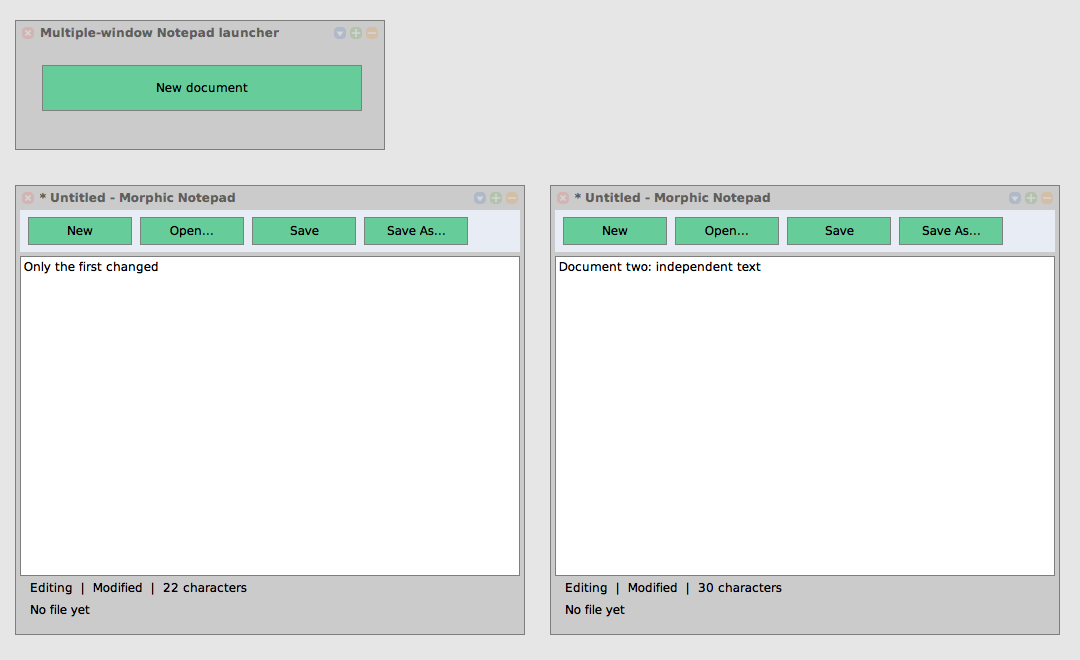
Build a minimal launcher with a New document button. Each click opens a distinct MorphicNotepad instance with independent live text, dirty state and file name. Verify editing one does not edit the other. Explain what a complete multi-document application would still need.
Expected: Two separate document windows initially contain different text. Editing the first leaves the second unchanged. The button opens a third, empty document.
This is a verified multiple-window launcher, not a full tabbed editor. A complete design needs document activation/listing, removal of closed models, unique untitled labels, tab or window navigation, Save All failure policy, and a coordinated Close All with per-document Save/Discard/Cancel. Existing Notepad save and close guards remain responsible for each window.
Scope: Tested minimal multiple-window launcher. Full multi-document navigation and coordinated closing remain a design challenge and are not represented as completed.
NATIVE SQUEAK CAPTURE
Native Squeak 6.1 rendering of the supplied solution. State was set by the test script, not a recording of mouse or keyboard input.Read the matching verification block
Test block · evaluate with value: answer after storing the solution result
[:answer | | launcher first second button |
    launcher := answer first. first := answer third. second := answer fourth.
    first == second ifTrue: [self error: 'Distinct instances'].
    first editor setText: 'Only the first changed'.
    first noteTextEdited: first currentText.
    second currentText = 'Document two: independent text' ifFalse: [self error: 'Independent buffers'].
    (first isDirty and: [second isDirty]) ifFalse: [self error: 'Separate dirty tracking'].
    (first fileName isNil and: [second fileName isNil]) ifFalse: [self error: 'Untitled files'].
    button := answer second submorphs detect: [:each | each isKindOf: SimpleButtonMorph].
    button doButtonAction.
    launcher documents size = 3 ifFalse: [self error: 'New document target/action'].
    launcher documents third currentText isEmpty ifFalse: [self error: 'New empty buffer'].
    true]
The supplied VerifyAll.st runs each exact solution and matching block automatically. Follow the package README; do not run a one-argument test block without supplying its solution result.
Cleanup: No files are written. Close each generated Notepad separately, choosing Discard for sample text; then close the launcher. Closing the launcher does not close its documents.
wireframe · easy
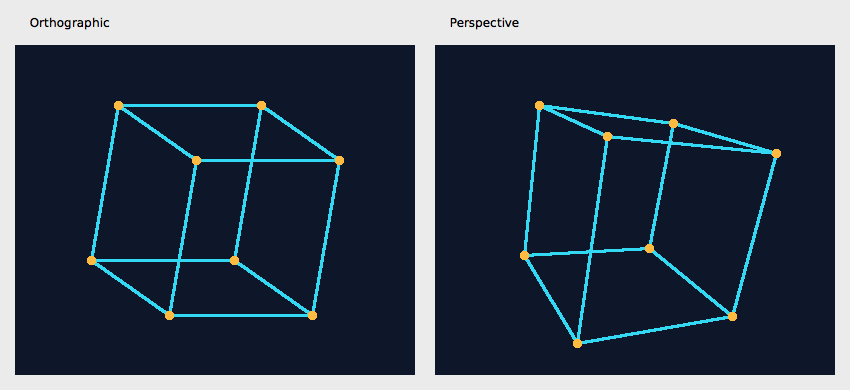
Compare two projection modes
Create two same-sized cube morphs with the same angle. Render one orthographically and one in perspective, side by side. Check that the perspective version makes a point nearer the camera appear farther from screen center.
Load LearnSqueakWireframeCube.st with File List > fileIn.
Hint 1
Both cubes need the same extent and angle.
Hint 2
Projection acts on already rotated vertices.
Hint 3
Compare the distance from each cube center for the point #(1 0 1).
Show tested solution and explanation
Complete Workspace solution · Do it / Print it as described
| panel left right label |
panel := Morph new color: (Color gray: 0.92); extent: 850@390.
left := LearnSqueakWireframeCube new extent: 400@330; angleDegrees: 30; orthographic.
right := LearnSqueakWireframeCube new extent: 400@330; angleDegrees: 30; perspective.
panel addMorph: left; addMorph: right.
left position: panel position + (15@45).
right position: panel position + (435@45).
label := StringMorph contents: 'Orthographic'.
panel addMorph: label. label position: panel position + (30@15).
label := StringMorph contents: 'Perspective'.
panel addMorph: label. label position: panel position + (450@15).
panel openInWorld.
{panel. left. right}
Expected: Two native wireframes show the same rotation. A point at z = 1 has a larger screen offset with perspective.
Projection and object rotation are separate operations. This is a software wireframe using ordinary Morphic Canvas, not a GPU or full 3D engine.
NATIVE SQUEAK CAPTURE
Native Squeak 6.1 rendering of the supplied solution. State was set by the test script, not a recording of mouse or keyboard input.Read the matching verification block
Test block · evaluate with value: answer after storing the solution result
[:answer | | left right a b |
    left := answer second. right := answer third.
    left angle = right angle ifFalse: [self error: 'Equal angle'].
    a := ((left projectVertex: #(1 0 1)) - left center) r.
    b := ((right projectVertex: #(1 0 1)) - right center) r.
    b > a ifFalse: [self error: 'Near point enlarged in perspective'].
    true]
The supplied VerifyAll.st runs each exact solution and matching block automatically. Follow the package README; do not run a one-argument test block without supplying its solution result.
Cleanup: No files are written. Close any sample windows when you finish; use a fresh image or remove only the Exercise-prefixed classes you installed if you want to undo class definitions.
wireframe · practical
Draw an octahedron by changing data
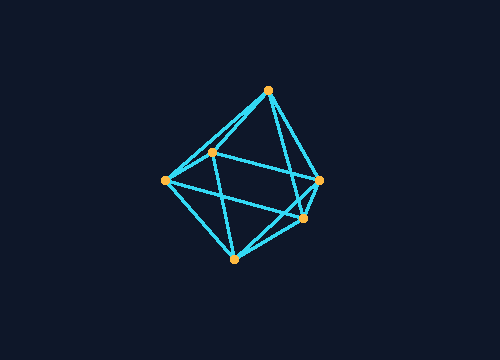
Subclass the cube to draw an octahedron with six vertices and twelve edges. Keep the inherited rotation, projection and Canvas drawing. Make sure every edge references a valid vertex and no edge connects a point to itself.
Expected: A rotating-ready six-vertex octahedron appears. Its rendering uses the same projection and drawing code as the cube.
Geometry is data. A shared rendering protocol makes a new shape a small change instead of a duplicated program.
NATIVE SQUEAK CAPTURE
Native Squeak 6.1 rendering of the supplied solution. State was set by the test script, not a recording of mouse or keyboard input.Read the matching verification block
Test block · evaluate with value: answer after storing the solution result
The supplied VerifyAll.st runs each exact solution and matching block automatically. Follow the package README; do not run a one-argument test block without supplying its solution result.
Cleanup: No files are written. Close any sample windows when you finish; use a fresh image or remove only the Exercise-prefixed classes you installed if you want to undo class definitions.
wireframe · challenge
Make camera distance safe to edit
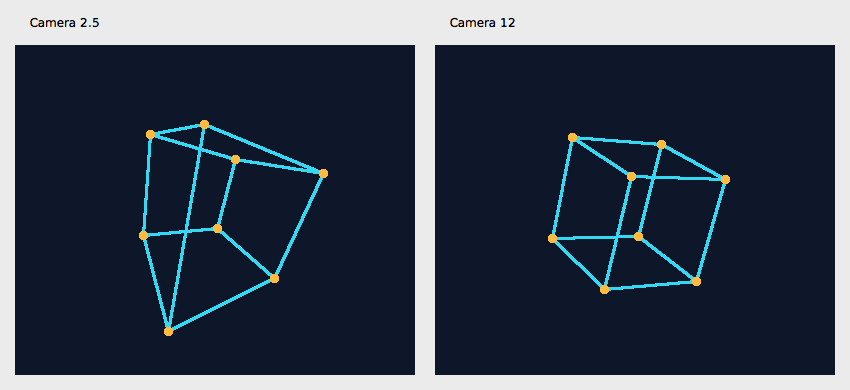
Add a cameraDistance: setter in a subclass. Accept distances greater than 2 and at most 20, reject invalid values before changing state, and compare perspective distortion at 2.5 and 12. Explain why greater than 2 keeps the cube in front of the camera at every rotation.
Load LearnSqueakWireframeCube.st with File List > fileIn.
Hint 1
The cube’s farthest vertex lies sqrt(3) from its center.
Hint 2
Override cameraDistance to return your new instance variable.
Hint 3
A positive denominator is a geometry invariant; validate before assigning.
Show tested solution and explanation
Complete Workspace solution · Do it / Print it as described
LearnSqueakWireframeCube subclass: #ExerciseCameraCube
    instanceVariableNames: 'distance'
    classVariableNames: '' poolDictionaries: ''
    category: 'LearnSqueak-Exercises'.
(Smalltalk at: #ExerciseCameraCube) compile: 'initialize
    super initialize.
    distance := 5.0'.
(Smalltalk at: #ExerciseCameraCube) compile: 'cameraDistance
    ^ distance'.
(Smalltalk at: #ExerciseCameraCube) compile: 'projectionScale
    ^ (self width min: self height) / 6.0'.
(Smalltalk at: #ExerciseCameraCube) compile: 'cameraDistance: aNumber
    (aNumber isNumber and: [aNumber > 2 and: [aNumber <= 20]])
        ifFalse: [self error: ''Use a camera distance greater than 2 and at most 20''].
    distance := aNumber asFloat.
    self changed'.

[| panel near far |
panel := Morph new color: (Color gray: 0.92); extent: 850@390.
near := ExerciseCameraCube new extent: 400@330; angleDegrees: 35; cameraDistance: 2.5.
far := ExerciseCameraCube new extent: 400@330; angleDegrees: 35; cameraDistance: 12.
panel addMorph: near; addMorph: far.
near position: panel position + (15@45). far position: panel position + (435@45).
panel addMorph: (StringMorph contents: 'Camera 2.5').
panel submorphs first position: panel position + (30@15).
panel addMorph: (StringMorph contents: 'Camera 12').
panel submorphs first position: panel position + (450@15).
panel openInWorld. {panel. near. far}] value
Expected: Distance 2.5 produces stronger perspective than 12. Unsafe distance 1 is rejected without changing the current distance. All sampled rotations have positive projection denominators.
Rotation preserves distance from the origin. Since sqrt(3) < 2, a camera farther than 2 cannot intersect the unit cube. The proof covers all angles; the sampled test is an implementation check, not the proof.
NATIVE SQUEAK CAPTURE
Native Squeak 6.1 rendering of the supplied solution. State was set by the test script, not a recording of mouse or keyboard input.Read the matching verification block
Test block · evaluate with value: answer after storing the solution result
[:answer | | near far rejected previous a b |
    near := answer second. far := answer third.
    a := ((near projectVertex: #(1 0 1)) - near center) r.
    b := ((far projectVertex: #(1 0 1)) - far center) r.
    a > b ifFalse: [self error: 'Near camera has stronger perspective'].
    previous := near cameraDistance. rejected := false.
    [near cameraDistance: 1] on: Error do: [:error | rejected := true].
    (rejected and: [near cameraDistance = previous]) ifFalse: [self error: 'Reject unsafe distance atomically'].
    0 to: 360 by: 15 do: [:degrees |
        near angleDegrees: degrees.
        near vertices do: [:vertex |
            near cameraDistance - (near rotateVertex: vertex) third > 0
                ifFalse: [self error: 'All vertices remain in front of camera']]].
    near angleDegrees: 35.
    true]
The supplied VerifyAll.st runs each exact solution and matching block automatically. Follow the package README; do not run a one-argument test block without supplying its solution result.
Cleanup: No files are written. Close any sample windows when you finish; use a fresh image or remove only the Exercise-prefixed classes you installed if you want to undo class definitions.
todo · easy
Summarize a task list
Create three sample tasks, complete the second, and compute total, complete and remaining counts from the model’s public tasks snapshot. Return the app and counts. Do not save the sample.
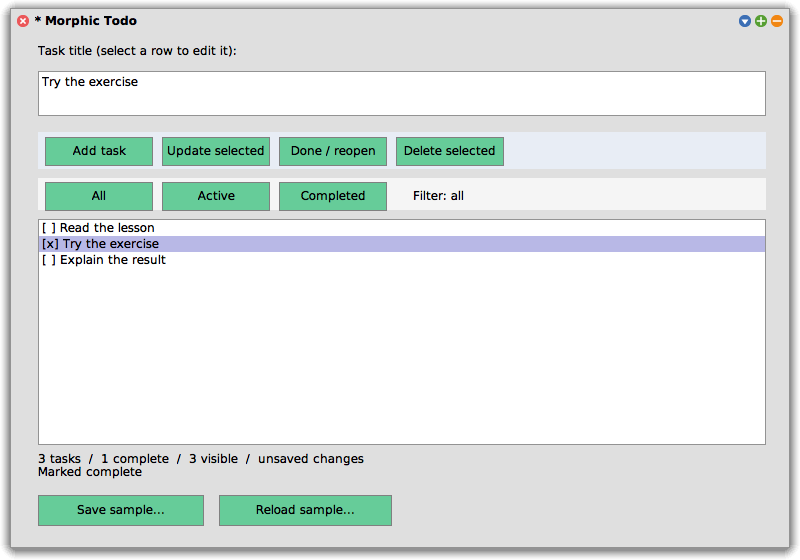
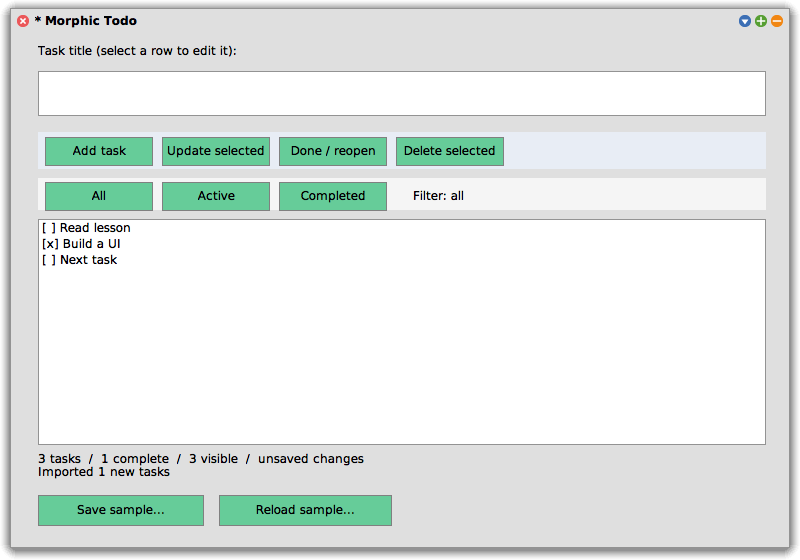
Expected: Three tasks, one complete, two remaining. The native list marks Try the exercise complete.
The tasks accessor returns a snapshot. Read-only summary code should not mutate internal records.
NATIVE SQUEAK CAPTURE
Native Squeak 6.1 rendering of the supplied solution. State was set by the test script, not a recording of mouse or keyboard input.Read the matching verification block
Test block · evaluate with value: answer after storing the solution result
[:answer |
    answer allButFirst = #(3 1 2) ifFalse: [self error: 'Total, complete, remaining'].
    answer first tasks second third ifFalse: [self error: 'Second completed'].
    true]
The supplied VerifyAll.st runs each exact solution and matching block automatically. Follow the package README; do not run a one-argument test block without supplying its solution result.
Cleanup: No files are written. Close the sample and choose to discard its unsaved generated tasks.
todo · practical
Search without confusing rows and IDs
Create a reusable case-insensitive title-search block taking a Todo model and query. Return matching task records without changing the model’s current filter or selection. Test an empty query and prove the returned records are safe copies.
Expected: Searching READ returns stable IDs 1 and 3 while selected ID 2 stays selected. Empty search returns all tasks.
This is a tested search command, not a new search widget. If you add a search field later, keep selection by ID and derive the visible row index after filtering.
Scope: Model-level search; optional UI wiring is not supplied.
Read the matching verification block
Test block · evaluate with value: answer after storing the solution result
The supplied VerifyAll.st runs each exact solution and matching block automatically. Follow the package README; do not run a one-argument test block without supplying its solution result.
Cleanup: No files are written. Close any sample windows when you finish; use a fresh image or remove only the Exercise-prefixed classes you installed if you want to undo class definitions.
todo · challenge
Merge validated JSON without partial changes
Add a merge command that validates the whole JSON document first, skips duplicate titles case-insensitively, assigns new local IDs, and commits all additions together. Preserve local data if any imported record is invalid. Import from the supplied string; no file access is required.
Reuse parseTasks: for the format and record validation.
Hint 2
Build additions in a temporary collection; do not add while validating.
Hint 3
Use local nextId values rather than trusting imported IDs, and check capacity before committing.
Show tested solution and explanation
Complete Workspace solution · Do it / Print it as described
MorphicTodo subclass: #ExerciseImportTodo
    instanceVariableNames: ''
    classVariableNames: '' poolDictionaries: ''
    category: 'LearnSqueak-Exercises'.
(Smalltalk at: #ExerciseImportTodo) compile: 'mergeJSON: aString
    | incoming known additions nextCandidate |
    incoming := self parseTasks: aString.
    known := (tasks collect: [:task | task second asLowercase]) asSet.
    additions := OrderedCollection new.
    nextCandidate := nextId.
    incoming do: [:record |
        (known includes: record second asLowercase) ifFalse: [
            additions add: {nextCandidate. record second copy. record third}.
            known add: record second asLowercase.
            nextCandidate := nextCandidate + 1]].
    tasks size + additions size > 1000 ifTrue: [self error: ''Too many tasks''].
    nextCandidate > 1000000001 ifTrue: [self error: ''No task IDs remain''].
    tasks addAll: additions.
    nextId := nextCandidate.
    status := ''Imported '', additions size printString, '' new tasks''.
    self refresh.
    ^ additions size'.

[| app | app := ExerciseImportTodo new. app acceptDraft: 'Read lesson'; addTask. app mergeJSON: '{"version":1,"tasks":[[1,"READ LESSON",false],[2,"Build a UI",true]]}'. app open. app] value
Expected: The existing Read lesson is retained, READ LESSON is skipped, Build a UI is added with local ID 2, and a malformed import leaves all tasks unchanged.
This policy treats titles as the deduplication key, so equal titles intentionally merge. It does not synchronize edits or resolve conflicts by imported ID. Those need a different explicit data model.
NATIVE SQUEAK CAPTURE
Native Squeak 6.1 rendering of the supplied solution. State was set by the test script, not a recording of mouse or keyboard input.Read the matching verification block
Test block · evaluate with value: answer after storing the solution result
[:answer | | before rejected added |
    answer taskCount = 2 ifFalse: [self error: 'Skip title duplicate'].
    answer tasks second = #(2 'Build a UI' true) ifFalse: [self error: 'New local ID and completion'].
    before := answer tasks asArray. rejected := false.
    [answer mergeJSON: '{"version":1,"tasks":[[5,"Good title",false],[6,"",false]]}']
        on: Error do: [:error | rejected := true].
    (rejected and: [answer tasks asArray = before]) ifFalse: [self error: 'Reject entire invalid import'].
    added := answer mergeJSON: '{"version":1,"tasks":[[99,"Next task",false],[100,"NEXT TASK",true]]}'.
    added = 1 ifFalse: [self error: 'Deduplicate incoming titles'].
    answer tasks last first = 3 ifFalse: [self error: 'Invalid import did not consume IDs'].
    true]
The supplied VerifyAll.st runs each exact solution and matching block automatically. Follow the package README; do not run a one-argument test block without supplying its solution result.
Cleanup: No files are written. Close the sample and discard its generated unsaved task list.
debugging · easy
Fix a collection transformation
A student wrote “#(2 4 6) do: [:number | number squared]” and expected #(4 16 36). Explain the actual return value, replace the appropriate message, and return the transformed collection without changing the input.
The supplied VerifyAll.st runs each exact solution and matching block automatically. Follow the package README; do not run a one-argument test block without supplying its solution result.
Cleanup: No files are written. Close any sample windows when you finish; use a fresh image or remove only the Exercise-prefixed classes you installed if you want to undo class definitions.
debugging · practical
Handle the empty case deliberately
Write an average block that returns nil for an empty collection and an exact Number otherwise. Test integer and fractional results. Explain why rescuing every Error and returning zero would hide unrelated mistakes.
The supplied VerifyAll.st runs each exact solution and matching block automatically. Follow the package README; do not run a one-argument test block without supplying its solution result.
Cleanup: No files are written. Close any sample windows when you finish; use a fresh image or remove only the Exercise-prefixed classes you installed if you want to undo class definitions.
debugging · challenge
Find and repair accidental aliasing
Create an inventory class with independent item collections. Copy incoming mutable strings and return copies of both the collection and its elements. Demonstrate that modifying an input string or a returned snapshot cannot corrupt stored data.
A fresh collection in initialize prevents sharing between instances.
Hint 2
Copying only the outer collection still shares mutable elements.
Hint 3
Test mutation through every reference that crosses the object boundary.
Show tested solution and explanation
Complete Workspace solution · Do it / Print it as described
Object subclass: #ExerciseSafeInventory
    instanceVariableNames: 'items'
    classVariableNames: '' poolDictionaries: ''
    category: 'LearnSqueak-Exercises'.
(Smalltalk at: #ExerciseSafeInventory) compile: 'initialize
    super initialize.
    items := OrderedCollection new'.
(Smalltalk at: #ExerciseSafeInventory) compile: 'add: aString
    items add: aString copy'.
(Smalltalk at: #ExerciseSafeInventory) compile: 'items
    ^ items collect: [:each | each copy]'.

[| first second name |
first := ExerciseSafeInventory new. second := ExerciseSafeInventory new.
name := 'Pencil' copy. first add: name.
{first. second. name}] value
Expected: Stored Pencil stays unchanged after the caller edits the input string and returned snapshot. A second inventory remains empty.
This is a concrete aliasing bug you can observe in two Inspectors. The copy policy is sufficient for strings; nested arbitrary objects would require an explicit deeper ownership policy.
Read the matching verification block
Test block · evaluate with value: answer after storing the solution result
[:answer | | first second supplied snapshot |
    first := answer first. second := answer second. supplied := answer third.
    supplied at: 1 put: $X.
    first items first = 'Pencil' ifFalse: [self error: 'Copy on input'].
    snapshot := first items. snapshot first at: 1 put: $Y. snapshot add: 'Eraser'.
    first items asArray = #('Pencil') ifFalse: [self error: 'Copy collection and strings on output'].
    second items isEmpty ifFalse: [self error: 'Independent instances'].
    true]
The supplied VerifyAll.st runs each exact solution and matching block automatically. Follow the package README; do not run a one-argument test block without supplying its solution result.
Cleanup: No files are written. Close any sample windows when you finish; use a fresh image or remove only the Exercise-prefixed classes you installed if you want to undo class definitions.
breakout · easy
Create a slower practice serve
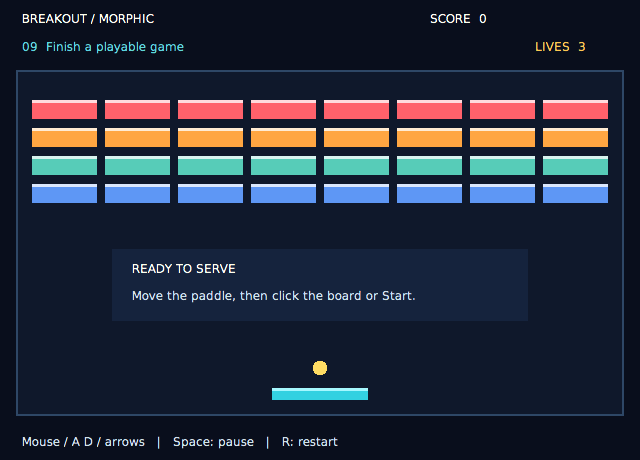
Subclass Breakout so every serve starts with velocity 100 @ -160. Keep scoring, lives, collision rules and restart behavior inherited. Verify restart reapplies the slower velocity.
Expected: The practice game starts with a slower upward serve. Restart restores three lives, zero score, and the practice velocity.
Choose the method matching the lifecycle event. Overriding only initialization would miss subsequent serves.
NATIVE SQUEAK CAPTURE
Native Squeak 6.1 rendering of the supplied solution. State was set by the test script, not a recording of mouse or keyboard input.Read the matching verification block
Test block · evaluate with value: answer after storing the solution result
The supplied VerifyAll.st runs each exact solution and matching block automatically. Follow the package README; do not run a one-argument test block without supplying its solution result.
Cleanup: No files are written. Close any sample windows when you finish; use a fresh image or remove only the Exercise-prefixed classes you installed if you want to undo class definitions.
breakout · practical
Design a shorter brick wall
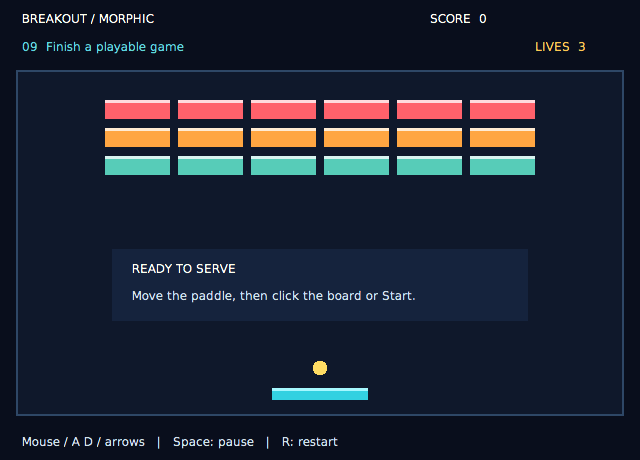
Build an 18-brick layout with three rows and six columns, centered in the existing logical field. Reuse the original brick size and row spacing so drawing and collision code still work. Check every brick fits and no two bricks overlap.
Expected: An 18-brick wall spans x = 105 through 535, centered at 320, with no overlapping rectangles.
This test uses instVarNamed: as an Inspector-style diagnostic to inspect the fixture; production application code should prefer a deliberate query method. The three original row colors remain valid.
NATIVE SQUEAK CAPTURE
Native Squeak 6.1 rendering of the supplied solution. State was set by the test script, not a recording of mouse or keyboard input.Read the matching verification block
Test block · evaluate with value: answer after storing the solution result
The supplied VerifyAll.st runs each exact solution and matching block automatically. Follow the package README; do not run a one-argument test block without supplying its solution result.
Cleanup: No files are written. Close any sample windows when you finish; use a fresh image or remove only the Exercise-prefixed classes you installed if you want to undo class definitions.
breakout · challenge
Increase difficulty only after real hits
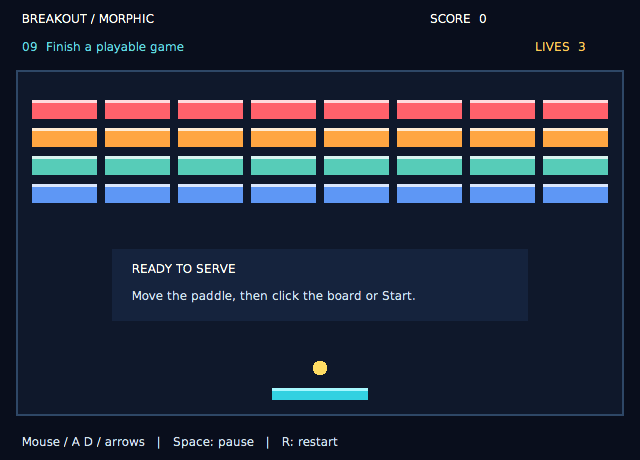
Increase ball velocity by 8% after a brick is actually removed, but cap the largest absolute component at 420 logical units/second. Empty collision checks must not accelerate it. Preserve collision direction changes and stop after the final brick.
Expected: No-hit checks preserve velocity. A hit changes upward -200 to downward +216. A later hit near the cap reaches 420, and removing the final brick still ends the game.
The cap is explicitly on the largest component, not total Euclidean speed. The inherited substep calculation uses that same maximum component to limit movement distance. This is a deterministic scripted collision test, not a play-through recording. The override forwards the previous axis coordinate so the base collision method can verify a directional face crossing rather than treating tangency as a hit.
NATIVE SQUEAK CAPTURE
Native Squeak 6.1 rendering of the supplied solution. State was set by the test script, not a recording of mouse or keyboard input.Read the matching verification block
Test block · evaluate with value: answer after storing the solution result
[:answer | | before |
    answer bricks: {200@200 extent: 65@19. 400@200 extent: 65@19}.
    answer ballPosition: 300@300 velocity: 100@ -200.
    before := answer ballVelocity.
    answer collideBrickOn: #y from: 240.
    answer ballVelocity = before ifFalse: [self error: 'No hit means no acceleration'].
    answer ballPosition: 220@200 velocity: 100@ -200.
    answer collideBrickOn: #y from: 240.
    answer brickCount = 1 ifFalse: [self error: 'Remove one brick'].
    (answer ballVelocity y - 216.0) abs < 0.0001 ifFalse: [self error: 'Bounce and increase 8 percent'].
    answer ballPosition: 420@200 velocity: 300@ -410.
    answer collideBrickOn: #y from: 240.
    ((answer ballVelocity x abs max: answer ballVelocity y abs) - 420) abs < 0.0001
        ifFalse: [self error: 'Component cap'].
    (answer gameState = #won and: [answer running not]) ifFalse: [self error: 'Final brick still wins and stops'].
    answer restart.
    true]
The supplied VerifyAll.st runs each exact solution and matching block automatically. Follow the package README; do not run a one-argument test block without supplying its solution result.
Cleanup: No files are written. Close any sample windows when you finish; use a fresh image or remove only the Exercise-prefixed classes you installed if you want to undo class definitions.
What was tested
All 30 exact solutions passed in a combined native run and in 30 separate fresh-image runs using only each exercise’s listed prerequisites. The supplied checks contain 113 assertions. The extracted portable verifier also passed all 30 solutions.
The 17 screenshots and two GIFs are native Morphic renders arranged by the verification script. They demonstrate the tested objects and state; they are not mouse/keyboard recordings.
Media depicts programmatically arranged native UI states, not human interaction recordings.
Calculator undo and Todo search are model commands without new UI controls.
Notepad multi-document challenge is a tested minimal multiple-window launcher; tab management, Save All and coordinated Close All are explicitly left as design extensions.
Later architectural extensions are named explicitly. A tested command does not imply a completed toolbar or dialog. The multi-document Notepad challenge opens independent document windows; tabs and coordinated Save All remain separate design work.