ALGORITHMS · CONNECTED REGIONS
Flood fill: paint one connected region
Build a queue-driven Squeak flood-fill model, watch cells join the frontier, and test exactly which regions a paint bucket can reach.
Install the native model and view
A paint bucket does not paint every pixel of the same color. It paints the matching pixels that connect to the place you clicked. This workshop makes that distinction visible with a tiny symbolic grid and a queue you can inspect. It is a different task from finding a route: there is no destination or path cost.
- Open a copy of Squeak 6.1 with its matching changes and sources files. These are native-only classes, not a prepared SqueakJS playground demo.
- Download flood-fill.st. Open it in Squeak’s File List and choose fileIn. This is a chunk-format source file; do not paste the entire file into Workspace.
- Keep one Workspace open. The complete model and view are installed before the numbered experiments. Read each displayed method in the Browser, then execute the short Workspace command for that step.
Before starting, be comfortable with classes and objects, collections and Point coordinates. Keep the fixed-layout window at least 980 × 620 pixels.
SUnit tests · Complete source kit
The lab uses no timers, network access or file saving. Close its window when done. Reset restores the original grid. Next experiment stops after experiment 8.
01 · Represent the picture as rows
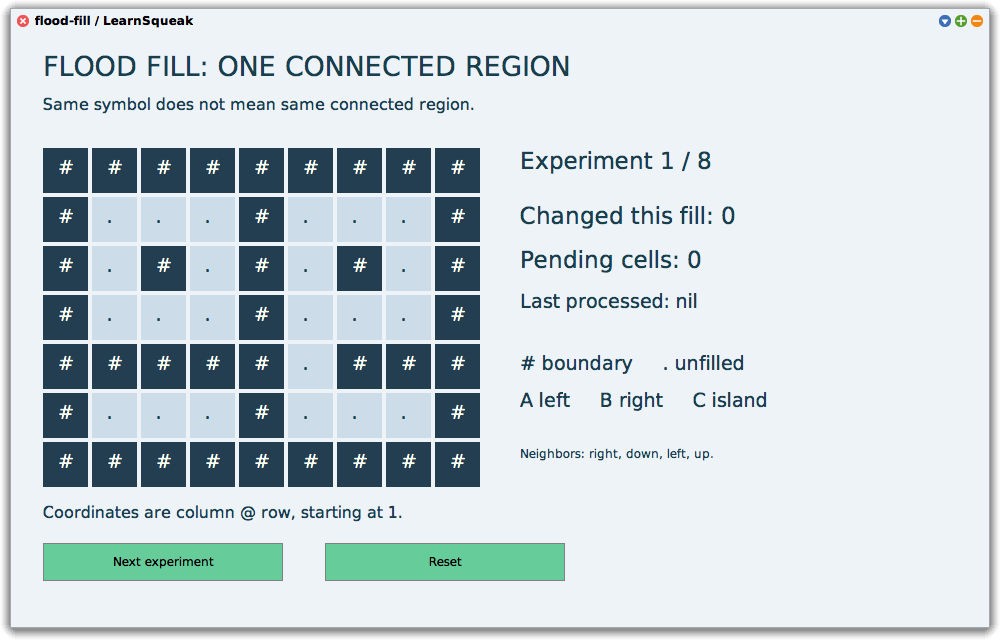
The grid is nine columns wide and seven rows high. Each String stores one row, so a Point such as 2@3 means column 2, row 3. The model stores Characters, not graphical colors: # is a boundary, a dot is an unfilled cell, and A, B or C identifies a painted region. LSFloodView translates those values into colors only when drawing.
rows: input
 input isEmpty ifTrue: [self error: 'Use at least one row'].
 (input allSatisfy: [:row | row isString]) ifFalse: [self error: 'Rows must be Strings'].
 width := input first size.
 (width > 0 and: [input allSatisfy: [:row | row size = width]])
  ifFalse: [self error: 'Rows must have equal nonzero width'].
 rows := input collect: [:row | row copy]. height := rows size.
 queue := OrderedCollection new. head := 1. changedCount := 0. last := nil.
^ selfview := LSFloodView open.Expected: Three separate dot-filled regions appear. Changed and pending counts are both zero.
Read LSFloodGrid class >> demo to see the seven literal rows. rows: copies each String rather than keeping the caller’s mutable row objects. Inspect view model snapshot to see another independent copy. This separation lets you test the grid without opening any window. The map has 23 dots, but one seed will not reach all of them.
02 · Choose a seed and mark it immediately
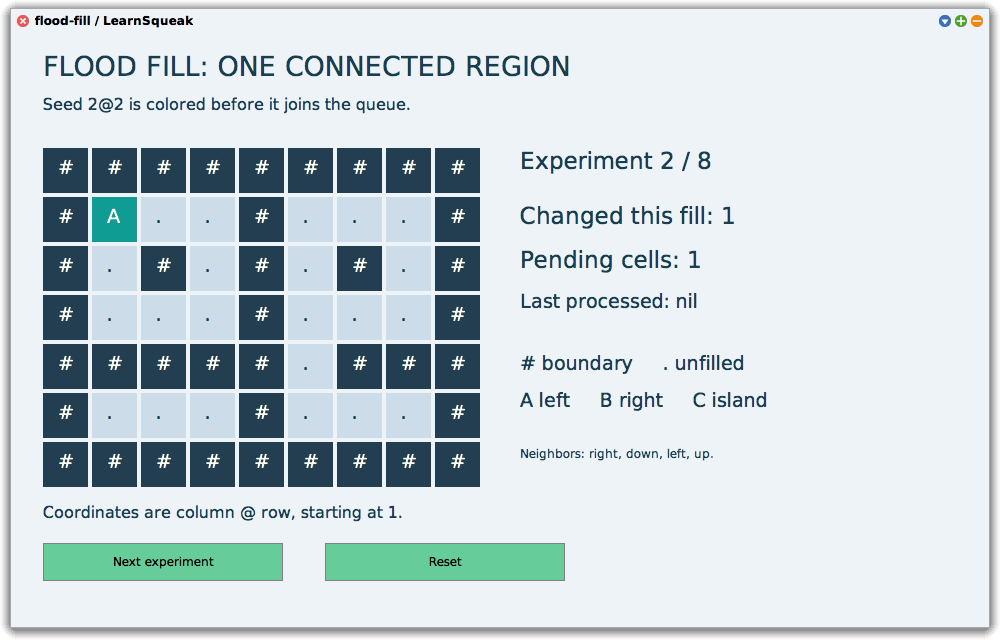
A fill needs a starting cell, called its seed, and a replacement value. startAt:color: validates both, remembers the seed’s old value, clears the previous queue and counters, and enqueues the seed only when the new value differs. This experiment selects 2@2 and replaces dots with A.
startAt: seed color: newValue
 (self inside: seed) ifFalse: [self error: 'Seed outside the grid'].
 newValue isCharacter ifFalse: [self error: 'Use a Character'].
 queue := OrderedCollection new. head := 1. changedCount := 0. last := nil.
 target := self at: seed. replacement := newValue.
 target = replacement ifFalse: [self enqueue: seed].
^ selfview next.Expected: The upper-left dot becomes A. Changed is 1 and pending is 1; no cell has been processed yet.
Read enqueue: as well: it writes the replacement before adding the Point to the queue. “Changed” therefore counts discovered cells, including cells still waiting for processing. It is not a count of completed step sends. The model compares exact Characters; this lesson does not use RGB tolerance or fuzzy color matching.
03 · Process the oldest pending cell
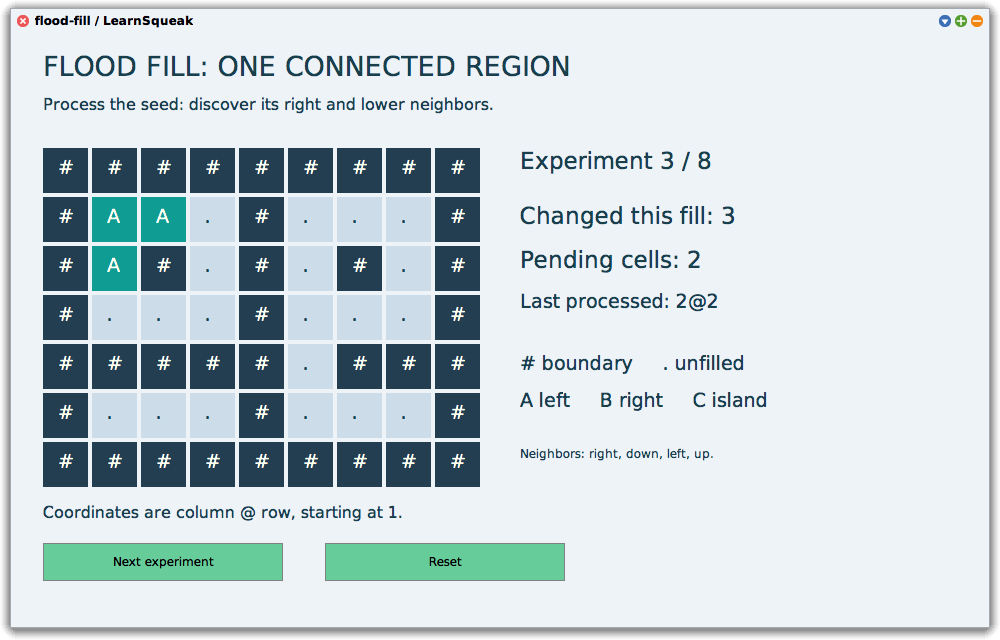
step reads the queue at head and then advances that index. It visits the four candidate neighbors in a fixed order: right, down, left, up. A candidate is accepted only if it lies inside the grid and still contains the original target value. The short-circuit and: block prevents reading an out-of-bounds cell.
step
 self pendingCount = 0 ifTrue: [^ false].
 last := queue at: head. head := head + 1.
 (self neighborsOf: last) do: [:neighbor |
  ((self inside: neighbor) and: [(self at: neighbor) = target])
   ifTrue: [self enqueue: neighbor]].
^ trueview next.Expected: A appears at 2@2, 3@2 and 2@3. Changed is 3, pending is 2, and last processed is 2@2.
The queue is an OrderedCollection with an increasing head index. Removing its first element each time would obscure the indexing in this small lesson; retaining the processed prefix also makes the traversal easy to inspect. This queue intentionally keeps all discovered Points until the next startAt:color: call. It is not a bounded-memory production image editor.
04 · Let boundaries reject candidates
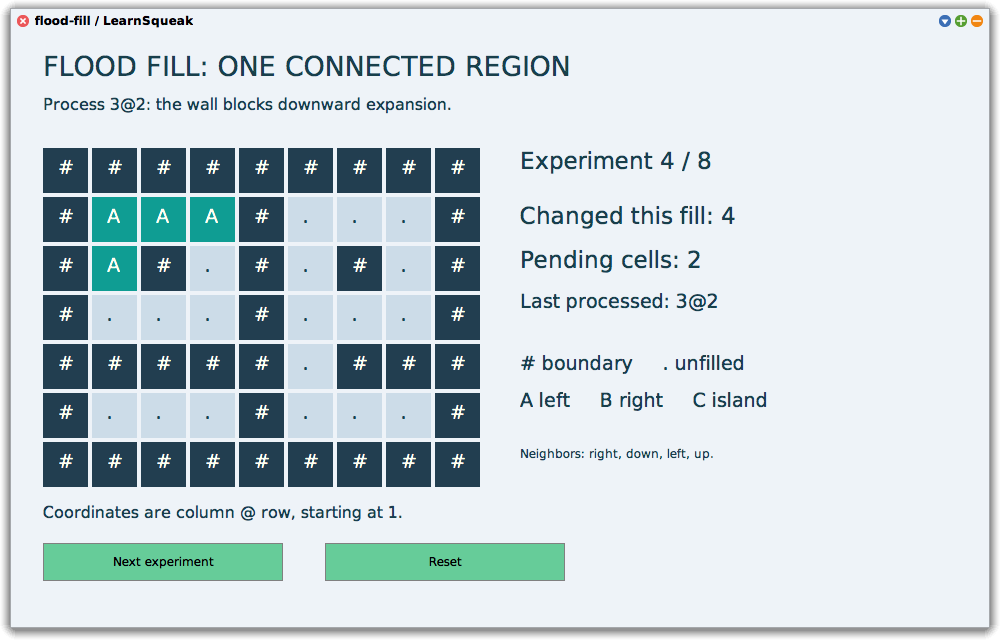
The next pending Point is 3@2. Its right neighbor 4@2 is another dot, but its lower neighbor 3@3 is a #. The already-painted seed on its left is A, not the target dot, so it is rejected too. Recoloring at discovery time is what prevents the same cell from joining the queue repeatedly.
enqueue: point
 self at: point put: replacement.
 queue add: point.
changedCount := changedCount + 1view next.Expected: Changed becomes 4. Pending stays 2 because one cell was processed and one new cell was discovered.
Follow the queue by hand: after the first step it contains 2@2, 3@2 and 2@3, with head at 2. The second step appends 4@2 and advances head to 3. Queue size and pending count are different quantities. The private helper enqueue: assumes its caller has already checked the candidate. Use startAt:color: and step rather than sending enqueue: yourself.
05 · Finish exactly one component
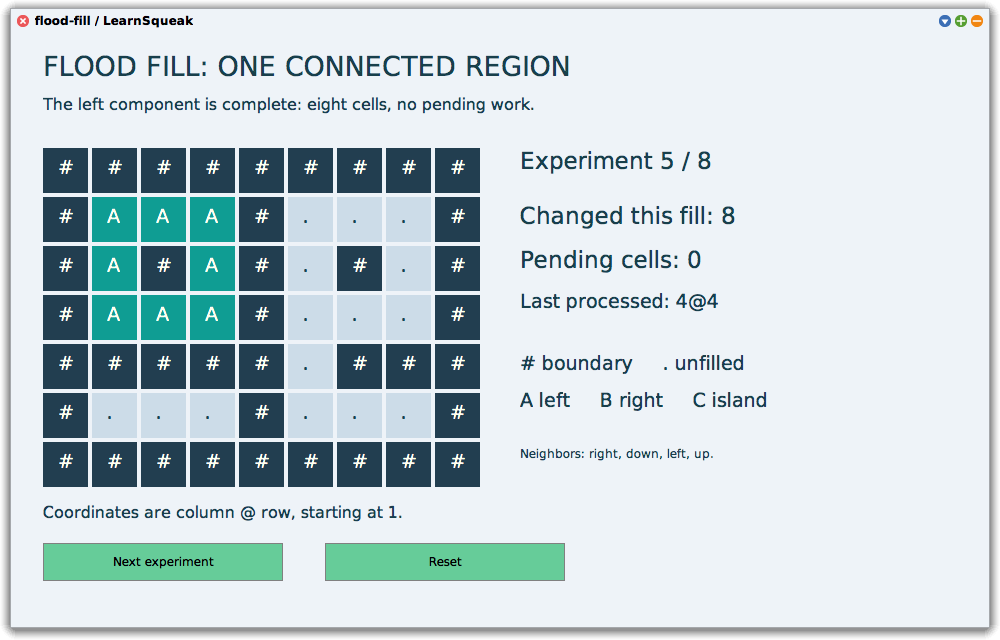
finish repeatedly sends step until it answers false. That happens when the queue has no pending cells. Every reachable dot is eventually discovered, while a # or an already-painted cell stops expansion. There is no search for a destination and no shortest-path reconstruction: the output is a changed region.
finish
 [self step] whileTrue.
^ changedCountview next.Expected: All eight cells of the left region are A. Pending is 0. The right region and lower-left island are untouched.
Try printing view model step now; it answers false and changes nothing. The finish method answers the number changed by this fill, so another view model finish still answers 8 rather than restarting the algorithm. On this finite grid each successful enqueue changes a dot to A; that dot cannot qualify again. This gives both termination and an upper bound on work.
06 · Start a second, independent fill
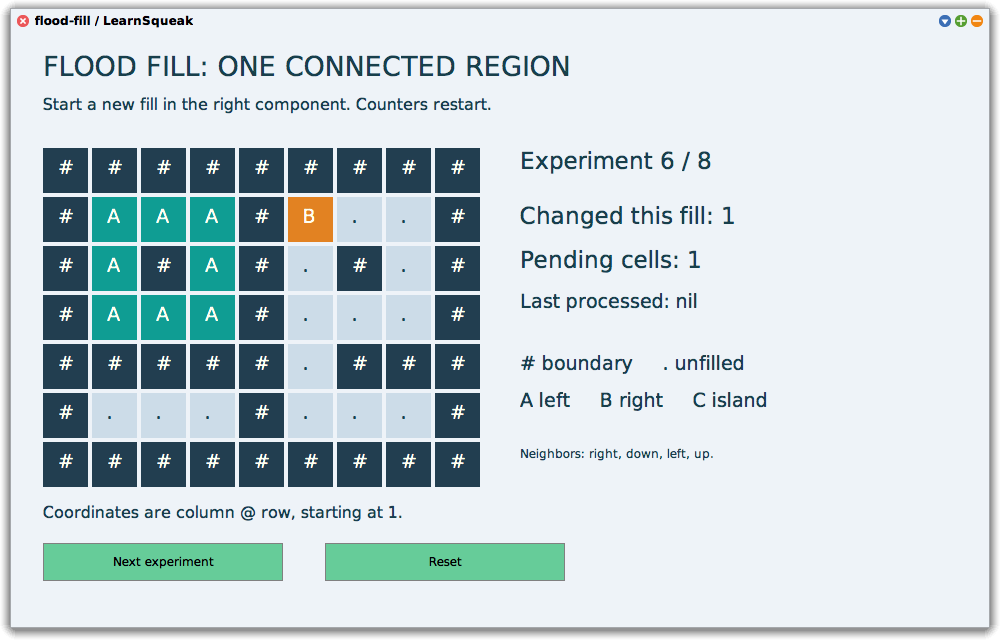
The next experiment starts at 6@2 and replaces that region’s dots with B. A new queue and count are created; the A cells from the previous fill remain in the model. Changing the seed changes which connected region will be painted, even though both seeds originally contained the same dot Character.
pendingCount
^ queue size - head + 1view next.Expected: The right seed is B. Changed resets to 1 and pending to 1. The completed A region stays visible.
A new start discards any unfinished queue. For predictable results, finish the current fill before starting another one, as these experiments do. Do not edit cells through at:put: while a fill is in progress: the stored target and queue describe the grid at the time the fill started. Reset restores a fresh copy of the demonstration map.
07 · Follow the narrow passage
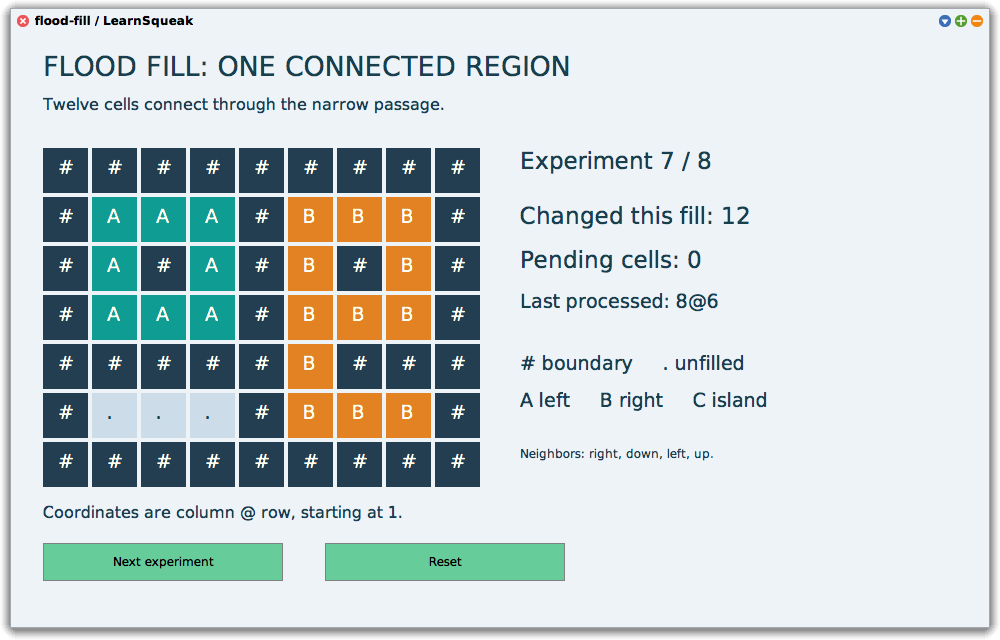
Four-neighbor connectivity permits turns and narrow passages. It does not require a rectangular region. The right-hand component bends around a wall and reaches the lower-right cells through column 6 in row 5. Only orthogonal neighbors are considered; touching at a corner is not a connection.
neighborsOf: point
^ {point + (1@0). point + (0@1). point + (-1@0). point + (0@-1)}view next.Expected: Twelve cells are B, including the lower-right row. The three lower-left dots remain unfilled.
Compare the final image with the original map. The algorithm did not jump over the wall at column 5. It reached the bottom-right row through successive adjacent dots. Neighbor order changes the intermediate visitation order, but not the final region for an unchanged grid and the same seed. The separate diagonal test below makes this rule explicit.
08 · Give the isolated island its own seed
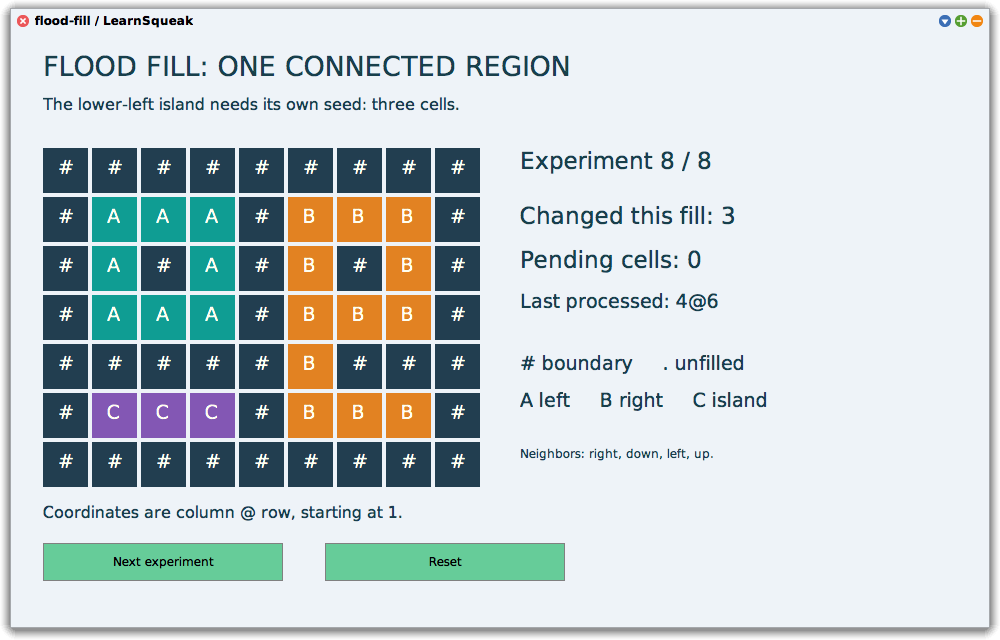
The last experiment starts at 2@6, uses C and finishes immediately. The three dots in that island are connected to one another, but not to either other region. Flood fill operates on a component, not on every matching value in the whole grid.
inside: point
 ^ (point isPoint and: [point x isInteger and: [point y isInteger]])
and: [(point x between: 1 and: width) and: [point y between: 1 and: height]]view next.Expected: Three cells are C. All 23 original dots are now painted across three separate fill operations.
inside: also requires integer Point coordinates. A seed such as 0@0 or 1.5@2 raises an Error rather than accessing an invalid row or column. This model has no special “wall type”: # stops these demonstrations because the target is a dot. If you deliberately seed a #, the connected # region is the region that will be recolored. That is normal paint-bucket behavior, not obstacle pathfinding.
Replay discovery and completion
Try three small edge cases
Each block below is independent. Select the whole block and choose Print it. Use a new Workspace or replace the previous exercise text so old printed answers are not part of the selection.
Diagonal contact does not count
| grid |
grid := LSFloodGrid new rows: #('.#' '#.').
grid startAt: 1@1 color: $A.
grid finish
Expected: 1. The other dot is diagonally adjacent and stays a dot.
Painting with the same value does no work
| grid |
grid := LSFloodGrid demo.
grid startAt: 2@2 color: $..
grid finish
Expected: 0. In $.. the first dot belongs to the Character literal $.; the second dot ends the statement.
A single-cell grid still works
| grid |
grid := LSFloodGrid new rows: #('.').
grid startAt: 1@1 color: $A.
grid finish
Expected: 1. Every candidate neighbor is outside the grid, so none is read or enqueued.
Run the test suite and understand the limits
LSFloodTest suite runExpected: 16 tests, 16 passes, 0 failures and 0 errors. This suite was executed in native Squeak 6.1 build 23976. It covers copies, bounds, invalid arguments, queue discovery, all three region sizes, diagonal separation, same-value replacement, a one-cell grid and repeated completion.
The model stores each cell once and retains at most one queued Point per discovered cell. For a component of k cells, traversal examines at most four neighbors per processed cell: O(k) work and O(k) queue storage, in addition to the grid itself. The demonstration’s growing queue keeps processed entries until another fill starts. A production editor might recycle storage, process work over multiple UI cycles, support undo, and operate on image pixels rather than Characters.
finish is synchronous. It is suitable for this 63-cell teaching map, not a claim that a huge image will keep a Morphic interface responsive. For longer operations, connect the model’s one-step protocol to a measured time budget or study responsive background work. Avoid editing the grid while a fill is active.
To extend the exercise, predict the result of replacing neighborsOf: with eight offsets, then add a new diagonal-connectivity test before changing the method. Do not change the existing four-neighbor expectations without explaining the new semantics.
The Algorithm Archive’s flood-fill implementation and explanation is background for four-neighbor traversal and marking cells when they enter a queue. This Smalltalk model, visualizer, experiments and tests are original. See official Squeak documentation for the environment.
Continue with stacks and queues, SUnit or the paint application.