Explore rational objects, signed arithmetic, safe input and recipe scaling with native Morphic fraction bars.
8 construction stagesTested source & checkpointsNative screenshots & demos
Before you start
Build a real Squeak application around its exact Fraction objects. Eight cumulative checkpoints turn arithmetic messages into visible bars, a number notebook, validated controls, a practical recipe calculator and an exact accumulation animation.
Each checkpoint is a complete .st file-in. Install it, study and accept the highlighted Browser methods, then run its exact Workspace block. Every checkpoint can start in a clean Squeak 6.1 image. The application is native Smalltalk and Morphic; this page supplies source, explanations and native demonstrations.
Squeak 6.1 with its bundled SUnit; no extra packages or network access
Workspace Do It / Print It, Browser Accept, message sends, blocks and basic classes
Use a copy of your learning image. Close the previous Fraction Lab window before installing another checkpoint.
File List → select the downloaded .st → fileIn. File-in chunks include exclamation marks and are not Workspace expressions.
Browser snippets are complete instance-side methods. Accept each on its named class after filing in the matching checkpoint.
The short run block belongs in a Workspace. Select the entire block and Do It; choose Inspect It if you want to send more messages to the returned app.
app is a block temporary. Put additional app messages before the final app line, or use self from an Inspector on that app.
To revisit an earlier checkpoint, use a fresh image copy. Earlier file-ins do not remove methods added by later checkpoints.
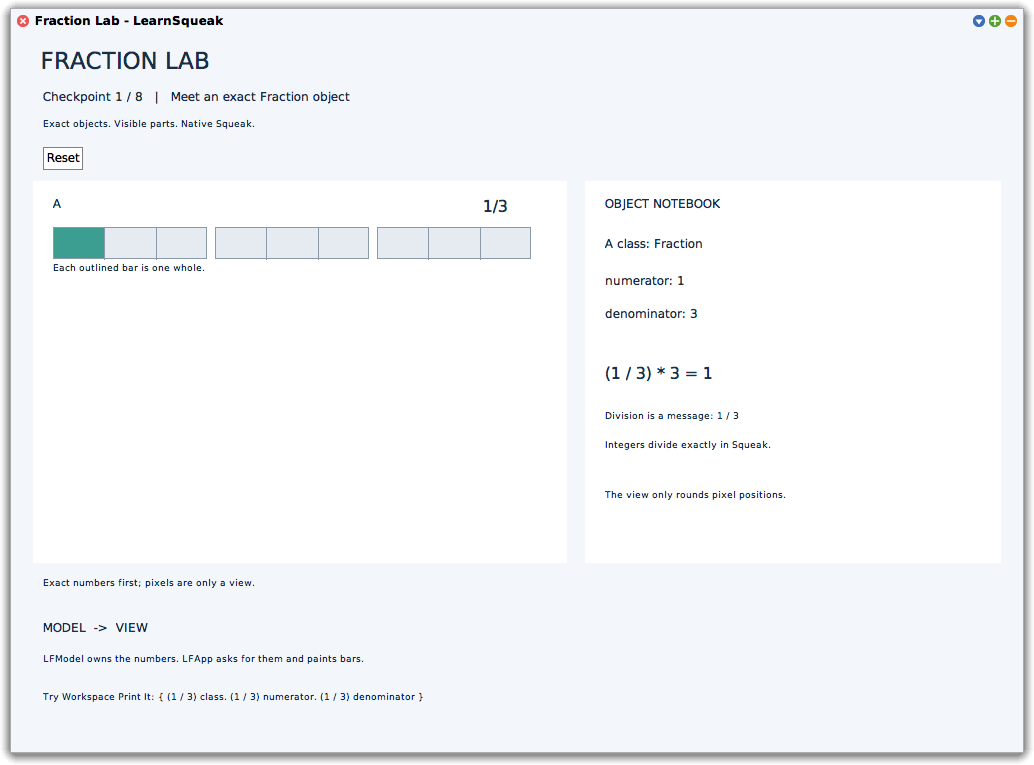
In Squeak, 1 / 3 sends the binary message / to the Integer 1, with the Integer 3 as its argument. The answer is a Fraction, not a rounded decimal. Its numerator is 1 and its denominator is 3. Multiplying that object by 3 produces the Integer 1 exactly. You can ask the objects these questions in a Workspace: {(1 / 3) class. (1 / 3) numerator. (1 / 3) denominator}. Print It gives {Fraction . 1 . 3}.
The first checkpoint opens a native Morphic window with three outlined bars. Each bar is one whole; the shaded part is one third of the first bar. The notebook shows the actual object's class and components. LFModel owns the arithmetic. LFApp asks the model for values and paints them. LFWindow holds a fixed-size teaching window. There is no duplicate decimal representation in the model.
Read textFor: below. A whole answer is an Integer and prints directly. Otherwise the method asks for numerator and denominator and formats them with a slash. This text is a label, not a new numeric object. Squeak's own printString may put parentheses around a Fraction, such as (1/3), which is also correct.
Painting introduces a different problem: pixels come in whole-number positions. drawBar:label:at:color:on: computes an exact ratio for the shaded width and rounds only the final pixel coordinate. A 154-pixel bar cannot show one third with perfect geometric accuracy, but the stored Fraction remains exact. This is the first model/view boundary: display precision must not decide numeric precision.
LFModel · supporting instance-side method, included in the checkpoint
initialize
 super initialize.
 a := 1 / 3. b := 1 / 6. rawA := 1@3. rawB := 1@6.
 operation := #+. message := 'Exact numbers first; pixels are only a view.'.
 target := 6. ticks := 0
LFApp · supporting instance-side method, included in the checkpoint
drawBar: value label: label at: point color: shade on: canvas
 | denominator width unitHeight visibleMagnitude units fill rectangle x |
 self label: label at: point size: 15 on: canvas.
 value isNil ifTrue: [self label: 'undefined: division by zero' at: point + (0@30) size: 18 on: canvas. ^ self].
 self label: (model textFor: value) at: point + (430@0) size: 19 on: canvas.
 width := 154. unitHeight := 32. denominator := value denominator.
 visibleMagnitude := value abs min: 3. units := 3.
 1 to: units do: [:unit |
  rectangle := (self position + point + (((unit - 1) * 162)@30)) extent: width@unitHeight.
  canvas fillRectangle: rectangle color: (Color fromString: '#E5EBF1').
  fill := (((visibleMagnitude - (unit - 1)) max: 0) min: 1) * width.
  fill > 0 ifTrue: [canvas fillRectangle: (rectangle origin extent: fill rounded@unitHeight) color: shade].
  canvas frameRectangle: rectangle width: 1 color: (Color fromString: '#8A9AA8').
  denominator <= 24 ifTrue: [1 to: denominator - 1 do: [:part |
   x := rectangle left + ((part * width / denominator) rounded).
   canvas line: x@rectangle top to: x@rectangle bottom width: 1 color: (Color fromString: '#8A9AA8')]]].
 self label: (self barNoteFor: value) at: point + (0@66) size: 11 on: canvas
LFApp · supporting instance-side method, included in the checkpoint
barNoteFor: value
 | prefix |
 prefix := value < 0 ifTrue: ['Negative magnitude. '] ifFalse: [''].
 value abs > 3 ifTrue: [^ prefix, 'Only the first three wholes are shown.'].
 value denominator > 24 ifTrue: [^ prefix, 'Fine partitions hidden (denominator > 24).'].
 ^ prefix, 'Each outlined bar is one whole.'
Where to run this
System Browser → LFModel → instance side → tutorial. Accept this complete method after filing in the checkpoint.
LFModel · instance-side method
textFor: number
 number isInteger ifTrue: [^ number printString].
 ^ number numerator printString, '/', number denominator printString
File List → fileIn fractions-01.st. Then Workspace → select this entire block → Do It.
Workspace · run after installing this checkpoint
| app |
app := LFApp open.
app
Watch for: Binary messages have the same precedence and run left to right. Write (1 / 3) + (1 / 6), not 1 / 3 + 1 / 6: the latter evaluates to 2/9.
Try it: Workspace → Print It on (1 / 3) * 3. The answer is 1. Print It on ((1 / 3) * 3) class to see SmallInteger.
Expected result
A native Fraction Lab window with A = 1/3, a Fraction with numerator 1 and denominator 3. Only Reset is available at this checkpoint.
Actual native Squeak 6.1 window produced by checkpoint 1 and the exact Workspace block above.
02 · Normalize signs and common factors
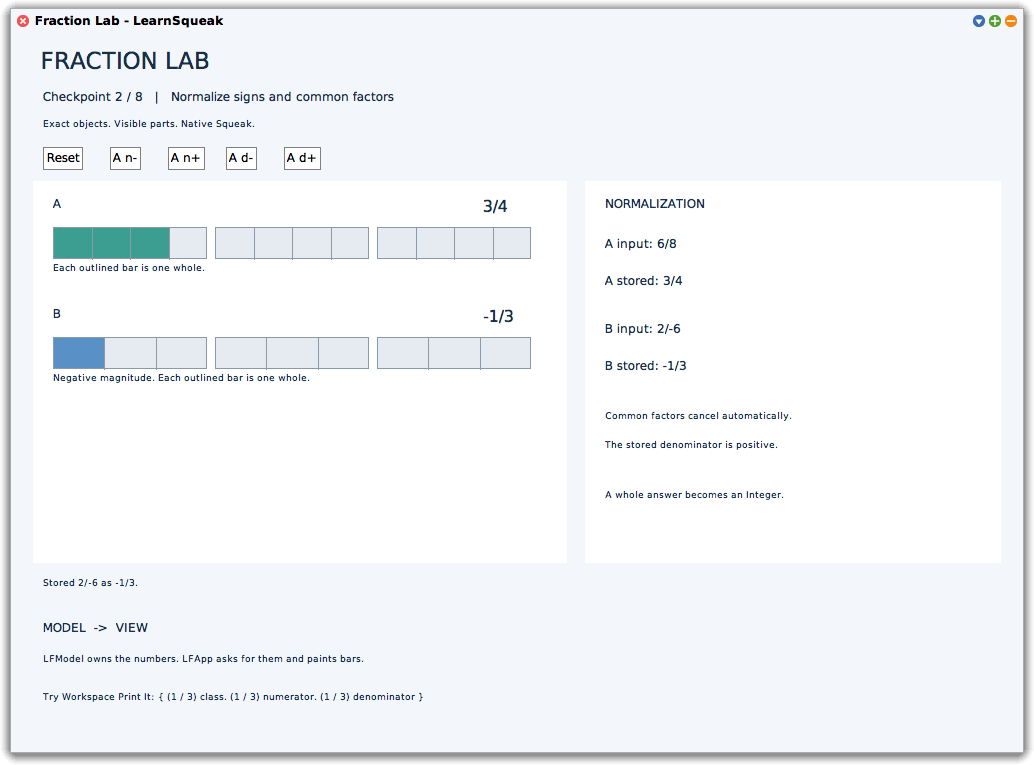
A Fraction represents a value, not the original spelling of the input. Dividing 6 by 8 produces 3/4 because the numerator and denominator share a factor of two. Dividing 2 by -6 produces -1/3: the sign moves to the numerator and the stored denominator is positive. If division leaves no fractional part, Squeak returns an Integer instead. Both 9 / 3 and 0 / 7 are Integers, with values 3 and 0.
The model deliberately keeps two things: rawA/rawB remember the entered numerator@denominator pairs, while a/b hold the normalized numeric answers. This lets the notebook explain what changed. It also makes the n+/n- and d+/d- buttons useful: they edit the visible input pair, then ask Squeak to divide again. When A begins as 6/8, increasing its numerator changes the input to 7/8, not to 4/4.
set:numerator:denominator: is the single gate for these updates. It checks that both inputs are Integers, rejects denominator zero, and verifies the operand name before changing any state. An invalid update returns false and leaves the last valid operand intact. A negative denominator is mathematically valid and is accepted; zero is the forbidden case. The returned Boolean describes whether the update succeeded, while message explains it to the person using the lab.
A negative bar uses its absolute length. The minus sign and caption identify that it is a negative quantity; shaded bars here are magnitude pictures, not an oriented number line. The numeric label is authoritative. The first three wholes are visible, so an improper fraction can fill more than one bar without being mistaken for a value between zero and one.
Where to run this
System Browser → LFModel → instance side → tutorial. Accept this complete method after filing in the checkpoint.
LFModel · instance-side method
set: name numerator: n denominator: d
 (n isInteger and: [d isInteger]) ifFalse: [message := 'Use integer numerators and denominators.'. ^ false].
 d = 0 ifTrue: [message := 'Denominator zero is undefined. Previous value kept.'. ^ false].
 (#(a b) includes: name) ifFalse: [message := 'Choose operand a or b.'. ^ false].
 name = #a
  ifTrue: [a := n / d. rawA := n@d]
  ifFalse: [b := n / d. rawB := n@d].
 message := 'Stored ', n printString, '/', d printString, ' as ', (self textFor: (name = #a ifTrue: [a] ifFalse: [b])), '.'.
 ^ true
File List → fileIn fractions-02.st. Then Workspace → select this entire block → Do It.
Watch for: Do not construct a Fraction by setting its internal fields. Integer division performs normalization and may legitimately return an Integer.
Try it: Use A n+ once: the notebook should show input 7/8 and stored value 7/8. Reset starts again from 1/3 and 1/6.
Expected result
A input 6/8 is stored as 3/4. B input 2/-6 is stored as -1/3. A has numerator/denominator adjustment buttons; the negative B bar is explicitly labeled as a magnitude.
Actual native Squeak 6.1 window produced by checkpoint 2 and the exact Workspace block above.
03 · Add and subtract equal-sized pieces
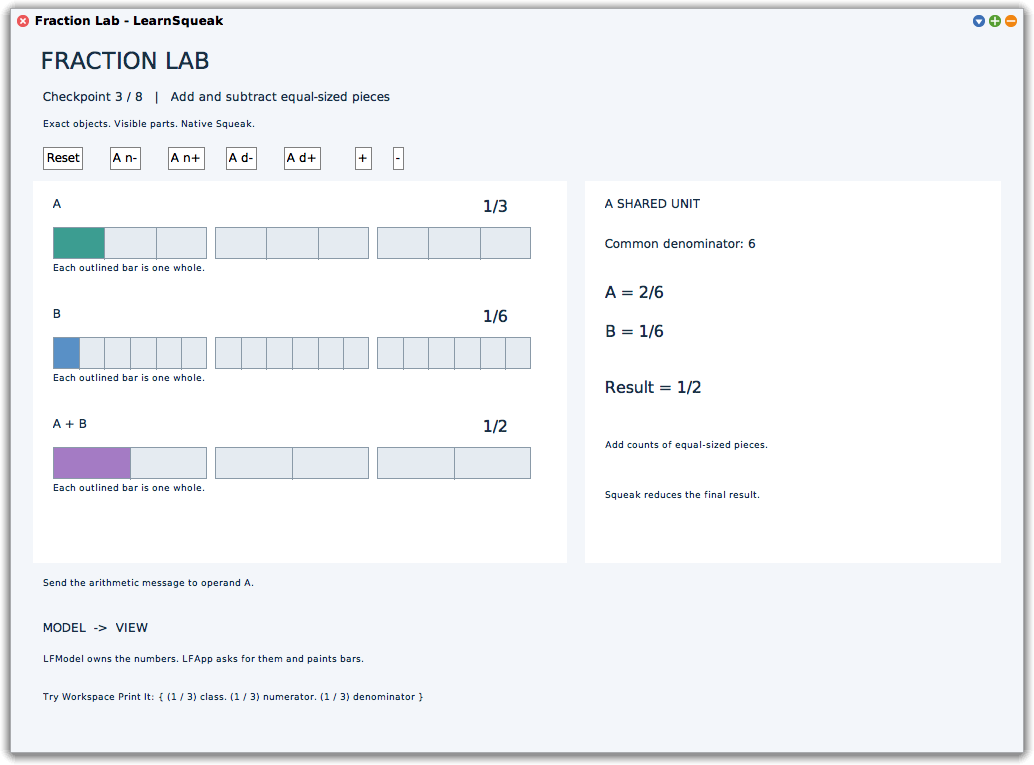
To add one third and one sixth by hand, describe both in sixths: 2/6 + 1/6 = 3/6 = 1/2. A common denominator is a common unit. Adding the original denominators, 1/3 + 1/6 = 2/9, would count pieces of different sizes as though they were equal. The native notebook makes the common unit visible while the bars continue to show each normalized value.
commonDenominator uses the least common multiple, computed as d1 * d2 // gcd(d1, d2). All denominators are positive Integers by this point. equivalentNumerators multiplies each numerator by common // denominator. For A = 1/3 and B = 1/6, it returns #(2 1). This method explains the arithmetic; the actual + and - messages already know how to operate on Fractions, so result simply sends the selected message.
The toolbar now contains + and -. The application forwards a button action to the model, then refreshes the view. LFApp does not recompute the answer in pixel space. Because the values are ordinary Number objects, the same model can be tested without drawing a window. Selecting minus gives 1/6; a negative result is valid too.
Notice the bars for A, B and A + B can have different subdivisions. They display each value's normalized denominator: thirds, sixths and halves in this example. The notebook supplies the shared denominator used to explain addition. The whole outlines have the same width, so the shaded lengths remain comparable even when the partitions differ.
LFModel · supporting instance-side method, included in the checkpoint
equivalentNumerators
 | common |
 common := self commonDenominator.
 ^ {a numerator * (common // a denominator). b numerator * (common // b denominator)}
LFModel · supporting instance-side method, included in the checkpoint
Actual native Squeak 6.1 window produced by checkpoint 3 and the exact Workspace block above.
04 · Multiply, divide and detect zero
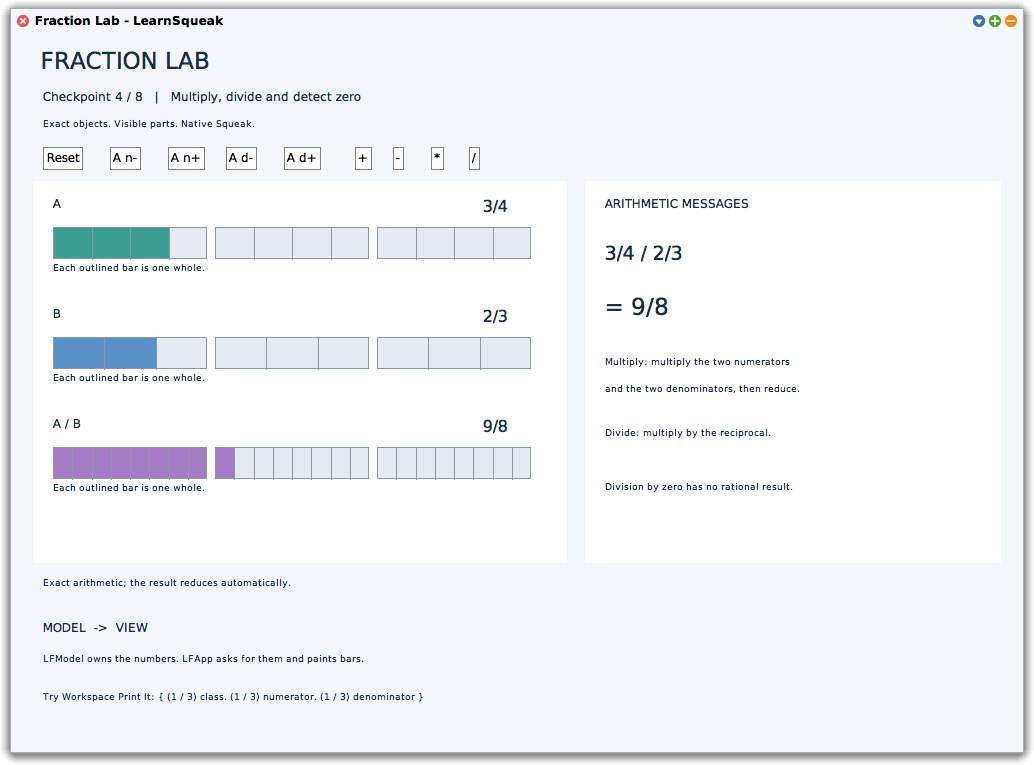
Multiplication combines the two numerators and the two denominators, then reduces the answer. With 3/4 and 2/3, the product is 6/12, or 1/2. Division multiplies by the reciprocal of the second operand: (3/4) / (2/3) = (3/4) * (3/2) = 9/8. An improper Fraction is still a perfectly good Fraction. The result bar fills one whole and one eighth of the next.
The result method now dispatches all four operations. Addition, subtraction and multiplication always return a Number for these inputs. Division by zero returns nil as this application's explicit marker for an undefined result. The view recognizes nil and writes an explanation instead of trying to paint it. This policy belongs to the lab; ordinary Smalltalk division by zero raises an exception, and nil is not a special kind of fraction.
There are two separate zero cases. A denominator of zero is invalid input and never replaces an operand. A numerator of zero is valid: 0 / 5 normalizes to the Integer zero. It can be added, subtracted or multiplied. It can also be the dividend, as in 0 / (1/3). It cannot be the divisor. This distinction is easy to lose if validation looks only for a character '0' in the input.
After storing a zero B, choosing / gives the undefined result; choosing * produces zero. Restoring a nonzero B allows division again. The operation remains selected throughout, so the UI can recover when the user corrects the operand. A robust view handles both numeric results and the explicit invalid-result marker.
LFModel · supporting instance-side method, included in the checkpoint
choose: selector
 (#(+ - * /) includes: selector) ifFalse: [^ false].
 operation := selector.
 message := (selector = #/ and: [b = 0])
  ifTrue: ['Cannot divide by zero. Change B or choose another operation.']
  ifFalse: ['Exact arithmetic; the result reduces automatically.'].
 ^ true
Where to run this
System Browser → LFModel → instance side → tutorial. Accept this complete method after filing in the checkpoint.
LFModel · instance-side method
result
 operation = #+ ifTrue: [^ a + b].
 operation = #- ifTrue: [^ a - b].
 operation = #* ifTrue: [^ a * b].
 b = 0 ifTrue: [^ nil].
 ^ a / b
File List → fileIn fractions-04.st. Then Workspace → select this entire block → Do It.
Watch for: Zero denominator is rejected input. Zero divisor is a valid stored operand used in an undefined operation. Keep those two cases separate.
Try it: In the Inspector for the returned app, Do It on self model set: #b numerator: 0 denominator: 5. Then self choose: #/. The result says undefined; choosing * gives zero.
Expected result
A = 3/4 divided by B = 2/3 gives 9/8. The result fills one whole bar and an eighth of the next. Selecting * gives 1/2.
Actual native Squeak 6.1 window produced by checkpoint 4 and the exact Workspace block above.
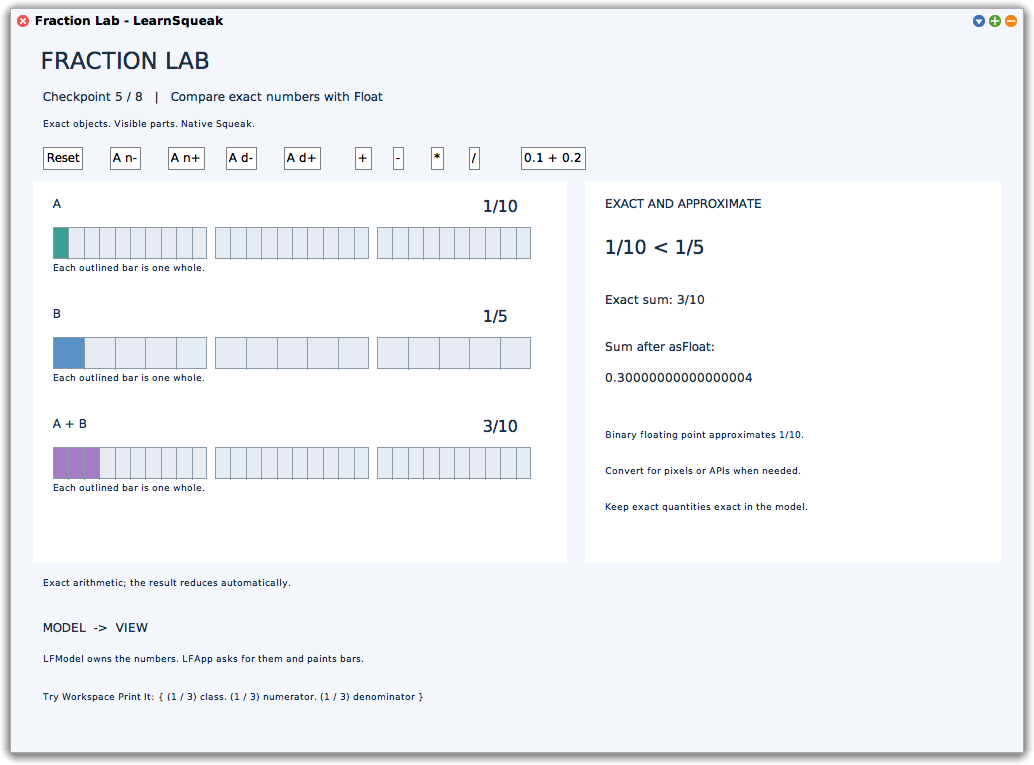
05 · Compare exact numbers with Float
Fractions participate in the normal comparison protocol. Ask a < b, a = b or a > b; do not compare their printed strings or their shaded pixel widths. Equivalent values compare equal even when their entered forms differ. After normalization, 2/6 and 1/3 are the same rational value. Negative values follow the usual numeric ordering, so -1/3 is less than 1/6.
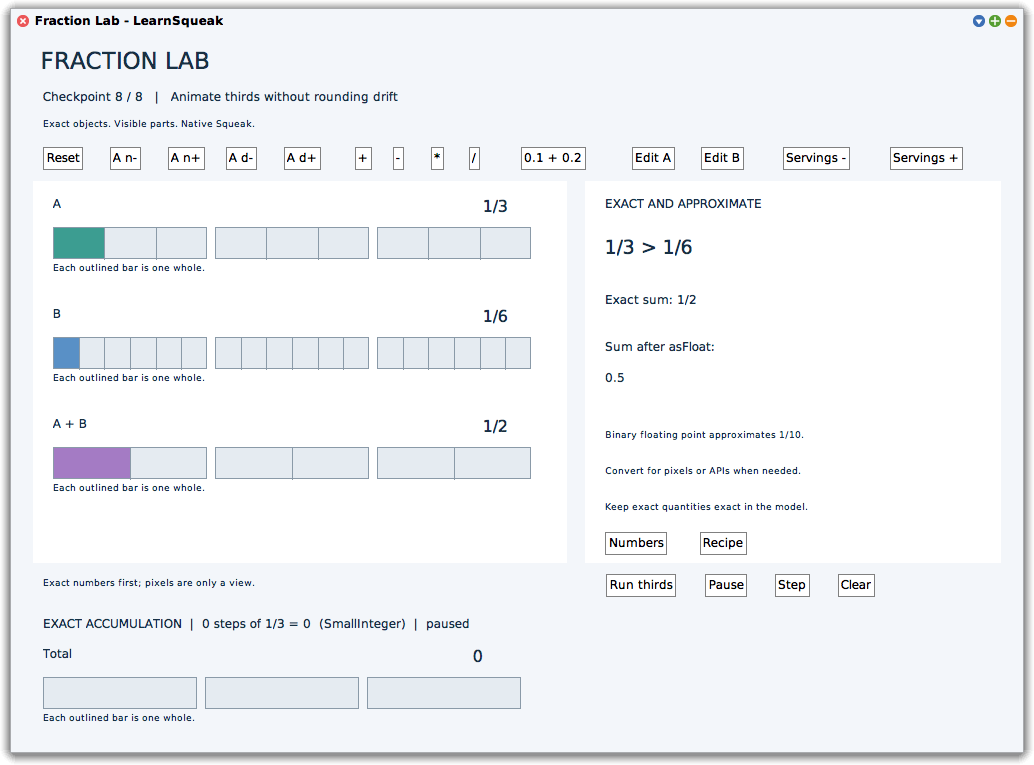
The decimal example uses exact A = 1/10 and B = 1/5. Their exact sum is 3/10. floatingSum deliberately converts each operand with asFloat before adding; in this Squeak 6.1 image it displays 0.30000000000000004. Binary floating point cannot represent one tenth or one fifth exactly. A different operation order, such as adding the Fractions first and then converting the final result, can round differently.
Neither representation is universally better. Fractions are appropriate when ratios, counts and recipe quantities should stay exact. Floats are useful for approximate measurements and many graphics or numerical algorithms. Exact numerator and denominator sizes can grow during arithmetic, so exactness also has a computational cost. Choose where conversion happens based on the meaning of the data.
The exact sum in the notebook is always A + B, even if the main result bar is currently showing another operation. Its label says 'Exact sum' to make this separate comparison explicit. The 0.1 + 0.2 button restores the demonstration and selects +. The lesson keeps pixel rounding in the view and asFloat in this deliberately approximate query; neither conversion silently changes a or b.
LFModel · supporting instance-side method, included in the checkpoint
relation
 a < b ifTrue: [^ '<'].
 a = b ifTrue: [^ '='].
 ^ '>'
Where to run this
System Browser → LFModel → instance side → tutorial. Accept this complete method after filing in the checkpoint.
LFModel · instance-side method
floatingSum
 ^ a asFloat + b asFloat
File List → fileIn fractions-05.st. Then Workspace → select this entire block → Do It.
Actual native Squeak 6.1 window produced by checkpoint 5 and the exact Workspace block above.
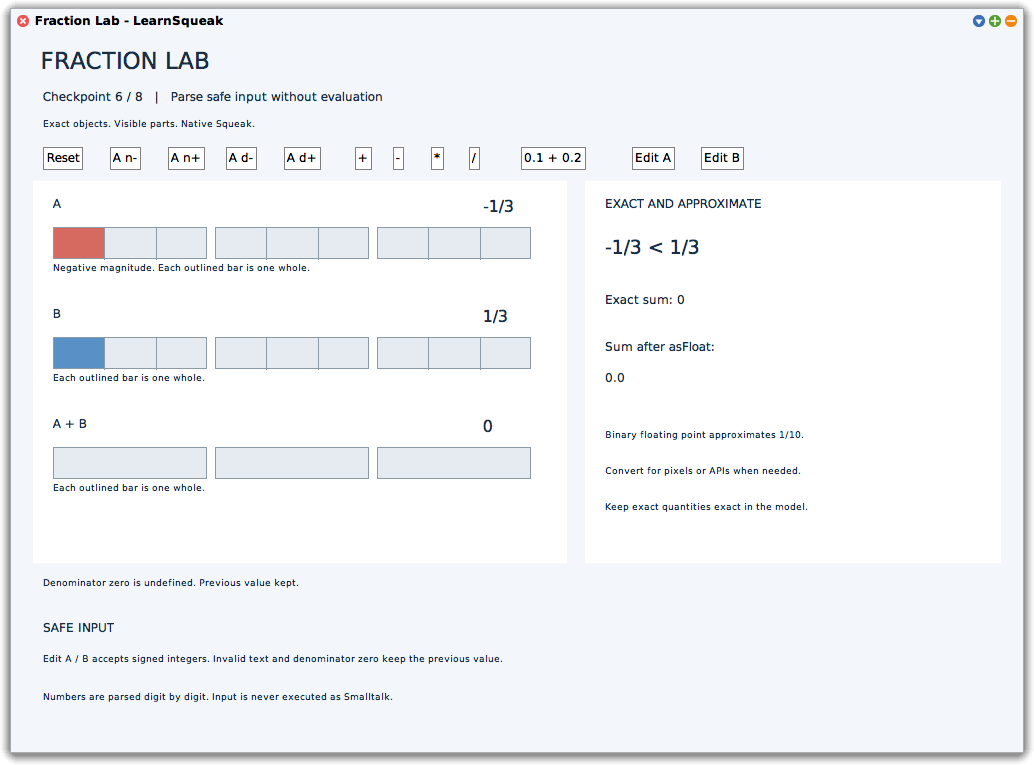
06 · Parse safe input without evaluation
Edit A and Edit B now ask for a numerator and denominator in native Squeak dialogs. Text is data here. parseInteger: trims surrounding whitespace, accepts an optional leading + or -, requires at least one digit, and folds the digits into an Integer. It never asks Compiler to evaluate what the user typed. Inputs such as 1 + 2, 1/3, 1.0, a lone minus sign and arbitrary code are rejected.
set:numeratorText:denominatorText: parses both strings first, then delegates to the same numeric setter used by buttons and tests. If either string is invalid, neither operand component changes. A parsed denominator zero also fails through the numeric setter. Signed numerators and signed denominators work; 0/-7 becomes the Integer zero. The dialogs accept whole-number components because '/' is already the relationship between those components.
The checkpoint block stores -2/6 as A and 1/3 as B, then deliberately attempts A = 7/0. The invalid attempt leaves A at -1/3. The message explains the rejection, and A + B remains exactly zero. Zero's class is SmallInteger, demonstrating that a computation beginning with Fractions can end with an Integer.
Empty or canceled dialog answers stop the edit without changing the model. This interaction is distinct from entering '0', which is valid numerator text. The parser and numeric setter can be exercised independently of modal dialogs, making the important validation behavior deterministic in SUnit. Native edit-button wiring is included in the source; the supplied scripted demonstrations do not automate typing into a modal dialog.
LFModel · supporting instance-side method, included in the checkpoint
set: name numeratorText: numeratorText denominatorText: denominatorText
 | n d |
 n := self parseInteger: numeratorText. d := self parseInteger: denominatorText.
 (n isNil or: [d isNil]) ifTrue: [message := 'Enter signed whole numbers, for example -2 and 6.'. ^ false].
 ^ self set: name numerator: n denominator: d
LFApp · supporting instance-side method, included in the checkpoint
edit: name
 | n d |
 n := UIManager default request: 'Numerator (signed integer):' initialAnswer: '1'.
 n isEmpty ifTrue: [^ self].
 d := UIManager default request: 'Denominator (nonzero integer):' initialAnswer: '3'.
 d isEmpty ifTrue: [^ self].
 model set: name numeratorText: n denominatorText: d. self refresh
Where to run this
System Browser → LFModel → instance side → tutorial. Accept this complete method after filing in the checkpoint.
LFModel · instance-side method
parseInteger: text
 | trimmed digits sign |
 text isString ifFalse: [^ nil].
 trimmed := text withBlanksTrimmed.
 trimmed isEmpty ifTrue: [^ nil].
 sign := 1. digits := trimmed.
 (trimmed first = $- or: [trimmed first = $+]) ifTrue: [
  sign := trimmed first = $- ifTrue: [-1] ifFalse: [1].
  digits := trimmed allButFirst].
 digits isEmpty ifTrue: [^ nil].
 (digits allSatisfy: [:each | each between: $0 and: $9]) ifFalse: [^ nil].
 ^ sign * (digits inject: 0 into: [:value :each | value * 10 + each digitValue])
File List → fileIn fractions-06.st. Then Workspace → select this entire block → Do It.
Watch for: Do not use Compiler evaluate: for user-entered numbers. It executes a program and accepts far more than the numeric input contract.
Try it: Use Edit A and enter +2, then -6. It becomes -1/3. Try entering 1 + 2 as the numerator; the lab rejects the text and preserves the old operand.
Expected result
A remains -1/3 after the rejected denominator-zero edit. B is 1/3, so the result is zero. The status message says the previous value was kept. Edit A and Edit B are available.
Actual native Squeak 6.1 window produced by checkpoint 6 and the exact Workspace block above.
07 · Scale a recipe with exact quantities
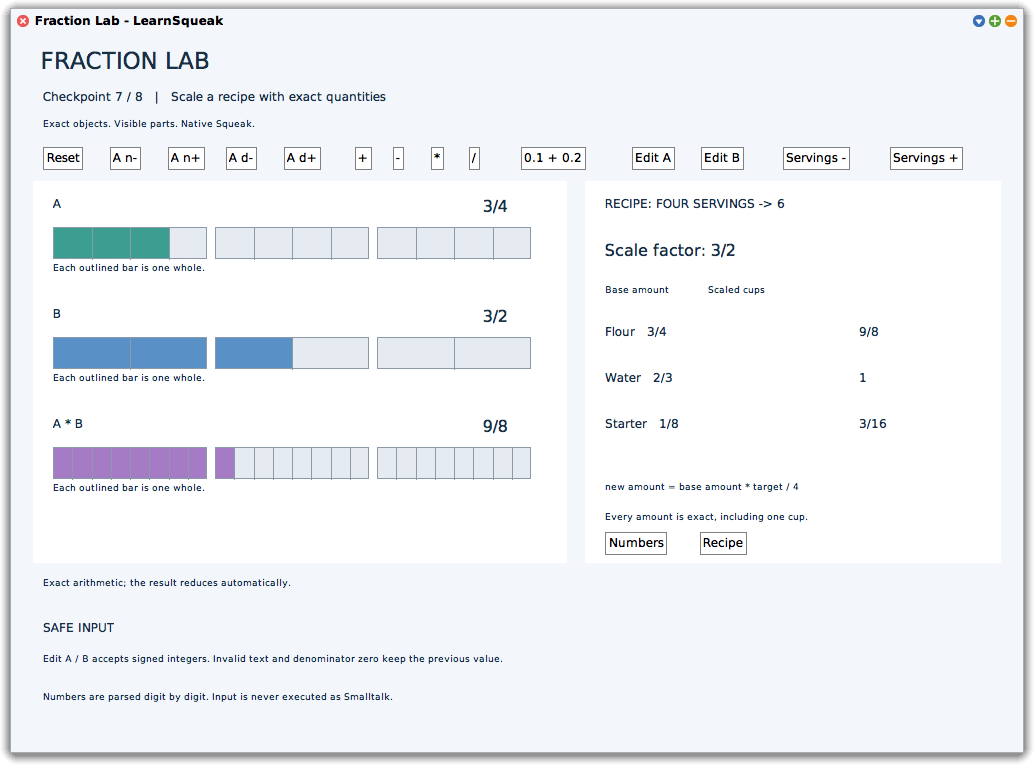
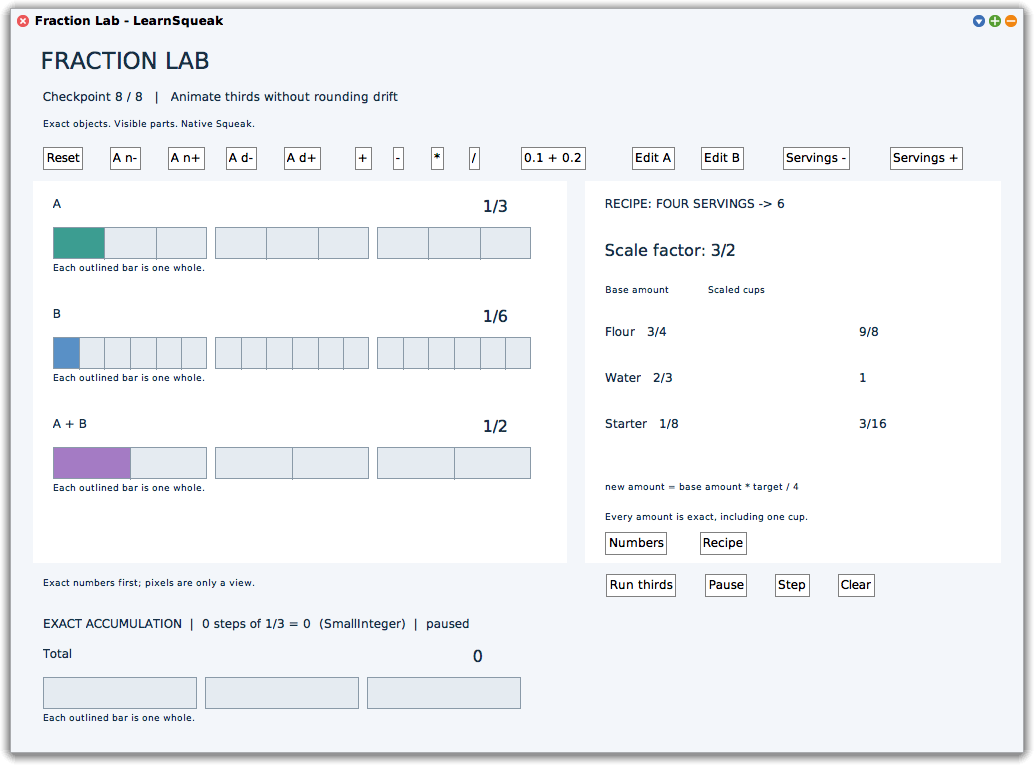
The recipe starts with quantities for four servings: 3/4 cup flour, 2/3 cup water and 1/8 cup starter. To make six servings, multiply every amount by target / 4 = 3/2. The new quantities are 9/8, 1 and 3/16 cups. Each ingredient is a pair containing its label and exact base amount. scaledRecipe uses collect: to build a new collection of scaled pairs.
The original recipe is not rewritten each time the serving count changes. Scaling an already-scaled recipe would compound errors in the workflow even if every number were mathematically exact. Instead, every query starts from the four-serving base. The UI's Servings - and Servings + buttons update only target. Repeatedly moving from six to seven and back to six therefore produces exactly the same quantities.
The target setter accepts whole serving counts from one to 24. That is a user-interface decision for this small lab, not a mathematical limit of Fraction. A request outside that range returns false, preserves the previous target and explains the constraint. The recipe method returns fresh arrays, so changing a returned ingredient pair does not mutate the next query's base data.
The left-hand operands remain an arithmetic scratch area while the right-hand notebook shows the recipe. Numbers and Recipe switch the notebook between exact/Float comparisons and the recipe. The decimal-example button selects Numbers; a serving adjustment selects Recipe. In this checkpoint A is the flour amount and B is the scale factor, with * selected. The left result of 9/8 matches the scaled flour row. Changing the recipe target does not overwrite the scratch operands; use the notebook to see all current scaled amounts. The third exercise asks the inverse question: how many servings can the available ingredients support?
LFModel · supporting instance-side method, included in the checkpoint
Watch for: Scale from the original recipe each time. Multiplying an already-scaled quantity by a new factor can be exact arithmetic applied to the wrong model.
Try it: Click Servings +, then Servings -. The recipe returns exactly to 9/8, 1 and 3/16. The scratch operands on the left keep their values.
Expected result
Four-serving quantities scale to six servings using factor 3/2: flour 9/8 cup, water 1 cup, starter 3/16 cup. A * B also shows 9/8.
Actual native Squeak 6.1 window produced by checkpoint 7 and the exact Workspace block above.
08 · Animate thirds without rounding drift
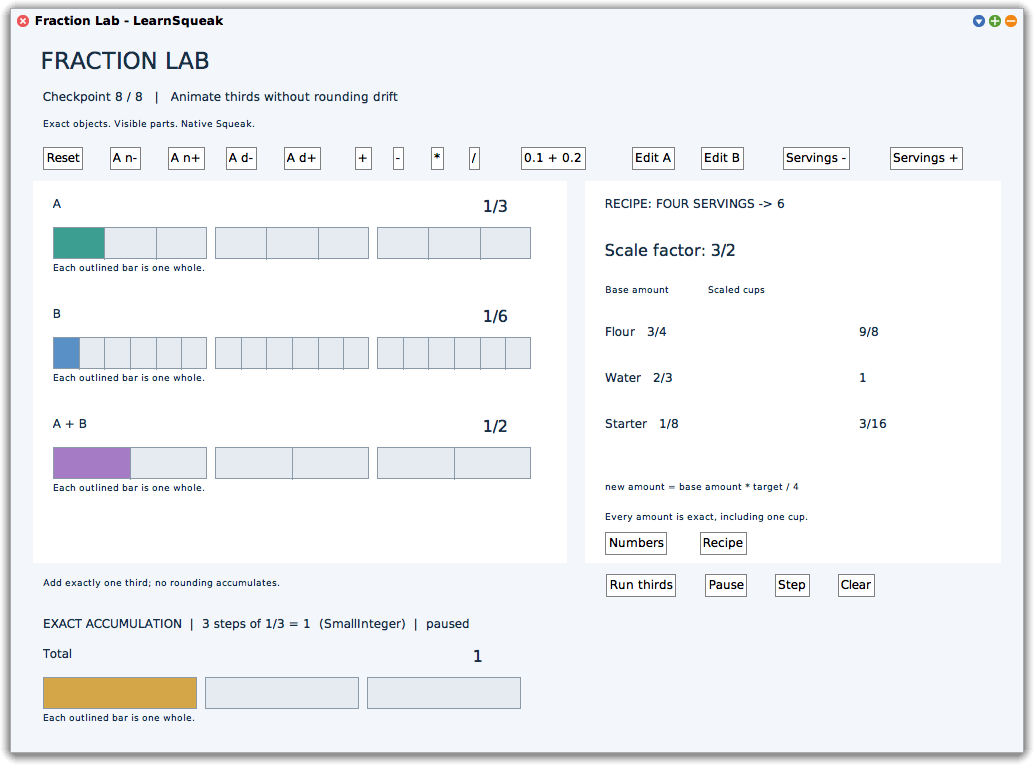
Finish the lab with a small native animation. The model counts ticks from zero to six. accumulated answers ticks * (1 / 3), so three steps are exactly one and six steps are exactly two. The type shown in the footer changes between Fraction and SmallInteger as the exact result changes. This is a useful demonstration of polymorphism: the view asks all these Number objects the same questions.
LFApp provides stepTime and step, the Morphic stepping protocol. Run registers the Morph for stepping at approximately 550 milliseconds; every step adds one bounded model event. Pause unregisters it. Step pauses first and performs exactly one manual event. Clear stops stepping and resets only the accumulator; Reset stops and replaces the whole model. Each action refreshes the view after changing the model.
wantsSteps answers running == true, so opening an idle window does not register it. The running guard makes a late scheduler callback harmless after Pause. The application remembers the original scheduledWorld and unregisters there even after closing detaches the Morph from its world. The six-step terminal condition stops registration instead of wasting callbacks forever. Run after completion starts a fresh sequence. Closing the window also stops stepping and clears the window reference; reopening the same application produces a new window without reviving an old timer. Run on an unopened application is a no-op. These small lifecycle decisions matter as much as the arithmetic when a demonstration becomes interactive.
The checkpoint opens at three completed manual steps, where the footer reads 1 (SmallInteger). Press Clear and Run thirds to watch 0, 1/3, 2/3, 1, 4/3, 5/3 and 2. The supplied GIF uses real native button events and the same step callback, invoked by a deterministic capture script. It is a scripted native execution, not a browser simulation or a recording of a person clicking.
LFModel · supporting instance-side method, included in the checkpoint
Watch for: Putting a long loop inside step would block the UI. One callback performs one small model update; startStepping and stopStepping own scheduling.
Try it: Clear, Run thirds, Pause, then Step. Pause preserves the count; Step advances once and stays paused. Close the window during Run and reopen it from the Inspector to check cleanup.
Expected result
The completed lab shows recipe controls, arithmetic controls and a footer reading 3 steps of 1/3 = 1 (SmallInteger). Clear then Run thirds advances to exactly 2 and stops.
Actual native Squeak 6.1 window produced by checkpoint 8 and the exact Workspace block above.
Watch the workflow
All eight PNGs and every GIF frame are genuine SystemWindow imageForm renders from the supplied source in native Squeak 6.1 build 23976. Checkpoint captures recompile the displayed methods and evaluate the exact Workspace blocks. The animations are scripted native executions: real Morphic button events and the same step callback used by the scheduler. Only GIF encoding and frame timing are applied; the interface is not recreated or composited. Modal edit-dialog typing is not automated.
NATIVE SQUEAK CAPTURE
Native Morphic Run, Pause, Step and Clear events. Thirds become the Integer 1, reach the Integer 2, stop and restart.
NATIVE SQUEAK CAPTURE
Native button events adjust numerator and denominator, select arithmetic, restore the exact/Float example and change recipe servings.
Practice with tested solutions
1. Format a mixed number without losing its sign
Add mixedTextFor: to LFModel. Show improper fractions as a whole part plus a proper fraction: 7/4 becomes 1 3/4 and -7/4 becomes -1 3/4. Keep 3/4, zero and integers tidy. This is a presentation method; the stored number must stay exact.
Hint
Take the absolute value before computing quotient and remainder. Put the original sign in front of the complete result, not just its whole part.
Show a tested solution
System Browser → LFModel → instance side. Accept this complete method after installing fractions-final.st.
| model |
model := LFModel new.
{model mixedTextFor: 7 / 4.
 model mixedTextFor: -7 / 4.
 model mixedTextFor: -3 / 4.
 model mixedTextFor: 0}
#('1 3/4' '-1 3/4' '-3/4' '0')
Using // directly on a negative numerator can give a misleading whole part because it rounds toward negative infinity. Splitting the magnitude first gives a readable sign-and-magnitude format; it never changes the Fraction itself.
The included LFExerciseTest suite checks the shown result and boundary cases in native Squeak.
2. Total an exact shopping list
Add sumQuantities: to LFModel. Accept an Array containing only Integer and Fraction objects, return their exact total, and return nil for any other input. The empty array should total zero. Reject a Float rather than silently mixing an approximate value into an exact recipe.
Hint
Validate the whole array before reducing it. Start inject:into: at the Integer zero.
Show a tested solution
System Browser → LFModel → instance side. Accept this complete method after installing fractions-final.st.
| model |
model := LFModel new.
{model sumQuantities: {1 / 3. 1 / 6. 3 / 4}.
 model sumQuantities: #().
 model sumQuantities: {1 / 3. 0.5}}
{(5/4) . 0 . nil}
The method makes an explicit contract: exact numeric inputs yield an exact total. A Float might be acceptable in another application, but silently accepting it here would weaken what the recipe model promises.
The included LFExerciseTest suite checks the shown result and boundary cases in native Squeak.
3. Find the ingredient that limits your recipe
Given an Array of available flour, water and starter quantities, in that order, calculate the maximum whole number of servings you can make. Start from the four-serving recipe. Reject negative, approximate or incorrectly sized input with nil. The result is a query; it must not change the selected target.
Hint
For each ingredient, available / baseAmount * 4 gives its serving capacity. Take the minimum capacity, then floor once at the end.
Show a tested solution
System Browser → LFModel → instance side. Accept this complete method after installing fractions-final.st.
| model |
model := LFModel new.
{model wholeServingsFrom: {3 / 2. 1. 1 / 4}.
 model wholeServingsFrom: {3 / 2. 1. 0}.
 model target}
#(6 0 6)
With 1 1/2 cups flour, 1 cup water and 1/4 cup starter, the capacities are 8, 6 and 8 servings. Water is the limiting ingredient, so six whole servings are possible. Working with ratios keeps the boundary exact.
The included LFExerciseTest suite checks the shown result and boundary cases in native Squeak.
When something looks wrong
The file-in opens a syntax error around an exclamation mark
Install the complete .st through File List → fileIn. In Workspace, run only the short | app | block shown for that checkpoint.
My arithmetic result differs from the lesson
Smalltalk binary messages evaluate left to right with equal precedence. Parenthesize each fraction: (1 / 3) + (1 / 6). The unparenthesized expression 1 / 3 + 1 / 6 answers 2/9.
The result has class SmallInteger, not Fraction
That is expected for whole results, including zero. Squeak normalizes exact division and arithmetic; both Integer and Fraction understand numerator and denominator.
The shaded bar does not display every tiny partition
Each bar is one whole. The renderer shows at most three wholes and skips subdivision lines above denominator 24. The exact numeric label and model remain unchanged.
A d- appears to do nothing when the denominator is one
The next denominator would be zero, so the model rejects the change and keeps its prior value. Read the status message. Negative denominators can be entered with Edit A or from Workspace.
A dialog will not accept 1/3 or 0.5
The two dialogs request integer numerator and denominator components separately. Enter 1 then 3. Cancel or empty text leaves the operand unchanged.
An old checkpoint still has later controls
File-ins add or replace methods but do not remove newer methods. Close tutorial windows and load the earlier checkpoint into a fresh learning-image copy.
Verification, cleanup and next steps
Verified with native Squeak6.1, image build 23976 and the packaged Linux x64 VM. A private image/changes copy was used and every process quit without saving the image. Native source and capture scripts are included for reproducibility.
Native Squeak: 38 application tests and 3 exercise tests pass with zero failures and zero errors. All eight checkpoints compile, execute their shown run block, and produce native screenshots.
The arithmetic suite checks four operations over 1,225 signed operand pairs, with zero divisors handled explicitly. Additional tests cover normalization, Integer results, strict parsing, atomic rejection, recipe bounds, real button events, rendering and animation lifecycle.
Each displayed Browser method is recompiled before its checkpoint capture.
Exercise solution methods and their exact shown check blocks execute in native Squeak.
Pause, repeated Run, manual Step, completion, reset, close and reopen are tested.
Bars render zero, negative, improper and fine-denominator values, plus undefined division.
Close the Fraction Lab window to stop Morphic stepping. Save your source separately from the image if you want to recreate the application in a clean image.
Squeak 6.1 image source: Fraction, Integer and Number — Executed through the native image: /, numerator, denominator, arithmetic, comparison, asFloat and Integer normalization.
Squeak 6.1 image source: Morph, SystemWindow and SimpleButtonMorph — Native drawing, imageForm, stepping, close cleanup and button-event dispatch used directly.