The separate playground loads the real Smalltalk image on demand. This lesson keeps its native setup instructions; browser compatibility notes appear beside each demo.
Before you start
Build a complete native Squeak laboratory for Conway's Game of Life. Start with a small model, then add editable cells, neighborhood inspection, single stepping, presets, run/pause, edge policy and repeatable experiments.
Save a working copy of your image before experimenting. Every numbered .st source is cumulative and can be filed into a clean Squeak 6.1 image independently.
Put the checkpoint file beside your image. Open the File List, select the file and choose fileIn. Close the previous tutorial window before advancing to the next checkpoint.
Accept displayed method definitions only in the named class and side in the System Browser. These methods are already installed by the checkpoint. Evaluate the separate Workspace block with Do it (Ctrl+D / Cmd+D).
To return to an earlier checkpoint, use a clean image: filing older source over a newer version does not remove later methods.
For SUnit, file in life-final.st and then life-tests.st. Evaluate TestRunner openForSuite: LLLifeTest suite, or Print it on LLLifeTest suite run.
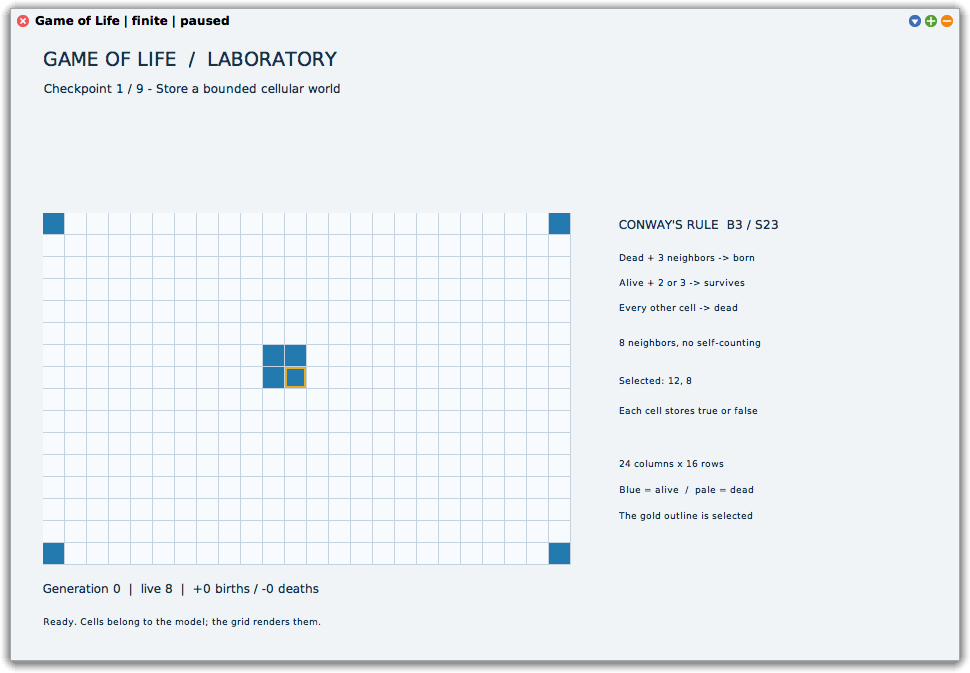
Build a 24-column by 16-row board before writing simulation code. LLBoard owns one flat Array of 384 Booleans. LLGrid reads those values and draws magnified cells; its pixels are never the source of truth. A one-based cell coordinate x@y maps to ((y - 1) * width) + x. Validate at the model boundary so programmatic edits and pointer edits obey the same rules.
Where to run this
System Browser, LLBoard, instance side. This method is already installed by checkpoint 01; accept it there to try changes.
LLBoard >> validCell: (instance side)
validCell: point
 ^ point isPoint and: [point x isInteger and: [point y isInteger and: [point x between: 1 and: self width] and: [point y between: 1 and: self height]]]
After filing in the checkpoint, select this entire block in a Workspace and choose Do it.
Native Squeak checkpoint 01, captured after executing the exact Workspace block.
02 · Paint with a native pointer gesture
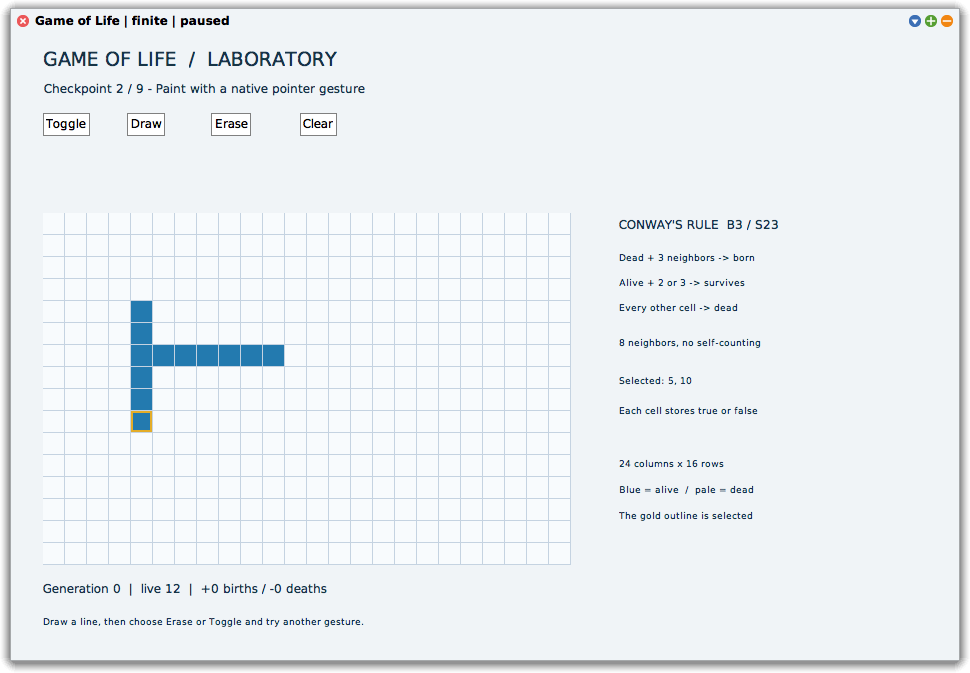
A click in Toggle mode chooses the opposite of the first cell. Every visited cell in that drag receives that same value. This lets a stroke fill or erase smoothly without flipping a cell every time another mouse-move event arrives. Draw and Erase choose explicit values. The view converts local pixels into a model coordinate, rejects points outside its rectangle, and ignores repeated visits to the immediately previous cell.
Where to run this
System Browser, LLGrid, instance side. This method is already installed by checkpoint 02; accept it there to try changes.
After filing in the checkpoint, select this entire block in a Workspace and choose Do it.
Workspace · run after installing this checkpoint
| app |
app := LLLifeApp open.
app chooseBrush: #draw.
5 to: 11 do: [:x | app paintCell: x@7 value: true].
5 to: 10 do: [:y | app paintCell: 5@y value: true].
app status: 'Draw a line, then choose Erase or Toggle and try another gesture.'.
app
MouseButtonEvent and MouseMoveEvent are handled by the real Morph
The bottom and right boundaries are excluded by containsPoint:
Release ends the drag even outside the grid; closing releases only this grid's mouse focus
Dragging paints cells visited by pointer events. It does not interpolate every cell between two distant events. An accepted change resets generation, births and deaths; painting the same value is a no-op.
Expected result
A small L-shaped stroke is visible. Draw, Erase, Toggle and Clear are native buttons.
Native Squeak checkpoint 02, captured after executing the exact Workspace block.
03 · Count the eight neighbors
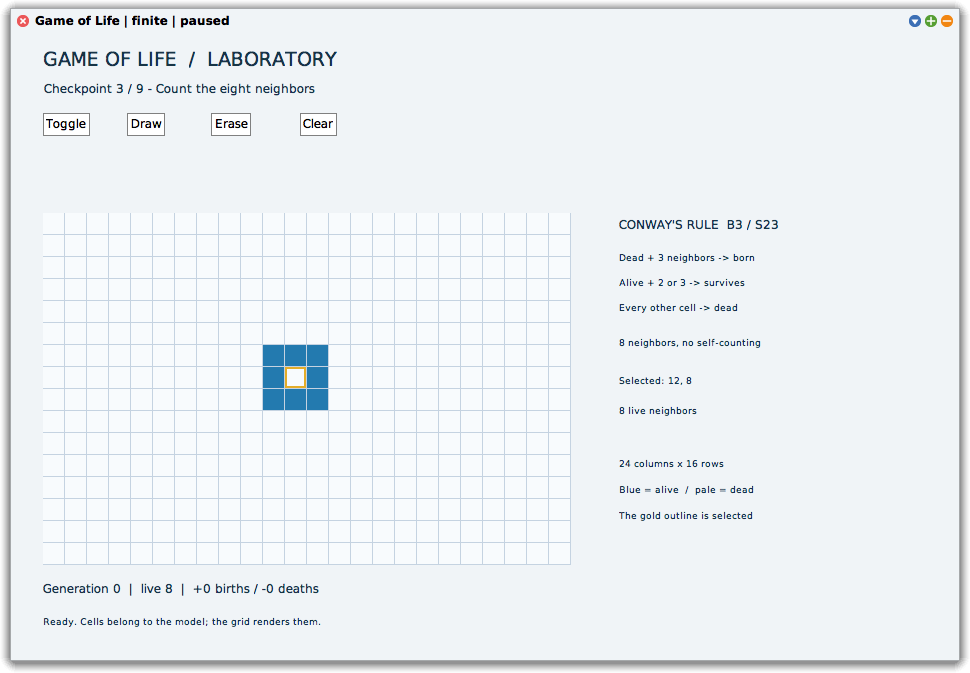
Visit the nine offsets in a 3 by 3 square and skip 0@0. At this checkpoint, cells beyond the rectangle are always dead. That gives a corner at most three in-board neighbors and an interior cell at most eight. Inspection only moves the gold outline and updates the neighbor label; it does not change the selected cell.
Where to run this
System Browser, LLBoard, instance side. This method is already installed by checkpoint 03; accept it there to try changes.
Native Squeak checkpoint 03, captured after executing the exact Workspace block.
04 · Advance a simultaneous generation
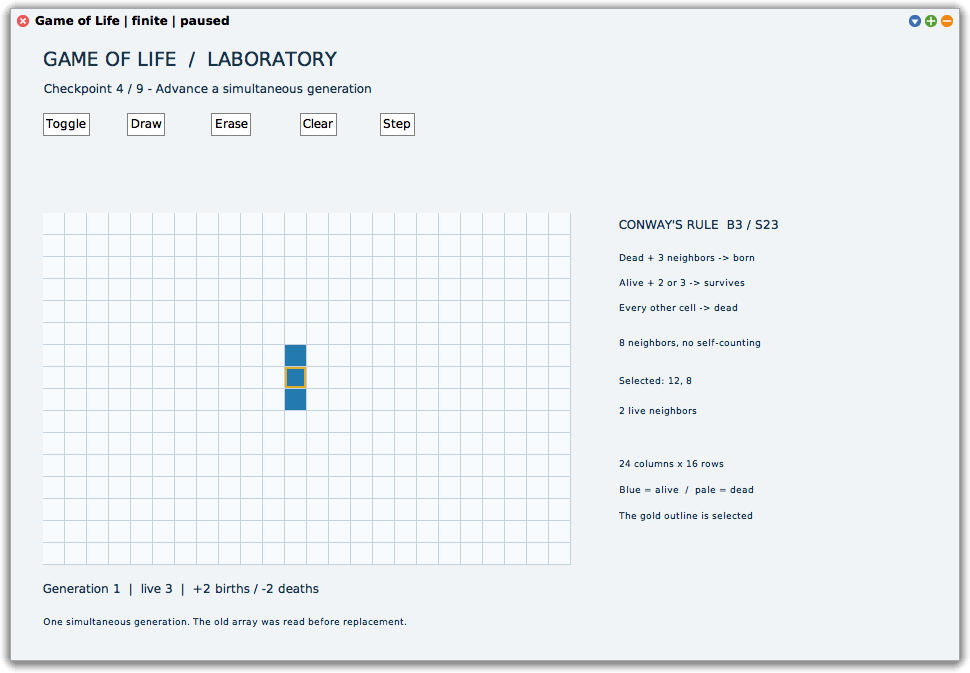
Conway's B3/S23 rule is short: a dead cell is born with exactly three live neighbors; a live cell survives with two or three. Every other cell is dead next time. nextGeneration allocates a fresh array, calculates every result from the unchanged old cells, counts births and deaths, then swaps the arrays once. This is double buffering. The Step button advances exactly one generation.
Where to run this
System Browser, LLBoard, instance side. This method is already installed by checkpoint 04; accept it there to try changes.
LLBoard >> nextGeneration (instance side)
nextGeneration
 | next count old alive index born died |
 next := Array new: cells size withAll: false.
 born := 0. died := 0.
 1 to: self height do: [:y | 1 to: self width do: [:x |
  index := self indexOf: x@y. old := cells at: index.
  count := self neighborCountAt: x@y.
  alive := count = 3 or: [old and: [count = 2]].
  next at: index put: alive.
  (alive and: [old not]) ifTrue: [born := born + 1].
  (old and: [alive not]) ifTrue: [died := died + 1]]].
 cells := next. generation := generation + 1.
 births := born. deaths := died
After filing in the checkpoint, select this entire block in a Workspace and choose Do it.
No write reaches cells until all 384 next states have been computed
The center survives while the two endpoints die and two new cells are born
A second Step returns the horizontal blinker, a useful order-independence regression
For W by H cells, this dense implementation takes O(W*H) time per generation, doing at most eight neighbor lookups per cell, and O(W*H) temporary space. It is clear and bounded, not a sparse or Hashlife implementation.
Expected result
A horizontal three-cell blinker becomes vertical. Generation 1 has three live cells, two births and two deaths.
Native Squeak checkpoint 04, captured after executing the exact Workspace block.
05 · Explore reusable pattern fixtures
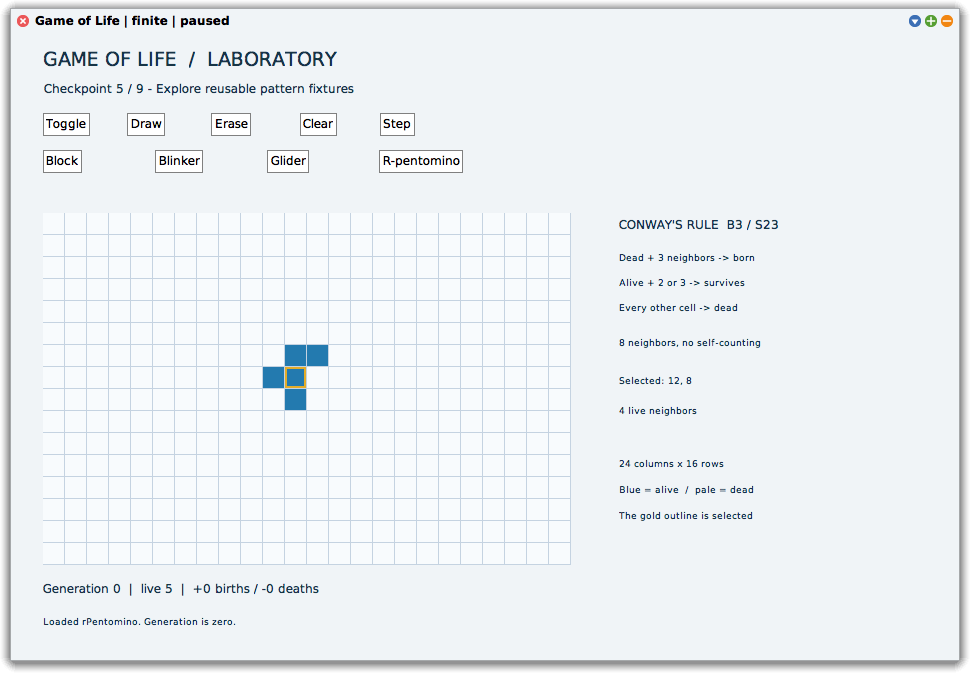
Presets give reproducible inputs. Block is a still life, Blinker is a period-two oscillator, and the five-cell Glider translates one cell diagonally after four generations while away from the boundary. R-pentomino offers a small, evolving seed. The preset selector validates its name before clearing anything, and the app refreshes only after the model has finished replacing the pattern.
Where to run this
System Browser, LLBoard, instance side. This method is already installed by checkpoint 05; accept it there to try changes.
Preset coordinates are explicit, so tests and screenshots reproduce the same state
Loading a preset clears the old cells and resets the counters
An unknown preset is rejected without changing cells, generation or running state
The finite laboratory is not an infinite plane. A moving or expanding pattern can change behavior when it reaches a boundary. Do not infer infinite-plane lifetimes from this small board.
Expected result
The five-cell R-pentomino starts at generation zero with its center selected.
Native Squeak checkpoint 05, captured after executing the exact Workspace block.
06 · Run with cooperative Morphic stepping
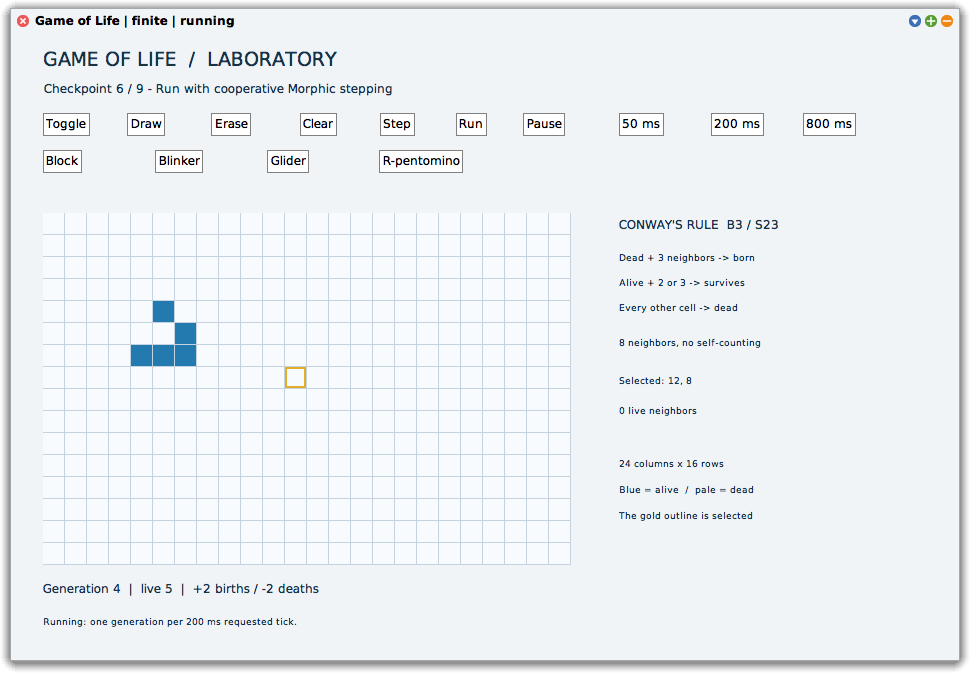
Run registers the app with Morphic stepping and sets a running flag. step performs one generation only while that flag is true. Pause clears the flag and removes the registration, so direct or delayed step messages become harmless. Run is idempotent: pressing it repeatedly does not create extra loops. The speed buttons choose a requested 50, 200 or 800 millisecond interval; the model remains deterministic regardless of display pacing.
Where to run this
System Browser, LLLifeApp, instance side. This method is already installed by checkpoint 06; accept it there to try changes.
LLLifeApp >> run (instance side)
run
 window ifNil: [^ false].
 running ifTrue: [^ true].
 grid endDrawing. running := true. self startStepping.
 self status: ('Running: one generation per ', delay printString, ' ms requested tick.'). self refresh. ^ true
After filing in the checkpoint, select this entire block in a Workspace and choose Do it.
stepTime reads the validated delay, bounded to 50..1000 integer milliseconds
Changing speed restarts the one stepping registration; Pause and Step both stop continuous running
Editing, clearing, loading a preset and closing the window also stop continuous running
Morphic stepping is cooperative scheduling, not a precise wall-clock simulator. A busy image can run slower than the requested delay; no missed generations are silently simulated to catch up.
Expected result
The app is registered to run. The script has executed four native step messages, moving the glider down and right.
Native Squeak checkpoint 06, captured after executing the exact Workspace block.
07 · Choose finite or wrapped edges
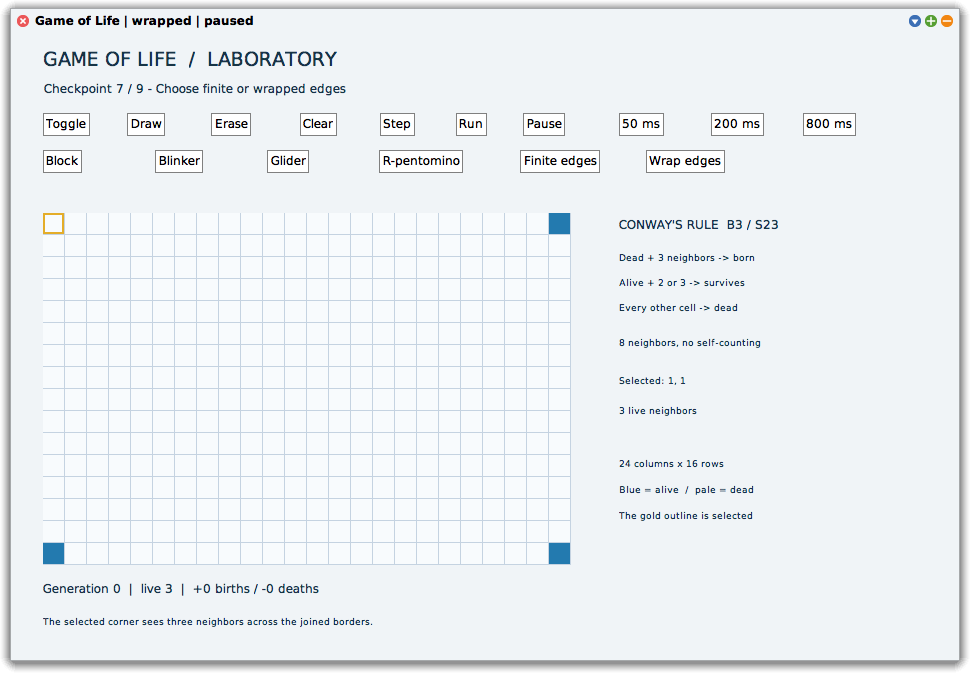
Finite edges treat off-board neighbors as dead. Wrapped edges join the left and right borders and the top and bottom borders, making a torus. Convert each outlying coordinate back into the one-based range with ((coordinate - 1) \ size) + 1, using Smalltalk's remainder modulo operator (two backslash characters). The B3/S23 rule and double-buffering algorithm stay the same; only neighborhood lookup changes.
Where to run this
System Browser, LLBoard, instance side. This method is already installed by checkpoint 07; accept it there to try changes.
After filing in the checkpoint, select this entire block in a Workspace and choose Do it.
Workspace · run after installing this checkpoint
| app |
app := LLLifeApp open.
app chooseEdge: #wrapped.
{24@16. 24@1. 1@16} do: [:cell | app board setAlive: true at: cell].
app inspectCell: 1@1.
app status: 'The selected corner sees three neighbors across the joined borders.'.
app
The modulo expression also handles coordinates immediately below one
Selecting a different policy pauses and resets generation, births and deaths; selecting the same policy preserves counters
Invalid edge symbols are rejected before changing state
Here the dimensions are at least three in both directions, so all eight wrapped offsets refer to distinct neighboring cells. Very narrow worlds need an explicit rule for duplicate neighbor positions.
Expected result
The selected dead cell at 1,1 sees three live neighbors across wrapped borders. Finite mode would see none.
Native Squeak checkpoint 07, captured after executing the exact Workspace block.
08 · Remember and restart experiments
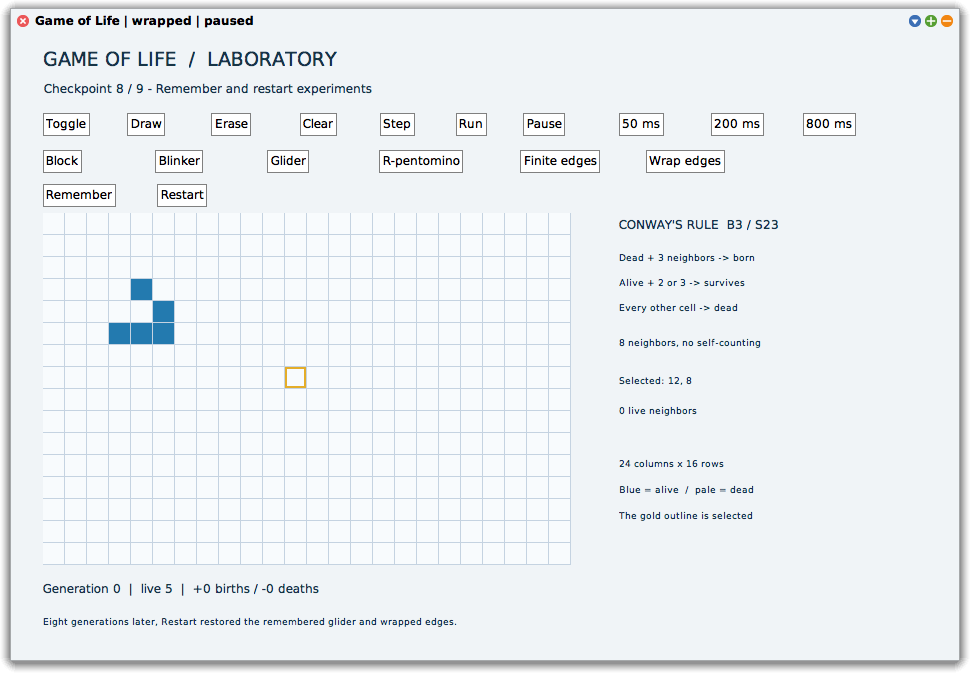
Remember copies the current cells and records the edge policy. Restart copies that saved array back and resets the counters. Keeping copies on both sides matters: later generations and brush edits must not alter the baseline. The app pauses before remembering or restarting, and every preset also becomes the new remembered baseline. Clear changes the live board but preserves the baseline so an experiment can be recovered.
Where to run this
System Browser, LLBoard, instance side. This method is already installed by checkpoint 08; accept it there to try changes.
The baseline belongs to this app instance and contains cells plus edge policy
Remember does not itself rewind the generation counter
Restart restores values through a copy, so it remains repeatable after more edits
This is an in-memory experiment baseline, not persistent storage or an undo stack. Closing the app discards it; the image and source remain separate concerns.
Expected result
The original glider and wrapped policy return at generation zero after an eight-step experiment.
Native Squeak checkpoint 08, captured after executing the exact Workspace block.
09 · Stop at fixed points and close cleanly
The Stop if stable button enables auto-pause when a generation has zero births plus zero deaths. That proves the entire board is unchanged, including when empty. Keep running disables this option. A Blinker has constant population but changing cells, so it must keep running. The completed laboratory also has an explicit lifecycle boundary. The native SystemWindow calls windowIsClosing; the app pauses and ends its grid gesture before releasing its window reference. Grid cleanup clears only mouse focus that actually points to that grid, preserving unrelated tools. The SUnit suite exercises model rules, fixtures, rejected inputs, native mouse dispatch, real button actions, timing registration, repeated Run/Pause, and close during a drag.
Where to run this
System Browser, LLLifeApp, instance side. This method is already installed by checkpoint 09; accept it there to try changes.
LLLifeApp >> step (instance side)
step
 running ifFalse: [^ self].
 board nextGeneration.
 (stopWhenStable and: [board births + board deaths = 0]) ifTrue: [
  self pause. self status: 'Fixed point reached: no cells changed. Run is paused.'].
 self refresh
After filing in the checkpoint, select this entire block in a Workspace and choose Do it.
File in life-final.st, then life-tests.st; run LLLifeTest suite run or open the native Test Runner
Tests verify Blinker, Block and Glider as deterministic mathematical fixtures
Fixed-point detection checks zero changed cells, not merely equal live counts; it does not detect periods longer than one
A late step after Pause does nothing; native close unregisters stepping and ends an active pointer gesture
The fixed window keeps grid geometry predictable. There is no file persistence, infinite scrolling, undo or random seed. The lesson concentrates on simulation, boundaries, input and lifecycle.
Expected result
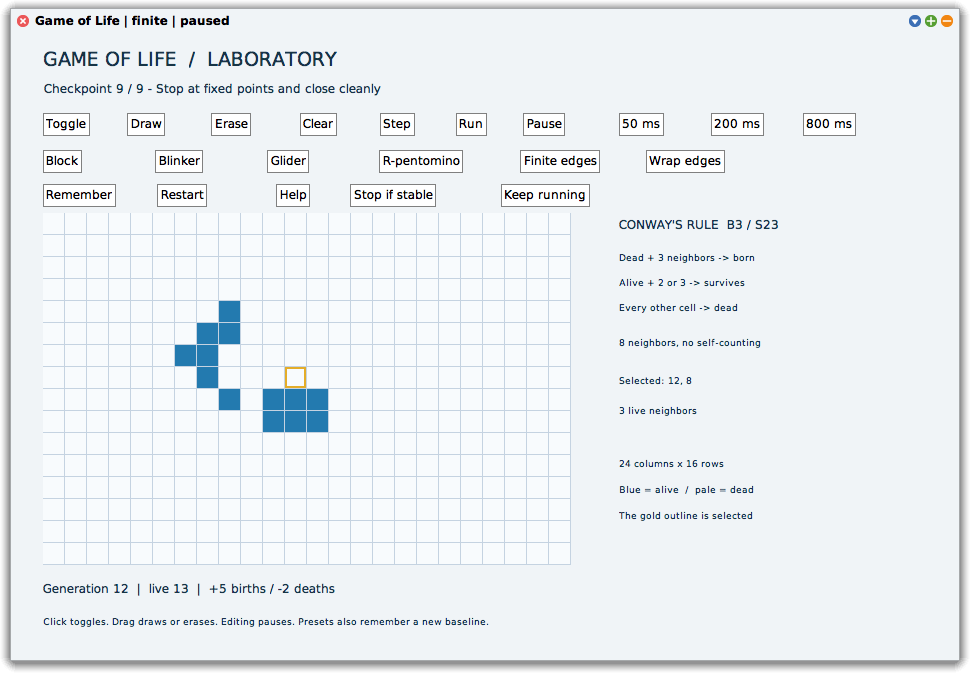
The final lab shows generation 12 of the R-pentomino with fixed-point controls and lifecycle protections installed.
Native Squeak checkpoint 09, captured after executing the exact Workspace block.
Watch the workflow
All screenshots are native SystemWindow imageForm captures from the checkpoint source and exact Workspace block shown. GIFs combine scripted native captures; they are not recordings of a person operating the desktop. Their first-frame posters are exact copies of the original PNGs.
NATIVE SQUEAK CAPTURE
Scripted native Squeak frames: actual mouse-button and mouse-move dispatch draws a blinker; real Step button actions reveal its two states; Remember and Restart restore the experiment.
NATIVE SQUEAK CAPTURE
Scripted native Squeak frames: the actual Run action registers Morphic stepping, native step messages move a glider, Pause unregisters it, and an edge-policy change demonstrates a corner birth.
Practice with tested solutions
1. Prove a period-two oscillator
Use the Blinker preset, step twice, and compare a copied snapshot to prove that the model returns to the exact original state.
Show a tested solution
After filing in the final Life app, select this entire block in a Workspace and choose Do it.
Exercise solution
| app original |
app := LLLifeApp open.
app preset: #blinker.
original := app board snapshot.
app singleStep; singleStep.
(app board snapshot = original and: [app board generation = 2])
 ifFalse: [self error: 'Blinker must return after two steps'].
app
Expected
All embedded assertions pass and the native laboratory remains open at the verified result.
The input cells and local rule are identical. The only changed condition is neighbor lookup at the boundary.
This exact solution block was executed in a fresh Squeak 6.1 baseline process.
3. Keep a restart baseline independent
Remember a wrapped Glider, evolve it, clear the board and switch the edge policy. Restart twice and prove that the saved cells, policy and zero-generation state survive.
Show a tested solution
After filing in the final Life app, select this entire block in a Workspace and choose Do it.
Exercise solution
| app original |
app := LLLifeApp open.
app preset: #glider; chooseEdge: #wrapped; remember.
original := app board snapshot.
4 timesRepeat: [app singleStep].
app clear; chooseEdge: #finite; restart.
(app board snapshot = original and: [app board edge = #wrapped] and: [app board generation = 0])
 ifFalse: [self error: 'Restart failed to restore the experiment'].
app singleStep; restart.
app board snapshot = original ifFalse: [self error: 'Baseline was aliased'].
app
Expected
All embedded assertions pass and the native laboratory remains open at the verified result.
Remember copies into the baseline and Restart copies out. Either missing copy can let future changes corrupt a saved experiment.
This exact solution block was executed in a fresh Squeak 6.1 baseline process.
When something looks wrong
The model changes while I try to edit
Any edit pauses Run. Use Pause first when inspecting an evolving pattern. A changed cell resets the generation counter; an unchanged value does not.
A pattern changes when it reaches the border
Finite edges treat outside cells as dead; wrapped edges join opposite borders. The window title shows the active policy.
A checkpoint seems to have later behavior
Load that checkpoint into a clean image. Source file-in replaces matching methods but does not delete later methods that are absent from the earlier file.
Verification, cleanup and next steps
52 SUnit tests passed in Squeak 6.1, with zero failures or errors. All nine checkpoints and all three exact exercise solutions were separately executed in fresh baseline processes.
Bounds and Boolean validation; detached snapshots; neighbor counting; B3/S23; Block, Blinker and Glider fixtures; finite/wrapped borders; rejected preset/edge inputs; counters; baseline copies; native click/drag/out-of-bounds/repeated moves; toolbar actions; Run/Pause and delay bounds; editing while running; fixed-point auto-pause without mistaking a Blinker; close and focus cleanup.
Close the laboratory window to stop stepping and release its pointer capture. No files or network requests are created by the app or exercises.
Squeak 6.1 image source — Array, Morph, SimpleButtonMorph, SystemWindow, MouseButtonEvent, MouseMoveEvent and TestCase were exercised in the shipped baseline; their source can be read in the System Browser.