Follow real node references, rewire insertions and removals, and make identity visible in a native Morphic diagram.
8 construction stagesTested source & checkpointsNative screenshots & demos
Before you start
Build a six-node linked-list explorer in native Squeak. Start with value and next slots, represent empty with nil, walk the chain, add and remove nodes, then draw arrows and keep selection attached to object identity. Finish by validating the structure and safely resetting Inspector experiments.
Eight cumulative file-in checkpoints build one application. Each contains all source needed at that stage; highlighted methods show the new idea while the support code keeps the window runnable. Every displayed method and Workspace launcher is compiled or evaluated in a clean Squeak 6.1 image before its screenshot is captured.
Squeak 6.1, 64-bit build 23976, with bundled Morphic and SUnit; no extra package or network service
Classes, instance variables, message sends, cascades, blocks, nil, = versus ==, and Workspace Do it / Print it / Inspect it
About 60–75 minutes for the eight stages, plus two exercises
Use a copy of your learning image. Close the previous linked-list window before installing another checkpoint.
Complete .st files are chunk-format source: use File List → select file → fileIn. Paste only the displayed launcher block into a Workspace.
Each checkpoint can start in a clean image. Use a fresh image to return to an earlier stage because filing in older source does not remove later methods.
The file-in defines classes but opens no window. Evaluate LSLinkApp open after installing a checkpoint.
Keep low-level next: and value: experiments in a disposable model. The public node references are intentional teaching access, not an encapsulation guarantee.
A linked list begins with an ordinary object that has two instance variables: value and next. value is the payload. next holds another node object, or nil when there is no successor. It does not contain an array index, a screen coordinate or a copy of the next node. In this lesson each node is an LSLinkNode instance, and the model reaches the chain through one reference named head.
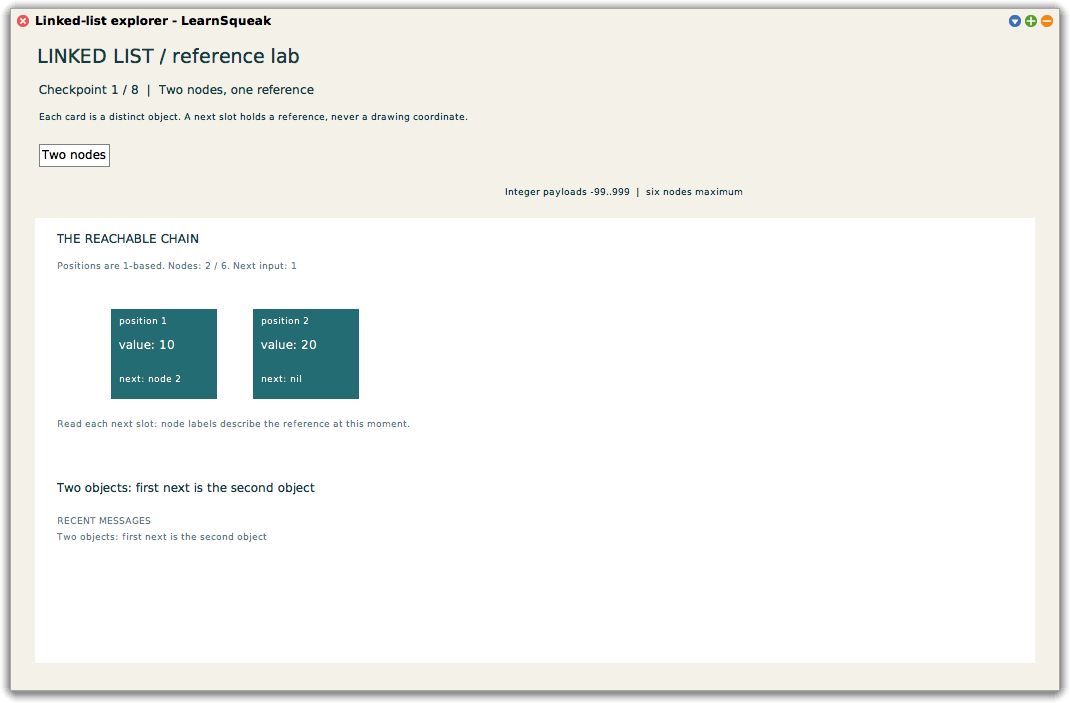
The class-side factory value:next: creates a fresh node and sends two setters. Read the cascade carefully: value:, next: and yourself are sent to the same new object. The final yourself makes the factory answer that node. seedPair creates a second node with value 20 and next nil, then creates a first node with value 10 and next pointing at the second object. The view reads those objects and paints two cards. At this stage the next slot is written as text; arrows arrive later.
Inspect app model, then inspect its instance variables. Follow head and next in the Inspector. You are following references through objects, not indexing into the card layout. The labels “node 1” and “node 2” are temporary display positions. Two separate objects can hold equal values, and an object can move to another position when the chain changes.
The complete checkpoint includes drawing and safe query helpers so it is runnable immediately. Those helpers collect a bounded snapshot of reachable nodes for the view; the chain itself is not stored in an OrderedCollection. The node setters are intentionally simple so you can study references in the Inspector. Treat them as low-level teaching tools: ordinary app commands go through the model's guards.
LSLinkNode class >> value: anInteger next: aNode · class side
seedPair
 | first second |
 second := LSLinkNode value: 20 next: nil.
 first := LSLinkNode value: 10 next: second.
 head := first.
 self note: 'Two objects: first next is the second object'
Where to run this
File List → select linked-list-01.st → fileIn. The checkpoint installs the named classes and methods. Open the System Browser on the specified class and side to read or type the highlighted methods.
Workspace → select the whole block → Do it. Use Inspect it on the whole block to retain the returned app. Close the previous explorer first.
Workspace · run after installing this checkpoint
| app |
app := LSLinkApp open.
app loadPair.
app
Watch for: The label node 2 is a display position, not a permanent node ID. Equal values do not make two node objects identical.
Try it: Inspect the two cards’ underlying nodes. Compare first next == second with first value = second value. What does each comparison ask?
Expected result
Two cards hold 10 and 20. The first next slot names node 2; the second next slot is nil.
Real Squeak 6.1 window after executing the exact launcher above. Two cards hold 10 and 20. The first next slot names node 2; the second next slot is nil.
02 · Let head be nil
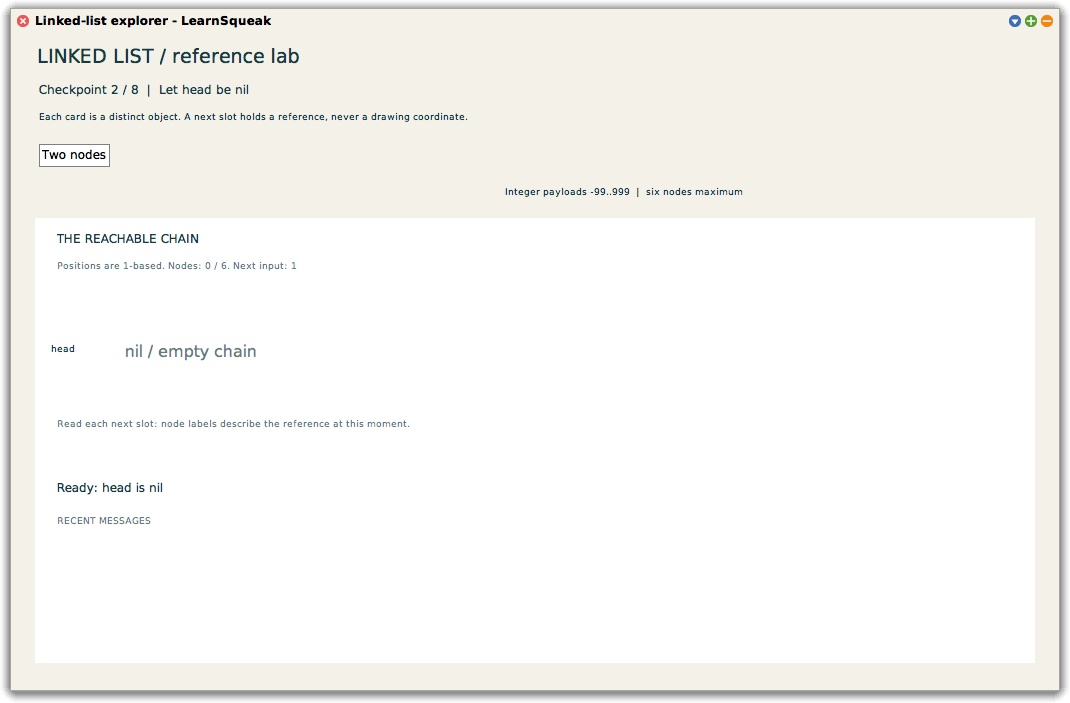
The empty list needs no dummy card. Its head is nil. The initialize method establishes that state, sets the display limit to six nodes and creates an empty message trace. isEmpty asks only whether head is nil. This is a structural question: a node containing the integer zero is still a node, so it is not an empty list.
The fresh launcher deliberately does not press Two nodes. The window shows “head” beside “nil / empty chain,” and the node count is zero. Press Two nodes to replace the model's head with the sample chain. This fixture is available throughout the workshop; it replaces the reachable chain and clears selection, while leaving the recent-message history in place. It is separate from Reset, which we add at the end.
head is a query for the actual node reference. Returning the reference is useful for teaching identity, but it means a caller can alter that node with next: or value:. The model therefore has bounded read helpers and an internal chainProblem guard from the beginning. nodes returns a new Array, but the Array contains the original nodes. values returns a new Array of integer payloads. Changing an entry in either Array does not replace a model link; sending next: to a node inside the Array does.
There is no stored tail and no cached size. For six nodes, computing the reachable size keeps the representation small enough to reason about directly. This lesson makes no claim that a linked list is faster than the collections you already know. The goal is to understand object references, termination and structural invariants.
LSLinkedList >> initialize · instance side
initialize
 super initialize.
 head := nil. capacity := 6. trace := OrderedCollection new.
 status := 'Ready: head is nil'
LSLinkedList >> head · instance side
head
 ^ head
LSLinkedList >> isEmpty · instance side
isEmpty
 ^ head isNil
Where to run this
File List → select linked-list-02.st → fileIn. The checkpoint installs the named classes and methods. Open the System Browser on the specified class and side to read or type the highlighted methods.
Workspace → select the whole block → Do it. Use Inspect it on the whole block to retain the returned app. Close the previous explorer first.
Workspace · run after installing this checkpoint
| app |
app := LSLinkApp open.
app
Watch for: nil is absence of a node. It is different from the valid integer payload 0.
Try it: Print it: LSLinkedList new isEmpty. Then use Two nodes and inspect the head reference.
Expected result
The count is zero, head is nil and no node cards are drawn.
Real Squeak 6.1 window after executing the exact launcher above. The count is zero, head is nil and no node cards are drawn.
03 · Prepend without losing the chain
Prepending changes one owner reference. First create a new node whose next is the current head. Then assign that new object to head. Smalltalk evaluates the right-hand expression before the assignment, so the old head is still available when value:next: runs. Reversing those steps carelessly could discard the only reference to the old chain.
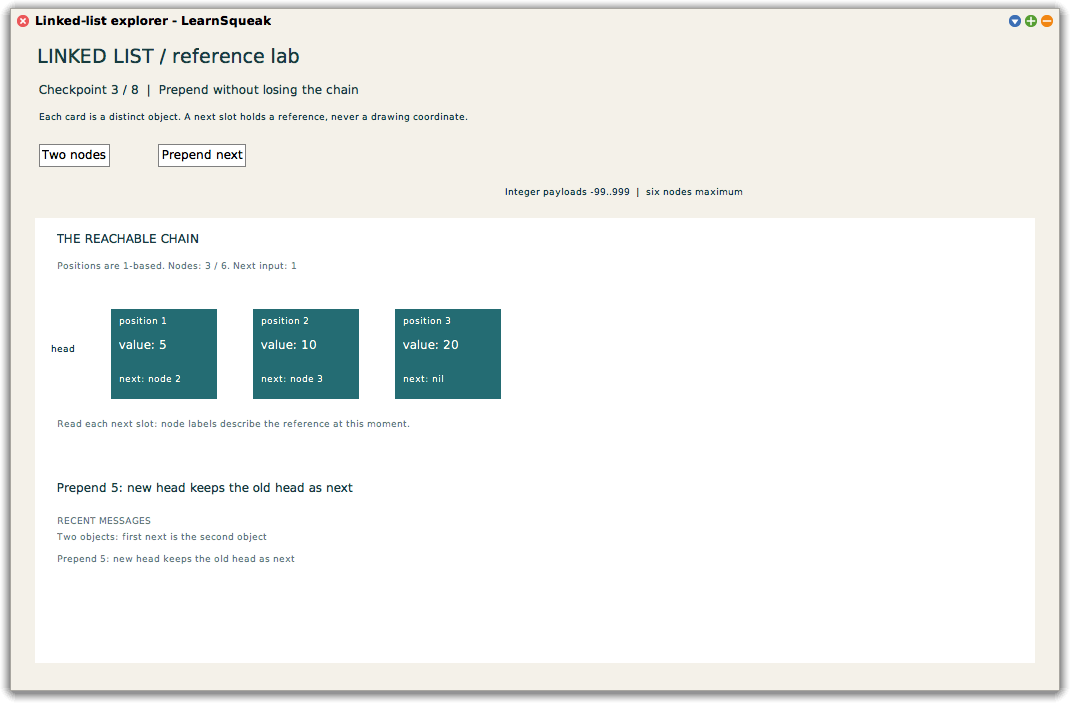
The example begins with 10 → 20 → nil and prepends 5. The result is 5 → 10 → 20 → nil. The 10 and 20 nodes are the same objects as before. Only the head reference and one new node have been introduced. Keep a reference to the old head in an Inspector and check that the new head's next is identical to it using ==.
canInsert: validates before allocating or changing a link. The supported payloads are integers from -99 through 999, a deliberate visual limit that keeps every card readable. Zero, negatives and duplicate integers are valid. nil, strings, booleans, fractions outside the integer type and out-of-range integers are rejected. A seventh reachable node is rejected as well. A failed insertion returns false and updates the message, while leaving the existing nodes and links unchanged. A successful insertion returns true.
The Prepend next button is a controller convenience. It supplies nextValue, increments it only if prepend: succeeds, and refreshes the view. The model does not know about buttons, selection or the next generated input. This separation lets us test reference changes without opening a window.
LSLinkedList >> canInsert: value · instance side
canInsert: value
 self canMutate ifFalse: [^ false].
 (self acceptsValue: value) ifFalse: [self note: 'Rejected: use an integer from -99 through 999'. ^ false].
 self size >= capacity ifTrue: [self note: 'Rejected: six nodes already visible'. ^ false].
 ^ true
LSLinkedList >> prepend: value · instance side
prepend: value
 (self canInsert: value) ifFalse: [^ false].
 head := LSLinkNode value: value next: head.
 self note: 'Prepend ', value printString, ': new head keeps the old head as next'.
 ^ true
File List → select linked-list-03.st → fileIn. The checkpoint installs the named classes and methods. Open the System Browser on the specified class and side to read or type the highlighted methods.
Workspace → select the whole block → Do it. Use Inspect it on the whole block to retain the returned app. Close the previous explorer first.
Real Squeak 6.1 window after executing the exact launcher above. Values are 5, 10, 20. The new first node points at the original 10 node.
04 · Walk until nil
Traversal starts with a local reference current := head. While current is not nil, read its payload and advance current := current next. Advancing this local variable does not alter any node. The chain can therefore be traversed repeatedly without changing its topology. When the list is empty, the loop runs zero times and answers an empty Array.
traversalValues collects a snapshot of the encountered payloads and records the result. It first asks chainProblem whether the links are safe. The guard uses an IdentitySet, so it detects revisiting the same node rather than merely seeing an equal value twice. It also checks the node type, value domain and six-node bound. A damaged chain returns nil from traversalValues and records a rejection. This prevents an accidental cycle made in the Inspector from starting an endless loop.
nodeAt: makes the same walk for a one-based position. Position 1 is head, so it advances zero times; position 3 advances twice. Invalid positions, including zero, out-of-range values and non-integers, answer nil. The return value is a node reference, which is different from that node's payload. The ordinary values query remains a bounded display snapshot; traversalValues is the explicit learning operation with a result message.
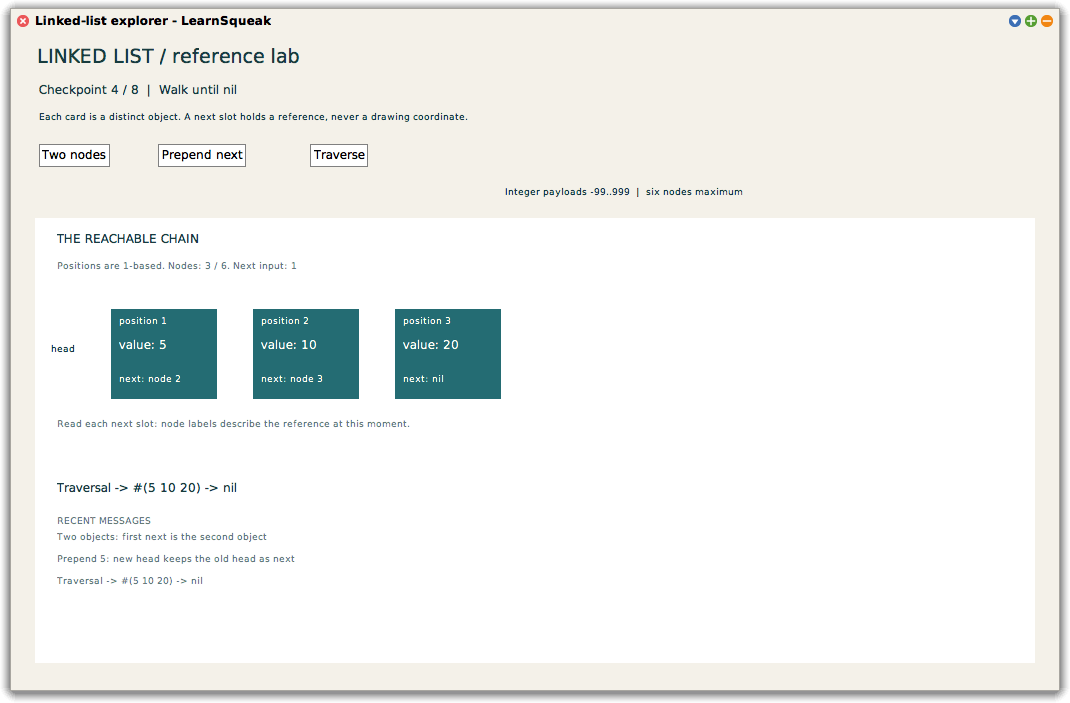
The launcher visits 5, 10 and 20 and ends at nil. Read the displayed next fields in order, then compare them with the trace. The result Array is newly created. Editing that Array does not edit a link or change the integer values held by the model.
LSLinkedList >> traversalValues · instance side
traversalValues
 | result current |
 self chainProblem ifNotNil: [self note: 'Traversal rejected: repair the chain or reset'. ^ nil].
 result := OrderedCollection new. current := head.
 [current notNil] whileTrue: [
  result addLast: current value.
  current := current next].
 self note: 'Traversal -> ', result asArray printString, ' -> nil'.
 ^ result asArray
LSLinkedList >> nodeAt: position · instance side
nodeAt: position
 | current |
 (position isInteger and: [position between: 1 and: self size]) ifFalse: [^ nil].
 self chainProblem ifNotNil: [^ nil].
 current := head.
 position - 1 timesRepeat: [current := current next].
 ^ current
Where to run this
File List → select linked-list-04.st → fileIn. The checkpoint installs the named classes and methods. Open the System Browser on the specified class and side to read or type the highlighted methods.
Workspace → select the whole block → Do it. Use Inspect it on the whole block to retain the returned app. Close the previous explorer first.
Real Squeak 6.1 window after executing the exact launcher above. The chain remains 5, 10, 20. The status reports Traversal -> #(5 10 20) -> nil.
05 · Append through the tail
Appending creates a node whose next is nil. For an empty list, that node becomes head. Otherwise, follow next references until the current tail's next is nil, then point that slot at the new node. The previous head and every earlier link remain unchanged. This empty branch is essential: sending next to a nil head would not perform the intended walk.
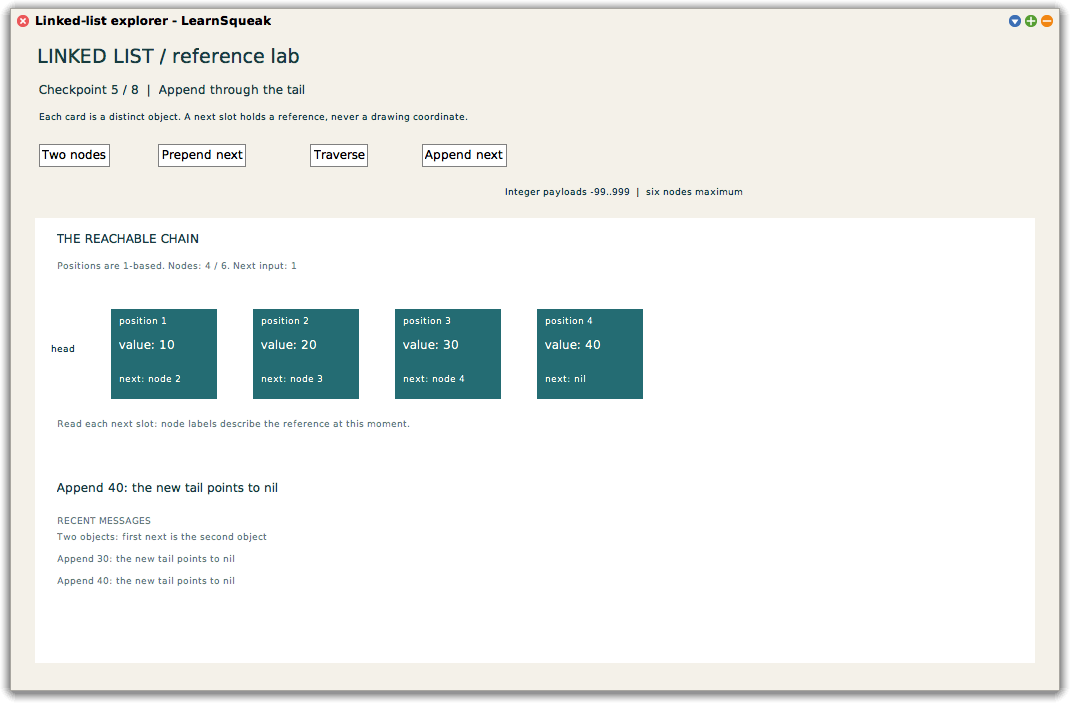
The launcher starts with 10 and 20, then appends 30 and 40. The 20 node no longer has next nil; it now reaches the 30 node, which reaches 40. The 40 node is the new tail because its next is nil. “Tail” here is a role discovered by walking, not another instance variable to keep synchronized.
The method reuses canInsert:, so validation and capacity checks happen before it touches any link. Inserting into a full or malformed chain returns false and preserves that chain. Since all mutation commands execute synchronously and the model has no background process, the guard and the subsequent traversal cannot race with another tutorial operation.
Append next and Prepend next use the same controller input sequence. Try mixing them: the arrival number tells you which value was generated, but its position depends on the operation. A linked chain can support many policies; the node representation itself does not dictate a stack or a queue interface. In this explorer you can change either end and later remove an interior node.
LSLinkedList >> append: value · instance side
append: value
 | node tail |
 (self canInsert: value) ifFalse: [^ false].
 node := LSLinkNode value: value next: nil.
 head isNil
  ifTrue: [head := node]
  ifFalse: [tail := head.
   [tail next notNil] whileTrue: [tail := tail next].
   tail next: node].
 self note: 'Append ', value printString, ': the new tail points to nil'.
 ^ true
File List → select linked-list-05.st → fileIn. The checkpoint installs the named classes and methods. Open the System Browser on the specified class and side to read or type the highlighted methods.
Workspace → select the whole block → Do it. Use Inspect it on the whole block to retain the returned app. Close the previous explorer first.
Real Squeak 6.1 window after executing the exact launcher above. The chain is 10, 20, 30, 40. Only the 40 node has next nil.
06 · Remove by rewiring
Removal changes which object is reachable next. To remove head, assign head := removed next. To remove any later node, find its predecessor and assign previous next := removed next. This bypasses the removed object while preserving the rest of the chain. The code then clears removed next so a separately held reference to that removed node does not continue to expose the old suffix.
Positions are one-based. removeAt: returns the removed integer, or nil when the position is invalid or the chain is malformed. Empty removal is safe. Removing the only node sets head to nil. Removing the tail sets its predecessor's next to nil. Since nil is not an accepted payload, it is an unambiguous failure/no-result sentinel; removing value 0 answers 0.
removeFirstValue: applies an explicit duplicate policy: walk from head and remove only the first node whose value is equal with =. It delegates the actual rewiring to removeAt:. No match answers nil and leaves the chain intact. Node identity still matters: two nodes containing 20 are different objects, and removing one does not remove the other.
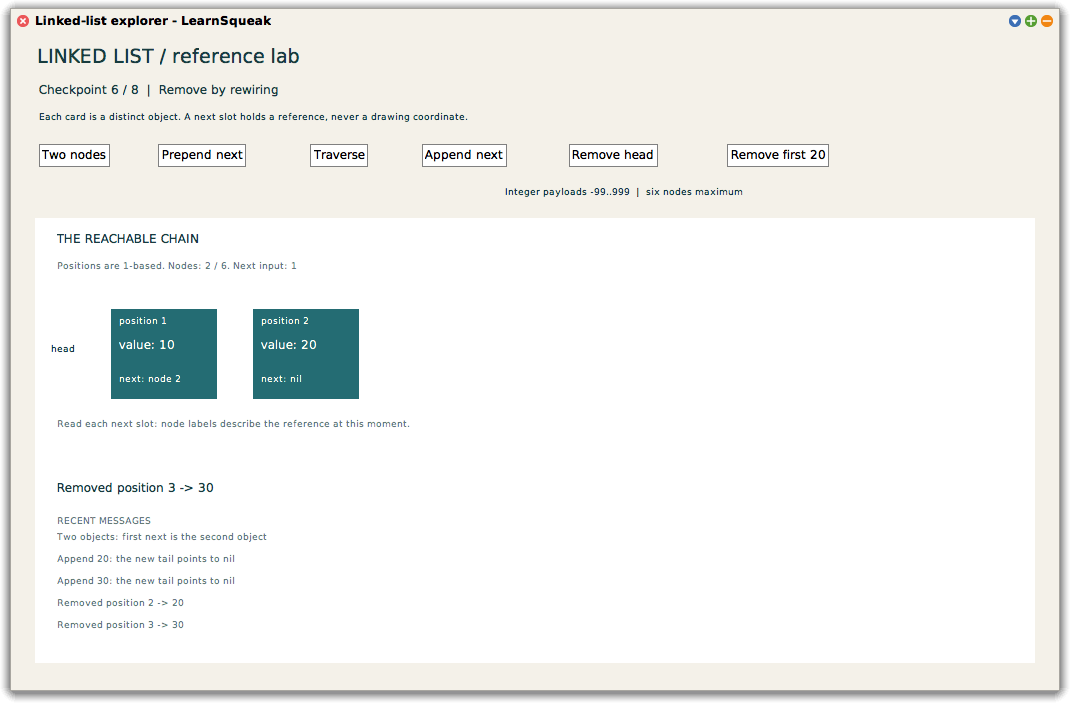
The launcher creates 10, 20, 20, 30, removes the first 20, then removes position 3, which is now 30. The surviving chain is 10, 20. Positions are recalculated after each edit. Keep an Inspector on the removed 20 node if you want to verify its next slot was cleared. The recent-message log is allowed to change on rejection; the data and link structure are not.
LSLinkedList >> removeAt: position · instance side
removeAt: position
 | previous removed |
 self canMutate ifFalse: [^ nil].
 (position isInteger and: [position between: 1 and: self size])
  ifFalse: [self note: 'Remove rejected: position must name an existing node'. ^ nil].
 position = 1
  ifTrue: [removed := head. head := removed next]
  ifFalse: [previous := self nodeAt: position - 1.
   removed := previous next. previous next: removed next].
 removed next: nil.
 self note: 'Removed position ', position printString, ' -> ', removed value printString.
 ^ removed value
LSLinkedList >> removeFirstValue: value · instance side
removeFirstValue: value
 | current position |
 self canMutate ifFalse: [^ nil].
 (self acceptsValue: value) ifFalse: [self note: 'Remove rejected: unsupported value'. ^ nil].
 current := head. position := 1.
 [current notNil] whileTrue: [
  current value = value ifTrue: [^ self removeAt: position].
  current := current next. position := position + 1].
 self note: 'No node equals ', value printString, '; chain unchanged'.
 ^ nil
Where to run this
File List → select linked-list-06.st → fileIn. The checkpoint installs the named classes and methods. Open the System Browser on the specified class and side to read or type the highlighted methods.
Workspace → select the whole block → Do it. Use Inspect it on the whole block to retain the returned app. Close the previous explorer first.
Watch for: After a removal, later positions shift. Use == when asking whether a particular node survived, and = when comparing payloads.
Try it: Remove head until empty, then remove once more. Create two 20 nodes and keep both references; confirm removeFirstValue: 20 removes only the first.
Expected result
The remaining values are 10, 20. The trace records removal of the first 20 and then the tail value 30.
Real Squeak 6.1 window after executing the exact launcher above. The remaining values are 10, 20. The trace records removal of the first 20 and then the tail value 30.
07 · Draw references and select objects
Now the diagram draws arrows from the same next references you have been inspecting. Each card's bounds are derived from its current position in the reachable snapshot. A line from head enters the first card; every ordinary next reference points to its successor; the final arrow ends at nil. If an Inspector has created a cycle or a foreign link, the bounded drawing labels that link invalid instead of pretending it reaches a normal successor.
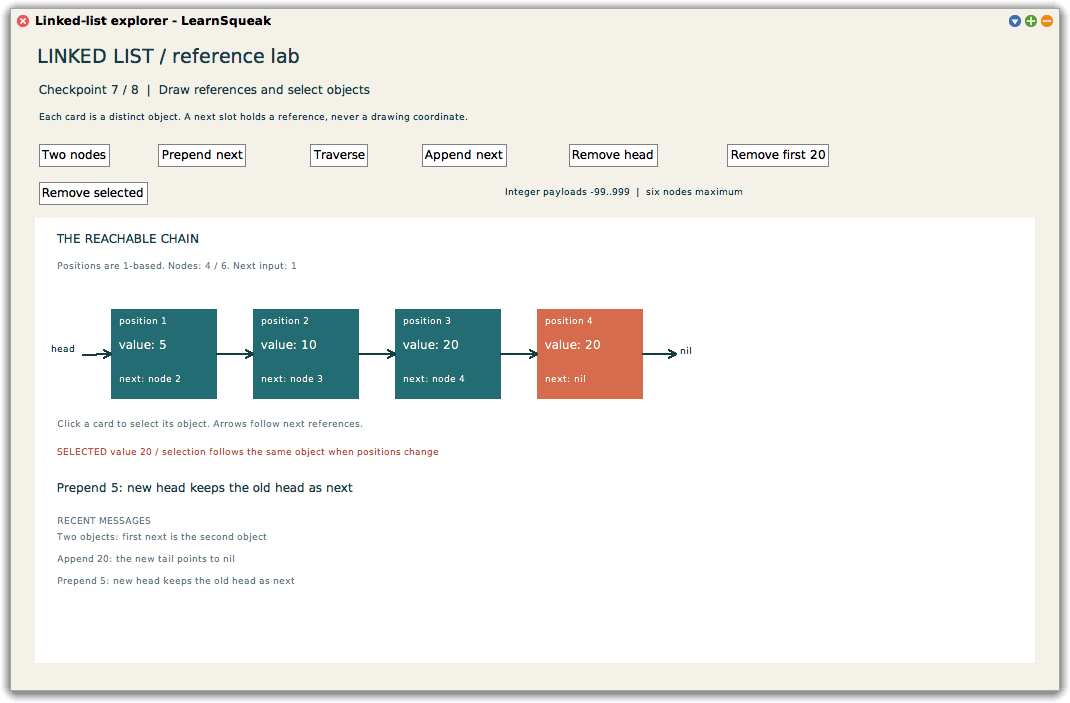
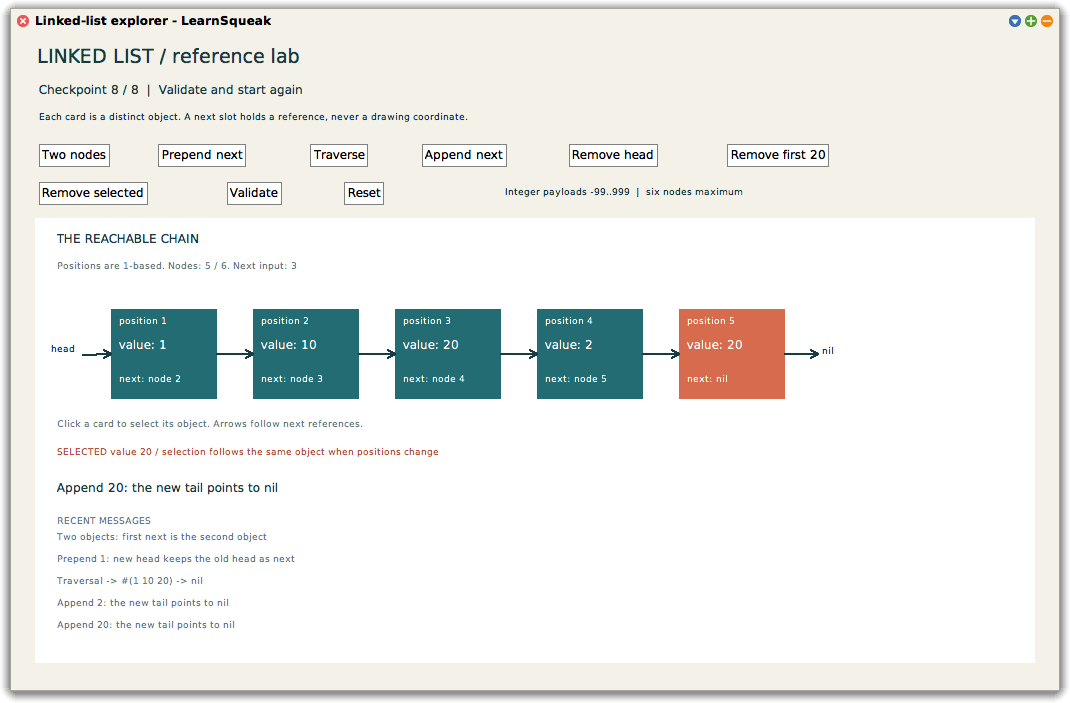
The panel is a view. Its mouseDown: method hit-tests card rectangles and tells the controller which node was clicked. The controller stores the node object in selected. It does not store just a position or payload. This matters when duplicate values exist or a prepend shifts every position. The orange card remains attached to the same object as that object moves through the picture.
The launcher creates 10, 20, 20, selects the second 20 object at position 3, then prepends 5. The selected object moves to position 4 and remains orange. Clicking blank panel space clears the selection. Remove selected finds the current position of the selected node and asks the model to remove it. refresh clears selection if that object is no longer reachable, including when another command removed it.
This is a native Morphic diagram. SimpleButtonMorph sends target/action messages, the panel receives native mouse events, and Canvas draws the cards and arrows. The model never receives a pixel coordinate. Moving the window changes geometry, but hit-testing uses the panel's actual position, so selection continues to work.
LSLinkPanel >> drawLinksOn: canvas · instance side
File List → select linked-list-07.st → fileIn. The checkpoint installs the named classes and methods. Open the System Browser on the specified class and side to read or type the highlighted methods.
Workspace → select the whole block → Do it. Use Inspect it on the whole block to retain the returned app. Close the previous explorer first.
Workspace · run after installing this checkpoint
| app |
app := LSLinkApp open.
app model seedPair; append: 20.
app selectNode: (app model nodeAt: 3).
app model prepend: 5.
app refresh.
app
Watch for: Selection must remember an object, not just its old index or value. Otherwise duplicate values or a prepend can select the wrong node.
Try it: Select one 20 card, prepend another value, then remove selected. Check which of the two 20 objects survives. Move the window and repeat the click.
Expected result
Arrows show 5 -> 10 -> 20 -> 20 -> nil. The last 20 is selected in orange after moving from position 3 to position 4.
Real Squeak 6.1 window after executing the exact launcher above. Arrows show 5 -> 10 -> 20 -> 20 -> nil. The last 20 is selected in orange after moving from position 3 to position 4.
08 · Validate and start again
The final checkpoint exposes the structural checks with a Validate button. A valid chain contains at most six distinct node objects, every reachable payload is an integer in the accepted range, every link is another node or nil, and following next eventually ends at nil. The IdentitySet checks object identity, so repeated payloads remain valid while a repeated node signals a cycle.
chainProblem answers nil for a valid chain or a short explanation for the first problem it finds. This helper has protected commands and display snapshots since the initial scaffold. validate now turns that result into a visible message and a boolean result. It does not repair or reorder the chain. Counting the reachable nodes is enough because this model has no separate cached size or tail that could disagree with the links.
Reset assigns nil to head, clears the trace and writes an empty-state status. The controller also clears selected and returns nextValue to 1. Repeated Reset is safe, including after an Inspector experiment created a cycle. Reset releases the model's reference; it does not destroy node objects that another Inspector still references. Those objects remain valid Smalltalk objects outside the new list.
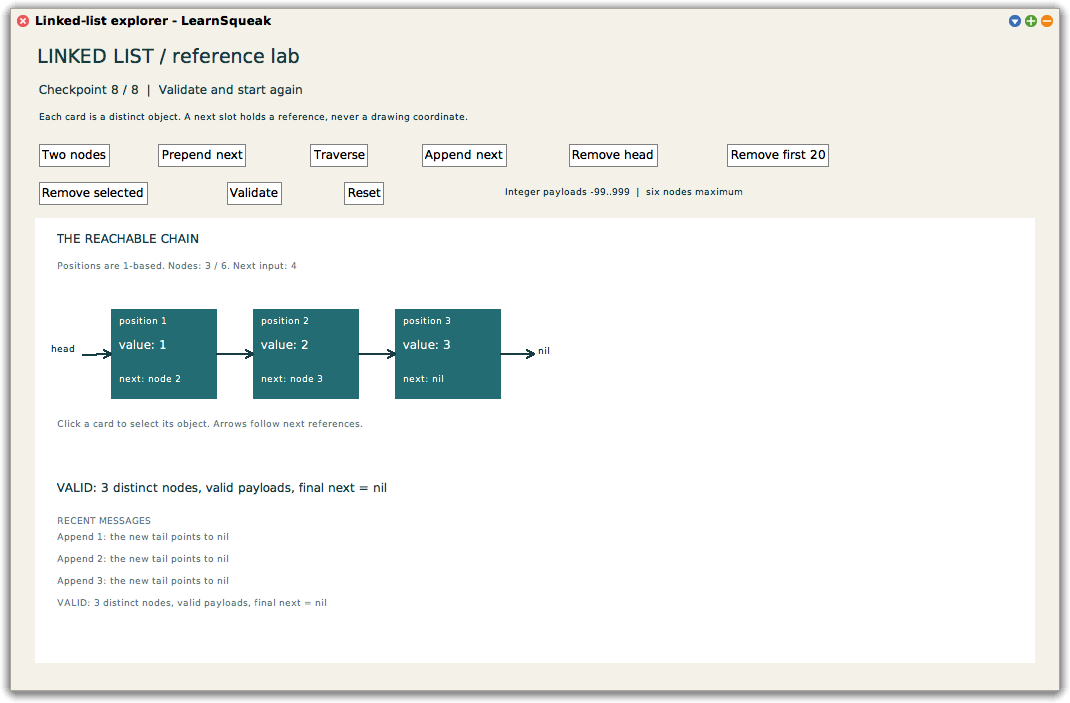
The launcher dirties the model, resets it, appends 1, 2 and 3 using controller commands, then validates. The demonstration below continues through selection, first-equal removal, full-capacity rejection, recovery and another reset. For deliberate corruption practice, use a spare app: point its tail back at head, validate, observe bounded drawing and rejected commands, then reset. No process needs stopping when this event-driven window closes.
LSLinkedList >> chainProblem · instance side
chainProblem
 | seen current |
 seen := IdentitySet new. current := head.
 [current notNil] whileTrue: [
  (current isKindOf: LSLinkNode) ifFalse: [^ 'A link is not a node or nil'].
  (seen includes: current) ifTrue: [^ 'Cycle: a node is reached twice'].
  seen size >= capacity ifTrue: [^ 'More than six reachable nodes'].
  (self acceptsValue: current value) ifFalse: [^ 'Payload outside -99 through 999'].
  seen add: current. current := current next].
 ^ nil
LSLinkedList >> validate · instance side
validate
 | problem |
 problem := self chainProblem.
 problem ifNotNil: [self note: 'INVALID: ', problem. ^ false].
 self note: 'VALID: ', self size printString, ' distinct nodes, valid payloads, final next = nil'.
 ^ true
LSLinkedList >> reset · instance side
reset
 head := nil. trace := OrderedCollection new.
 status := 'Reset: head = nil; no reachable nodes'.
 ^ self
File List → select linked-list-08.st → fileIn. The checkpoint installs the named classes and methods. Open the System Browser on the specified class and side to read or type the highlighted methods.
Workspace → select the whole block → Do it. Use Inspect it on the whole block to retain the returned app. Close the previous explorer first.
Watch for: A safe traversal must detect revisiting an object, not reject duplicate values. Reset discards model ownership; it does not delete externally referenced objects.
Try it: In a spare app, point the last node next at head. Validate, try Append next and observe the rejection. Reset and validate the empty chain.
Expected result
The chain is 1, 2, 3; Next input is 4. The status says VALID: 3 distinct nodes, valid payloads, final next = nil.
Real Squeak 6.1 window after executing the exact launcher above. The chain is 1, 2, 3; Next input is 4. The status says VALID: 3 distinct nodes, valid payloads, final next = nil.
Watch the workflow
All eight PNGs and the GIF frames are native Squeak 6.1 SystemWindow imageForm captures. The animation is a deterministic replay of real native button/card events plus one disclosed model append used to introduce a duplicate payload. Frame timing is added during GIF encoding; no UI or state is reconstructed in a browser.
NATIVE SQUEAK CAPTURE
Scripted native replay: create the pair, prepend and append, add a duplicate 20 through the model, select that exact node, remove the first equal value, remove the selected object, hit six-node capacity, recover, validate and reset. Button actions and card selection are native mouse events; it is not a continuous human screen recording.
Practice with tested solutions
1. Count equal payloads without changing links
Add countOccurrencesOf: to LSLinkedList. Answer how many reachable nodes have the requested value. Answer 0 for a valid empty chain or no match, and nil for an unsupported value or malformed chain. Do not change head, next links or the trace. Duplicate values count separately.
Hint
Use a local current reference and counter. Check acceptsValue: and chainProblem before walking. Equality of payloads uses =.
Show a tested solution
System Browser → LSLinkedList → instance side. Accept this method, or file in linked-list-exercise-1.st after the final application.
Exercise solution
countOccurrencesOf: value
 | current count |
 (self acceptsValue: value) ifFalse: [^ nil].
 self chainProblem ifNotNil: [^ nil].
 count := 0. current := head.
 [current notNil] whileTrue: [
  current value = value ifTrue: [count := count + 1].
  current := current next].
 ^ count
Expected
A list containing 20, 5, 20 answers 2 for 20 and 0 for 99. Invalid or cyclic input answers nil.
Workspace · Print it after installing the solution
Check the solution
| list |
list := LSLinkedList new.
list append: 20; append: 5; append: 20.
{list countOccurrencesOf: 20. list countOccurrencesOf: 99. list values}
Print it answers #(2 0 #(20 5 20)).
The query walks the same nodes without replacing or rewiring them. The exercise tests also verify the head identity is unchanged and cycles are rejected.
2. Reverse the existing node objects
Add reverse to LSLinkedList. Reverse next references in place, answer true on success, and preserve the original node objects. Empty and singleton lists are successful no-ops. Reject malformed chains with false before changing a link. Record one message on success.
Hint
Carry previous, current and following. Save following before overwriting current next; otherwise the unprocessed suffix becomes unreachable.
Show a tested solution
System Browser → LSLinkedList → instance side. Accept this method, or file in linked-list-exercise-2.st after the final application. If using an open app, send app refresh afterward.
Exercise solution
reverse
 | previous current following |
 self canMutate ifFalse: [^ false].
 previous := nil. current := head.
 [current notNil] whileTrue: [
  following := current next.
  current next: previous.
  previous := current. current := following].
 head := previous.
 self note: 'Reversed the same node objects'.
 ^ true
Expected
10 -> 20 -> 30 becomes 30 -> 20 -> 10. The old head is now the tail and points to nil; reversing twice restores every original link.
Workspace · Print it after installing the solution
Check the solution
| list oldHead |
list := LSLinkedList new.
list seedPair; append: 30.
oldHead := list head.
list reverse.
{list values. (list nodeAt: 3) == oldHead. oldHead next isNil}
Print it answers #(#(30 20 10) true true).
Three local references preserve the unexplored suffix while one link is reversed per iteration. Native tests check empty, singleton, duplicate identity, two reversals and atomic cycle rejection.
When something looks wrong
A source file opens as text or produces syntax errors in a Workspace
Use File List fileIn for complete .st files. Chunk separators and class declarations are not a Workspace launcher. The displayed Browser methods belong on the specified class and side.
My model changed but the picture did not
Model commands intentionally do not know the view. After changing an Inspector-accessed model, send app refresh. Native buttons already do this.
The seventh insertion is rejected
This explorer is intentionally bounded at six nodes. Remove one node or reset, then retry. Failed button insertion keeps Next input unchanged.
Duplicate 20 values appear to be the same card
They are equal payloads in separate node objects. Select one card, keep its node reference in an Inspector and use == to follow it after a prepend or removal.
Validate reports a cycle or invalid link
A low-level next: experiment bypassed the model. The view and commands remain bounded. Use Reset to drop the model head, or repair that specific reference in the Inspector before validating again.
Earlier-stage methods still exist after filing in an old checkpoint
File-in replaces methods but does not remove newer ones. Start that checkpoint in a clean copied image to reproduce its exact stage.
Verification, cleanup and next steps
Verified against the bundled Squeak 6.1 image, latest update #23976, using its own compiler, Morphic classes, IdentitySet and SUnit. These are native Smalltalk source files, not JavaScript simulations.
47 application tests and 8 exercise tests passed in Squeak 6.1 with zero failures and errors.
Tests cover object identity, every empty/head/middle/tail removal case, first-equal duplicate policy, capacity and invalid-input atomicity, bounded traversal, malformed links, cycles, copied query arrays, real native mouse events, moved-window hit-testing, selection lifetime, reset and close/reopen.
All eight cumulative checkpoints were filed into fresh image sessions; every displayed method was recompiled and every exact launcher was evaluated before capture.
Both exercise solutions and their exact printed examples were executed; eight SUnit tests verify their contracts.
The replay records native states and frame hashes. Reproduction scripts and original PNG frames are included in the download.
Close the explorer windows when finished. No background process needs stopping. Keep the .st sources or ZIP to rebuild in a clean image. For another data-structure comparison, revisit stacks and queues; here the focus is the explicit object chain.
Bundled Squeak 6.1 classes: Object, IdentitySet, OrderedCollection and Array — Object identity, bounded visited sets, temporary snapshots and collection protocol inspected and executed in the image.
Bundled Squeak 6.1 classes: Morph, SystemWindow, SimpleButtonMorph, MouseButtonEvent and Canvas — Native window layout, drawing, hit-testing and target/action dispatch used by the explorer.
Bundled Squeak 6.1 classes: TestCase, TestSuite and PNGReadWriter — Native behavioral verification and imageForm capture, with runnable scripts included in the kit.
Six reachable nodes and integer payloads -99 through 999 keep the diagram readable; this is a teaching bound, not a claim about Smalltalk collections.
Head and node queries expose live node objects so references can be inspected. Low-level setters can corrupt a chain; guarded operations reject it and Reset recovers.
There is no cached tail, cached count, iterator protocol, concurrent mutation or performance benchmark.
Card labels are current positions, not stable node identifiers. The selected object is tracked by identity.
The fixed-size window draws its own UI. It has no network calls, background stepping process or extra dependencies.