New to the language? Start with Smalltalk in Squeak, then return here.
SMALLTALK YOU CAN SEE
Your first
Morphic objects.
Draw a shape. Send it a message. Watch it change.
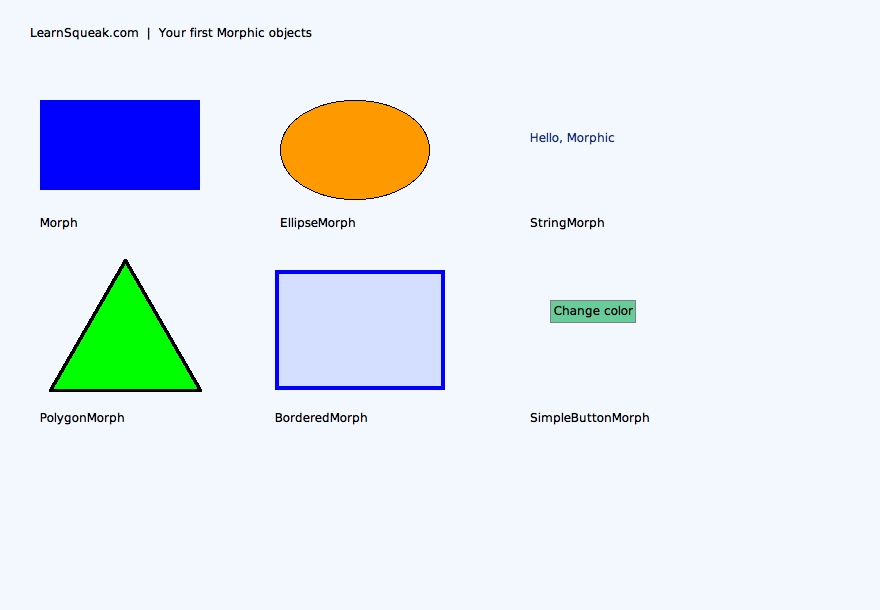
Morphic is Squeak’s live graphical world. Its shapes, labels, buttons, and windows are objects you can inspect and program. Build seven small examples, one at a time.
BEFORE YOU BEGIN
Open a Workspace. Make a Morph.
- Open Squeak and choose Tools → Workspace. You can also use the desktop’s World menu to open a Workspace.
- Copy one complete example into the Workspace, including its first line. Select that example’s text.
- Choose do it from the text pane’s context menu. The usual shortcut is Ctrl+D on Windows/Linux or Cmd+D on macOS.
Every example is independent. Run just one at a time, then remove its Morph before trying the next; the examples share starting coordinates and can overlap. These are Squeak examples, not browser JavaScript.
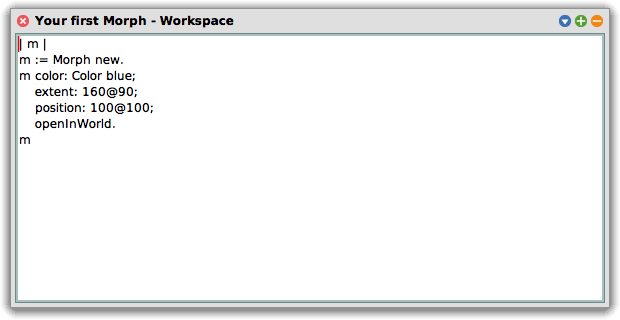
100@100A Point: x across, y down. The origin is the top-left of the Squeak world.
extent: 160@90Width and height in pixels. Position sets the top-left of the Morph’s bounds.
color: Color blueA message sent to an object. A semicolon sends the next message to the same receiver.
openInWorldAdds the object to the visible world. Creating an object alone doesn’t display it.
The names between vertical bars, such as | m |, are temporary variables for that evaluation. The final m or stage returns the result; it does not keep a reference for the next do-it.
Run in the SqueakJS playground
The separate playground loads the real Smalltalk image on demand. This lesson keeps its native setup instructions; browser compatibility notes appear beside each demo.
Morph
Your first rectangle
Start with the simplest visible object. A plain Morph draws a solid rectangle.
| m |
m := Morph new.
m color: Color blue;
    extent: 160@90;
    position: 100@100;
    openInWorld.
m

EllipseMorph
A circle—or an ellipse
Use the same messages with a different class. Equal width and height give you a circle.
| m |
m := EllipseMorph new.
m color: Color orange;
    extent: 150@100;
    position: 100@100;
    openInWorld.
m

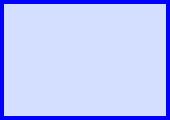
BorderedMorph
Give a shape an outline
A border has its own width and color. RGB components here range from 0 to 1.
| m |
m := BorderedMorph new.
m color: (Color r: 0.83 g: 0.87 b: 1);
    borderWidth: 4;
    borderColor: Color blue;
    extent: 170@120;
    position: 100@100;
    openInWorld.
m
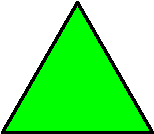
PolygonMorph
Connect points into a triangle
Each point is a vertex. This three-vertex polygon closes the shape and fills its interior.
| m |
m := PolygonMorph
    vertices: {100@230. 250@230. 175@100}
    color: Color green
    borderWidth: 3
    borderColor: Color black.
m openInWorld.
m
StringMorph
Put words in your world
Text can be a Morph too. StringMorph is a lightweight, single-line label.
| m |
m := StringMorph contents: 'Hello, Morphic!'.
m color: (Color r: 0.1 g: 0.2 b: 0.45);
    position: 100@100;
    openInWorld.
m

SimpleButtonMorph
Make something happen
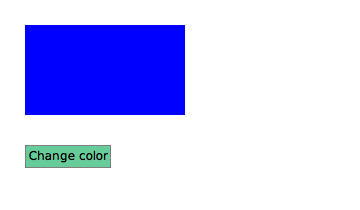
Build a small composition: a container, a colored swatch, and a button. Each click evaluates a block that chooses a new color.
| stage swatch button |
stage := Morph new color: Color white;
    extent: 360@210; position: 100@100; openInWorld.
swatch := Morph new color: Color blue;
    extent: 160@90; position: stage position + (25@25).
stage addMorph: swatch.
button := SimpleButtonMorph new
    label: 'Change color';
    target: [swatch color: Color random];
    actionSelector: #value;
    position: stage position + (25@145).
stage addMorph: button.
stage
A tiny custom class
Let a Morph take a step
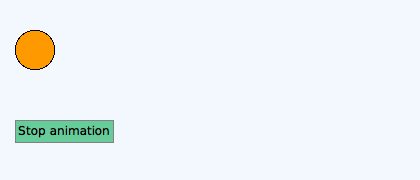
Morphic calls step repeatedly while stepping is active. Our ball moves four pixels per step and reverses at the edges of its container.
This example installs a class named LearnSqueakBall in the LearnSqueak-Tutorial category. If Squeak asks for author initials, enter your own. Re-running it reuses that class. The other examples do not install classes.
| stage ball stop |
EllipseMorph subclass: #LearnSqueakBall
    instanceVariableNames: 'velocity'
    classVariableNames: ''
    poolDictionaries: ''
    category: 'LearnSqueak-Tutorial'.
(Smalltalk at: #LearnSqueakBall) compile: 'initialize
    super initialize.
    velocity := 4@0.
    self color: Color orange; extent: 40@40'.
(Smalltalk at: #LearnSqueakBall) compile: 'stepTime
    ^ 30'.
(Smalltalk at: #LearnSqueakBall) compile: 'step
    self owner ifNil: [^ self stopStepping].
    ((self right + velocity x > self owner right)
        or: [self left + velocity x < self owner left])
        ifTrue: [velocity := velocity negated].
    self position: self position + velocity'.
stage := Morph new color: (Color r: 0.95 g: 0.97 b: 1);
    extent: 420@180; position: 100@100; openInWorld.
ball := (Smalltalk at: #LearnSqueakBall) new
    position: stage position + (15@30).
stage addMorph: ball.
stop := SimpleButtonMorph new label: 'Stop animation';
    target: ball; actionSelector: #stopStepping;
    position: stage position + (15@120).
stage addMorph: stop.
ball startStepping.
stage
LEAVE YOUR WORLD TIDY
Stop, inspect, and clean up
Remove a Morph
Open its halo with Alt+click on Windows/Linux or Option+click on macOS (input mappings can vary). Click the red delete handle, often marked ×. For a composition, choose the outer container so its children go with it.
If those keys don’t bring up a halo, use Squeak’s configured blue-button/halo gesture. Don’t confuse the Morph’s halo with the operating-system window’s close button.
Stop the ball first
Click Stop animation inside Squeak, then delete the outer stage using its halo. This sends stopStepping to the ball. The web page’s demo control only stops its GIF.
The animation class remains in your image. If you want it removed too, open a Browser, find LearnSqueak-Tutorial → LearnSqueakBall, and remove that class after deleting its instances.
Prefer cleanup in code? Within the same evaluation, a reference can receive m delete. For a stepping Morph, use ball stopStepping; delete. A temporary variable from an earlier do-it is no longer available.
When something goes wrong
- Nothing visible? Make sure you selected the whole example, used do it, and included openInWorld. Look behind existing windows.
- A syntax error? Copy the whole block again. Keep single quotes, periods, semicolons, and vertical bars intact.
- An unfamiliar message? Check your image version. These exact snippets were executed successfully in Squeak 6.1 build 23976.
Keep exploring
Open a Browser and inspect these classes and their methods. The image’s source is the best guide to the version you’re actually using.
- Creating a Morph
- Morphs, ellipses, and composition
- StringMorph and button actions
- PolygonMorph vertices
- stepTime and milliseconds
- Official Squeak documentation
All screenshots are genuine Squeak renders. The animated GIFs were assembled from frames captured in the running image, not browser simulations. Demos start only when you press Play. Historical wiki examples may differ from current Squeak APIs.
Put it into practice.
Try an exercise before revealing its hints and tested solution.