The separate playground loads the real Smalltalk image on demand. This lesson keeps its native setup instructions; browser compatibility notes appear beside each demo.
Before you start
Build a native visual language: arrange nodes, connect typed ports, execute arithmetic and explain broken dataflow.
Save a copy of your Squeak image before trying the lesson. Each checkpoint is a complete cumulative .st file that works in a fresh Squeak 6.1 image.
Place the chosen file beside your image. In File List, select it and choose fileIn. Close the previous checkpoint window before loading a later one; use a fresh image when revisiting an earlier checkpoint.
Evaluate each complete Workspace block with Do it (Ctrl+D / Cmd+D). The displayed method belongs in its named System Browser class and is already included in the checkpoint.
For the final suite, file in LearningDataflow.st and then LearningDataflowTests.st. Open Test Runner, select the LearnSqueak-Dataflow-Tests package and run LDDataflowTest. The tests open temporary practice windows and write no user data.
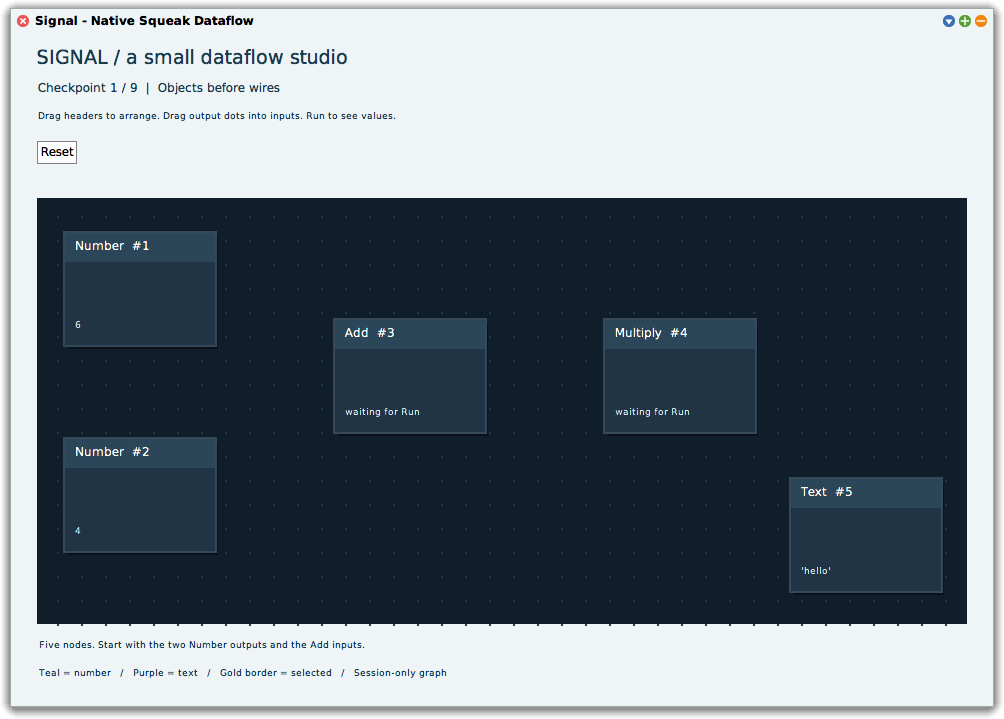
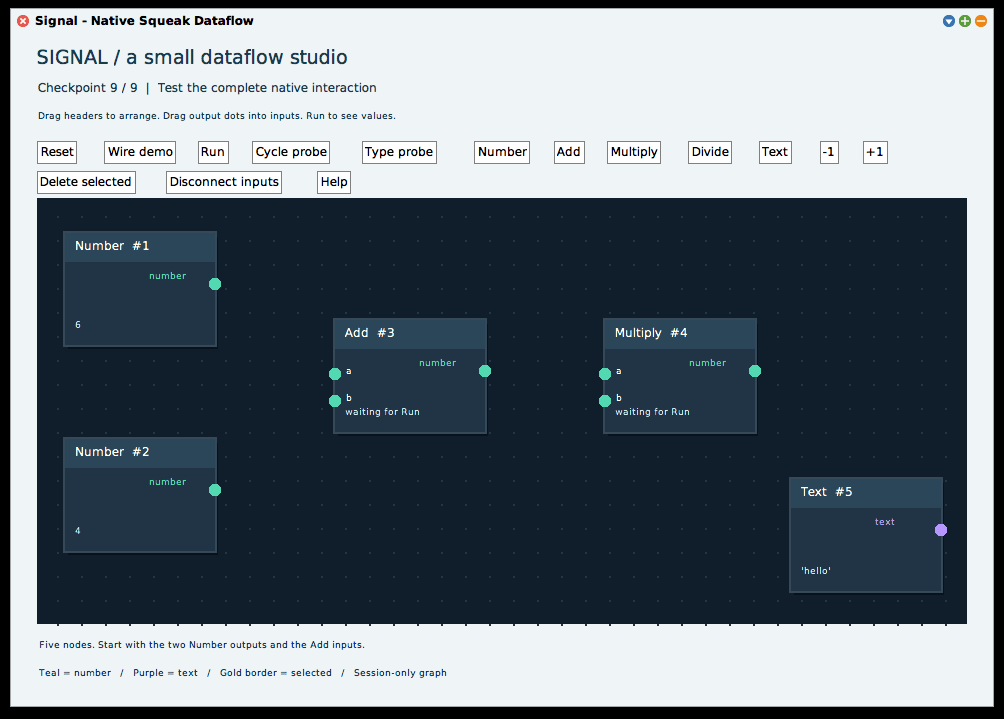
Begin with five ordinary LDNode objects and an LDGraph that owns them. A node remembers its kind, literal, local position and stable serial number. LDCanvas renders the cards from that model. Positions stay in canvas coordinates, so moving the native window does not alter the graph. The first checkpoint draws Number, Add, Multiply and Text cards without wires.
Start by defining LDNode as an Object subclass with kind, literal, location and serial instance variables. Its initialize method supplies a Number node with value 1. kind: accepts only the five supported symbols and chooses the appropriate initial literal. Keep arithmetic and drawing out of this class: its small protocol describes one node, which makes it easy to inspect in a Workspace.
Next define LDGraph with an ordered node collection, a wire dictionary, a serial counter and separate dictionaries for derived values and errors. add:at: is the creation boundary: construct and validate the new node, give it a fresh serial, append it and invalidate derived state. LDApp creates this graph, installs its LDCanvas as a submorph and opens a SystemWindow. LDCanvas asks the graph for its nodes during drawOn:, so the displayed cards always come from the same objects that later execute.
Where to run this
System Browser, LDGraph, instance side. The cumulative checkpoint already installs this method. Read it here or accept it in that class; a method definition is not a Workspace expression.
Construction code · follow the run instructions above
File in this checkpoint, then select the entire block in a Workspace and choose Do it (Ctrl+D / Cmd+D). The block returns the open native app.
Workspace · run after installing this checkpoint
| app |
app := LDApp open.
app
add:at: validates the 18-node bound before changing the graph
A serial number identifies the node independently of its place in the collection
invalidate clears derived values and error messages; positions and literals remain the model
Workspace: | app | declares one temporary. LDApp open is a class-side convenience method that creates the application, opens its native window and returns the application object; := binds that result to app.
Workspace: the final app expression returns the application for inspection. Initialization has already called samples, which creates the five disconnected nodes.
This first checkpoint is intentionally read-only. Later checkpoints add gesture handling. All sample data is fictional and local.
Expected result
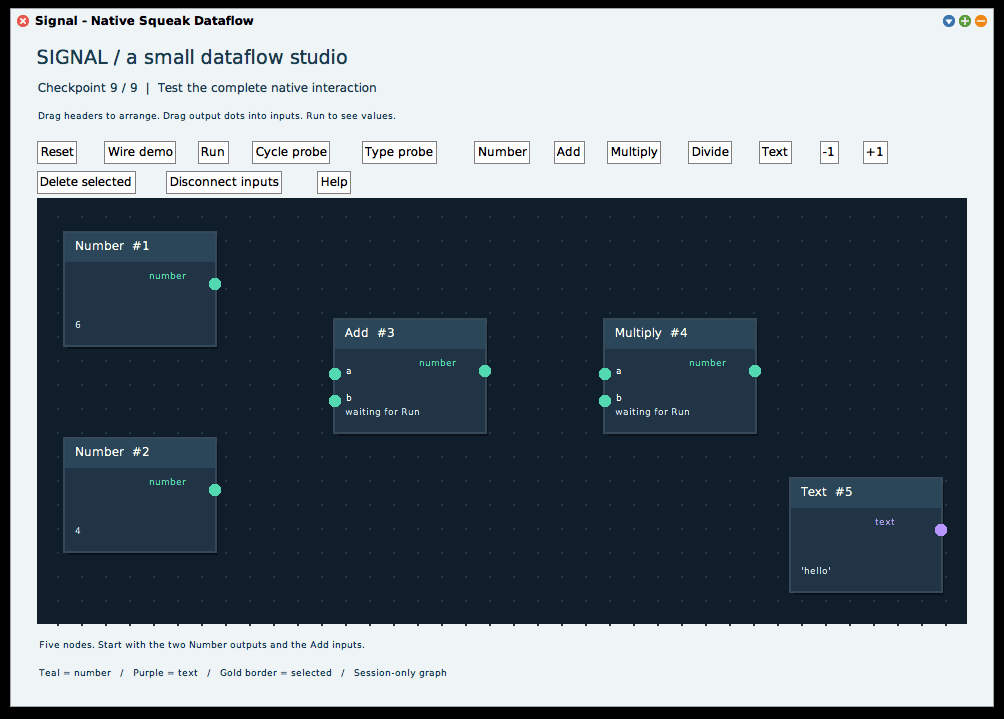
Five native node cards appear on a dotted canvas, including the number sources 6 and 4
Native Squeak 6.1 checkpoint 01, rendered after evaluating the exact Workspace block shown here.
02 · Drag through native mouse events
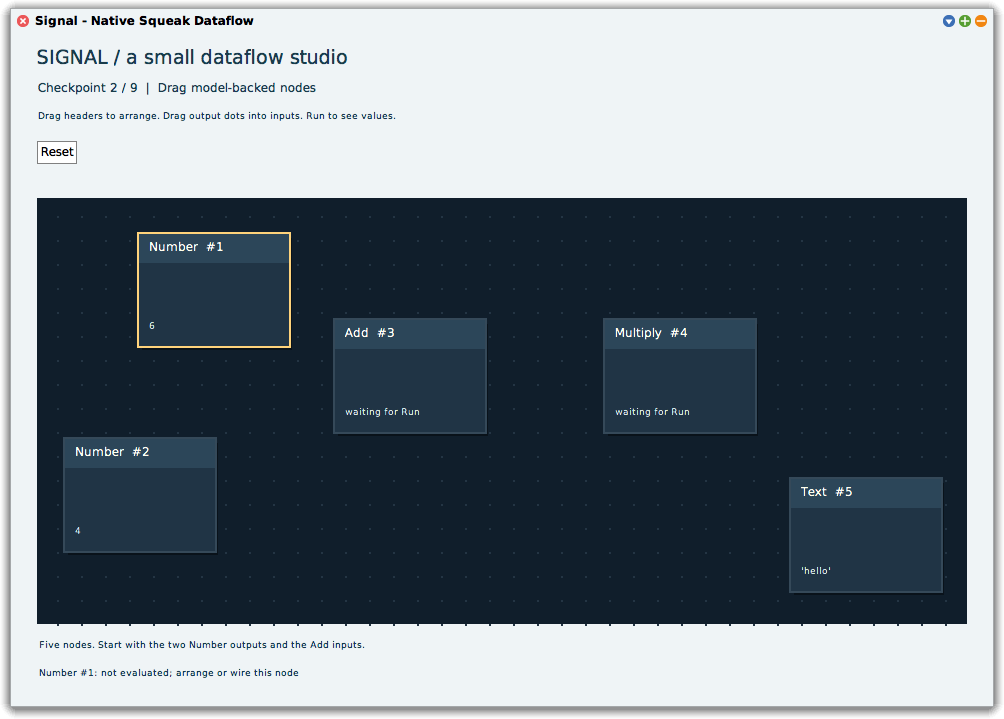
The canvas handles real Morphic mouseDown:, mouseMove: and mouseUp: events. A press on a card selects it; a press in its header also remembers a drag offset. Movement subtracts that offset and clamps the node inside the canvas. Because wires will read node positions when drawing, they will automatically follow later. Releasing outside the canvas still ends the captured gesture.
Add gesture fields to LDCanvas, not to LDNode: selected, dragOffset and gestureHand describe an interaction in progress. handlesMouseDown: opts the canvas into native dispatch. mouseDown: converts the event's world position to a canvas-local point by subtracting self position, selects the hit card and records an offset only when the press is inside its header. This offset prevents a grabbed card from jumping so its corner lands under the pointer.
mouseMove: subtracts dragOffset and delegates to moveSelectedTo:, keeping hit testing, event adaptation and model movement separate. mouseUp: calls cancelGesture to clear that temporary state and release mouse focus only if this canvas owns it. Morphic's capture route delivers the release even outside the card. The clamped local position is stored on the node; changed invalidates the drawing so the next native paint reads the new coordinates.
Where to run this
System Browser, LDCanvas, instance side. The cumulative checkpoint already installs this method. Read it here or accept it in that class; a method definition is not a Workspace expression.
Construction code · follow the run instructions above
moveSelectedTo: point
 selected ifNil: [^ self].
 selected location: (((point x max: 12) min: self width - 162) @ ((point y max: 12) min: self height - 124)).
 self changed
File in this checkpoint, then select the entire block in a Workspace and choose Do it (Ctrl+D / Cmd+D). The block returns the open native app.
selected is the LDNode being moved, not a second visual copy
The 12-pixel margin keeps each port accessible at the edges
changed asks Morphic to repaint; graph values do not depend on layout
Workspace: open creates a fresh sample. app graph nodes first obtains Number #1 from the ordered model collection.
Workspace: in app canvas select: ...; moveSelectedTo: 102@36, the semicolon sends both messages to app canvas. The selected node is moved by the same helper used by mouseMove:, and 102@36 constructs its new canvas-local Point. This block demonstrates the movement helper; the native drag route is tested separately.
Workspace: the final app returns the still-open application, whose refresh already shows the selected node's gold border.
Try dragging the header. The card body only selects. The automated test uses handleMouseDown:, handleMouseMove: and handleMouseUp:, including an outside release.
Expected result
The selected first Number card moves right, with a gold outline
Native Squeak 6.1 checkpoint 02, rendered after evaluating the exact Workspace block shown here.
03 · Make typed ports visible
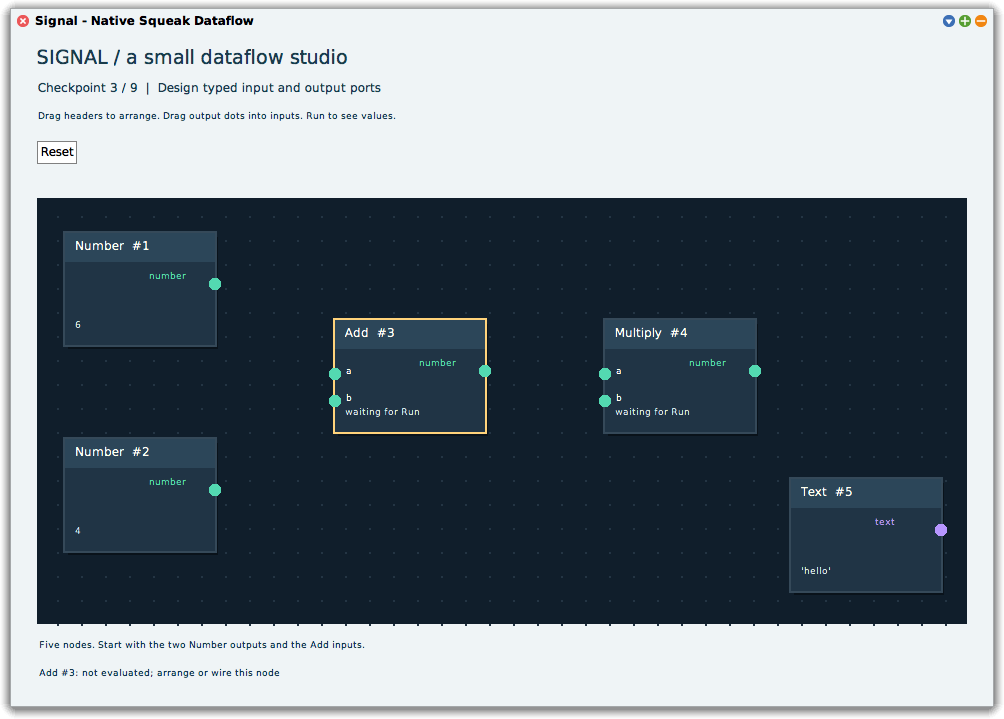
Arithmetic nodes have two left inputs, a and b. Every node has one right output. Number, Add, Multiply and Divide output numbers; Text outputs text. Port centers are computed from each node position, and the same helpers drive drawing and hit testing. Start a wire on an output dot to preview it. Checkpoint 3 draws the preview but deliberately does not store connections yet.
Give nodes three small port messages: inputCount, inputType: and outputType. Number and Text return zero inputs; each arithmetic operation returns two. An arithmetic input requires #number, while a Text output declares #text. These symbols are explicit labels in this teaching language, rather than Smalltalk class names or an inferred type system.
In the canvas, inputPoint:index: and outputPoint: turn node-local geometry into canvas-local port centers. drawNode:on: paints dots at those centers; inputAt: and outputAt: use the same centers for hit testing. A mouseDown on an output remembers wireSource. mouseMove: updates pointer and redraws a gold preview. Sharing the coordinate helpers is important: a visually moved dot and its hit region cannot drift apart.
Where to run this
System Browser, LDCanvas, instance side. The cumulative checkpoint already installs this method. Read it here or accept it in that class; a method definition is not a Workspace expression.
Construction code · follow the run instructions above
Each hit test returns both a target node and its one-based integer input index; inputType: rejects nonintegers before checking the range
A 12-pixel hit radius makes a 12-pixel-wide dot easier to grab
The node declares its input count; sources therefore never expose input hit targets
Workspace: LDApp open builds a fresh sample with the new port protocol. app graph nodes third is Add #3, because samples creates two Number nodes before it.
Workspace: select: is sent to app canvas and refreshes the selected-card detail. It neither adds a wire nor evaluates the graph. The final app returns the native application.
Text is a typed source used to demonstrate rejected numeric connections. This lesson does not include a text-consuming operation or automatic conversions.
Expected result
Input and output dots appear, with the Add card selected
Native Squeak 6.1 checkpoint 03, rendered after evaluating the exact Workspace block shown here.
04 · Store wires and fan out outputs
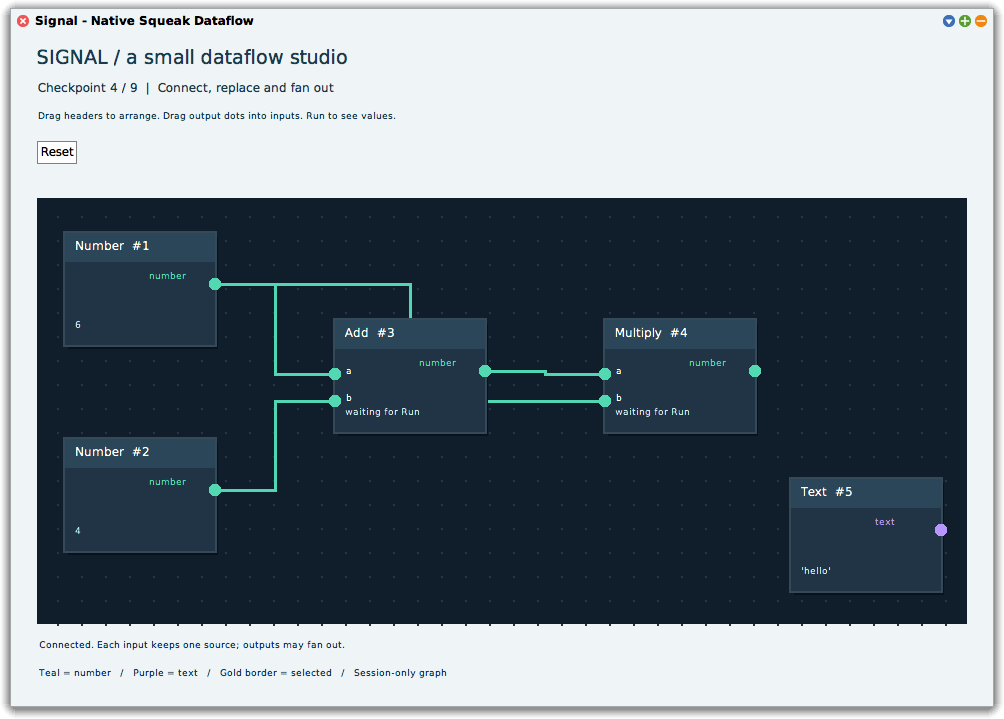
The graph stores each wire under the key {target node. input index}. Connecting an occupied input replaces its former source. The same output can feed multiple targets. validateSource:target:input: checks graph membership, the input index and type compatibility before mutation. The gesture adapter catches expected errors and displays their message. The sample graph represents (6 + 4) * 6.
Represent a connection by its destination socket. The key {target. index} is a two-element Array constructed at runtime; equal arrays retrieve the same Dictionary entry. The associated value is the source node. This representation makes replacement an ordinary at:put: operation and needs no separate rule limiting incoming wires. An output has no such key, so several inputs can reference the same source.
Finish the gesture adapter by finding an input on mouseUp:. A valid target leads to connect:to:input:; releasing elsewhere simply cancels the preview. Put membership, port-index and type checks in LDGraph so Workspace calls receive the same protection as mouse actions. Draw stored wires before the node cards, recomputing their endpoints from current locations on every paint. That is why dragging a card moves its wires without editing the wire dictionary.
Where to run this
System Browser, LDGraph, instance side. The cumulative checkpoint already installs this method. Read it here or accept it in that class; a method definition is not a Workspace expression.
Construction code · follow the run instructions above
connect: source to: target input: index
 self validateSource: source target: target input: index.
 source == target ifTrue: [self error: 'A node cannot connect to itself'].
 wires at: {target. index} put: source. self invalidate.
 status := 'Connected. Each input keeps one source; outputs may fan out.'
File in this checkpoint, then select the entire block in a Workspace and choose Do it (Ctrl+D / Cmd+D). The block returns the open native app.
Workspace · run after installing this checkpoint
| app |
app := LDApp open.
app wireSample.
app
The dictionary key makes the one-source-per-input rule explicit
The source object can appear in several dictionary values, which provides fan-out
Only a valid connection invalidates evaluated values; failed replacements leave the old wire intact
Workspace: app wireSample sends four connect:to:input: messages to this app's graph: Number #1 to Add.a, Number #2 to Add.b, Add to Multiply.a, and Number #1 again to Multiply.b.
Workspace: wireSample refreshes the view but does not evaluate. The final app therefore returns a connected graph whose operation cards still wait for Run.
At this checkpoint self-wires are rejected. Indirect cycle rejection is added in checkpoint 6. Wires use a simple orthogonal path and can overlap cards or one another.
Expected result
Four real wires connect the Number sources to Add and Multiply; results still wait for Run
Native Squeak 6.1 checkpoint 04, rendered after evaluating the exact Workspace block shown here.
05 · Evaluate dependencies, then their consumers
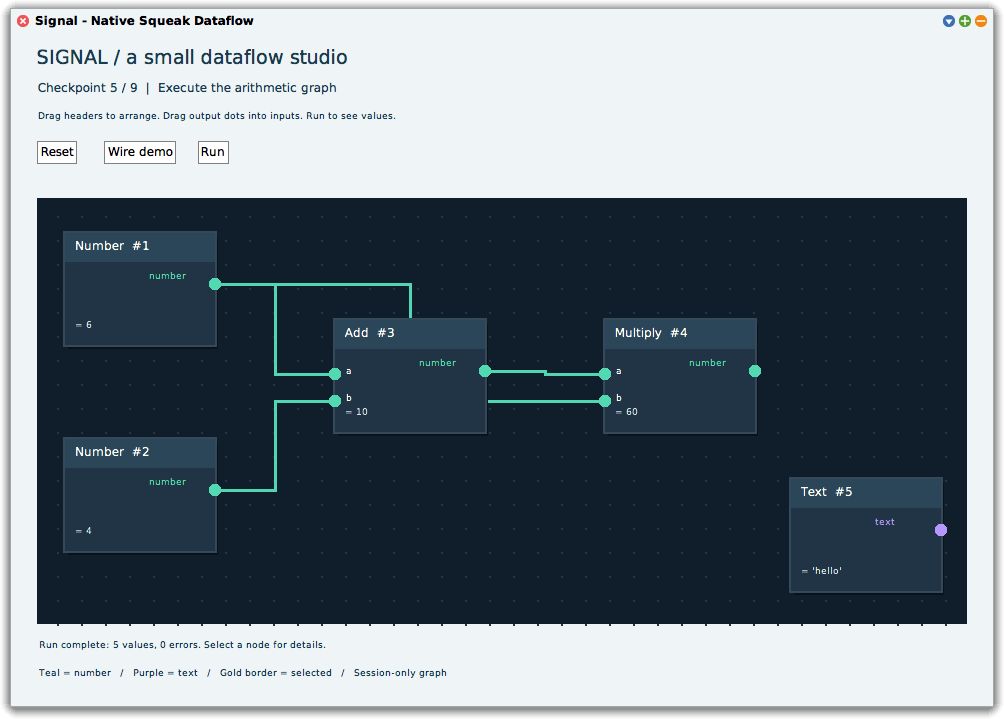
Run clears the previous result cache, then visits every node. evaluate:active: recursively obtains a node’s inputs and performs addition, multiplication or division. Successfully computed values are memoized for the rest of that run, so the source 6 can feed two places without being recomputed. Each node is evaluated inside an Error handler: one broken branch does not prevent unrelated sources from producing values.
Build evaluate:active: as a recursive model operation, without referring to any morph. First return a value already cached for this run. Otherwise mark the node active, recursively evaluate its input sources, perform the selected arithmetic operation and cache the result. A source node ends the recursion by returning its literal. The active set describes unfinished work on the current path; the cache describes completed work shared across paths. They serve different purposes.
Wrap that evaluator in run. Reset both derived dictionaries, visit each node, and catch an ordinary Error around each visit. Store the message against the failing node and continue. Finally compose a graph-wide status summary. The app's Run button sends LDApp>>run, which asks the graph to evaluate and then refreshes the canvas. Rendering only reads those value and error dictionaries, so it never starts a computation merely because a window needs repainting.
Where to run this
System Browser, LDGraph, instance side. The cumulative checkpoint already installs this method. Read it here or accept it in that class; a method definition is not a Workspace expression.
Construction code · follow the run instructions above
run
 values removeAll. errors removeAll.
 nodes do: [:node |
  [self evaluate: node active: IdentitySet new]
   on: Error do: [:error | errors at: node put: error messageText]].
 status := 'Run complete: ', values size printString, ' values, ', errors size printString, ' errors. Select a node for details.'.
 ^ errors isEmpty
File in this checkpoint, then select the entire block in a Workspace and choose Do it (Ctrl+D / Cmd+D). The block returns the open native app.
Workspace · run after installing this checkpoint
| app |
app := LDApp open.
app demo.
app
values and errors are derived state and are cleared at the start of each run
IdentitySet tracks the current recursive path; the result dictionary memoizes completed work
Each Error is recorded against the affected node, allowing the outer loop to continue
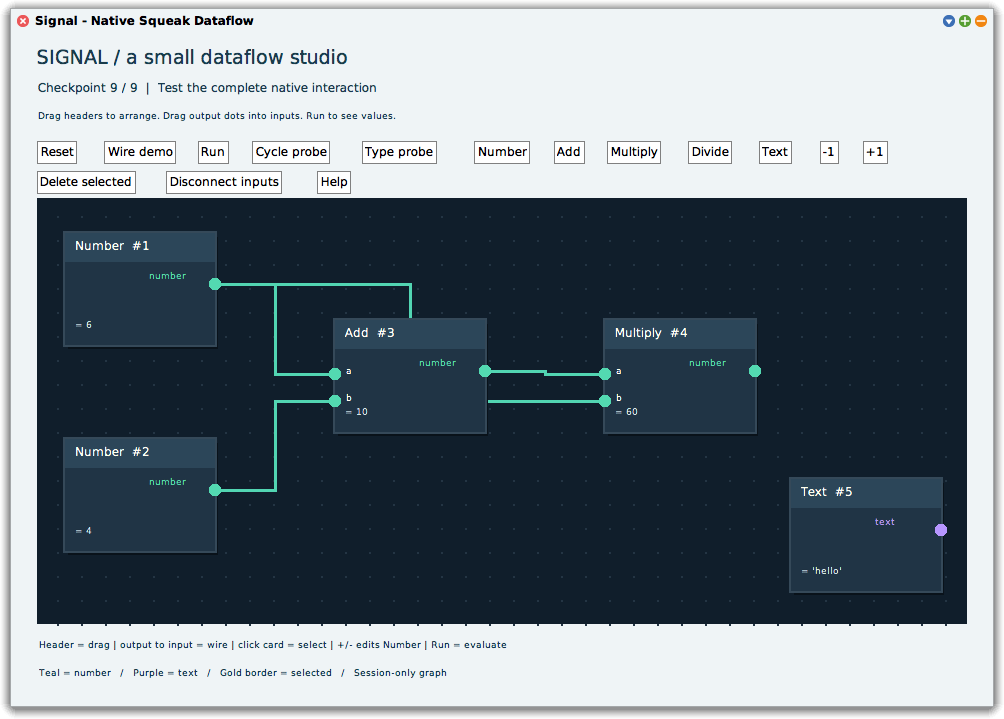
Workspace: app demo sends samples, wireSample and run to the same application inside its implementation. It creates a fresh sample graph, connects its four wires and evaluates it.
Workspace: Add computes 6 + 4 = 10 and Multiply computes 10 * 6 = 60. Text is an independent source. The final app returns the application with those cached outputs visible.
Evaluation is explicit. After rewiring or editing, results are cleared and the user clicks Run. This is a synchronous, bounded teaching graph, not a streaming scheduler.
Expected result
The cards display 6, 4, 10 and 60; Text independently produces hello, with zero errors
Native Squeak 6.1 checkpoint 05, rendered after evaluating the exact Workspace block shown here.
06 · Reject a feedback loop before replacing a wire
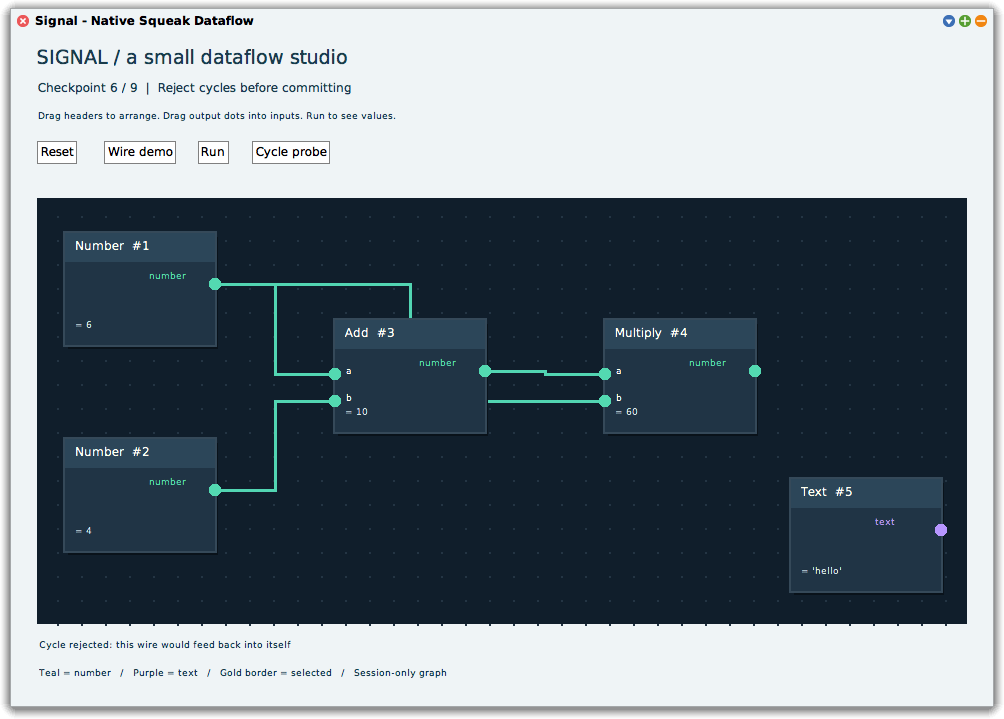
The proposed source cannot already depend on the proposed target. depends:on:seen: follows existing incoming wires upstream, using a visited set to terminate repeated paths. The test happens before the dictionary write, so rejecting Multiply back into Add preserves the input that carried 6 and preserves the last successful outputs. The evaluator also retains its own active-path guard as a defensive check.
Where to run this
System Browser, LDGraph, instance side. The cumulative checkpoint already installs this method. Read it here or accept it in that class; a method definition is not a Workspace expression.
Construction code · follow the run instructions above
connect: source to: target input: index
 self validateSource: source target: target input: index.
 (self depends: source on: target seen: IdentitySet new) ifTrue: [self error: 'Cycle rejected: this wire would feed back into itself'].
 wires at: {target. index} put: source. self invalidate.
 status := 'Connected. Each input keeps one source; outputs may fan out.'
File in this checkpoint, then select the entire block in a Workspace and choose Do it (Ctrl+D / Cmd+D). The block returns the open native app.
Starting at the proposed source, depends:on:seen: searches for the target among its ancestors
The same check catches a direct self-cycle because a node is its own starting ancestor
Both validation and cycle detection finish before the connection commit
Workspace: app demo; tryCycle is a cascade: both demo and tryCycle are sent to app, regardless of the first message's return value.
Workspace: demo first builds a successful graph. tryCycle then asks the graph to connect Multiply back to Add.a, catches the expected rejection and puts its message in the status line. The final app shows that the old wire and result 60 survived.
Try dragging the Multiply output into either Add input. The connection is rejected. Intentional feedback requires a separate delay/state design, which is outside this lesson.
Expected result
The cycle rejection appears below an unchanged working graph whose Multiply output is still 60
Native Squeak 6.1 checkpoint 06, rendered after evaluating the exact Workspace block shown here.
07 · Explain missing inputs and arithmetic failures
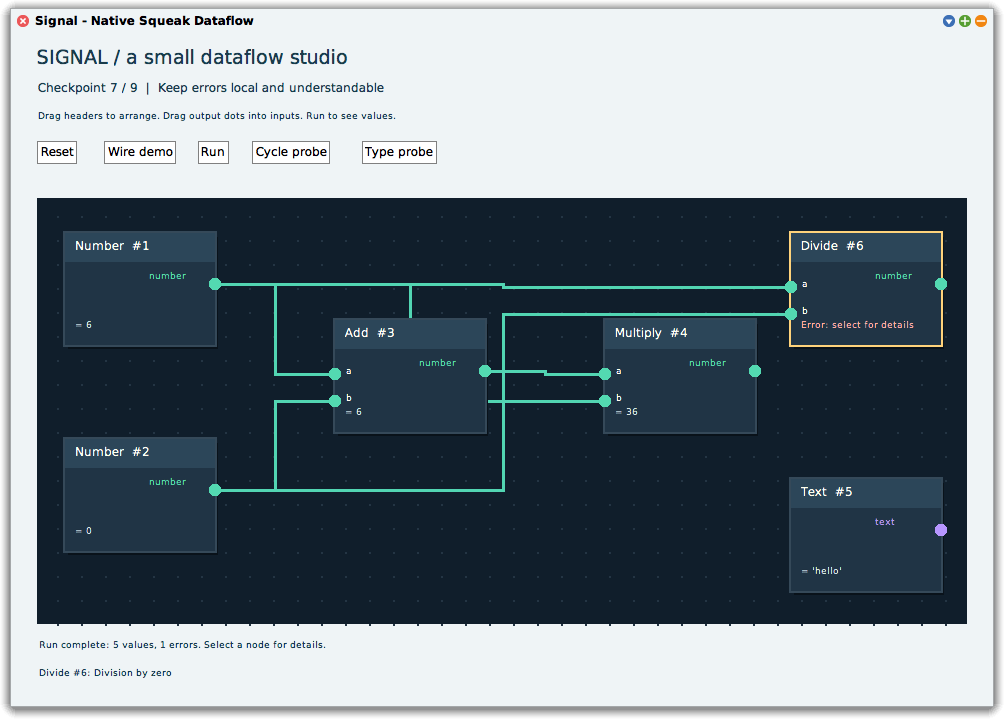
This checkpoint exposes the full evaluator. Sources return literals. Operation nodes recursively read a and b, then apply their operation. A missing input identifies its port and node. Division checks b for zero. The ensure: block removes the node from the active path even when evaluation raises an error. Downstream nodes report the dependency’s error, while independent nodes retain valid results. Select a card with red error text for the complete message.
Where to run this
System Browser, LDGraph, instance side. The cumulative checkpoint already installs this method. Read it here or accept it in that class; a method definition is not a Workspace expression.
Construction code · follow the run instructions above
evaluate: node active: active
 | inputs result |
 (values includesKey: node) ifTrue: [^ values at: node].
 (active includes: node) ifTrue: [self error: 'Cycle detected while evaluating'].
 active add: node.
 [node inputCount = 0
  ifTrue: [result := node literal]
  ifFalse: [
   inputs := (1 to: node inputCount) collect: [:index | | source |
    source := self sourceFor: node input: index.
    source ifNil: [self error: 'Missing input ', index printString, ' on ', node title, ' #', node serial printString].
    self evaluate: source active: active].
   node kind = #add ifTrue: [result := inputs first + inputs second].
   node kind = #multiply ifTrue: [result := inputs first * inputs second].
   node kind = #divide ifTrue: [
    inputs second = 0 ifTrue: [self error: 'Division by zero'].
    result := inputs first / inputs second]].
  values at: node put: result]
 ensure: [active remove: node ifAbsent: []].
 ^ result
File in this checkpoint, then select the entire block in a Workspace and choose Do it (Ctrl+D / Cmd+D). The block returns the open native app.
A cached result returns immediately; unfinished nodes enter the active set
collect: preserves a/b input order, which matters for division
ensure: runs on success and failure, preventing a stale active marker from causing a false cycle report
The outer run method records the error and continues with independent nodes
Workspace: | app divide | declares the application and a node reference. app wireSample connects the initial five nodes without evaluating them. app graph nodes second literal: 0 sends literal: to Number #2, so the sample's second source becomes zero.
Workspace: divide := app graph add: #divide at: 754@35 adds a sixth node and stores the returned LDNode in divide. The graph creation operation invalidates derived results. This block sets its source before the first Run; later interactive edits should use setLiteral:on: so existing results are invalidated too.
Workspace: each connect:to:input: line is one keyword message sent to app graph. Number #1 supplies Divide.a and Number #2 supplies Divide.b. app run evaluates the entire graph: Add is 6, Multiply is 36, and Divide records Division by zero.
Workspace: app canvas select: divide selects the failed node and refreshes the full error detail; the last app expression returns the application. No graph is replaced during these mutations.
Click Type probe on a wired sample to reject the purple Text output. The text source remains useful as a type-check example; it is never coerced into a number.
Expected result
Divide is highlighted with Division by zero; Add and Multiply still compute 6 and 36
Native Squeak 6.1 checkpoint 07, rendered after evaluating the exact Workspace block shown here.
08 · Edit numbers and remove graph structure
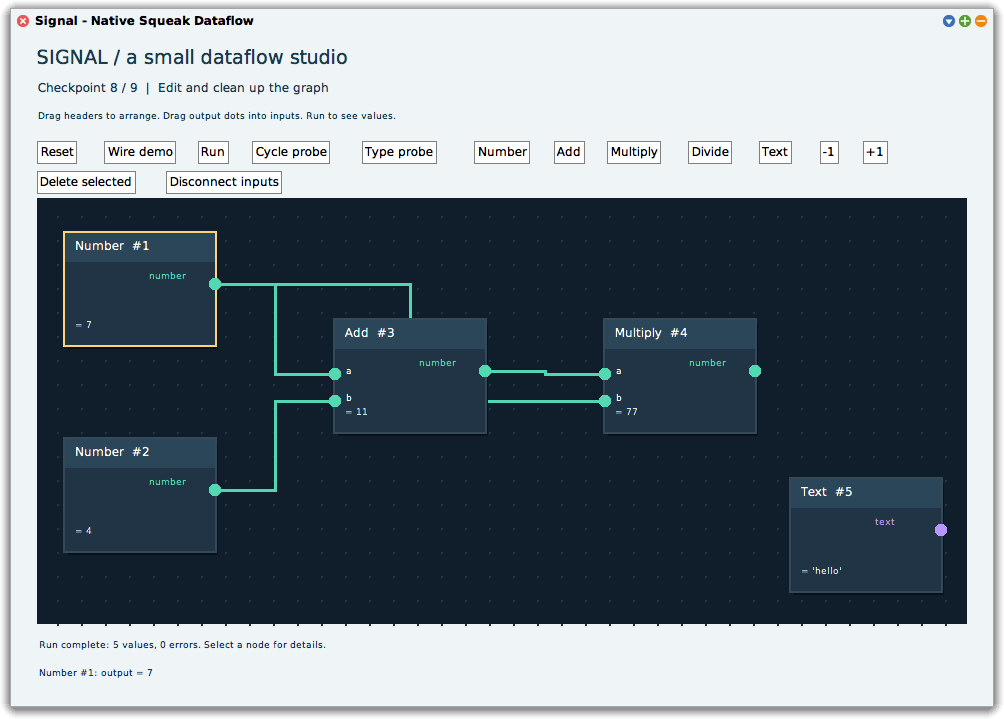
The toolbar can add Number, Add, Multiply, Divide and Text nodes. Select a Number card and use +1 or -1 to edit it. Each edit clears outputs until Run. Disconnect inputs removes only incoming wires. Delete selected removes the node and every wire entering or leaving it, so the graph never keeps a dangling endpoint. Reset restores five disconnected sample nodes.
Where to run this
System Browser, LDGraph, instance side. The cumulative checkpoint already installs this method. Read it here or accept it in that class; a method definition is not a Workspace expression.
Construction code · follow the run instructions above
Deletion iterates over a copy of keys because it mutates the wire dictionary
A wire is removed if the deleted node is either its target or its source
The node collection changes only after incident wires are removed, then all derived outputs are invalidated
Workspace: app demo creates and evaluates the sample, then app canvas select: app graph nodes first selects Number #1 as the editing target.
Workspace: app increase; run sends both messages to app. increase changes the selected literal from 6 to 7 through graph setLiteral:on:, clearing old results; run computes Add = 11 and Multiply = 77. The final app returns the updated native application.
New cards can overlap; drag their headers to arrange them. There is no zoom, pan, undo or file persistence. The native window has a fixed size and the graph limit is 18 nodes.
Expected result
The first Number becomes 7, Add becomes 11 and Multiply becomes 77
Native Squeak 6.1 checkpoint 08, rendered after evaluating the exact Workspace block shown here.
09 · Verify the native adapter as well as the model
The finished program separates five jobs: LDNode describes operations, LDGraph stores and evaluates the graph, LDCanvas handles drawing and pointer gestures, LDApp owns buttons and status, and LDWindow fixes the teaching layout. The SUnit suite exercises successful and rejected model changes, recovery after errors, actual toolbar actions, and native handleMouseDown:/Move:/Up: dispatch. Closing the window invokes windowIsClosing, which cancels pending drags and wire previews.
Where to run this
System Browser, LDApp, instance side. The cumulative checkpoint already installs this method. Read it here or accept it in that class; a method definition is not a Workspace expression.
Construction code · follow the run instructions above
SystemWindow calls the application model’s windowIsClosing during an accepted close
cancelGesture releases focus only when this canvas owns it and clears all gesture fields
Clearing window avoids retaining a stale native window reference after close
Workspace: app demo; showHelp is a cascade whose receiver remains app. demo resets, wires and evaluates the sample; showHelp then replaces only the status text with the interaction guide.
Workspace: the final app returns the complete editor. This block does not close its window; close cleanup is exercised by the SUnit native-window tests.
This is a session-only teaching tool. Closing discards the graph without a save prompt. Tests also verify that closing this app does not release another morph’s mouse focus.
Expected result
The complete native studio shows a runnable graph, all editing controls and a concise interaction guide
Division uses Smalltalk arithmetic and preserves exact fractions for integer operands. Input a is the numerator and b the denominator. In the solution, app holds the application and divide holds the newly returned node. The two connect:to:input: messages are sent to app graph, then app run computes all results. The equality assertion compares the Divide output with the exact Fraction 3/2 and raises an Error only on mismatch. Selecting divide changes the displayed detail; the final app returns the editor.
The exact solutionRun was evaluated with its assertions in a fresh official Squeak 6.1 image.
2. Prove failed wiring is transactional
Start with the sample graph. Attempt a type mismatch and an indirect cycle. Assert that both rejections preserve all original wires and the result 60.
All checks happen before the dictionary write and invalidation. A rejected attempt changes only the status message. before is a copied wire dictionary whose entries still refer to the same node objects. After each probe, = checks the full mapping, not just its size. The final assertion also checks the cached Multiply value, proving rejection did not invalidate successful work. Both probes are app messages; the last app returns the unchanged editor with the cycle message visible.
The exact solutionRun was evaluated with its assertions in a fresh official Squeak 6.1 image.
3. Break a branch and repair it
Disconnect the Add inputs. Run and prove that Add and Multiply fail while the independent Number source still succeeds. Reconnect the sample and prove complete recovery.
The graph is not all-or-nothing at evaluation time. Each node gets a value or an error; the next Run rebuilds both dictionaries from current structure. plus and times retain references to the existing Add and Multiply nodes. disconnectInputsOf: mutates only the incoming wires of Add; app run then records an error for Add and its dependent Multiply while Number #1 still evaluates. app wireSample; run is a cascade to app: it reconnects the existing nodes and then recomputes them. The final two assertions prove stale errors were cleared and the value 60 returned. The last app returns the repaired editor.
The exact solutionRun was evaluated with its assertions in a fresh official Squeak 6.1 image.
Verification, cleanup and next steps
37 passed on official Squeak 6.1, zero failures or errors.
Arithmetic, exact fractions, memoized fan-out, type/member/integer-port guards, fractional-port rejection without model/cache/wire mutation, replacement preservation, direct and indirect cycles, defensive evaluation cycle detection, missing inputs, zero division, downstream error propagation and recovery, edit invalidation, graph cleanup and limits, native drag/wire focus and outside release, all creation/editing controls, reset/close cleanup and unrelated-focus preservation.
Close the tutorial windows when finished. Save the source separately from the image if you want to recreate the application in a clean image.