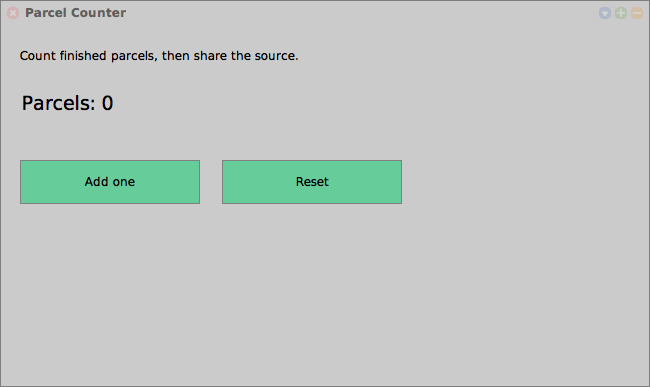
Trace a native button from mouse release to model update, then use the Browser to explore.
8 construction stagesTested source & checkpointsNative screenshots & demos
Before you start
A small concrete question turns the live image into a practical reference: how does clicking Add one change a number? Follow the exact Squeak 6.1 implementation, distinguish senders from implementors and discover inherited APIs without guessing.
Download the lesson source bundle and extract it. In Squeak, open a Workspace and Print it on FileDirectory default fullName. Put the extracted .st files in that directory, or use their actual absolute paths in FileStream fileIn:. File in ParcelCounter-export.st first. These definition files use chunk format; do not execute the entire file-out as one Workspace expression. Step snippets and exercise solutions are ordinary Workspace expressions; select the stated block and use Do it or Print it. Each native image can be opened at full size. For the source-tracing test suite, additionally file in SourceTrailTests.st after the app source.
Use the included Parcel Counter as a small client of Squeak's own UI classes. File in ParcelCounter-export.st and evaluate ParcelCounter open. Click Add one and observe the changing number. The question for this lesson is specific: how does a mouse release eventually change the model? Keeping one observable behavior in view makes a large source image manageable.
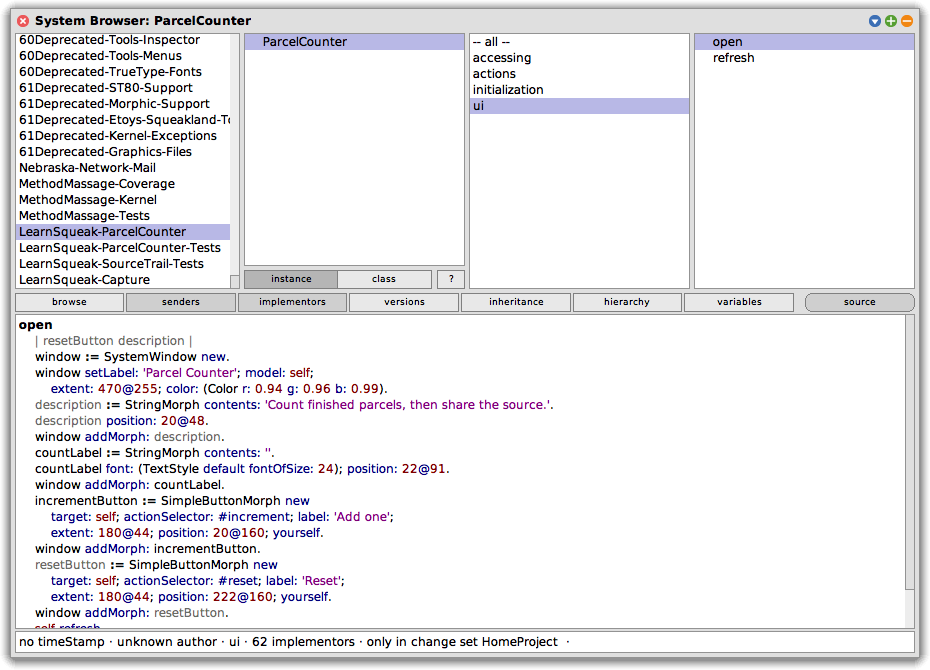
Open the Browser on ParcelCounter >> open with the expression below. Read the incrementButton construction. It creates a SimpleButtonMorph, sets target: self, assigns actionSelector: #increment, and gives it the visible label Add one. Here self is the ParcelCounter instance that is building its window. The label is display text; #increment is a Symbol naming a method. The four upper Browser panes show category, class, method category and selector; the lower pane shows source for the selected method. Do not edit system methods for this exploration. We will follow the existing implementation and test our understanding with our own model.
Where to run this
File in the app source first. Workspace → Do it. In the native Browser, find target: self and actionSelector: #increment in instance-side open.
Construction code · follow the run instructions above
Actual ParcelCounter source in the native Browser, with the button target and action selector visible.
02 · Inspect the concrete class and its defaults
Follow the class name SimpleButtonMorph rather than guessing from the word button. Select that class in the Browser. Its superclass chain is SimpleButtonMorph → RectangleMorph → BorderedMorph → Morph → Object → ProtoObject in this Squeak 6.1 build. That chain will matter when a method is inherited instead of listed locally.
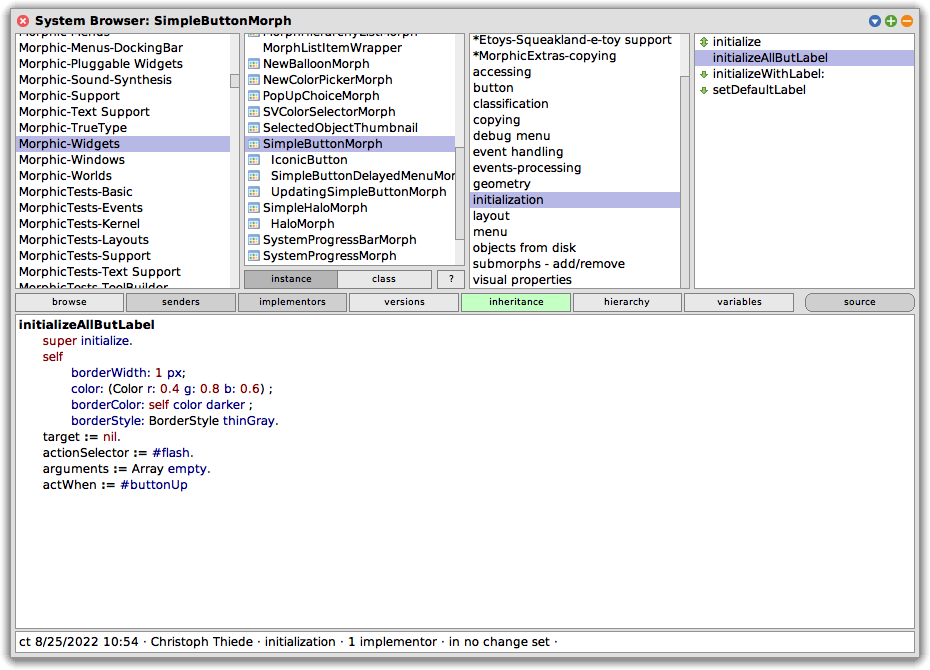
The initialize method delegates to initializeAllButLabel and setDefaultLabel. Open initializeAllButLabel below. It assigns target := nil, actionSelector := #flash, arguments := Array empty, and actWhen := #buttonUp. Our app overrides target and actionSelector; it leaves the empty argument array and button-up timing alone. Now we have a prediction: merely pressing Add one should not increment this default button; releasing it inside should. A different configured actWhen or another button class could behave differently. Source reading is about the actual receiver and its configuration, not a universal rule for every UI widget.
Where to run this
Workspace → Do it. Read the four assignments at the end of the selected native method.
Construction code · follow the run instructions above
Shipped SimpleButtonMorph initialization in Squeak 6.1; actWhen defaults to #buttonUp.
03 · Follow the press into mouseDown:
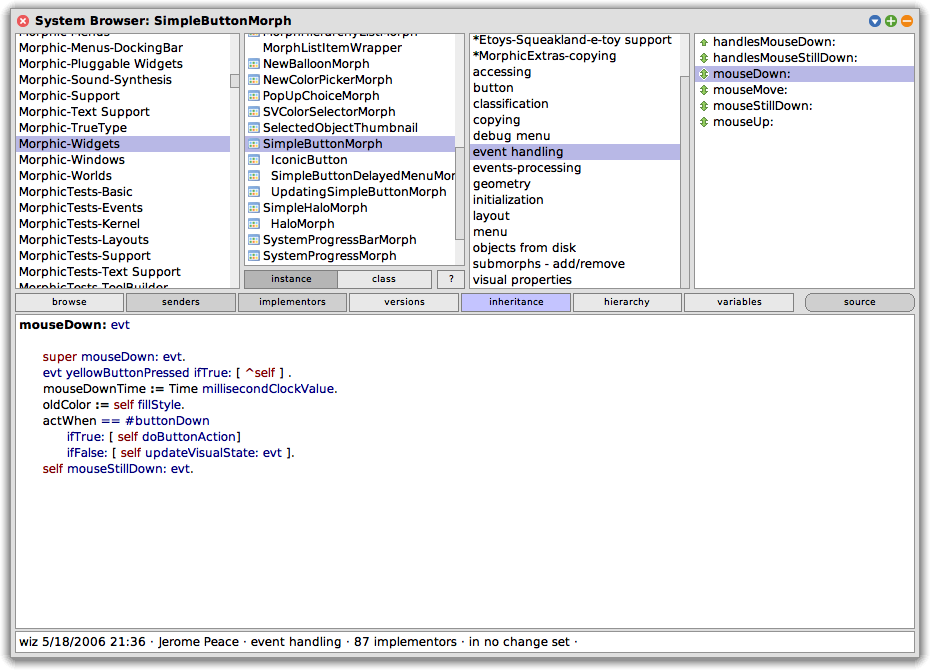
Open mouseDown:. The colon tells you the method receives one argument, named evt in this source. The first statement delegates to the superclass with super mouseDown: evt. The yellow-button guard returns early for the secondary mouse button. The method records a time and saves the prior fill style in oldColor.
The next conditional distinguishes buttons configured for #buttonDown from other timing modes. Our button uses #buttonUp, so this branch updates the visual state rather than sending doButtonAction. Finally mouseStillDown: supports the #whilePressed case. In this default configuration that helper returns without invoking the action. Try holding the primary button down inside Add one: the pressed appearance can change while the counter remains unchanged. The animation on this page was produced by delivering synthetic MouseButtonEvent objects directly to the native widget and capturing its imageForm. It illustrates the method's response, not a recorded operating-system pointer route.
Where to run this
Workspace → Do it. Read the default branch using actWhen = #buttonUp from the previous step. Manually press and hold Add one to compare.
Construction code · follow the run instructions above
Actual native mouseDown: source. The app uses the branch that calls updateVisualState:.
04 · Read the guards on mouseUp:
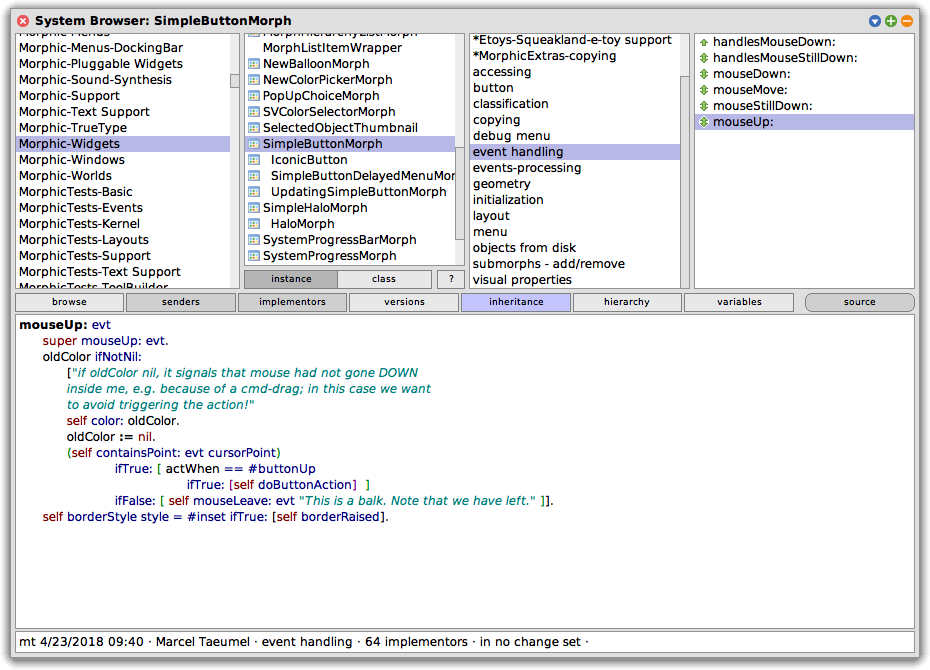
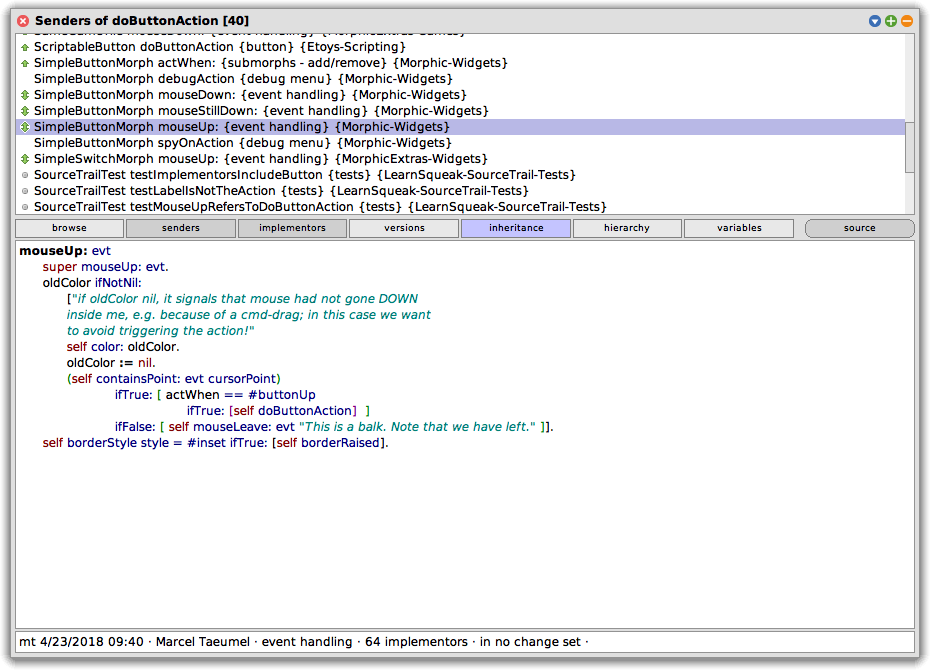
Open mouseUp:. The source contains important conditions before the action. oldColor must be non-nil, which records that this button saw a press. The method restores the old color and clears that marker. Then containsPoint: checks whether the release position is still inside the button. Only the inside branch with actWhen == #buttonUp sends self doButtonAction.
The outside branch sends mouseLeave: instead. This is why pressing inside and dragging out before releasing cancels a normal button click. A release with no qualifying prior press also avoids this action path. Read these branches before assuming that every mouseUp event calls the target. Our tests directly delivered an inside press followed by an inside release and observed count 1. They also delivered an inside press followed by an outside release and observed count 0. Those tests verify the native handler behavior at this level; they do not simulate the entire World and Hand dispatch pipeline.
Where to run this
Workspace → Do it. Read oldColor ifNotNil:, containsPoint: and the #buttonUp comparison in order. Try a drag-out release on the demo.
Construction code · follow the run instructions above
Native mouseUp: guards the action with prior-press state, release position and configured timing.
05 · Resolve the dynamic message send
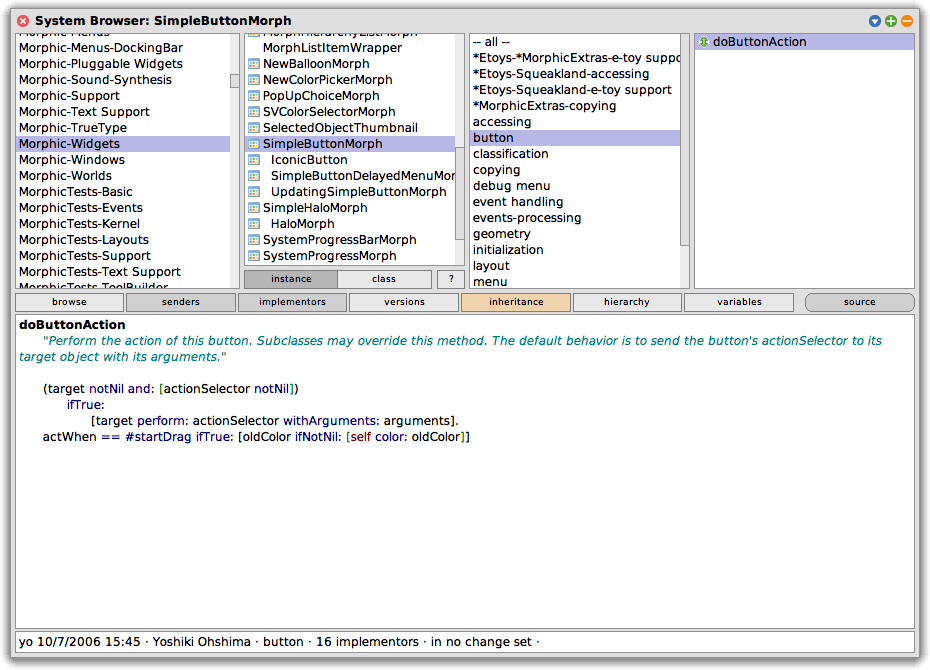
The receiver of self doButtonAction in the previous step is the SimpleButtonMorph. Open that implementation. It checks that target and actionSelector are not nil, then evaluates target perform: actionSelector withArguments: arguments. For our button those values are a ParcelCounter, #increment and an empty Array. The dynamic send therefore has the same effect as sending increment to that counter.
Follow the application side next: ParcelCounter >> increment sends self add: 1. add: updates count and calls refresh. refresh changes the StringMorph contents and marks the window changed. This connects the event to the model change and then to the visible label. The literal #increment supplied by configuration is why a sender search alone cannot always expose the final runtime receiver. When reading perform:-based code, inspect the target, selector and arguments together. Changing the button's label alone does not change that action; exercise one proves it.
Where to run this
Workspace → Do it. Then browse ParcelCounter instance-side increment, add: and refresh to complete the visible behavior trail.
Construction code · follow the run instructions above
Shipped doButtonAction source performs the configured selector on its target with its argument array.
06 · Use senders to ask who mentions a message
Select doButtonAction in the Browser and click senders. A senders browser gathers methods that refer to the selector. Select SimpleButtonMorph mouseUp: to return to the caller we just read. You can also find mouseDown: and mouseStillDown:, which explains the other action-timing modes. The expression below opens the same kind of native method-list browser from the collected references.
Treat this list as evidence to inspect, not a complete runtime call graph. A literal reference can occur in a test or configuration without being an ordinary direct send, and dynamic sends can construct selectors at runtime. The count depends on which packages and tutorial tests are loaded. Our screenshot includes the tutorial's test references, so your list may be shorter. Use the selected method's class and selector to decide whether it belongs to the path you are following. The useful question is which of these references can execute for this concrete button and event.
Where to run this
Workspace → Do it, or select doButtonAction in a Browser and click senders. Select SimpleButtonMorph mouseUp: in the resulting list.
Construction code · follow the run instructions above
MessageSet
    openMessageList: (SystemNavigation default allCallsOn: #doButtonAction)
    name: 'Senders of doButtonAction'.
Expected result
The native list includes SimpleButtonMorph mouseUp:, mouseDown: and mouseStillDown:. Counts vary with the loaded image.
Actual native senders browser with SimpleButtonMorph mouseUp: selected; loaded tutorial tests also appear.
07 · Compare implementors without losing the receiver
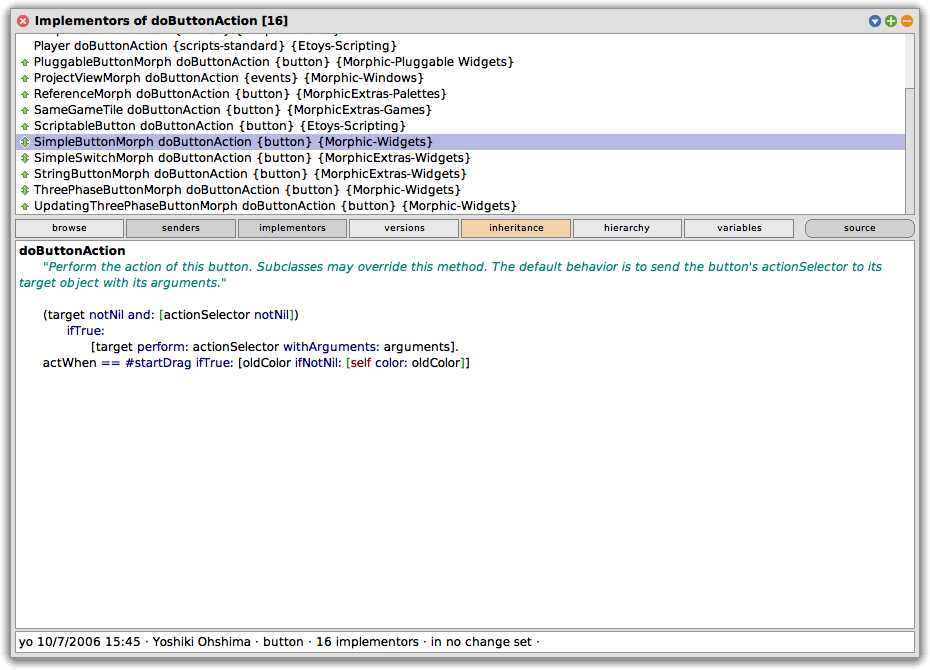
Now click implementors for doButtonAction. This answers a different question: which classes define a method with this selector? The native list contains several button families and other objects. The screenshot selects SimpleButtonMorph's implementation. Another class can implement the same selector with different behavior, so seeing a familiar method name is not enough to identify the method that will run.
Smalltalk method lookup begins at the receiver's class and searches upward through its superclasses. For our receiver, SimpleButtonMorph itself implements doButtonAction, so that is the relevant definition. Compare another implementor if you are curious, then return to the concrete class. The inheritance and hierarchy controls can help distinguish an override from a method inherited unchanged. A selector is a message name, not a global function name. Senders show references to that name; implementors show definitions; the runtime receiver determines the actual lookup path.
Where to run this
Workspace → Do it, or use the Browser's implementors button. Select SimpleButtonMorph doButtonAction in the list.
Construction code · follow the run instructions above
MessageSet
    openMessageList: (SystemNavigation default allImplementorsOf: #doButtonAction)
    name: 'Implementors of doButtonAction'.
Expected result
You see multiple definitions of the same selector. SimpleButtonMorph supplies the definition used by the demo button.
Native implementors browser with the SimpleButtonMorph definition selected, among 16 definitions in the captured image.
08 · Discover inherited APIs and verify what you learn
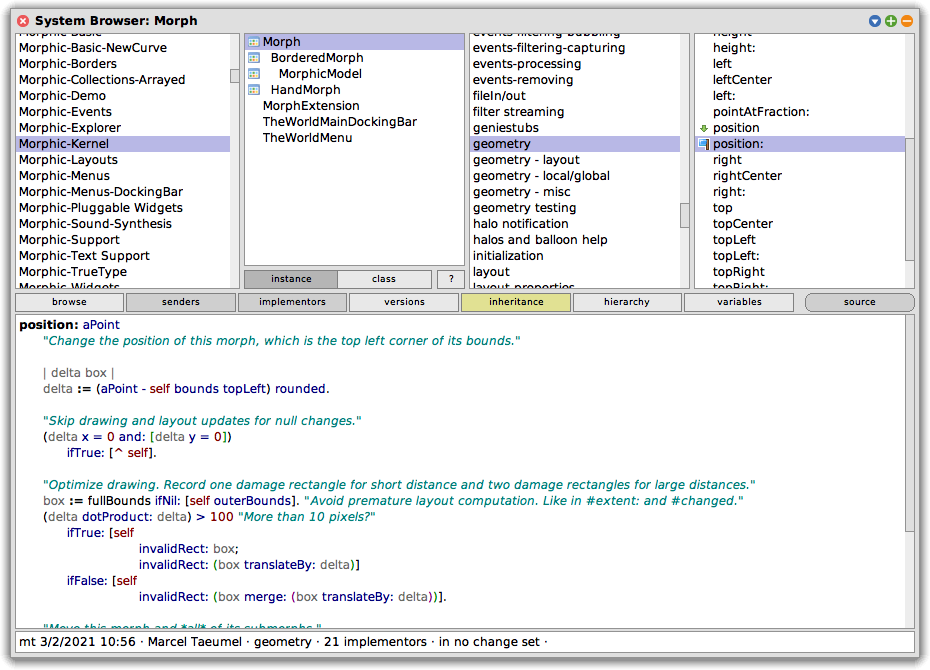
Suppose you want to move the button. Searching only SimpleButtonMorph's local method list can miss position:, because that method is inherited from Morph. The first expression below asks which class supplies it; the answer is Morph. Browse Morph >> position: and read its comment: it changes the top-left position of the morph's bounds. The screenshot shows that real implementation, not a guessed API name.
Use selectors for methods defined locally and allSelectors for the inherited set as well. The final expression searches that inherited set for label-related names. Read a candidate's source and inspect a sender before using it. For text source, SimpleButtonMorph sourceCodeAt: #mouseUp: answers a String; compiledMethodAt: answers the executable method object. Finish by filing in SourceTrailTests.st and running SourceTrailTest suite run. Its nine checks cover press/release behavior, cancellation, relabeling, an argument-bearing action and the source-navigation facts. Reading source plus a small executable experiment gives you a reusable way to learn the rest of the image.
Where to run this
Workspace → Print it on the first and final expressions separately; Do it on the Browser expression. File in SourceTrailTests.st, then Print SourceTrailTest suite run.
Construction code · follow the run instructions above
position: is supplied by Morph. The selector search includes label: and label:font:. The source-tracing suite reports 9 passes, 0 failures and 0 errors.
Native Browser at Morph >> position:, reached by following inherited method lookup from SimpleButtonMorph.
Watch the workflow
The demonstrations below use the real Squeak image. Each caption explains the recorded interaction. Animations stay paused until you choose Play demo.
NATIVE SQUEAK CAPTURE
Three native widget frames: unpressed at 0, synthetic mouseDown at 0 with pressed feedback, then synthetic mouseUp inside at 1. Events were delivered directly to the real button handlers; no operating-system pointer was recorded.
NATIVE SQUEAK CAPTURE
A scripted sequence of real native Browser captures: mouseDown:, mouseUp:, doButtonAction, ParcelCounter increment and refresh. It is a guided source-reading sequence, not a debugger stepping recording; add: lies between increment and refresh.
Practice with tested solutions
1. Change the label, keep the behavior
Relabel Add one as Finish parcel without changing target or actionSelector. Invoke the native button action and explain why it still increments by one.
Show a tested solution
After loading the lesson source, open the solution as text, select its whole block in a Workspace and use the action stated in its first comment.
Exercise solution
"Workspace: select this whole block and Do it."
| app |
app := ParcelCounter open.
app incrementButton label: 'Finish parcel'; doButtonAction.
app count = 1 ifFalse: [self error: 'The label changed the action'].
app
Expected
The relabeled native button increments the model to 1.
Change actionSelector to #add: and supply arguments: #(5). Read doButtonAction again and explain the correspondence between one colon and one argument.
Show a tested solution
After loading the lesson source, open the solution as text, select its whole block in a Workspace and use the action stated in its first comment.
Exercise solution
"Workspace: select this whole block and Do it."
| app |
app := ParcelCounter open.
app incrementButton
    label: 'Add five';
    actionSelector: #add:;
    arguments: #(5);
    doButtonAction.
app count = 5 ifFalse: [self error: 'Argument was not delivered'].
app
Expected
The native button labeled Add five changes the count to 5.
Create a synthetic primary-button press at the button center and a release beyond its bottom-right corner. Deliver them to the native handlers. Which guard prevents an increment?
Show a tested solution
After loading the lesson source, open the solution as text, select its whole block in a Workspace and use the action stated in its first comment.
Exercise solution
"Workspace: select this whole block and Print it.
These are direct synthetic button events, not operating-system mouse input."
| app button down up answer |
app := ParcelCounter open.
[button := app incrementButton.
down := MouseButtonEvent new
    setType: #mouseDown position: button center which: 4 buttons: 4
    hand: HandMorph new stamp: Time millisecondClockValue.
up := MouseButtonEvent new
    setType: #mouseUp position: button bottomRight + (30@30)
    which: 4 buttons: 0 hand: HandMorph new
    stamp: Time millisecondClockValue.
button mouseDown: down; mouseUp: up.
answer := app count = 0]
    ensure: [app window delete].
answer
Expected
true: the count remained zero, and the demo window is closed by ensure:.
Use allSelectors or whichClassIncludesSelector:. position: is inherited from Morph in this build.
Your sender list has a different count
Loaded packages and tests add references. Look for class-and-selector matches, not an exact total.
You see another button implementation
Return to the concrete receiver class SimpleButtonMorph. A shared selector name does not determine which class implementation will run.
Adding an argument causes a message error
The selector's arity and argument array must agree: #increment uses #(), while #add: uses one argument such as #(5).
Verification, cleanup and next steps
All source excerpts and native Browser images come from the shipped Squeak 6.1 build 23976, not another Smalltalk dialect. The verification scope is direct native widget event handlers and source introspection. It does not claim full OS/World event-dispatch coverage.
Default native mouseDown did not increment the counter