Home/Refactor a Workspace experiment into an application
PRACTICAL SQUEAK WORKSHOP
Refactor a Workspace experiment into an application
Keep the counter working while extracting a model, a view, and a single place for repeated behavior.
12 construction stagesTested source & checkpointsNative screenshots & demos
Before you start
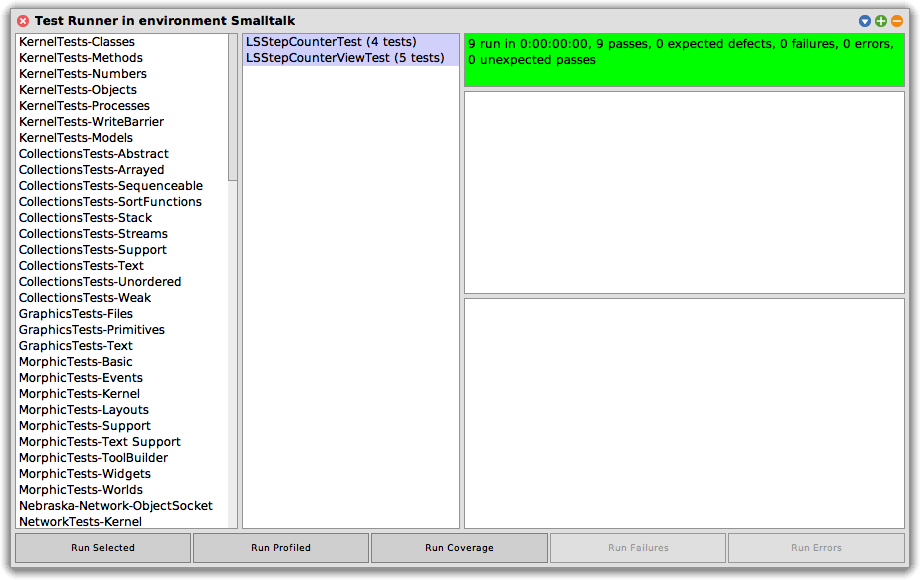
A Workspace is a great place to discover an idea. As an experiment grows, copied callbacks and captured variables become hard to change. We will start with a working counter, record what it does, and move responsibilities into two small classes. Its +1, +5, and Reset behavior will stay the same throughout the refactoring. The final base lesson has 9 passing tests; the exercises extend it to 11.
Use a learning image. The names LSStepCounter and LSStepCounterView are separate from earlier counter examples. Extract the per-lesson bundle. Run a Workspace expression with Do It; use Print It when you want an answer. Install cumulative .st checkpoints through File List → fileIn. A file-in has chunk delimiters; a Browser method is accepted individually on the specified class. Follow checkpoints in order in a fresh learning image. Checkpoint 03 intentionally opens the transitional panel as part of demonstrating it.
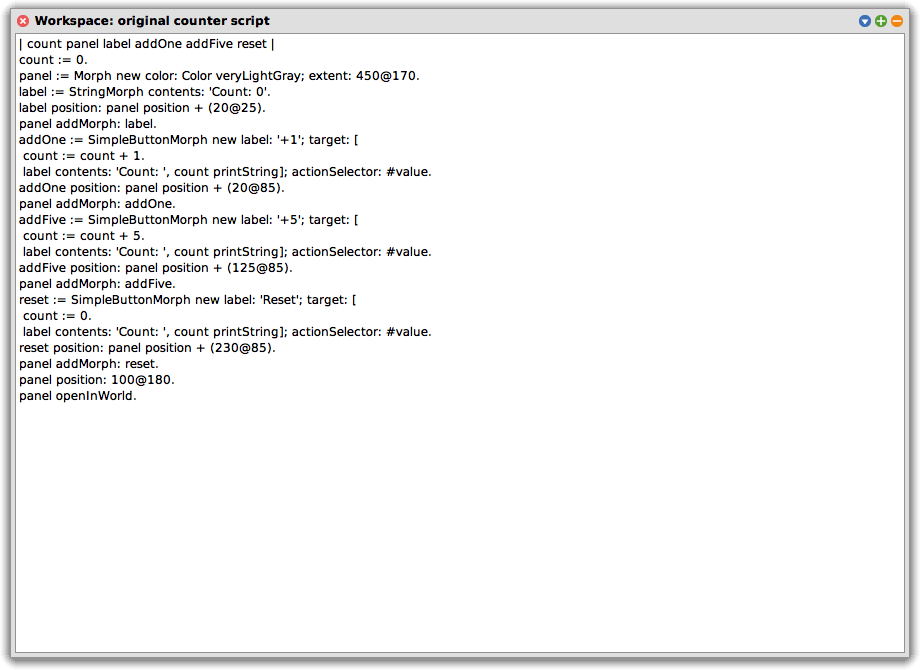
Paste and Do It the whole script. count is a temporary variable captured by the three button-target blocks; it survives because the buttons keep those blocks. The label and panel are real Morphic objects. Click +1, +5, and Reset. This is useful exploratory code, but its responsibilities are mixed: storing state, changing state, building widgets, and formatting text all live together. We will change its structure while preserving its observable behavior.
Where to run this
Workspace → paste the complete script → select all → Do It. Equivalent download: fileIn source/01-workspace-script.st.
Construction code · follow the run instructions above
Genuine Squeak 6.1 native capture; this state was prepared by the accompanying script.
02 · Write down the behavior before moving code
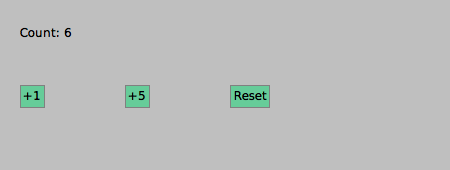
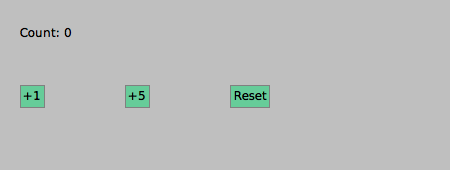
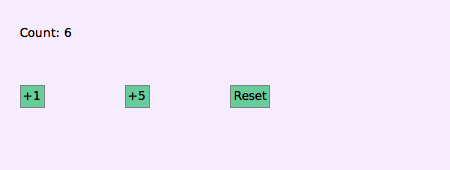
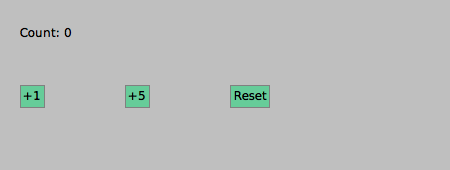
Use a fresh panel for this sequence: it starts at zero, +1 changes it to one, +5 changes it to six, and Reset returns it to zero. These are the behaviors the user can observe. The downloadable verification script executes exactly these button actions and asserts the labels. A change in class layout is not a reason to change those expected answers. Close the original panel after this check so it is easy to tell which version you are exercising.
Where to run this
Interact with the original Morphic panel. These lines are a behavior checklist, not executable assertions.
Construction code · follow the run instructions above
"Expected sequence in the original panel:"
"Open → Count: 0"
"+1   → Count: 1"
"+5   → Count: 6"
"Reset → Count: 0"
Expected result
The original application satisfies all four states. We will assert the same sequence after extraction.
NATIVE SQUEAK CAPTURE
Genuine Squeak 6.1 native capture; this state was prepared by the accompanying script.
03 · Find a change that currently needs several edits
The same label construction appears in three callbacks. If you change “Count:” to “Clicks:”, all three copies must be found. The button construction also repeats target, actionSelector, position, and addMorph. First extract the model; then give the view one refresh method and one button-construction helper. Do one structural change at a time and rerun the recorded behaviors between changes. Do not combine a refactoring with new validation rules or different Reset semantics.
Where to run this
Read the original Workspace script. This is a highlighted excerpt; count and label belong to that complete script.
Construction code · follow the run instructions above
"Repeated in all three callbacks:"
label contents: 'Count: ', count printString
Expected result
You can point to the repeated formatting and separate it from the arithmetic.
NATIVE SQUEAK CAPTURE
Genuine Squeak 6.1 native capture; this state was prepared by the accompanying script.
04 · Move the state into LSStepCounter
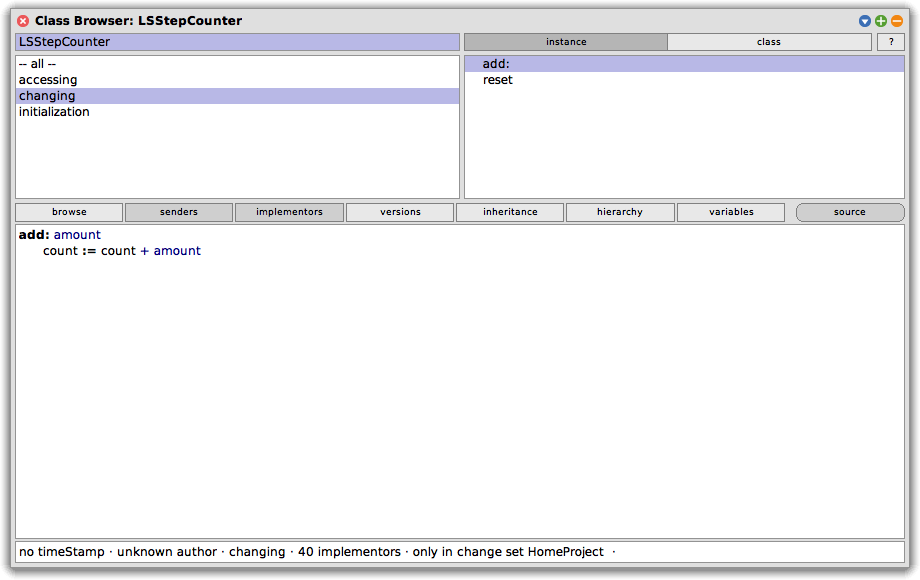
File in checkpoint 02. The model owns count. initialize sets it to zero; count answers it; add: changes it; reset restores zero. None of these methods mention Morph, buttons, colors, or labels. That gives the behavior a direct testing surface and lets another interface reuse it. This extraction intentionally keeps addition’s existing semantics; validation or limits would be a separate feature with separate tests.
Where to run this
File List → fileIn source/02-model.st. Browse LSStepCounter → instance side.
Construction code · follow the run instructions above
Genuine Squeak 6.1 native capture; this state was prepared by the accompanying script.
05 · Run characterization tests for the extracted model
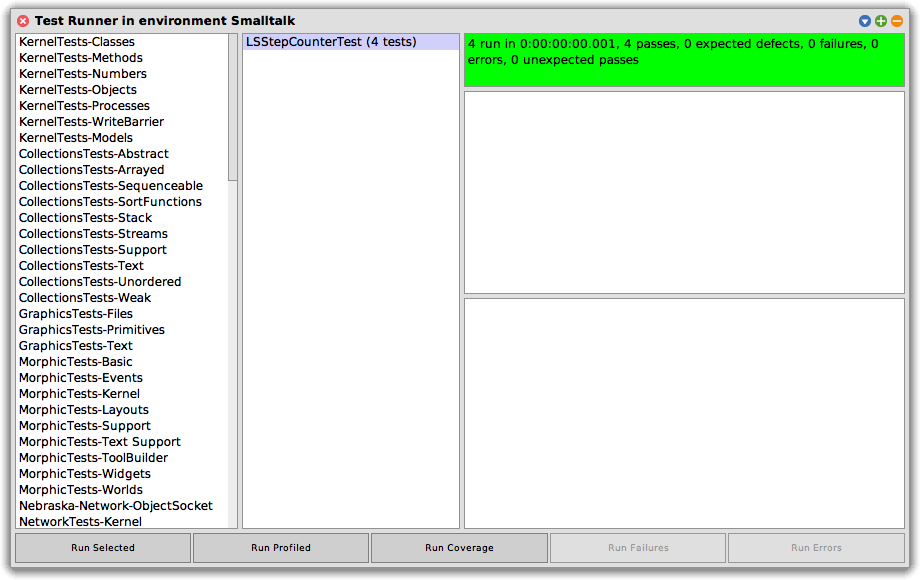
The tests preserve zero, +1 then +5, and Reset. A fourth example checks independent instances: changing one counter must not change another. Fresh setUp fixtures avoid accidental dependence on test order. The new model is a useful intermediate result even before we change the GUI. Run the four tests now so a later failure is easier to locate.
Where to run this
Workspace → Do It, then Test Runner → Run Selected.
Construction code · follow the run instructions above
TestRunner openForSuite: LSStepCounterTest suite.
Expected result
4 run, 4 passes, 0 failures, 0 errors.
NATIVE SQUEAK CAPTURE
Genuine Squeak 6.1 native capture; this state was prepared by the accompanying script.
06 · Keep the script, but delegate state to the model
Checkpoint 03 is a transitional version. The script still creates the widgets, but each button tells counter what to do. The label reads counter count. We deliberately leave the repeated formatting in place for this one step. Click the same +1, +5, Reset sequence and check the same labels. Now all the state changes go through a tested object, and any later UI extraction can reuse it.
Where to run this
File in source/03-model-and-script.st, which defines the model/tests and opens this transitional panel. Or Do It this script after checkpoint 02.
Construction code · follow the run instructions above
Native transitional panel after state was moved to LSStepCounter; the visible behavior remains the same.
07 · Move widget construction into LSStepCounterView
File in checkpoint 04. LSStepCounterView is a Morph subclass whose instance variables hold the model, label, and three buttons. initialize builds a new model and the widgets, then calls refresh. model: lets a caller supply an existing model and immediately synchronizes the label. This is explicit model/view separation: the model changes data; the view builds controls, delegates actions, and displays the model. A class name alone does not create that separation; the message boundaries do.
Where to run this
File List → fileIn source/04-final.st. In a Workspace, select the complete expression including the temporary declaration, then Do It.
Construction code · follow the run instructions above
Genuine Squeak 6.1 native capture; this state was prepared by the accompanying script.
08 · Give the label formatting one home
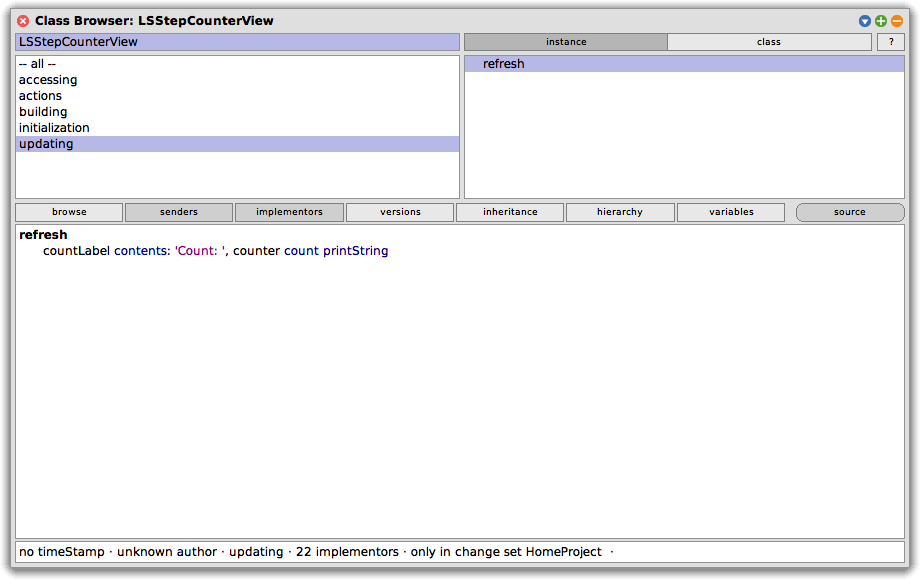
The label expression now lives in refresh. The shared add: action changes the model and then refreshes. addOne and addFive simply pass different amounts to that shared action. Reset has different model behavior but uses the same refresh. Notice that the view is not secretly doing the arithmetic. The model remains responsible for count. If an outside caller changes the model directly, it must explicitly ask this small view to refresh; automatic observation is beyond this extraction.
Where to run this
Browser → LSStepCounterView. Accept each method separately, or use the complete checkpoint 04.
Construction code · follow the run instructions above
Genuine Squeak 6.1 native capture; this state was prepared by the accompanying script.
09 · Extract repeated button construction
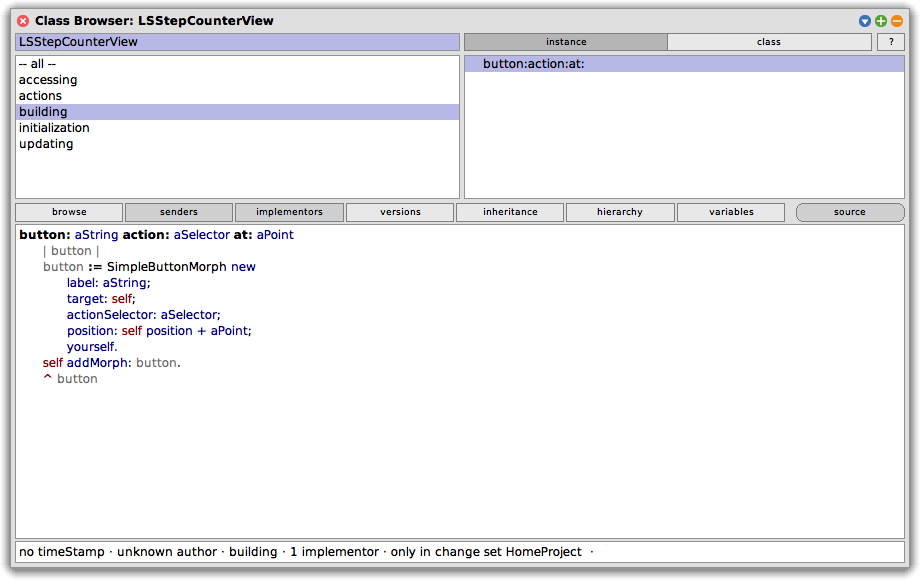
The helper receives the things that vary: label text, selector, and local position. The common part creates a SimpleButtonMorph, targets the view, installs the selector, positions it relative to the view, and adds it as a submorph. It returns the button so initialize can save it in oneButton, fiveButton, or resetButton. Keep the helper small and concrete; we need three similar controls, not a general widget framework.
Where to run this
Browser → LSStepCounterView → building → button:action:at:.
Construction code · follow the run instructions above
Genuine Squeak 6.1 native capture; this state was prepared by the accompanying script.
10 · Prove the buttons still do the same things
The UI regression test drives the actual buttons through doButtonAction, then checks both model and display. It would fail if the +5 button pointed at addOne, or if the model reached six but the label stayed at one. The full view suite also covers the initial label, Reset, two independent views, and an existing model. This is a component-level guarantee of the button action wiring and state transitions; still manually try mouse and keyboard behavior in the real panel.
Where to run this
Browser → LSStepCounterViewTest → tests. Run its suite and LSStepCounterTest together.
Construction code · follow the run instructions above
Genuine Squeak 6.1 native capture; this state was prepared by the accompanying script.
11 · Reuse the behavior without the interface
This final Workspace expression does the same state changes without creating a Morph. The answer should be six. A second model would start at zero because count belongs to each instance, not to a global or class variable. The short launch expression from stage 7 now replaces the large construction script when you want a GUI. The original script remains valuable as a record of the experiment, while the classes are where you make ongoing changes.
Where to run this
Workspace → select the complete expression → Print It.
Construction code · follow the run instructions above
6. No window is required to use or test the model.
NATIVE SQUEAK CAPTURE
Genuine Squeak 6.1 native capture; this state was prepared by the accompanying script.
12 · Make a later feature change explicit
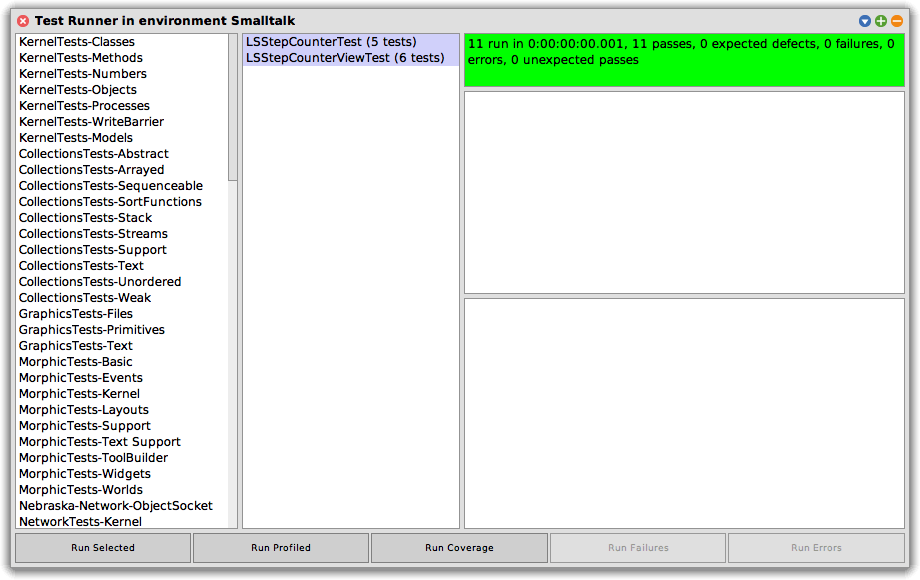
The exercises begin after the behavior-preserving refactoring is complete. Adding +10 as an action, adding a model query, and changing the displayed word are new requirements. For the last exercise, updating label expectations is justified because the requirement changes; updating tests during the earlier extraction would have hidden a regression. The final solution file updates all affected label expectations and leaves all 11 tests passing.
Where to run this
File in source/07-exercise-solutions.st; Workspace → Print It the combined suite.
Construction code · follow the run instructions above
| suite |
suite := LSStepCounterTest suite.
suite addTests: LSStepCounterViewTest suite tests.
suite run.
Expected result
11 run, 11 passes, 0 failures, 0 errors. Final solution text uses Clicks: consistently.
Genuine Squeak 6.1 native capture; this state was prepared by the accompanying script.
Watch the workflow
Every image comes from Squeak 6.1’s own native Morphic rendering. The two GIFs are scripted button-action sequences using the original and refactored programs, not browser recreations or human interaction recordings.
NATIVE SQUEAK CAPTURE
Scripted native Morphic frames from the original closures: zero, +1, +5, Reset.
NATIVE SQUEAK CAPTURE
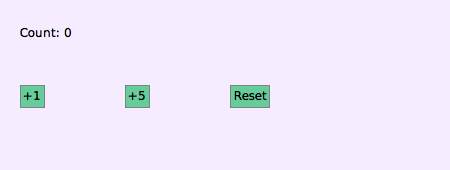
Scripted native Morphic frames from the extracted classes. The same button sequence gives the same visible counts.
Practice with tested solutions
1. 1. Reuse the action for +10
Add addTen to the view using the existing add: method. Test its model value and label. This exercise adds an action method; it does not claim to add a fourth visible button.
The new requirement is to display Clicks: instead of Count:. Change only refresh in production code, then update every affected view-label expectation. Keep the model tests unchanged.
System Browser → LSStepCounterView → instance side → updating → accept refresh. Then update each affected test separately on LSStepCounterViewTest → instance side → tests or tests-exercises. The assertion examples belong inside those existing test methods, not in the model or view.
The complete downloadable solution updates all affected test methods and passes all 11 tests. A deliberate presentation change is now cheap and explicit.
Select the whole original script, including the temporary declaration at the top. A highlighted callback excerpt is not a standalone program.
I accidentally created a class-side method.
Select the instance side of the named class before accepting initialize, count, add:, or a view method. The supplied file-in checkpoints place methods correctly.
A new model changes the old panel.
Check for a global variable or class variable. count must be an instance variable of LSStepCounter; each view’s initialize creates its own model.
My old view still says Count: after the exercise.
A live view retains its current label until refresh runs. Send refresh or use one of its actions. New views run refresh during initialize.
Verification, cleanup and next steps
Original and transitional Workspace scripts executed with real button actions; every checkpoint compiled; all model/view suites passed; all three exercise solutions passed. Native UI captures came from those executions.
Close the tutorial windows when finished. Save the source separately from the image if you want to recreate the application in a clean image.