Follow real left and right references, step through comparisons, and turn an object tree into a native Morphic explorer.
8 construction stagesTested source & checkpointsNative screenshots & demos
Before you start
Build a bounded binary search tree with explicit node objects, native integer input and working buttons. Insert values, reject duplicates, follow successful and missing search paths one comparison at a time, traverse in order, and inspect object identity in a live diagram.
Eight cumulative file-in checkpoints build one application. Every checkpoint is independently runnable in a clean Squeak image. Highlighted Browser methods and exact Workspace launchers are compiled or evaluated before the native screenshot is recorded.
Squeak 6.1, 64-bit update 23976, with bundled Morphic and SUnit; no extra Smalltalk package
Classes and instance variables; message sends, blocks, cascades, nil and object identity; basic recursive reasoning
About 75–90 minutes for eight stages plus two exercises
Use a copy of your learning image. Each .st checkpoint is chunk-format source: File List → choose file → fileIn. Do not paste a whole source file into a Workspace.
The file-in defines classes but opens no window. Evaluate the displayed launcher in a Workspace; its last expression returns the app.
Each checkpoint contains all source needed at that stage. Start a fresh copied image when returning to an earlier checkpoint, because file-in does not remove later methods.
Close the previous explorer before opening the next checkpoint. The fixed-size native window uses no network or background timer.
Node setters expose real references for Inspector learning. Make destructive link experiments in a disposable model; Reset recovers the app.
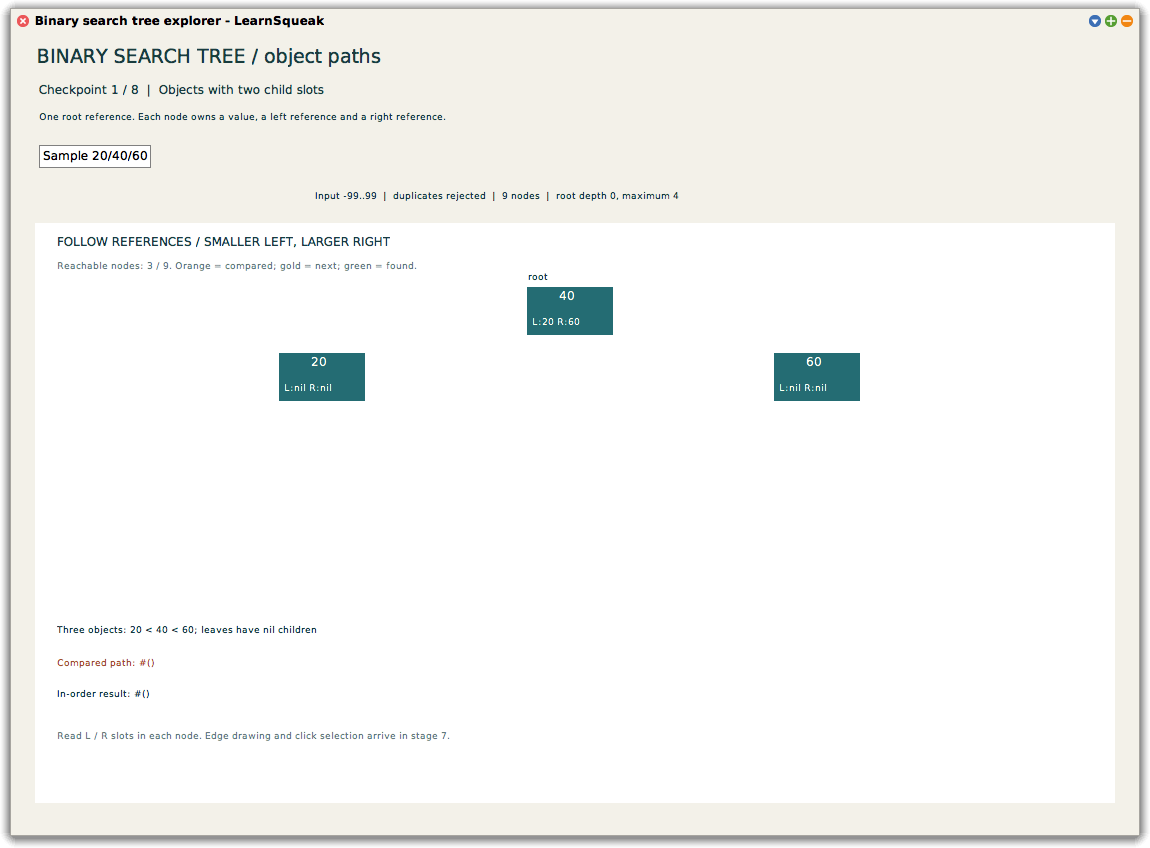
A binary search tree begins with ordinary objects. Each LSBSTNode has three instance variables: value, left and right. The value is an integer payload. The two child slots contain references to other node objects, or nil when that child is absent. Neither slot holds an array index or a drawing coordinate. The model owns one entry reference named root, so every reachable node is discovered by following objects from there.
The sample deliberately creates three separate nodes. First seedThree creates the node holding 40 and assigns it to root. It then creates 20 and 60, storing those new objects in the root's left and right slots. Fresh instance variables begin as nil, so the two leaf nodes need no additional assignments. Read the factory as a cascade: value: and yourself are both sent to the same newly allocated instance. The final yourself answers that node.
The search-tree rule is stronger than placing a small number immediately on the left. Every value anywhere in a node's left subtree must be smaller than that node's value; every value anywhere in its right subtree must be larger. We will reject duplicates, so those comparisons are strict. This first example satisfies the rule because 20 < 40 < 60.
Inspect app model root and follow left and right in the Inspector. The cards display those actual objects. Their L and R labels show the current child values only as a readable reference description. The diagram is derived from the structure and is never the storage representation. Support methods for bounded reading and drawing are included now so every checkpoint opens a real, safe window; later stages focus on the commands that change or traverse the tree.
LSBSTNode class >> value: anInteger · class side
value: anInteger
 ^ self new value: anInteger; yourself
File List → select search-tree-01.st → fileIn. The complete checkpoint installs all classes and support methods. Read or accept the highlighted methods in the System Browser on the named class and side.
Workspace → select the entire launcher → Do it. Use Inspect it on that whole block to keep the returned app available. Close the previous explorer first.
Workspace · run after installing this checkpoint
| app |
app := LSBSTApp open.
app loadSample.
app
Watch for: A child slot holds an object reference. A displayed value or screen position is only a description of that reference.
Try it: Inspect the root and both children. Create two standalone nodes with value 20 and compare = on their values with == on their objects.
Expected result
Three node objects show 40 at root, left reference 20 and right reference 60. Both leaf cards show L:nil R:nil.
Real Squeak 6.1 SystemWindow capture after the exact launcher above. Three node objects show 40 at root, left reference 20 and right reference 60. Both leaf cards show L:nil R:nil.
02 · Empty means root is nil
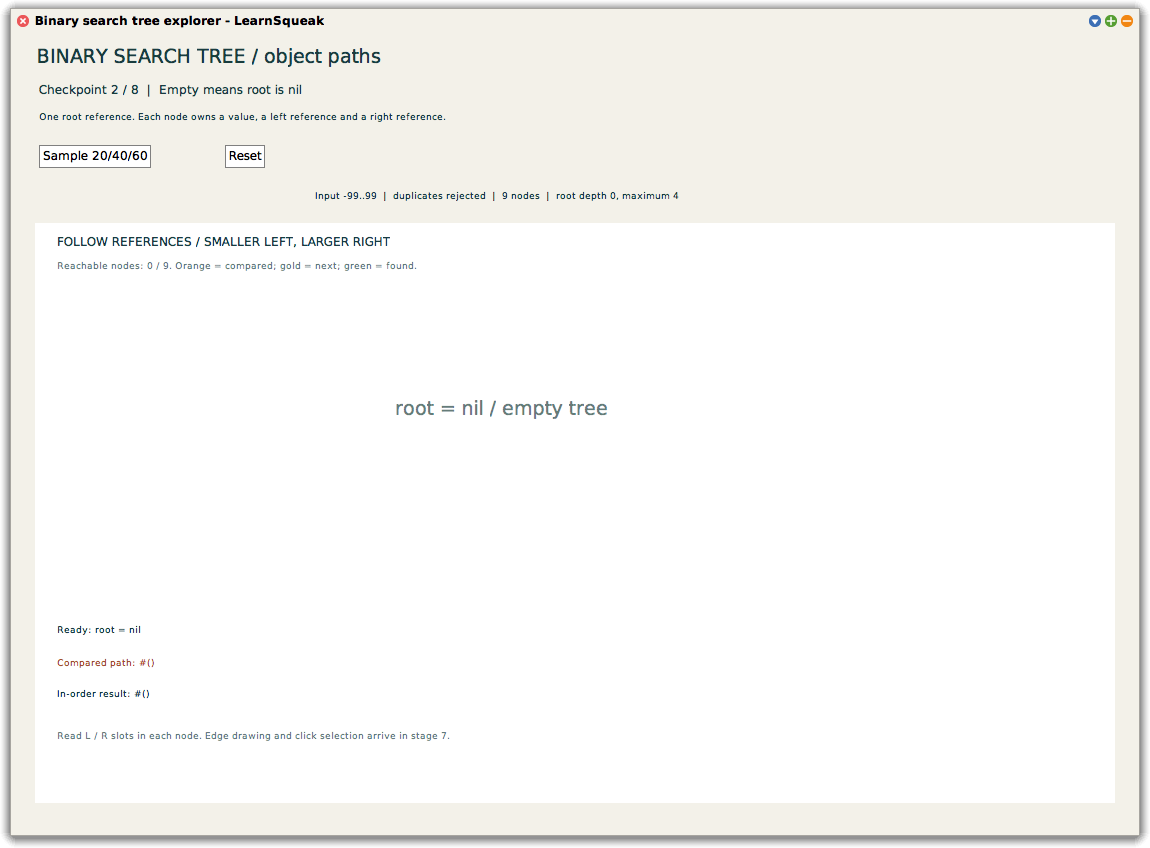
An empty tree has root equal to nil. It does not need a special node holding zero, an empty string or a sentinel value. Zero is a supported integer and can be stored in a perfectly ordinary nonempty tree. The isEmpty method therefore asks only whether the root reference is absent. This is a useful distinction between a container's structure and the values held inside that structure.
The launcher for this checkpoint opens a fresh application without loading the sample. You should see root = nil / empty tree, a count of zero, and no cards. Press Sample 20/40/60 to install the fixture, then press Reset. reset drops the model's root reference and clears the saved search path, current comparison, found result and traversal output. Repeated Reset clicks leave the same empty state. The app also clears its selected object and restores the input value used in later stages.
Dropping root does not send a destructive message to every node. If you kept the old root in an Inspector, that object and its child references still exist as long as something refers to them. The model simply no longer reaches them. This is a practical introduction to object reachability: an Inspector reference can keep an old example alive while the application's current model is empty.
The query nodes returns a new bounded Array of reachable node references. Replacing an Array entry does not change root or a child slot. Sending left: or right: to one of the returned nodes does change that live object. Those public setters are intentionally useful for learning, but they are lower-level operations than the guarded application commands. Use a disposable model for experiments that break links, and use Reset to recover the visible application.
File List → select search-tree-02.st → fileIn. The complete checkpoint installs all classes and support methods. Read or accept the highlighted methods in the System Browser on the named class and side.
Workspace → select the entire launcher → Do it. Use Inspect it on that whole block to keep the returned app available. Close the previous explorer first.
Workspace · run after installing this checkpoint
| app |
app := LSBSTApp open.
app
Watch for: nil means no node. A node whose value is 0 still makes the tree nonempty.
Try it: Keep an old root in an Inspector, then Reset. Verify that the app is empty while your inspected old object still has children.
Expected result
Root is nil, the node count is zero and the diagram says empty tree.
Real Squeak 6.1 SystemWindow capture after the exact launcher above. Root is nil, the node count is zero and the diagram says empty tree.
03 · Insert at a missing child
Insertion follows comparisons until it finds a missing child. Starting at root, compare the new integer with the current node's value. A smaller number follows left; a larger number follows right. Keep parent and goLeft while advancing current, because once current becomes nil we need to know which parent slot to fill. An empty tree is the special case where no parent was visited: the new object becomes root.
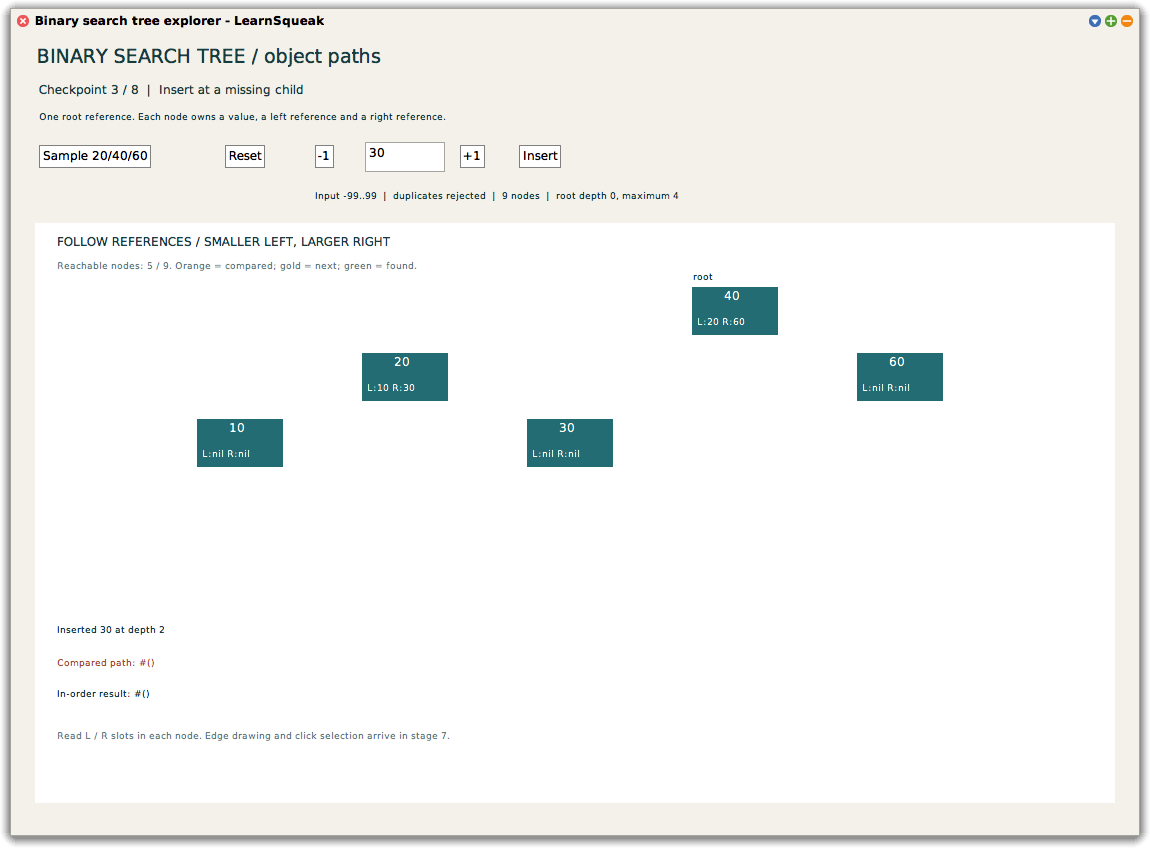
The launcher starts with 20, 40 and 60, then inserts 10 and 30. Both new objects belong in the left subtree of 40, but they occupy different child slots of 20. Existing nodes keep their identity. No array is sorted and no old payload is copied into a new position. The final assignment changes exactly one owner reference: root for an empty tree, or left: or right: on the parent.
This application accepts only integers from -99 through 99. There are two deliberate drawing limits: at most nine reachable nodes and maximum depth four, counting the root as depth zero. An insertion that would exceed either limit is rejected before allocating or attaching a node. Equal values are rejected too. The duplicate policy makes the representation a set of integers rather than a multiset, and avoids inventing a second rule for equal branches.
Type a number in the native input field, then press Insert. The controller reads the current text even if you have not separately accepted the editor contents. It accepts decimal digits with an optional minus sign and surrounding blanks; expressions such as 1+2 are rejected. The -1 and +1 buttons clamp to the supported range. Invalid input or rejected insertion preserves existing nodes and links. Successful insertion clears old search and traversal results because those results described the previous structure.
LSBinarySearchTree >> insert: number · instance side
insert: number
 | current parent goLeft depth newNode |
 self canRead ifFalse: [^ false].
 (self acceptsValue: number) ifFalse: [self note: 'Use an integer from -99 to 99'. ^ false].
 current := root. parent := nil. depth := 0.
 [current notNil] whileTrue: [
  current value = number ifTrue: [self note: 'Duplicate ', number printString, ': tree unchanged'. ^ false].
  parent := current. goLeft := number < current value.
  current := goLeft ifTrue: [current left] ifFalse: [current right].
  depth := depth + 1].
 (self size >= capacity or: [depth > maxDepth]) ifTrue: [
  self note: 'Insert rejected: nine nodes or depth four is the display limit'. ^ false].
 newNode := LSBSTNode value: number.
 parent isNil
  ifTrue: [root := newNode]
  ifFalse: [goLeft ifTrue: [parent left: newNode] ifFalse: [parent right: newNode]].
 self clearSearch. ordered := #().
 self note: 'Inserted ', number printString, ' at depth ', depth printString.
 ^ true
LSBSTApp >> acceptInputText: text · instance side
acceptInputText: text
 | string digits value |
 string := text asString withBlanksTrimmed.
 (string isEmpty or: [string size > 4]) ifTrue: [model note: 'Input rejected: type an integer from -99 to 99'. self refresh. ^ false].
 digits := string first = $- ifTrue: [string allButFirst] ifFalse: [string].
 (digits notEmpty and: [digits allSatisfy: [:char | char >= $0 and: [char <= $9]]])
  ifFalse: [model note: 'Input rejected: use decimal digits and optional minus'. self refresh. ^ false].
 value := string asNumber.
 (model acceptsValue: value) ifFalse: [model note: 'Input rejected: supported range is -99 to 99'. self refresh. ^ false].
 inputValue := value. self refresh. ^ true
Where to run this
File List → select search-tree-03.st → fileIn. The complete checkpoint installs all classes and support methods. Read or accept the highlighted methods in the System Browser on the named class and side.
Workspace → select the entire launcher → Do it. Use Inspect it on that whole block to keep the returned app available. Close the previous explorer first.
Real Squeak 6.1 SystemWindow capture after the exact launcher above. Five nodes hold 10, 20, 30, 40 and 60. The 20 node has left 10 and right 30.
04 · Find follows one branch
Searching uses the same branch rule as insertion, but it never allocates or rewires a node. Begin with current := root. Compare the target with current value. Equality succeeds immediately; a smaller target chooses left and a larger target chooses right. Reaching nil means the target is absent. That missing child is evidence, not an error: the search-tree invariant rules out the other branch at every comparison.
find: answers the actual matching node object, or nil when the target is missing or the request is invalid. The model separately records path, an OrderedCollection of the nodes that were compared. pathValues is a readable snapshot of their integer payloads. Keeping node references lets the view highlight precisely the objects used by the search. It also lets you check that the returned object is identical to a node already reachable from root, using == rather than merely comparing equal values.
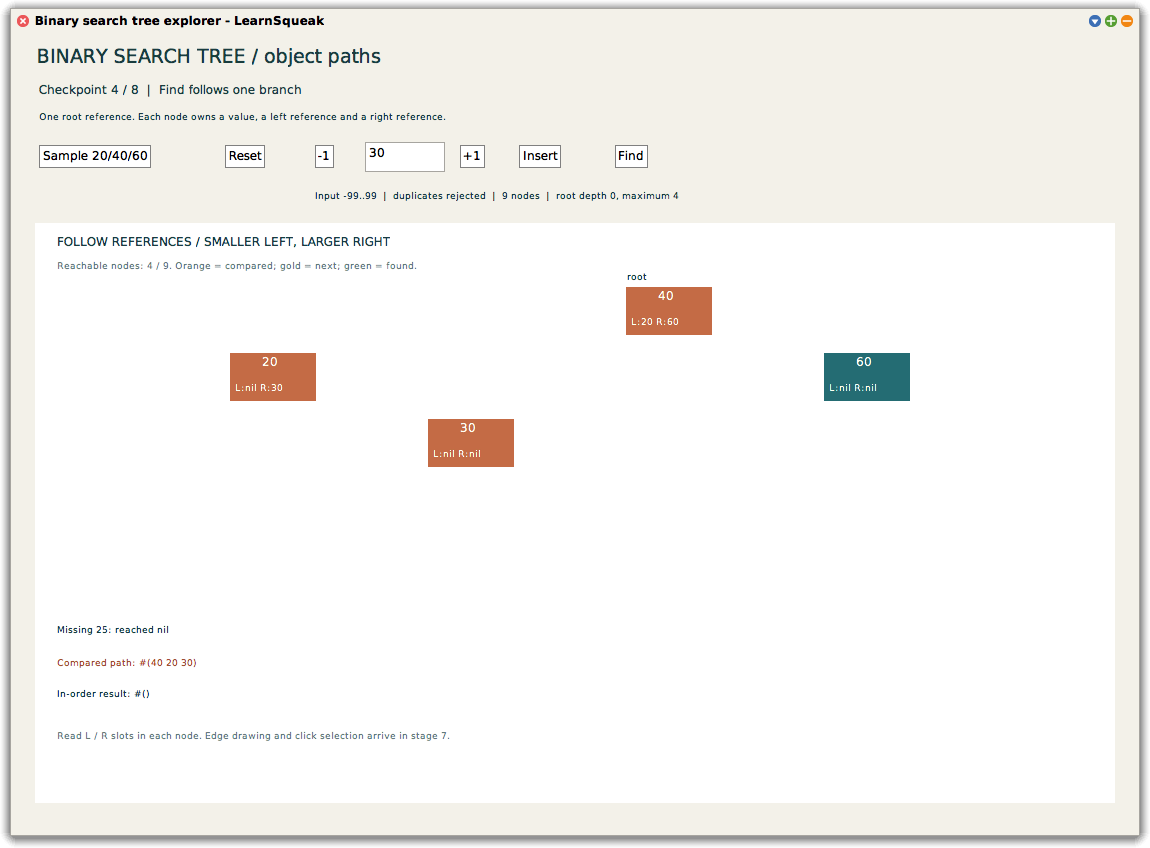
The example inserts 30 under the sample's 20 node, then searches for 25. It compares 40, 20 and 30, then reaches 30's missing left child. The displayed path is #(40 20 30), and found is nil. Search did not need to visit 60. Try 30 next: the path contains the same three values, but equality at the final node makes that search succeed.
Every new find clears the previous path and result before starting. The operation validates both the requested value and the complete tree, so a cycle, an invalid child or broken ordering cannot cause an endless search. These safety checks add work in this small teaching app; the lesson is about reference-based search behavior, not a performance benchmark. An ordinary unbalanced search tree can still become a long chain when values arrive in sorted order.
LSBinarySearchTree >> find: number · instance side
find: number
 | current |
 self clearSearch.
 self canRead ifFalse: [^ nil].
 (self acceptsValue: number) ifFalse: [self note: 'Find needs an integer from -99 to 99'. ^ nil].
 current := root.
 [current notNil] whileTrue: [
  path add: current.
  number = current value ifTrue: [found := current.
   self note: 'Found ', number printString, ' after ', path size printString, ' comparisons'. ^ found].
  current := number < current value ifTrue: [current left] ifFalse: [current right]].
 self note: 'Missing ', number printString, ': reached nil'.
 ^ nil
File List → select search-tree-04.st → fileIn. The complete checkpoint installs all classes and support methods. Read or accept the highlighted methods in the System Browser on the named class and side.
Workspace → select the entire launcher → Do it. Use Inspect it on that whole block to keep the returned app available. Close the previous explorer first.
Real Squeak 6.1 SystemWindow capture after the exact launcher above. Search for 25 ends at nil with compared path #(40 20 30). The three visited nodes are orange.
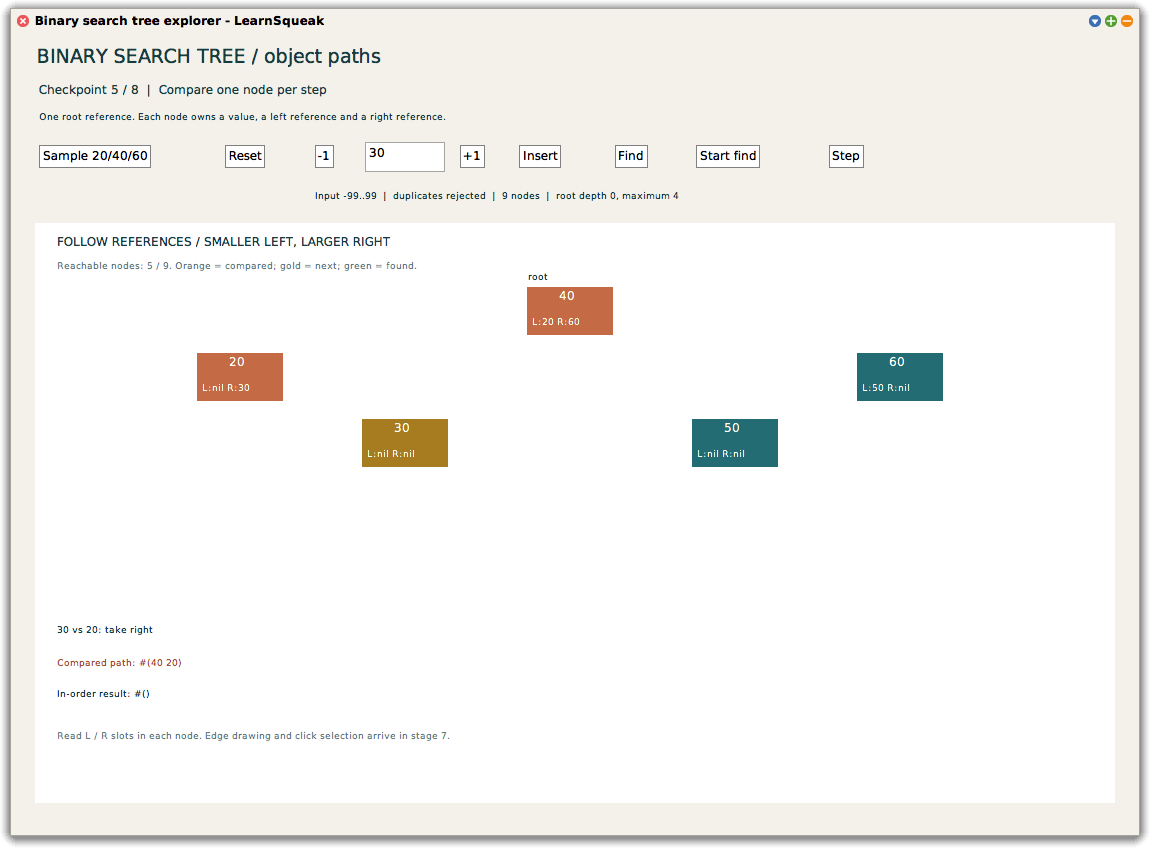
05 · Compare one node per step
The complete find: operation is useful for testing, but its comparisons happen before the screen can show each intermediate decision. A stepped search makes those decisions visible without adding a background process. startFind: stores the target and sets cursor to root. It clears the old path and found reference. If the root is nil, it reports a miss immediately; otherwise searching becomes true and the next comparison is ready.
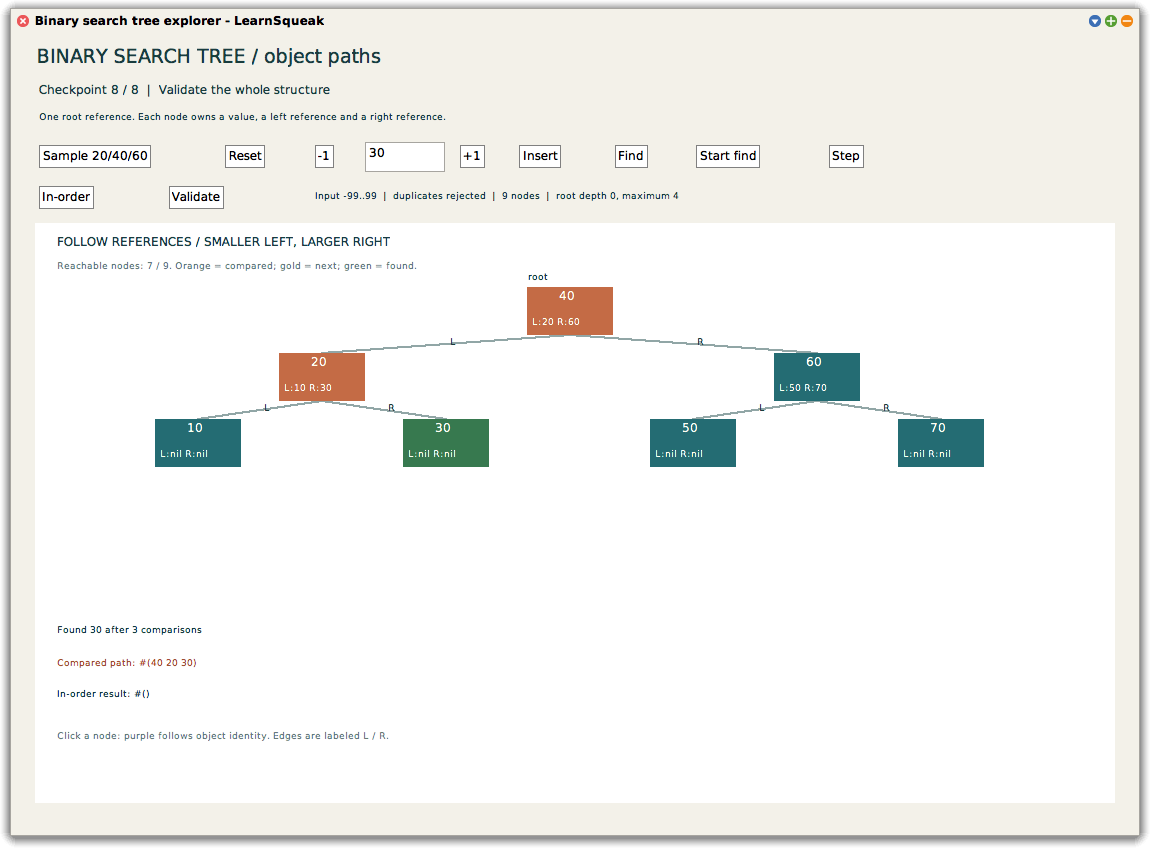
Each Step click calls stepFind exactly once. The method appends cursor to the compared path, tests equality, then chooses a child if necessary. Orange cards have already been compared. Gold marks the next cursor, which has not yet been compared. Green marks the found object. A final missing child ends the search, while finding equality sets found and also ends it. Pressing Step again after either outcome returns false and leaves the completed state unchanged.
The launcher prepares a five-node tree, starts a search for 30 and performs two steps. The orange path is #(40 20); the gold 30 node is the next comparison. One additional Step should turn 30 green and finish the search. Change the input to 55, press Start find and step again to observe a missing target through the right subtree. Starting a new search safely replaces an unfinished one.
The input field is a controller choice, not the search's changing target. After Start find, editing the field does not rewrite the stored target; press Start find again to use a new number. A successful insertion cancels an active search because it changes the structure. Reset and Sample cancel it too. Everything runs synchronously on button actions, so the window needs no timer to stop when closed. The native tests also compare stepped outcomes and paths with direct searches.
LSBinarySearchTree >> startFind: number · instance side
startFind: number
 self clearSearch.
 self canRead ifFalse: [^ false].
 (self acceptsValue: number) ifFalse: [self note: 'Find needs an integer from -99 to 99'. ^ false].
 target := number. cursor := root. searching := cursor notNil.
 self note: (searching
  ifTrue: ['Ready to compare ', number printString, ' with root']
  ifFalse: ['Missing ', number printString, ': root is nil']).
 ^ true
File List → select search-tree-05.st → fileIn. The complete checkpoint installs all classes and support methods. Read or accept the highlighted methods in the System Browser on the named class and side.
Workspace → select the entire launcher → Do it. Use Inspect it on that whole block to keep the returned app available. Close the previous explorer first.
Real Squeak 6.1 SystemWindow capture after the exact launcher above. Compared path is #(40 20). The next node, 30, is gold; one more Step finds it.
06 · Visit left, node, right
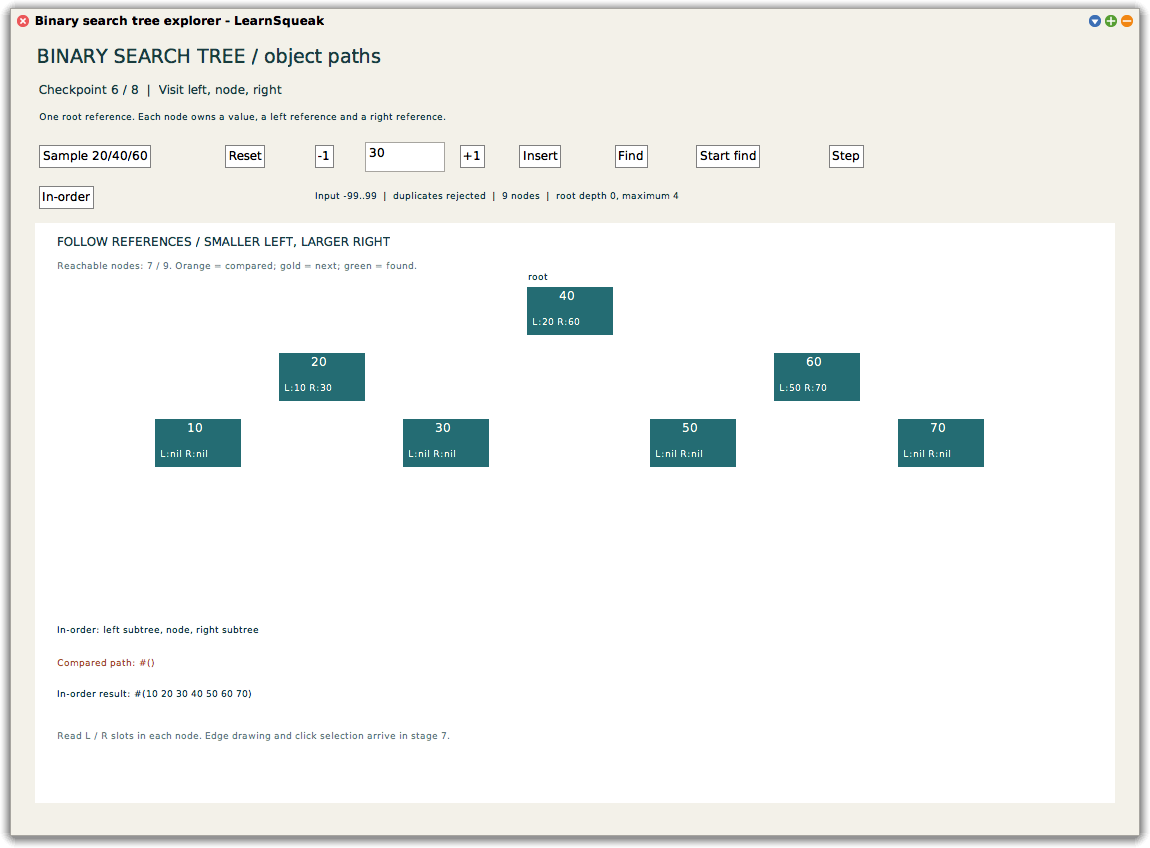
An in-order traversal visits the left subtree, then the current node, then the right subtree. Unlike finding one value, it intentionally visits every node. The recursive block expresses the rule directly: if the node is nil, do nothing; otherwise visit its left child, append its value and visit its right child. nil is the base case that stops recursion at each missing child.
Why does this produce increasing order? Every value reached through left is smaller than the current node, and every value reached through right is larger. Applying the same rule inside both subtrees makes each part ordered too. Joining those parts around the current value therefore gives a sorted result. This reasoning depends on the whole search-tree invariant, including ancestor constraints. Checking only each immediate parent-child pair would miss some invalid arrangements.
The launcher builds seven nodes and calls inOrder. The output should be #(10 20 30 40 50 60 70), even though the insertion order began with 40. The tree itself remains in the same shape. The Array is a result of traversal, not a new representation stored in place of the links. The method keeps a private result snapshot for display and returns a copy, so changing the returned Array cannot rewrite node values or the displayed result.
The view has used a related guarded walk to assign horizontal ranks since the first checkpoint. That is layout support: it asks where to draw an existing object. This stage introduces the explicit public traversal command and its result contract. Empty traversal returns an empty Array, while a malformed tree returns nil and a rejection message. Distinguish those cases when writing callers. After a successful insertion, the saved output is cleared so an old sorted result is never presented as if it came from the new structure.
File List → select search-tree-06.st → fileIn. The complete checkpoint installs all classes and support methods. Read or accept the highlighted methods in the System Browser on the named class and side.
Workspace → select the entire launcher → Do it. Use Inspect it on that whole block to keep the returned app available. Close the previous explorer first.
Real Squeak 6.1 SystemWindow capture after the exact launcher above. The traversal result is #(10 20 30 40 50 60 70), with all seven node objects unchanged.
07 · Draw edges and select objects
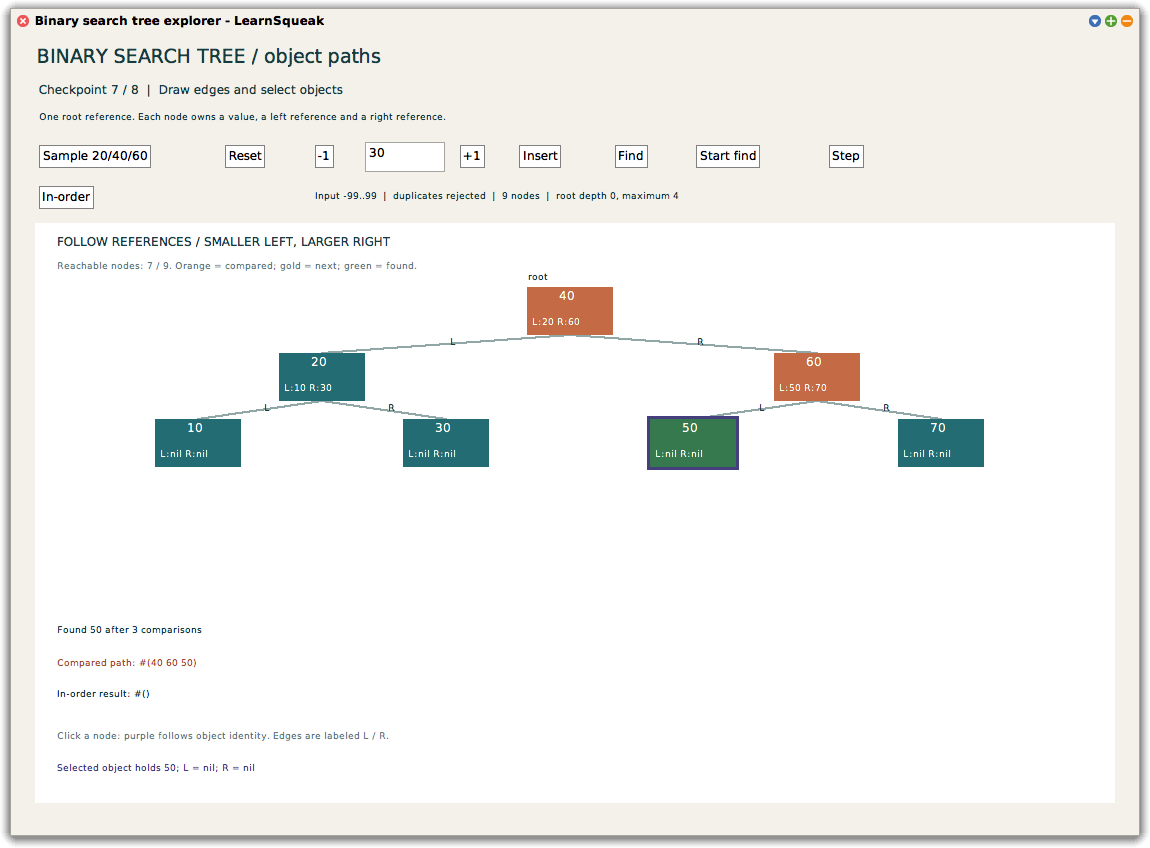
Now make the child references visible as lines. The model's layoutEntries query collects each reachable node together with its depth in in-order sequence. The view uses that sequence only to assign horizontal positions. A node's vertical position comes from its depth. This keeps different nodes in different horizontal slots, including an unbalanced chain, within the lesson's nine-node and depth-four limits.
For each node, drawEdgesOn: asks for its left and right references. A non-nil child produces a line from the parent's bottom center to the child's top center. The line receives an L or R label. Missing children remain visible as nil in the card text; they are not extra fake node objects. Edge drawing happens before card drawing, so the card bodies cover line endpoints cleanly. All drawing coordinates are derived from the panel's current position.
Clicking a card stores the underlying node object as selected. The purple outline follows identity, not the card's current rank. Inserting another value can shift horizontal positions while the selected object remains the same. The controller refresh clears selection if the object is no longer reachable, for example after Reset or loading a new sample. Clicking empty panel space clears it deliberately. The tests move the window before clicking a card to check that hit testing uses the actual coordinate system.
The example finds 50 in a seven-node tree and selects that same object. You should see the compared path 40, 60, 50, a green found card, and its purple selection outline. Inspect app selected, then compare it with app model root right left using ==. The picture explains references, but the Smalltalk objects remain the source of truth. This layout is intentionally simple; it is neither a balancing algorithm nor a claim of minimum-width tree drawing.
LSBinarySearchTree >> layoutEntries · instance side
File List → select search-tree-07.st → fileIn. The complete checkpoint installs all classes and support methods. Read or accept the highlighted methods in the System Browser on the named class and side.
Workspace → select the entire launcher → Do it. Use Inspect it on that whole block to keep the returned app available. Close the previous explorer first.
Real Squeak 6.1 SystemWindow capture after the exact launcher above. L/R edges connect seven nodes. Search path is #(40 60 50), with 50 green and outlined in purple.
08 · Validate the whole structure
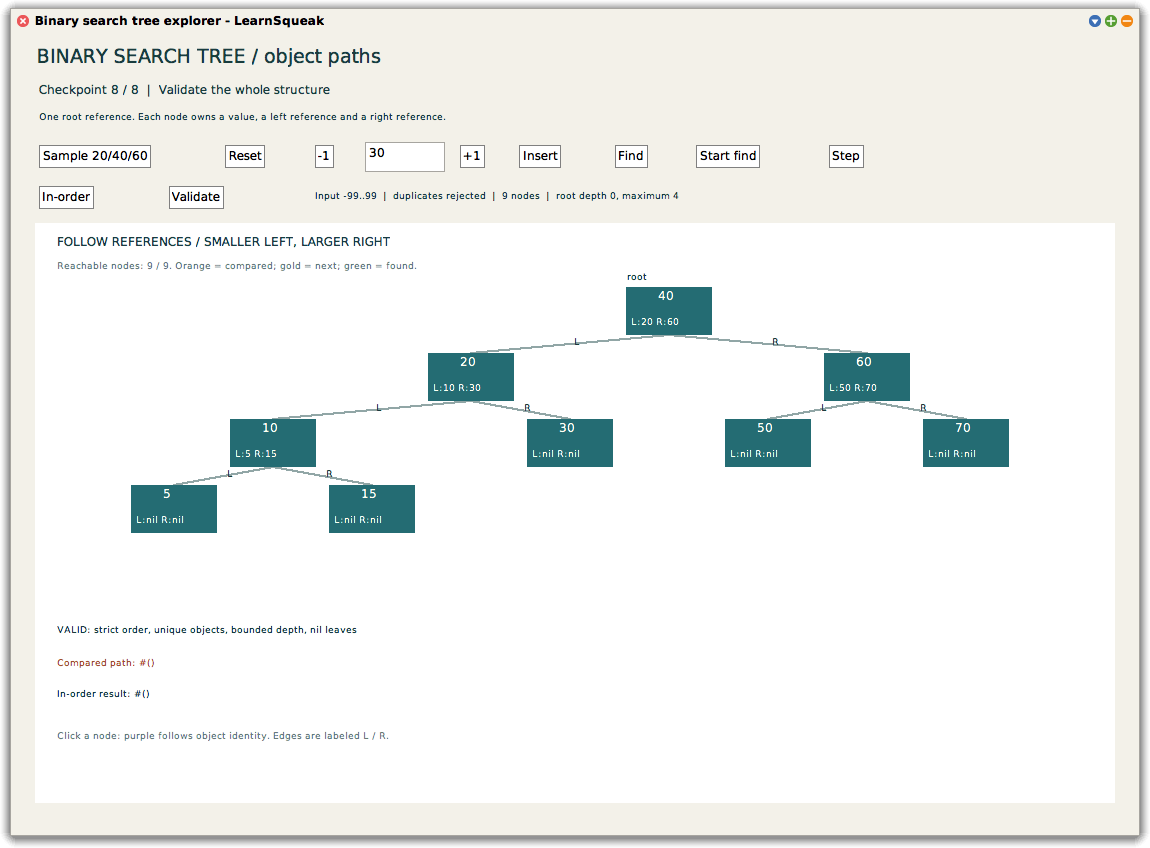
A valid binary search tree needs more than sorted-looking cards. Every child must be nil or a node. Each node object must be reached once, ruling out both cycles and shared children. Every payload must be a supported integer. The strict ordering must hold against all ancestors, and the teaching bounds must still hold. treeProblem checks these conditions with an IdentitySet and a recursive walk carrying low, high and depth.
The allowed interval becomes narrower at every branch. When visiting left, the current value becomes the upper bound; when visiting right, it becomes the lower bound. This catches a subtle mistake such as placing 50 under the right child slot of 20 while 20 is still inside 40's left subtree. Fifty is larger than its immediate parent, but violates the ancestor's upper bound of 40. A local parent-child check alone would accept it incorrectly.
The validator stops as soon as it finds a problem and returns explanatory text. validate turns that result into a visible VALID or INVALID status and a Boolean answer. Guarded search, insertion and traversal use the same structural checks. The panel suppresses the tree diagram when the structure is malformed, rather than trying to recursively draw an unsafe graph. Its bounded node snapshot can still report a limited reachable count.
The launcher fills nine nodes and validates them. Try a duplicate, then a new tenth value: both must leave the existing node identities and child references unchanged. For an Inspector experiment, use a separate model, deliberately create a cycle and ask treeProblem. Reset recovers even a damaged visible model by dropping root and clearing transient state. This workshop deliberately stops before deletion, rotations and balancing. Those operations deserve their own invariants and tests; this finished explorer focuses on construction, comparison paths, ordered traversal and safe visual inspection.
LSBinarySearchTree >> treeProblem · instance side
treeProblem
 | seen problem visit |
 seen := IdentitySet new. problem := nil.
 visit := [:node :low :high :depth |
  (node notNil and: [problem isNil]) ifTrue: [
   (node isKindOf: LSBSTNode)
    ifFalse: [problem := 'A child is not a node or nil']
    ifTrue: [
     (seen includes: node)
      ifTrue: [problem := 'A node is reached twice (cycle or shared child)']
      ifFalse: [
       (seen size >= capacity or: [depth > maxDepth])
        ifTrue: [problem := 'Diagram limit: nine nodes, depth at most four']
        ifFalse: [
         (self acceptsValue: node value)
          ifFalse: [problem := 'Payload must be an integer from -99 to 99']
          ifTrue: [
           (node value > low and: [node value < high])
            ifFalse: [problem := 'Strict search-tree order is broken']
            ifTrue: [seen add: node.
             visit value: node left value: low value: node value value: depth + 1.
             visit value: node right value: node value value: high value: depth + 1]]]]]]].
 visit value: root value: -100 value: 100 value: 0.
 ^ problem
LSBinarySearchTree >> validate · instance side
validate
 | problem |
 problem := self treeProblem.
 problem ifNotNil: [self note: 'INVALID: ', problem. ^ false].
 self note: 'VALID: strict order, unique objects, bounded depth, nil leaves'.
 ^ true
Where to run this
File List → select search-tree-08.st → fileIn. The complete checkpoint installs all classes and support methods. Read or accept the highlighted methods in the System Browser on the named class and side.
Workspace → select the entire launcher → Do it. Use Inspect it on that whole block to keep the returned app available. Close the previous explorer first.
Real Squeak 6.1 SystemWindow capture after the exact launcher above. Nine reachable nodes satisfy all invariants. The status begins VALID and the deepest nodes have depth three.
Watch the workflow
The animation is a scripted native replay, not a screen recording of a person. Each frame is a real Squeak SystemWindow imageForm after a specified action. Buttons receive native mouse down/up events; text changes are set through the native text morph. The kit contains the capture script, original PNG frames, state log and frame hashes. Playback timing is chosen for readability.
NATIVE SQUEAK CAPTURE
Scripted native Squeak replay: load three nodes, insert values from the input field, reject a duplicate, step through a found path and a missing path, traverse in order, select a node, validate and reset. All pictured states come from the actual Smalltalk application.
Practice with tested solutions
1. Measure the height recursively
Add height to LSBinarySearchTree. Define an empty tree as height 0 and a leaf as height 1. For a node, the answer is one plus the larger child height. Return nil for a malformed tree, and leave every reference unchanged. Notice that this height counts levels, while the app depth limit counts edges from root depth zero.
Hint
Use one recursive block with nil as its base case. Keep the guard outside recursion so the whole structure is checked once.
Show a tested solution
System Browser → LSBinarySearchTree instance side → accept this method. Or file in search-tree-exercise-1.st after the final application.
Workspace · Print it after installing the solution
Check the solution
| tree |
tree := LSBinarySearchTree new.
tree seedThree; insert: 30.
{tree height. tree inOrder}
Print it answers #(3 #(20 30 40 60)).
Tests cover empty, singleton, balanced, chain and corrupted structures, and verify that the queries preserve the original objects.
2. Collect an inclusive range with pruning
Add valuesBetween:and:. Return the values within the inclusive bounds in sorted order. Reject unsupported bounds, reversed bounds and malformed structures with nil. Return an empty Array when the valid interval contains no values. Use the search-tree rule to skip a left subtree when the current value is already at or below the lower bound, and skip a right subtree when it is at or above the upper bound.
Hint
Keep in-order visitation, but make the left and right recursive calls conditional. Check inclusion independently, so equal boundary values are retained.
Show a tested solution
System Browser → LSBinarySearchTree instance side → accept this method. Or file in search-tree-exercise-2.st after the final application.
Workspace · Print it after installing the solution
Check the solution
| tree |
tree := LSBinarySearchTree new.
tree seedThree; insert: 30; insert: 50.
{(tree valuesBetween: 30 and: 50). (tree valuesBetween: 20 and: 20). (tree valuesBetween: 70 and: 90)}
Print it answers #(#(30 40 50) #(20) #()).
Tests exercise both inclusive boundaries, singleton ranges, misses, empty trees, invalid intervals and cycle rejection. The query returns a new result Array without changing nodes.
When something looks wrong
The source file gives syntax errors in a Workspace
Use File List fileIn for complete .st files. Only the short launcher belongs in a Workspace; individual method definitions belong in the named Browser class and side.
The input looks changed but a previous number is used
Insert, Find and Start find read the current editor text. Step continues the target captured by the last Start find. Press Start find again to switch targets.
Insertion fails before nine nodes are present
The app also limits root-to-node depth to four. A sorted insertion sequence forms a chain and reaches that limit with five nodes. Reset and use a less skewed insertion order.
A duplicate did not create another card
This model stores distinct integer values. Duplicate insertion deliberately returns false and preserves the tree.
The diagram does not change after an Inspector edit
Model commands do not know the view. Send app refresh after direct model changes. Native buttons refresh automatically.
The panel says the structure needs repair
A low-level node edit violated a reference, value, depth or ordering rule. Read treeProblem in an Inspector, repair that reference, or use Reset to drop the current root.
Older checkpoints still have newer methods
File-in replaces methods but does not remove additional ones. Use a clean image copy to reproduce an earlier checkpoint exactly.
Verification, cleanup and next steps
Verified using the bundled Squeak 6.1 update 23976 compiler, Morphic UI and SUnit. The downloaded files are native Smalltalk source; the page does not claim an in-browser Squeak runtime.
54 application tests and 12 exercise tests passed in native Squeak 6.1 with zero failures and errors.
Coverage includes node identity, empty cases, both insertion branches, duplicate rejection, integer bounds, capacity and depth atomicity, direct and stepped successful/missing search, repeated Step and Reset, traversal copies, ancestor ordering, cycles, shared children, invalid payloads, actual native button events, pending text input, moved-window selection, rendering and close/reopen.
All eight checkpoints run in independent clean-image sessions; every displayed method is recompiled and the exact launcher is evaluated before its screenshot.
Both exercise solutions and their exact printed examples are executed in the image.
The complete ZIP is extracted to a new directory and its native tests, checkpoint captures and scripted replay are rerun from the extracted paths.
Close the explorer when finished. There is no stepping process or timer to stop. Keep the sources and lab ZIP to rebuild in a clean image; compare the explicit left/right references with the linked-list explorer next.
Bundled Squeak 6.1: Object, IdentitySet, OrderedCollection and Array — Node references, identity guards, bounded snapshots and traversal collections are executed in the image.
Bundled Squeak 6.1: Morph, SystemWindow, SimpleButtonMorph, PluggableTextMorph and MouseButtonEvent — Native drawing, text input, target/action dispatch and hit testing provide the working explorer.
Bundled Squeak 6.1: TestCase, TestSuite and PNGReadWriter — Behavioral tests and real imageForm captures are reproducible from the included scripts.
Distinct integer payloads from -99 to 99; at most nine reachable nodes and maximum depth four with root at zero.
This is an unbalanced tree. No deletion, rotation, balancing, persistence, concurrency or performance benchmark is implemented.
Live node references and low-level setters are exposed for teaching. Altering nodes during a saved search is outside the supported interaction flow; reset or start a new search after Inspector experiments.
Fixed-size layout uses in-order ranks and depth. It is a teaching diagram rather than a general graph-layout engine.
Guarding the whole structure before commands adds traversal work; do not infer production search complexity from this protected visual app.