LANGUAGES AS EXECUTABLE IDEAS
Build a Smalltalk-like language inside Squeak
Build Pebble: a message-language scanner, parser and interpreter in Squeak, with runnable examples, native tests and Alan Kay’s Lisp connection.
A language can explain its own rules
Alan Kay traced his attempt to design a very small object-oriented language to McCarthy’s compact, self-describing Lisp evaluator. The powerful idea is that a language’s rules can themselves be expressed as a program. In The Early History of Smalltalk, section 11.4, printed page 533, Kay connects that example with his challenge of writing an object-language interpreter in a small amount of code.
We borrow the method, not a claim that all of Smalltalk fits into this lesson: design a small language, represent its programs as data, and make a program interpret that data. McCarthy’s 1960 paper, section 3(f) specifies apply and eval. His history of Lisp also describes Steve Russell’s implementation of the evaluator. A definition still needs an underlying machine implementation.
Our interpreter is written in Squeak Smalltalk and executes a new teaching language named Pebble. It is not written in Pebble, so it is neither a self-hosted implementation nor a metacircular evaluator. Pebble resembles Smalltalk message syntax but does not implement the full Smalltalk language or create a new Squeak VM.
01 · Install the finished interpreter, then take it apart
Use a learning copy of native Squeak 6.1. You should know classes and instance variables, arrays and dictionaries, and blocks. The earlier tiny arithmetic-language workshop is a useful prerequisite. This lesson is different: it implements Smalltalk-style messages, three levels of message precedence, keyword selectors and a typed dispatch boundary.
- Save a copy of your image. Download PebbleLanguage.st beside it.
- Open Squeak’s File List, select that file and choose fileIn. It defines one class in its own category; it does not replace Squeak’s compiler.
- Open a Workspace. Select the complete expression below and choose Print it (Ctrl+P on many systems; use the menu if your shortcut differs).
- Open a System Browser and find PebbleLanguage. The rest of this tutorial explains the actual methods installed by that file.
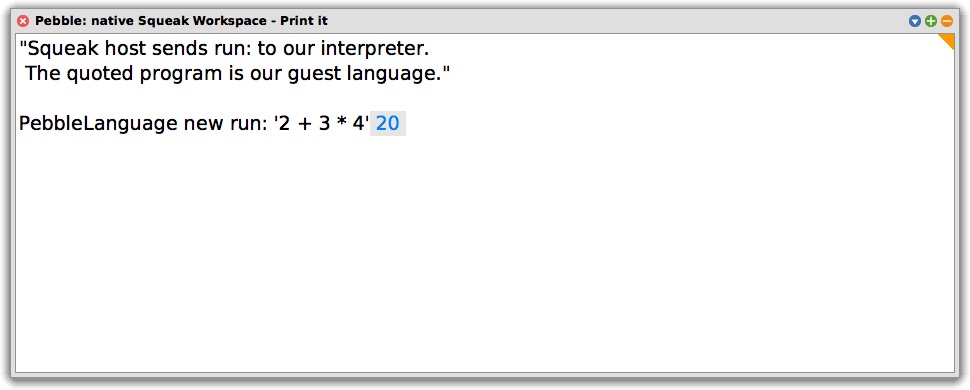
PebbleLanguage new run: '2 + 3 * 4'Expected: 20. In our guest language, as in Smalltalk, binary messages have equal precedence and associate left to right. This is not the conventional multiplication-before-addition rule of many arithmetic parsers.
Download the complete small lesson kit for source, native assertions and instructions. The kit is this lesson only, not the whole website. No package installation, account or network access is needed by the interpreter.
02 · Separate the host from the guest
In PebbleLanguage new run: '2 + 3 * 4', the outside expression is ordinary host Squeak. The text inside the quotes is a guest Pebble program. Squeak creates an interpreter object and sends it run:; Pebble then scans, parses and evaluates the guest text. There is no Compiler evaluate: call on the guest program.
- Literal forms: nonnegative integer text, single-quoted strings, and
true/false. Obtain negative values with subtraction ornegated. - Names: a letter followed by letters or digits. Names are case-sensitive. The two Boolean names cannot be assigned.
- Assignment:
name := expression. Separate statements with periods; a final period is optional. The result is the last statement’s value. - Messages bind in this order: primary/grouping, unary, binary, then keyword. Binary messages associate left to right.
- There are no guest classes, methods, blocks, closures, loops, cascades, comments, decimal literals, global objects or file/network operations.
A dot is always a statement separator. Thus 1.5 is two integer statements and returns 5; it is not a decimal literal. A leading minus is not part of the literal grammar: write 3 negated or 0 - 3. This explicit contract prevents a familiar-looking syntax from promising more than we implemented.
| language |
language := PebbleLanguage new.
language run: 'width := 6. height := 7. width * height'
Expected: 42. Keep the same interpreter object to reuse its environment; PebbleLanguage new creates a fresh one.
03 · Give the interpreter a small amount of state
To rebuild manually rather than file in the complete source, accept this class definition in a Browser, then accept the following instance-side methods. Method definitions belong in the Browser, not in a Workspace. The downloadable file is the reliable one-step route; these pieces show how to construct the same object.
Object subclass: #PebbleLanguage
    instanceVariableNames: 'tokens cursor environment'
    classVariableNames: ''
    poolDictionaries: ''
category: 'LearnSqueak-Pebble'initialize
super initialize.
environment := Dictionary new.environment
^ environment copyreset
environment removeAllrun: source
^ self evaluate: (self parse: source)parse: source
tokens := self tokenize: source.
cursor := 1.
^ self programtokens and cursor belong to the current parse. environment belongs to the interpreter across successful runs. Returning a copy prevents a caller from editing the dictionary through the accessor. It is a shallow copy, not a general deep-copy guarantee.
run: first builds a complete syntax tree and only then evaluates it. Syntax errors therefore happen before any statement in that program runs. Later runtime errors have different state semantics, which we test below.
04 · Turn characters into positioned tokens
A token is a three-element Array: kind, value, one-based character position. The scanner consumes spaces, reads consecutive digits or name characters, recognizes :=, and distinguishes a keyword such as between: from a unary name. A string uses doubled quotes to represent one quote inside it. The final end token lets the parser stop without reading past the token array.
tokenize: source
 | out i start ch value closed |
 out := OrderedCollection new. i := 1.
 [i <= source size] whileTrue: [
  ch := source at: i.
  ch isSeparator
   ifTrue: [i := i + 1]
   ifFalse: [
    start := i.
    ch isDigit ifTrue: [
     [i <= source size and: [(source at: i) isDigit]] whileTrue: [i := i + 1].
     out add: {#number. (source copyFrom: start to: i - 1) asNumber. start}
    ] ifFalse: [ch isLetter ifTrue: [
     [i <= source size and: [(source at: i) isAlphaNumeric]] whileTrue: [i := i + 1].
     value := source copyFrom: start to: i - 1.
     (i <= source size and: [(source at: i) = $: and: [i = source size or: [(source at: i + 1) ~= $=]]])
      ifTrue: [out add: {#keyword. value, ':'. start}. i := i + 1]
      ifFalse: [out add: {#name. value. start}]
    ] ifFalse: [ch = $' ifTrue: [
     value := WriteStream on: String new. closed := false. i := i + 1.
     [i <= source size and: [closed not]] whileTrue: [
      ch := source at: i. i := i + 1.
      ch = $' ifTrue: [
       (i <= source size and: [(source at: i) = $'])
        ifTrue: [value nextPut: $'. i := i + 1]
        ifFalse: [closed := true]
      ] ifFalse: [value nextPut: ch]].
     closed ifFalse: [self error: 'Unclosed string at character ', start printString].
     out add: {#string. value contents. start}
    ] ifFalse: [
     (ch = $: and: [i < source size and: [(source at: i + 1) = $=]])
      ifTrue: [out add: {#assign. ':='. start}. i := i + 2]
      ifFalse: [
       ('()+-*/<>=~.,' includes: ch)
        ifFalse: [self error: 'Unexpected character at character ', i printString].
       value := ch asString. i := i + 1.
       (('<>~' includes: ch) and: [i <= source size and: [(source at: i) = $=]])
        ifTrue: [value := value, '='. i := i + 1].
       out add: { ((ch = $() ifTrue: [#left] ifFalse: [ch = $) ifTrue: [#right] ifFalse: [ch = $. ifTrue: [#period] ifFalse: [#binary]]]). value. start}
      ]
    ]]]]].
 out add: {#end. ''. source size + 1}.
^ out asArrayPebbleLanguage new tokenize: '2 + 3'The resulting collection contains number 2 at character 1, binary selector + at character 3, number 3 at character 5, then an end token at character 6. Inspect the Array to see those triples. Tokenizing alone does not execute any message.
Notice how every scanner branch advances i or signals an error. This makes malformed characters fail instead of leaving a stationary scan loop. It does not impose an input-size or memory budget.
05 · Let the grammar choose the tree
Here is the grammar we implement. Braces mean repetition, brackets mean optional text, and the quoted punctuation is part of Pebble. These notation marks are explanatory, not extra guest syntax.
program       = statement { "." statement } [ "." ]
statement     = name ":=" keywordExpr | keywordExpr
keywordExpr   = binaryExpr { keyword binaryExpr }
binaryExpr    = unaryExpr { binarySelector unaryExpr }
unaryExpr     = primary { name }
primary       = integer | string | name | "(" keywordExpr ")"
The keyword line creates one combined selector, such as between:and:, with one argument per keyword. A keyword argument can contain unary and binary messages. To place another keyword expression inside an argument, put it in parentheses.
kind
^ (tokens at: cursor) firsttake
| token |
token := tokens at: cursor. cursor := cursor + 1.
^ token secondfail: message
self error: message, ' at character ', (tokens at: cursor) third printStringprogram
| nodes |
nodes := OrderedCollection new.
self kind = #end ifTrue: [self fail: 'Expected a program'].
[self kind = #end] whileFalse: [
nodes add: self statement.
self kind = #period
ifTrue: [self take]
ifFalse: [self kind = #end ifFalse: [self fail: 'Expected a period']]].
^ {#program. nodes asArray}statement
| name |
(self kind = #name and: [(tokens at: cursor + 1) first = #assign]) ifTrue: [
name := self take. self take.
(#('true' 'false') includes: name) ifTrue: [self fail: 'Reserved name'].
^ {#assign. name. self keywordExpression}].
^ self keywordExpressionThe two-token lookahead in statement recognizes an assignment only at statement level. Parentheses group expressions, not whole statement lists. program rejects empty programs, missing separators and consecutive periods.
keywordExpression
 | receiver selector args |
 receiver := self binaryExpression.
 self kind = #keyword ifFalse: [^ receiver].
 selector := ''. args := OrderedCollection new.
 [self kind = #keyword] whileTrue: [
  selector := selector, self take.
  args add: self binaryExpression].
^ {#send. receiver. selector. args asArray}binaryExpression
| receiver selector argument |
receiver := self unaryExpression.
[self kind = #binary] whileTrue: [
selector := self take. argument := self unaryExpression.
receiver := {#send. receiver. selector. {argument}}].
^ receiverunaryExpression
| receiver |
receiver := self primary.
[self kind = #name] whileTrue: [
receiver := {#send. receiver. self take. #()}].
^ receiverprimary
| value |
(#(#number #string) includes: self kind) ifTrue: [^ {#literal. self take}].
self kind = #name ifTrue: [
value := self take.
value = 'true' ifTrue: [^ {#literal. true}].
value = 'false' ifTrue: [^ {#literal. false}].
^ {#variable. value}].
self kind = #left ifTrue: [
self take. value := self keywordExpression.
self kind = #right ifFalse: [self fail: 'Expected closing parenthesis'].
self take. ^ value].
^ self fail: 'Expected a value'The nesting of these methods is the precedence rule. Unary parsing finishes before binary parsing can combine its receiver and argument. Binary parsing repeatedly folds the previous receiver into a new send node. Keyword parsing receives that finished binary expression and collects its named arguments.
06 · Inspect programs without running them
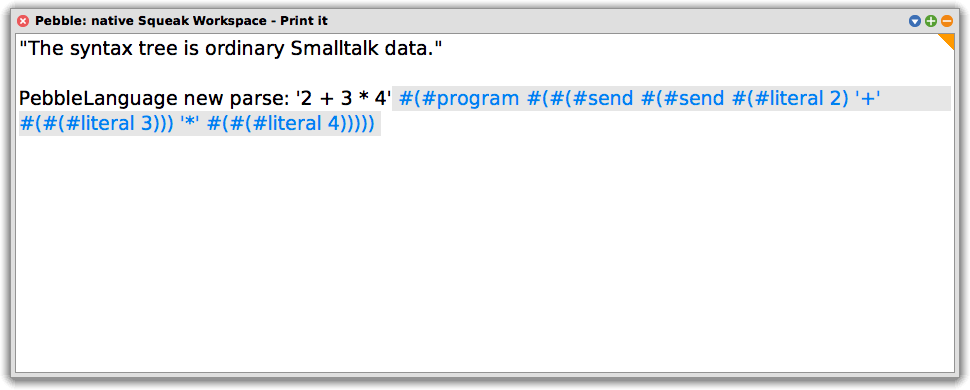
The parser creates Arrays tagged #literal, #variable, #assign, #send and #program. A send is {#send. receiverTree. selectorString. argumentTrees}. The tree contains descriptions, not already computed arithmetic answers.
PebbleLanguage new parse: '2 + 3 * 4'The outer program contains a send of * to the tree for 2 + 3, with literal 4 as its argument. In human-readable notation: send(send(2, +, 3), *, 4). It is not send(2, +, send(3, *, 4)). Inspect the Array in Squeak rather than relying on a particular print layout.
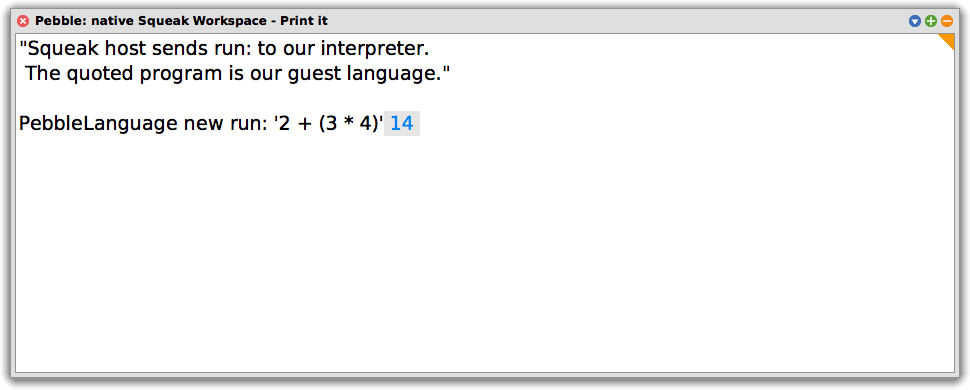
PebbleLanguage new run: '2 + (3 * 4)'Expected: 14. The parentheses explicitly change the receiver/argument tree. Likewise 2 + 3 squared gives 11, because squared is unary and binds before +.
07 · Walk the tree with an explicit environment
evaluate: node
 | tag result receiver arguments |
 tag := node first.
 tag = #literal ifTrue: [^ node second].
 tag = #variable ifTrue: [^ environment at: node second ifAbsent: [self error: 'Unknown variable: ', node second]].
 tag = #assign ifTrue: [
  result := self evaluate: node third.
  environment at: node second put: result. ^ result].
 tag = #program ifTrue: [
  result := nil. node second do: [:each | result := self evaluate: each]. ^ result].
 tag = #send ifTrue: [
  receiver := self evaluate: node second.
  arguments := node fourth collect: [:each | self evaluate: each].
  ^ self send: node third to: receiver arguments: arguments].
 self error: 'Unknown syntax node'
A literal evaluates to its value. A variable looks up a name. An assignment evaluates its right-hand side before changing the dictionary. A program evaluates statements in order and returns the last result. A send evaluates the receiver and each argument, then delegates to one boundary method.
That boundary is a deliberate language-design choice. We use host Squeak numbers and strings as values, but we do not expose all their host methods to guest text. In particular, a guest selector is never passed unchecked to perform:.
08 · Decide which messages the new language means
send: selector to: receiver arguments: args
 "Only these language primitives can reach host objects. No general perform:."
 args isEmpty ifTrue: [
  (receiver isNumber and: [#('squared' 'negated' 'abs') includes: selector]) ifTrue: [
   selector = 'squared' ifTrue: [^ receiver * receiver].
   selector = 'negated' ifTrue: [^ 0 - receiver].
   ^ receiver abs].
  receiver isString ifTrue: [
   selector = 'size' ifTrue: [^ receiver size].
   selector = 'asUppercase' ifTrue: [^ receiver asUppercase].
   selector = 'asLowercase' ifTrue: [^ receiver asLowercase].
   selector = 'reversed' ifTrue: [^ receiver reversed]]].
 args size = 1 ifTrue: [
  selector = '=' ifTrue: [^ receiver = args first].
  selector = '~=' ifTrue: [^ receiver ~= args first].
  (receiver isNumber and: [args first isNumber]) ifTrue: [
   selector = '+' ifTrue: [^ receiver + args first].
   selector = '-' ifTrue: [^ receiver - args first].
   selector = '*' ifTrue: [^ receiver * args first].
   selector = '/' ifTrue: [args first = 0 ifTrue: [self error: 'Division by zero']. ^ receiver / args first].
   selector = '<' ifTrue: [^ receiver < args first].
   selector = '>' ifTrue: [^ receiver > args first].
   selector = '<=' ifTrue: [^ receiver <= args first].
   selector = '>=' ifTrue: [^ receiver >= args first]].
  (selector = ',' and: [receiver isString and: [args first isString]]) ifTrue: [^ receiver, args first]].
 args size = 2 ifTrue: [
  (selector = 'between:and:' and: [receiver isNumber and: [args allSatisfy: [:each | each isNumber]]])
   ifTrue: [^ receiver between: args first and: args second].
  (selector = 'copyFrom:to:' and: [receiver isString and: [args allSatisfy: [:each | each isInteger]]]) ifTrue: [
   ((args first between: 1 and: receiver size) and: [args second between: args first and: receiver size])
    ifFalse: [self error: 'Substring bounds out of range'].
   ^ receiver copyFrom: args first to: args second]].
 self error: 'Unsupported message or argument types: ', selector
The dispatcher recognizes exact selector/arity/type combinations. For numbers it supports arithmetic, comparisons, squared, negated, abs, and between:and:. For strings it supports case conversion, size, reversal, comma concatenation and a checked nonempty copyFrom:to:. Equality and inequality accept the supported values. Division can return Squeak’s exact Fraction even though the scanner has only integer literals.
This is a teaching interpreter with explicit primitives, not a security sandbox. It has no fuel counter, recursion-depth limit or arithmetic-size budget, and its host API is public. Use short trusted examples in a learning image. Deeply nested or enormous input may consume resources. It is not an internet service or a place to run untrusted programs.
09 · Write a few actual guest programs
| language |
language := PebbleLanguage new.
language run: 'score := 7. score between: 1 + 2 and: 10'
Expected: true. The selector is one message named between:and:; its first argument is the binary expression 1 + 2.
PebbleLanguage new run: '''hello'' asUppercase'Expected: 'HELLO'. The doubled quotes in the outer Squeak string represent guest quote characters. The guest program itself is simply 'hello' asUppercase. Do not add Squeak’s outer quoting when typing guest source into your own future editor.
PebbleLanguage new run: '''Smalltalk'' copyFrom: 1 to: 5'Expected: 'Small'. Indexes are one-based. An invalid or reversed range signals an error before copying.
| language |
language := PebbleLanguage new.
language run: 'total := 10'.
language run: 'total := total + 5'.
language run: 'total'
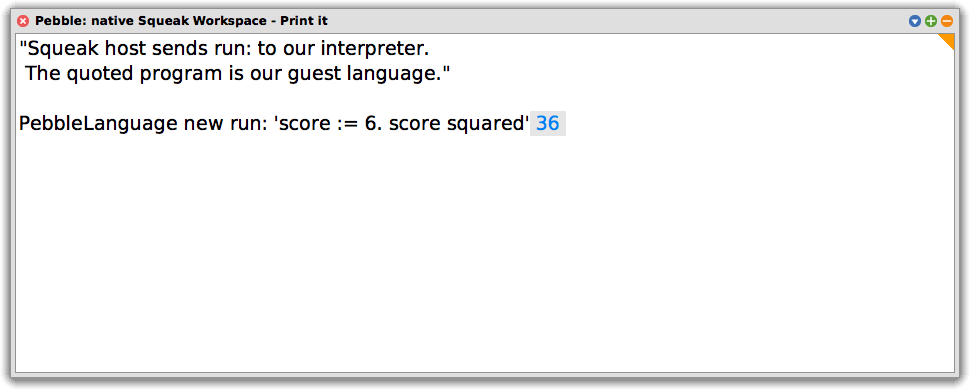
Expected: 15. Reusing one object retains variables. Send reset to clear them; a subsequent reference to total will be unknown.
10 · Make failure understandable and recoverable
[PebbleLanguage new run: '2 +']
    on: Error
    do: [:error | error messageText]
Expected: 'Expected a value at character 4'. Catching Error here is host Squeak behavior; Pebble does not have an exception syntax.
missing + 1: unknown variable.10 / 0: division by zero.2 yourself: unsupported message, even though a Squeak object normally understands it.'abc' copyFrom: 0 to: 2: substring bounds out of range.(2 + 3: missing closing parenthesis at the end position.
State is not globally transactional. In x := 1. y := 1 / 0, x is retained but y is not assigned. An individual failing right-hand side leaves that target’s previous value unchanged. Conversely, a parse error anywhere prevents all evaluation, because the entire program is parsed first. The assertion suite checks these distinctions and verifies that a later valid run still works.
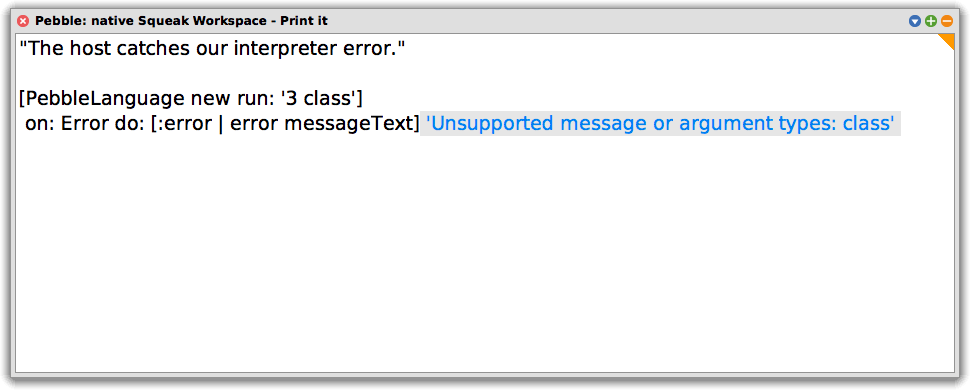
11 · Change one rule and see the language change
Try adding a numeric unary message cubed. The parser already treats any unary name as a selector, so no scanner or parser change is needed. In the no-argument numeric branch of send:to:arguments:, add cubed to the recognized names and return the cube in its own branch before the existing final abs return.
selector = 'cubed' ifTrue: [^ receiver * receiver * receiver].Then PebbleLanguage new run: '3 cubed' should yield 27. Add an assertion for that result and one rejecting a string receiver. This extension was separately tested in native Squeak (3 cubed gives 27; 2 cubed + 1 gives 9). The shipped baseline intentionally does not include it.
Adding blocks would be a much larger step: you would need syntax, a closure representation, a captured lexical environment and application rules. Adding guest classes and method lookup would similarly require a genuine object model, not merely allowing arbitrary host messages. Start by writing those contracts before extending the parser.
Verification, downloads and boundaries
The accompanying native assertion expression tests literal scanning, quoted strings, tokens, AST structure, unary/binary/keyword precedence, variable persistence, error recovery, explicit selector rejection and generated arithmetic comparisons. Download PebbleChecks.st, open it as text after filing in PebbleLanguage.st, select the complete expression and Print it. Expect 453 checks passed. Two further native checks verified the cubed extension in a disposable image without changing the shipped baseline. The actual result and environment details are recorded in the verification log.
The screenshots are native Squeak output from the downloaded implementation, not HTML imitations. Any animation replays captured evaluated states rather than claiming to be mouse footage. No browser-SqueakJS compatibility is claimed for this new package. The page uses the existing site’s themes and copy controls.
There is no timer or background process in Pebble. Close the demonstration Workspaces when finished. Keep your working learning image, or discard that copy to remove the class. Continue with reading Squeak source, SUnit, or the earlier arithmetic parser workshop.