The separate playground loads the real Smalltalk image on demand. This lesson keeps its native setup instructions; browser compatibility notes appear beside each demo.
Before you start
Build Sorting Lab: labeled bars, bubble/insertion/selection strategies, step/run/pause/reset, deterministic fixtures, shuffle, speed controls and a fair comparison of operation counts. Learn how a resumable model and Morphic view fit together.
Each of the nine checkpoints is a complete, cumulative .st file. File it in, read and accept the highlighted method on the named class, then evaluate the exact Workspace block. Every checkpoint has also been executed independently in a clean baseline image.
Squeak 6.1, 64-bit build 23976, with the bundled Morphic and SUnit tools; no extra packages or network data
Workspace Do It / Print It, Browser method editing, arrays, blocks, instance variables and basic inheritance
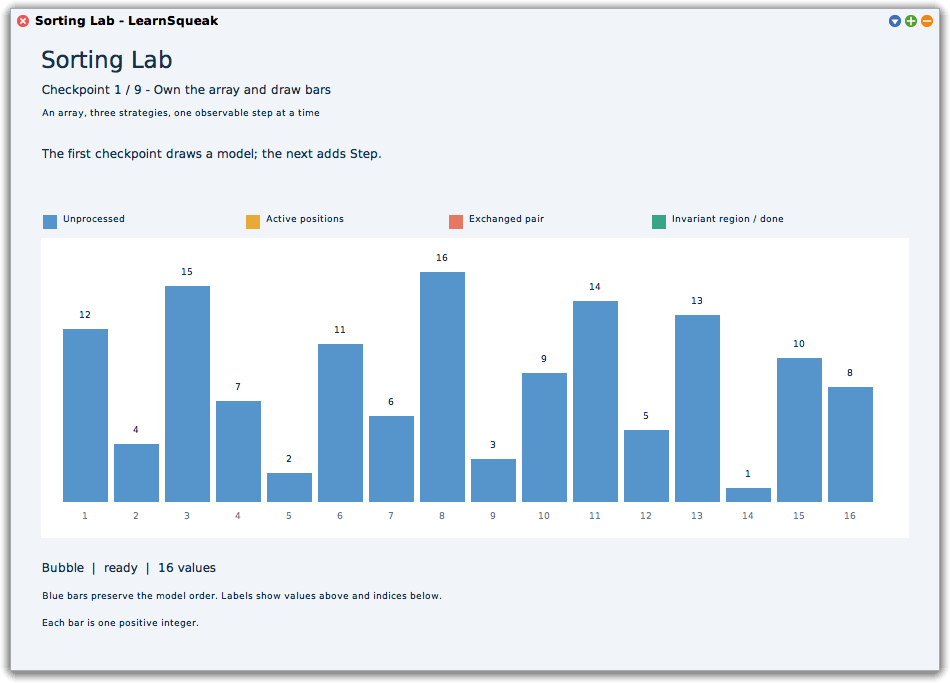
A sorting visualiser is easier to reason about when the array exists independently of its picture. LSSortModel owns two arrays: original is the input we can restore; values is the working copy. Loading validates the entire input before replacing either array. This lesson accepts arrays of zero to 32 integers from 1 through 99. That keeps the view readable and makes the supported domain explicit. Empty and singleton inputs are already complete.
LSSortApp coordinates the window, controls and model. LSBars is a Morph that reads the model and draws rectangles. LSSortWindow fixes the example's extent so the absolute layout stays intact. The view does not sort or alter the array. Model queries return copies, so an Inspector experiment on a returned array cannot secretly change the running application.
In drawOn:, width is the available horizontal space divided by the item count; height is value times a scale based on the largest value. Positive values rise from a shared baseline. The empty-input branch returns before division. Value labels belong above the bars, while one-based array indices sit below them. Rescaling each fixture makes its distribution readable, but means equal pixel heights in different fixtures need not represent equal values.
Read load: first, then inspect the view in the complete source. This checkpoint deliberately provides a visible model before adding an algorithm. The sample is deterministic, which will make later screenshots and operation counts reproducible.
Where to run this
System Browser → LSSortModel → instance side → tutorial. Accept the complete method below after filing in this checkpoint. The download contains every required class and method.
File List → fileIn sorting-01.st. Then Workspace → select the entire block → Do It.
Workspace · run after installing this checkpoint
| app |
app := LSSortApp open.
app
Watch for: The load: API accepts Arrays, not an OrderedCollection. Convert with asArray when needed. There are no zero or negative bar values in this lesson.
Try it: Print It on (LSSortModel new load: #(3 0 1)). Expect false. Inspect model values and model original to see independent arrays.
Expected result
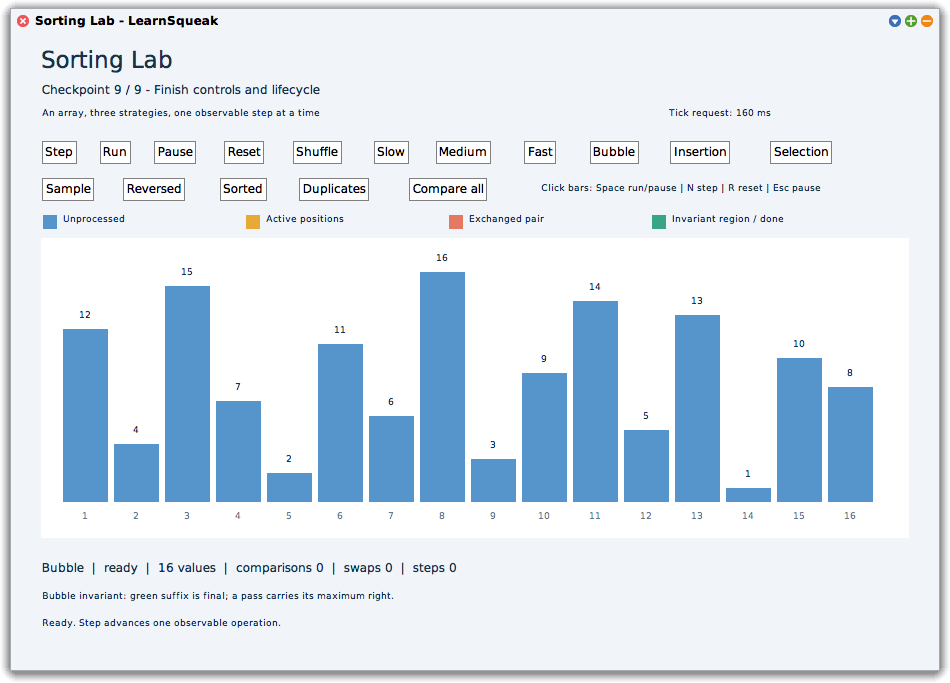
A native Sorting Lab window with 16 labeled blue bars in the supplied sample order. No sorting controls appear yet.
Actual Squeak 6.1 window from checkpoint 1, using the exact Workspace block above.
02 · Make bubble sort resumable
An ordinary bubble-sort loop finishes before the screen can show its decisions. Turn its loop variables into the state of an object instead. LSSortStrategy defines the model:, reset and advance protocol. LSBubbleSort holds a cursor, the unsorted boundary, and a flag recording whether the current pass exchanged anything. LSSortModel sends one advance per step; it does not know how the strategy chooses its next pair.
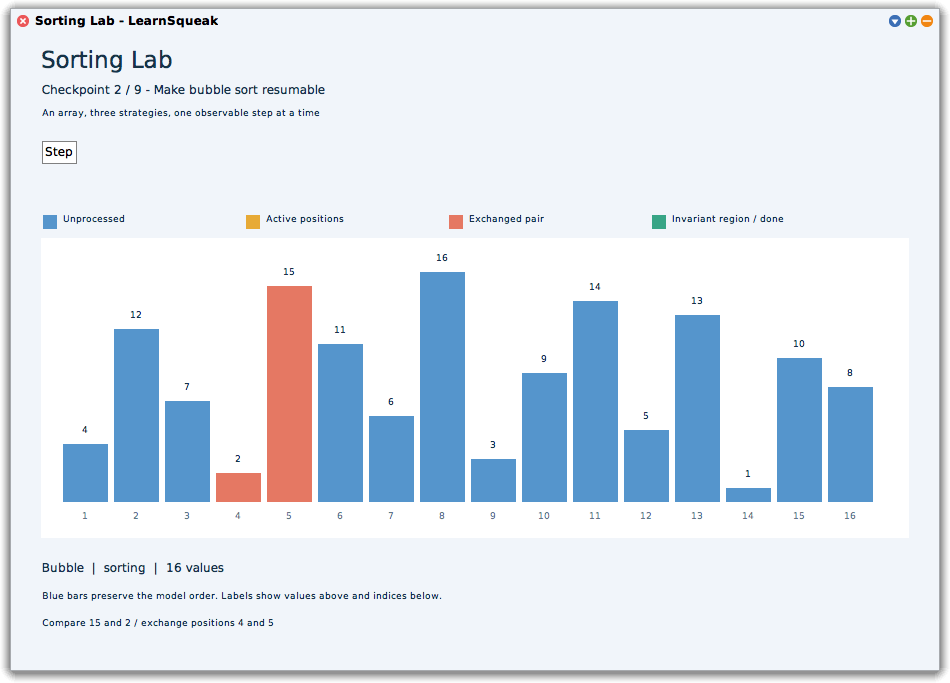
Each bubble advance compares adjacent positions. If the left value is greater, the model exchanges them and counts one swap. The comparison and its optional exchange form one observable step. Moving the cursor across a pass carries the largest remaining value to the boundary. At the end of that pass the boundary moves left; a pass without exchanges finishes early because all neighboring pairs were already ordered.
The algorithm's state survives between button clicks. There is no waiting loop, process or Delay in the model. stepSort changes ready to sorting, counts the operation, and delegates. finish changes the state to done and clears the active pair. Calling Step after completion does nothing. With fewer than two elements the strategy is never advanced, so no invalid pair is indexed.
The displayed method is a small state machine: read its instance variables in an Inspector after each click. The run block advances four times. The first large value has moved right, while the rest of the array is still visibly unfinished.
Where to run this
System Browser → LSBubbleSort → instance side → tutorial. Accept the complete method below after filing in this checkpoint. The download contains every required class and method.
Actual Squeak 6.1 window from checkpoint 2, using the exact Workspace block above.
03 · Expose the sorting invariant
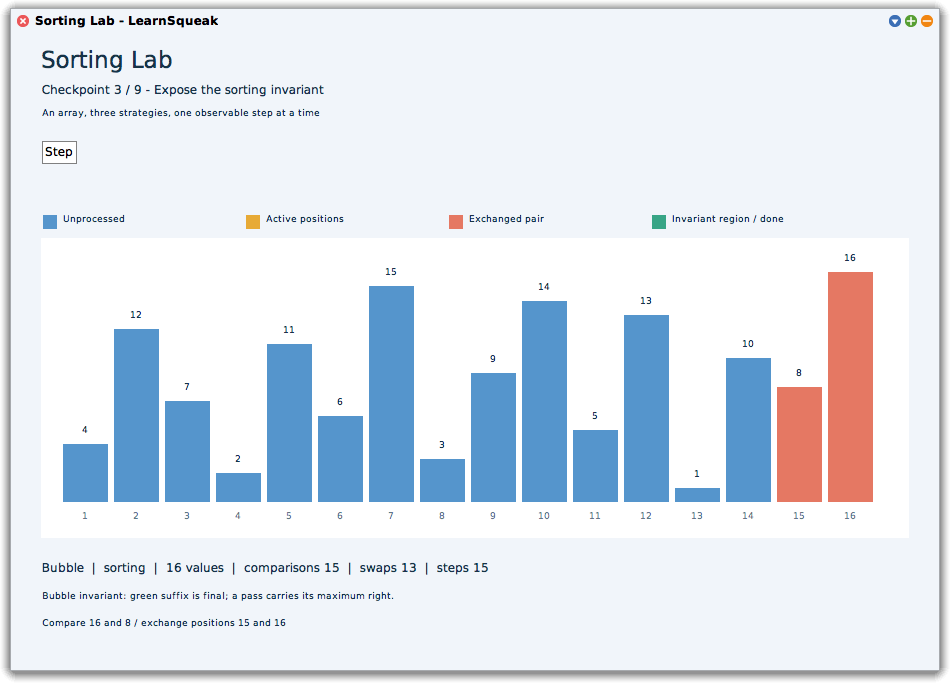
Colors should express a fact about the algorithm, not merely decorate its progress. Bubble sort's green suffix is already in its final sorted positions. Every new pass works only to its left. LSBubbleSort answers orderedIndex: without copying or rescanning the array: an index belongs to that suffix exactly when it is greater than boundary. Completion makes every position green.
Blue means unprocessed for the current invariant. Amber marks active positions; coral means the current step exchanged them. Active highlighting takes precedence over green, so a highlighted bar can temporarily conceal part of the known region. The status sentence explains the actual operation. This distinction matters later: selection sort also has a placement step which may make neither a comparison nor a swap.
The model owns the counters. compareAt:with: increments comparisons exactly once; swapAt:with: increments swaps only when two distinct positions are exchanged. operations counts calls that actually advance the strategy. Avoid deriving these numbers from repainting or elapsed time: resizing or exposing a window should not change a measurement.
After exactly 15 bubble steps on the 16-value sample, the first pass has placed 16 at the far right. That is a visual invariant you can inspect and an executable condition you can test. The native tests later check both the final answer and certified positions at intermediate steps.
LSBubbleSort · instance-side method
orderedIndex: index
 ^ index > boundary
Where to run this
System Browser → LSSortModel → instance side → tutorial. Accept the complete method below after filing in this checkpoint. The download contains every required class and method.
LSSortModel · instance-side method
compareAt: left with: right
 comparisons := comparisons + 1. active := {left. right}.
 note := 'Compare ', (values at: left) printString, ' and ', (values at: right) printString.
 ^ (values at: left) > (values at: right)
File List → fileIn sorting-03.st. Then Workspace → select the entire block → Do It.
Actual Squeak 6.1 window from checkpoint 3, using the exact Workspace block above.
04 · Run, pause, step and reset
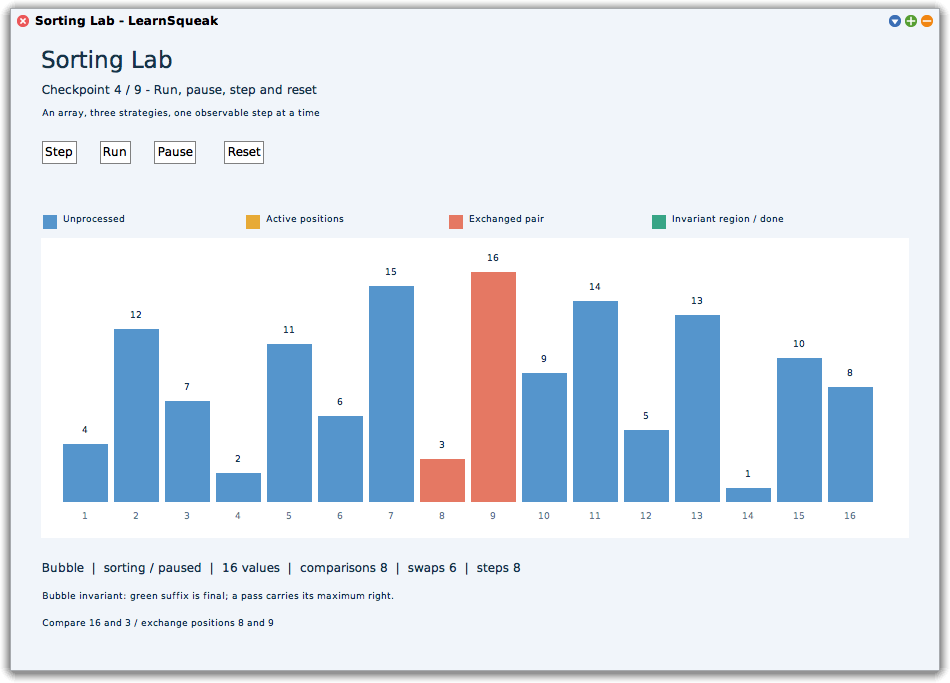
Morphic already provides a scheduler. Run sets running, remembers the owning world and calls startStepping. stepTime requests a delay in milliseconds. Each step callback performs one model operation, refreshes the view, and unregisters as soon as the model is done. The scheduler can be late under load; its interval is a request, not a timing guarantee.
Pause stops scheduling while preserving values, the strategy cursor and every counter. Run resumes that exact state. Step first pauses, then advances once. Reset stops scheduling and restores original, recreates the strategy, clears the counters and returns a nontrivial array to ready. Run on a completed model does nothing until you reset or choose new input. Repeated Run calls are harmless.
Two lifecycle details prevent invisible work. wantsSteps answers running rather than accepting Morph's default scheduling on open. stopActivity also unregisters from the remembered world: a SystemWindow may already have been detached when it tells its model that it is closing. A late callback sees running false and does nothing.
The run block starts, invokes eight real native callbacks, then pauses. It does not sleep or block the user interface. Try pausing after one step, inspect the working values, resume, and compare with the result of manual stepping from the same original array.
System Browser → LSSortApp → instance side → tutorial. Accept the complete method below after filing in this checkpoint. The download contains every required class and method.
LSSortApp · instance-side method
step
 running ifFalse: [^ self].
 model stepSort. model state = #done ifTrue: [self stopActivity]. self refresh
File List → fileIn sorting-04.st. Then Workspace → select the entire block → Do It.
Actual Squeak 6.1 window from checkpoint 4, using the exact Workspace block above.
05 · Choose inputs and animation speed
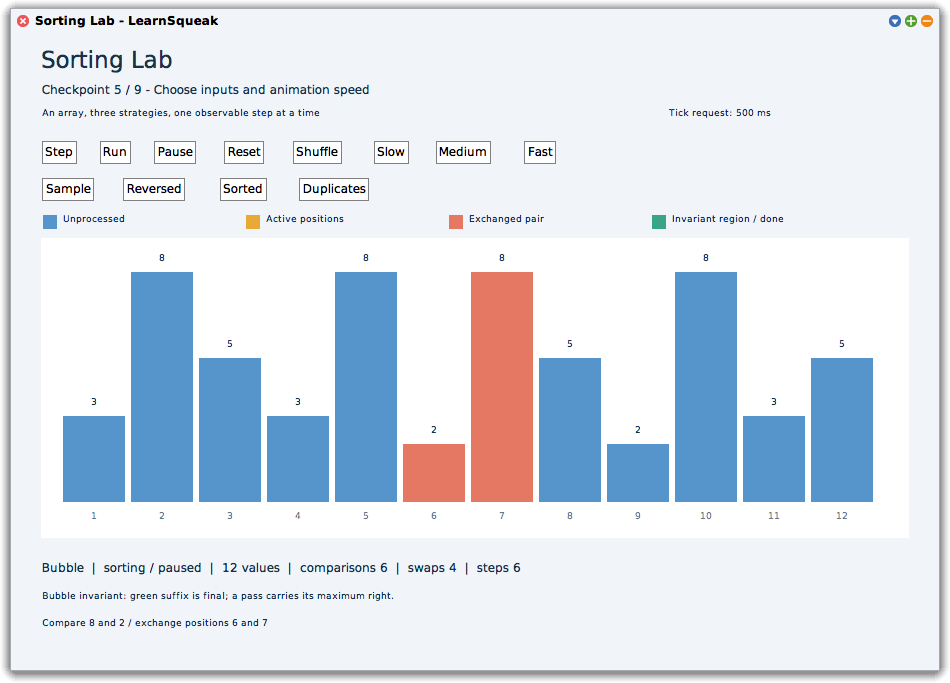
A useful experiment needs reproducible inputs as well as random ones. Sample, Reversed, Sorted and Duplicates are deterministic fixtures. They replace original and reset all progress. Reset then returns to that chosen input. Shuffle applies Fisher-Yates to a copy of original: for each position from the end, choose a uniformly distributed earlier position including itself and exchange. It preserves duplicate counts and makes the shuffled result the new reset input. A shuffle is allowed to return the same order.
All input changes stop animation before changing the model. The fixed speed choices request 500, 160 or 40 milliseconds per operation; changing speed while running unregisters and registers the callback with the new interval. It changes presentation speed without changing the algorithm, comparisons or swaps. The selected request remains visible above the controls.
The on-screen fixtures stay small, but the public load: contract also covers empty input, one value and up to 32 bars. Try app fixture: #empty or app fixture: #singleton from a Workspace. Empty input displays an explanatory message instead of attempting division by zero. Bad inputs return false without changing the current model.
The checkpoint deliberately uses a duplicate-rich fixture and advances six times. Repeated heights let you see why equality should not trigger an exchange in the adjacent-swap algorithms. In the model, comparison uses strict greater-than rather than greater-than-or-equal.
Where to run this
System Browser → LSSortApp → instance side → tutorial. Accept the complete method below after filing in this checkpoint. The download contains every required class and method.
LSSortApp · instance-side method
shuffle
 | data random other temporary |
 self stopActivity. data := model original. random := Random new.
 data size to: 2 by: -1 do: [:index |
  other := random nextInt: index. temporary := data at: index.
  data at: index put: (data at: other). data at: other put: temporary].
 model load: data. comparison := ''. self refresh
File List → fileIn sorting-05.st. Then Workspace → select the entire block → Do It.
Actual Squeak 6.1 window from checkpoint 5, using the exact Workspace block above.
06 · Swap in insertion sort
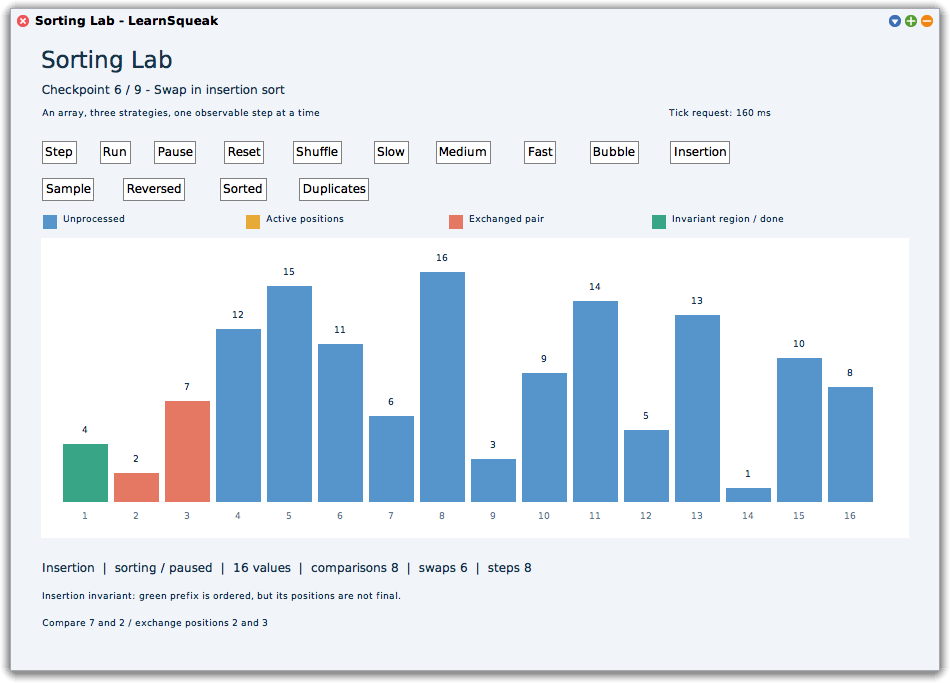
The existing view and controls should not need a second sorting loop. Add LSInsertionSort as another LSSortStrategy and let the model choose its class. The new object stores outer, the item currently being inserted, and cursor, that item's current position. Before an insertion starts, the prefix before outer is ordered. Comparing backward and exchanging an inverted neighboring pair moves the new item left until it fits.
This implementation uses adjacent exchanges, not the shift-and-insert implementation found in many textbooks. Each exchange is a swap in our metrics. A step that finds the preceding value less than or equal to the current value ends that insertion without exchanging; reaching position one also ends it. nextInsertion advances outer and resets cursor, or finishes when every item has been inserted.
The green region now means the prefix strictly before cursor is ordered. It can shrink while an insertion moves left, then grow when that insertion finishes. Those positions are not necessarily final: later values can move ahead of them. The label explicitly distinguishes this invariant from bubble sort's final suffix. Neither algorithm exchanges equal adjacent values; that is the basis of their stability, though this integer-only display does not attach identity labels to equal items.
Switching algorithms restores the same original input instead of handing a partially sorted array to the new strategy. That makes a manual comparison fair and avoids mismatched strategy state. The Workspace block starts insertion sort on the normal sample and pauses after eight operations.
System Browser → LSInsertionSort → instance side → tutorial. Accept the complete method below after filing in this checkpoint. The download contains every required class and method.
Watch for: The green insertion prefix is ordered, not final. Later insertions can move those values to new positions.
Try it: Choose Reversed and watch the green prefix shrink as a newly inserted value moves left. Switch back to Bubble to restore the same original fixture.
Expected result
Insertion sorting after eight comparisons and six adjacent swaps. Its ordered prefix is green where the active pair does not cover it.
Actual Squeak 6.1 window from checkpoint 6, using the exact Workspace block above.
07 · Scan with selection sort
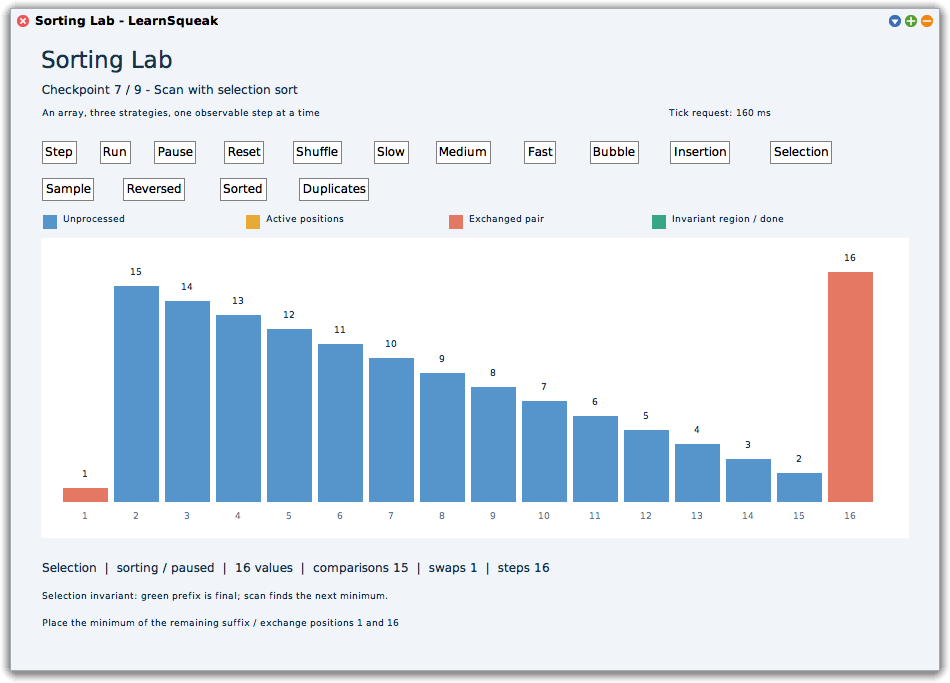
Selection sort does different work. LSSelectionSort stores head, the position to fill; scan, the next candidate; minimum, the best candidate seen; and placing, whether scanning has finished. A scan step compares the current minimum with one candidate and advances scan. After the entire remaining suffix has been examined, the next step places its minimum at head.
The placement step is separate so the visualiser can show the scan and exchange as distinct events. It performs no comparison. If minimum already equals head, there is no exchange either. The step counter still increases because the strategy advanced. This is why operations, comparisons and swaps are separate quantities and why the amber legend says active positions rather than compared pair.
After placement, the prefix before head contains the smallest values in their final positions. The next scan ignores it. Choosing the first minimum on ties makes behavior deterministic, but a nonadjacent exchange can reorder equal values, so this selection implementation is not stable.
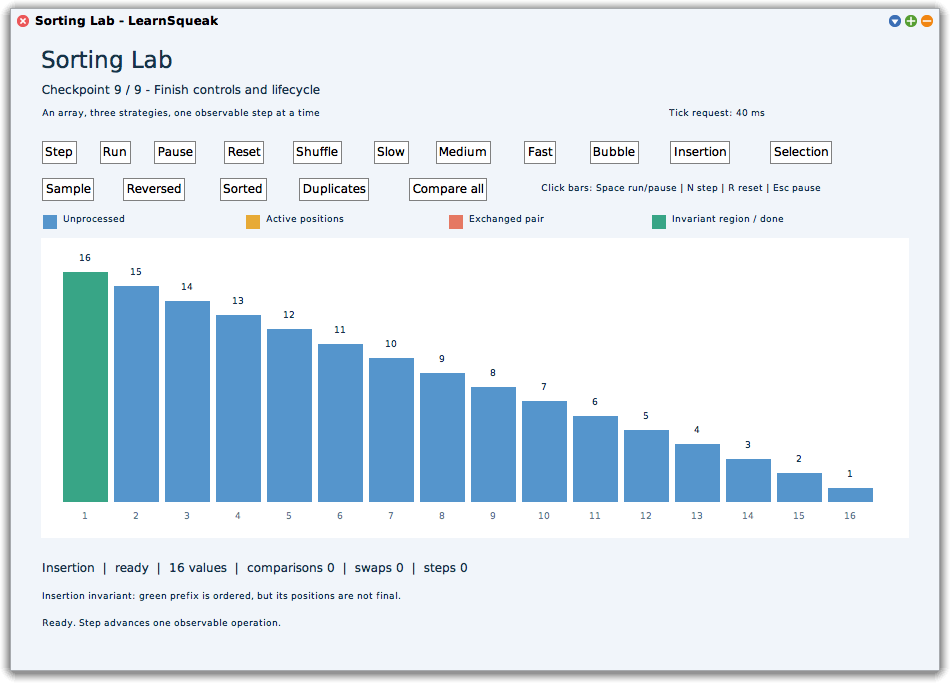
For n values, selection makes n(n - 1) / 2 comparisons even on already sorted input and at most n - 1 exchanges. Our presentation adds n - 1 placement operations. On the 16-item reversed fixture it therefore makes 120 comparisons, eight actual swaps and 135 operations. The checkpoint captures its first placement: 1 is final at the left, while the remaining suffix awaits more scans.
Where to run this
System Browser → LSSelectionSort → instance side → tutorial. Accept the complete method below after filing in this checkpoint. The download contains every required class and method.
LSSelectionSort · instance-side method
advance
 placing ifTrue: [
  model highlight: {head. minimum} note: 'Place the minimum of the remaining suffix'.
  model swapAt: head with: minimum.
  head := head + 1. head >= model size ifTrue: [^ model finish].
  minimum := head. scan := head + 1. placing := false. ^ self].
 (model compareAt: minimum with: scan) ifTrue: [minimum := scan].
 scan := scan + 1. scan > model size ifTrue: [placing := true]
File List → fileIn sorting-07.st. Then Workspace → select the entire block → Do It.
Actual Squeak 6.1 window from checkpoint 7, using the exact Workspace block above.
08 · Compare equal starting inputs
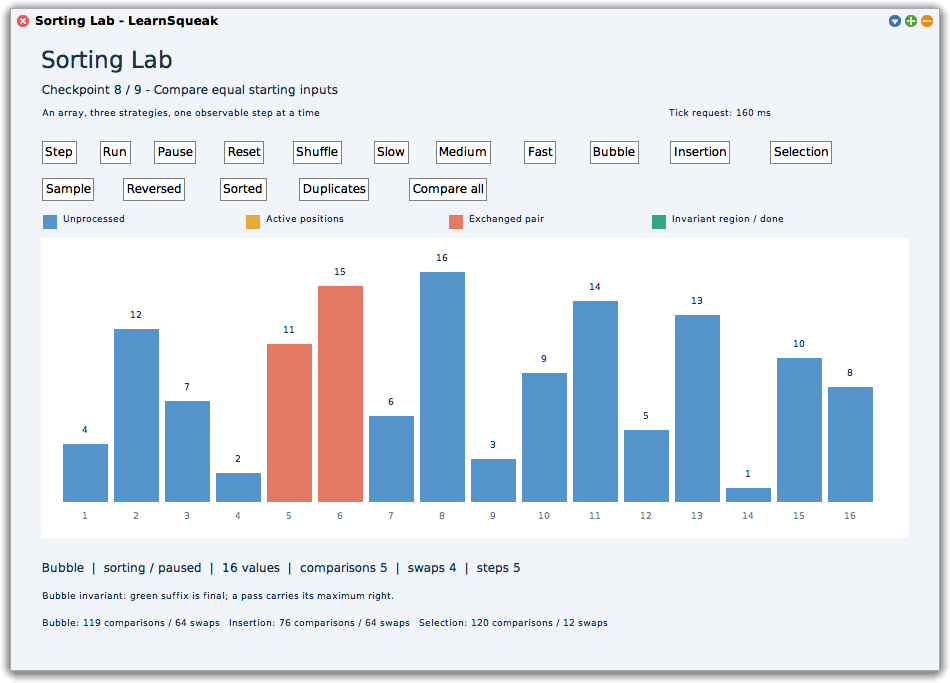
A comparison should hold the input and the measurement rules constant. comparison creates a fresh model for each strategy, loads original into it and solves it independently. It returns the three models with their operation counts. It never reuses the visible working array or the visible strategy's cursor. The app pauses the live animation before showing the summary; pressing Step or Run clears that summary so operation explanations become visible again.
solve uses a finite operation budget and raises an error if a strategy unexpectedly fails to finish. The three educational strategies fit inside two times n squared plus two operations. That bound is a guard against a broken state transition, not the definition of sorting correctness. The tests still compare against Squeak's sorted result, preserve the input multiset at every step and inspect invariants.
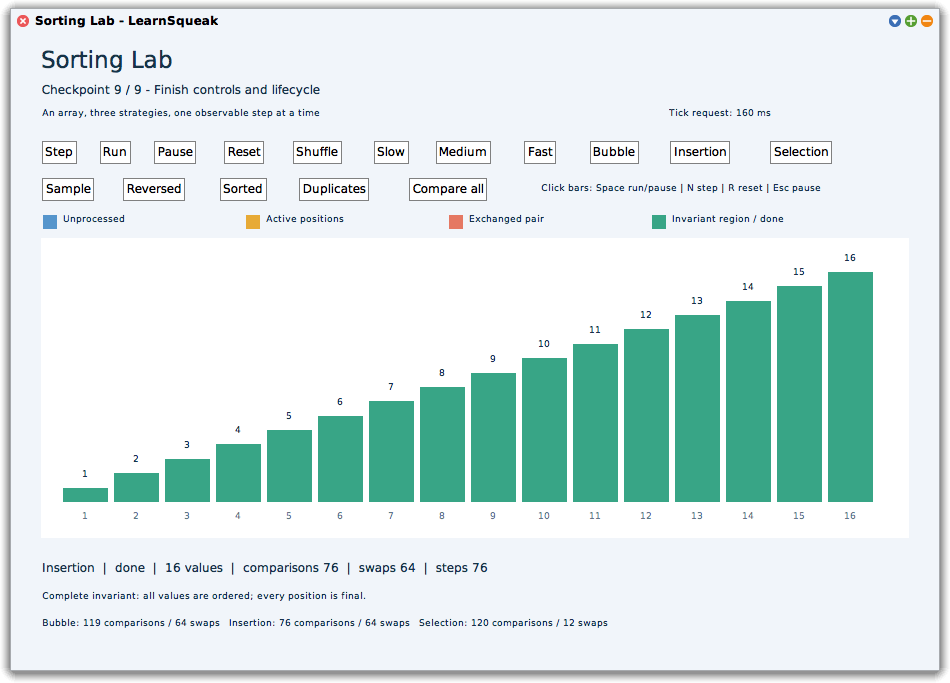
On our sample, bubble makes 119 comparisons and 64 swaps, insertion makes 76 and 64, and selection makes 120 and 12. Selection's smaller swap count does not make it universally faster. These are logical operation counts, not CPU timings: object overhead, array accesses, scheduler intervals and redraws are different costs. Adjacent-swap insertion also differs from a textbook implementation that counts shifts.
Bubble and insertion take linear comparison work on sorted input and quadratic work in their worst cases. Selection always takes quadratic comparisons. Each strategy uses constant extra state, but the complete app keeps original plus values, and the detached comparison creates additional O(n) arrays. Drawing all bars costs O(n) per displayed frame.
Where to run this
System Browser → LSSortModel → instance side → tutorial. Accept the complete method below after filing in this checkpoint. The download contains every required class and method.
LSSortModel · instance-side method
comparison
 ^ #(bubble insertion selection) collect: [:symbol |
  | other |
  other := self class new. other load: original; algorithm: symbol; solve.
  other]
File List → fileIn sorting-08.st. Then Workspace → select the entire block → Do It.
Actual Squeak 6.1 window from checkpoint 8, using the exact Workspace block above.
09 · Finish controls and lifecycle
Finish the user-facing controls and verify the interactions between them. Clicking the bars gives them keyboard focus. Space toggles Run and Pause, N steps once, R resets, and Escape pauses. These keystrokes call the same application methods as the buttons, so shortcuts do not invent a second lifecycle policy.
The window remembers a fixed layout and can be reopened through the same app object after closing. Close stops scheduling and releases keyboard focus if it still belongs to the bar view. Reopen refreshes the status so a formerly running window cannot claim to be running after it was stopped. The tests inspect the original world's scheduler registration, not just a detached morph's isStepping result.
The final source is still entirely native Squeak: model objects, polymorphic strategies, a Morph view, SimpleButtonMorph controls and a SystemWindow. File in sorting-tests.st and Print It on LSSortTest suite run. The regression suite covers algorithm results, counters, every short array over three values, atomic input validation, defensive copies, invariants, native button/key events and pause/reset/close/reopen behavior.
The final screenshot solves the normal sample with insertion sort, then compares all three algorithms from that same original input. All bars are green and the comparison summary remains visible. Use the downloadable checkpoints to revisit a stage in a clean image; filing an older file over the final app does not remove later methods.
Where to run this
System Browser → LSSortApp → instance side → tutorial. Accept the complete method below after filing in this checkpoint. The download contains every required class and method.
LSSortApp · instance-side method
windowIsClosing
 self stopActivity.
 World hands do: [:hand | hand keyboardFocus == bars ifTrue: [hand newKeyboardFocus: nil]].
 window := nil
File List → fileIn sorting-09.st. Then Workspace → select the entire block → Do It.
Actual Squeak 6.1 window from checkpoint 9, using the exact Workspace block above.
Watch the workflow
All nine screenshots and every animation frame are real native SystemWindow imageForm renders from the official Squeak 6.1 build 23976. Each stage is installed in an unsaved baseline image; the visible method is recompiled and the exact Workspace block is evaluated. The GIFs are scripted native demonstrations: controls receive actual MouseButtonEvent messages and progress invokes the same step callback used by Morphic. They are not human screen recordings or recreated web interfaces. GIF encoding combines native PNG frames; playback timing is chosen for readability and is not a performance measurement. Posters are exact copies of the first native frame.
NATIVE SQUEAK CAPTURE
Scripted native controls run bubble sort, pause without losing progress, step once, resume to a green completed array, then reset to the original sample. A late callback while paused is harmless.
NATIVE SQUEAK CAPTURE
Scripted native controls sort the same reversed fixture with insertion and selection, expose selection's separate placement steps, and compare all three algorithms from the unchanged original input.
Practice with tested solutions
1. Measure disorder without changing it
Add inversionCount to LSSortModel. An inversion is a pair of indices i < j whose left value is greater than its right value. Count all such pairs without changing the live values or counters. Equal values are not inversions.
Hint
Use two bounded loops, starting the inner loop one position after the outer loop. Snapshot counters in your checks so accidental use of compareAt:with: is detected.
Show a tested solution
System Browser → LSSortModel → instance side → exercises. Accept this method, or file in sorting-exercise-1.st (complete final app plus solution).
Workspace → select the whole check block → Print It.
Check the solution
| model |
model := LSSortModel new. model load: #(3 1 2 2).
(model inversionCount = 3) and: [model operations = 0 and: [
 model solve. model inversionCount = 0]]
true
This diagnostic is O(n squared) and uses constant extra state. It examines values directly so it does not add comparisons to the live sorting experiment.
2. Advance by a bounded budget
Add advanceBy: to LSSortModel. Accept integer budgets from 1 to 128, perform at most that many operations from the current state, and return the number actually performed. Invalid input returns nil and changes nothing. A completed model must remain complete.
Hint
Record operations before the loop and subtract afterward. Call stepSort rather than resetting or reconstructing the strategy.
Show a tested solution
System Browser → LSSortModel → instance side → exercises. Accept this method, or file in sorting-exercise-2.st (complete final app plus solution).
Exercise solution
advanceBy: budget
 | before |
 (budget isInteger and: [budget between: 1 and: 128]) ifFalse: [^ nil].
 before := operations.
 1 to: budget do: [:ignored | state = #done ifFalse: [self stepSort]].
 ^ operations - before
Expected
true; one operation, then two remaining operations, then zero after completion.
A bounded batch could later animate several operations per frame. Keep that presentation choice separate from speed, and pause the application before manually batching its live model.
3. Add a fourth strategy: gnome sort
Implement LSGnomeSort using the existing strategy protocol. Compare adjacent values. If inverted, exchange and move one position left (never before position two); otherwise move right. Finish when the cursor passes the last item. Extend the model strategy selection without changing the bar view.
Hint
A cursor alone is enough. The ordered prefix may shrink during backward movement. Keep the inherited model: protocol and provide reset, advance, orderedIndex: and invariantText.
Show a tested solution
This is complete chunk-format source, not one Browser method. File in sorting-exercise-3.st through File List. The source installs the final app plus the new strategy.
Workspace → select the whole check block → Print It.
Check the solution
| app |
app := LSSortApp open.
app chooseAlgorithm: #gnome. app model solve. app refresh.
(app model isSorted) and: [app model values = app model original sorted]
true
Gnome sort uses the same strict adjacent comparison and exchange primitives. It takes quadratic worst-case work and preserves equal-value order. The downloadable solution is checked over every ternary array up to length five; the default Compare all remains a comparison of the three tutorial algorithms.
When something looks wrong
Run does nothing after completion
Press Reset, choose a fixture, or Shuffle to start a new experiment. Pause is the operation that preserves a resumable cursor.
The green region shrinks with insertion sort
That green prefix is ordered, not fixed in final positions. Moving a new value left temporarily shortens it. Active highlighting can also cover green bars.
Selection steps exceed its comparison count
Selection has one extra placement operation per completed scan. A placement makes no comparison and may need no swap if the minimum is already in place.
Compare all does not match the partly sorted visible array
Every comparison uses original, so all strategies receive the same input. The live model is paused and left untouched.
Keyboard shortcuts do not respond
Click the bar area to give it focus, or use the visible buttons. Another native window can hold keyboard focus.
An older checkpoint has newer methods
Install earlier checkpoints in a fresh baseline image. Filing in source adds or replaces methods; it does not uninstall later additions.
Verification, cleanup and next steps
The arrays are synthetic. The application uses no accounts, personal files, external data or packages. The source and native tests run independently of this website.
47 SUnit regression tests pass in native Squeak 6.1. An independent native review adds 12 passing checks, including collapse/expand, captured-world scheduler cleanup and every short-array intermediate invariant. The exhaustive short-array test performs 1,092 algorithm/input runs: every array of length zero through five over values 1, 2 and 3, across all three strategies. Nine checkpoint files, their displayed methods and exact Workspace blocks are executed independently. All three exercise solutions and their visible checks are tested separately.
File in sorting-final.st, then sorting-tests.st. Workspace → LSSortTest suite run → Print It. Expected: 47 passes, zero failures and errors.
Empty and singleton input, pairs, duplicates, all-equal values, reversed and already sorted arrays, all 32 positions, extreme supported values, and exact comparison/swap/operation counts
Per-operation multiset preservation and final sortedness; intermediate bubble/selection final-position invariants and insertion ordered-prefix invariants
Atomic rejection of invalid data, copy isolation, terminal no-ops, preserved reset input, fair detached comparisons and unchanged live counters
Actual native button and keyboard events; scheduler registration, pause/resume, repeated Run, reset, speed change, fixture/algorithm/shuffle interruption, close during run, focus cleanup and reopen
Close the Sorting Lab window to stop its scheduler and release keyboard focus. There is no unsaved-close prompt or persistence. Keep the .st source outside your image so you can reproduce the app from a clean baseline.
Official Squeak downloads — Official Squeak 6.1 build 23976 Linux image and VM used for execution and native captures
Bundled Squeak sources — Morph, SystemWindow, SimpleButtonMorph, MouseButtonEvent, KeyboardEvent, Random, Array, PNGReadWriter and TestCase APIs were compiled and exercised in the supplied image
Arrays contain zero to 32 positive integers from 1 through 99; no text, negative values, custom ordering or imported data
Insertion uses adjacent swaps; counts are logical operations, not CPU timings or a claim that one strategy is always faster
The model keeps an original copy for reset. Comparing strategies creates independent models and additional arrays
Fixed native layout; no persistence, undo, resizing layout, accessibility certification, background process or sound
Morphic tick intervals are requested, not guaranteed. GIF playback is independently paced for explanation
The view shows equal values but does not attach identity tags to them; stability is explained by the algorithms, not demonstrated as a separate identity trace