Make LIFO and FIFO visible with native controls, safe empty handling, a bounded trace and tested collection contracts.
8 construction stagesTested source & checkpointsNative screenshots & demos
Before you start
Build Container Lab: two native visual containers that receive integers, explain their next departure and show every operation. Add push/pop and enqueue/dequeue, separate the model from its view, reject invalid or full insertions, and reset experiments safely.
Eight cumulative checkpoint files let you work forward or start at any stage in a clean Squeak image. Each complete source contains the supporting model, window, panel and controller; the highlighted methods explain what changed. Every displayed launcher was executed in the native image before its screenshot was captured.
Squeak 6.1, 64-bit image build 23976; Morphic and SUnit are bundled; no extra package or network service is required
Messages, symbols, blocks, OrderedCollection, instance variables, and Workspace Do it / Print it / Inspect it
Allow about 45–60 minutes, plus the two practice exercises
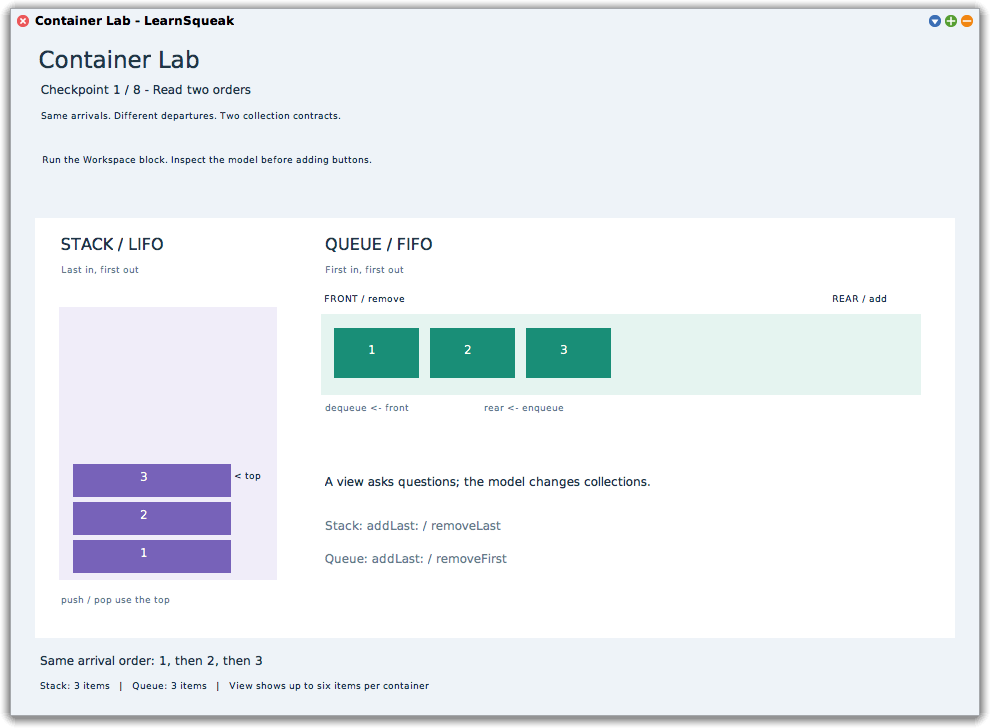
A stack and a queue can hold the same arrivals while promising different departures. Last in, first out (LIFO) means the most recently added item leaves next. First in, first out (FIFO) means the oldest waiting item leaves next. With arrivals 1, 2, 3, the stack will remove 3 first and the queue will remove 1 first. These are behavioral contracts, not different kinds of integer.
Start with two OrderedCollections in LSContainerModel. Both store arrivals from first to last. The view draws the stack vertically, with the last item at the top, and the queue horizontally, with the first item on the left. The drawing direction does not change either collection. seedExample is a setup helper that supplies identical data without needing operations we have not written yet.
The complete checkpoint includes a model, a panel, a controller and a fixed-size native window. Inspect app model and compare stackItems with queueItems. Both queries return a copy. Adding to the returned collection therefore cannot silently change the model. At this first checkpoint, use the supplied integer data; later we make the accepted value domain explicit.
LSContainerModel >> initialize · instance side
initialize
 super initialize.
 stack := OrderedCollection new. queue := OrderedCollection new.
 history := OrderedCollection new. operations := 0. capacity := 6.
 lastResult := 'Ready: both containers are empty'
LSContainerModel >> stackItems · instance side
stackItems
 ^ stack copy
LSContainerModel >> queueItems · instance side
queueItems
 ^ queue copy
Where to run this
File List → select stacks-queues-01.st → fileIn. Then open the named classes, instance side, in the System Browser. These methods are already installed by the checkpoint; accept them there if typing along.
Workspace → select the complete block below → Do it. Use Inspect it on the whole block to keep access to the returned app. Close the previous Container Lab window first.
Real Squeak 6.1 window after executing the exact Workspace block above. Both collections contain 1, 2, 3. The stack shows 3 on top; the queue shows 1 at its front.
02 · Push and pop the top
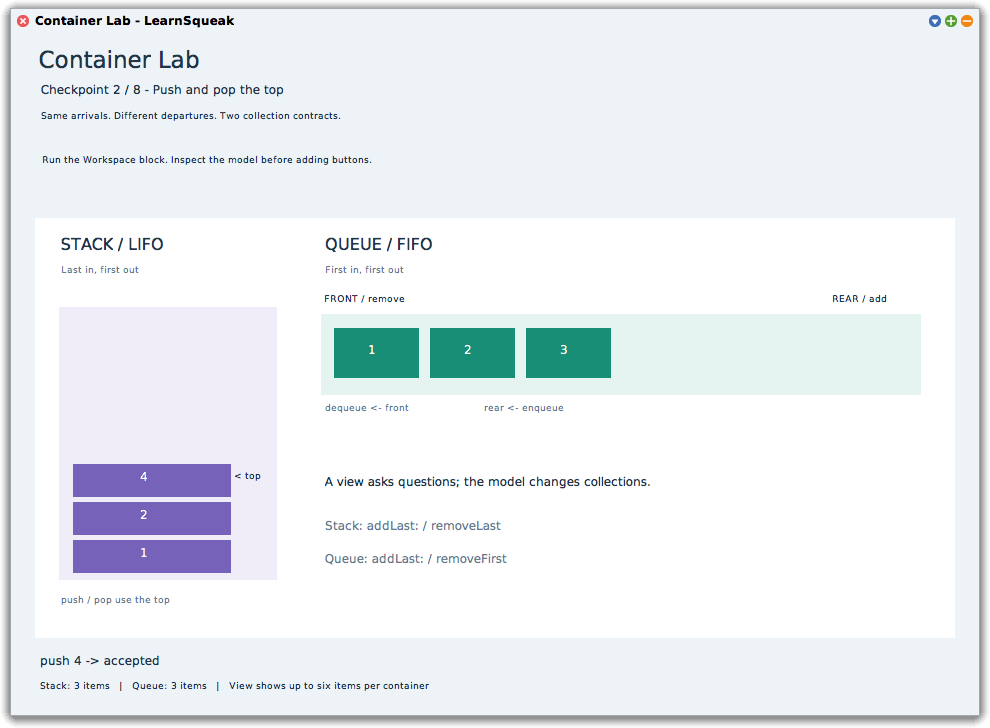
A stack needs two main commands. push: adds at the top; pop removes and returns the top value. We represent the top using the last position of an OrderedCollection, so these commands map directly to addLast: and removeLast. The return contract is deliberate: push: answers true for an accepted insertion; pop answers the removed integer.
Our launcher loads 1, 2, 3, pops 3 and pushes 4. The stored sequence becomes 1, 2, 4. Reading it as an array still shows insertion order, while the picture draws 4 above 2 above 1. If you now pop three times, the answers are 4, 2, 1. The queue remains 1, 2, 3 because the collections are independent objects.
This checkpoint assumes a nonempty stack when popping. Calling pop once more would raise the collection's empty error. That is a known incomplete contract, repaired in stage 4. First concentrate on the end being removed. record: currently updates one result string; it will become an operation trace without changing the code that requests a record.
LSContainerModel >> push: value · instance side
push: value
 stack addLast: value.
 self record: 'push ', value printString, ' -> accepted'.
 ^ true
LSContainerModel >> pop · instance side
pop
 | value |
 value := stack removeLast.
 self record: 'pop -> ', value printString.
 ^ value
Where to run this
File List → select stacks-queues-02.st → fileIn. Then open the named classes, instance side, in the System Browser. These methods are already installed by the checkpoint; accept them there if typing along.
Workspace → select the complete block below → Do it. Use Inspect it on the whole block to keep access to the returned app. Close the previous Container Lab window first.
Real Squeak 6.1 window after executing the exact Workspace block above. The stack contains 1, 2, 4 from bottom to top. The queue remains 1, 2, 3. The result says push 4 -> accepted.
03 · Enqueue at the rear, dequeue the front
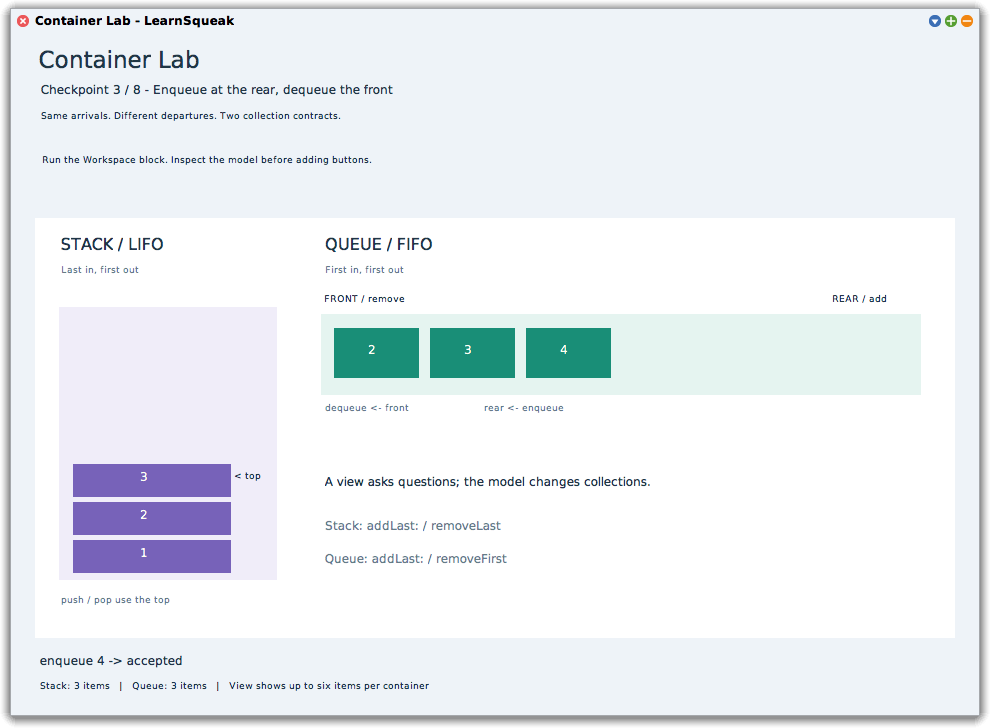
A queue adds at its rear and removes from its front. enqueue: uses addLast:, just like stack insertion. dequeue uses removeFirst, which is the crucial difference. With arrivals 1, 2, 3, removing once returns 1 and leaves 2, 3. Enqueueing 4 then leaves 2, 3, 4, preserving the order of the items that are still waiting.
The two representations intentionally use the same collection class. A data structure is partly the set of operations you expose and the order they guarantee. Clients of this model ask for push:, pop, enqueue: or dequeue; they do not reach in and choose a collection index. A view can display the results, and tests can verify the contract without opening a window.
In the launcher, only the queue changes. Compare its leftmost value, 2, with the stack's top value, 3. This makes the contrast concrete before we add controls. As in stage 2, removal currently requires a nonempty collection. We also avoid promising a specific implementation cost: an OrderedCollection is convenient for this small demonstration, but a production FIFO may call for a ring buffer or another representation.
LSContainerModel >> enqueue: value · instance side
enqueue: value
 queue addLast: value.
 self record: 'enqueue ', value printString, ' -> accepted'.
 ^ true
LSContainerModel >> dequeue · instance side
dequeue
 | value |
 value := queue removeFirst.
 self record: 'dequeue -> ', value printString.
 ^ value
Where to run this
File List → select stacks-queues-03.st → fileIn. Then open the named classes, instance side, in the System Browser. These methods are already installed by the checkpoint; accept them there if typing along.
Workspace → select the complete block below → Do it. Use Inspect it on the whole block to keep access to the returned app. Close the previous Container Lab window first.
Real Squeak 6.1 window after executing the exact Workspace block above. The queue contains 2, 3, 4 from front to rear. The stack remains 1, 2, 3.
04 · Give empty a safe meaning
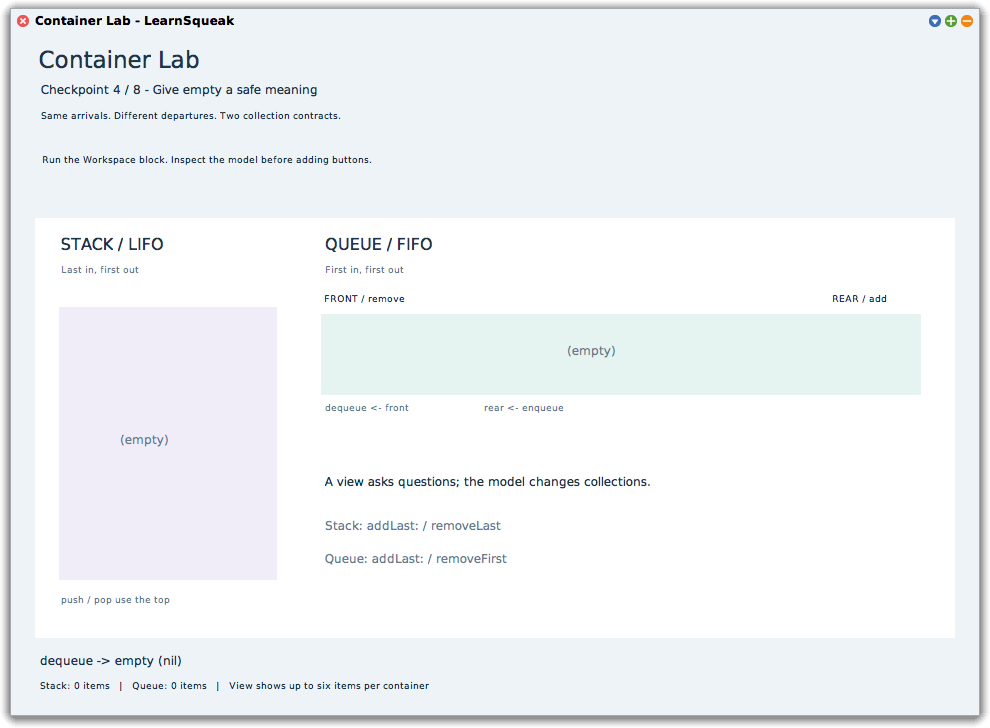
Empty is a normal state, so make its behavior part of the API. pop and dequeue now ask isEmpty before removal and answer nil when no value exists. Repeated empty removals are safe and leave the collections unchanged. The status line explains why nil was returned; nil does not mean the integer zero.
To keep that sentinel unambiguous, insertion now accepts integers only. push: and enqueue: reject nil, text and fractional values with false. A rejected insertion does not modify the collection. Zero, negative integers and duplicate integers are valid. This small, explicit domain also makes copied collection queries sufficient: the elements are immutable integer values, so there are no mutable nested objects to leak.
The example intentionally removes from two empty containers. The last result is dequeue -> empty (nil), and both sizes remain zero. Use Print it on a separate model expression to observe nil directly. Treat the result of insertion and removal differently: false reports an insertion rejection; nil reports an empty removal. The app will use that success flag to avoid consuming a new input value when an insertion fails.
LSContainerModel >> pop · instance side
pop
 | value |
 stack isEmpty ifTrue: [self record: 'pop -> empty (nil)'. ^ nil].
 value := stack removeLast.
 self record: 'pop -> ', value printString.
 ^ value
LSContainerModel >> dequeue · instance side
dequeue
 | value |
 queue isEmpty ifTrue: [self record: 'dequeue -> empty (nil)'. ^ nil].
 value := queue removeFirst.
 self record: 'dequeue -> ', value printString.
 ^ value
LSContainerModel >> push: value · instance side
push: value
 value isInteger ifFalse: [self record: 'push rejected: use an integer'. ^ false].
 stack addLast: value.
 self record: 'push ', value printString, ' -> accepted'.
 ^ true
Where to run this
File List → select stacks-queues-04.st → fileIn. Then open the named classes, instance side, in the System Browser. These methods are already installed by the checkpoint; accept them there if typing along.
Workspace → select the complete block below → Do it. Use Inspect it on the whole block to keep access to the returned app. Close the previous Container Lab window first.
Real Squeak 6.1 window after executing the exact Workspace block above. Both containers are empty. The result says dequeue -> empty (nil); no debugger opens.
05 · Wire native buttons to the model
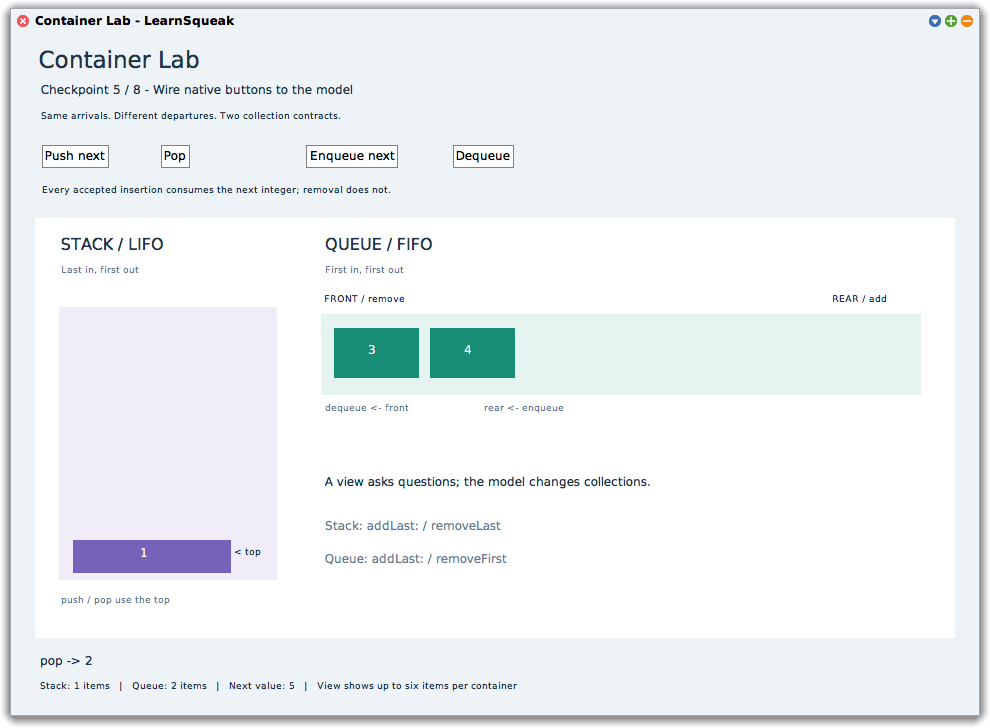
Connect real SimpleButtonMorph controls to controller messages. Each button has a target, an action selector and arguments. Push next sends pushNext to the app; the app passes its next integer to the model, increments that integer only when insertion succeeds, then refreshes the read-only view. Enqueue next follows the same path. Pop and Dequeue remove without consuming the next input integer.
The controller owns nextValue because it is input generation for this demonstration. The model owns the containers because they are the subject being studied. The panel knows how to draw but never pushes, pops or dequeues. refresh marks the panel changed and rewrites status labels, so a later Morphic display pass paints the current model. Mutating the model directly in an Inspector requires app refresh to update the displayed state.
The launcher inserts 1 and 2 into the stack, 3 and 4 into the queue, then pops 2. The next value is 5. Click the controls yourself and predict the outcome before each click. The test suite also dispatches real native mouse-down and mouse-up events to these buttons, checking the full target/action path rather than calling only the model.
File List → select stacks-queues-05.st → fileIn. Then open the named classes, instance side, in the System Browser. These methods are already installed by the checkpoint; accept them there if typing along.
Workspace → select the complete block below → Do it. Use Inspect it on the whole block to keep access to the returned app. Close the previous Container Lab window first.
Real Squeak 6.1 window after executing the exact Workspace block above. The stack contains 1, the queue contains 3, 4 and Next value is 5. The result says pop -> 2.
06 · Trace commands without leaking state
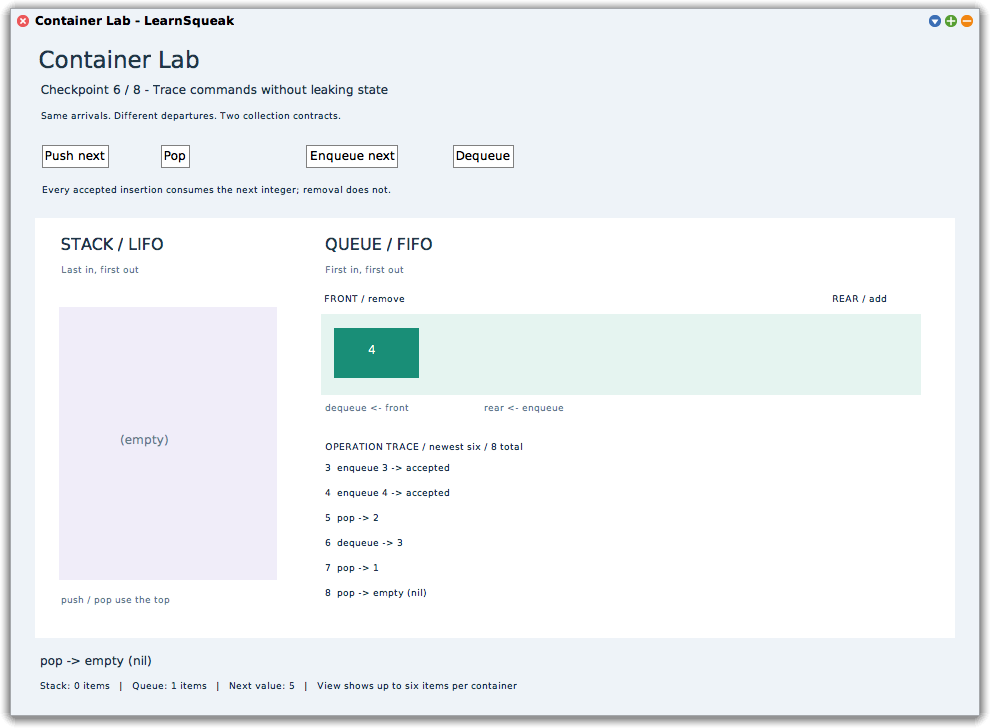
A single status message shows only the latest event. Replace record: with a bounded history of attempted operations. Each call increments operations, updates the current result, and appends a numbered line. If more than six lines exist, remove the oldest. The operation count continues increasing even while old lines disappear from the visible trace.
Record both successful and rejected commands. An empty pop is still a user action worth explaining, even though it does not change stored data. This distinguishes an operation count from a mutation count. Initialization and redraws are not operations. The launcher performs eight commands; the view keeps lines 3 through 8, ending with an empty pop. The stack is empty and the queue contains only 4.
history copies each line as well as the containing collection. A shallow collection copy alone would expose its mutable strings, allowing an Inspector to change a saved event. This is different from stackItems and queueItems, whose integer elements are immutable. The panel simply reads history and draws each line. Trace rendering must not add events of its own, or merely repainting a window would change the experiment.
LSContainerModel >> record: text · instance side
record: text
 operations := operations + 1.
 lastResult := text copy.
 history addLast: operations printString, '  ', text.
 history size > 6 ifTrue: [history removeFirst]
LSContainerModel >> history · instance side
history
 ^ history collect: [:line | line copy]
LSContainerPanel >> drawHistoryOn: canvas · instance side
drawHistoryOn: canvas
 | ink |
 ink := Color fromString: '#20364A'.
 self text: ('OPERATION TRACE / newest six / ', app model operations printString, ' total') on: canvas at: 290@224 size: 12 color: ink.
 app model history withIndexDo: [:line :index |
  self text: line on: canvas at: 290@(245 + ((index - 1) * 25)) size: 12 color: ink]
Where to run this
File List → select stacks-queues-06.st → fileIn. Then open the named classes, instance side, in the System Browser. These methods are already installed by the checkpoint; accept them there if typing along.
Workspace → select the complete block below → Do it. Use Inspect it on the whole block to keep access to the returned app. Close the previous Container Lab window first.
Real Squeak 6.1 window after executing the exact Workspace block above. The stack is empty, the queue contains 4 and the trace keeps events 3 through 8. Event 8 is an empty pop.
07 · Enforce a capacity before mutating
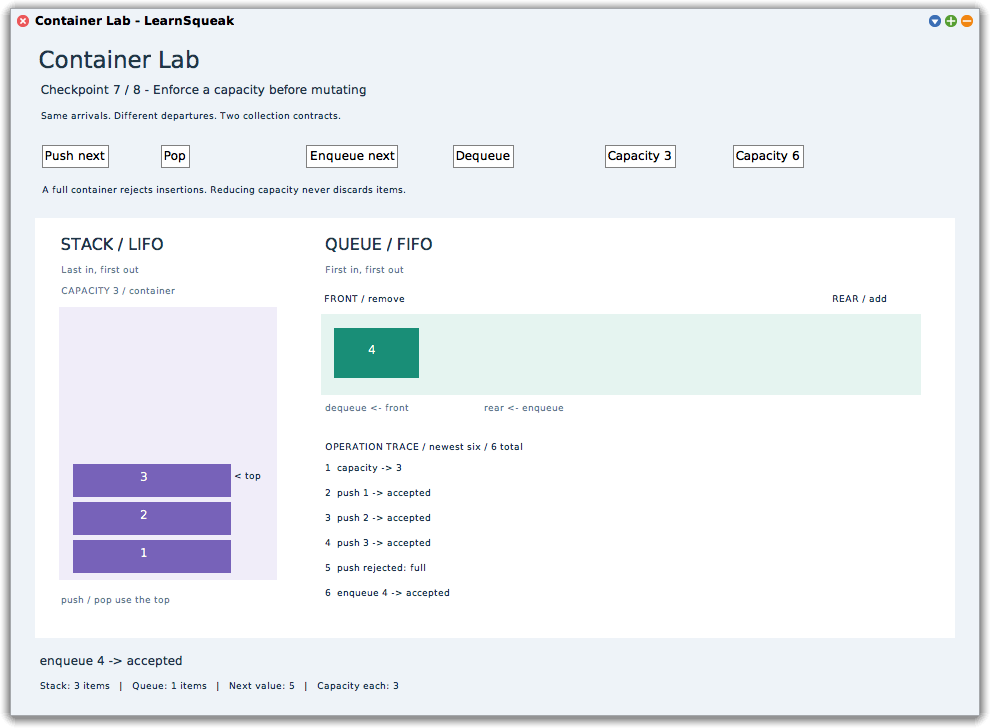
A bounded container refuses insertion when its size reaches capacity. Check the value domain and available space before addLast:, then return false on rejection. The rejected command still appears in the trace, but existing items keep their order. Capacity applies independently to the stack and the queue: a full stack does not stop the queue accepting an item.
capacity: accepts integers from 1 through 6. It also checks both current sizes before committing the new value. Reducing capacity below an existing size is rejected; nothing is discarded. A failed capacity change leaves capacity and both collections intact, while recording the reason. The native buttons offer convenient values 3 and 6; the model API supports every integer in the documented range. Six keeps all final-stage items visible.
The launcher sets capacity 3 and attempts four pushes. The fourth push fails, so nextValue remains 4. Enqueue next then successfully places 4 in the queue and advances nextValue to 5. This is a useful invariant to test: failed input does not silently skip a token. The example loader also checks that capacity is at least 3 before replacing either collection.
LSContainerModel >> push: value · instance side
push: value
 value isInteger ifFalse: [self record: 'push rejected: use an integer'. ^ false].
 stack size >= capacity ifTrue: [self record: 'push rejected: full'. ^ false].
 stack addLast: value.
 self record: 'push ', value printString, ' -> accepted'.
 ^ true
LSContainerModel >> capacity: anInteger · instance side
capacity: count
 model capacity: count. self refresh
Where to run this
File List → select stacks-queues-07.st → fileIn. Then open the named classes, instance side, in the System Browser. These methods are already installed by the checkpoint; accept them there if typing along.
Workspace → select the complete block below → Do it. Use Inspect it on the whole block to keep access to the returned app. Close the previous Container Lab window first.
Real Squeak 6.1 window after executing the exact Workspace block above. Capacity is 3. The stack contains 1, 2, 3; the queue contains 4. The trace includes the rejected fourth push and Next value is 5.
08 · Reset and compare the same arrivals
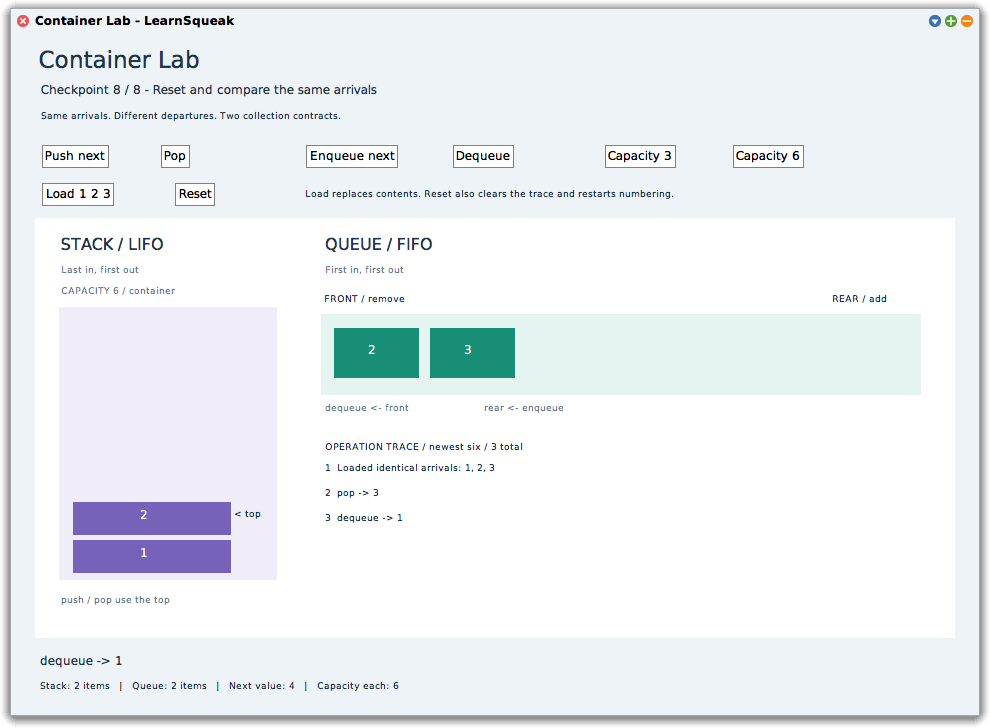
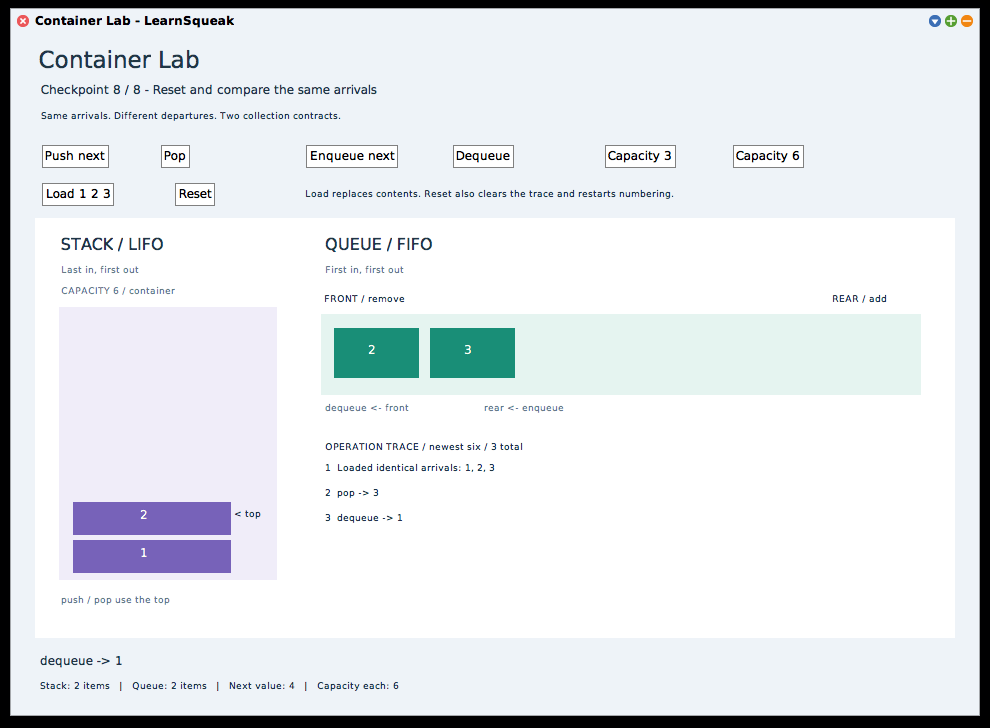
Reset restores transient state: both containers become empty, history is cleared and the operation counter returns to zero. It preserves capacity, which is configuration. The app separately resets nextValue to 1. Repeated Reset is safe. Initialization reuses the same model reset method so a fresh instance and a reset instance obey the same invariants.
Load 1 2 3 is a comparison aid. It replaces both containers with the same three arrivals and sets the next input to 4. Unlike Reset, it preserves the existing trace and appends one explicit load event. If capacity is below 3, the load is rejected atomically and the app does not change its next input. This makes the difference between loading a fixture and starting a new experiment visible.
The final launcher loads identical arrivals and removes one item from each: pop returns 3 while dequeue returns 1. Continue removing to see 3, 2, 1 leave the stack and 1, 2, 3 leave the queue. Then reset and try a bounded run. The scripted native animation below uses the same mouse events as the buttons to compare order, handle empty removal, hit capacity, recover by removing an item, and reset. No background process is needed for this event-driven application.
File List → select stacks-queues-08.st → fileIn. Then open the named classes, instance side, in the System Browser. These methods are already installed by the checkpoint; accept them there if typing along.
Workspace → select the complete block below → Do it. Use Inspect it on the whole block to keep access to the returned app. Close the previous Container Lab window first.
Real Squeak 6.1 window after executing the exact Workspace block above. The stack contains 1, 2 and the queue contains 2, 3. The trace proves pop returned 3 and dequeue returned 1. Next value is 4.
Watch the workflow
All eight screenshots and every GIF frame are native Squeak 6.1 window imageForm captures saved by PNGReadWriter. The GIF is a deterministic sequence of real native button mouse events, with chosen display delays for readability. It is an edited native-frame demonstration, not a real-time screen recording or a browser recreation.
NATIVE SQUEAK CAPTURE
Scripted native button events load identical arrivals, remove 3/1 then 2/2 then 1/3, explain empty removals, fill a capacity-three stack, reject a fourth insertion without consuming its input, remove and retry, then reset. Every frame comes from the real Squeak window.
Practice with tested solutions
1. Peek at the stack without removing anything
Add stackTop to LSContainerModel. Return nil for empty, otherwise the next integer a pop would return. Peeking must leave the containers, operation count, result and trace unchanged.
Hint
Read last only after checking isEmpty. This is a query, so do not call pop or record:.
Show a tested solution
System Browser → LSContainerModel → instance side → exercises. Accept this method after filing in the final application.
Exercise solution
stackTop
 stack isEmpty ifTrue: [^ nil].
 ^ stack last
Expected
A fresh model returns nil. After push: 7; push: 9, repeated peeks return 9 and both values remain in the stack.
Workspace · Print it after installing the solution
Check the solution
| model before |
model := LSContainerModel new.
model push: 7; push: 9.
before := model operations.
{model stackTop. model stackTop. model stackItems asArray. model operations = before}
Print it returns #(9 9 #(7 9) true). Tests also cover empty, zero, negative values and duplicates.
A read-only query has no trace entry. This keeps rendering, inspection and prediction from changing the experiment.
2. Move the stack top to the queue atomically
Add moveStackTopToQueue. On success, remove the stack top, append it at the queue rear, record one move event and return the integer. If the stack is empty or the queue is full, return nil and record one rejection without changing either collection.
Hint
Check both preconditions before removing anything. Calling pop first and discovering a full queue afterward would lose the value.
Show a tested solution
System Browser → LSContainerModel → instance side → exercises. Accept this method after filing in the final application.
Workspace · Print it after installing the solution
Check the solution
| model moved |
model := LSContainerModel new.
model push: 1; push: 2; enqueue: 8.
moved := model moveStackTopToQueue.
{moved. model stackItems asArray. model queueItems asArray. model operations}
Print it returns #(2 #(1) #(8 2) 4): three insertions plus one transfer.
Atomic here means the command validates before changing either in-memory collection. It is a single UI-process demonstration, not a concurrency or database transaction guarantee.
When something looks wrong
The complete source gives syntax errors in a Workspace
File in the chunk-format .st through File List. Paste only the launcher expression into Workspace. Accept individual methods in the named class and side in System Browser.
Pop raises an error in stage 2 or dequeue does in stage 3
Those intermediate stages assume a nonempty collection. Install stage 4 or later to add the explicit nil-on-empty contract.
The view does not reflect an Inspector change
The view reads the model when refreshed. Evaluate app refresh after changing the model directly, or use the native buttons.
Push next keeps the same next value
Check the trace for a full-container rejection. A failed insertion intentionally does not consume the input. Pop once or increase capacity, then retry.
Reset did not restore capacity 6
Reset preserves configuration. Click Capacity 6 explicitly if you want the original capacity. Load 1 2 3 also rejects a model capacity below 3.
How do I run SUnit?
File in stacks-queues-final.st and stacks-queues-tests.st, then Print it: LSContainerTest suite run. For exercises, also file in both solution files and stacks-queues-exercise-tests.st; Print it: LSContainerExerciseTest suite run.
Verification, cleanup and next steps
Built and executed with Squeak 6.1 image build 23976 and its 64-bit Linux VM. Every checkpoint was loaded independently from a private baseline image, each displayed method was recompiled and its exact launcher executed.
42 application tests and 8 exercise tests pass in native Squeak 6.1, with zero failures and zero errors. All eight cumulative checkpoints were loaded independently from a private clean baseline; every displayed method was recompiled and each exact Workspace launcher executed before capture.
Model contracts, empty handling, capacity, defensive queries, operation trace, real button events, reset, loading and exercise behavior are verified in the bundled native SUnit suites.
Both exact displayed exercise solutions compiled and both printed check arrays verified
22 genuine native GIF frames with mouse-down/up button events and assertions at key state boundaries; 23.3 seconds of selected display delays
Close Container Lab when finished; it has no background process or stepping registration. Keep the .st files separately so you can reconstruct it. Close its windows before removing the LearnSqueak-StacksQueues category from the Browser.
Squeak 6.1 bundled source: OrderedCollection and Morphic — The running image supplies addLast:, removeFirst, removeLast, native SimpleButtonMorph event handling, SystemWindow and PNGReadWriter.
Runnable sources and SUnit tests — The complete files in the kit provide the executable contracts for every stage and both exercises.
The supported final-stage payload domain is integers, including duplicates, zero and negatives. nil is reserved for empty removal.
Final capacity is an integer from 1 through 6 per container. Earlier unbounded checkpoints display only the nearest six stack items and first six queue items.
OrderedCollection makes order easy to inspect; this lesson makes no asymptotic performance claim and does not implement a ring buffer.
The model uses ordinary single-process Morphic interaction. Atomic exercise validation is not a concurrency guarantee.
Native Squeak 6.1 only; these classes are not installed in the site’s embedded SqueakJS image.