The separate playground loads the real Smalltalk image on demand. This lesson keeps its native setup instructions; browser compatibility notes appear beside each demo.
Before you start
Build a real tokenizer, recursive-descent parser and bounded interpreter, then explore the syntax tree through a native Morphic workbench.
Each numbered source is complete and cumulative. Start with any checkpoint in a fresh image, then run its exact Workspace block. The displayed Browser method is an excerpt already installed by that checkpoint.
Comfort with classes, arrays, dictionaries and blocks
A working Squeak 6.1 image and the File List / Workspace tools
Save a copy of your image before experimenting. Download a checkpoint .st file beside that copy, select it in the File List, and choose fileIn.
Close the previous tutorial window before installing another checkpoint. Select the complete Workspace block and use Do it (Ctrl+D or Cmd+D).
Accept displayed method definitions only in the named class and instance-side Browser category; a Workspace expects expressions, not method definitions.
For final verification, file in LearningLanguage.st and LearningLanguageTests.st, then evaluate TestRunner openForSuite: LLLanguageTest suite.
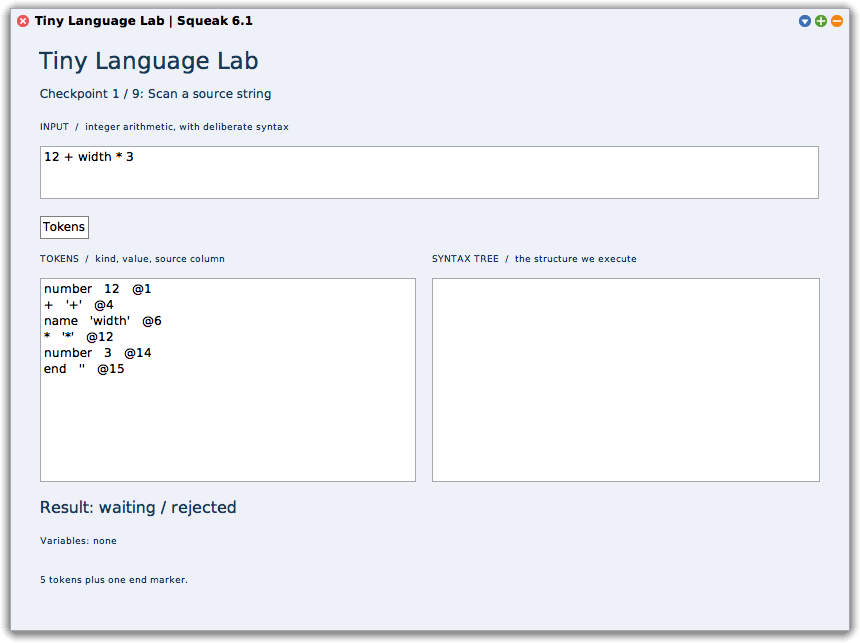
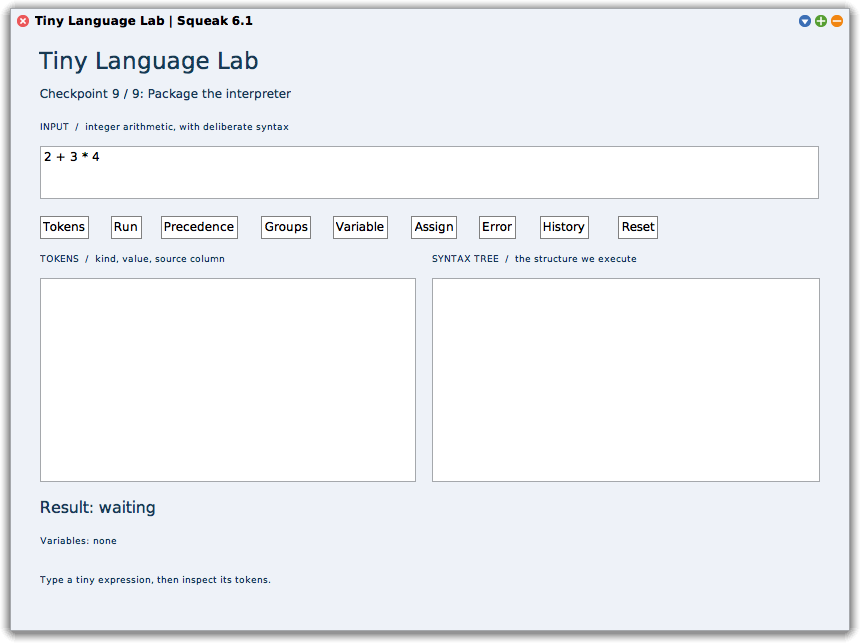
A language starts by deciding which character sequences count as words. Our scanner advances one cursor through the source and emits small arrays containing a token kind, value and one-based source column. Integers become numbers; names retain their spelling; each punctuation operator has its own token kind. An explicit end token makes later parsing predictable. The UI is already a real Morphic window, but at this first checkpoint only Tokens is available. Scanning an expression does not execute it.
Where to run this
System Browser, LLLexer, instance side. This method is already installed by checkpoint 01.
Construction code · follow the run instructions above
The cursor always moves or signals an error, so malformed input cannot create an infinite scan loop
Only ASCII letters and digits belong to names; spaces, tabs and line breaks separate tokens
Every token remembers where it began, which lets the parser report useful columns
Run Tokens on 1.5 or a_b. Decimal dots and underscores are deliberately outside this tiny grammar; integers can still produce exact fractions through division later.
Expected result
The token pane shows number 12 at column 1, + at column 4, name width at column 6, * at column 12, and number 3 at column 14.
Native Squeak 6.1 checkpoint 01, rendered after executing the exact Workspace block above.
02 · Build a tree for addition and subtraction
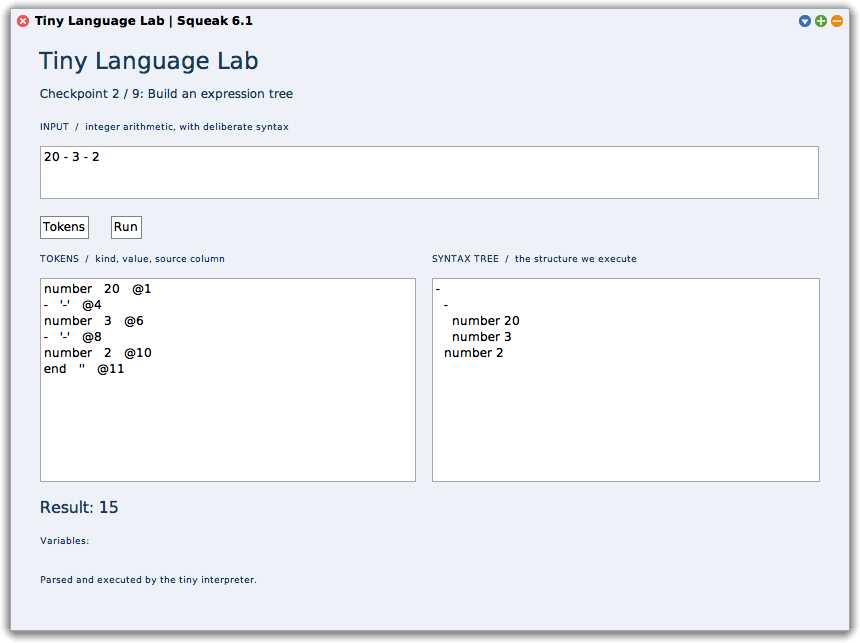
The parser consumes tokens and creates data that describes the computation. expression starts with a term, then repeatedly combines a left subtree, an operator and the next term. Reassigning left folds a chain from left to right, so 20 - 3 - 2 means (20 - 3) - 2. LLInterpreter walks this tree using a fixed list of supported node kinds. LLTreePrinter walks the same data to show the syntax in the right pane. Neither operation compiles the input as Smalltalk.
Where to run this
System Browser, LLParser, instance side. This method is already installed by checkpoint 02.
Construction code · follow the run instructions above
expression
 | left operator | left := self term.
 [#('+' '-') includes: self current second] whileTrue: [
  operator := self advance. left := {#binary. operator second. left. self term. operator third}].
 ^ left
After filing in this checkpoint, evaluate the complete block in a Workspace with Do it. It returns the open native application.
Native Squeak 6.1 checkpoint 02, rendered after executing the exact Workspace block above.
03 · Give multiplication a tighter binding level
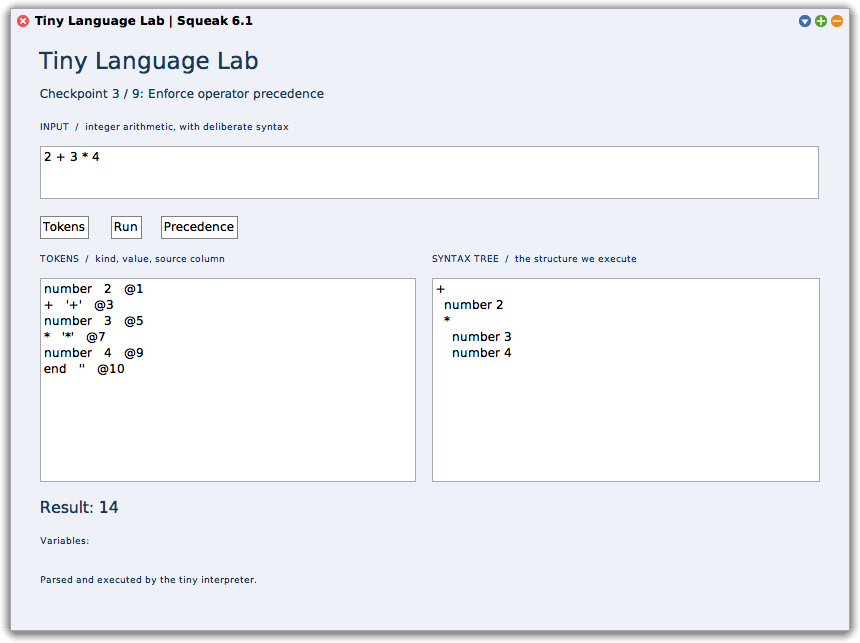
Precedence comes from the call structure, not from the order in which operators appear in a table. expression asks term to finish an entire multiplication or division before it joins that term with + or -. term uses the same left-fold pattern, which also gives division left associativity. The interpreter explicitly handles four operators and checks for division by zero. Squeak fractions keep 1 / 3 exact; this small language therefore avoids introducing floating-point rounding before you have chosen a numeric policy.
Where to run this
System Browser, LLParser, instance side. This method is already installed by checkpoint 03.
Construction code · follow the run instructions above
term
 | left operator | left := self primary.
 [#('*' '/') includes: self current second] whileTrue: [
  operator := self advance. left := {#binary. operator second. left. self primary. operator third}].
 ^ left
After filing in this checkpoint, evaluate the complete block in a Workspace with Do it. It returns the open native application.
Native Squeak 6.1 checkpoint 03, rendered after executing the exact Workspace block above.
04 · Add grouping and unary negation
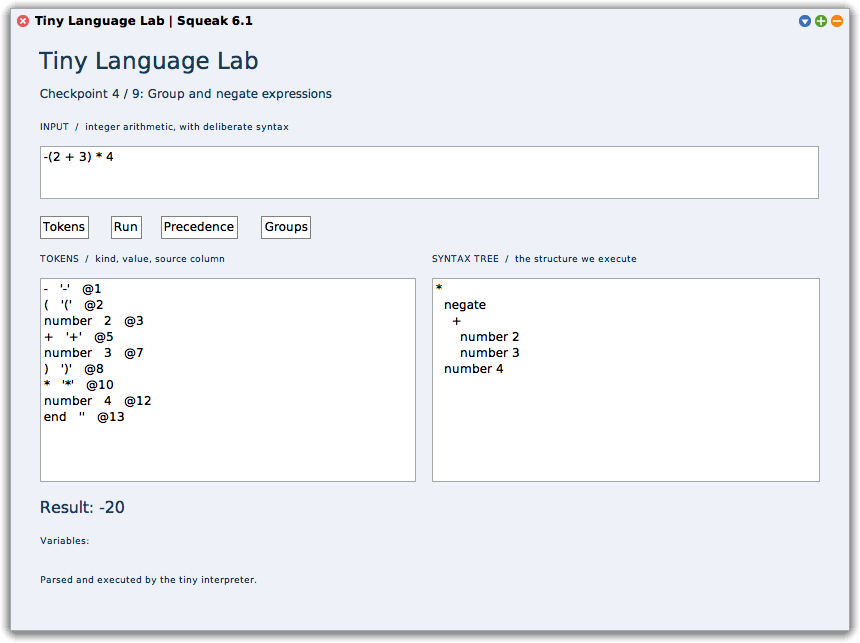
A primary is the smallest expression building block. In addition to integers, it can now consume a leading minus sign or an opening parenthesis. Parentheses recursively invoke expression, so a full low-precedence sum can become one high-precedence operand. Unary minus recursively parses another primary, supporting both -3 and --3. A shared depth counter bounds nested signs and groups. The closing parenthesis is consumed only after its matching inner expression succeeds, and a missing close reports the next token column.
Where to run this
System Browser, LLParser, instance side. This method is already installed by checkpoint 04.
Construction code · follow the run instructions above
primary
 | token tree | token := self current.
 token first = #number ifTrue: [self advance. ^ {#number. token second. token third}].
 depth >= 32 ifTrue: [self fail: 'Limit: 32 nested groups or signs'].
 token second = '-' ifTrue: [
  self advance. depth := depth + 1. tree := self primary. depth := depth - 1. ^ {#negate. tree. token third}].
 token second = '(' ifTrue: [
  self advance. depth := depth + 1. tree := self expression. depth := depth - 1.
  self current second = ')' ifFalse: [self fail: 'Expected closing parenthesis'].
  self advance. ^ tree].
 self fail: 'Expected an integer, minus sign or parenthesis'
After filing in this checkpoint, evaluate the complete block in a Workspace with Do it. It returns the open native application.
Native Squeak 6.1 checkpoint 04, rendered after executing the exact Workspace block above.
05 · Read values from an explicit environment
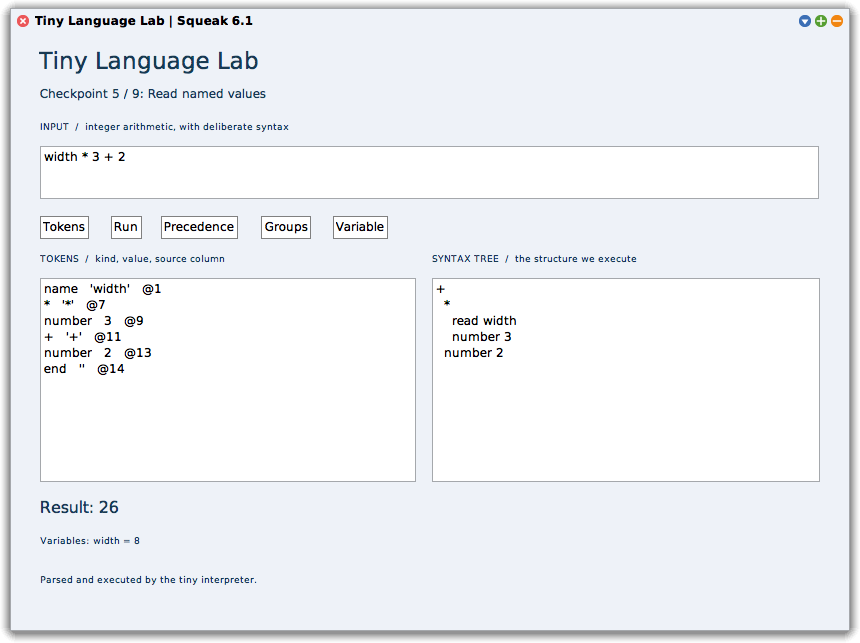
Names let expressions refer to values without rewriting the source. The interpreter owns a Dictionary called variables; a name node performs a lookup in that dictionary and reports an unknown name with its source column. At this checkpoint the Variable button seeds width through a Smalltalk setup method, then evaluates an ordinary tiny-language expression. This keeps the distinction between the host application and the language visible. The variables accessor returns a copy so callers cannot silently replace stored bindings through the inspector.
Where to run this
System Browser, LLInterpreter, instance side. This method is already installed by checkpoint 05.
Construction code · follow the run instructions above
evaluate: tree
 | left right op |
 tree first = #negate ifTrue: [^ self bounded: (self evaluate: tree second) negated].
 tree first = #name ifTrue: [^ variables at: tree second ifAbsent: [self error: 'Unknown name ', tree second, ' at column ', tree third printString]].
 tree first = #number ifTrue: [^ tree second].
 tree first = #binary ifTrue: [
  left := self evaluate: tree third. right := self evaluate: tree fourth. op := tree second.
  op = '+' ifTrue: [^ self bounded: left + right].
  op = '-' ifTrue: [^ self bounded: left - right].
  op = '*' ifTrue: [^ self bounded: left * right].
  op = '/' ifTrue: [right = 0 ifTrue: [self error: 'Division by zero at column ', tree fifth printString]. ^ self bounded: left / right]].
 self error: 'Unknown syntax node'
After filing in this checkpoint, evaluate the complete block in a Workspace with Do it. It returns the open native application.
Names are case-sensitive: width and Width refer to different bindings
An absent name signals a useful error instead of silently becoming zero
The only readable state is this interpreter instance’s variables dictionary
The tiny source has no message sends, blocks, strings, globals, file operations or host-language evaluation. Smalltalk code in the Workspace is setup code that you choose to run.
Expected result
width is 8, and width * 3 + 2 produces 26. The tree includes a read width node.
Native Squeak 6.1 checkpoint 05, rendered after executing the exact Workspace block above.
06 · Commit assignments after successful evaluation
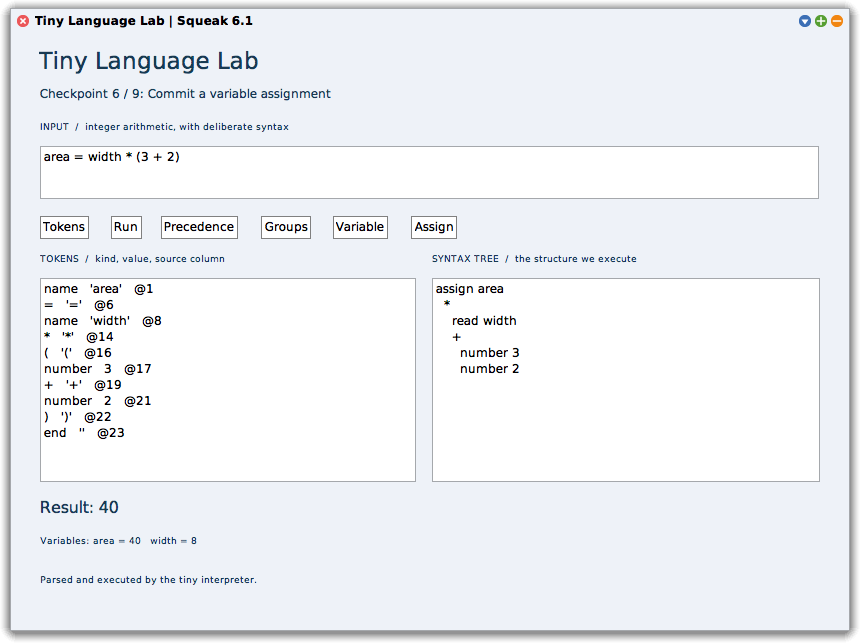
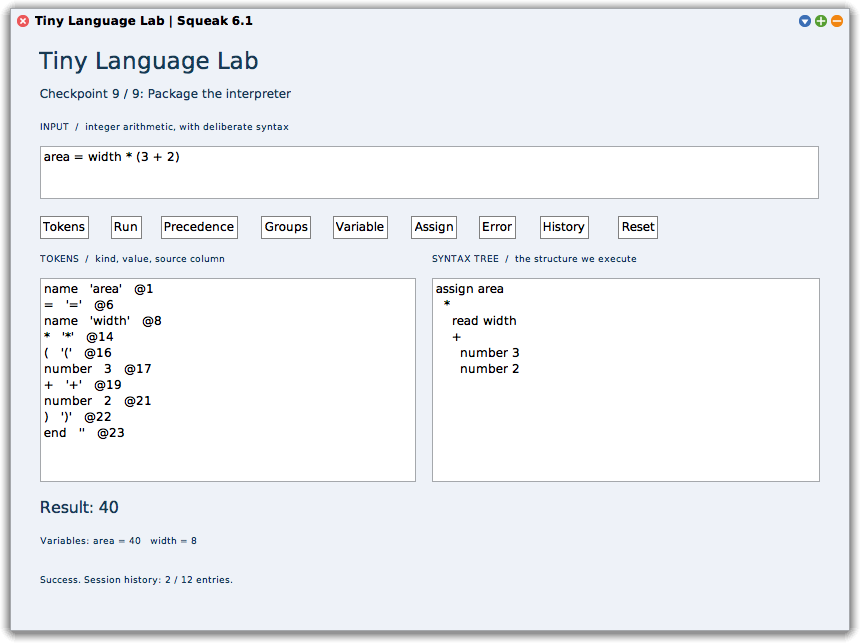
Assignment is a statement form at the outermost parsing level: a name followed by = and an expression. It is intentionally excluded from primary, which prevents hidden writes inside arithmetic expressions and rejects chains such as a = b = 3. The interpreter first evaluates the entire right side. Only then does it replace the named binding. This ordering makes a single assignment atomic: an undefined name, zero division or result-limit error leaves the previous value untouched. Fifty distinct variables are enough for a bounded teaching session.
Where to run this
System Browser, LLParser, instance side. This method is already installed by checkpoint 06.
Construction code · follow the run instructions above
complete
 | tree name |
 (self current first = #name and: [(tokens at: cursor + 1) second = '='])
 ifTrue: [name := self advance. self advance. tree := {#assign. name second. self expression. name third}]
 ifFalse: [tree := self expression].
 self current first = #end ifFalse: [self fail: 'Expected end of expression']. ^ tree
After filing in this checkpoint, evaluate the complete block in a Workspace with Do it. It returns the open native application.
Native Squeak 6.1 checkpoint 06, rendered after executing the exact Workspace block above.
07 · Make errors bounded and recoverable
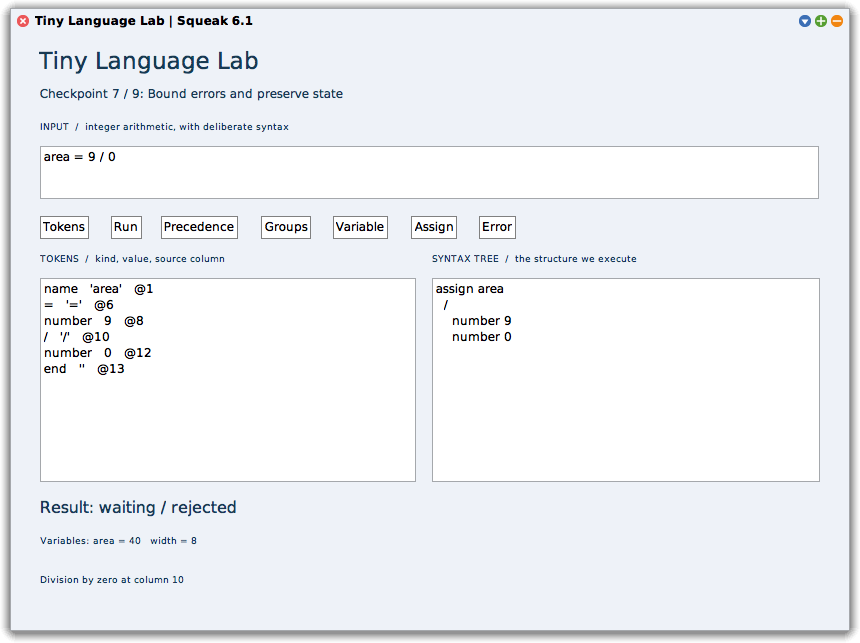
A usable tool needs a predictable failure path. The UI clears the previous result, scans, parses and interprets inside one Error handler, then displays the message without opening a debugger. The partially available token list and valid syntax tree can still explain an evaluation failure. Limits cover source length, token count, integer width, name length, recursion, variable count and numeric growth. These bounds are part of the model from their first relevant checkpoint; here we inspect their combined behavior through the application.
Where to run this
System Browser, LLLanguageApp, instance side. This method is already installed by checkpoint 07.
Construction code · follow the run instructions above
evaluate
 source := editor text asString. result := nil. tree := nil. treePane setText: ''. tokenPane setText: ''.
 [tokenPane setText: (self tokenText: (LLLexer new scan: source)).
  tree := LLParser new parse: source. treePane setText: (LLTreePrinter new describe: tree).
  result := interpreter evaluate: tree. status := 'Parsed and executed by the tiny interpreter.'. self rememberSuccess]
 on: Error do: [:error | status := error messageText]. self refresh
After filing in this checkpoint, evaluate the complete block in a Workspace with Do it. It returns the open native application.
The result area never displays an old answer as though a rejected input succeeded
Failed assignment does not overwrite the existing environment
Lexical and parsing errors include positions where possible; limit errors name the exceeded limit
The limits are 1000 source characters, 200 tokens, 9 digits per integer, 24 characters per name, 32 nested signs/groups, 50 variables, and result magnitude/denominator at most 10^12.
Expected result
The error is Division by zero at column 10. area remains 40, and the result is marked rejected.
Native Squeak 6.1 checkpoint 07, rendered after executing the exact Workspace block above.
08 · Keep a short history of successful inputs
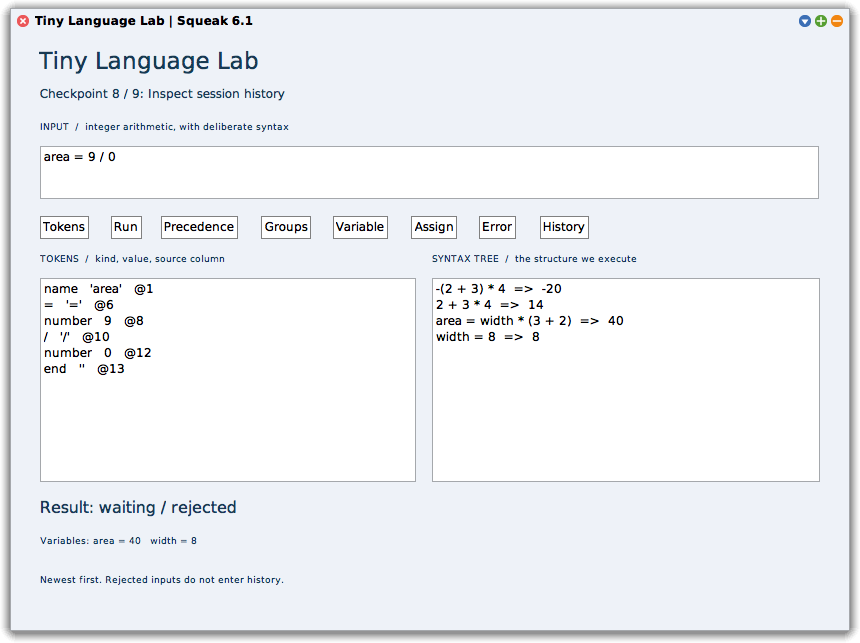
The history is a UI feature layered on the interpreter. Each successful run stores a copy of its source and its immutable numeric result. Rejections never call rememberSuccess, so the history records computations rather than attempts. addFirst makes the latest result easy to see, and removing the last entry after twelve bounds memory use. The History button reuses the tree pane for a readable session log. Running another expression replaces that view with the newly parsed syntax tree.
Where to run this
System Browser, LLLanguageApp, instance side. This method is already installed by checkpoint 08.
Construction code · follow the run instructions above
rememberSuccess
 history addFirst: {source copy. result}. history size > 12 ifTrue: [history removeLast].
 status := 'Success. Session history: ', history size printString, ' / 12 entries.'
After filing in this checkpoint, evaluate the complete block in a Workspace with Do it. It returns the open native application.
Native Squeak 6.1 checkpoint 08, rendered after executing the exact Workspace block above.
09 · Package the model and Morphic adapter
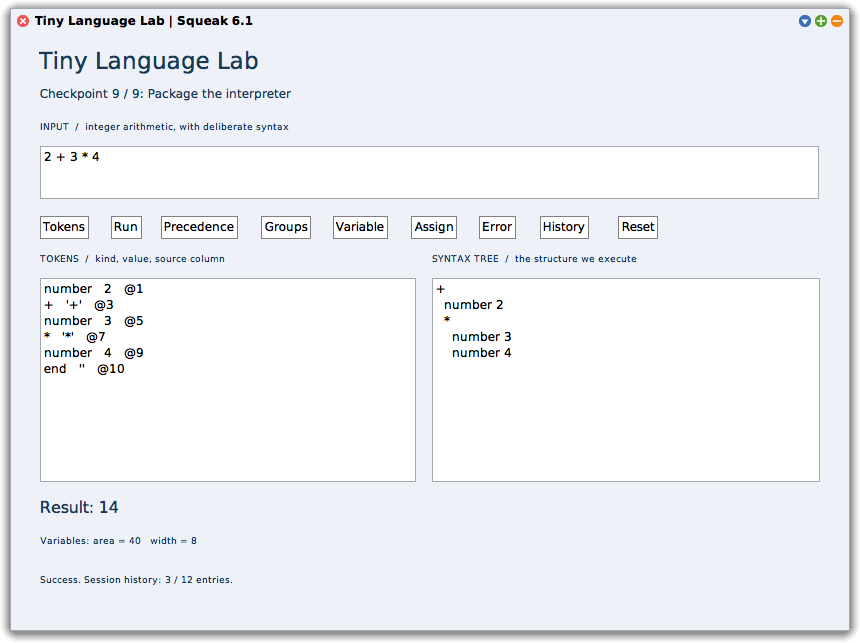
The final source contains a lexer, parser, tree printer, interpreter and Morphic adapter. Their boundaries let you test the language without clicking and test the UI without trusting a screenshot. The SUnit suite covers grammar structure, numeric semantics, state preservation, exact limits, malformed inputs and native pointer events sent through toolbar controls. Reset replaces the interpreter and clears the short history. Download the complete app plus its separate test source, load them into a fresh Squeak 6.1 image, and run the suite before experimenting with new syntax.
Where to run this
System Browser, LLLanguageApp, instance side. This method is already installed by checkpoint 09.
Construction code · follow the run instructions above
resetSession
 interpreter := LLInterpreter new. history removeAll. result := nil. tree := nil. tokenPane setText: ''; yourself. treePane setText: ''. status := 'Session reset. No variables or history remain.'. self refresh
After filing in this checkpoint, evaluate the complete block in a Workspace with Do it. It returns the open native application.
LLLexer and LLParser accept only the documented grammar
LLInterpreter executes explicit node kinds and arithmetic branches
Morphic buttons call model operations; screenshots are generated by the same running app
For a next extension, design exponent associativity on paper first. Adding a token alone is not enough; grammar, tree interpretation, bounds and tests all need an explicit decision.
Expected result
The complete app offers Tokens, Run, samples, Error, History and Reset. Result is 14 and the two variables remain available.
Native Squeak 6.1 checkpoint 09, rendered after executing the exact Workspace block above.
Watch the workflow
Every still is captured from a native Squeak 6.1 SystemWindow after loading that checkpoint into the unsaved baseline image. Animations combine PNG frames rendered by the running Morphic application while scripted native pointer events operate its actual controls. There are no reconstructed browser mockups.
NATIVE SQUEAK CAPTURE
Native toolbar execution: inspect tokens, compare precedence with grouping, assign variables, and inspect the successful history.
NATIVE SQUEAK CAPTURE
Native toolbar execution: assign area, reject division by zero without losing its value, recover with a valid run, and reset the session.
Practice with tested solutions
1. Compute an exact invoice
Use assignments to store a unit price, count and discount. Compute a total, then prove the fraction is exact.
Hint
Dictionary bindings outlive one Run. Division produces a Fraction when needed.
Show a tested solution
After filing in the final app, select this entire block in a Workspace and use Do it. It opens the app and raises an error if any assertion fails.
This check establishes grammar behavior independently from numerical evaluation. A wrong parser can accidentally produce the right answer for less carefully chosen examples.
This exact solution and its assertions were executed successfully in a fresh Squeak 6.1 image.
3. Prove a failed update preserves a binding
Assign stock = 12, reject an attempted overwrite that divides by zero, then use the surviving value in another expression. Check that the rejected attempt does not enter history.
Hint
After rejection, result is nil; the interpreter dictionary and successful history should still hold the last good state.
Show a tested solution
After filing in the final app, select this entire block in a Workspace and use Do it. It opens the app and raises an error if any assertion fails.
Because assignment evaluates its right side before storing, failure cannot replace an existing binding. The UI then recovers on the next valid Run.
This exact solution and its assertions were executed successfully in a fresh Squeak 6.1 image.
When something looks wrong
Message not understood after loading an earlier checkpoint
Close the prior window and load the complete checkpoint source in a fresh Squeak 6.1 image. Earlier checkpoints intentionally expose fewer controls and grammar/query features.
A method definition fails in the Workspace
Use the File List to file in the downloaded source. The displayed method belongs in its named class in the System Browser. Only the separate Workspace block is meant for Do it.
The displayed result differs after editing the text
Click Run in the language app, or All words / Phrase in the search app. Each action reads the editor’s current buffer, including unaccepted text.
Verification, cleanup and next steps
37 SUnit tests passed in Squeak 6.1; zero failures and errors.
Token positions, AST shape, arithmetic precedence and associativity, fractions, grouping, names, atomic assignment, malformed and host-language inputs, every input/result limit, native toolbar events, recovery, history bounds and close behavior.
Close the tutorial windows when finished. The apps keep session data only in memory. The downloads contain source and verification notes so you can recreate them in a fresh image.