Smalltalk in a browser: run, save, and revisit an image
Start with a running system, not an installation checklist. This evergreen edition follows Smalltalk into the browser, then asks a practical question: where will your work live when you close the tab?
Published · Curated links & context
WHAT CAUGHT OUR EYE
News & articles
Dates below belong to the original sources. Evergreen resources are labeled separately from dated news.
EVERGREEN SPOTLIGHT · SQUEAKJS
Open Squeak 6.1 without installing it
Publication date not established · Live resource checked 8 November 2026
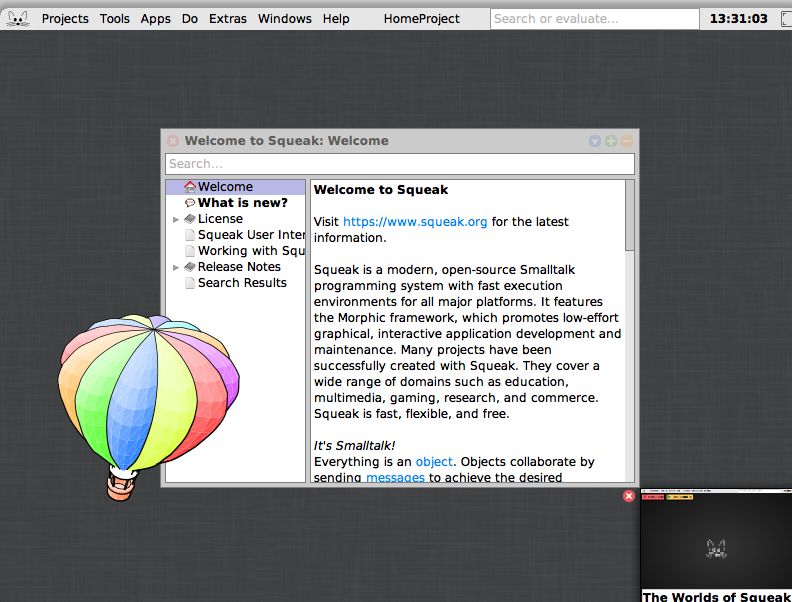
Try Squeak opens Squeak 6.1 in a web page using SqueakJS. It is a working Smalltalk environment, not a screenshot or a JavaScript imitation of Smalltalk syntax. The page explains that it runs more slowly than native Squeak and that saved images live in the browser’s local database. Clicking a filename in the page’s file list exports that file to your browser’s downloads folder. Treat a browser-local save and an exported copy as two different things.
Why explore it?
Try a small, recognizable change, then save the image and find it in the page’s “Your SqueakJS Files” section. Export work you want to keep, including any related changes or source files you need. Browser-local storage is not cloud synchronization or a separate backup. Before a longer project, practice finding your saved files and keeping a copy somewhere you control.
Squeak 6.1 running through SqueakJS at Try Squeak, captured 8 November 2026. Cropped contextual screenshot of the live welcome screen; interface and artwork belong to the Squeak project and their contributors. Source
KEEP EXPLORING
Useful sites, tutorials & videos
A small shelf of learning resources. Older material is labeled so you can expect interface differences.
Publication date not established · Checked 8 November 2026
Vanessa Freudenberg’s SqueakJS project describes a JavaScript virtual machine that runs unmodified Smalltalk images. Its examples connect the same idea to Etoys, Scratch and other systems. This is a project introduction, not an announcement of a new release.
Publication date not established · Checked 8 November 2026
The launcher documents image loading, related files and exporting from browser storage. Read it after trying the demo. Some example links identify older or alpha images; use Try Squeak above for the 6.1 environment shown in our capture.
Hansen Hsu · Computer History Museum · 17 December 2020
The museum introduces Dan Ingalls’s collection of browser-runnable historical Smalltalk systems. Follow its link to the Zoo and compare one older environment with Squeak: what can you inspect, change and keep? A running system can reveal more than a picture of its interface.
Published 8 November 2026 as an evergreen learning path, not new-release news. We checked the official project and launcher documentation, Try Squeak and the museum article. We opened the Squeak 6.1 browser demo and captured its welcome screen; the save/export guidance comes from the project documentation and was not tested end to end. The screenshot is genuine and attributed. Older environments may differ from current Squeak, and this edition makes no promise that every image or tutorial runs unchanged in a browser.